
Eclipse 4.0
Styling the UI with CSS
Kai Tödter
Siemens Corporate Technology
1/30/2015 1© Kai Tödter and others, Licensed under Creative Commons Attribution-Noncommercial-No Derivative Works 3.0 Germany License.
Who am I?
 Software Architect/Engineer at
Siemens Corporate Technology
 Eclipse RCP expert and OSGi enthusiast
 Open Source advocate
 Committer at e4 and Platform UI
 E-mail: kai.toedter@siemens.com
 Twitter: twitter.com/kaitoedter
 Blog: toedter.com/blog
1/30/2015 2© Kai Tödter and others, Licensed under Creative Commons Attribution-Noncommercial-No Derivative Works 3.0 Germany License.
UI Styling
1/30/2015 © Kai Tödter and others, Licensed under Creative Commons Attribution-Noncommercial-No Derivative Works 3.0 Germany License. 3
Picture from
http://www.sxc.hu/photo/1089931
UI Styling
 In Eclipse 3.x, UI styling can be done using
 The Presentation API
 Custom Widgets
 These mechanisms are very limited
 It is not possible to implement a specific UI
design, created by a designer
 e4 provides a CSS based UI styling that
addresses many of the above issues
© Kai Tödter and others, Licensed under Creative Commons Attribution-Noncommercial-No Derivative Works 3.0 Germany License. 41/30/2015
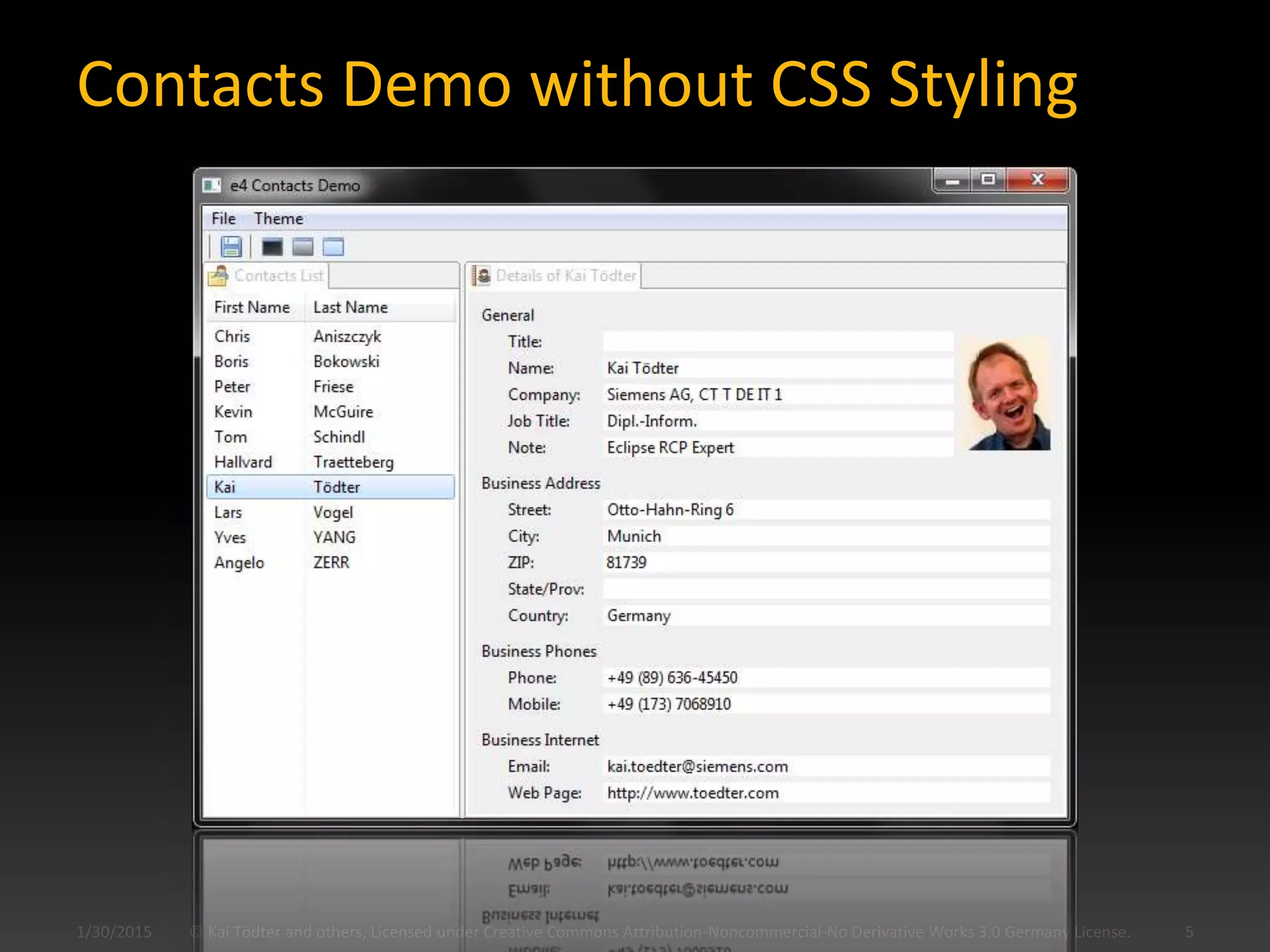
Contacts Demo without CSS Styling
1/30/2015 © Kai Tödter and others, Licensed under Creative Commons Attribution-Noncommercial-No Derivative Works 3.0 Germany License. 5
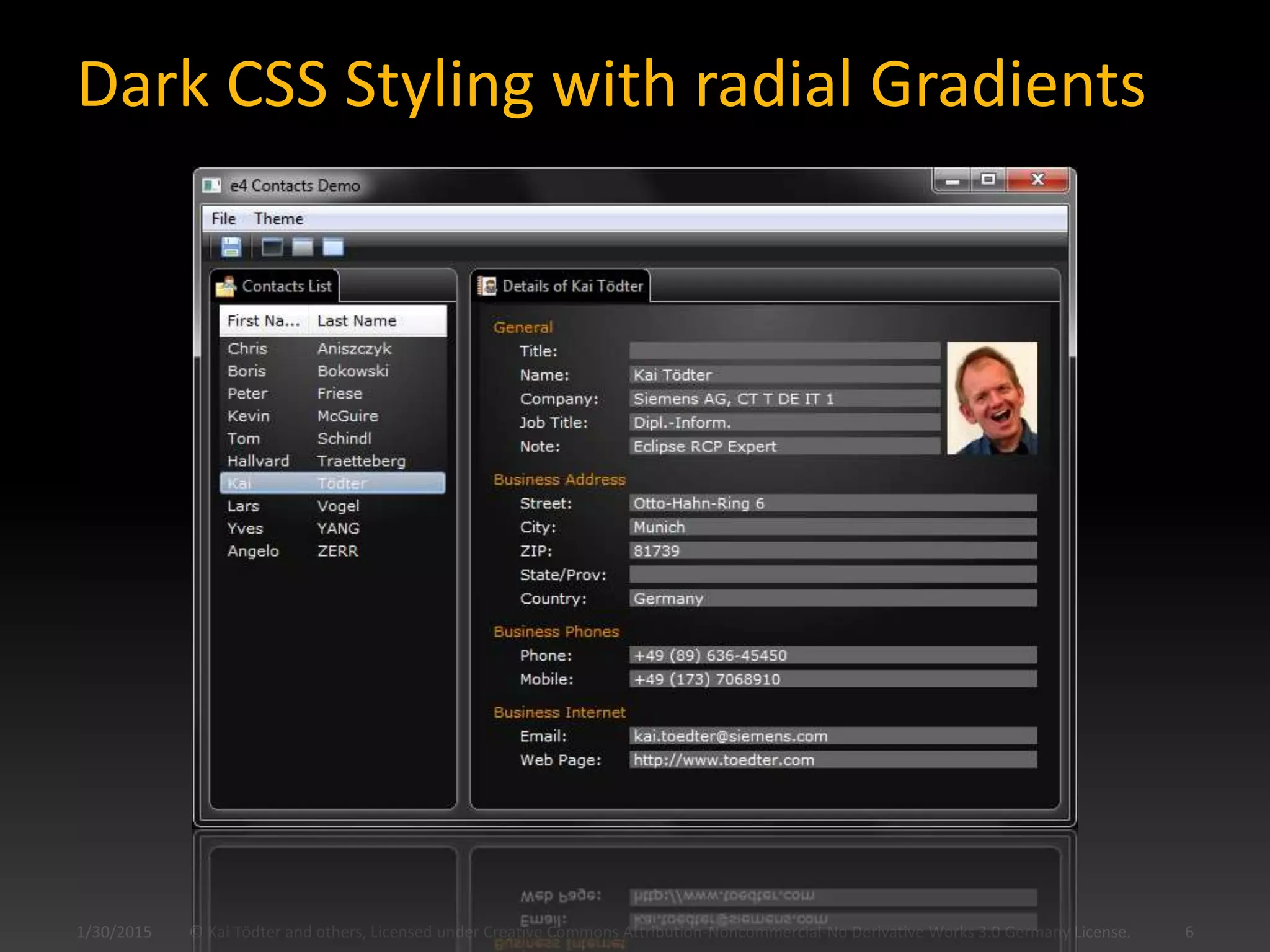
Dark CSS Styling with radial Gradients
© Kai Tödter and others, Licensed under Creative Commons Attribution-Noncommercial-No Derivative Works 3.0 Germany License. 61/30/2015
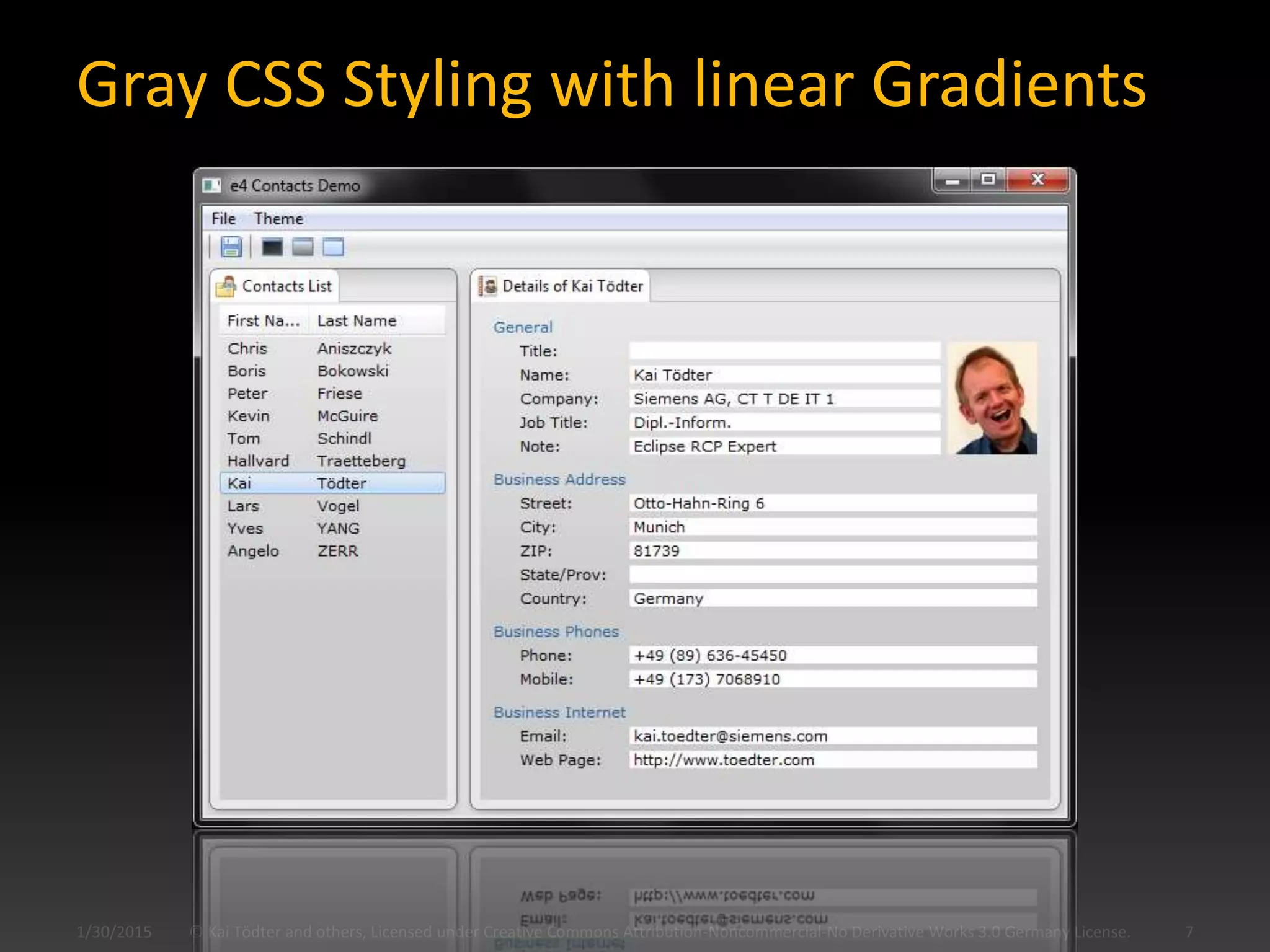
Gray CSS Styling with linear Gradients
© Kai Tödter and others, Licensed under Creative Commons Attribution-Noncommercial-No Derivative Works 3.0 Germany License. 71/30/2015
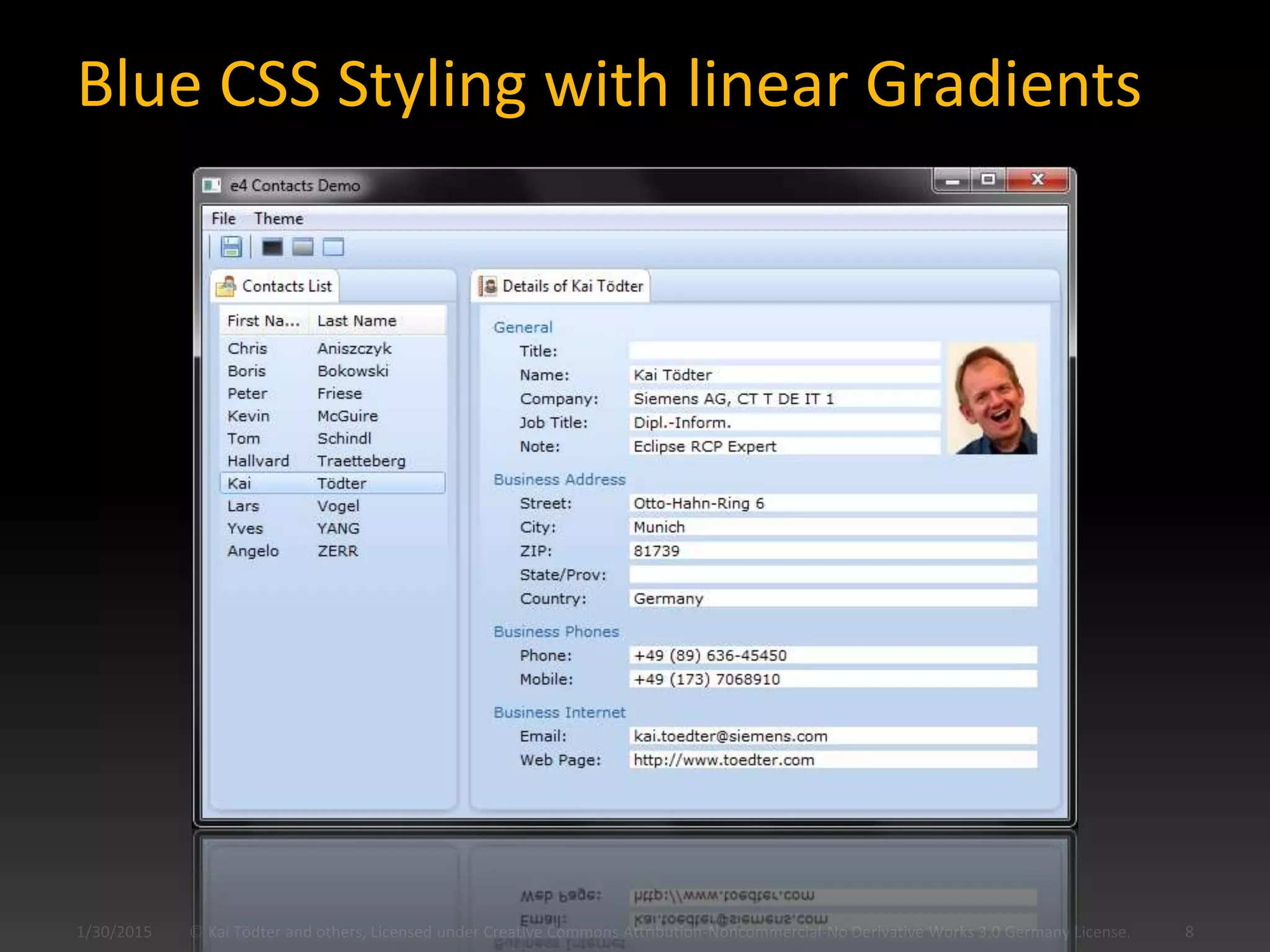
Blue CSS Styling with linear Gradients
1/30/2015 © Kai Tödter and others, Licensed under Creative Commons Attribution-Noncommercial-No Derivative Works 3.0 Germany License. 8
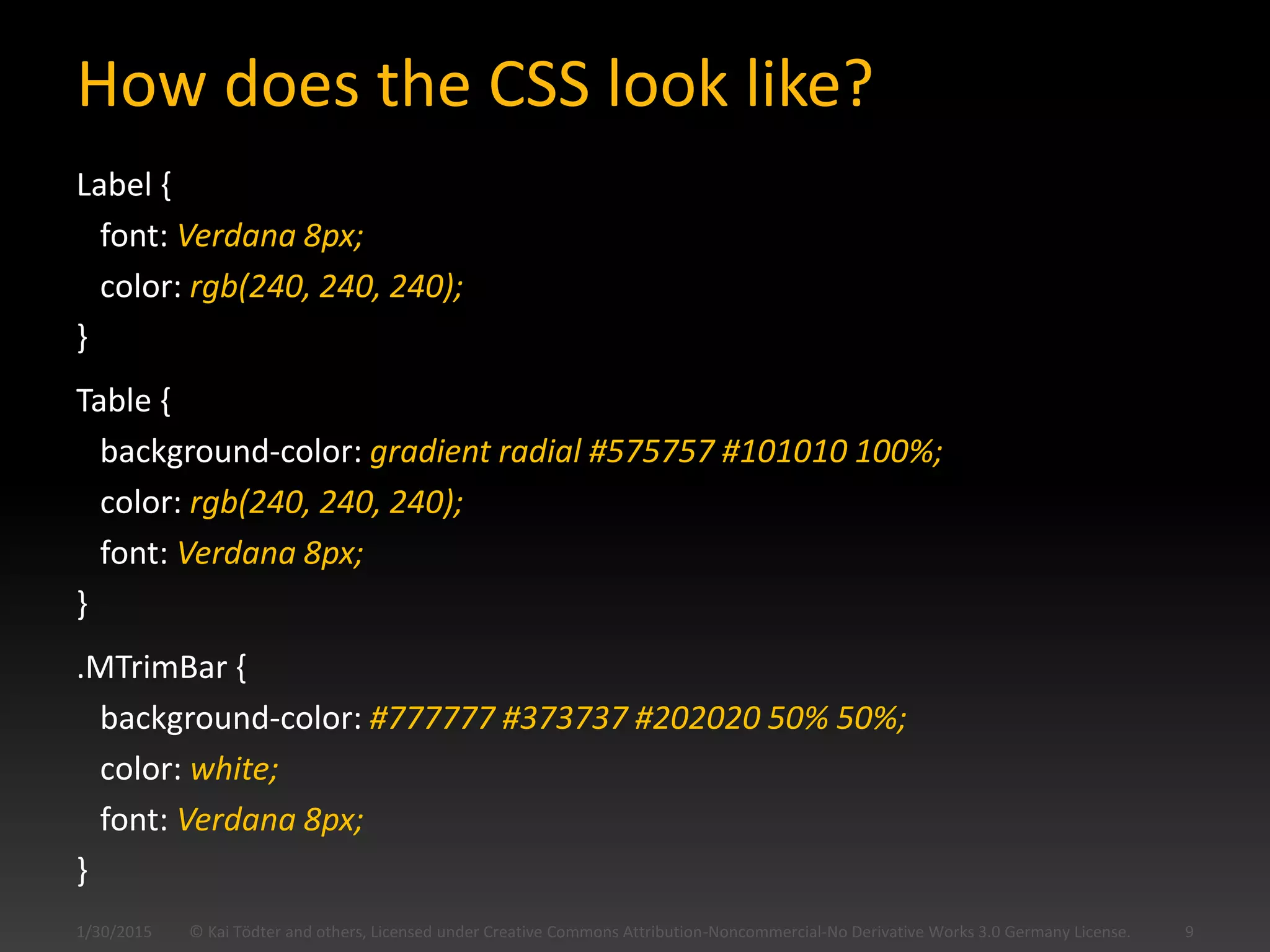
How does the CSS look like?
Label {
font: Verdana 8px;
color: rgb(240, 240, 240);
}
Table {
background-color: gradient radial #575757 #101010 100%;
color: rgb(240, 240, 240);
font: Verdana 8px;
}
.MTrimBar {
background-color: #777777 #373737 #202020 50% 50%;
color: white;
font: Verdana 8px;
}
© Kai Tödter and others, Licensed under Creative Commons Attribution-Noncommercial-No Derivative Works 3.0 Germany License. 91/30/2015
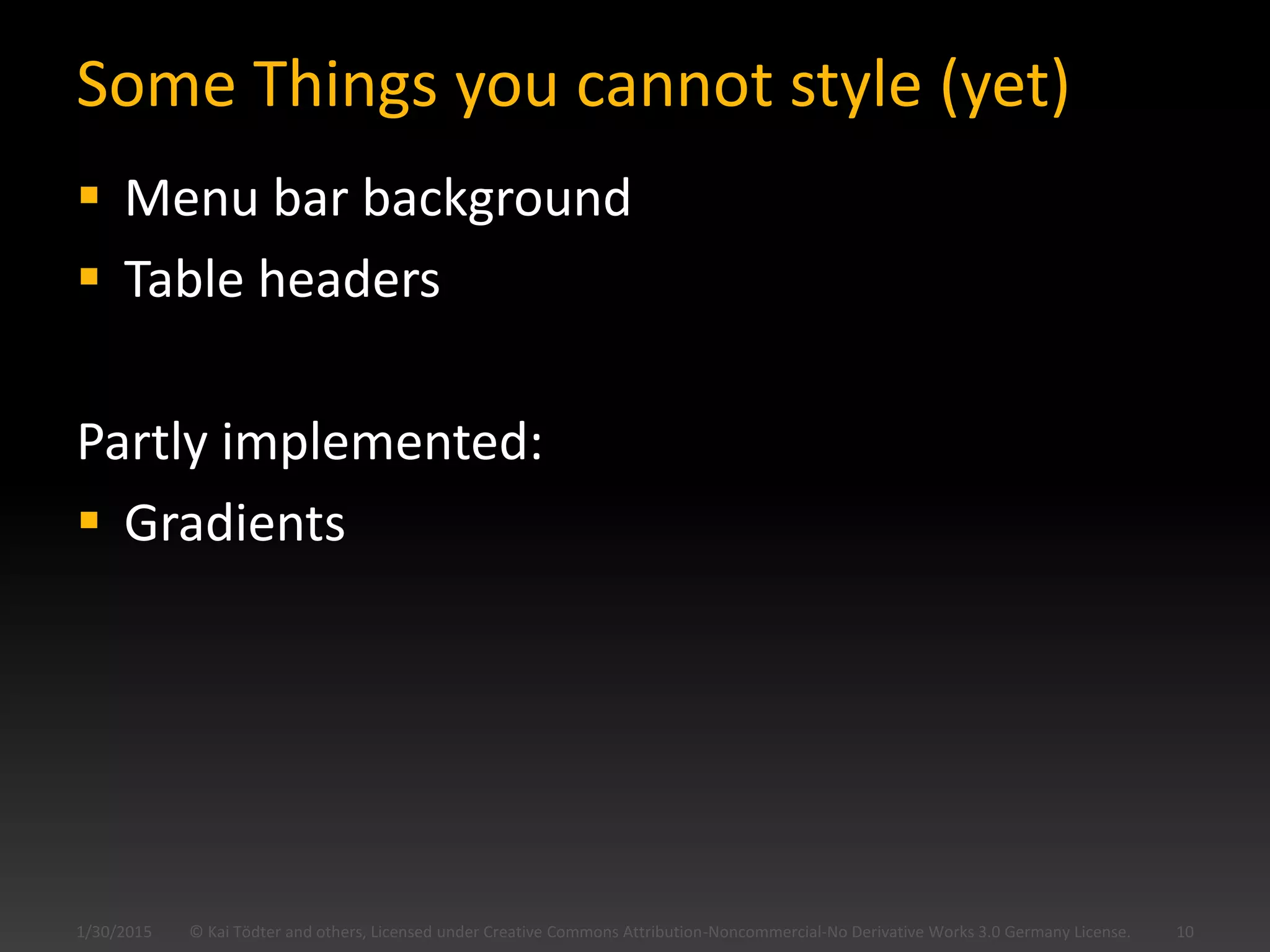
Some Things you cannot style (yet)
 Menu bar background
 Table headers
Partly implemented:
 Gradients
© Kai Tödter and others, Licensed under Creative Commons Attribution-Noncommercial-No Derivative Works 3.0 Germany License. 101/30/2015
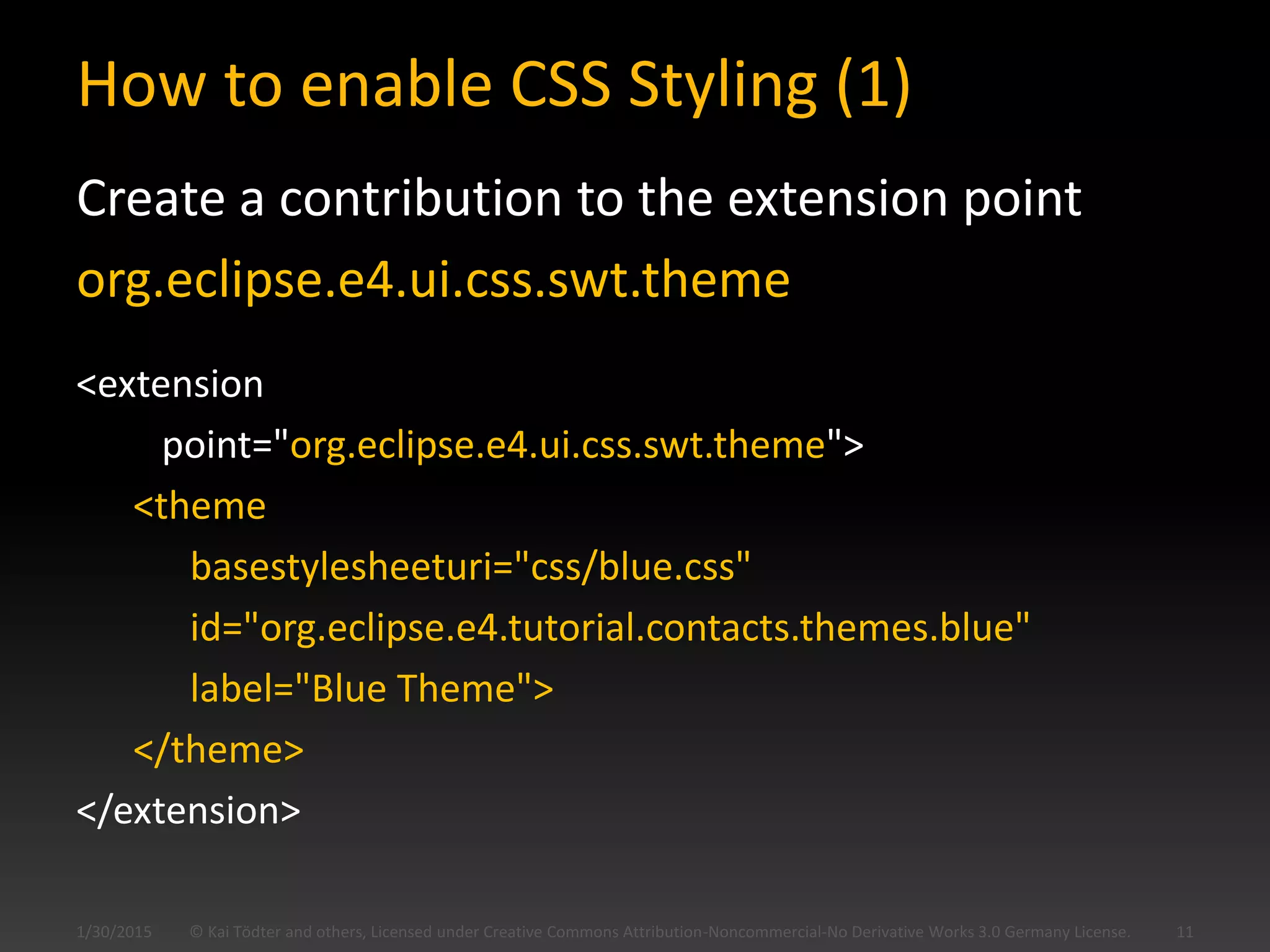
How to enable CSS Styling (1)
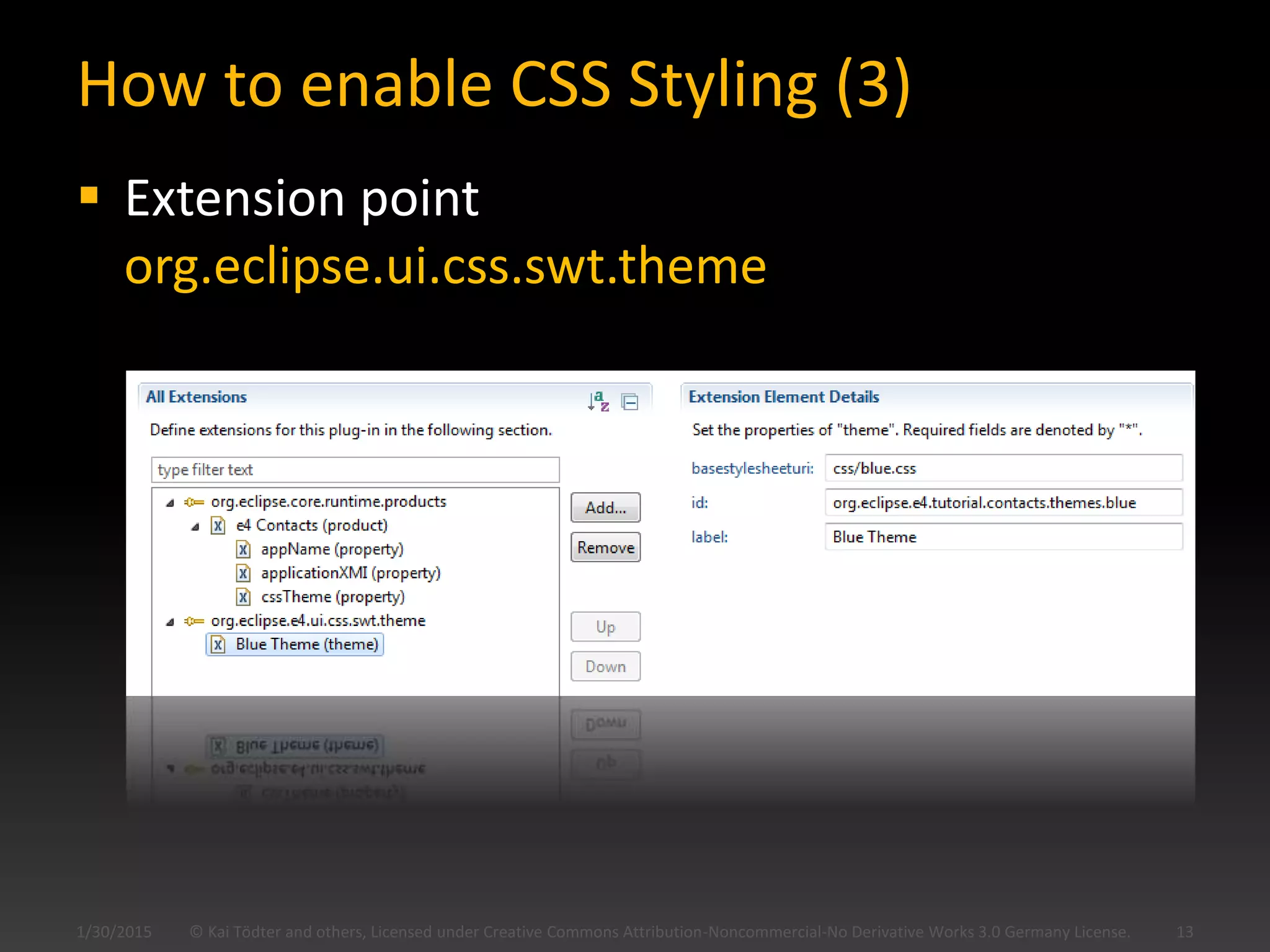
Create a contribution to the extension point
org.eclipse.e4.ui.css.swt.theme
<extension
point="org.eclipse.e4.ui.css.swt.theme">
<theme
basestylesheeturi="css/blue.css"
id="org.eclipse.e4.tutorial.contacts.themes.blue"
label="Blue Theme">
</theme>
</extension>
© Kai Tödter and others, Licensed under Creative Commons Attribution-Noncommercial-No Derivative Works 3.0 Germany License. 111/30/2015
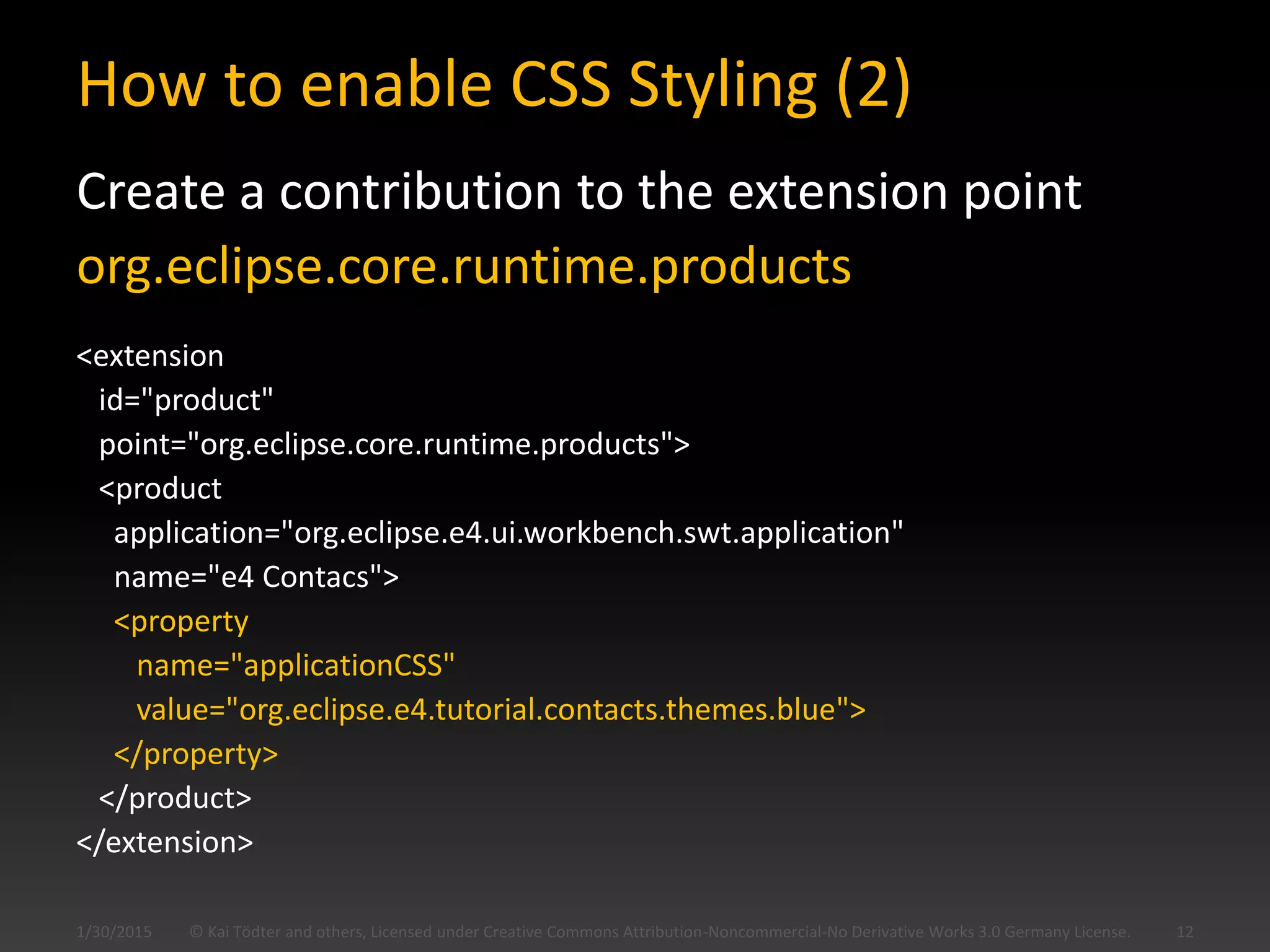
How to enable CSS Styling (2)
Create a contribution to the extension point
org.eclipse.core.runtime.products
<extension
id="product"
point="org.eclipse.core.runtime.products">
<product
application="org.eclipse.e4.ui.workbench.swt.application"
name="e4 Contacs">
<property
name="applicationCSS"
value="org.eclipse.e4.tutorial.contacts.themes.blue">
</property>
</product>
</extension>
© Kai Tödter and others, Licensed under Creative Commons Attribution-Noncommercial-No Derivative Works 3.0 Germany License. 121/30/2015
How to enable CSS Styling (3)
 Extension point
org.eclipse.ui.css.swt.theme
© Kai Tödter and others, Licensed under Creative Commons Attribution-Noncommercial-No Derivative Works 3.0 Germany License. 131/30/2015
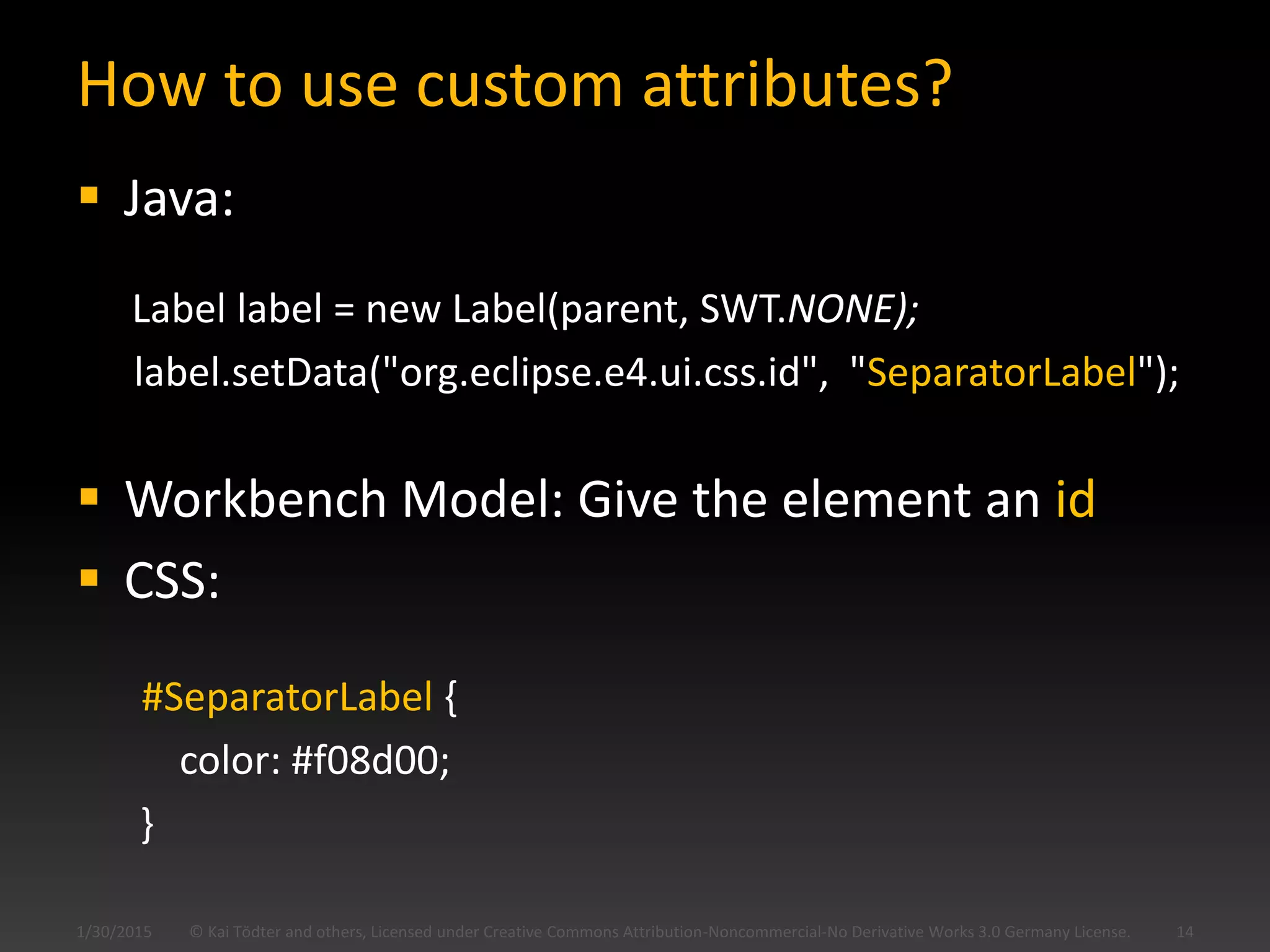
How to use custom attributes?
 Java:
Label label = new Label(parent, SWT.NONE);
label.setData("org.eclipse.e4.ui.css.id", "SeparatorLabel");
 Workbench Model: Give the element an id
 CSS:
#SeparatorLabel {
color: #f08d00;
}
© Kai Tödter and others, Licensed under Creative Commons Attribution-Noncommercial-No Derivative Works 3.0 Germany License. 141/30/2015
e4 CSS Editors
 CSS has a well known syntax
 But which UI elements can be styled?
 Which CSS attributes does a specific element
support?
 The first approach for the above questions
might be an Xtext-based editor, with content
assist for both elements and attributes
 Join Sven’s and Sebastian’s talk on Thursday,
11:30
© Kai Tödter and others, Licensed under Creative Commons Attribution-Noncommercial-No Derivative Works 3.0 Germany License. 151/30/2015
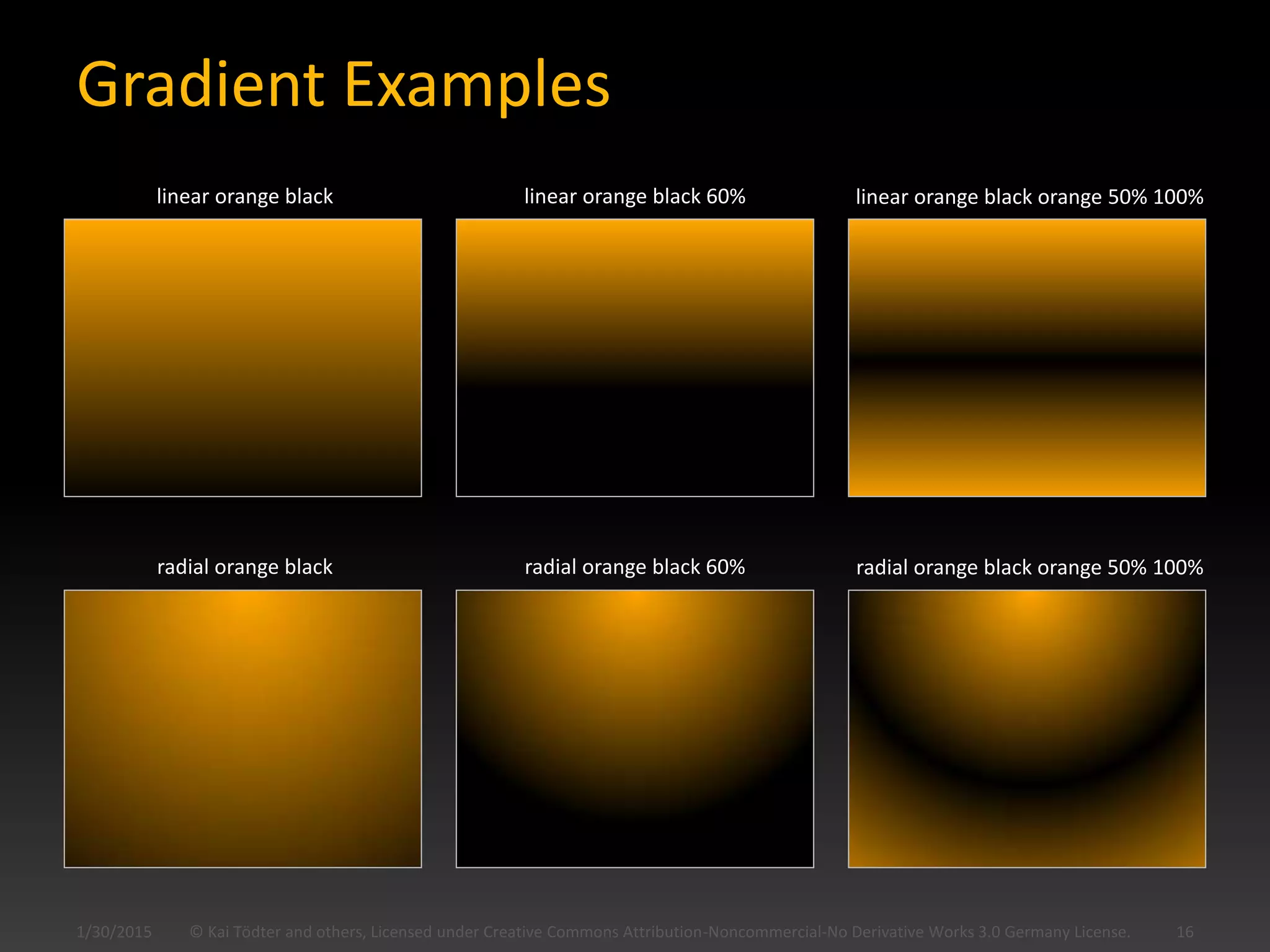
Gradient Examples
© Kai Tödter and others, Licensed under Creative Commons Attribution-Noncommercial-No Derivative Works 3.0 Germany License. 161/30/2015
linear orange black linear orange black 60% linear orange black orange 50% 100%
radial orange black radial orange black 60% radial orange black orange 50% 100%
Dynamic Theme Switching
 It is possible to change the
CSS based theme at runtime
 Good for accessibility
 Good for user preferences
1/30/2015 © Kai Tödter and others, Licensed under Creative Commons Attribution-Noncommercial-No Derivative Works 3.0 Germany License. 17
Picture from
http://www.sxc.hu/photo/823108
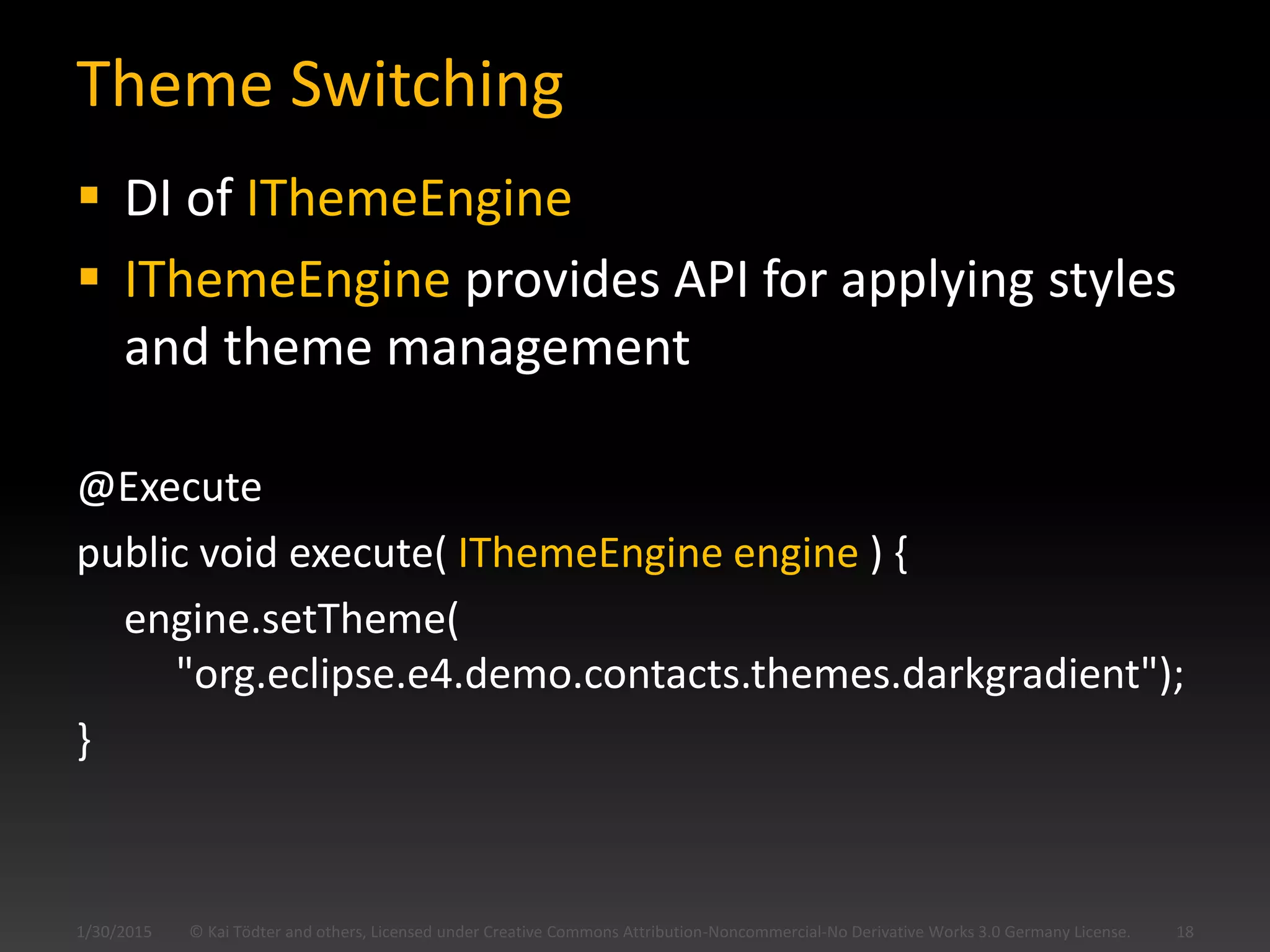
Theme Switching
 DI of IThemeEngine
 IThemeEngine provides API for applying styles
and theme management
@Execute
public void execute( IThemeEngine engine ) {
engine.setTheme(
"org.eclipse.e4.demo.contacts.themes.darkgradient");
}
© Kai Tödter and others, Licensed under Creative Commons Attribution-Noncommercial-No Derivative Works 3.0 Germany License. 181/30/2015
Using e4 CSS with RCP 3.x
 It is possible today…
 … but not as easy as it could be
 Read my blog about it
 http://www.toedter.com/blog/?p=295
 Demo: CSS RCP Mail
1/30/2015 © Kai Tödter and others, Licensed under Creative Commons Attribution-Noncommercial-No Derivative Works 3.0 Germany License. 19
1/30/2015 © Kai Tödter and others, Licensed under Creative Commons Attribution-Noncommercial-No Derivative Works 3.0 Germany License. 20
Picture from
http://www.sxc.hu/photo/922004
License & Acknowledgements
 This work is licensed under the Creative Commons
Attribution-Noncommercial-No Derivative Works 3.0
Germany License
 See http://creativecommons.org/licenses/by-nc-
nd/3.0/de/deed.en_US
1/30/2015 © Kai Tödter and others, Licensed under Creative Commons Attribution-Noncommercial-No Derivative Works 3.0 Germany License. 21
Picture Index
 http://www.sxc.hu/photo/1089931
 http://www.sxc.hu/photo/823108
 http://www.sxc.hu/photo/922004
1/30/2015 © Kai Tödter and others, Licensed under Creative Commons Attribution-Noncommercial-No Derivative Works 3.0 Germany License. 22
Many thanks to the authors of the following pictures:

E4 css

  • 1.
    Eclipse 4.0 Styling theUI with CSS Kai Tödter Siemens Corporate Technology 1/30/2015 1© Kai Tödter and others, Licensed under Creative Commons Attribution-Noncommercial-No Derivative Works 3.0 Germany License.
  • 2.
    Who am I? Software Architect/Engineer at Siemens Corporate Technology  Eclipse RCP expert and OSGi enthusiast  Open Source advocate  Committer at e4 and Platform UI  E-mail: kai.toedter@siemens.com  Twitter: twitter.com/kaitoedter  Blog: toedter.com/blog 1/30/2015 2© Kai Tödter and others, Licensed under Creative Commons Attribution-Noncommercial-No Derivative Works 3.0 Germany License.
  • 3.
    UI Styling 1/30/2015 ©Kai Tödter and others, Licensed under Creative Commons Attribution-Noncommercial-No Derivative Works 3.0 Germany License. 3 Picture from http://www.sxc.hu/photo/1089931
  • 4.
    UI Styling  InEclipse 3.x, UI styling can be done using  The Presentation API  Custom Widgets  These mechanisms are very limited  It is not possible to implement a specific UI design, created by a designer  e4 provides a CSS based UI styling that addresses many of the above issues © Kai Tödter and others, Licensed under Creative Commons Attribution-Noncommercial-No Derivative Works 3.0 Germany License. 41/30/2015
  • 5.
    Contacts Demo withoutCSS Styling 1/30/2015 © Kai Tödter and others, Licensed under Creative Commons Attribution-Noncommercial-No Derivative Works 3.0 Germany License. 5
  • 6.
    Dark CSS Stylingwith radial Gradients © Kai Tödter and others, Licensed under Creative Commons Attribution-Noncommercial-No Derivative Works 3.0 Germany License. 61/30/2015
  • 7.
    Gray CSS Stylingwith linear Gradients © Kai Tödter and others, Licensed under Creative Commons Attribution-Noncommercial-No Derivative Works 3.0 Germany License. 71/30/2015
  • 8.
    Blue CSS Stylingwith linear Gradients 1/30/2015 © Kai Tödter and others, Licensed under Creative Commons Attribution-Noncommercial-No Derivative Works 3.0 Germany License. 8
  • 9.
    How does theCSS look like? Label { font: Verdana 8px; color: rgb(240, 240, 240); } Table { background-color: gradient radial #575757 #101010 100%; color: rgb(240, 240, 240); font: Verdana 8px; } .MTrimBar { background-color: #777777 #373737 #202020 50% 50%; color: white; font: Verdana 8px; } © Kai Tödter and others, Licensed under Creative Commons Attribution-Noncommercial-No Derivative Works 3.0 Germany License. 91/30/2015
  • 10.
    Some Things youcannot style (yet)  Menu bar background  Table headers Partly implemented:  Gradients © Kai Tödter and others, Licensed under Creative Commons Attribution-Noncommercial-No Derivative Works 3.0 Germany License. 101/30/2015
  • 11.
    How to enableCSS Styling (1) Create a contribution to the extension point org.eclipse.e4.ui.css.swt.theme <extension point="org.eclipse.e4.ui.css.swt.theme"> <theme basestylesheeturi="css/blue.css" id="org.eclipse.e4.tutorial.contacts.themes.blue" label="Blue Theme"> </theme> </extension> © Kai Tödter and others, Licensed under Creative Commons Attribution-Noncommercial-No Derivative Works 3.0 Germany License. 111/30/2015
  • 12.
    How to enableCSS Styling (2) Create a contribution to the extension point org.eclipse.core.runtime.products <extension id="product" point="org.eclipse.core.runtime.products"> <product application="org.eclipse.e4.ui.workbench.swt.application" name="e4 Contacs"> <property name="applicationCSS" value="org.eclipse.e4.tutorial.contacts.themes.blue"> </property> </product> </extension> © Kai Tödter and others, Licensed under Creative Commons Attribution-Noncommercial-No Derivative Works 3.0 Germany License. 121/30/2015
  • 13.
    How to enableCSS Styling (3)  Extension point org.eclipse.ui.css.swt.theme © Kai Tödter and others, Licensed under Creative Commons Attribution-Noncommercial-No Derivative Works 3.0 Germany License. 131/30/2015
  • 14.
    How to usecustom attributes?  Java: Label label = new Label(parent, SWT.NONE); label.setData("org.eclipse.e4.ui.css.id", "SeparatorLabel");  Workbench Model: Give the element an id  CSS: #SeparatorLabel { color: #f08d00; } © Kai Tödter and others, Licensed under Creative Commons Attribution-Noncommercial-No Derivative Works 3.0 Germany License. 141/30/2015
  • 15.
    e4 CSS Editors CSS has a well known syntax  But which UI elements can be styled?  Which CSS attributes does a specific element support?  The first approach for the above questions might be an Xtext-based editor, with content assist for both elements and attributes  Join Sven’s and Sebastian’s talk on Thursday, 11:30 © Kai Tödter and others, Licensed under Creative Commons Attribution-Noncommercial-No Derivative Works 3.0 Germany License. 151/30/2015
  • 16.
    Gradient Examples © KaiTödter and others, Licensed under Creative Commons Attribution-Noncommercial-No Derivative Works 3.0 Germany License. 161/30/2015 linear orange black linear orange black 60% linear orange black orange 50% 100% radial orange black radial orange black 60% radial orange black orange 50% 100%
  • 17.
    Dynamic Theme Switching It is possible to change the CSS based theme at runtime  Good for accessibility  Good for user preferences 1/30/2015 © Kai Tödter and others, Licensed under Creative Commons Attribution-Noncommercial-No Derivative Works 3.0 Germany License. 17 Picture from http://www.sxc.hu/photo/823108
  • 18.
    Theme Switching  DIof IThemeEngine  IThemeEngine provides API for applying styles and theme management @Execute public void execute( IThemeEngine engine ) { engine.setTheme( "org.eclipse.e4.demo.contacts.themes.darkgradient"); } © Kai Tödter and others, Licensed under Creative Commons Attribution-Noncommercial-No Derivative Works 3.0 Germany License. 181/30/2015
  • 19.
    Using e4 CSSwith RCP 3.x  It is possible today…  … but not as easy as it could be  Read my blog about it  http://www.toedter.com/blog/?p=295  Demo: CSS RCP Mail 1/30/2015 © Kai Tödter and others, Licensed under Creative Commons Attribution-Noncommercial-No Derivative Works 3.0 Germany License. 19
  • 20.
    1/30/2015 © KaiTödter and others, Licensed under Creative Commons Attribution-Noncommercial-No Derivative Works 3.0 Germany License. 20 Picture from http://www.sxc.hu/photo/922004
  • 21.
    License & Acknowledgements This work is licensed under the Creative Commons Attribution-Noncommercial-No Derivative Works 3.0 Germany License  See http://creativecommons.org/licenses/by-nc- nd/3.0/de/deed.en_US 1/30/2015 © Kai Tödter and others, Licensed under Creative Commons Attribution-Noncommercial-No Derivative Works 3.0 Germany License. 21
  • 22.
    Picture Index  http://www.sxc.hu/photo/1089931 http://www.sxc.hu/photo/823108  http://www.sxc.hu/photo/922004 1/30/2015 © Kai Tödter and others, Licensed under Creative Commons Attribution-Noncommercial-No Derivative Works 3.0 Germany License. 22 Many thanks to the authors of the following pictures: