CASCADING STYLE SHEETS
By
Lakshmi R
Asst. Professor
Dept. of ISE
CSS
 HTML should not describe the formatting or
presentation of HTML documents
 CSS- standard for describing the appearance
of HTML documents.
Benefits:
 Improved control over formatting.
 Improved site maintainability
 Improved accessibility
 Improved page download speed
 Improved output flexibility
Lakshmi R, Asst. Professor, Dept. of ISE
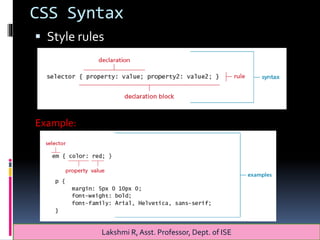
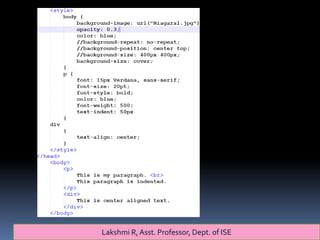
CSS Syntax
 Style rules
Example:
Lakshmi R, Asst. Professor, Dept. of ISE
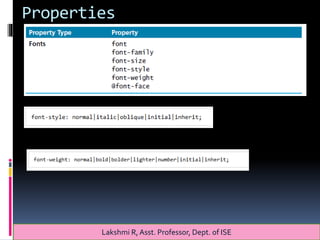
Properties
Lakshmi R, Asst. Professor, Dept. of ISE
Properties
Lakshmi R, Asst. Professor, Dept. of ISE
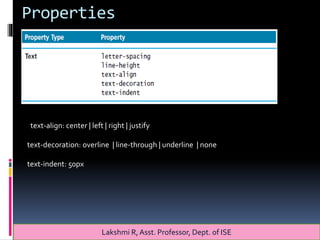
text-align: center | left | right | justify
text-decoration: overline | line-through | underline | none
text-indent: 50px
Lakshmi R, Asst. Professor, Dept. of ISE
Properties
Lakshmi R, Asst. Professor, Dept. of ISE
Properties
Lakshmi R, Asst. Professor, Dept. of ISE
Properties
Lakshmi R, Asst. Professor, Dept. of ISE
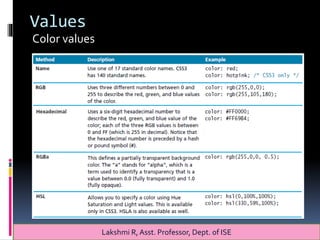
Values
Color values
Lakshmi R, Asst. Professor, Dept. of ISE
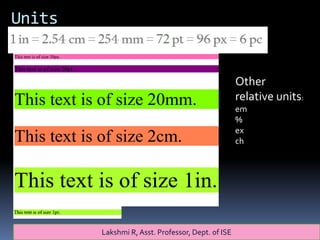
Units
Other
relative units:
em
%
ex
ch
Lakshmi R, Asst. Professor, Dept. of ISE
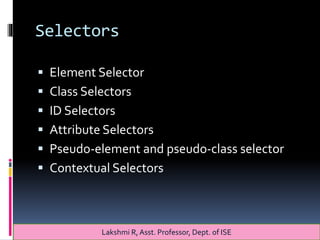
Selectors
 Element Selector
 Class Selectors
 ID Selectors
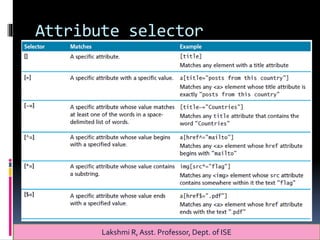
 Attribute Selectors
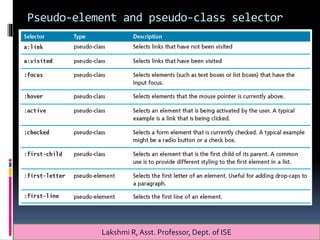
 Pseudo-element and pseudo-class selector
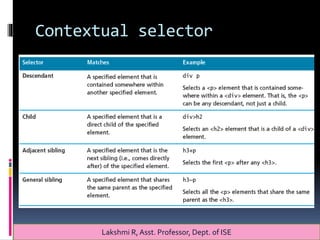
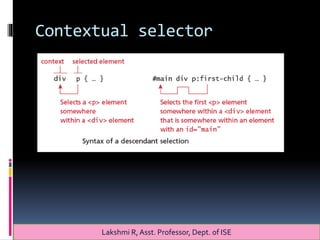
 Contextual Selectors
Lakshmi R, Asst. Professor, Dept. of ISE
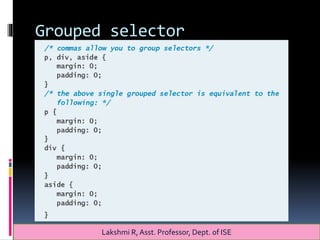
Grouped selector
Lakshmi R, Asst. Professor, Dept. of ISE
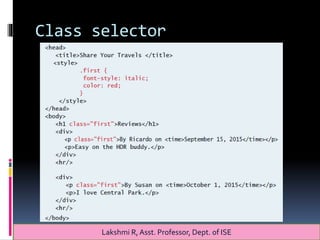
Class selector
Lakshmi R, Asst. Professor, Dept. of ISE
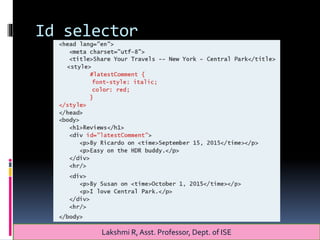
Id selector
Lakshmi R, Asst. Professor, Dept. of ISE
Attribute selector
Lakshmi R, Asst. Professor, Dept. of ISE
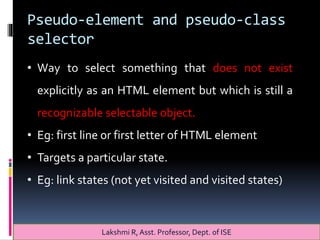
Pseudo-element and pseudo-class
selector
Lakshmi R, Asst. Professor, Dept. of ISE
• Way to select something that does not exist
explicitly as an HTML element but which is still a
recognizable selectable object.
• Eg: first line or first letter of HTML element
• Targets a particular state.
• Eg: link states (not yet visited and visited states)
Pseudo-element and pseudo-class selector
Lakshmi R, Asst. Professor, Dept. of ISE
Contextual selector
Lakshmi R, Asst. Professor, Dept. of ISE
Contextual selector
Lakshmi R, Asst. Professor, Dept. of ISE
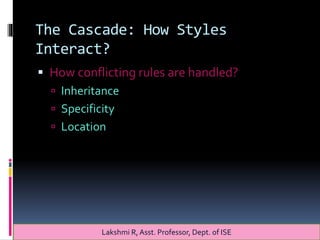
The Cascade: How Styles
Interact?
 How conflicting rules are handled?
 Inheritance
 Specificity
 Location
Lakshmi R, Asst. Professor, Dept. of ISE
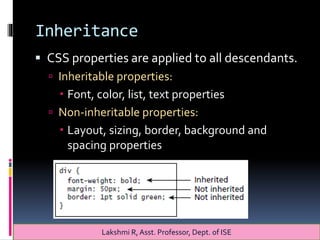
Inheritance
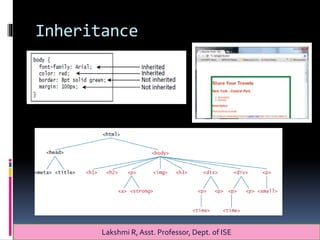
 CSS properties are applied to all descendants.
 Inheritable properties:
 Font, color, list, text properties
 Non-inheritable properties:
 Layout, sizing, border, background and
spacing properties
Lakshmi R, Asst. Professor, Dept. of ISE
Inheritance
Lakshmi R, Asst. Professor, Dept. of ISE
Specificity
 How browser determines which style rule takes
precedence when more than one rule could be
applied.
Lakshmi R, Asst. Professor, Dept. of ISE
Specificity
 Specificity is how the browser determines
which style rule takes precedence when more
than one style rule could be applied to the
same element.
 In CSS, the more specific the selector, the
more it takes precedence
 It overrides the previous definition
Lakshmi R, Asst. Professor, Dept. of ISE
Location
 When inheritance and specificity cannot
determine the style precedence.
 If rules have the same specificity, then latest
is given more weight.
Lakshmi R, Asst. Professor, Dept. of ISE
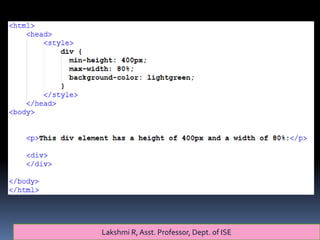
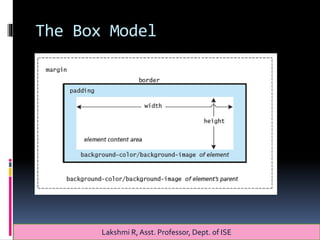
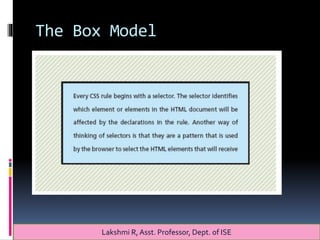
The Box Model
Lakshmi R, Asst. Professor, Dept. of ISE
The Box Model
Lakshmi R, Asst. Professor, Dept. of ISE
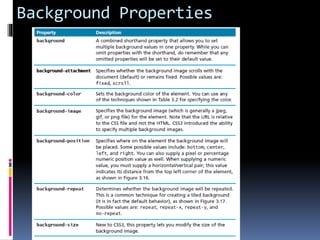
Background Properties
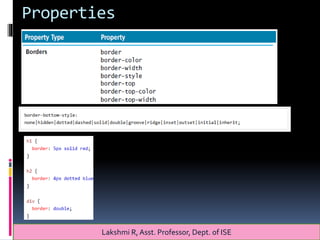
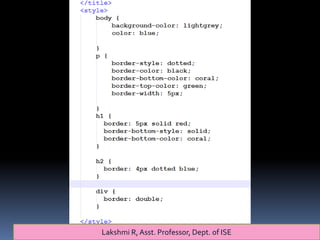
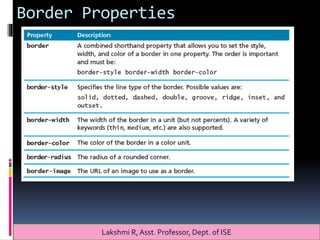
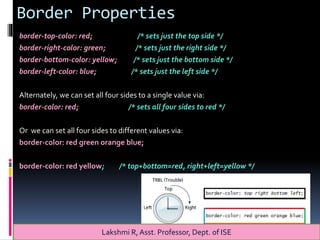
Border Properties
Lakshmi R, Asst. Professor, Dept. of ISE
Border Properties
border-top-color: red; /* sets just the top side */
border-right-color: green; /* sets just the right side */
border-bottom-color: yellow; /* sets just the bottom side */
border-left-color: blue; /* sets just the left side */
Alternately, we can set all four sides to a single value via:
border-color: red; /* sets all four sides to red */
Or we can set all four sides to different values via:
border-color: red green orange blue;
border-color: red yellow; /* top+bottom=red, right+left=yellow */
Lakshmi R, Asst. Professor, Dept. of ISE
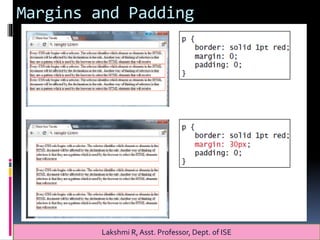
Margins and Padding
Lakshmi R, Asst. Professor, Dept. of ISE
Margins and Padding
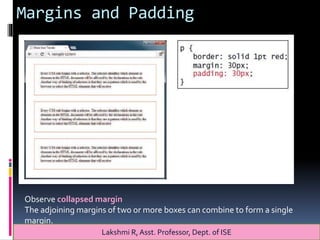
Observe collapsed margin
The adjoining margins of two or more boxes can combine to form a single
margin.
Lakshmi R, Asst. Professor, Dept. of ISE
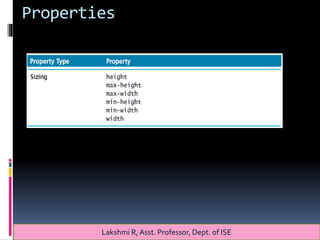
Box Dimensions
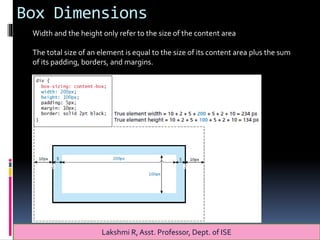
Width and the height only refer to the size of the content area
The total size of an element is equal to the size of its content area plus the sum
of its padding, borders, and margins.
Lakshmi R, Asst. Professor, Dept. of ISE
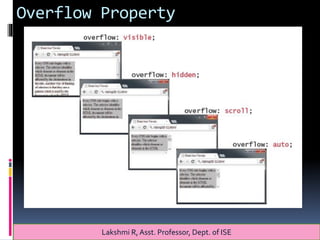
Overflow Property
Lakshmi R, Asst. Professor, Dept. of ISE
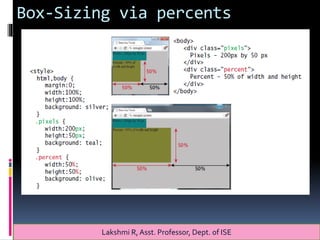
Box-Sizing via percents
Lakshmi R, Asst. Professor, Dept. of ISE
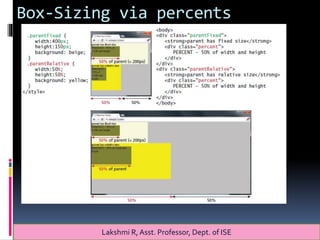
Box-Sizing via percents
Lakshmi R, Asst. Professor, Dept. of ISE
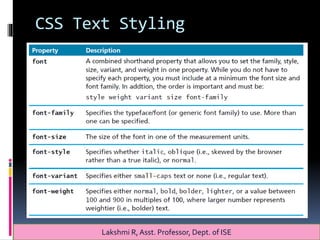
CSS Text Styling
Lakshmi R, Asst. Professor, Dept. of ISE
CSS Text Styling
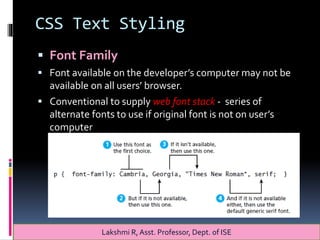
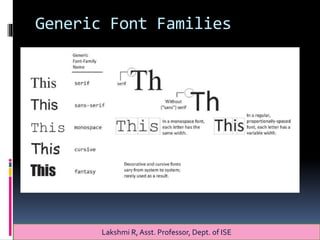
 Font Family
 Font available on the developer’s computer may not be
available on all users’ browser.
 Conventional to supply web font stack - series of
alternate fonts to use if original font is not on user’s
computer
Lakshmi R, Asst. Professor, Dept. of ISE
Generic Font Families
Lakshmi R, Asst. Professor, Dept. of ISE
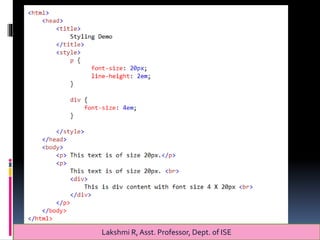
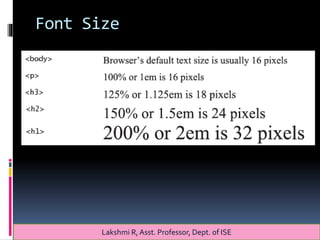
Font Size
Lakshmi R, Asst. Professor, Dept. of ISE
References:
[1] Randy Connolly, Ricardo Hoar,
"Fundamentals ofWeb Development”,
1stEdition,Pearson Education India.
(ISBN:978-9332575271)
[2] https://www.w3schools.com/
Lakshmi R, Asst. Professor, Dept. of ISE

Css basics