By: -
T. Sandesh Alexander
  Mass Comm 2nd yr
Step 1


         Type
         www.wordpress.co
         m on the url.
         Type your usrname
         and password.
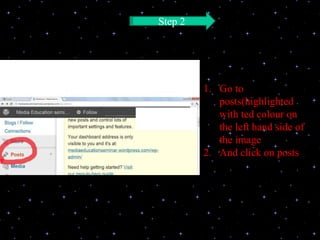
Step 2


         1. Go to
            posts(highlighted
            with ted colour on
            the left hand side of
            the image
         2. And click on posts
Step 3


         1. Go to “Add
            New” (under
            posts)
         2. Then click on
            it
Step 4


         1. Click choose file
         to upload a picture
         file.
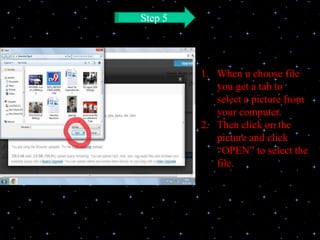
Step 5


         1. When u choose file
            you get a tab to
            select a picture from
            your computer.
         2. Then click on the
            picture and click
            “OPEN” to select the
            file.
Step 6


         1. After selecting
         the picture, click
         UPLOAD to post
         the image.
Step 7


         1. After u click
         upload u get
         another tab to
         write details about
         the file, click
         “SAVE ALL
         CHANGES” to
         save the details
Step 8


         1. Click
         PUBLISH
         to upload
         the Image
E content 1

E content 1

  • 1.
    By: - T. SandeshAlexander Mass Comm 2nd yr
  • 2.
    Step 1 Type www.wordpress.co m on the url. Type your usrname and password.
  • 3.
    Step 2 1. Go to posts(highlighted with ted colour on the left hand side of the image 2. And click on posts
  • 4.
    Step 3 1. Go to “Add New” (under posts) 2. Then click on it
  • 5.
    Step 4 1. Click choose file to upload a picture file.
  • 6.
    Step 5 1. When u choose file you get a tab to select a picture from your computer. 2. Then click on the picture and click “OPEN” to select the file.
  • 7.
    Step 6 1. After selecting the picture, click UPLOAD to post the image.
  • 8.
    Step 7 1. After u click upload u get another tab to write details about the file, click “SAVE ALL CHANGES” to save the details
  • 9.
    Step 8 1. Click PUBLISH to upload the Image