Using Digital Signatures in SAP QM
to Meet Regulatory Requirements
Carl Dunlap
Cohesion, Inc.
cdunlap@cohesion.biz
Learning Points
• Understand the concept of Electronic Signatures and
Compliance issues
• Discover how SAP software uses Digital Signatures to
meet regulatory requirements
• Get a look at upcoming additional functionality in ERP
2005 to satisfy signature requirements
What is Part 11?
• Regulation allowing FDA to accept electronic records and
signatures in place of paper records and handwritten
signatures
• Describes controls to ensure that electronic records and
signatures are:
• Trustworthy
• Reliable
• Compatible with FDA work
• Effective August 20, 1997
http://www.fda.gov/cder/regulatory/ersr/2002_11_05_standards1/sld003.htm
• Regulation allowing FDA to accept electronic records and
signatures in place of paper records and handwritten
signatures
• Describes controls to ensure that electronic records and
signatures are:
• Trustworthy
• Reliable
• Compatible with FDA work
Digital Signature in Results Recording
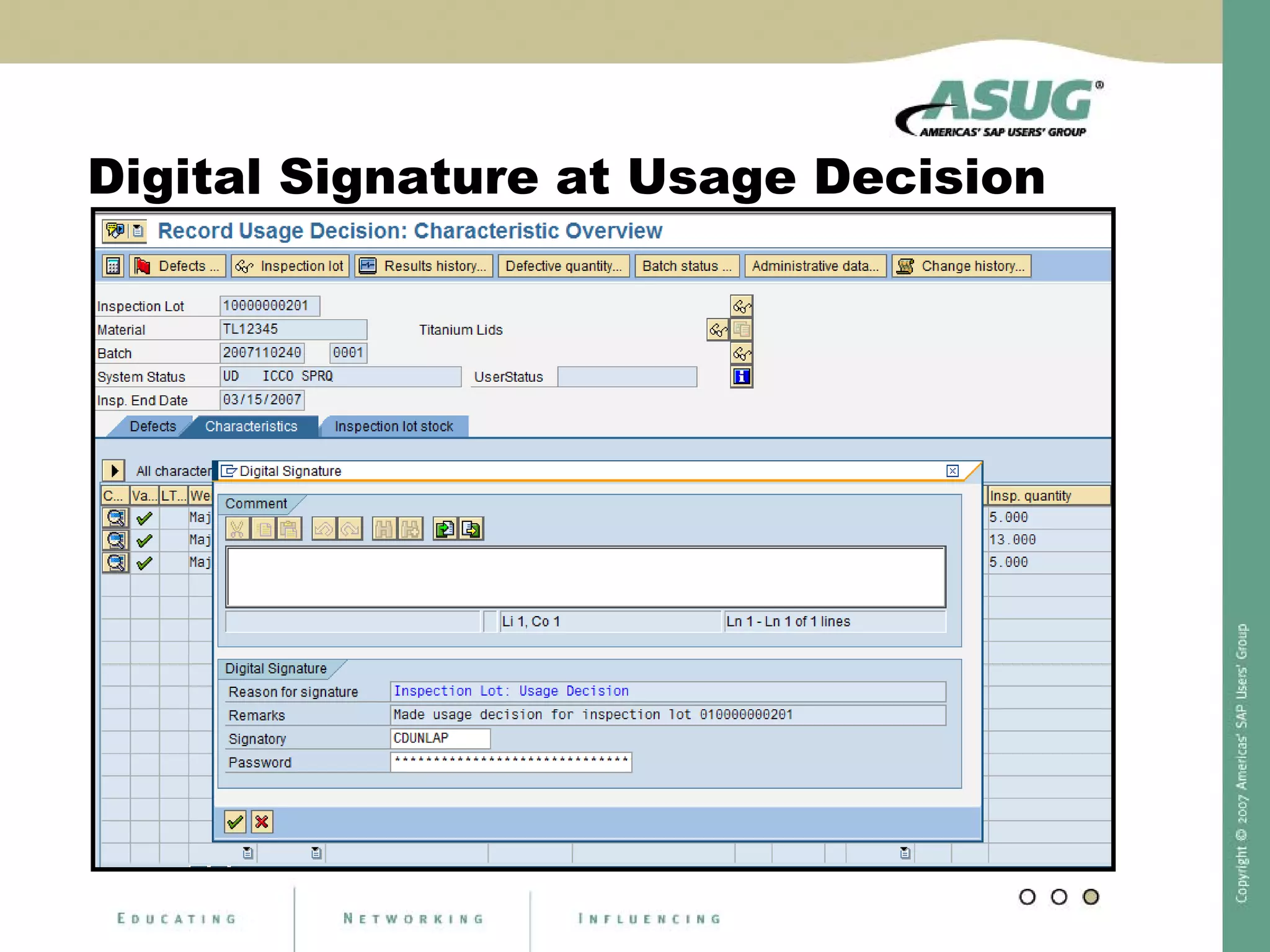
Digital Signature at Usage Decision
Digital Signature in PI Sheet
Digital Signature
Quality Notification - using Business Add In
New Digital Signature Functionality in
SAP QM
SAP ERP 2005, with Enhancement Package 3
*scheduled Nov. 2007
• Modern Signature Tool
• Signature Strategies
• Sequences
• Settings for Comments (optional, mandatory, etc.)
• Signature for Quality Notification is now standard
• Header, Tasks, Action Box
• Inspection Lots
• Document Business Data with Signature
* Subject to Change
DISCLAIMER: This slide reflects current development. Contents may be changed without prior notice, and are in no way binding upon SAP.
New Digital Signature for Lots and Samples
Digital Signature for Notifications
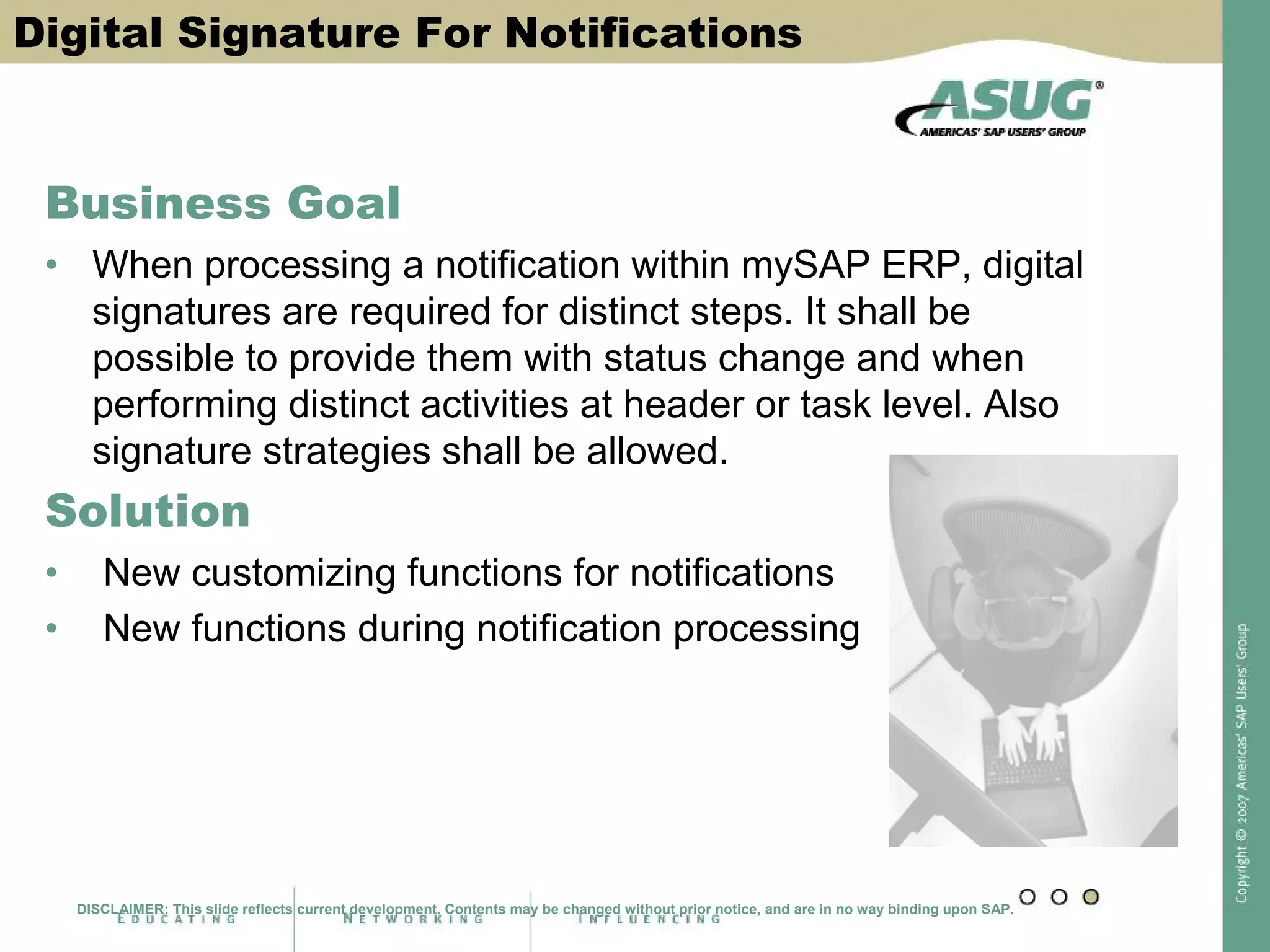
Digital Signature For Notifications
Business Goal
• When processing a notification within mySAP ERP, digital
signatures are required for distinct steps. It shall be
possible to provide them with status change and when
performing distinct activities at header or task level. Also
signature strategies shall be allowed.
Solution
• New customizing functions for notifications
• New functions during notification processing
DISCLAIMER: This slide reflects current development. Contents may be changed without prior notice, and are in no way binding upon SAP.
Customizing for Digital Signature in Notifications I
DISCLAIMER: This slide reflects current development. Contents may be changed without prior notice, and are in no way binding upon SAP.
Customizing for Digital Signatures in Notifications II
The signature can be
activated for
Notification type and
business transaction
For header or task level
Synchronously or
asynchronously
With strategy
assignment
Open for all notification categories (e.g. QM or PM notifications)!
DISCLAIMER: This slide reflects current development. Contents may be changed without prior notice, and are in no way binding upon SAP.
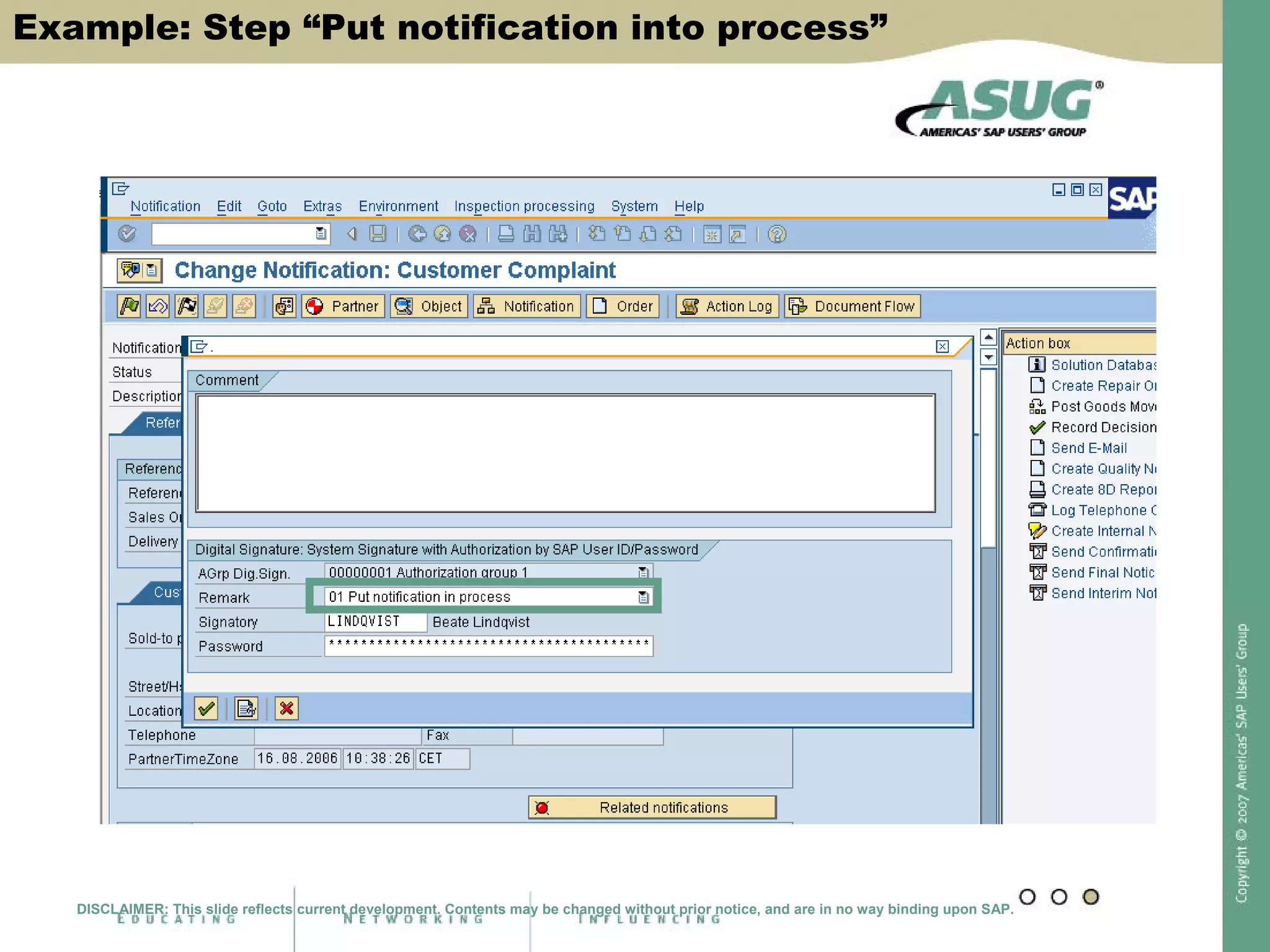
Signature Process Within Notifications
Example: Step “Put notification into process”
DISCLAIMER: This slide reflects current development. Contents may be changed without prior notice, and are in no way binding upon SAP.
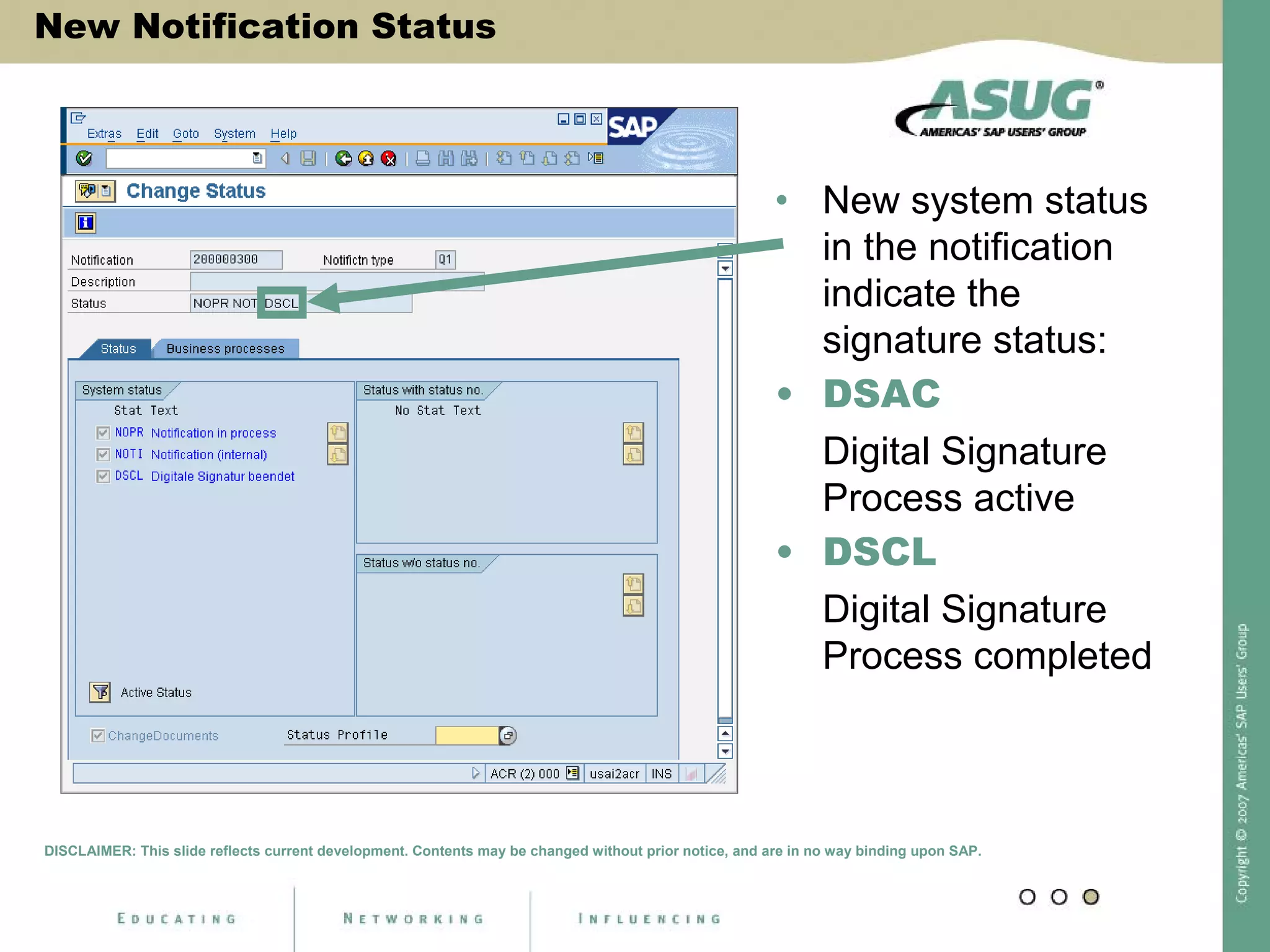
New Notification Status
• New system status
in the notification
indicate the
signature status:
• DSAC
Digital Signature
Process active
• DSCL
Digital Signature
Process completed
DISCLAIMER: This slide reflects current development. Contents may be changed without prior notice, and are in no way binding upon SAP.
What is Signed in the Notification?
Important!
• The signature is given
for a business process
and not for distinct
notification content (*).
• It can be requested
when …
• Performing a status
change at notification
header level or task
level
• Performing an activity
via the action box
(*) Technically this means: the signature data does not contain any data table content, such as
from QMEL.
DISCLAIMER: This slide reflects current development. Contents may be changed without prior notice, and are in no way binding upon SAP.
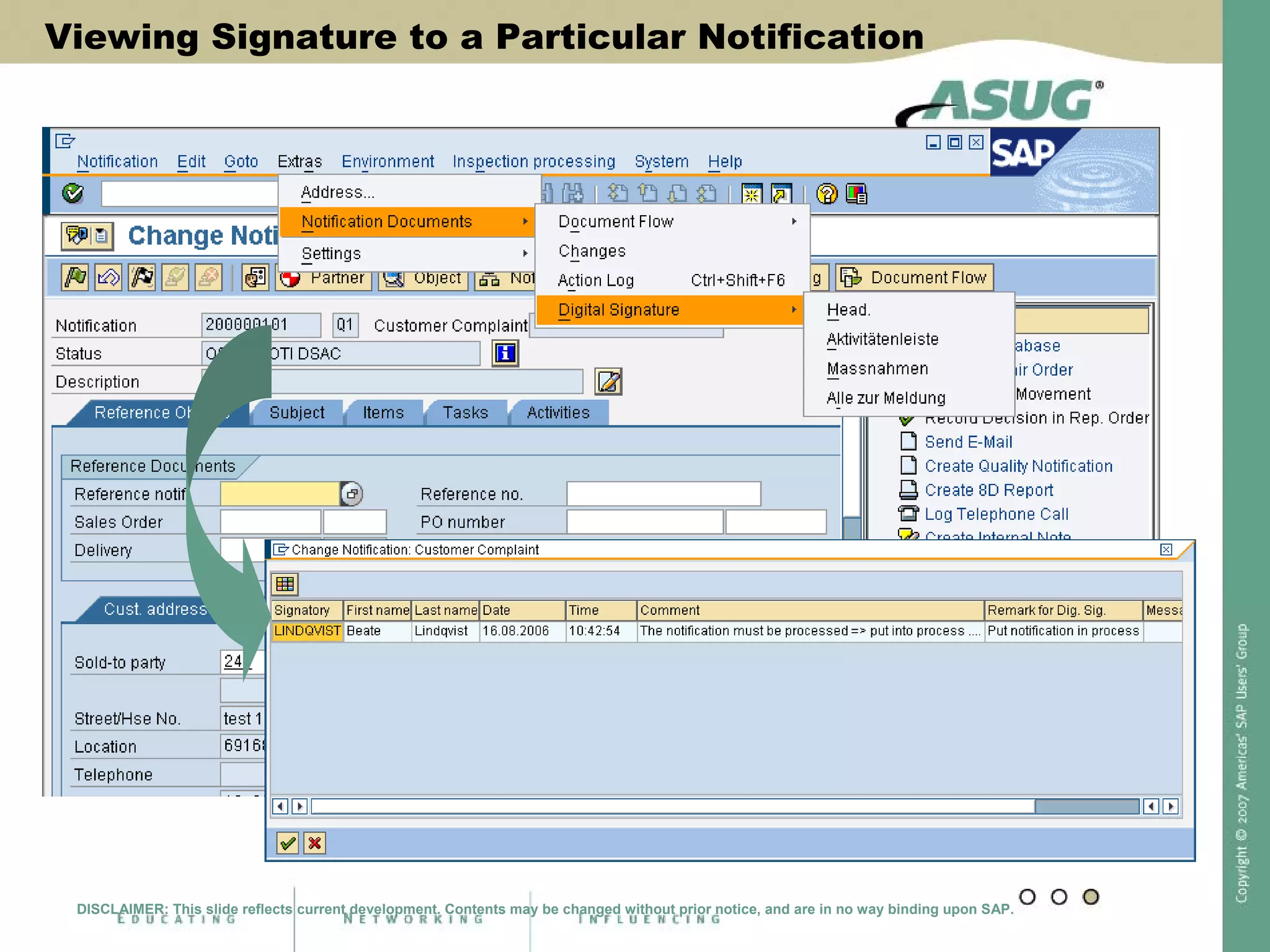
Viewing Signature to a Particular Notification
DISCLAIMER: This slide reflects current development. Contents may be changed without prior notice, and are in no way binding upon SAP.
New Digital Signature for Lots and Samples
Digital Signature for Notifications
Apply “New” Digital Signature within QM
• Business Goal
• For inspection lots and physical samples the “new” digital
signature technology shall be applied in order to allow …
• Signature strategies
• Multi-level signatures
• A more detailed documentation
• Printout of signature information
• Solution
• Extended customizing
• New functions during sample registration, results recording and
usage decision
• New application for multi-level signatures (for inspection results)
DISCLAIMER: This slide reflects current development. Contents may be changed without prior notice, and are in no way binding upon SAP.
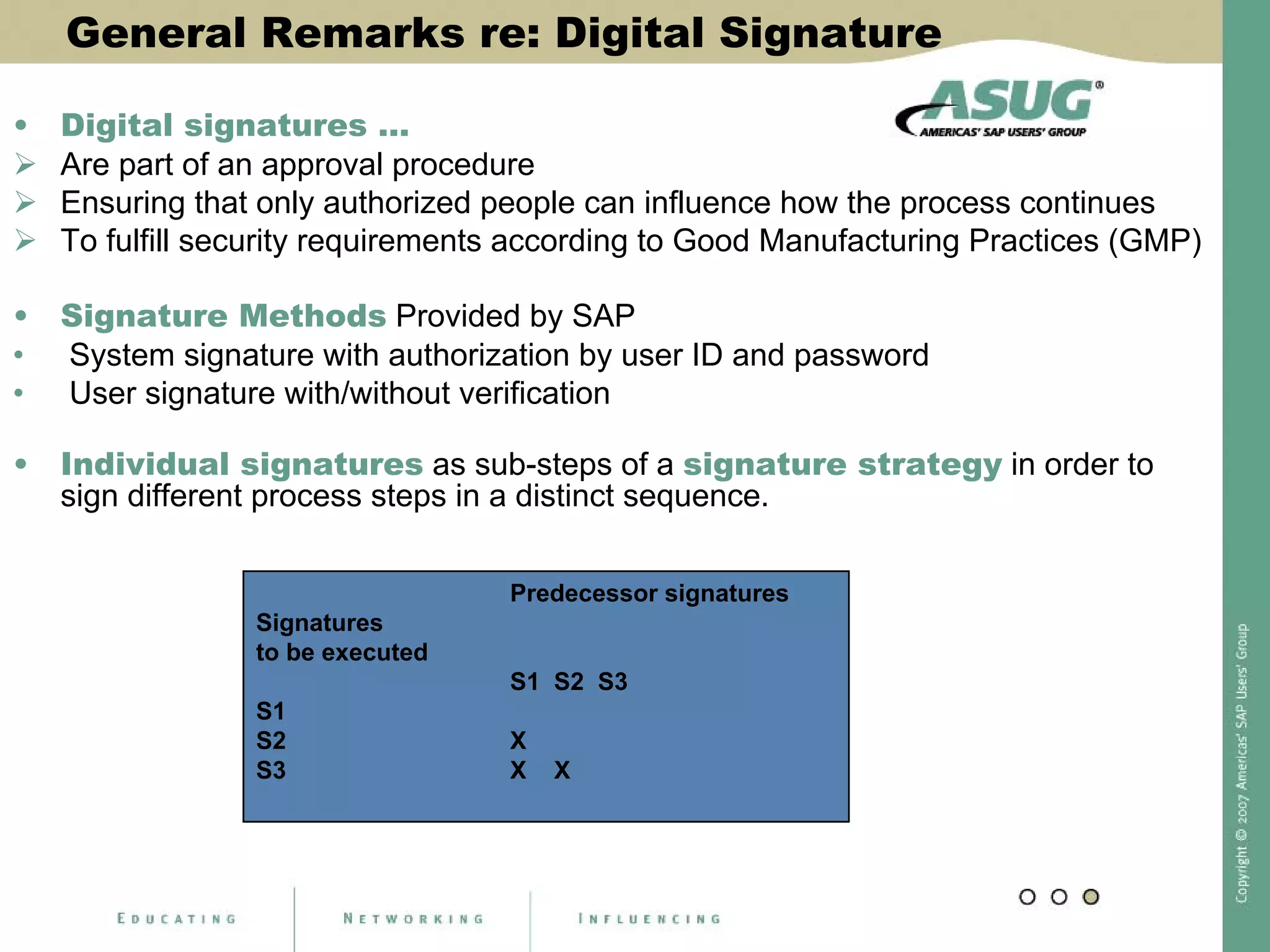
General Remarks re: Digital Signature
• Digital signatures …
Are part of an approval procedure
Ensuring that only authorized people can influence how the process continues
To fulfill security requirements according to Good Manufacturing Practices (GMP)
• Signature Methods Provided by SAP
• System signature with authorization by user ID and password
• User signature with/without verification
• Individual signatures as sub-steps of a signature strategy in order to
sign different process steps in a distinct sequence.
Predecessor signatures
Signatures
to be executed
S1 S2 S3
S1
S2 X
S3 X X
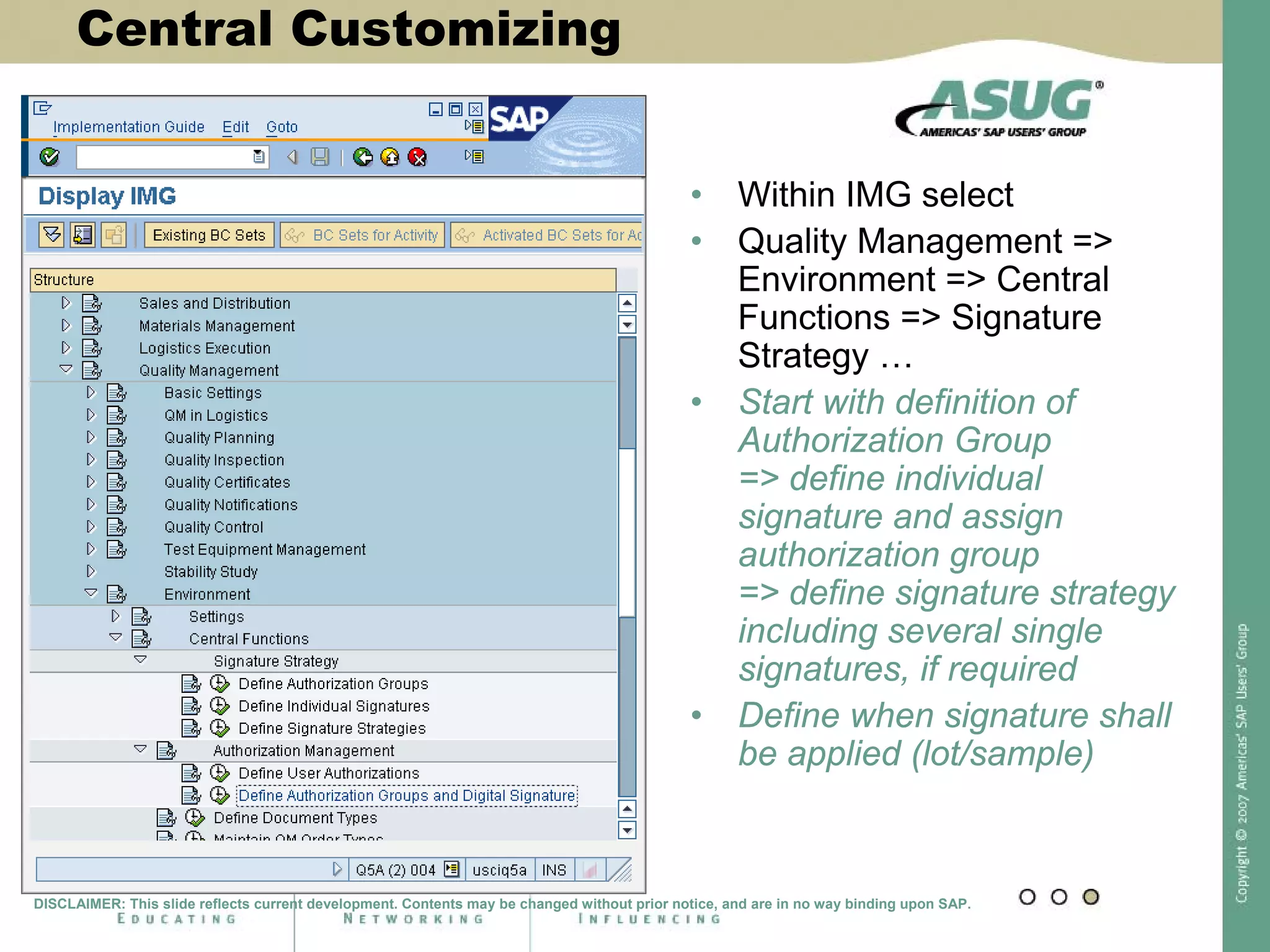
Central Customizing
• Within IMG select
• Quality Management =>
Environment => Central
Functions => Signature
Strategy …
• Start with definition of
Authorization Group
=> define individual
signature and assign
authorization group
=> define signature strategy
including several single
signatures, if required
• Define when signature shall
be applied (lot/sample)
DISCLAIMER: This slide reflects current development. Contents may be changed without prior notice, and are in no way binding upon SAP.
Define Authorization Groups
DISCLAIMER: This slide reflects current development. Contents may be changed without prior notice, and are in no way binding upon SAP.
Step one:
• Define authorization
group for digital
signature
Define Individual Signatures
Step two:
• Define individual
signatures for
signature strategies
DISCLAIMER: This slide reflects current development. Contents may be changed without prior notice, and are in no way binding upon SAP.
Bundle Individual Signatures to a Strategy
Step three:
• Bundle individual
signatures
DISCLAIMER: This slide reflects current development. Contents may be changed without prior notice, and are in no way binding upon SAP.
Define Sequence of Signatures
Step four: Define required sequence in a strategy
DISCLAIMER: This slide reflects current development. Contents may be changed without prior notice, and are in no way binding upon SAP.
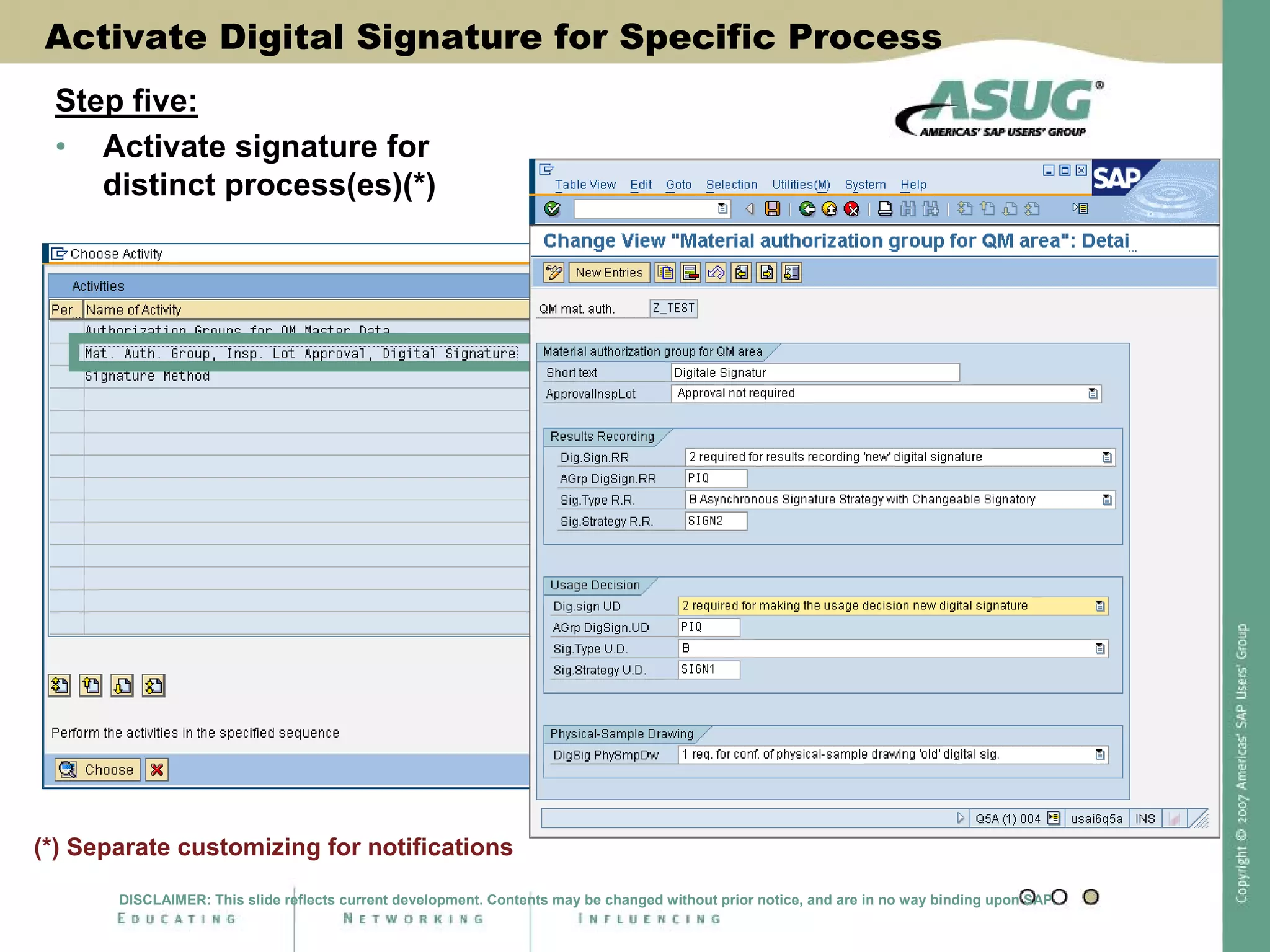
Activate Digital Signature for Specific Process
Step five:
• Activate signature for
distinct process(es)(*)
(*) Separate customizing for notifications
DISCLAIMER: This slide reflects current development. Contents may be changed without prior notice, and are in no way binding upon SAP.
Prepare Master Data
• Assign
Authorization Group
within Material
Master, QM View
* For lots and samples the activation is done via the material master,
i.e. no material master => no digital signature
DISCLAIMER: This slide reflects current development. Contents may be changed without prior notice, and are in no way binding upon SAP.
Prepare Master Data
Digital Signature Within the Sample Registration
• As before with individual signature only, but more
fields for documentation available …
DISCLAIMER: This slide reflects current development. Contents may be changed without prior notice, and are in no way binding upon SAP.
Digital Signature Within Results Recording
Adjustments
• Actual signature status displayed in separate column
within characteristic overview and Work list tree (QE51N)
• Signature strategy with several individual signatures
possible
• First “completion” only sets status 3 for a characteristic =>
further completion via separate transaction to cover
additional signatures
• It is possible to cancel the signature process
Also here with different users (according to signature strategy)
DISCLAIMER: This slide reflects current development. Contents may be changed without prior notice, and are in no way binding upon SAP.
Results Recording: Characteristic Overview
Indicates the actual status
of the digital signature process
DISCLAIMER: This slide reflects current development. Contents may be changed without prior notice, and are in no way binding upon SAP.
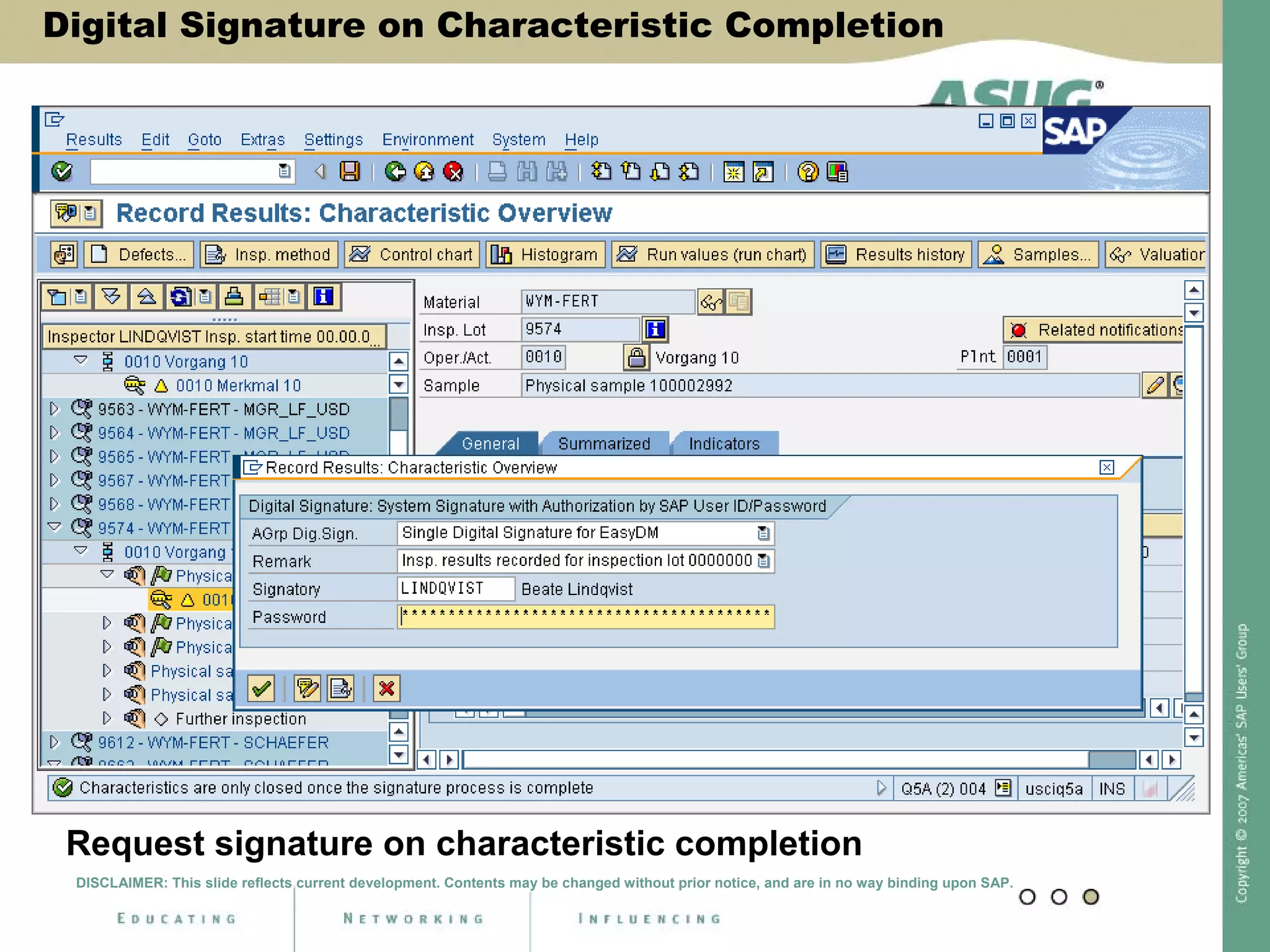
Digital Signature on Characteristic
Completion
Request signature on characteristic completion
DISCLAIMER: This slide reflects current development. Contents may be changed without prior notice, and are in no way binding upon SAP.
Digital Signature on Characteristic Completion
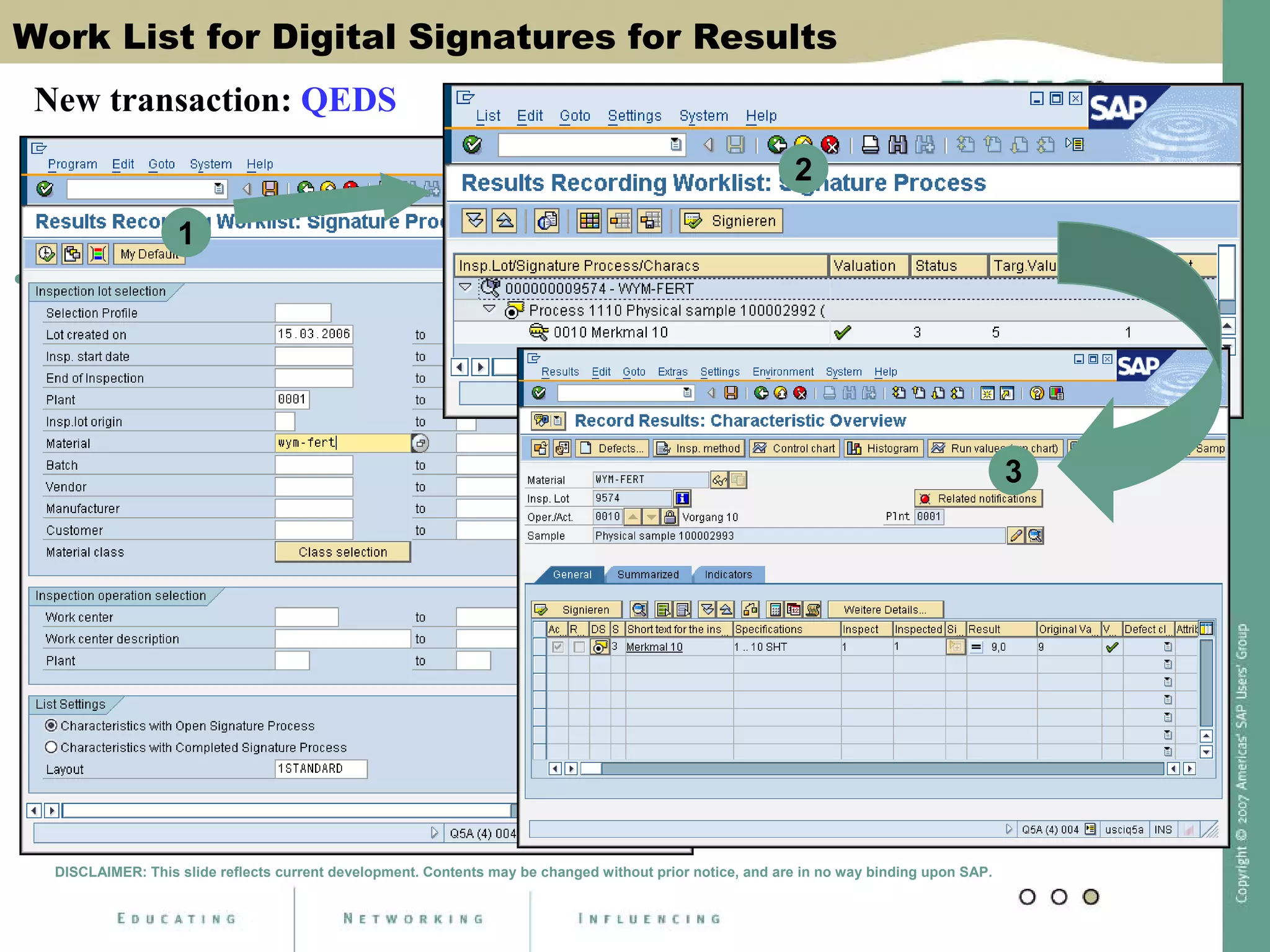
Work List for Digital Signatures for Results
• New transaction QEDS to proceed after first signature if
signature strategy is used
1
2
DISCLAIMER: This slide reflects current development. Contents may be changed without prior notice, and are in no way binding upon SAP.
3
New transaction: QEDS
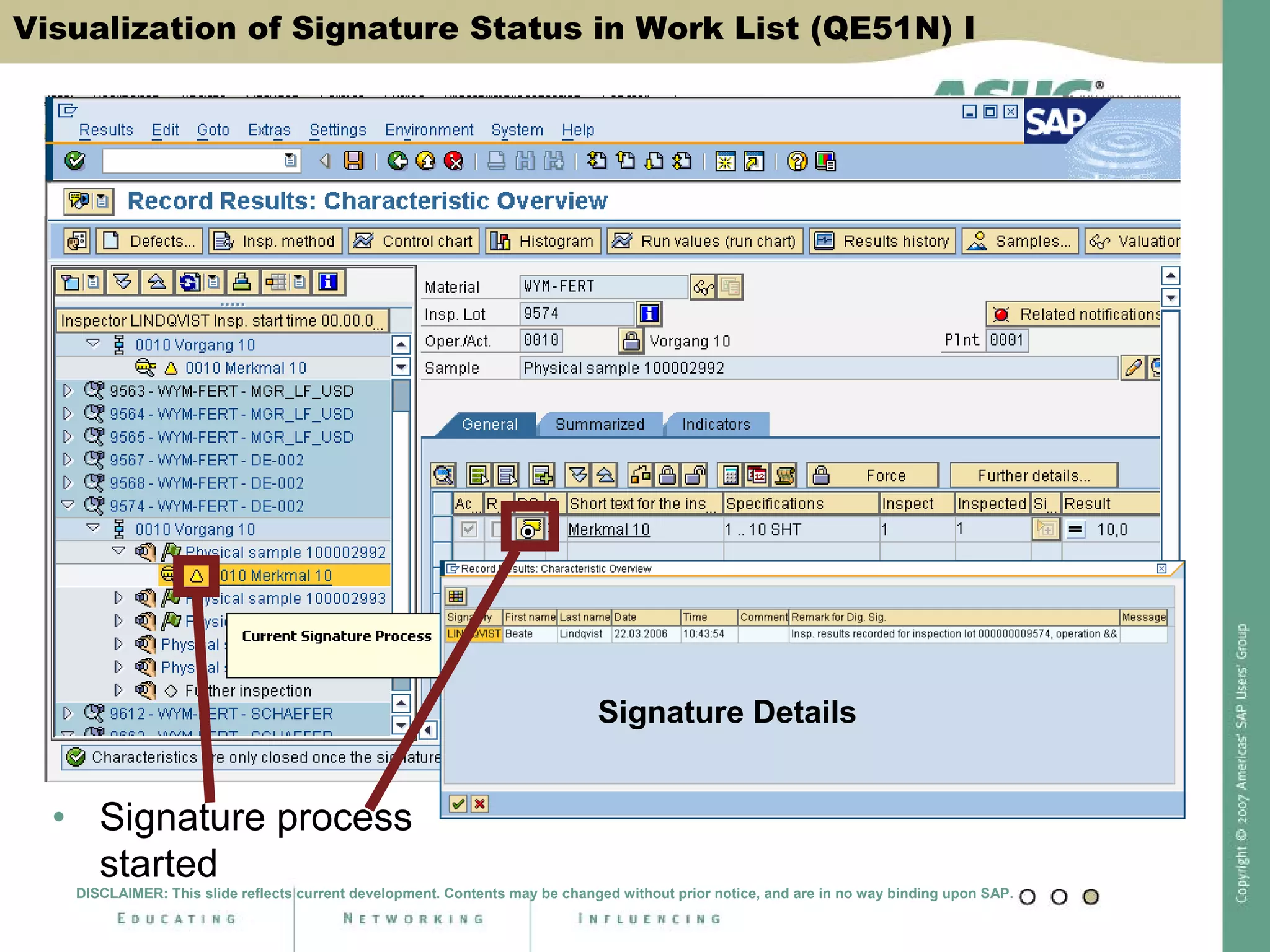
Visualization of Signature Status in Work List (QE51N) I
• Signature process
started
Signature Details
DISCLAIMER: This slide reflects current development. Contents may be changed without prior notice, and are in no way binding upon SAP.
Visualization of Signature Status in
Work List (QE51N) II
Signature process complete
DISCLAIMER: This slide reflects current development. Contents may be changed without prior notice, and are in no way binding upon SAP.
Visualization of Signature Status in Work List (QE51N) II
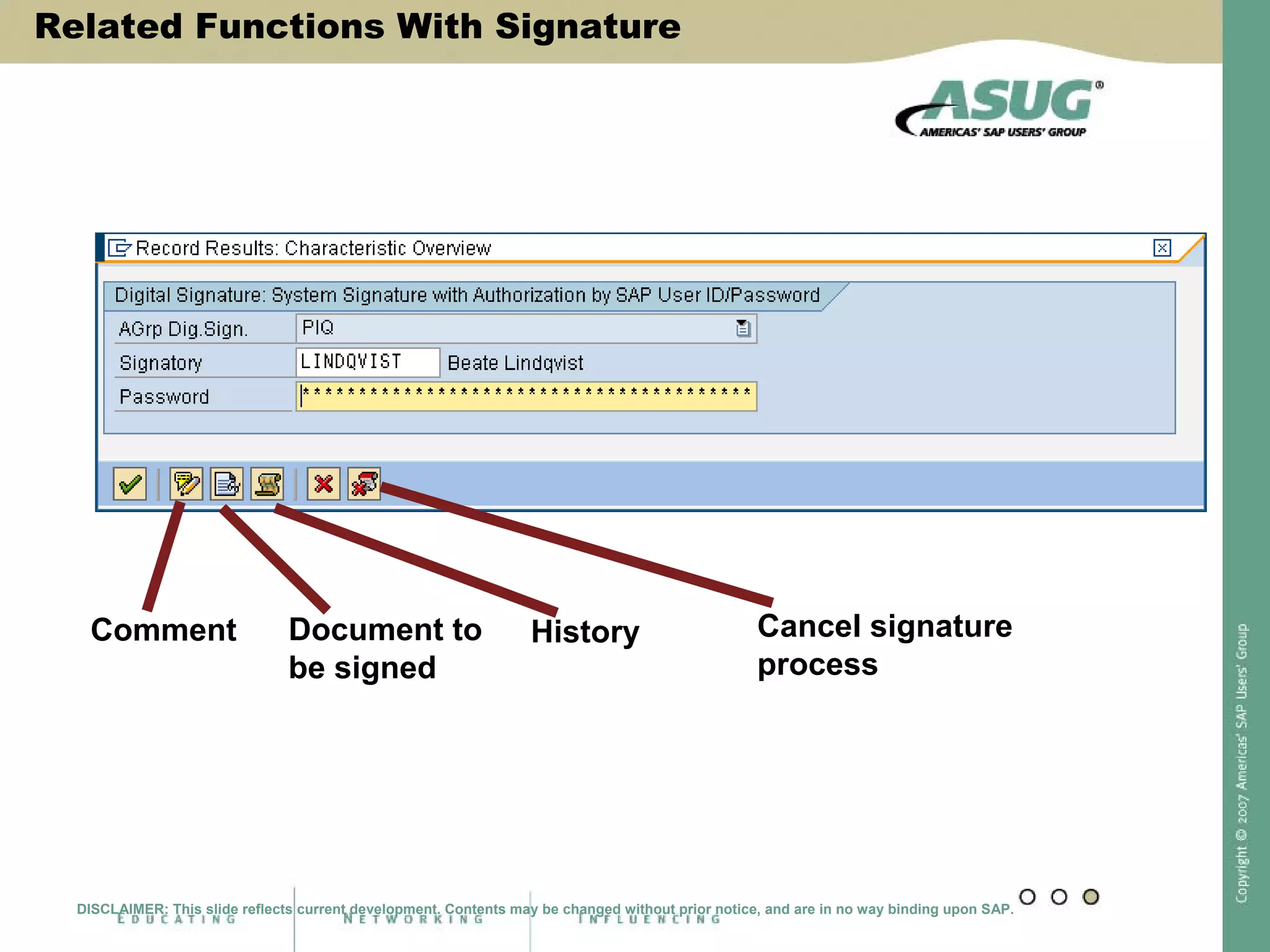
Related Functions With Signature
Document to
be signed
History Cancel signature
process
Comment
DISCLAIMER: This slide reflects current development. Contents may be changed without prior notice, and are in no way binding upon SAP.
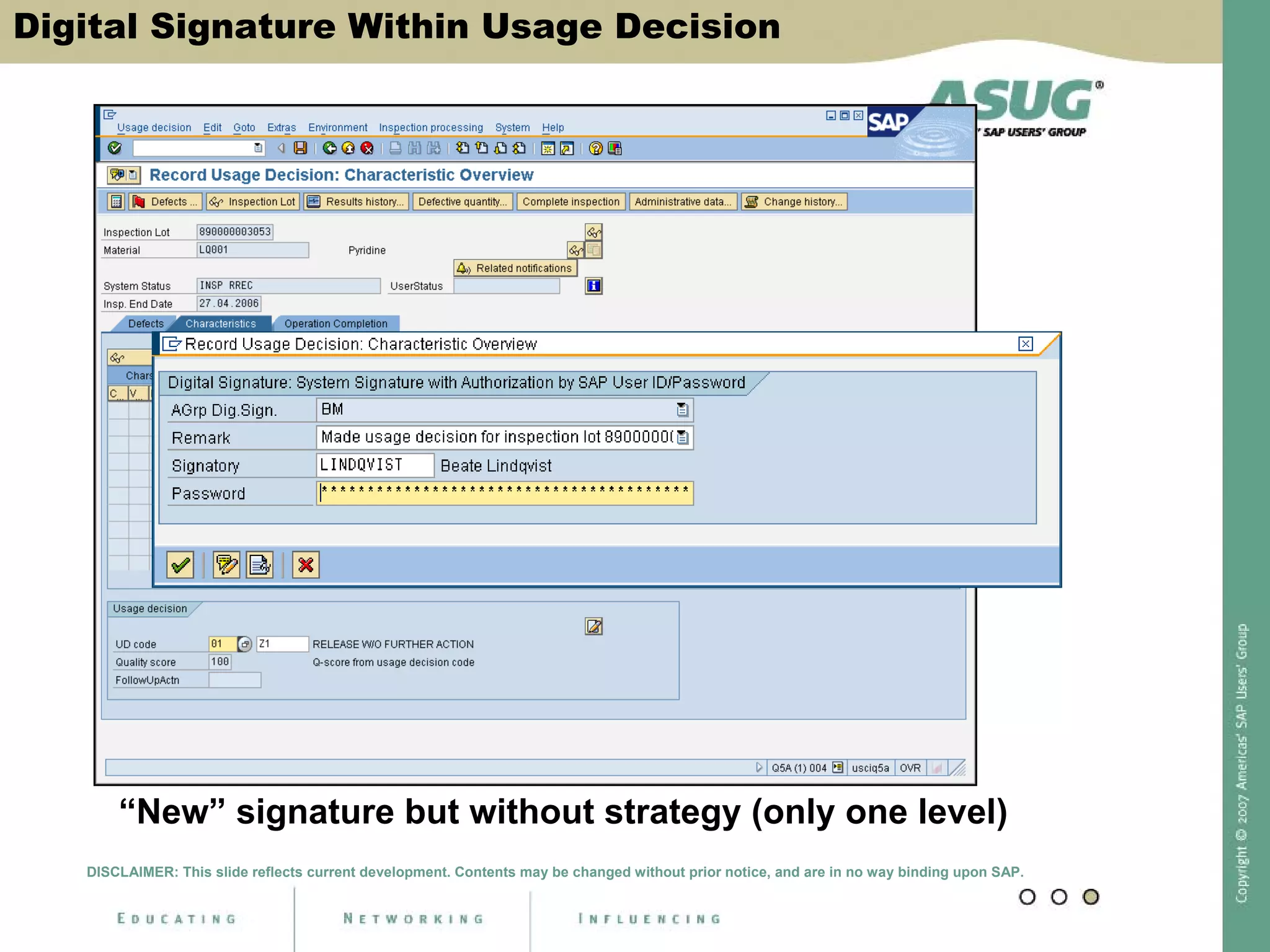
Digital Signature Within Usage Decision
“New” signature but without strategy (only one level)
DISCLAIMER: This slide reflects current development. Contents may be changed without prior notice, and are in no way binding upon SAP.
Detailed Signature Information Within UD
DISCLAIMER: This slide reflects current development. Contents may be changed without prior notice, and are in no way binding upon SAP.
• Navigation into
detailed
signature
information
• (at char. level)
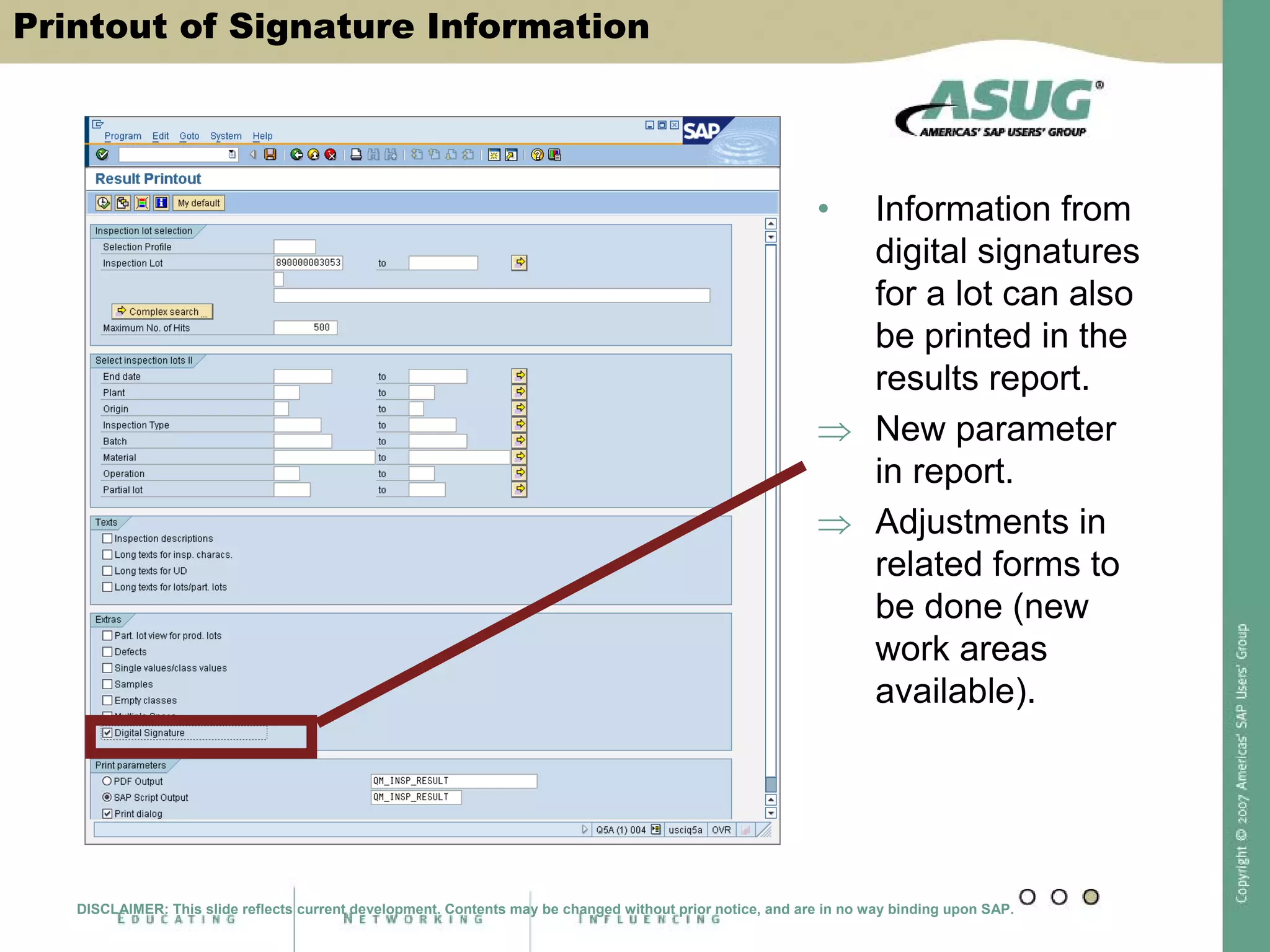
Printout of Signature Information
• Information from
digital signatures
for a lot can also
be printed in the
results report.
⇒ New parameter
in report.
⇒ Adjustments in
related forms to
be done (new
work areas
available).
DISCLAIMER: This slide reflects current development. Contents may be changed without prior notice, and are in no way binding upon SAP.
Example Results Printout With Signature
• With signature
information
(according to
design of form)
DISCLAIMER: This slide reflects current development. Contents may be changed without prior notice, and are in no way binding upon SAP.
Central Function To View Signatures
• Transaction DSAL
displays the log
from digital
signatures
application-related
DISCLAIMER: This slide reflects current development. Contents may be changed without prior notice, and are in no way binding upon SAP.
Best Practices
• Take advantage of SAP Best Practices
• Go live quickly with SAP All-in-One
Time Risk
Pragmatic
methodology
Proven
preconfiguration
Extensive
documentation
SAP
Best Practices
Cost
Key Learnings
• Start with simple signature using SAP user ID and
password
• Utilize SAP “internal controls”
• Set aside time for documentation and validation
• Test, Test, Test
Return on Investment
• No separate investments in outside software (i.e. LIMS)
needed
• Cost of storing paper records
• “Cost of Compliance”
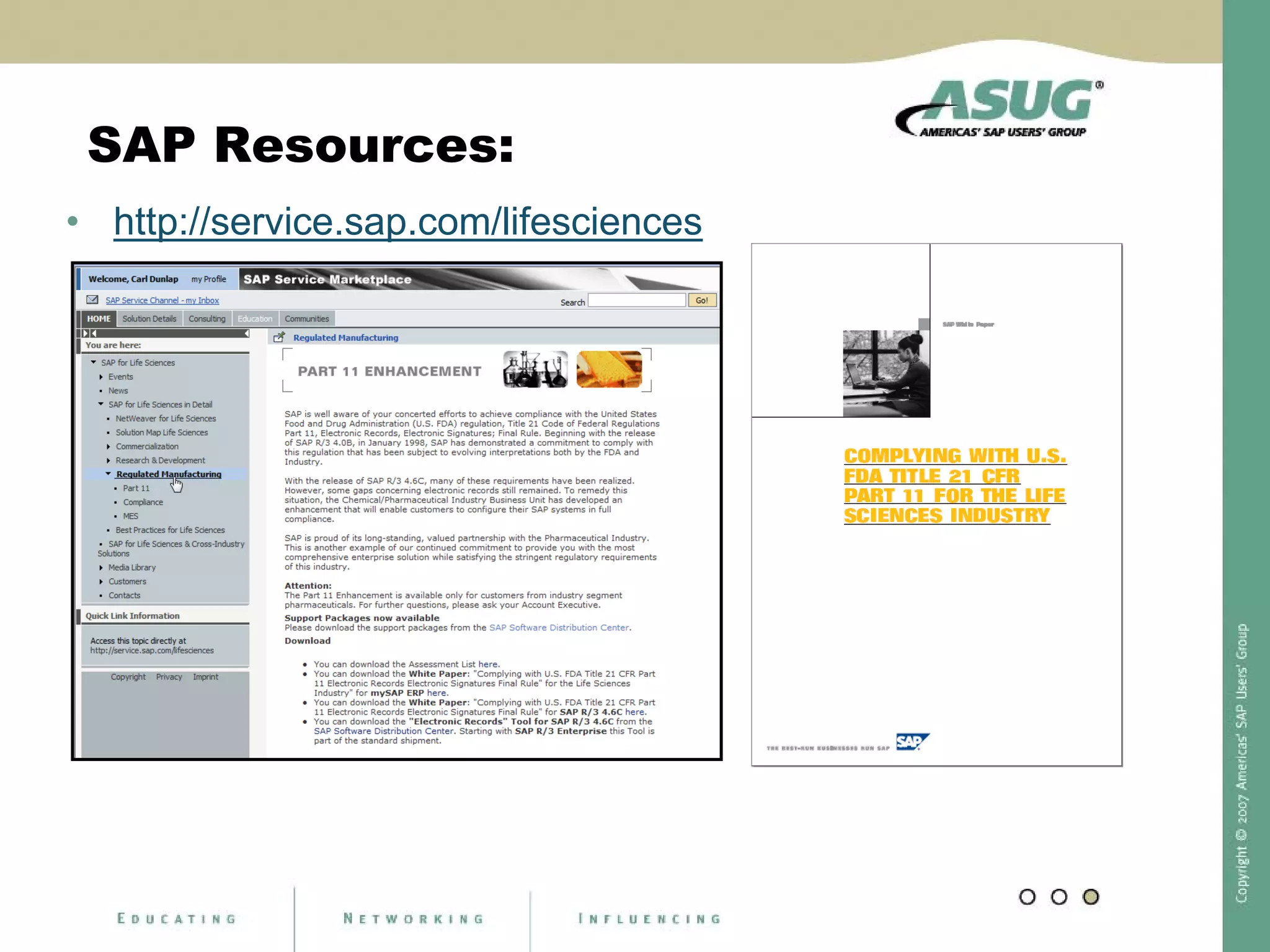
SAP Resources:
• http://service.sap.com/lifesciences
References:
• http://searchsap.techtarget.com/searchSAP/downloads/Us
ingDigitalSignaturesEMconvtSearchSAP.pdf
• http://www.fda.gov/cder/guidance/5667fnl.pdf
• http://help.sap.com
3706
Session Code:

Dunlap 3706 e_sig

  • 1.
    Using Digital Signaturesin SAP QM to Meet Regulatory Requirements Carl Dunlap Cohesion, Inc. cdunlap@cohesion.biz
  • 2.
    Learning Points • Understandthe concept of Electronic Signatures and Compliance issues • Discover how SAP software uses Digital Signatures to meet regulatory requirements • Get a look at upcoming additional functionality in ERP 2005 to satisfy signature requirements
  • 3.
    What is Part11? • Regulation allowing FDA to accept electronic records and signatures in place of paper records and handwritten signatures • Describes controls to ensure that electronic records and signatures are: • Trustworthy • Reliable • Compatible with FDA work • Effective August 20, 1997 http://www.fda.gov/cder/regulatory/ersr/2002_11_05_standards1/sld003.htm • Regulation allowing FDA to accept electronic records and signatures in place of paper records and handwritten signatures • Describes controls to ensure that electronic records and signatures are: • Trustworthy • Reliable • Compatible with FDA work
  • 4.
    Digital Signature inResults Recording
  • 5.
    Digital Signature atUsage Decision
  • 6.
  • 7.
  • 8.
    New Digital SignatureFunctionality in SAP QM SAP ERP 2005, with Enhancement Package 3 *scheduled Nov. 2007 • Modern Signature Tool • Signature Strategies • Sequences • Settings for Comments (optional, mandatory, etc.) • Signature for Quality Notification is now standard • Header, Tasks, Action Box • Inspection Lots • Document Business Data with Signature * Subject to Change DISCLAIMER: This slide reflects current development. Contents may be changed without prior notice, and are in no way binding upon SAP.
  • 9.
    New Digital Signaturefor Lots and Samples Digital Signature for Notifications
  • 10.
    Digital Signature ForNotifications Business Goal • When processing a notification within mySAP ERP, digital signatures are required for distinct steps. It shall be possible to provide them with status change and when performing distinct activities at header or task level. Also signature strategies shall be allowed. Solution • New customizing functions for notifications • New functions during notification processing DISCLAIMER: This slide reflects current development. Contents may be changed without prior notice, and are in no way binding upon SAP.
  • 11.
    Customizing for DigitalSignature in Notifications I DISCLAIMER: This slide reflects current development. Contents may be changed without prior notice, and are in no way binding upon SAP.
  • 12.
    Customizing for DigitalSignatures in Notifications II The signature can be activated for Notification type and business transaction For header or task level Synchronously or asynchronously With strategy assignment Open for all notification categories (e.g. QM or PM notifications)! DISCLAIMER: This slide reflects current development. Contents may be changed without prior notice, and are in no way binding upon SAP.
  • 13.
    Signature Process WithinNotifications Example: Step “Put notification into process” DISCLAIMER: This slide reflects current development. Contents may be changed without prior notice, and are in no way binding upon SAP.
  • 14.
    New Notification Status •New system status in the notification indicate the signature status: • DSAC Digital Signature Process active • DSCL Digital Signature Process completed DISCLAIMER: This slide reflects current development. Contents may be changed without prior notice, and are in no way binding upon SAP.
  • 15.
    What is Signedin the Notification? Important! • The signature is given for a business process and not for distinct notification content (*). • It can be requested when … • Performing a status change at notification header level or task level • Performing an activity via the action box (*) Technically this means: the signature data does not contain any data table content, such as from QMEL. DISCLAIMER: This slide reflects current development. Contents may be changed without prior notice, and are in no way binding upon SAP.
  • 16.
    Viewing Signature toa Particular Notification DISCLAIMER: This slide reflects current development. Contents may be changed without prior notice, and are in no way binding upon SAP.
  • 17.
    New Digital Signaturefor Lots and Samples Digital Signature for Notifications
  • 18.
    Apply “New” DigitalSignature within QM • Business Goal • For inspection lots and physical samples the “new” digital signature technology shall be applied in order to allow … • Signature strategies • Multi-level signatures • A more detailed documentation • Printout of signature information • Solution • Extended customizing • New functions during sample registration, results recording and usage decision • New application for multi-level signatures (for inspection results) DISCLAIMER: This slide reflects current development. Contents may be changed without prior notice, and are in no way binding upon SAP.
  • 19.
    General Remarks re:Digital Signature • Digital signatures … Are part of an approval procedure Ensuring that only authorized people can influence how the process continues To fulfill security requirements according to Good Manufacturing Practices (GMP) • Signature Methods Provided by SAP • System signature with authorization by user ID and password • User signature with/without verification • Individual signatures as sub-steps of a signature strategy in order to sign different process steps in a distinct sequence. Predecessor signatures Signatures to be executed S1 S2 S3 S1 S2 X S3 X X
  • 20.
    Central Customizing • WithinIMG select • Quality Management => Environment => Central Functions => Signature Strategy … • Start with definition of Authorization Group => define individual signature and assign authorization group => define signature strategy including several single signatures, if required • Define when signature shall be applied (lot/sample) DISCLAIMER: This slide reflects current development. Contents may be changed without prior notice, and are in no way binding upon SAP.
  • 21.
    Define Authorization Groups DISCLAIMER:This slide reflects current development. Contents may be changed without prior notice, and are in no way binding upon SAP. Step one: • Define authorization group for digital signature
  • 22.
    Define Individual Signatures Steptwo: • Define individual signatures for signature strategies DISCLAIMER: This slide reflects current development. Contents may be changed without prior notice, and are in no way binding upon SAP.
  • 23.
    Bundle Individual Signaturesto a Strategy Step three: • Bundle individual signatures DISCLAIMER: This slide reflects current development. Contents may be changed without prior notice, and are in no way binding upon SAP.
  • 24.
    Define Sequence ofSignatures Step four: Define required sequence in a strategy DISCLAIMER: This slide reflects current development. Contents may be changed without prior notice, and are in no way binding upon SAP.
  • 25.
    Activate Digital Signaturefor Specific Process Step five: • Activate signature for distinct process(es)(*) (*) Separate customizing for notifications DISCLAIMER: This slide reflects current development. Contents may be changed without prior notice, and are in no way binding upon SAP.
  • 26.
    Prepare Master Data •Assign Authorization Group within Material Master, QM View * For lots and samples the activation is done via the material master, i.e. no material master => no digital signature DISCLAIMER: This slide reflects current development. Contents may be changed without prior notice, and are in no way binding upon SAP. Prepare Master Data
  • 27.
    Digital Signature Withinthe Sample Registration • As before with individual signature only, but more fields for documentation available … DISCLAIMER: This slide reflects current development. Contents may be changed without prior notice, and are in no way binding upon SAP.
  • 28.
    Digital Signature WithinResults Recording Adjustments • Actual signature status displayed in separate column within characteristic overview and Work list tree (QE51N) • Signature strategy with several individual signatures possible • First “completion” only sets status 3 for a characteristic => further completion via separate transaction to cover additional signatures • It is possible to cancel the signature process Also here with different users (according to signature strategy) DISCLAIMER: This slide reflects current development. Contents may be changed without prior notice, and are in no way binding upon SAP.
  • 29.
    Results Recording: CharacteristicOverview Indicates the actual status of the digital signature process DISCLAIMER: This slide reflects current development. Contents may be changed without prior notice, and are in no way binding upon SAP.
  • 30.
    Digital Signature onCharacteristic Completion Request signature on characteristic completion DISCLAIMER: This slide reflects current development. Contents may be changed without prior notice, and are in no way binding upon SAP. Digital Signature on Characteristic Completion
  • 31.
    Work List forDigital Signatures for Results • New transaction QEDS to proceed after first signature if signature strategy is used 1 2 DISCLAIMER: This slide reflects current development. Contents may be changed without prior notice, and are in no way binding upon SAP. 3 New transaction: QEDS
  • 32.
    Visualization of SignatureStatus in Work List (QE51N) I • Signature process started Signature Details DISCLAIMER: This slide reflects current development. Contents may be changed without prior notice, and are in no way binding upon SAP.
  • 33.
    Visualization of SignatureStatus in Work List (QE51N) II Signature process complete DISCLAIMER: This slide reflects current development. Contents may be changed without prior notice, and are in no way binding upon SAP. Visualization of Signature Status in Work List (QE51N) II
  • 34.
    Related Functions WithSignature Document to be signed History Cancel signature process Comment DISCLAIMER: This slide reflects current development. Contents may be changed without prior notice, and are in no way binding upon SAP.
  • 35.
    Digital Signature WithinUsage Decision “New” signature but without strategy (only one level) DISCLAIMER: This slide reflects current development. Contents may be changed without prior notice, and are in no way binding upon SAP.
  • 36.
    Detailed Signature InformationWithin UD DISCLAIMER: This slide reflects current development. Contents may be changed without prior notice, and are in no way binding upon SAP. • Navigation into detailed signature information • (at char. level)
  • 37.
    Printout of SignatureInformation • Information from digital signatures for a lot can also be printed in the results report. ⇒ New parameter in report. ⇒ Adjustments in related forms to be done (new work areas available). DISCLAIMER: This slide reflects current development. Contents may be changed without prior notice, and are in no way binding upon SAP.
  • 38.
    Example Results PrintoutWith Signature • With signature information (according to design of form) DISCLAIMER: This slide reflects current development. Contents may be changed without prior notice, and are in no way binding upon SAP.
  • 39.
    Central Function ToView Signatures • Transaction DSAL displays the log from digital signatures application-related DISCLAIMER: This slide reflects current development. Contents may be changed without prior notice, and are in no way binding upon SAP.
  • 40.
    Best Practices • Takeadvantage of SAP Best Practices • Go live quickly with SAP All-in-One Time Risk Pragmatic methodology Proven preconfiguration Extensive documentation SAP Best Practices Cost
  • 41.
    Key Learnings • Startwith simple signature using SAP user ID and password • Utilize SAP “internal controls” • Set aside time for documentation and validation • Test, Test, Test
  • 42.
    Return on Investment •No separate investments in outside software (i.e. LIMS) needed • Cost of storing paper records • “Cost of Compliance”
  • 43.
  • 44.
  • 45.