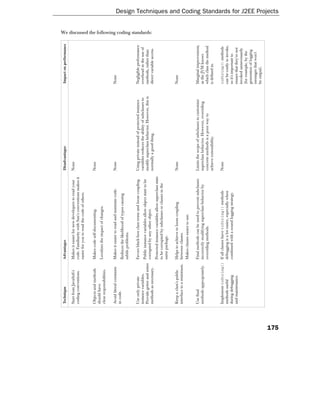
Design Techniques and Coding
           Standards for J2EE Projects

As J2EE applications tend to be large and complex, it's vital that we follow sound OO design practice, adopt
consistent coding conventions, and leverage existing investment – whether our own or that of third parties. In
this chapter we'll look at each of these important areas in turn.

The first two concern code quality, at object-design and code level. What are we trying to achieve? What is
good code? These are a few of its characteristics:

   ❑    Good code is extensible without drastic modification. It's easy to add features without
        tearing it apart.
   ❑    Good code is easy to read and maintain.
   ❑    Good code is well documented.
   ❑    Good code makes it hard to write bad code around it. For example, objects expose clean,
        easy-to-use interfaces that promote good use. Both good code and bad code breed.
   ❑    Good code is easy to test.
   ❑    Good code is easy to debug. Remember that even if a piece of code works perfectly, it's still a
        problem if it doesn't favor debugging. What if a developer is trying to track down an error in
        imperfect code, and the stack trace disappears into perfect but obscure code?
   ❑    Good code contains no code duplication.
   ❑    Good code gets reused.
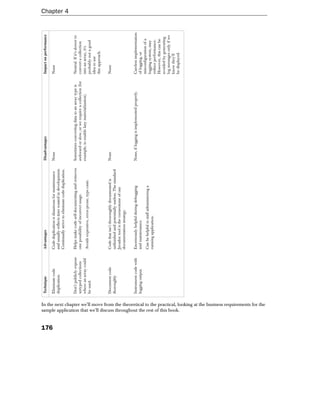
Chapter 4


  It's hard to write code that achieves these goals, although Java arguably gives us more help than any
  other popular language.

  I've written and debugged a lot of Java code since I started using the language back in 1996 (and plenty of C
  and C++ before that) and I'm still learning. I don't pretend that this chapter contains all the answers, and
  there are many matters of opinion, but hopefully it will provide some guidance and useful food for thought.
  This is an important area.

  We must not only ensure that we write code right, but also that we write the right code, taking advantage of
  existing solutions wherever appropriate. This means that development teams must work closely to avoid
  duplication of effort, and that architects and lead developers must maintain up-to-date knowledge of
  third-party solutions such as open source projects.

  This chapter, like this book, is focused on J2EE 1.3, and hence J2SE 1.3. However, language and API
  improvements in J2SE 1.4 are discussed where relevant, as J2SE 1.4 is already available and can even be used
  with some J2EE 1.3 application servers.


OO Design Recommendations for J2EE Applications
  It's possible to design a J2EE application so badly that, even if it contains beautifully written Java code
  at an individual object level, it will still be deemed a failure. A J2EE application with an excellent
  overall design but poor implementation code will be an equally miserable failure. Unfortunately, many
  developers spend too much time grappling with the J2EE APIs and too little ensuring they adhere to
  good coding practice. All of Sun's J2EE sample applications seem to reflect this.

  In my experience, it isn't pedantry to insist on adherence to good OO principles: it brings real benefits.


        OO design is more important than any particular implementation technology (such as
        J2EE, or even Java). Good programming practices and sound OO design underpin good
        J2EE applications. Bad Java code is bad J2EE code.


  Some "coding standards" issues – especially those relating to OO design – are on the borderline between
  design and implementation: for example, the use of design patterns.

  The following section covers some issues that I've seen cause problems in large code bases, especially issues
  that I haven't seen covered elsewhere. This is a huge area, so this section is by no means complete. Some
  issues are matters of opinion, although I'll try to convince you of my position.


        Take every opportunity to learn from the good (and bad) code of others, inside and outside
        your organization. Useful sources in the public domain include successful open source
        projects and the code in the core Java libraries. License permitting, it may be possible to
        decompile interesting parts of commercial products. A professional programmer or
        architect cares more about learning and discovering the best solution than the buzz of
        finding their own solution to a particular problem.


114
Design Techniques and Coding Standards for J2EE Projects


Achieving Loose Coupling with Interfaces
 The "first principle of reusable object-oriented design" advocated by the classic Gang of Four design patterns
 book is: "Program to an interface, not an implementation". Fortunately, Java makes it very easy (and natural)
 to follow this principle.


        Program to interfaces, not classes. This decouples interfaces from their implementations.
        Using loose coupling between objects promotes flexibility. To gain maximum flexibility,
        declare instance variables and method parameters to be of the least specific type required.


 Using interface-based architecture is particularly important in J2EE applications, because of their scale.
 Programming to interfaces rather than concrete classes adds a little complexity, but the rewards far outweigh
 the investment. There is a slight performance penalty for calling an object through an interface, but this is
 seldom an issue in practice.

 A few of the many advantages of an interface-based approach include:

    ❑     The ability to change the implementing class of any application object without affecting
          calling code. This enables us to parameterize any part of an application without breaking
          other components.
    ❑     Total freedom in implementing interfaces. There's no need to commit to an inheritance
          hierarchy. However, it's still possible to achieve code reuse by using concrete inheritance in
          interface implementations.
    ❑     The ability to provide simple test implementations and stub implementations of application
          interfaces as necessary, facilitating the testing of other classes and enabling multiple teams to
          work in parallel after they have agreed on interfaces.

 Adopting interface-based architecture is also the best way to ensure that a J2EE application is portable, yet is
 able to leverage vendor-specific optimizations and enhancements.

 Interface-based architecture can be effectively combined with the use of reflection for
 configuration (see below).


Prefer Object Composition to Concrete Inheritance
 The second basic principle of object-oriented design emphasized in the GoF book is "Favor object
 composition over class inheritance". Few developers appreciate this wise advice.

 Unlike many older languages, such as C++, Java distinguishes at a language level between concrete
 inheritance (the inheritance of method implementations and member variables from a superclass) and
 interface inheritance (the implementation of interfaces). Java allows concrete inheritance from only a single
 superclass, but a Java class may implement any number of interfaces (including, of course, those interfaces
 implemented by its ancestors in a class hierarchy). While there are rare situations in which multiple concrete
 inheritance (as permitted in C++) is the best design approach, Java is much better off avoiding the
 complexity that may arise from permitting these rare legitimate uses.


                                                                                                           115
Chapter 4


  Concrete inheritance is enthusiastically embraced by most developers new to OO, but has many
  disadvantages. Class hierarchies are rigid. It's impossible to change part of a class's implementation; by
  contrast, if that part is encapsulated in an interface (using delegation and the Strategy design pattern, which
  we'll discussed below), this problem can be avoided.

  Object composition (in which new functionality is obtained by assembling or composing objects) is more flexible
  than concrete inheritance, and Java interfaces make delegation natural. Object composition allows the behavior
  of an object to be altered at run time, through delegating part of its behavior to an interface and allowing callers
  to set the implementation of that interface. The Strategy and State design patterns rely on this approach.

  To clarify the distinction, let's consider what we want to achieve by inheritance.

  Abstract inheritance enables polymorphism: the substitutability of objects with the same interface at run
  time. This delivers much of the value of object-oriented design.

  Concrete inheritance enables both polymorphism and more convenient implementation. Code can be
  inherited from a superclass. Thus concrete inheritance is an implementation, rather than purely a design,
  issue. Concrete inheritance is a valuable feature of any OO language; but it is easy to overuse. Common
  mistakes with concrete inheritance include:

      ❑     Forcing users to extend an abstract or concrete class, when we could require implementation of a
            simple interface. This means that we deprive the user code of the right to its own inheritance
            hierarchy. If there's normally no reason that a user class would need it's own custom superclass,
            we can provide a convenient abstract implementation of the method for subclassing. Thus the
            interface approach doesn't preclude the provision of convenient superclasses.
      ❑     Using concrete inheritance to provide helper functionality, by subclasses calling helper methods
            in superclasses. What if classes outside the inheritance hierarchy need the helper functionality?
            Use object composition, so that the helper is a separate object and can be shared.
      ❑     Using abstract classes in place of interfaces. Abstract classes are very useful when used
            correctly. The Template Method design pattern (discussed below) is usually implemented with
            an abstract class. However, an abstract class is not an alternative to an interface. It is usually a
            convenient step in the implementation of an interface. Don't use an abstract class to define a
            type. This is a recipe for running into problems with Java's lack of multiple concrete
            inheritance. Unfortunately, the core Java libraries are poor examples in this respect, often
            using abstract classes where interfaces would be preferable.

  Interfaces are most valuable when kept simple. The more complex an interface is, the less valuable is
  modeling it as an interface, as developers will be forced to extend an abstract or concrete implementation to
  avoid writing excessive amounts of code. This is a case where correct interface granularity is vital; interface
  hierarchies may be separate from class hierarchies, so that a particular class need only implement the exact
  interface it needs.


          Interface inheritance (that is, the implementation of interfaces, rather than inheritance of
          functionality from concrete classes) is much more flexible than concrete inheritance.

  Does this mean that concrete inheritance is a bad thing? Absolutely not; concrete inheritance is a powerful
  way of achieving code reuse in OO languages. However, it's best considered an implementation approach,
  rather than a high-level design approach. It's something we should choose to use, rather than be forced to use
  by an application's overall design.

116
Design Techniques and Coding Standards for J2EE Projects


The Template Method Design Pattern
 One good use of concrete inheritance is to implement the Template Method design pattern.

 The Template Method design pattern (GoF) addresses a common problem: we know the steps of an
 algorithm and the order in which they should be performed, but don't know how to perform all of the steps.
 This Template Method pattern solution is to encapsulate the individual steps we don't know how to perform
 as abstract methods, and provide an abstract superclass that invokes them in the correct order. Concrete
 subclasses of this abstract superclass implement the abstract methods that perform the individual steps. The
 key concept is that it is the abstract base class that controls the workflow. Public superclass methods are
 usually final: the abstract methods deferred to subclasses are protected. This helps to reduce the likelihood of
 bugs: all subclasses are required to do, is fulfill a clear contract.

 The centralization of workflow logic into the abstract superclass is an example of inversion of control. Unlike
 in traditional class libraries, where user code invokes library code, in this approach framework code in the
 superclass invokes user code. It's also known as the Hollywood principle: "Don't call me, I'll call you".
 Inversion of control is fundamental to frameworks, which tend to use the Template Method pattern heavily
 (we'll discuss frameworks later).

 For example, consider a simple order processing system. The business involves calculating the purchase
 price, based on the price of individual items, checking whether the customer is allowed to spend this amount,
 and applying any discount if necessary. Some persistent storage such as an RDBMS must be updated to
 reflect a successful purchase, and queried to obtain price information. However, it's desirable to separate this
 from the steps of the business logic.

 The AbstractOrderEJB superclass implements the business logic, which includes checking that the
 customer isn't trying to exceed their spending limit, and applying a discount to large orders. The public
 placeOrder() method is final, so that this workflow can't be modified (or corrupted) by subclasses:

     public final Invoice placeOrder(int customerId, InvoiceItem[] items)
         throws NoSuchCustomerException, SpendingLimitViolation {

         int total = 0;
         for (int i = 0; i < items.length; i++) {
           total += getItemPrice(items[i]) * items[i].getQuantity();
         }

         if (total > getSpendingLimit(customerId)) {
           getSessionContext().setRollbackOnly();
           throw new SpendingLimitViolation(total, limit);
         }
         else if (total > DISCOUNT_THRESHOLD) {
           // Apply discount to total...
         }

         int invoiceId = placeOrder(customerId, total, items);
         return new InvoiceImpl(iid, total);
     }


                                                                                                          117
Chapter 4


  I've highlighted the three lines of code in this method that invoke protected abstract "template methods" that
  must be implemented by subclasses. These will be defined in AbstractOrderEJB as follows:

      protected abstract int getItemPrice(InvoiceItem item);

      protected abstract int getSpendingLimit(customerId)
        throws NoSuchCustomerException;

      protected abstract int placeOrder(int customerId, int total,
                         InvoiceItem[] items);

  Subclasses of AbstractOrderEJB merely need to implement these three methods. They don't need to
  concern themselves with business logic. For example, one subclass might implement these three methods
  using JDBC, while another might implement them using SQLJ or JDO.

  Such uses of the Template Method pattern offer good separation of concerns. Here, the superclass
  concentrates on business logic; the subclasses concentrate on implementing primitive operations (for
  example, using a low-level API such as JDBC). As the template methods are protected, rather than public,
  callers are spared the details of the class's implementation.

  As it's usually better to define types in interfaces rather than classes, the Template Method pattern is often
  used as a strategy to implement an interface.

       Abstract superclasses are also often used to implement some, but not all, methods of an interface. The
       remaining methods – which vary between concrete implementations – are left unimplemented. This differs
       from the Template Method pattern in that the abstract superclass doesn't handle workflow.


        Use the Template Method design pattern to capture an algorithm in an abstract
        superclass, but defer the implementation of individual steps to subclasses. This has the
        potential to head off bugs, by getting tricky operations right once and simplifying user
        code. When implementing the Template Method pattern, the abstract superclass must
        factor out those methods that may change between subclasses and ensure that the method
        signatures enable sufficient flexibility in implementation.

        Always make the abstract parent class implement an interface. The Template Method design
        pattern is especially valuable in framework design (discussed towards the end of this chapter).


  The Template Method design pattern can be very useful in J2EE applications to help us to achieve as
  much portability as possible between application servers and databases while still leveraging proprietary
  features. We've seen how we can sometimes separate business logic from database operations above.
  We could equally use this pattern to enable efficient support for specific databases. For example, we
  could have an OracleOrderEJB and a DB2OrderEJB that implemented the abstract template methods
  efficiently in the respective databases, while business logic remains free of proprietary code.


118
Design Techniques and Coding Standards for J2EE Projects


The Strategy Design Pattern
 An alternative to the Template Method is the Strategy design pattern, which factors the variant behavior into
 an interface. Thus, the class that knows the algorithm is not an abstract base class, but a concrete class that
 uses a helper that implements an interface defining the individual steps. The Strategy design pattern takes a
 little more work to implement than the Template Method pattern, but it is more flexible. The advantage of
 the Strategy pattern is that it need not involve concrete inheritance. The class that implements the individual
 steps is not forced to inherit from an abstract template superclass.

 Let's look at how we could use the Strategy design pattern in the above example. The first step is to move the
 template methods into an interface, which will look like this:

     public interface DataHelper {
       int getItemPrice(InvoiceItem item);
       int getSpendingLimit(customerId) throws NoSuchCustomerException;
       int placeOrder(int customerId, int total, InvoiceItem[] items);
     }

 Implementations of this interface don't need to subclass any particular class; we have the maximum
 possible freedom.

 Now we can write a concrete OrderEJB class that depends on an instance variable of this interface. We must
 also provide a means of setting this helper, either in the constructor or through a bean property. In the
 present example I've opted for a bean property:

     private DataHelper dataHelper;

     public void setDataHelper(DataHelper newDataHelper) {
       this.dataHelper = newDataHelper;
     }

 The implementation of the placeOrder() method is almost identical to the version using the Template
 Method pattern, except that it invokes the operations it doesn't know how to do on the instance of the helper
 interface, in the highlighted lines:

     public final Invoice placeOrder(int customerId, InvoiceItem[] items)
         throws NoSuchCustomerException, SpendingLimitViolation {

         int total = 0;
         for (int i = 0; i < items.length; i++) {
           total += this.dataHelper.getItemPrice(items[i]) *
             items[i].getQuantity();
         }

         if (total > this.dataHelper.getSpendingLimit(customerId)) {
           getSessionContext().setRollbackOnly();
           throw new SpendingLimitViolation(total, limit);
         } else if (total > DISCOUNT_THRESHOLD) {
           // Apply discount to total...
         }

         int invoiceId = this.dataHelper.placeOrder(customerId, total, items);
         return new InvoiceImpl(iid, total);
     }


                                                                                                         119
Chapter 4


  This is slightly more complex to implement than the version using concrete inheritance with the Template
  Method pattern, but is more flexible. This is a classic example of the tradeoff between concrete inheritance
  and delegation to an interface.

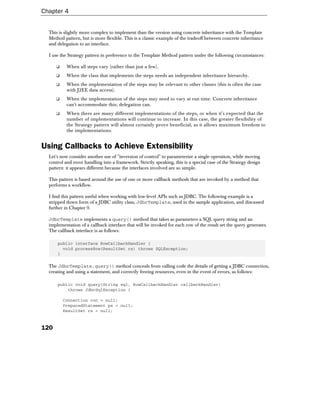
  I use the Strategy pattern in preference to the Template Method pattern under the following circumstances:

      ❑    When all steps vary (rather than just a few).
      ❑    When the class that implements the steps needs an independent inheritance hierarchy.
      ❑    When the implementation of the steps may be relevant to other classes (this is often the case
           with J2EE data access).
      ❑    When the implementation of the steps may need to vary at run time. Concrete inheritance
           can't accommodate this; delegation can.
      ❑    When there are many different implementations of the steps, or when it's expected that the
           number of implementations will continue to increase. In this case, the greater flexibility of
           the Strategy pattern will almost certainly prove beneficial, as it allows maximum freedom to
           the implementations.


Using Callbacks to Achieve Extensibility
  Let's now consider another use of "inversion of control" to parameterize a single operation, while moving
  control and error handling into a framework. Strictly speaking, this is a special case of the Strategy design
  pattern: it appears different because the interfaces involved are so simple.

  This pattern is based around the use of one or more callback methods that are invoked by a method that
  performs a workflow.

  I find this pattern useful when working with low-level APIs such as JDBC. The following example is a
  stripped down form of a JDBC utility class, JdbcTemplate, used in the sample application, and discussed
  further in Chapter 9.

  JdbcTemplate implements a query() method that takes as parameters a SQL query string and an
  implementation of a callback interface that will be invoked for each row of the result set the query generates.
  The callback interface is as follows:

      public interface RowCallbackHandler {
        void processRow(ResultSet rs) throws SQLException;
      }

  The JdbcTemplate.query() method conceals from calling code the details of getting a JDBC connection,
  creating and using a statement, and correctly freeing resources, even in the event of errors, as follows:

      public void query(String sql, RowCallbackHandler callbackHandler)
          throws JdbcSqlException {

          Connection con = null;
          PreparedStatement ps = null;
          ResultSet rs = null;


120
Design Techniques and Coding Standards for J2EE Projects


        try {
          con = <code to get connection>
          ps = con.prepareStatement(sql);
          rs = ps.executeQuery();

          while (rs.next()) {
            callbackHandler.processRow(rs);
          }

          rs.close();
          ps.close();
        } catch (SQLException ex) {
          throw new JdbcSqlException("Couldn't run query [" + sql + "]", ex);
        }
        finally {
          DataSourceUtils.closeConnectionIfNecessary(this.dataSource, con);
        }
    }

The DataSourceUtils class contains a helper method that can be used to close connections, catching and
logging any SQLExceptions encountered.

In this example, JdbcSqlException extends java.lang.RuntimeException, which means that calling
code may choose to catch it, but is not forced to. This makes sense in the present situation. If, for example, a
callback handler tries to obtain the value of a column that doesn't exist in the ResultSet, it will do calling code
no good to catch it. This is clearly a programming error, and JdbcTemplate's behavior of logging the exception
and throwing a runtime exception is logical (see discussion on Error Handling - Checked or Unchecked Exceptions later).

In this case, I modeled the RowCallbackHandler interface as an inner interface of the JdbcTemplate
class. This interface is only relevant to the JdbcTemplate class, so this is logical. Note that implementations
of the RowCallbackHandler interface might be inner classes (in trivial cases, anonymous inner classes are
appropriate), or they might be standard, reusable classes, or subclasses of standard convenience classes.

Consider the following implementation of the RowCallbackHandler interface to perform a JDBC query.
Note that the implementation isn't forced to catch SQLExceptions that may be thrown in extracting column
values from the result set:

    class StringHandler implements JdbcTemplate.RowCallbackHandler {
      private List l = new LinkedList();

        public void processRow(ResultSet rs) throws SQLException {
          l.add(rs.getString(1));
        }

        public String[] getStrings() {
          return (String[]) l.toArray(new String[l.size()]);
        }
    }


                                                                                                               121
Chapter 4


  This class can be used as follows:

      StringHandler sh = new StringHandler();
      jdbcTemplate.query("SELECT FORENAME FROM CUSTMR", sh);
      String[] forenames = sh.getStrings();

  These three lines show how the code that uses the JdbcTemplate is able to focus on the business problem,
  without concerning itself with the JDBC API. Any SQLExceptions thrown will be handled by JdbcTemplate.

  This pattern shouldn't be overused, but can be very useful. The following advantages and disadvantages
  indicate the tradeoffs involved:

  Advantages:

      ❑    The framework class can perform error handling and the acquisition and release of resources.
           This means that tricky error handling (as is required using JDBC) can be written once only,
           and calling code is simpler. The more complex the error handling and cleanup involved, the
           more attractive this approach is.
      ❑    Calling code needn't handle the details of low-level APIs such as JDBC. This is desirable,
           because such code is bug prone and verbose, obscuring the business problem application code
           should focus on.
      ❑    The one control flow function (JdbcTemplate.query() in the example) can be used with a
           wide variety of callback handlers, to perform different tasks. This is a good way of achieving
           reuse of code that uses low-level APIs.

  Disadvantages:

      ❑    This idiom is less intuitive than having calling code handle execution flow itself, so code may
           be harder to understand and maintain if there's a reasonable alternative.
      ❑    We need to create an object for the callback handler.
      ❑    In rare cases, performance may be impaired by the need to invoke the callback handler via an
           interface. The overhead of the above example is negligible, compared to the time taken by the
           JDBC operations themselves.

  This pattern is most valuable when the callback interface is very simple. In the example, because the
  RowCallbackHandler interface contains a single method, it is very easy to implement, meaning that
  implementation choices such as anonymous inner classes may be used to simplify calling code.


The Observer Design Pattern
  Like the use of interfaces, the Observer design pattern can be used to decouple components and enable
  extensibility without modification (observing the Open Closed Principle). It also contributes to achieving
  separation of concerns.

  Consider, for example, an object that handles user login. There might be several outcomes from a user's
  attempt to login: successful login; failed login due to an incorrect password; failed login due to an incorrect
  username and password; system error due to failure to connect to the database that holds login information.


122
Design Techniques and Coding Standards for J2EE Projects


Let's imagine that we have a login implementation working in production, but that further requirements
mean that the application should e-mail an administrator in the event of a given number of system errors;
and should maintain a list of incorrectly entered passwords, along with the correct passwords for the users
concerned, to contribute to developing information to help users avoid common errors. We would also like
to know the peak periods for user login activity (as opposed to general activity on the web site).

All this functionality could be added to the object that implements login. We should have unit tests that
would verify that this hasn't broken the existing functionality, but this is approach doesn't offer good
separation of concerns (why should the object handling login need to know or obtain the administrator's
e-mail address, or know how to send an e-mail?). As more features (or aspects) are added, the
implementation of the login workflow itself – the core responsibility of this component – will be obscured
under the volume of code to handle them.

We can address this problem more elegantly using the Observer design pattern. Observers (or listeners) can
be notified of application events. The application must provide (or use a framework that provides) an event
publisher. Listeners can register to be notified of events: all workflow code must do is publish events that
might be of interest. Event publication is similar to generating log messages, in that it doesn't affect the
working of application code. In the above example, events would include:

   ❑     Attempted login, containing username and password
   ❑     System error, including the offending exception
   ❑     Login result (success or failure and reason)

Events normally include timestamps.

Now we could achieve clean separation of concerns by using distinct listeners to e-mail the administrator on system
errors; react to a failed login (added it to a list); and gather performance information about login activity.

The Observer design pattern is used in the core Java libraries: for example, JavaBeans can publish property
change events. In our own applications, we will use the Observer pattern at a higher level. Events of interest
are likely to relate to application-level operations, not low-level operations such as setting a bean property.

Consider also the need to gather performance information about a web application. We could build
sophisticated performance monitoring into the code of the web application framework (for example, any
controller servlets), but this would require modification to those classes if we required different performance
statistics in future. It's better to publish events such as "request received" and "request fulfilled" (the latter
including success or failure status) and leave the implementation of performance monitoring up to listeners
that are solely concerned with it. This is an example of how the Observer design pattern can be used to
achieve good separation of concerns. This amounts to Aspect-Oriented Programming, which we discuss
briefly under Using Reflection later.

Don't go overboard with the Observer design pattern: it's only necessary when there's a real likelihood
that loosely coupled listeners will need to know about a workflow. If we use the Observer design pattern
everywhere our business logic will disappear under a morass of event publication code and performance
will be significantly reduced. Only important workflows (such as the login process of our example) should
generate events.


                                                                                                            123
Chapter 4


  A warning when using the Observer design pattern: it's vital that listeners return quickly. Rogue listeners can
  lock an application. Although it is possible for the event publishing system to invoke observers in a different
  thread, this is wasteful for the majority of listeners that will return quickly. It's a better choice in most
  situations for the onus to be on listeners to return quickly or spin off long-running tasks into separate threads.
  Listeners should also avoid synchronization on shared application objects, as this may lead to blocking.
  Listeners must be threadsafe.

  The Observer design pattern is less useful in a clustered deployment than in deployment on a single server,
  as it only allows us to publish events on a single server. For example, it would be unsafe to use the Observer
  pattern to update a data cache; as such an update would apply only to a single server. However, the Observer
  pattern can still be very useful in a cluster. For example, the applications discussed above would all be valid
  in a clustered environment. JMS can be used for cluster-wide event publication, at the price of greater API
  complexity and a much greater performance overhead.

  In my experience, the Observer design pattern is more useful in the web tier than in the EJB tier. For
  example, it's impossible to create threads in the EJB tier (again, JMS is the alternative).

  In Chapter 11 we look at how to implement the Observer design pattern in an application framework. The
  application framework infrastructure used in the sample application provides an event publication
  mechanism, allowing approaches such as those described here to be implemented without the need for an
  application to implement any "plumbing".


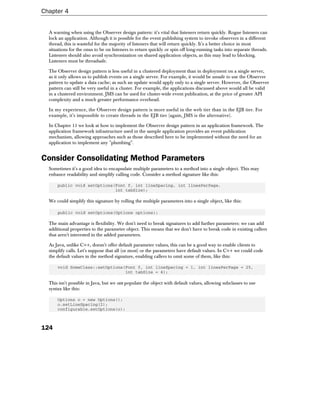
Consider Consolidating Method Parameters
  Sometimes it's a good idea to encapsulate multiple parameters to a method into a single object. This may
  enhance readability and simplify calling code. Consider a method signature like this:

      public void setOptions(Font f, int lineSpacing, int linesPerPage,
                             int tabSize);

  We could simplify this signature by rolling the multiple parameters into a single object, like this:

      public void setOptions(Options options);

  The main advantage is flexibility. We don't need to break signatures to add further parameters: we can add
  additional properties to the parameter object. This means that we don't have to break code in existing callers
  that aren't interested in the added parameters.

  As Java, unlike C++, doesn't offer default parameter values, this can be a good way to enable clients to
  simplify calls. Let's suppose that all (or most) or the parameters have default values. In C++ we could code
  the default values in the method signature, enabling callers to omit some of them, like this:

      void SomeClass::setOptions(Font f, int lineSpacing = 1, int linesPerPage = 25,
                                 int tabSize = 4);

  This isn't possible in Java, but we can populate the object with default values, allowing subclasses to use
  syntax like this:

      Options o = new Options();
      o.setLineSpacing(2);
      configurable.setOptions(o);


124
Design Techniques and Coding Standards for J2EE Projects


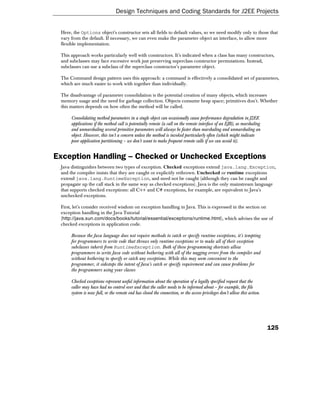
 Here, the Options object's constructor sets all fields to default values, so we need modify only to those that
 vary from the default. If necessary, we can even make the parameter object an interface, to allow more
 flexible implementation.

 This approach works particularly well with constructors. It's indicated when a class has many constructors,
 and subclasses may face excessive work just preserving superclass constructor permutations. Instead,
 subclasses can use a subclass of the superclass constructor's parameter object.

 The Command design pattern uses this approach: a command is effectively a consolidated set of parameters,
 which are much easier to work with together than individually.

 The disadvantage of parameter consolidation is the potential creation of many objects, which increases
 memory usage and the need for garbage collection. Objects consume heap space; primitives don't. Whether
 this matters depends on how often the method will be called.

      Consolidating method parameters in a single object can occasionally cause performance degradation in J2EE
      applications if the method call is potentially remote (a call on the remote interface of an EJB), as marshaling
      and unmarshaling several primitive parameters will always be faster than marshaling and unmarshaling an
      object. However, this isn't a concern unless the method is invoked particularly often (which might indicate
      poor application partitioning – we don't want to make frequent remote calls if we can avoid it).


Exception Handling – Checked or Unchecked Exceptions
 Java distinguishes between two types of exception. Checked exceptions extend java.lang.Exception,
 and the compiler insists that they are caught or explicitly rethrown. Unchecked or runtime exceptions
 extend java.lang.RuntimeException, and need not be caught (although they can be caught and
 propagate up the call stack in the same way as checked exceptions). Java is the only mainstream language
 that supports checked exceptions: all C++ and C# exceptions, for example, are equivalent to Java's
 unchecked exceptions.

 First, let's consider received wisdom on exception handling in Java. This is expressed in the section on
 exception handling in the Java Tutorial
 (http://java.sun.com/docs/books/tutorial/essential/exceptions/runtime.html), which advises the use of
 checked exceptions in application code.

      Because the Java language does not require methods to catch or specify runtime exceptions, it's tempting
      for programmers to write code that throws only runtime exceptions or to make all of their exception
      subclasses inherit from RuntimeException. Both of these programming shortcuts allow
      programmers to write Java code without bothering with all of the nagging errors from the compiler and
      without bothering to specify or catch any exceptions. While this may seem convenient to the
      programmer, it sidesteps the intent of Java's catch or specify requirement and can cause problems for
      the programmers using your classes

      Checked exceptions represent useful information about the operation of a legally specified request that the
      caller may have had no control over and that the caller needs to be informed about – for example, the file
      system is now full, or the remote end has closed the connection, or the access privileges don't allow this action.


                                                                                                                           125
Chapter 4


       What does it buy you if you throw a RuntimeException or create a subclass of RuntimeException just
       because you don't want to deal with specifying it? Simply, you get the ability to throw an exception
       without specifying that you do so. In other words, it is a way to avoid documenting the exceptions that a
       method can throw. When is this good? Well, when is it ever good to avoid documenting a method's
       behavior? The answer is "hardly ever".

  To summarize Java orthodoxy: checked exceptions should be the norm. Runtime exceptions indicate
  programming errors.

  I used to subscribe to this view. However, after writing and working with thousands of catch blocks, I've
  come to the conclusion that this appealing theory doesn't always work in practice. I'm not alone. Since
  developing my own ideas on the subject, I've noticed that Bruce Eckel, author of the classic book Thinking in
  Java, has also changed his mind. Eckel now advocates the use of runtime exceptions as the norm, and
  wonders whether checked exceptions should be dropped from Java as a failed experiment
  (http://www.mindview.net/Etc/Discussions/CheckedExceptions).

  Eckel cites the observation that, when one looks at small amounts of code, checked exceptions seem a brilliant
  idea and promise to avoid many bugs. However, experience tends to indicate the reverse for large code bases.
  See "Exceptional Java" by Alan Griffiths at http://www.octopull.demon.co.uk/java/ExceptionalJava.html for
  another discussion of the problems with checked exceptions.

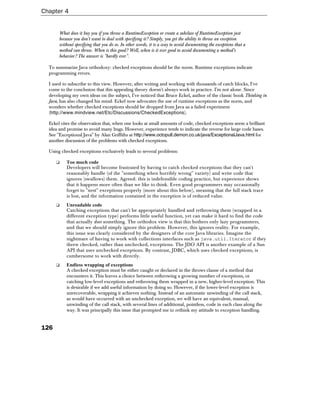
  Using checked exceptions exclusively leads to several problems:

      ❑    Too much code
           Developers will become frustrated by having to catch checked exceptions that they can't
           reasonably handle (of the "something when horribly wrong" variety) and write code that
           ignores (swallows) them. Agreed: this is indefensible coding practice, but experience shows
           that it happens more often than we like to think. Even good programmers may occasionally
           forget to "nest" exceptions properly (more about this below), meaning that the full stack trace
           is lost, and the information contained in the exception is of reduced value.
      ❑    Unreadable code
           Catching exceptions that can't be appropriately handled and rethrowing them (wrapped in a
           different exception type) performs little useful function, yet can make it hard to find the code
           that actually does something. The orthodox view is that this bothers only lazy programmers,
           and that we should simply ignore this problem. However, this ignores reality. For example,
           this issue was clearly considered by the designers of the core Java libraries. Imagine the
           nightmare of having to work with collections interfaces such as java.util.Iterator if they
           threw checked, rather than unchecked, exceptions. The JDO API is another example of a Sun
           API that uses unchecked exceptions. By contrast, JDBC, which uses checked exceptions, is
           cumbersome to work with directly.
      ❑    Endless wrapping of exceptions
           A checked exception must be either caught or declared in the throws clause of a method that
           encounters it. This leaves a choice between rethrowing a growing number of exceptions, or
           catching low-level exceptions and rethrowing them wrapped in a new, higher-level exception. This
           is desirable if we add useful information by doing so. However, if the lower-level exception is
           unrecoverable, wrapping it achieves nothing. Instead of an automatic unwinding of the call stack,
           as would have occurred with an unchecked exception, we will have an equivalent, manual,
           unwinding of the call stack, with several lines of additional, pointless, code in each class along the
           way. It was principally this issue that prompted me to rethink my attitude to exception handling.


126
Design Techniques and Coding Standards for J2EE Projects


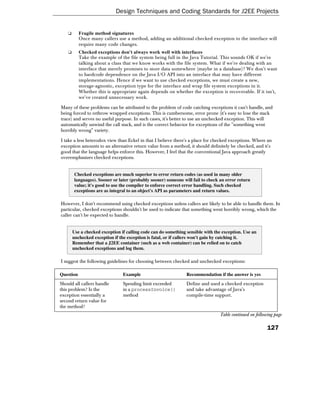
    ❑      Fragile method signatures
           Once many callers use a method, adding an additional checked exception to the interface will
           require many code changes.
    ❑      Checked exceptions don't always work well with interfaces
           Take the example of the file system being full in the Java Tutorial. This sounds OK if we're
           talking about a class that we know works with the file system. What if we're dealing with an
           interface that merely promises to store data somewhere (maybe in a database)? We don't want
           to hardcode dependence on the Java I/O API into an interface that may have different
           implementations. Hence if we want to use checked exceptions, we must create a new,
           storage-agnostic, exception type for the interface and wrap file system exceptions in it.
           Whether this is appropriate again depends on whether the exception is recoverable. If it isn't,
           we've created unnecessary work.

Many of these problems can be attributed to the problem of code catching exceptions it can't handle, and
being forced to rethrow wrapped exceptions. This is cumbersome, error prone (it's easy to lose the stack
trace) and serves no useful purpose. In such cases, it's better to use an unchecked exception. This will
automatically unwind the call stack, and is the correct behavior for exceptions of the "something went
horribly wrong" variety.

I take a less heterodox view than Eckel in that I believe there's a place for checked exceptions. Where an
exception amounts to an alternative return value from a method, it should definitely be checked, and it's
good that the language helps enforce this. However, I feel that the conventional Java approach greatly
overemphasizes checked exceptions.


        Checked exceptions are much superior to error return codes (as used in many older
        languages). Sooner or later (probably sooner) someone will fail to check an error return
        value; it's good to use the compiler to enforce correct error handling. Such checked
        exceptions are as integral to an object's API as parameters and return values.

However, I don't recommend using checked exceptions unless callers are likely to be able to handle them. In
particular, checked exceptions shouldn't be used to indicate that something went horribly wrong, which the
caller can't be expected to handle.


        Use a checked exception if calling code can do something sensible with the exception. Use an
        unchecked exception if the exception is fatal, or if callers won't gain by catching it.
        Remember that a J2EE container (such as a web container) can be relied on to catch
        unchecked exceptions and log them.

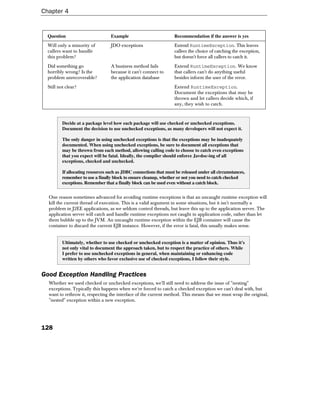
I suggest the following guidelines for choosing between checked and unchecked exceptions:

Question                         Example                         Recommendation if the answer is yes
Should all callers handle        Spending limit exceeded         Define and used a checked exception
this problem? Is the             in a processInvoice()           and take advantage of Java's
exception essentially a          method                          compile-time support.
second return value for
the method?
                                                                                 Table continued on following page

                                                                                                          127
Chapter 4


  Question                         Example                          Recommendation if the answer is yes
  Will only a minority of          JDO exceptions                   Extend RuntimeException. This leaves
  callers want to handle                                            callers the choice of catching the exception,
  this problem?                                                     but doesn't force all callers to catch it.
  Did something go                 A business method fails          Extend RuntimeException. We know
  horribly wrong? Is the           because it can't connect to      that callers can't do anything useful
  problem unrecoverable?           the application database         besides inform the user of the error.
  Still not clear?                                                  Extend RuntimeException.
                                                                    Document the exceptions that may be
                                                                    thrown and let callers decide which, if
                                                                    any, they wish to catch.


          Decide at a package level how each package will use checked or unchecked exceptions.
          Document the decision to use unchecked exceptions, as many developers will not expect it.

          The only danger in using unchecked exceptions is that the exceptions may be inadequately
          documented. When using unchecked exceptions, be sure to document all exceptions that
          may be thrown from each method, allowing calling code to choose to catch even exceptions
          that you expect will be fatal. Ideally, the compiler should enforce Javdoc-ing of all
          exceptions, checked and unchecked.

          If allocating resources such as JDBC connections that must be released under all circumstances,
          remember to use a finally block to ensure cleanup, whether or not you need to catch checked
          exceptions. Remember that a finally block can be used even without a catch block.


  One reason sometimes advanced for avoiding runtime exceptions is that an uncaught runtime exception will
  kill the current thread of execution. This is a valid argument in some situations, but it isn't normally a
  problem in J2EE applications, as we seldom control threads, but leave this up to the application server. The
  application server will catch and handle runtime exceptions not caught in application code, rather than let
  them bubble up to the JVM. An uncaught runtime exception within the EJB container will cause the
  container to discard the current EJB instance. However, if the error is fatal, this usually makes sense.


          Ultimately, whether to use checked or unchecked exception is a matter of opinion. Thus it's
          not only vital to document the approach taken, but to respect the practice of others. While
          I prefer to use unchecked exceptions in general, when maintaining or enhancing code
          written by others who favor exclusive use of checked exceptions, I follow their style.


Good Exception Handling Practices
  Whether we used checked or unchecked exceptions, we'll still need to address the issue of "nesting"
  exceptions. Typically this happens when we're forced to catch a checked exception we can't deal with, but
  want to rethrow it, respecting the interface of the current method. This means that we must wrap the original,
  "nested" exception within a new exception.


128
Design Techniques and Coding Standards for J2EE Projects


Some standard library exceptions, such as javax.servlet.ServletException, offer such wrapping
functionality. But for our own application exceptions, we'll need to define (or use existing) custom exception
superclasses that take a "root cause" exception as a constructor argument, expose it to code that requires it,
and override the printStackTrace() methods to show the full stack trace, including that of the root
cause. Typically we need two such base exceptions, one for checked and on for unchecked exceptions.

     This is no longer necessary in Java 1.4, which supports exception nesting for all exceptions. We'll discuss
     this important enhancement below.

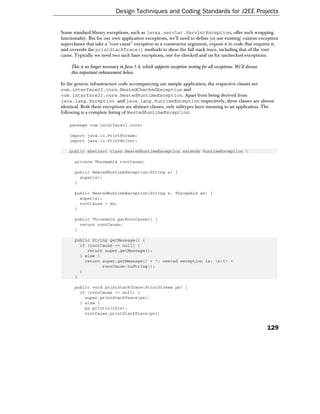
In the generic infrastructure code accompanying our sample application, the respective classes are
com.interface21.core.NestedCheckedException and
com.interface21.core.NestedRuntimeException. Apart from being derived from
java.lang.Exception and java.lang.RuntimeException respectively, these classes are almost
identical. Both these exceptions are abstract classes; only subtypes have meaning to an application. The
following is a complete listing of NestedRuntimeException:

    package com.interface21.core;

    import java.io.PrintStream;
    import java.io.PrintWriter;

    public abstract class NestedRuntimeException extends RuntimeException {

       private Throwable rootCause;

       public NestedRuntimeException(String s) {
         super(s);
       }

       public NestedRuntimeException(String s, Throwable ex) {
         super(s);
         rootCause = ex;
       }

       public Throwable getRootCause() {
         return rootCause;
       }

       public String getMessage() {
         if (rootCause == null) {
            return super.getMessage();
         } else {
           return super.getMessage() + "; nested exception is: nt" +
                  rootCause.toString();
         }
       }

       public void printStackTrace(PrintStream ps) {
         if (rootCause == null) {
           super.printStackTrace(ps);
         } else {
           ps.println(this);
           rootCause.printStackTrace(ps);


                                                                                                                   129
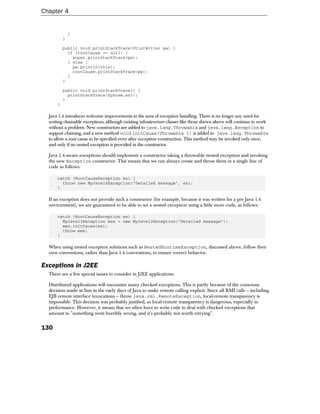
Chapter 4


              }
          }

          public void printStackTrace(PrintWriter pw) {
            if (rootCause == null) {
              super.printStackTrace(pw);
            } else {
              pw.println(this);
              rootCause.printStackTrace(pw);
            }
          }

          public void printStackTrace() {
            printStackTrace(System.err);
          }
      }

  Java 1.4 introduces welcome improvements in the area of exception handling. There is no longer any need for
  writing chainable exceptions, although existing infrastructure classes like those shown above will continue to work
  without a problem. New constructors are added to java.lang.Throwable and java.lang.Exception to
  support chaining, and a new method void initCause(Throwable t) is added to java.lang.Throwable
  to allow a root cause to be specified even after exception construction. This method may be invoked only once,
  and only if no nested exception is provided in the constructor.

  Java 1.4-aware exceptions should implement a constructor taking a throwable nested exception and invoking
  the new Exception constructor. This means that we can always create and throw them in a single line of
  code as follows:

      catch (RootCauseException ex) {
        throw new MyJava14Exception("Detailed message", ex);
      }

  If an exception does not provide such a constructor (for example, because it was written for a pre Java 1.4
  environment), we are guaranteed to be able to set a nested exception using a little more code, as follows:

      catch (RootCauseException ex) {
        MyJava13Exception mex = new MyJava13Exception("Detailed message");
        mex.initCause(ex);
        throw mex;
      }

  When using nested exception solutions such as NestedRuntimeException, discussed above, follow their
  own conventions, rather than Java 1.4 conventions, to ensure correct behavior.

Exceptions in J2EE
  There are a few special issues to consider in J2EE applications.

  Distributed applications will encounter many checked exceptions. This is partly because of the conscious
  decision made at Sun in the early days of Java to make remote calling explicit. Since all RMI calls – including
  EJB remote interface invocations – throw java.rmi.RemoteException, local-remote transparency is
  impossible. This decision was probably justified, as local-remote transparency is dangerous, especially to
  performance. However, it means that we often have to write code to deal with checked exceptions that
  amount to "something went horribly wrong, and it's probably not worth retrying".


130
Design Techniques and Coding Standards for J2EE Projects


  It's important to protect interface code – such as that in servlets and JSP pages – from J2EE "system-level"
  exceptions such as java.rmi.RemoteException. Many developers fail to recognize this issue, with
  unfortunate consequences, such as creating unnecessary dependency between architectural tiers and
  preventing any chance of retrying operations that might have been retried had they been caught at a low
  enough level. Amongst developers who do recognize the problem, I've seen two approaches:

     ❑     Allow interface components to ignore such exceptions, for example by writing code to catch
           them at a high level, such as a superclass of all classes that will handle incoming web requests
           that permits subclasses to throw a range of exceptions from a protected abstract method.
     ❑     Use a client-side façade that conceals communication with the remote system and throws
           exceptions – checked or unchecked – that are dictated by business need, not the problem of
           remote method calls. This means that the client-side façade should not mimic the interface of
           the remote components, which will all throw java.rmi.RemoteException. This approach
           is known as the Business delegate J2EE pattern (Core J2EE Patterns).

  I believe that the second of these approaches is superior. It provides a clean separation of architectural tiers,
  allows a choice of checked or unchecked exceptions and does not allow the use of EJB and remote invocation
  to intrude too deeply into application design. We'll discuss this approach in more detail in Chapter 11.

Making Exceptions Informative
  It's vital to ensure that exceptions are useful both to code and to humans developing, maintaining and
  administering an application.

  Consider the case of exceptions of the same class reflecting different problems, but distinguished only by
  their message strings. These are unhelpful to Java code catching them. Exception message strings are of
  limited value: they may be helpful to explain problems when they appear in log files, but they won't enable
  the calling code to react appropriately, if different reactions are required, and they can't be relied on for
  display to users. When different problems may require different actions, the corresponding exceptions should
  be modeled as separate subclasses of a common superclass. Sometimes the superclass should be abstract.
  Calling code will now be free to catch exceptions at the relevant level of detail.

  The second problem – display to users – should be handled by including error codes in exceptions. Error
  codes may be numeric or strings (string codes have the advantage that they can make sense to readers), which
  can drive runtime lookup of display messages that are held outside the exception. Unless we are able to use a
  common base class for all exceptions in an application – something that isn't possible if we mix checked and
  unchecked exceptions – we will need to make our exceptions implement an ErrorCoded or similarly
  named interface that defines a method such as this:

      String getErrorCode();

  The com.interface21.core.ErrorCoded interface from the infrastructure code discussed in Chapter
  11 includes this single method. With this approach, we are able to distinguish between error messages
  intended for end users and those intended for developers. Messages inside exceptions (returned by the
  getMessage() method) should be used for logging, and targeted to developers.


         Separate error messages for display to users from exception code, by including an error
         code with exceptions. When it's time to display the exception, the code can be resolved: for
         example, from a properties file.


                                                                                                           131
Chapter 4


  If the exception isn't for a user, but for an administrator, it's less likely that we'll need to worry about formatting
  messages or internationalization (internationalization might, however, still be an issue in some situations: for
  example, if we are developing a framework that may be used by non-English speaking developers).

  As we've already discussed, there's little point in catching an exception and throwing a new exception unless
  we add value. However, occasionally the need to produce the best possible error message is a good reason
  for catching and wrapping.

  For example, the following error message contains little useful information:

  WebApplicationContext failed to load config

  Exception messages like this typically indicate developer laziness in writing messages or (worse still) use of a
  single catch block to catch a wide variety of exceptions (meaning that the code that caught the exception had
  as little idea what went wrong as the unfortunate reader of the message).

  It's better to include details about the operation that failed, as well as preserving the stack trace. For example,
  the following message is an improvement:

  WebApplicationContext failed to load config: cannot instantiate class com.foo.bar.Magic

  Better still is a message that gives precise information about what the process was trying to do when it failed,
  and information about what might be done to correct the problem:

  WebApplicationContext failed to load config from file '/WEB-INF/applicationContext.xml': cannot
  instantiate class 'com.foo.bar.Magic' attempting to load bean element with name 'foo' – check that
  this class has a public no arg constructor


         Include as much context information as possible with exceptions. If an exception probably
         results from a programming error, try to include information on how to rectify the problem.


Using Reflection
  The Java Reflection API enables Java code to discover information about loaded classes at runtime, and to
  instantiate and manipulate objects. Many of the coding techniques discussed in this chapter depend on
  reflection: this section considers some of the pros and cons of reflection.


         Many design patterns can best be expressed by use of reflection. For example, there's no
         need to hard-code class names into a Factory if classes are JavaBeans, and can be
         instantiated and configured via reflection. Only the names of classes – for example,
         different implementations of an interface – need be supplied in configuration data.

  Java developers seem divided about the use of reflection. This is a pity, as reflection is an important part of
  the core API, and forms the basis for many technologies, such as JavaBeans, object serialization (crucial to
  J2EE) and JSP. Many J2EE servers, such as JBoss and Orion, use reflection (via Java 1.3 dynamic proxies) to
  simplify J2EE deployment by eliminating the need for container-generated stubs and skeletons. This means
  that every call to an EJB is likely to involve reflection, whether we're aware of it or not. Reflection is a
  powerful tool for developing generic solutions.


132
Design Techniques and Coding Standards for J2EE Projects


          Used appropriately, reflection can enable us to write less code. Code using reflection can
          also minimize maintenance by keeping itself up to date. As an example, consider the
          implementation of object serialization in the core Java libraries. Since it uses reflection,
          there's no need to update serialization and deserialization code when fields are added to or
          removed from an object. At a small cost to efficiency, this greatly reduces the workload on
          developers using serialization, and eliminates many programming errors.


   Two misconceptions are central to reservations about reflection:

      ❑     Code that uses reflection is slow
      ❑     Code that uses reflection is unduly complicated

   Each of these misconceptions is based on a grain of truth, but amounts to a dangerous oversimplification.
   Let's look at each in turn.

   Code that uses reflection is usually slower than code that uses normal Java object creation and method calls.
   However, this seldom matters in practice, and the gap is narrowing with each generation of JVMs. The
   performance difference is slight, and the overhead of reflection is usually far outweighed by the time taken by
   the operations the invoked methods actually do.

   Most of the best uses of reflection have no performance implications. For example, it's largely immaterial how long
   it takes to instantiate and configure objects on system startup. As we'll see in Chapter 15, most optimization is
   unnecessary. Unnecessary optimization that prevents us from choosing superior design choices is downright
   harmful. Similarly, the overhead added by the use of reflection to populate a JavaBean when handling a web
   request (the approach taken by Struts and most other web application frameworks) won't be detectable.

   Disregarding whether or not performance matters in a particular situation, reflection also has far from the disastrous
   impact on performance that many developers imagine, as we'll see in Chapter15. In fact, in some cases, such as its
   use to replace a length chain of if/else statements, reflection will actually improve performance.

   The Reflection API is relatively difficult to use directly. Exception handling, especially, can be cumbersome.
   However, similar reservations apply to many important Java APIs, such as JDBC. The solution to avoid using
   those APIs directly, by using a layer of helper classes at the appropriate level of abstraction, not to avoid the
   functionality they exist to provide. If we use reflection via an appropriate abstraction layer, using reflection
   will actually simplify application code.


          Used appropriately, reflection won't degrade performance. Using reflection appropriately
          should actually improve code maintainability. Direct use of reflection should be limited to
          infrastructure classes, not scattered through application objects.


Reflection Idioms
   The following idioms illustrate appropriate use of reflection.

Reflection and Switches
   Chains of if/else statements and large switch statements should alarm any developer committed to OO
   principles. Reflection provides two good ways of avoiding them:


                                                                                                                 133
Chapter 4


      ❑    Using the condition to determine a class name, and using reflection to instantiate the class and
           use it (assuming that the class implements a known interface).
      ❑    Using the condition to determine a method name, and using reflection to invoke it.

  Let's look at the second approach in practice.

  Consider the following code fragment from an implementation of the
  java.beans.VetoableChangeListener interface. A PropertyChangeEvent received contains the
  name of the property in question. The obvious implementation will perform a chain of if/else statements to
  identify the validation method to invoke within the class (the vetoableChange() method will become
  huge if all validation rules are included inline):

      public void vetoableChange(PropertyChangeEvent e) throws PropertyVetoException {
        if (e.getPropertyName().equals("email")) {
          String email = (String) e.getNewValue();
          validateEmail(email, e);
        }
        ...
        } else if (e.getPropertyName().equals("age")) {
          int age = ((Integer) e.getNewValue()).intValue();
          validateAge(age, e);

          } else if (e.getPropertyName().equals("surname")) {
            String surname = (String) e.getNewValue();
            validateForename(surname, e);

          } else if (e.getPropertyName().equals("forename")) {
            String forename = (String) e.getNewValue();
            validateForename(forename, e);
          }
      }

  At four lines per bean property, adding another 10 bean properties will add 40 lines of code to this method.
  This if/else chain will need updating every time we add or remove bean properties.

  Consider the following alternative. The individual validator now extends
  AbstractVetoableChangeListener, an abstract superclass that provides a final implementation of the
  vetoableChange() method. The AbstractVetoableChangeListener's constructor examines
  methods added by subclasses that fit a validation signature:

      void validate<bean property name>(<new value>, PropertyChangeEvent)
          throws PropertyVetoException

  The constructor is the most complex piece of code. It looks at all methods declared in the class that fit the
  validation signature. When it finds a valid validator method, it places it in a hash table,
  validationMethodHash, keyed by the property name, as indicated by the name of the validator method:

      public AbstractVetoableChangeListener() throws SecurityException {

          Method[] methods = getClass().getMethods();
          for (int i = 0; i < methods.length; i++) {


134
Design Techniques and Coding Standards for J2EE Projects


            if (methods[i].getName().startsWith(VALIDATE_METHOD_PREFIX) &&
              methods[i].getParameterTypes().length == 2 &&
                PropertyChangeEvent.class.isAssignableFrom(methods[i].
                  getParameterTypes()[1])) {

                // We've found a potential validator
                Class[] exceptions = methods[i].getExceptionTypes();

                // We don't care about the return type, but we must ensure that
                // the method throws only one checked exception, PropertyVetoException
                if (exceptions.length == 1 &&
                    PropertyVetoException.class.isAssignableFrom(exceptions[0])) {

                    // We have a valid validator method
                    // Ensure it's accessible (for example, it might be a method on an
                    // inner class)
                    methods[i].setAccessible(true);
                    String propertyName = Introspector.decapitalize(methods[i].getName().
                      substring(VALIDATE_METHOD_PREFIX.length()));

                    validationMethodHash.put(propertyName, methods[i]);
                    System.out.println(methods[i] + " is validator for property " +
                      propertyName);
                }
            }
        }
    }

The implementation of vetoableChange() does a hash table lookup for the relevant validator method for
each property changed, and invokes it if one is found:

    public final void vetoableChange(PropertyChangeEvent e)
        throws PropertyVetoException {

        Method m = (Method) validationMethodHash.get(e.getPropertyName());

        if (m != null) {
          try {
            Object val = e.getNewValue();
            m.invoke(this, new Object[] { val, e });

            } catch (IllegalAccessException ex) {
              System.out.println("WARNING: can't validate. " +
                "Validation method '" + m + "' isn't accessible");

            } catch (InvocationTargetException ex) {
              // We don't need to catch runtime exceptions
              if (ex.getTargetException() instanceof RuntimeException)
                throw (RuntimeException) ex.getTargetException();
              // Must be a PropertyVetoException if it's a checked exception
              PropertyVetoException pex = (PropertyVetoException)
                ex.getTargetException();
              throw pex;
            }
        }
    }


                                                                                               135
Chapter 4


   For a complete listing of this class, or to use it in practice, see the
   com.interface21.bean.AbstractVetoableChangeListener class under the /framework/src
   directory of the download accompanying this book.

   Now subclasses merely need to implement validation methods with the same signature as in the first example. The
   difference is that a subclass's logic will automatically be updated when a validation method is added or removed.
   Note also that we've used reflection to automatically convert parameter types to validation methods. Clearly it's a
   programming error if, say, the validateAge() method expects a String rather than an int. This will be
   indicated in a stack trace at runtime. Obvious bugs pose little danger. Most serious problems result from subtle
   bugs, that don't occur every time the application runs, and don't result in clear stack traces.

   Interestingly, the reflective approach will actually be faster on average than the if/else approach if there are
   many bean properties. String comparisons are slow, whereas the reflective approach uses a single hash table
   lookup to find the validation method to call.

   Certainly, the AbstractVetoableChangeListener class is more conceptually complex than the if/else
   block. However, this is framework code. It will be debugged once, and verified by a comprehensive set of test
   cases. What's important is that the application code – individual validator classes – is much simpler because of
   the use of reflection. Furthermore, the AbstractVetoableChangeListener class is still easy to read for
   anyone with a sound grasp of Java reflection. The whole of the version of this class I use – including full
   Javadoc and implementation comments and logging statements – amounts to a modest 136 lines.


          Reflection is a core feature of Java, and any serious J2EE developer should have a strong
          grasp of the Reflection API. Although reflective idioms (such as, the ternary operator) may
          seem puzzling at first, they're equally a part of the language's design, and it's vital to be
          able to read and understand them easily.


Reflection and the Factory Design Pattern
   I seldom use the Factory design pattern in its simplest form, which requires all classes created by the factory
   to be known to the implementation of the factory. This severely limits extensibility: the factory object cannot
   create objects (even objects that implement a known interface) unless it knows their concrete class.

   The following method (a simplified version of the "bean factory" approach discussed in Chapter 11) shows a
   more flexible approach, which is extensible without any code changes. It's based on using reflection to
   instantiate classes by name. The class names can come from any configuration source:

       public Object getObject(String classname, Class requiredType)
           throws FactoryException {

          try {
            Class clazz = Class.forName(classname);
            Object o = clazz.newInstance();
            if (!requiredType.isAssignableFrom(clazz))
              throw new FactoryException("Class '" + classname +
                                         "' not of required type " + requiredType);
            // Configure the object...
            return o;

          } catch (ClassNotFoundException ex) {


136
Design Techniques and Coding Standards for J2EE Projects


             throw new FactoryException("Couldn't load class '" + classname + "'", ex);

           } catch (IllegalAccessException ex) {
             throw new FactoryException("Couldn't construct class '" + classname +
                                        "': is the no arg constructor public?", ex);

           } catch (InstantiationException ex) {
             throw new FactoryException("Couldn't construct class '" + classname +
                                        "': does it have a no arg constructor", ex);
           }
       }

   This method can be invoked like this:

       MyInterface mo = (MyInterface)
       beanFactory.getObject("com.mycompany.mypackage.MyImplementation",
       MyInterface.class);

   Like the other reflection example, this approach conceals complexity in a framework class. It is true that this
   code cannot be guaranteed to work: the class name may be erroneous, or the class may not have a no arg
   constructor, preventing it being instantiated. However, such failures will be readily apparent at runtime,
   especially as the getObject() method produces good error messages (when using reflection to implement
   low-level operations, be very careful to generate helpful error messages). Deferring operations till runtime
   does involve trade-offs (such as the need to cast), but the benefits may be substantial.

        Such use of reflection can best be combined with the use of JavaBeans. If the objects to be instantiated
        expose JavaBean properties, it's easy to hold initialization information outside Java code.

   This is a very powerful idiom. Performance is unaffected, as it is usually used only at application startup; the
   difference between loading and initializing, say, ten objects by reflection and creating the same objects using the
   new operator and initializing them directly is undetectable. On the other hand, the benefit in terms of truly flexible
   design may be enormous. Once we do have the objects, we invoke them without further use of reflection.

   There is a particularly strong synergy between using reflection to load classes by name and set their
   properties outside Java code and the J2EE philosophy of declarative configuration. For example, servlets, filters
   and web application listeners are instantiated from fully qualified class names specified in the web.xml
   deployment descriptor. Although they are not bean properties, ServletConfig initialization parameters
   are set in XML fragments in the same deployment descriptor, allowing the behavior of servlets at runtime to
   be altered without the need to modify their code.


           Using reflection is one of the best ways to parameterize Java code. Using reflection to
           choose instantiate and configure objects dynamically allows us to exploit the full power of
           loose coupling using interfaces. Such use of reflection is consistent with the J2EE
           philosophy of declarative configuration.

Java 1.3 Dynamic Proxies
   Java 1.3 introduced dynamic proxies: special classes that can implement interfaces at runtime without
   declaring that they implement them at compile time.


                                                                                                                   137
Chapter 4


  Dynamic proxies can't be used to proxy for a class (rather than an interface). However, this isn't a problem if
  we use interface-based design. Dynamic proxies are used internally by many application servers, typically to
  avoid the need to generate and compile stubs and skeletons.

  Dynamic proxies are usually used to intercept calls to a delegate that actually implements the interface in
  question. Such interception can be useful to handle the acquisition and release of resources, add additional
  logging, and gather performance information (especially about remote calls in a distributed J2EE application).
  There will, of course, be some performance overhead, but its impact will vary depending on what the
  delegate actually does. One good use of dynamic proxies is to abstract the complexity of invoking EJBs. We'll
  see an example of this in Chapter 11.

  The com.interface21.beans.DynamicProxy class included in the infrastructure code with the sample
  application is a generic dynamic proxy that fronts a real implementation of the interface in question, designed
  to be subclassed by dynamic proxies that add custom behavior.

  Dynamic proxies can be used to implement Aspect Oriented Programming (AOP) concepts in standard
  Java. AOP is an emerging paradigm that is based on crosscutting aspects of a system, based on separation of
  concerns. For example, the addition of logging capabilities just mentioned is a crosscut that addresses the
  logging concern in a central place. It remains to be seen whether AOP will generate anything like the interest
  of OOP, but it's possible that it will at least grow to complement OOP.

  For more information on AOP, see the following sites:

      ❑     http://aosd.net/. AOP home page.
      ❑     http://aspectj.org/. Home page for AspectJ, an extension to Java that supports AOP.

       See the reflection guide with your JDK for detailed information about dynamic proxies.


          A warning: I feel dangerously good after I've made a clever use of reflection. Excessive
          cleverness reduces maintainability. Although I'm a firm believer that reflection, used
          appropriately, is beneficial, don't use reflection if a simpler approach might work equally well.


Using JavaBeans to Achieve Flexibility
  Where possible, application objects – except very fine-grained objects – should be JavaBeans. This
  maximizes configuration flexibility (as we've seen above), as beans allow easy property discovery and
  manipulation at runtime. There's little downside to using JavaBeans, as there's no need to implement a special
  interface to make an object a bean.

  When using beans, consider whether the following standard beans machinery can be used to
  implement functionality:

      ❑     PropertyEditor
      ❑     PropertyChangeListener
      ❑     VetoableChangeListener
      ❑     Introspector


138
Design Techniques and Coding Standards for J2EE Projects


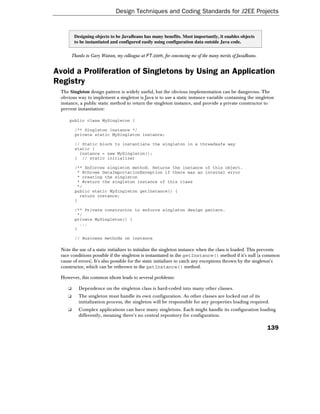
        Designing objects to be JavaBeans has many benefits. Most importantly, it enables objects
        to be instantiated and configured easily using configuration data outside Java code.

      Thanks to Gary Watson, my colleague at FT.com, for convincing me of the many merits of JavaBeans.


Avoid a Proliferation of Singletons by Using an Application
Registry
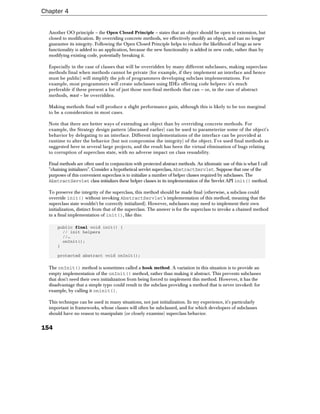
 The Singleton design pattern is widely useful, but the obvious implementation can be dangerous. The
 obvious way to implement a singleton is Java is to use a static instance variable containing the singleton
 instance, a public static method to return the singleton instance, and provide a private constructor to
 prevent instantiation:

     public class MySingleton {

        /** Singleton instance */
        private static MySingleton instance;

        // Static block to instantiate the singleton in a threadsafe way
        static {
          instance = new MySingleton();
        } // static initializer

        /** Enforces singleton method. Returns the instance of this object.
         * @throws DataImportationException if there was an internal error
         * creating the singleton
         * @return the singleton instance of this class
         */
        public static MySingleton getInstance() {
          return instance;
        }

        /** Private constructor to enforce singleton design pattern.
         */
        private MySingleton() {
          ...
        }

        // Business methods on instance

 Note the use of a static initializer to initialize the singleton instance when the class is loaded. This prevents
 race conditions possible if the singleton is instantiated in the getInstance() method if it's null (a common
 cause of errors). It's also possible for the static initializer to catch any exceptions thrown by the singleton's
 constructor, which can be rethrown in the getInstance() method.

 However, this common idiom leads to several problems:

    ❑     Dependence on the singleton class is hard-coded into many other classes.
    ❑     The singleton must handle its own configuration. As other classes are locked out of its
          initialization process, the singleton will be responsible for any properties loading required.
    ❑     Complex applications can have many singletons. Each might handle its configuration loading
          differently, meaning there's no central repository for configuration.

                                                                                                           139
Chapter 4


      ❑     Singletons are interface-unfriendly. This is a very bad thing. There's little point in making a
            singleton implement an interface, because there's then no way of preventing there being other
            implementations of that interface. The usual implementation of a singleton defines a type in a
            class, not an interface.
      ❑     Singletons aren't amenable to inheritance, because we need to code to a specific class, and
            because Java doesn't permit the overriding of static methods such as getInstance().
      ❑     It's impossible to update the state of singletons at runtime consistently. Any updates may be
            performed haphazardly in individual Singleton or factory classes. There's no way to refresh
            the state of all singletons in an application.

  A slightly more sophisticated approach is to use a factory, which may use different implementation classes for
  the singleton. However, this only solves some of these problems.


          I don't much like static variables in general. They break OO by introducing dependency on a
          specific class. The usual implementation of the Singleton design pattern exhibits this problem.


  In my view, it's a much better solution to have one object that can be used to locate other objects. I call this an
  application context object, although I've also seen it termed a "registry" or "application toolbox". Any object in the
  application needs only to get a reference to the single instance of the context object to retrieve the single instances
  of any application object. Objects are normally retrieved by name. This context object doesn't even need to be a
  singleton. For example, it's possible to use the Servlet API to place the context in a web application's
  ServletContext, or we can bind the context object in JNDI and access it using standard application server
  functionality. Such approaches don't require code changes to the context object itself, just a little bootstrap code.

  The context object itself will be generic framework code, reusable between multiple applications.

  The advantages of this approach include:

      ❑     It works well with interfaces. Objects that need the "singletons" never need to know their
            implementing class.
      ❑     All objects are normal Java classes, and can use inheritance normally. There are no
            static variables.
      ❑     Configuration is handled outside the classes in question, and entirely by framework code. The
            context object is responsible for instantiating and configuring individual singletons. This
            means that configuration outside Java code (such as an XML document or even RDBMS tables)
            can be used to source configuration data. Individual objects can be configured using JavaBean
            properties. Such configuration can include the creation of object graphs amongst managed
            objects by the application context, without the objects in question needing to do anything
            except expose bean properties.
      ❑     The context object will implement an interface. This allows different implementations to
            take configuration from different sources without any need to change code in managed
            application objects.
      ❑     It's possible to support dynamic state changes to "singletons". The context can be refreshed,
            changing the state of the objects it manages (although of course there are thread safety
            issues to consider).


140
Design Techniques and Coding Standards for J2EE Projects


   ❑     Using a context object opens other possibilities. For example, the context may provide other
         services, such as implementing the Prototype design pattern to serve as a factory for
         independent object instances. Since many application objects have access to it, the context
         object may serve as an event publisher, in the Observer design pattern.
   ❑     While the Singleton design pattern is inflexible, we can choose to have multiple application
         context objects if this is useful (the infrastructure discussed in Chapter 11 supports hierarchical
         context objects).

The following code fragments illustrate the use of this approach.

The context object itself will be responsible for loading configuration. The context object may register itself
(for example with the ServletContext of a web application, or JNDI) or a separate bootstrap class may
handle this. Objects needing to use "singletons" must look up the context object in. For example:

    ApplicationContext application = (ApplicationContext )
    servletContext.getAttribute("com.mycompany.context.ApplicationContext");

The ApplicationContext instance can be used to obtain any "singleton":

    MySingleton mySingleton = (MySingleton )
    applicationContext.getSingleInstance("mysingleton");

In Chapter 11 we'll look at how to implement this superior alternative to the Singleton design pattern.
Note that it isn't limited to managing "singletons": this is valuable piece of infrastructure that can be used
in many ways.

     Why not use JNDI – a standard J2EE service – instead of use additional infrastructure to achieve this
     result? Each "singleton" could be bound to the JNDI context, allowing other components running in the
     application server to look them up.
     Using JNDI adds complexity (JNDI lookups are verbose) and is significantly less powerful than the
     application context mechanism described above. For example, each "singleton" would be left on its own to
     handle its configuration, as JNDI offers only a lookup mechanism, not a means of externalizing
     configuration. Another serious objection is that this approach would be wholly dependent on application
     server services, making testing outside an application server unnecessarily difficult. Finally, some kind of
     bootstrap service would be required to bind the objects into JNDI, meaning that we'd probably need to
     implement most of the code in the application context approach anyway. Using an application context, we
     can choose to bind individual objects with JNDI if it proves useful.


       Avoid a proliferation of singletons, each with a static getInstance() method. Using a
       factory to return each singleton is better, but still inflexible. Instead, use a single
       "application context" object or registry that returns a single instance of each class. The
       generic application context implementation will normally
       (but not necessarily) be based on the use of reflection, and should take care of configuring
       the object instances it manages. This has the advantage that application objects need only
       expose bean properties for configuration, and never need to look up configuration sources
       such as properties files.


                                                                                                                    141
Chapter 4


Refactoring
  Refactoring, according to Martin Fowler in Refactoring: Improving the Design of Existing Code from
  Addison-Wesley (ISBN 0-201485-6-72), is "the process of changing a software system in such a way that it does
  not alter the external behavior of the code, yet improves its internal structure. It's a disciplined way to clean
  up code that minimizes the chances of introducing bugs". See
  http://www.refactoring.com for more information and resources on refactoring.

  Most of the refactoring techniques Fowler describes are second nature to good developers. However, the
  discussion is useful and Fowler's naming is being widely adopted (For example, the Eclipse IDE uses these
  names on menus).


          Be prepared to refactor to eliminate code duplication and ensure that a system is well
          implemented at each point in time.


  It's helpful to use an IDE that supports refactoring. Eclipse is particularly good in this respect.

  I believe that refactoring can be extended beyond functional code. For example, we should continually seek
  to improve in the following areas:

      ❑     Error messages
            A failure with a confusing error message indicates an opportunity to improve the error message.
      ❑     Logging
            During code maintenance, we can refine logging to help in debugging. We'll discuss logging below.
      ❑     Documentation
            If a bug results from a misunderstanding of what a particular object or method does,
            documentation should be improved.


Coding Standards
  J2EE projects tend to be big projects. Big projects require teamwork, and teamwork depends on consistent
  programming practices. We know that more effort is spent on software maintenance than initial
  development, so it's vital to ensure that applications are easy to work on. This makes good Java coding
  standards – as well as the practice of sound OO design principles – vital across J2EE projects. Coding
  standards are particularly important if we choose to use XP. Collective code ownership can only work if all
  code is written to the same standards, and there are no significant discrepancies in style within a team.

  Why does a section on Java coding standards (albeit with a J2EE emphasis) belong in a book on J2EE?
  Because there's a danger in getting lost in the details of J2EE technology, and losing sight of good
  programming practice. This danger is shown by many J2EE sample applications, which contain sloppy code.

  Sun are serious offenders in this respect. For example, the Smart Ticket Demo version 1.1 contains practically no
  comments, uses meaningless method parameter names such as u, p, zc and cc, and contains serious programming
  errors such as consistently failing to close JDBC connections correctly in the event of exceptions. Code that isn't
  good enough to go into a production application is definitely not good enough to serve as an example.


142
Design Techniques and Coding Standards for J2EE Projects


 Perhaps the authors of such applications believe that omitting such "refinements" clarifies the architectural
 patterns they seek to illustrate. This is a mistake. J2EE is often used for large projects in which sloppy
 practices will wreak havoc. Furthermore, bringing code to production standard may expose inadequacies in
 the original, naïve implementation.

 As with design principles, this is a huge area, so the following discussion is far from comprehensive.
 However, it tries to address issues that I've found to be of particular importance in practice. Again, there are
 necessarily matters of opinion, and the discussion is based on my opinions and practical experience.


Start from the Standard
 Don't invent your own coding conventions or import those from other languages you've worked in. Java is a
 relatively simple language, offering only one way to do many things. In contrast, Java's predecessor C++
 usually offered several. Partly for this reason, there's a greater degree of standardization in the way
 developers write in Java, which should be respected.

 For example, you may be familiar with "Hungarian notation" or Smalltalk naming conventions. However,
 Hungarian Notation exists to solve problems (the proliferation of types in the Windows API) that don't exist
 in Java. A growing proportion of Java developers haven't worked in other languages, and will be baffled by
 code that imports naming conventions.

 Start from Sun's Java coding conventions (available at
 http://java.sun.com/docs/codeconv/html/CodeConvTOC.doc.html). Introduce refinements and variations
 if you prefer, but don't stray too far from common Java practice. If you organization already has coding
 standards, work within them unless they are seriously non-standard or questionable. In that case, don't ignore
 them: initiate discussion on how to improve them.

 Some other coding standards worth a look are:

    ❑     http://g.oswego.edu/dl/html/javaCodingStd.html
          Java coding standards by Doug Lea, author of Concurrent Programming in Java (now
          somewhat dated).
    ❑     http://www.chimu.com/publications/javaStandards/part0003.html#E11E4
          Chimu Inc coding standards (partly based on Lea's).
    ❑     http://www.ambysoft.com/javaCodingStandards.html
          Scott Ambler's coding conventions. A lengthy document, with some of the best discussion I've
          seen. Ambler, the author of many books on Java and OO design, devotes much more
          discussion than the Sun conventions to the design end of the coding standards spectrum
          (issues such as field and method visibility).

 It is, however, worth mentioning one common problem that results from adhering to standard Java practice.
 This concerns the convention of using the instance variable name as a parameter, and resolving ambiguity
 using this. This is often used in property setters. For example:

     private String name;

     public void setName(String name) {
       this.name = name;
     }


                                                                                                           143
Chapter 4


  On the positive side, this is a common Java idiom, so it's widely understood. On the negative, it's very easy
  to forget to use this to distinguish between the two variables with the same name (the parameter will mask
  the instance variable). The following form of this method will compile:

      public void setName(String name) {
        name = name;
      }

  As will this, which contains a typo in the name of the method parameter:

      public void setName(String nme) {
        name = name;
      }

  In both these cases (assuming that the instance variable name started off as null) mysterious null pointer
  exceptions will occur at runtime. In the first erroneous version, we've assigned the method parameter to itself,
  accomplishing nothing. In the second, we've assigned the instance variable to itself, leaving it null.

  I don't advocate using the C++ convention of prefixing instance or member variables with m_ (for example,
  m_name), as it's ugly and inconsistent with other Java conventions (underscores are normally only used in
  constants in Java). However, I recommend the following three practices to avoid the likelihood of the two
  errors we've just seen:

      ❑    Consider giving parameters a distinguishing name if ambiguity might be an issue. In the above
           case, the parameter could be called newName. This correctly reflects the purpose of the
           parameter, and avoids the problem we've seen.
      ❑    Always use this when accessing instance variables, whether it's necessary to resolve
           ambiguity or not. This has the advantage of making explicit each method's dependence on
           instance data. This can be very useful when considering concurrency issues, for example.
      ❑    Follow the convention that local variable names should be fairly short, while instance
           variables names are more verbose. For example, i should be a local variable; userInfo an
           instance variable. Usually, the instance variable name should be an interface or class name
           beginning with a lower case letter (for example SystemUserInfo systemUserInfo), while
           local variable names should convey their meaning in the current context (for example
           SystemUserInfo newUser).

       See http://www.beust.com/cedric/naming/index.html for arguments against standard Java
       convention in this area, from Cedric Beust, lead developer of the WebLogic EJB container.

  Consistent file organization is important, as it enables all developers on a project to grasp a class's structure
  quickly. I use the following conventions, which supplement Sun's conventions:

      ❑    Organize methods by function, not accessibility. For example, instead of putting public
           methods before private methods, put a private method in the same section of a class as the
           public methods that use it.
      ❑    Delimit sections of code. For example, I delimit the following sections (in order):


144
Design Techniques and Coding Standards for J2EE Projects


                Any static variables and methods. Note that main() methods shouldn't be an issue, as a class
                that does anything shouldn't include a main() method, and code should be tested using JUnit.
                Instance variables. Some developers prefer to group each bean property holder with the related
                getter and setter method, but I think it is preferable to keep all instance variables together.
                Constructors.
                Implementations of interfaces (each its own section), along with the private
                implementation methods supporting them.
                Public methods exposed by the class but not belonging to any implemented interface.
                Protected abstract methods.
                Protected methods intended for use by subclasses.
                Implementation methods not related to any one previous group.

  I use section delimiters like this:

      //---------------------------------------------------------------------
      // Implementation of interface MyInterface
      //---------------------------------------------------------------------

  Please refer to the classes in the /framework/src directory in the download accompanying this book for
  examples of use of the layout and conventions described here. The
  com.interface21.beans.factory.support.AbstractBeanFactory class is one good example.

       If you need to be convinced of the need for coding standards, and have some time to spare, read
       http://www.mindprod.com/unmain.html .


Allocation of Responsibilities
  Every class should have a clear responsibility. Code that doesn't fit should be refactored, usually into a helper
  class (inner classes are often a good way to do this in Java). If code at a different conceptual level will be
  reused by related objects, it may be promoted into a superclass. However, as we've seen, delegation to a
  helper is often preferable to concrete inheritance.

  Applying this rule generally prevents class size blowout. Even with generous Javadoc and internal comments,
  any class longer than 500 lines of code is a candidate for refactoring, as it probably has too much
  responsibility. Such refactoring also promotes flexibility. If the helper class's functionality might need to be
  implemented differently in different situations, an interface can be used to decouple the original class from
  the helper (in the Strategy design pattern).

  The same principle should be applied to methods:


         A method should have a single clear responsibility, and all operations should be at the
         same level of abstraction.


  Where this is not the case, the method should be refactored. In practice, I find that this prevents methods
  becoming too long.


                                                                                                            145
Chapter 4


  I don't use any hard and fast rules for method lengths. My comfort threshold is largely dictated by how much
  code I can see at once on screen (given that I normally devote only part of my screen to viewing code, and
  sometimes work on a laptop). This tends to be 30 to 40 lines (including internal implementation comments,
  but not Javadoc method comments). I find that methods longer than this can usually be refactored. Even if a
  unit of several individual tasks within a method is invoked only once, it's a good idea to extract them into a
  private method. By giving such methods appropriate names (there are no prizes for short method names!)
  code is made easier to read and self-documenting.


Avoid Code Duplication
  It may seem an obvious point, but code duplication is deadly.

  A simple example from the Java Pet Store 1.3 illustrates the point. One EJB implementation contains the
  following two methods:

      public void ejbCreate() {

          try {
            dao = CatalogDAOFactory.getDAO();
          } catch (CatalogDAOSysException se) {
            Debug.println("Exception getting dao " + se);
            throw new EJBException(se.getMessage());
          }
      }

  and:

      public void ejbActivate() {

          try {
            dao = CatalogDAOFactory.getDAO();
          } catch (CatalogDAOSysException se) {
            throw new EJBException(se.getMessage());
          }
      }

  This may seem trivial, but such code duplication leads to serious problems, such as:

      ❑    Too much code. In this case, refactoring saves only one line, but in many cases the savings
           will be much greater.
      ❑    Confusing readers as to the intent. As code duplication is illogical and easy to avoid, the
           reader is likely to give the developer the benefit of the doubt and assume that the two
           fragments are not identical, wasting time comparing them.
      ❑    Inconsistent implementation. Even in this trivial example, one method logs the exception,
           while the other doesn't.
      ❑    The ongoing need to update two pieces of code to modify what is really a single operation.


146
Design Techniques and Coding Standards for J2EE Projects


 The following refactoring is simpler and much more maintainable:

     public void ejbCreate() {
        initializeDAO();
     }

     public void ejbActivate() {
       initializeDAO();
     }

     private void initializeDAO() {

         try {
           dao = CatalogDAOFactory.getDAO();
         } catch (CatalogDAOSysException se) {
           Debug.println("Exception getting dao " + se);
           throw new EJBException(se.getMessage());
         }
     }

 Note that we've consolidated the code; we can make a single line change to improve it to use the new
 EJBException constructor in EJB 2.0 that takes a message along with a nested exception. We'll also include
 information about what we were trying to do:

     throw new EJBException("Error loading data access object: " +
                            se.getMessage(), se);

 EJB 1.1 allowed EJBExceptions to contain nested exceptions, but it was impossible to construct an
 EJBException with both a message and a nested exception, forcing us to choose between including the
 nested exception or a meaningful message about what the EJB was trying to do when it caught the exception.


Avoid Literal Constants

         With the exception of the well-known distinguished values 0, null and "" (the empty
         string) do not use literal constants inside Java classes.


 Consider the following example. A class that contains the following code as part of processing an order:

     if (balance > 10000) {
       throw new SpendingLimitExceededException(balance, 10000);
     }

 Unfortunately, we often see this kind of code. However, it leads to many problems:

    ❑      The code isn't self-documenting. Readers are forced to read the code to guess the meaning
           of the 10000.
    ❑      The code is error prone. Readers will be forced to compare different literals to ensure that
           they're the same, and it's easy to mistype one of the multiple literals.
    ❑      Changing the one logical "constant" will require multiple code changes.


                                                                                                        147
Chapter 4


  It's better to use a constant. In Java, this means a static final instance variable. For example:

       private static final int SPENDING_LIMIT = 10000;

       if (balance > SPENDING_LIMIT) {
         throw new SpendingLimitExceededException(balance, SPENDING_LIMIT);
       }

  This version is much more readable and much less error prone. In many cases, it's good enough. However,
  it's still problematic in some circumstances. What if the spending limit isn't always the same? Today's
  constant might be tomorrow's variable. The following alternative allows us more control:

       private static final int DEFAULT_SPENDING_LIMIT = 10000;

       protected int spendingLimit() {
         return DEFAULT_SPENDING_LIMIT;
       }

       if (balance > spendingLimit()) {
         throw new SpendingLimitExceededException(balance, spendingLimit());
       }

  At the cost of a little more code, we can now calculate the spending limit at runtime if necessary. Also, a
  subclass can override the protected spendingLimit() method. In contrast, it's impossible to override a
  static variable. A subclass might even expose a bean property enabling the spending limit to be set outside
  Java code, by a configuration manager class (see the Avoiding a proliferation of Singletons by Using an Application
  Registry section earlier). Whether the spendingLimit() method should be public is a separate issue. Unless
  other classes are known to need to use it, it's probably better to keep it protected.

  I suggest the following criteria to determine how to program a constant:


  Requirement                           Example                                Recommendation
  String constant that is effectively   Simple SQL SELECT statement            This is a rare exception to the
  part of application code              used once only and which won't         overall rule when there's little
                                        vary between databases.                benefit in using a named
                                                                               constant or method value
                                        JDO query used once only.              instead of a literal string. In this
                                                                               case, it makes sense for the
                                                                               string to appear at the point in
                                                                               the application where it is used,
                                                                               as it's effectively part of
                                                                               application code.
  Constant that will never vary         JNDI name – such as the name           Use a static final variable.
                                        of an EJB – that will be same in       Shared constants can be
                                        all application servers.               declared in an interface, which
                                                                               can be implemented by multiple
                                                                               classes to simplify syntax.


148
Design Techniques and Coding Standards for J2EE Projects


  Requirement                               Example                           Recommendation
  Constant that may vary at                 JNDI name – such as the           Use a protected method, which
  compile time                              name of the                       subclasses may override, or
                                            TransactionManager –              which may return a bean
                                            that is likely to vary between    property, allowing external
                                            application servers.              configuration,
  Constant that may vary at runtime         Spending limit.                   Use a protected method.
  Constant subject to                       Error message or other            Use a protected method or a
  internationalization                      string that may need to           ResourceBundle lookup.
                                            vary in different locales.        Note that a protected method
                                                                              may return a value that was
                                                                              obtained from a
                                                                              ResourceBundle lookup,
                                                                              possibly outside the class.


Visibility and Scoping
  The visibility of instance variables and methods is one of the important questions on the boundary between
  coding standards and OO design principles. As field and method visibility can have a big impact on
  maintainability, it's important to apply consistent standards in this area.

  I recommend the following general rule:


          Variables and methods should have the least possible visibility (of private, package,
          protected and public). Variables should be declared as locally as possible.


  Let's consider some of the key issues in turn.

Public Instance Variables
  The use of public instance variables is indefensible, except for rare special cases. It usually reflects bad design
  or programmer laziness. If any caller can manipulate the state of an object without using the object's methods,
  encapsulation is fatally compromised. We can never maintain any invariants about the object's state.

  Core J2EE Patterns suggests the use of public instance variables as an acceptable strategy in the Value Object
  J2EE pattern (value objects are serializable parameters containing data, rather than behavior, exchanged
  between JVMs in remote method calls). I believe that this is only acceptable if the variables are made final
  (preventing their values from being changed after object construction and avoiding the potential for callers to
  manipulate object state directory). However, there are many serious disadvantages that should be considered
  with any use of public instance variables in value objects, which I believe should rule it out. For example:

      ❑     If variables aren't made final, the data in value objects can't be protected against modification.
            Consider the common case in which value objects, once retrieved in a remote invocation, are
            cached on the client side. A single rogue component that modifies value object state can affect
            all components using the same value object. Java gives us the tools to avoid such scenarios
            (such as private variables with accompanying getter methods); we should use them.


                                                                                                             149
Chapter 4


      ❑     If variables are made final, all variable values must be supplied in the value object constructor,
            which may make value objects harder to create.
      ❑     Use of public instance variables is inflexible. Once callers are dependent on public instance
            variables, they're dependent on the value object's data structure, not just a public interface.
            For example, we can't use some of the techniques discussed in Chapter 15 for optimizing the
            serialization of value objects, as they depend on switching to more efficient storage types
            without changing public method signatures. While we're free to change the implementation of
            public methods if necessary without affecting callers, changes to value object implementations
            will require all callers using instance variables first to migrate to using accessor methods,
            which may prove time-consuming.
      ❑     Use of public instance variables ties us to coding to concrete classes, not interfaces.
      ❑     Instance variable access cannot be intercepted. We have no way of telling what data is
            being accessed.

  A value object using public instance variables is really a special case of a struct: a group of variables without any
  behavior. Unlike C++ (which is a superset of C) Java does not have a struct type. However, it is easy to define
  structs in Java, as objects containing only public instance variables. Due to their inflexibility, structs are only suited
  to local use: for example, as private and protected inner classes. A struct might be used to return multiple values
  from method, for example, given that Java doesn't support call by reference for primitive types.

  I don't see such concealed structs as a gross violation of OO principles. However, structs usually require
  constructors, bringing them closer to true objects. As IDEs make it easy to generate getter and setter methods
  for instance variables, using public instance variables is a very marginal time saving during development. In
  modern JVMs, any performance gain will be microscopic, except for very rare cases. I find that structs are
  usually elevated into true objects by refactoring, making it wiser to avoid their use in the first place.


          The advantages in the rare legitimate uses of public instance variables are so marginal,
          and the consequence of misuse of public instance variables so grave, that I recommend
          banning the use of public instance variables altogether.


Protected and Package Protected Instance Variables
  Instance variables should be private, with few exceptions. Expose such variables through protected accessor
  methods if necessary to support subclasses.

  I strongly disagree with coding standards (such as Doug Lea's) that advocate making instance variables
  protected, in order to maximize the freedom for subclasses. This is a questionable approach to concrete
  inheritance. It means that the integrity and invariants of the superclass can be compromised by buggy
  subclass code. In practice, I find that subclassing works as perfectly as a "black box" operation.

  There are many better ways of allowing class behavior to be modified than by exposing instance variables for
  subclasses to manipulate as they please, such as using the Template Method and Strategy design patterns
  (discussed above) and providing protected methods as necessary to allow controlled manipulation of superclass
  state. Allowing subclasses to access protected instance variables produces tight coupling between classes in an
  inheritance hierarchy, making it difficult to change the implementation of classes within it.


150
Design Techniques and Coding Standards for J2EE Projects


  Scott Ambler argues strongly that all instance variables should be private and, further, that "the ONLY
  member functions that are allowed to directly work with a field are the accessor member functions
  themselves" (that is, even methods within the declaring class should use getter and setter methods, rather than
  access the private instance variable directly).

  I feel that a protected instance variable is only acceptable if it's final (say, a logger that subclasses will use
  without initializing or modifying). This has the advantage of avoiding a method call, offering slightly simpler
  syntax. However, even in this case there are disadvantages. It's impossible to return a different object in
  different circumstances, and subclasses cannot override a variable as they can a method.

  I seldom see a legitimate use for Java's package (default) visibility for instance variables. It's a bit like C++'s
  friend mechanism: the fair-weather friend of lazy programmers.


         Avoid protected instance variables. They usually reflect bad design: there's nearly always a
         better solution. The only exception is the rare case when an instance variable can be made final.


Method Visibility
  Although method invocations can never pose the same danger as direct manipulation of instance variables, there
  are many benefits in reducing method visibility as far as possible. This is another way to reduce the coupling
  between classes. It's important to distinguish between the requirements of classes that use a class (even subclasses)
  and the class's internal requirements. This can both prevent accidental corruption of the class's internal state and
  simplify the task of developers working with the class, by offering them only the choices they need.


         Hide methods as much as possible. The fewer methods that are public, package protected
         or protected, the cleaner a class is and the easier it will be to test, use, subclass and
         refactor. Often, the only public methods that a class exposes will be the methods of the
         interfaces it implements and methods exposing JavaBean properties.

  It's a common practice to make a class's implementation methods protected rather than private, to allow them to be
  used by subclasses. This is inadvisable. In my experience, inheritance is best approached as a black box operation,
  rather than a white box operation. If class Dog extends Animal, this should mean that a Dog can be used where an
  Animal can be used, not that the Dog class needs to know the details of Animal's implementation.

  The protected modifier is best used for abstract methods (as in the Template Method design pattern), or
  for read-only helper methods required by subclasses. In both these cases, there are real advantages in making
  methods protected, rather than public.

  I find that I seldom need to use package protected (default visibility) methods, although the objections to
  them are less severe than to protected instance variables. Sometimes package protected methods revealing
  class state can be helpful to test cases. Package protected classes are typically far more useful, enabling an
  entire class to be concealed within a package.

Variable Scoping
  Variables should be declared as close as possible to where they are used. The fewer variables in scope, the
  easier code is to read and debug. It's a serious mistake to use an instance variable where an automatic method
  variable and/or additional method parameters can be used. Use C++/Java local declarations, in which
  variables are declared just before they're used, rather than C-style declarations at the beginning of methods.


                                                                                                                 151
Chapter 4


Inner Classes and Interfaces
  Inner classes and interfaces can be used in Java to avoid namespace pollution. Inner classes are often helpers,
  and can be used to ensure that the outer class has a consistent responsibility.

  Understand the difference between static and non-static inner classes. Static inner classes can be instantiated
  without the creation of an object of the enclosing type; non-static inner classes are linked to an instance of the
  enclosing type. There's no distinction for interfaces, which are always static.

  Inner interfaces are typically used when a class requires a helper that may vary in concrete class, but not in
  type, and when this helper is of no interest to other classes (we've already seen an example of this).

  Anonymous inner classes offer convenient implementation of simple interfaces, or overrides that add a small
  amount of new behavior. Their most idiomatic use is for action handlers in Swing GUIs, which is of limited
  relevance to J2EE applications. However, they can be useful when implementing callback methods, which we
  discussed above.

  For example, we could implement a JDBC callback interface with an anonymous inner class as follows:

      public void anonClass() {
        JdbcTemplate template = new JdbcTemplate(null);
        template.update(new PreparedStatementCreator() {
          public PreparedStatement createPreparedStatement
              (Connection conn) throws SQLException {
            PreparedStatement ps =
              conn.prepareStatement("DELETE FROM TAB WHERE ID=?");
            ps.setInt(1, 1);
            return ps;
          }
        });
      }

  Anonymous inner classes have the disadvantages that they don't promote code reuse, can't have constructors
  that take arguments and are only accessible in the single method call. In the above example, these restrictions
  aren't a problem, as the anonymous inner class doesn't need constructor arguments and doesn't need to
  return data. Any inner class (including anonymous inner classes) can access superclass instance variables,
  which offers a way to read information from and update the enclosing class, to work around these restrictions.
  Personally I seldom use anonymous inner classes except when using Swing, as I've found that they're nearly
  always refactored into named inner classes.

  A halfway house between top-level inner classes (usable by all methods and potentially other objects) and
  anonymous inner classes is a named inner class defined within a method. This avoids polluting the class's
  namespace, but allows the use of a normal constructor. However, like anonymous inner classes, local classes
  may lead to code duplication. Named classes defined within methods have the advantages that they can
  implement constructors that take arguments and can be invoked multiple times. In the following example,
  the named inner class not only implements a callback interface, but adds a new public method, which we use
  to obtain data after its work is complete:

      public void methodClass() {
        JdbcTemplate template = new JdbcTemplate(dataSource);
        class Counter implements RowCallbackHandler {
          private int count = 0;
          public void processRow(ResultSet rs) throws SQLException {


152
Design Techniques and Coding Standards for J2EE Projects


             count++;
           }
           public int getCount() {
             return count;
           }
          }
          Counter counter = new Counter();
          template.query("SELECT ID FROM MYTABLE", counter);
          int count = counter.getCount();
      }

  It would be impossible to implement the above example with an anonymous inner class without making
  (inappropriate) use of an instance variable in the enclosing class to hold the count value.


Using the final Keyword
  The final keyword can be used in several situations to good effect.

Method Overriding and Final Methods
  There is a common misconception that making methods final reduces the reusability of a class, because it
  unduly constrains the implementation of subclasses. In fact, overriding concrete methods is a poor way of
  achieving extensibility.

  I recommend making public and protected non-abstract methods final. This can help to eliminate a common
  cause of bugs: subclasses corrupting the state of their superclasses. Overriding methods is inherently
  dangerous. Consider the following problems and questions:

     ❑     Should the subclass call the superclass's version of the method? If so, at what point should the
           call happen? At the beginning or end of the subclass method? Whether to invoke the
           superclass's method can only be determined by reading code or relying on documentation in
           the superclass. The compiler can't help. This rules out black box inheritance. If the
           superclass's form of the method is not called, or is called at the wrong point in the subclass
           method, the superclass's state may be corrupted.
     ❑     Why is the superclass implementing a method that it does not have enough knowledge to
           implement on behalf of all subclasses? If it can provide a valid partial implementation it should
           defer those parts of the operation it doesn't understand to protected abstract methods in the
           Template Method design pattern; if its implementation is likely to be completely overridden by
           some subclasses it's best to break out the inheritance tree to provide an additional superclass for
           those subclasses that share the same behavior (in which the method is final).
     ❑     If a subclass's overridden implementation of a method does something different to the
           superclass implementation, the subclass probably violates the Liskov Substitution Principle.
           The Liskov Substitution principle, stated by Barbara Liskov in 1988 ("Data Abstraction and
           Hierarchy", SIGPLAN Notices, 23 May, 1988), states that a subclass should always be usable in
           place of its superclass without affecting callers. This principle protects the concept of concrete
           inheritance. For example, a Dog object should be usable wherever an Animal has to be used.
           Subclasses that violate the Liskov Substitution Principle are also unfriendly to unit testing. A
           class without concrete method overrides should pass all the unit tests of its superclasses.


                                                                                                         153
Chapter 4


  Another OO principle – the Open Closed Principle – states that an object should be open to extension, but
  closed to modification. By overriding concrete methods, we effectively modify an object, and can no longer
  guarantee its integrity. Following the Open Closed Principle helps to reduce the likelihood of bugs as new
  functionality is added to an application, because the new functionality is added in new code, rather than by
  modifying existing code, potentially breaking it.

  Especially in the case of classes that will be overridden by many different subclasses, making superclass
  methods final when methods cannot be private (for example, if they implement an interface and hence
  must be public) will simplify the job of programmers developing subclass implementations. For
  example, most programmers will create subclasses using IDEs offering code helpers: it's much
  preferable if these present a list of just those non-final methods that can – or, in the case of abstract
  methods, must – be overridden.

  Making methods final will produce a slight performance gain, although this is likely to be too marginal
  to be a consideration in most cases.

  Note that there are better ways of extending an object than by overriding concrete methods. For
  example, the Strategy design pattern (discussed earlier) can be used to parameterize some of the object's
  behavior by delegating to an interface. Different implementations of the interface can be provided at
  runtime to alter the behavior (but not compromise the integrity) of the object. I've used final methods as
  suggested here in several large projects, and the result has been the virtual elimination of bugs relating
  to corruption of superclass state, with no adverse impact on class reusability.

  Final methods are often used in conjunction with protected abstract methods. An idiomatic use of this is what I call
  "chaining initializers". Consider a hypothetical servlet superclass, AbstractServlet. Suppose that one of the
  purposes of this convenient superclass is to initialize a number of helper classes required by subclasses. The
  AbstractServlet class initializes these helper classes in its implementation of the Servlet API init() method.

  To preserve the integrity of the superclass, this method should be made final (otherwise, a subclass could
  override init() without invoking AbstractServlet's implementation of this method, meaning that the
  superclass state wouldn't be correctly initialized). However, subclasses may need to implement their own
  initialization, distinct from that of the superclass. The answer is for the superclass to invoke a chained method
  in a final implementation of init(), like this:

      public final void init() {
        // init helpers
        //…
        onInit();
      }

      protected abstract void onInit();

  The onInit() method is sometimes called a hook method. A variation in this situation is to provide an
  empty implementation of the onInit() method, rather than making it abstract. This prevents subclasses
  that don't need their own initialization from being forced to implement this method. However, it has the
  disadvantage that a simple typo could result in the subclass providing a method that is never invoked: for
  example, by calling it oninit().

  This technique can be used in many situations, not just initialization. In my experience, it's particularly
  important in frameworks, whose classes will often be subclassed, and for which developers of subclasses
  should have no reason to manipulate (or closely examine) superclass behavior.


154
Design Techniques and Coding Standards for J2EE Projects


  I recommend that public or protected non-abstract methods should usually be made final, unless one of the
  following conditions applies:

     ❑     A subclass's form of the method won't need to invoke the superclass's form of the method.
           This commonly arises if the superclass provides a simple default or empty implementation of
           a method to save all subclass being forced to provide an implementation of an abstract
           method that is only of interest to a minority of subclasses (as in the variation noted above).
     ❑     It is logical to call the superclass's form of the method as part of the work of the subclass's
           form. Overriding the toString() method of a Java object is the commonest example of this.
     ❑     The number of hook methods might otherwise spiral out of control. In this case, we must
           temper design rigor with practicality. Superclass documentation must scrupulously note at
           what point subclass methods should call overridden superclass methods.

  My views in this area are somewhat controversial. However, experience in several large projects has
  convinced me of the value of writing code that helps to minimize the potential for errors in code written
  around it. This position was summarized by the distinguished computer scientist (and inventor of quicksort)
  C.A.R. Hoare as follows:

       "I was eventually persuaded of the need to design programming notations so as to maximize the number of errors
       which cannot be made, or if made, can be reliably detected at compile time" (1980 Turing Award Lecture).

Final Classes
  Final classes are used less frequently than final methods, as they're a more drastic way of curtailing
  object modification.

  The UML Reference Manual (Addison Wesley; ISBN: 0-20130-998-X) goes so far as to recommend that only
  abstract classes should be sub-classed (for the reasons we've discussed when considering final methods).
  However, I feel that if final methods are used appropriately, there's little need to make classes final to
  preserve object integrity.

  I tend to use final classes only for objects that must be guaranteed to be immutable: for example, value
  objects that contain data resulting from an insurance quotation.

Final Instance Variables
  I've already mentioned the use of final protected instance variables. A final instance variable may be
  initialized at most once, either at its declaration or in a constructor. Final instance variables are the only way
  to define constants in Java, which is their normal use. However, they can occasionally be used to allow
  superclasses to expose protected instance variables without allowing subclasses to manipulate them, or to
  allow any class to expose public instance variables that cannot be manipulated.

       Java language gurus will also note that final instance variables can be initialized in a class initializer: a
       block of code that appears in a class outside a method body, and is evaluated when an object is instantiated.
       Class initializers are used less often than static initializers, as constructors are usually preferable.


Implementing toString() Methods Useful for Diagnostics
  It's good practice for classes to implement toString() methods that summarize their state. This can be
  especially helpful in generating log messages (we'll discuss logging below).


                                                                                                                        155
Chapter 4


  For example, consider the following code, which might be used in a value object representing a user, and which
  provides a concise, easily readable dump of the object's state which will prove very useful in debugging:

      public String toString() {
        StringBuffer sb = new StringBuffer(getClass().getName() + ": ");
        sb.append("pk=" + id + "; ");
        sb.append("surname='" + getSurname() + "'; ");
        sb.append("forename='" + getForename() + "'; ");
        sb.append(" systemHashCode=" + System.identityHashCode());
        return sb.toString();
      }

  Note the use of a StringBuffer, which is more efficient than concatenating strings with the + operator. Also
  note that the string forename and surname values are enclosed in single quotes, which will make any white space
  which may be causing unexpected behavior easy to detect. Note also that the state string includes the object's hash
  code. This can be very useful to verify if objects are distinct at runtime. The example uses
  System.identityHashCode() instead of the object's hashCode() method as the
  System.identityHashCode() method returns the default Object hash code, which in most JVMs will be
  based on an object's location in memory, rather than any override of this method that the object may implement.

  Another important use of toString() values is to show the type and configuration of an implementation of
  an interface.


Defensive Coding Practices
  NullPointerExceptions are a common cause of bugs. Since
  NullPointerExceptions don't carry helpful messages, the problems they cause
  can be hard to track down. Let's consider some coding standards we can
  apply to reduce the likelihood of them occurring at runtime.

Handle Nulls Correctly
  It's particularly important to consider what will happen when an object is null. I recommend the following
  guidelines for handling the possibility of nulls:

      ❑    Document method behavior on null arguments. Often it's a good idea to check parameters for
           nulls. It's important to document the behavior if null arguments are deemed to indicate
           erroneous calling code, and a method may legitimately throw a NullPointerException.
      ❑    Write test cases that invoke methods with null arguments to verify the documented behavior,
           whatever it may be.
      ❑    Don't assume that an object can never be null at a particular point without good reason. This
           assumption causes many problems.

Consider the Ordering of Object Comparisons
  The following two lines of code will produce the same result in normal operation:

      if (myStringVariable.equals(MY_STRING_CONSTANT))

      if (MY_STRING_CONSTANT.equals(myStringVariable))


156
Design Techniques and Coding Standards for J2EE Projects


  However, the second form is more robust. What if myStringVariable is null? The second condition will
  evaluate to false, without error, while the first will throw a NullPointerException. It's usually a good
  idea to perform object comparisons by calling the equals() method on the object less likely to be null. If
  it's an error for the other object to be null, perform an explicit check for null and throw the appropriate
  exception (which won't be NullPointerException).

Use Short-circuit Evaluation
  Sometimes we can rely on Java's short-circuit evaluation of Boolean expressions to avoid potential errors: for
  example, with null objects. Consider the following code fragment:

      if ( (o != null) && (o.getValue() < 0))

  This is safe even if the object o is null. In this case, the second test won't be executed, as the condition has
  already evaluated to false. Of course, this idiom can only be used if it reflects the intention of the code.
  Something quite different might need to be done (besides evaluating this condition to false) if o is null.
  However, it's a safe bet that we don't want a NullPointerException.

  An alternative is to perform the second check in an inner if statement, only after an outer if statement has
  established that the object is non-null. However, I don't recommend this approach unless there is some other
  justification for the nested if statements (which, however, there often will be), as statement nesting adds complexity.

Distinguish Whitespace in Debug Statements and Error Messages
  Consider the following scenario. A web application fails with the following error:

  Error in com.foo.bar.MagicServlet: Cannot load class com.foo.bar.Magic

  The developer checks and establishes that the class com.foo.bar.Magic, as expected, is in the web
  application's classpath, in a JAR file in the /WEB-INF/lib directory. The problem makes no sense: is it an
  obscure J2EE classloading issue? The developer writes a JSP that successfully loads the class by name, and is
  still more puzzled.

  Now, consider the alternative error message:

  Error in com.foo.bar.MagicServlet: Cannot load class 'com.foo.bar.Magic '

  Now the problem is obvious: com.foo.bar.MagicServlet is trying to load class com.foo.bar.Magic
  by name, and somehow a trailing space has gotten into the class name. The moral of the story is that white
  space is important in debug statements and error messages. String literals should be enclosed in delimiters
  that clearly show what is part of the string and what isn't. Where possible, the delimiters should be illegal in
  the variable itself.


Prefer Arrays to Collections in Public Method Signatures
  Java's lack of generic types mean that whenever we use a collection, we're forced to cast to access its
  elements, even when – as we usually do – we know that all its elements are of the same type. This
  longstanding issue may be addressed in Java 1.5 with the introduction of a simpler analog of C++'s template
  mechanism. Casts are slow, complicate code, and are potentially fragile.


                                                                                                                  157
Chapter 4


  Using collections seldom poses seriously problems within a class's implementation. However, it's more
  problematic when collections are used as parameters in a class's public interface, as there's a risk that external
  callers may supply collections containing elements of incorrect types. Public interface methods returning a
  collection will require callers to cast.


          Use a typed array in preference to a collection if possible when defining the signatures for
          public methods.


  Preferring collections to arrays provides a much clearer indication of method purpose and usage, and may
  eliminate the need to perform casts, which carry a heavy performance cost.

  This recommendation shouldn't be applied rigidly. Note that there are several situations where a collection is
  the correct choice:

      ❑     When data may be retrieved only in response to user traversal of the collection (this is often
            the case in collections returned by JDO and CMP entity beans).
      ❑     In the rare cases when elements may not be of the same type. In this case a collection of
            Objects correctly models the data.
      ❑     When converting a collection to an array may be inefficient.
      ❑     When the object genuinely is a map of keys to values.
      ❑     When the collection is returned by a superclass that may not know the types of elements
            handled by subclasses.

  Note that it's possible to convert a collection to a typed array in a single line of code, if we know that all the
  elements are of the required type. For example, if we know that the collection c consists of Product objects
  we can use the following code:

      Product[] products = (Product[]) c.toArray(new Product[c.size()]);


Documenting Code
  There is no excuse for inadequate code documentation, in any language. Java goes a step further than most
  languages in helping developers to document code by standardizing documentation conventions with Javadoc.


          Code that isn't fully documented is unfinished and potentially useless.


  Remember that documentation should serve to:

      ❑     Provide a contract for objects and methods. Test cases for an object are also valuable
            specifications, and documentation and test cases should be kept synchronized.
      ❑     Save developers the trouble of needing to read code before they use it. There should be no
            need to examine a class's code to establish what it does or whether it works. Javadoc exists to
            establish what it does, and unit tests should establish that it works as documented.


158
Design Techniques and Coding Standards for J2EE Projects


   ❑    Explain non-obvious features of the implementation. Deciding what is obvious is a tricky
        issue. Assume that your readers are competent Java and J2EE developers (unless you know
        otherwise, for example if you are writing a demonstration application for a new deployment).
        Accordingly, don't document language features, even those that are not universally
        understood such as the ternary operator. Java is a small, simple language. There is no excuse
        for developers who aren't familiar with its features and common idioms.

I suggest the following documentation guidelines:

   ❑    Learn to use the features of Javadoc (such as @param and @throws). Refer to the
        documentation with your version of the JDK for detailed information about Javadoc.
   ❑    Use Javadoc comments on all methods, including private methods. Use an IDE that makes
        this easy. It's tedious and error prone to generate comments manually, but both Forte and
        Eclipse, for example, can generate stub Javadoc comments, leaving the developer to fill in the
        blanks. Add meaningful information in Javadoc comments. Pay particular attention to the way
        in which methods handle null values.
   ❑    Always document runtime exceptions that may be thrown by a method if they're effectively part
        of the API. Perhaps the best way to ensure this is to declare these exceptions in the method's
        throws clauses (which is legal, but not enforced by the compiler). For example, a
        NullPointerException probably indicates a programming error and shouldn't be
        documented, but if your API, such as JDO, chooses to use runtime exceptions instead of
        checked exceptions, it's vital to indicate what might go wrong and under what circumstances
        callers should choose to catch unchecked exceptions.
   ❑    Javadoc comments on methods and classes should normally indicate what the method or class
        does. It's also usually necessary to implement how a class is implemented. Use ordinary // or
        /* comments for this, within the body of the class or method.
   ❑    Use /* style comments for implementation comments longer than 3 lines. Use // comments for
        shorter comments.
   ❑    Use Javadoc comments on all instance variables.
   ❑    When a class implements an interface, don't repeat comments about the interface contract
        (they add nothing to the implementation, and will get out of sync). The comments in classes
        should focus on the particular implementation; Javadoc method comments in classes should
        use @see tags to refer to the interface documentation for the method (Eclipse automatically
        generates such comments for implementation classes).
   ❑    Always document the type of keys and values in a Map, as well as the Map's purpose. I find
        this a huge help towards understanding classes that use Maps.
   ❑    Likewise, document the element types permissible in a Collection.
   ❑    Ensure that all comments add value. High-level languages such as Java are substantially
        self-documenting. Don't comment something until you are sure you can't make it obvious from
        the code itself. For example: comments like "loop through the array elements" add no value.
   ❑    While there's no need to document obvious things, it's essential to document non-obvious things.
        If you needed to use a tricky workaround for any reason, document it. Otherwise, someone may
        switch to the "natural" approach in the future and strike the problem you sought to avoid. Such
        documentation should normally be in implementation comments, not Javadoc comments.


                                                                                                  159
Chapter 4


      ❑    Take every opportunity to improve documentation. Confused as to how to use a method and
           had to look at the method's implementation? Once you know how it works, take the
           opportunity to improve the method's documentation. Noticed a non-obvious feature in the
           code? If you had to figure it out (and realized that it's necessary), add a comment explaining it.
           Of course, this is no substitute for writing full documentation in the first place.
      ❑    Include a package.html file in each package. This will be picked up by Javadoc (see
           Javadoc documentation for details).
      ❑    Document early and always keep documentation up to date. Never plan to add documentation
           "after coding is complete". Even if you do ever get to write it, you will probably have
           forgotten some of the vital details. Writing documentation, like writing test cases, helps
           increase your understanding of your code and design. Consider writing method
           documentation, then test cases for the method, then the method. Keep all three in sync.
      ❑    Don't use "endline" (or "trailing") comments. Endline comments are left-justified and appear
           on the same line as the statement they refer to. Endline comments tend to lead to long lines,
           and ongoing need to spend time formatting code to keep comments aligned. Endline
           comments may occasionally be used for variables within a method.
      ❑    Don't include a change log in class documentation. It's common practice to include a change
           log (for example, from CVS) in a Javadoc class comment. This information can easily be
           obtained from the source control system. The change log will become long and no one will
           read it (they probably won't read the real comments either). However, it is a good idea to
           include the revision id and last committer in the class comment. How to do this will vary with
           the source control system.
      ❑    Unless bureaucracy in your organization insists on it, don't use massive comments at the
           beginning of files containing your company's mission statement, verbose license terms and the
           like (simply provide a URL if necessary). It's frustrating when one opens a file and can't see
           any code without scrolling down. Don't bother to include the file path as reported by the
           version control system: Java's package structure means that we always know the path from the
           root of the classpath to any file (and that's all we should know).
      ❑    Generate full Javadoc comments daily and make them available on your intranet. Use Ant or
           your preferred build tool to integrate the generation of Javadoc comments into the build
           process. This not only provides essential, up-to-date information for developers, but helps to
           spot typos such as unterminated formatting tags early, and can serve to shame developers
           whose code is not adequately documented. Javadoc will also report problems such as incorrect
           tags, which should be corrected.

  Finally, if you don't already, learn to touch type. It's much easier to write comments if you can type fluently.
  It's surprisingly easy to learn to touch type (and no, non-touch typists never approach the speed of touch
  typists, even if they seem to have a flurry of activity).


Logging
  It's important to instrument code: to add logging capabilities that help to trace the application's execution.
  Adequate instrumentation is so important that it should be a required coding standard.

  Logging has many uses, but the most important is probably to facilitate debugging. It's not a fashionable
  position, but I think that debugging tools are overrated. However, I'm in good company; programming gurus
  Brian Kernighan and Rob Pike argue this point in The Practice of Programming, from Addison-Wesley (ISBN 0-
  201-61586-X). I find that I seldom need to use debuggers when working in Java.

160
Design Techniques and Coding Standards for J2EE Projects


Writing code to emit log messages is a lower-tech but more lasting solution. Consider the following issues:

   ❑     Debugging sessions are transient. They help to track down today's bug, but won't make debugging
         easier tomorrow. There's no record of today's debugging session under version control.
   ❑     Debugging is time consuming when it becomes necessary to step through code. Searching for
         a particular pattern in a log file may be much quicker.
   ❑     Logging encourages thought about a program's structure and activity, regardless of whether
         bugs are reported.
   ❑     Debuggers don't always work well in distributed applications (although some IDEs can
         integrate with J2EE application servers to facilitate debugging distributed applications).

A good logging framework can provide detailed information about program flow. Both Java 1.4 logging
and the Log4j logging package offer settings that show the class, method and line number that generated
the log output.

As with configuration in general, it's best to configure log output outside Java classes. It's common to see
"verbose" flags and the like in Java classes themselves, enabling logging to be switched on. This is poor
practice. It necessitates recompiling classes to reconfigure logging. Especially when using EJB, this can mean
multiple deployments as debugging progresses. If logging options are held outside Java code, they can be
changed without the need to change object code itself.

Requirements of a production logging package should include:

   ❑     A simple API available to application code.
   ❑     The ability to configure logging outside Java code. For example it should be possible to switch
         logging on or off for one or more packages or classes without modifying their source code.
   ❑     The division of log messages into several priorities, such as debug, info, and error, and the
         ability to choose which priority will be the threshold for display.
   ❑     The ability to query programmatically whether messages with a given priority will be displayed.
   ❑     The ability to configure message formatting, and the way in which messages are reported (for
         example, to the file system, as XML documents or to the Windows event log). Ideally this
         should also be handled declaratively, and divorced from the API.
   ❑     The ability to buffer output to minimize expensive I/O operations such as file writes or
         database inserts.


       Never use System.out for logging. Console output can't be configured. For example, we
       can't switch it off for a particular class, or choose to display a subset of messages. Console
       output may also seriously degrade performance when running in some servers.


Even code that is believed to be "finished" and bug free should be capable of generating log output. There
may turn out to be bugs after all, bugs may be introduced by changes, or it may be necessary to switch on
logging in a trusted module to see what's going wrong with other classes in development. For this reason, all
application servers are capable of generating detailed log messages, if configured to do so. This is not only
useful for the server's developers, but can help to track down problems in applications running on them.


                                                                                                        161
Chapter 4


          Remember that unit tests are valuable in indicating what may be wrong with an object, but
          won't necessarily indicate where the problem is. Logging can provide valuable assistance here.


   Instrumentation is also vital in performance tuning. By knowing what an application is doing and how it's
   doing it, it's much easier to establish which operations are unreasonably slow.


          Code isn't ready for production unless it is capable of generating log messages and its log
          output can easily be configured.


   Log messages should be divided into different priorities, and debug messages should indicate the whole
   workflow through a component. Debug log messages should often show object state (usually by invoking
   toString() methods).

      ❑     Use logging heavily in important sections of code.
      ❑     Modify and improve logging statements during maintenance (for example, if log output
            seems unclear).
      ❑     Think carefully when choosing priority (severity) for log messages. It's useless to be able to
            configure log output if all log messages have the same priority. Log messages with the same
            priority should expose a consistent level of detail.

Choosing a Logging API
   Until the release of Java 1.4, Java had no standard logging functionality. Some APIs such as the Servlet API
   provided primitive logging functionality, but developers were forced to rely on third-party logging products
   such as Apache Log4j to achieve an application-wide logging solution. Such products added dependencies, as
   application code referenced them directly, and were potentially problematic in the EJB tier.

Java 1.4 Logging and a Pre-1.4 Emulation Package
   Java 1.4 introduces a new package – java.util.logging – that provides a standard logging API meeting
   the criteria we've discussed. Since this book is about J2EE 1.3, the following discussion assumes that Java 1.4
   isn't available – if it is, simply use standard Java 1.4 logging functionality.

   Fortunately, it's possible to benefit from the standard API introduced in Java 1.4 even when running Java 1.3.
   This approach avoids dependence on proprietary logging APIs and makes eventual migration to Java 1.4
   logging trivial. It also eliminates the need to learn a third-party API.

   Java 1.4 logging is merely an addition to the core Java class library, rather than a language change like Java
   1.4 assertion support. Thus it is possible to provide an API emulating the Java 1.4 API and use it in Java 1.2
   and 1.3 applications. Application code can then use the Java 1.4 API. Although the full Java 1.4 logging
   infrastructure won't be available, actual log output can be generated by another logging package such as
   Log4j (Log4j is the most powerful and widely used pre-Java 1.4 logging solution). Thus the Java 1.4 emulation
   package is a fairly simple wrapper, which imposes negligible runtime overhead.

   The only catch is that Java 1.4 defines the logging classes in a new java.util.logging package. Packages
   under java are reserved for Sun. Hence we must import a distinctly named emulation package – I've chosen
   java14.java.util.logging – in place of the Java 1.4 java.util.logging package. This import can
   be changed when code is migrated to Java 1.4.

162
Design Techniques and Coding Standards for J2EE Projects


   See Appendix A for a discussion of the implementation of the Java 1.4 logging emulation package used in the
   infrastructure code and sample application accompanying this book.

        Log4j is arguably more powerful than Java 1.4 logging, so why not use Log4j directly? Using Log4j may
        be problematic in some application servers; there is a clear advantage in using a standard Java API, and
        it's possible to use the powerful log output features of Log4j while using the Java 1.4 API (which differs
        comparatively little). However, using Log4j directly may be a good choice when using a third-party
        product (such as many open source projects) that already uses Log4j.


          We have yet another choice for logging in web applications. The Servlet API provides
          logging methods available to any web component with access to the application's
          ServletContext. The javax.servlet.GenericServlet servlet superclass
          provided by the Servlet API provides convenient access to the same logging functionality.
          Don't use Servlet API logging. Most of an application's work should be done in ordinary
          Java classes, without access to Servlet API objects. Don't end up with components logging
          to different logs. Use the one solution for all logging, including from servlets.


Java 1.4 Logging Idioms
   Once we've imported the emulation package, we can use the Java 1.4 API. Please refer to the Java 1.4
   Javadoc for details.

   The most important class is the java.util.logging.Logger class, used both to obtain a logger and to
   write log output. The most important methods are:

       Logger.getLogger(String name)

   This obtains a logger object associated with a given component. The convention is that the name for a
   component should be the class name. For example:

       Logger logger = Logger.getLogger(getClass().getName());

   Loggers are threadsafe, so it's significantly more efficient and results in simpler code to obtain and cache a
   logger to be used throughout the class's lifecycle. I normally use the following instance variable definition:

       protected final Logger logger = Logger.getLogger(getClass().getName());

   Often an abstract superclass will include this definition, allowing subclasses to perform logging without
   importing any logging classes or obtaining a logger. Note that the protected instance variable is final, in
   accordance with the visibility guidelines discussed earlier. Logging calls will look like this:

       logger.fine("Found error number element <" +
                   ERROR_NUMBER_ELEMENT + ">: checking numeric value");

   Java 1.4 logging defines the following log level constants in the java.util.logging.Level class:

      ❑      SEVERE: Indicates a serious failure. Often there will be an accompanying Throwable.
      ❑      CONFIG: Intended for messages generated during application configuration.
      ❑      INFO: Moderate priority. More likely to indicate what a component is doing (for example, to
             monitor progress in performing a task) than to be intended to help in debugging the component.

                                                                                                                     163
Chapter 4


      ❑    FINE: Tracing information. This and lower priority levels should be used to help debug the
           class in question, rather than to elucidate the working of the application as a whole.
      ❑    FINER: Detailed tracing information.
      ❑    FINEST: Highly detailed tracing information.

  Each level has a corresponding convenience method, such as severe() and fine(). Generic methods
  allow the assigning of a level to a message and logging an exception.

  Each message must be assigned one of these logging levels, to ensure that the granularity of logging can be
  controlled easily at runtime.

Logging and Performance
  Correct use of a logging framework should have negligible effect on performance, as a logging framework
  should consume few resources. Applications should usually be configured to log only errors in production, to
  avoid excessive overhead and the generation of excessively large log files.

  It's important to ensure that generating log messages doesn't slow down the application, even if these
  messages are never displayed. A common offender in this regard is using toString() methods on complex
  objects that access many methods and build large strings.

  If a log message might be slow to generate, it's important to check whether or not it will be displayed before
  generating it. A logging framework must provide fast methods that indicate whether messages with a given
  log priority will be displayed at runtime. Java 1.4 allows the ability to perform checks such as the following:

      if (logger.isLoggable(Level.FINE)) {
        logger.fine("The state of my complex object is " + complexObject);
      }

  This code will execute very quickly if FINE log output is disabled for the given class, as the toString()
  method won't be invoked on complexObject. String operations are surprisingly expensive, so this is a very
  important optimization.

  Also remember to take care that logging statements cannot cause failures, by ensuring that objects they will
  call toString() cannot be null.

  An equally important performance issue with logging concerns log output. Both Java 1.4 logging and Log4j offer
  settings that show the class, method and line number that generated the log output. This setting should be
  switched off in production, as it's very expensive to generate this information (it can only be done by generating
  a new exception and parsing its stack trace string as generated by one of its printStackTrace() methods).
  However, it can be very useful during development. Java 1.4 logging allows the programmer to supply the class
  and method name through the logging API. At the cost of making logging messages harder to write and slightly
  more troublesome to read, this guarantees that this information will be available efficiently, even if a JIT makes
  it impossible to find sufficient detail from a stack trace.

  Other logging system configuration options with a significant impact on performance are:

      ❑    The destination of log messages. Writing log messages to the console or to a database will
           probably be much slower than writing to a file.


164
Design Techniques and Coding Standards for J2EE Projects


      ❑    The maximum file size and file rollover configuration. All logging packages should allow
           automatic rollover to a new log file when the existing log file reaches a certain size. Allowing
           too large a maximum file size may significantly slow logging, as each write to the file may
           involve substantial overhead. It's usually necessary to cap the number of log files retained
           after rollover, as otherwise logging can consume enormous amounts of disk space, which may
           cause the server and application to fail.

Logging in the EJB Tier
  In logging as in many other respects, the EJB tier poses special problems.

      ❑    The EJB programming restrictions doesn't permit configuration to be loaded from the file
           system or allow writing (such as of log files) to the file system.
      ❑    Most logging frameworks technically violate the programming restrictions imposed on
           application code by the EJB specification (§24.1.2). Several core Log4j classes, for example,
           use synchronization.
      ❑    How can objects that may be passed to and from the EJB tier using remote invocation handle
           logging, as their execution spans distinct virtual machines?

  Let's discuss each issue in turn.

  Logging configuration isn't a major problem. We can load logging configuration from the classpath, rather
  than the file system, allowing it be included in EJB JAR files.

  What to do with log output is a more serious problem. Two solutions sometimes proposed are to write log
  output using enterprise resources that EJBs are allowed to use, such as databases; or to use JMS to publish log
  messages, hoping that a JMS message consumer will be able to do something legal with them.

  Neither of these solutions is attractive. Using a database will cause logging to have a severe impact on
  performance, which calls the viability of logging in question. Nor is a database a logical place to look for log
  messages. Using JMS merely pushes the problem somewhere else, and is also technological overkill (JMS is
  also likely to have a significant overhead).

  Another powerful argument against using enterprise resources such as databases and JMS topics or queues for
  logging is the real possibility that we will need to log a failure in the enterprise resource being used to generate the
  log output. Imagine that we need to log the failure of the application server to access its database. If we attempt to
  write a log message to the same database, we'll produce another failure, and fail to generate a log message.

  It's important not to be too doctrinaire about EJB programming restrictions. Remember that EJB should be
  used to help us achieve our goals; we shouldn't let adopting it make life more difficult. The destination of log
  messages is best handled in logging system configuration, not Java code. In my view it's best to ignore these
  restrictions and log to a file, unless your EJB container objects (remember that EJB containers must perform
  logging internally; JBoss, for example, uses Log4j). Logging configuration can be changed if it is necessary to
  use a database or other output destination (this may be necessary if the EJB container doesn't necessarily sit
  on a file system; for example, if it is implemented on a database).

  I feel that the synchronization issue calls for a similar tempering of rigid interpretation of the EJB specification with
  practical considerations. It's impracticable to avoid using libraries that use synchronization in EJB (for example, it
  would rule out using all pre Java 1.2 collections, such as java.util.Vector; while there's seldom good reason
  to use these legacy classes today, vast amounts of existing code does and it's impossible to exclude it from EJB
  world). In Chapter 6 we'll discuss the EJB programming restrictions in more detail.

                                                                                                                    165
Chapter 4


  Finally, where distributed applications using EJB are concerned, we must consider the issue of remote method
  invocation. Java 1.4 loggers aren't serializable. Accordingly, we need to take special care when using logging in
  objects that will be passed between architectural tiers, such as value objects created in the EJB container and
  subsequently accessed in a remote client JVM. There are three plausible alternative approaches:

      ❑    Don't use logging in such classes. There is a strong argument that such objects are basically
           parameters, and should not contain enough intelligence to require log output.
      ❑    Obtain a logger with each logging statement, ensuring that the object will always obtain a
           valid logger whatever JVM it runs in.
      ❑    Obtain a logger by implementing a private getLogger() method, which each logging
           statement uses in place of an instance variable to obtain a logger.

  The third method allows caching, and will offer the best performance, although the complexity isn't usually
  justified. The following code fragment illustrates the approach. Note that the logger instance variable is
  transient. When such an object is passed as a remote parameter, this value will be left null, prompting the
  getLogger() method to cache the logger for the new JVM:

      private transient Logger logger;

      private Logger getLogger() {
        if (this.logger == null) {
          // Need to get logger
          this.logger = Logger.getLogger(getClass().getName());
        }
        return this.logger;
      }

  A race condition is possible at the highlighted line. However, this isn't a problem, as object references (such
  as the logger instance variable) are atomic. The worse that can happen is that heavy concurrent access may
  result in multiple threads making unnecessary calls to Logger.getLogger(). The object's state cannot be
  corrupted, so there's no reason to synchronize this call (which would be undesirable when the object is used
  within the EJB container).


Why (and How) Not to Reinvent the Wheel
  So far we've considered design and coding standards that help us write quality, maintainable code.
  Professional enterprise architects and developers not only write good code; they avoid writing code they
  don't have to write.

  Many common problems (beyond those addressed by J2EE application servers) have been solved well by
  open source or commercial packages and frameworks. In such cases, designing and implementing a
  proprietary solution may be wasted effort. By adopting an existing solution, we are free to devote all our
  effort to meeting business requirements.

  In this section we'll look at issues in using third-party frameworks to reuse existing investment.


166
Design Techniques and Coding Standards for J2EE Projects


Help! API Overload
 Today, there are many API and technology choices for most problems in J2EE.

 Even Sun now seems to be at the point where pulling it all together is so complex that we're seeing significant
 duplication of effort. For example, JDO and EJB 2.0 entity beans with CMP seem to overlap significantly.

 Ultimately, we all pay for duplication of effort in increased effort and decreased quality. At least we can do our utmost
 to control it within our organization. I believe that code reuse is possible, and we should do our best to achieve it.

 There are many ways to avoid duplication of effort and leverage existing code. I suggest the following
 practices as a starting point:

     ❑    Adopt existing frameworks where possible. For example, use a standard logging framework and an
          existing framework for web applications. However, don't force developers to use organization-wide
          standard frameworks if it seems that they're not proving a good fit to the problem in hand. Where
          multiple alternative frameworks exist, survey the options. Don't automatically assume that the first
          product you look at, or the most popular, will best meet your needs.
     ❑    Have zero tolerance for code duplication. This indicates the need for generalization: try to
          avoid code duplication in the first place, but refactor it out of the way as soon as it appears.
     ❑    Ensure good communication amongst developers. For example, have developers give
          presentations on modules they've recently completed, so that other developers know what
          common needs are emerging or have already been met. Encourage developers to encourage
          other developers to use the infrastructure components they've implemented.
     ❑    Develop and maintain some simple infrastructure packages that implement functionality that's
          widely used. Document them well and ensure that all developers are aware of them.
     ❑    Adopt standard architectural patterns, even where it's not possible to share code. It's much
          easier to avoid duplication of effort when working with familiar patterns.
     ❑    Use code reviews. This not only helps to boost quality, but also spurs communication
          within a team.


Using Frameworks
 One particularly valuable way of leveraging existing components, whether third-party or developed in-house,
 is to build within a framework. A framework is a generic architecture that forms the basis for specific
 applications within a domain or technology area.

 A framework differs from a class library in that committing to a framework dictates the architecture of an
 application. Whereas user code that uses a class library handles control flow itself, using class library objects
 as helpers, frameworks take responsibility for control flow, calling user code (we've already talked about
 inversion of control and the Hollywood principle ("Don't call me, I'll call you")). This takes the same
 approach as the Template Method design pattern, but applies it on a much larger scale.

 Frameworks differ from design patterns in that:

          Frameworks are concrete, not abstract. While design patterns are conceptual, you can take an
          existing framework and build an application with it by adding additional code. This normally
          takes the form of implementing framework interfaces or subclassing framework classes.


                                                                                                                   167
Chapter 4


           Frameworks are higher-level than design patterns. A framework may use several design patterns.
           Frameworks are usually domain-specific or technology-specific, whereas design patterns can be
           applied to many problems. For example, a framework might handle insurance quotations, or
           provide a clean separation of logic from presentation for web applications. Most design
           patterns can be used in just about any application.

  Adopting a good framework that is a good fit can slash a project's development time. The toughest design
  problems may have been solved, based on recognized best practices. Much of the project's implementation
  will be devoted to filling in the gaps, which shouldn't involve so many difficult design decisions.

  On the other hand, trying to shoehorn a project into using a framework that is a poor fit will cause serious
  problems. The problems will be much worse than choosing an unsuitable class library. In that case, the
  library can be ignored: application developers will simply have to develop their own, more suitable, library
  functionality. A poorly fitting framework will impose an unnatural structure on application code.

  The performance and reliability of the resulting application can also be no greater than that of the
  framework. Usually, this is not a problem, as an existing framework is likely to have been widely used in
  earlier projects and its reliability and performance characteristics are known, but in all cases it justifies a
  thorough quality check of a framework before making a commitment.

What Makes a Good Framework?
  Good frameworks are simple to use, yet powerful.

  The Scylla and Charybdis of framework design are excessive flexibility and irritating rigidity.

       In Greek mythology, Scylla was a sea monster that lived on one side of the Strait of Messia, opposite the
       whirlpool Charybdis. Sailors had to chart a course between the two.

  Excessive flexibility means that the framework contains code that will probably never be used, and may be
  confusing to work with (it will also be harder to test, as there are more possibilities to cover). However, if a
  framework isn't flexible enough to meet a particular requirement, developers will cheerfully implement their
  own way of doing things, so that the framework delivers little benefit in practice.

  Good framework code is a little different to good application code. A good framework may contain complex code:
  this is justified if it conceals that complexity from code that uses it. A good framework simplifies application code.

Benefits of Using Existing Frameworks
  Generally, it's better to avoid building any but simple frameworks in-house. Open source has flowered over
  the past few years, especially in Java, and there are many existing frameworks. Developing good frameworks
  is harder than developing applications.

  The main benefit of adopting an existing framework is the same as that in adopting J2EE itself: it enables an
  organization's development team to focus its effort on developing the required product, rather than
  concerning itself with the underlying infrastructure. If the third-party framework is popular, there is also a
  potential advantage in the availability of skills working with that framework.

  As usual, there's a trade-off: the learning curve in adopting the framework, and a continuing dependency on the
  framework. The more complex the project, the easier it is to justify the initial investment and ongoing dependency.


168
Design Techniques and Coding Standards for J2EE Projects


Evaluating Existing Frameworks
   Adopting a framework is a very important decision. In some cases, it can determine whether a project succeeds or
   fails; in many cases, it will determine developer productivity. As with choosing an application server, it's important to
   conduct a thorough evaluation before making a commitment. Remember that even if choosing a framework involves
   no license costs (in the case of an open source framework) there are many other costs to consider, such as the impact of
   a learning curve on developer productivity and the likely cost of dealing with any bugs in the framework.

   I apply the following criteria to evaluating existing frameworks. Applying them in this order tends to limit the
   amount of time spent evaluating unsuitable products:

      ❑     What is the quality of the project documentation?
      ❑     What is the project's status?
      ❑     Is the design sound?
      ❑     What is the quality of the code?
       ❑    Does the release include test cases?

   Let's look at each criterion in turn.

What is the Quality of the Project Documentation?
   Is there a coherent – and persuasive – overview document that explains the framework's rationale and
   design? Are there Javadocs for all the classes, and do they contain meaningful information?

What is the Project's Status?
   If the product is commercial, the main considerations will be the status of the vendor, the place of this
   product in the vendor's strategy, and the licensing strategy. There is a real danger in adopting a commercial,
   closed source, product that the vendor will shut shop or abandon it, leaving users unsupported. Clearly this is
   less likely to happen with a large vendor.

   However, large companies such as IBM initiate many projects that don't fit into their longer-term strategy
   (consider many of the projects on the IBM Alphaworks site). The viability of the vendor is no guarantee that
   they will continue to resource and support any individual project. Finally, especially if the product is
   commercial but currently free, does the small print in the license agreement imply that the vendor could
   begin to charge for it at any time? Is your organization prepared to accept this?

   If the product is open source, there are different considerations. How live is the project? How many
   developers are working on it? When was the last release, and how frequently have releases been made? Does
   the project documentation cite reference sites? If so, how impressive are they? How active are the project
   mailing lists? Is there anywhere to go for support? Are the project developers helpful? The ideal is to have
   both helpful developers responding to newsgroup questions and the existence of paid consulting.

   Sites such as SourceForge (http://www.sourceforge.net) have statistics on project activity. Other indications
   are active mailing lists and searching with your favorite search engine for material on the product.

   Many managers have reservations about adopting open source products. Although the quality of projects varies
   widely, such reservations are becoming less and less rational. After all, Apache is now the most widely deployed web
   server, and has proven very reliable. Several open source Java products are very widely used: for example, the Xerces
   XML parser and Log4j. We're also seeing interest from major commercial players such as IBM in open source. Xalan
   and Eclipse, for example, are two significant open source projects that were initially developed at IBM.


                                                                                                                    169
Chapter 4


Is the Design Sound?
   The project's documentation should describe the design used (for example, the design patterns and architectural
   approach). Does this meet your needs? For example, a framework based entirely on concrete inheritance (such
   as Struts) may prove inflexible. Not only might this pose a problem for your code, but it might necessitate
   radical changes in the framework itself to add new functionality in the future. If your classes are forced to extend
   framework classes, this might require significant migration effort for your organization in future.

What is the Quality of the Code?
   This may be time-consuming, but is very important, assuming that the source code is available. Assuming
   that the product has satisfied the previous criteria, the investment of time is justified.

   Spend half a day browsing the code. Apply the same criteria as you would to code written within your
   organization, and look at some of the core classes to evaluate the cleanliness, efficiency and correctness of the
   implementation. As an incidental benefit, your team will end up understanding a lot more about the technology
   in question and, if the framework is well written, may see some useful design and coding techniques.

Does the Release Include Test Cases?
   There are challenges developing reliable software with a community of geographically dispersed developers
   communicating via e-mail and newsgroups. One of the ways to assure quality is to develop a test suite.
   Successful open source products such as JBoss have large test suites. If an open source product doesn't have a
   test suite, it's a worrying sign. If you commit to it, you may find that your application breaks with each new
   release because of the lack of regression tests.

Implementing your own Framework
   The first rule of developing frameworks in-house is: don't. In general it's better to adopt existing solutions.

   However, there are situations where we have unusual needs, or where existing frameworks don't meet our
   needs. In this case, it will be better to develop a simple framework than to use an unsuitable existing product
   or to code haphazardly without any framework.

   Even in this case, it's not a good idea to jump in early. Attempt to design a framework only after you
   understand the problem, and then try to design the simplest possible framework. Don't expect that your first
   design will be perfect: let the design evolve before making too big a commitment.

Learn from Existing Frameworks
   As writing frameworks is hard, successful frameworks are among the most valuable examples of real world
   design. Take a close look at successful frameworks in your domain and others, the design patterns they use
   and how they enable application code to extend them.

Implementing a Framework
   When implementing a framework, it's vital to have clear goals up front. It's impossible to foresee every
   requirement in the framework's future, but, unless you have a vision of what you want to achieve, you'll be
   disappointed with the results.

   Probably the most important lesson of scoping a framework is to deliver maximum value with minimum
   complexity. Often we find a situation where the framework can solve most, but not all, of the problems in a
   domain fairly easily, but that providing a complete solution is hard. In this case, it may be preferable to settle for
   a simple solution to 90% of problems, rather than seek to force a generalization that covers the remaining 10%.


170
Design Techniques and Coding Standards for J2EE Projects


        Apply the Pareto Principle if designing a framework. If a particular function seems
        particularly hard to implement, ask whether it's really necessary, or whether the
        framework can deliver most of its value without tackling this issue.


 Writing a framework differs from writing application code in several ways:

    ❑     The XP advice of "Writing the simplest thing that could possibly work" isn't always appropriate
          It's impossible to refactor the interfaces exposed by a framework without breaking code that
          uses it and severely reducing its usefulness. Even within an organization, the cost of
          incompatible changes to a framework can be very large (on the other hand, it is possible to
          refactor the internals of a framework). So the framework must be designed upfront to meet
          reasonably anticipated needs. However, adding unneeded flexibility increases complexity.
          This balance calls for fine judgment.
    ❑     Provide different levels of complexity
          Successful frameworks provide interfaces on several levels. It's easy for developers to become
          productive with them without a steep learning curve. Yet it's possible for developers with
          more complex requirements to use more features if they desire. The goal is that developers
          should need to handle no more complexity than is required for the task in hand.
    ❑     Distinguish between framework internals and externals
          Externals should be simple. Internals may be more complex, but should be encapsulated.
    ❑     It's even more important than usual to have a comprehensive test suite
          The cost of framework bugs is usually much higher than the cost of application bugs, as one
          framework bug may cause many flow-on bugs and necessitate costly workarounds.

 An excellent article by Brian Foote and Joseph Yoder of the University of Illinois at Urbana-Champaign
 entitled "The Selfish Class" uses a biological analogy to characterize successful software artifacts that
 result in code reuse. It's particularly relevant to framework design (see
 http://www.joeyoder.com/papers/patterns/Selfish/selfish.html). See
 http://c2.com/cgi/wiki?CriticalSuccessFactorsOfObjectOrientedFrameworks for a discussion from an
 XP perspective.


Summary
 .J2EE projects tend to be complex. This makes good programming practices vital.

 In this chapter, we've looked at how good OO practice underpins good J2EE applications.

 We've also looked at the importance of consistently applying sound coding standards, to allow efficient
 teamwork and help to ensure that applications are easy to maintain.

 Finally, we've discussed how to avoid writing code, through use of existing frameworks and – in the last
 resort – the implementation of our own frameworks.

 The following table summarizes the OO design principles we've discussed:


                                                                                                        171
172
      Technique                   Advantages                               Disadvantages                        Related design patterns   Impact on performance

      Code to interfaces, not     Promotes design flexibility.             Marginally more complex to           Many design patterns      Negligible
                                                                                                                                                                  Chapter 4


      concrete classes.           Works well when interfaces are           implement than use of                are based on
      The relationship            implemented by JavaBeans,                concrete inheritance.                interface inheritance.
      between application         configured through their
      components should be        bean properties.
      in terms of interfaces,     Doesn't preclude use of concrete
      not classes.                inheritance. Implementations can
                                  have a parallel but distinct
                                  inheritance hierarchy from interfaces.

      Prefer object               Promotes design flexibility.             May lead to an increased number      Strategy (GoF)            None
      composition to              Avoids problems with Java's lack of      of classes.
      concrete inheritance.       multiple concrete inheritance.           May be overkill for
                                  Enables class behavior to be             simple requirements.
                                  changed at runtime.

      Use the Template            Ensures that the workflow can be         Sometimes delegation is a better     Template Method           None
      Method design pattern       implemented and tested once.             model, and the Strategy pattern      (GoF)
      when you know how to        Ideal for resolving portability issues   is preferable.
      implement a workflow        in J2EE.
      but not how all
      individual steps should
      be implemented.

      Use the Strategy design     There's greater freedom when             Slightly more complex to             Strategy (GoF)            None
      pattern as an alternative   implementing the interface than          implement than the Template
      to the Template             using concrete inheritance.              Method pattern, which is often
      Method pattern when         The implementation can vary              an alternative.
      the flexibility of          at runtime.
      delegation, rather than     The implementation can be shared
      concrete inheritance,       with other classes.
      is desirable.

      Use callback methods        Can achieve code reuse when other        Conceptually complex, although       A special case of the     Slight performance
      to achieve                  approaches can't deliver it.             code using it is generally simpler   Strategy design pattern   degradation if the
      extensibility while         Allows the centralization of error       than it would be using               (GoF)                     callback interface is
      centralizing workflow.      handling code.                           other approaches.                                              invoked very often
                                  Reduces the likelihood of bugs by
                                  moving complexity from application
                                  code into the framework.
Technique                   Advantages                            Disadvantages                             Related design patterns   Impact on performance

      Use the Observer            Promotes separation of concerns       Introduces complexity that isn't          Observer (GoF)            Having too many
      design pattern.             by decoupling listeners from the      always warranted.                                                   observers (listeners) can
                                  execution of business logic that      Requires an event publication                                       slow a system down.
                                  generates events.                     infrastructure, and event classes.
                                  Enables extensibility without         A rogue observer that blocks can
                                  modification of existing code.        lock an application using this pattern.
                                                                        May not always work in a
                                                                        clustered environment.

      Combine multiple            Allows use of the Command             Increases the number of objects in        Command (GoF)             Contributes to "object
      method arguments into       design pattern.                       a system.                                 EJB Command               churn." In relatively
      a single object.            Makes it easier to extend                                                       (EJB Design Patterns)     infrequent calls such as
                                  functionality with                                                                                        EJB invocation, the
                                  breaking interfaces.                                                                                      cost of the necessary
                                                                                                                                            object creation is
                                                                                                                                            negligible. In a nested
                                                                                                                                            loop, the cost might
                                                                                                                                            be severe.

      Use unchecked               Less code.                            Many Java developers are used to          All                       None
      exceptions for              More readable code; business logic    using checked exceptions
      unrecoverable errors,       won't be obscured by catching         almost exclusively.
      and checked                 exceptions that can't be handled.     When using unchecked exceptions
      exceptions when             Enhanced productivity.                be sure to remember to document
      calling code is likely to                                         those that may be thrown the
      be able to handle           No need to catch, wrap and
                                  rethrow exceptions; less likelihood   compiler can't assist.
      the problem.
                                  of losing stack traces.

      Use reflection.             A powerful way to parameterize        Reflection can be overused.               Factory (GoF)             Depends on how often
                                  Java code.                            Sometimes a simpler solution is                                     calls are made.
                                  Superior to implementing the          equally effective.                                                  Usually there is no
                                  Factory design pattern.                                                                                   significant effect.
                                  Very powerful when combined
                                  with JavaBeans.
                                  Helps to resolve portability issues
                                  in J2EE.


173
                                                                                                                                                                        Design Techniques and Coding Standards for J2EE Projects
174
      Technique                  Advantages                              Disadvantages                         Related design patterns   Impact on performance

      Implement application      Makes it easier to configure                                                  All                       Usually negligible.
                                                                                                                                                                 Chapter 4


      components as              systems declaratively, consistent
      JavaBeans.                 with J2EE deployment approach.
                                 Allows problems such as input
                                 validation to be addressed using
                                 the standard JavaBeans API.

      Avoid a proliferation of   Promotes design flexibility.            Registry will require configuration   Singleton (GoF)           None
      singletons by using an     Enables us to implement the             outside Java, such as an XML          Factory (GoF)
      application context        "singletons" as normal JavaBeans;       document. This is an excellent        Prototype (GoF)
      or registry.               they will be configured via their       approach for complex applications,
                                 bean properties.                        but unnecessary for very
                                 In web applications, we can put the     simple applications.
                                 context in the ServletContext,
                                 avoiding the need even for a
                                 getInstance() method on the registry.
                                 Anywhere within a J2EE server, we
                                 can bind the registry in JNDI. We
                                 may be able to use JMX.
                                 It's possible to support reloading
                                 of "singletons"
                                 The application context can provide
                                 other services, such as
                                 event publication.
                                 Provides a central point for
                                 configuration management inside the
                                 application. Configuration
                                 management code will be handled by
                                 the application context a generic
                                 framework object rather than
                                 individual application objects.
                                 Application developers will never
                                 need to write code to read properties
                                 files, for examples.
                                 Minimizes dependencies on particular
                                 APIs (such as the properties API) in
                                 application objects.
Technique                 Advantages                                            Disadvantages                                    Impact on performance

      Start from JavaSoft's     Makes it easier for new developers to read your       None
      coding conventions.       code. Familiarity with Sun's conventions makes it
                                easier for you to read the code of others.


      Objects and methods       Makes code self-documenting.                          None
      should have
                                Localizes the impact of changes.
      clear responsibilities.

      Avoid literal constants   Makes it easier to read and maintain code.            None                                             None
      in code.
                                Reduces the likelihood of typos causing
                                subtle problems.

      Use only private          Favors black-box class reuse and loose coupling.      Using private instead of protected instance      Negligible performance
      instance variables.                                                             variables reduces the ability of subclasses to   overhead in the use of
                                Public instance variables allow object state to be
      Provide getter and setter                                                       modify superclass behavior. However, this is     methods, rather than
                                corrupted by any other object.
                                                                                                                                                                  We discussed the following coding standards:


      methods as necessary.                                                           normally a good thing.                           direct variable access.
                                Protected instance variables allow superclass state
                                to be corrupted by subclasses or classes in the
                                same package.

      Keep a class's public     Helps to achieve to loose coupling                    None                                             None
      interface to a minimum.   between classes.
                                Makes classes easier to use.

      Use final                 Final methods can be used to prevent subclasses       Limits the scope of subclasses to customize      Marginal improvement,
      methods appropriately.    incorrectly modifying superclass behavior by          superclass behavior. However, overriding         as the JVM knows
                                overriding methods.                                   concrete methods is a poor way to                which class the method
                                                                                      achieve extensibility.                           is defined in.

      Implement toString() If all classes have toString() methods                     None                                             toString() methods
      methods useful       debugging is a lot easier, especially when                                                                  can be costly to invoke,
      during debugging     combined with a sound logging strategy.                                                                     so it's important to
      and maintenance.                                                                                                                 ensure that they're not
                                                                                                                                       invoked unnecessarily
                                                                                                                                       (for example, by the
                                                                                                                                       generation of logging
                                                                                                                                       messages that won't
                                                                                                                                       be output).


175
                                                                                                                                                                                                                 Design Techniques and Coding Standards for J2EE Projects
Technique               Advantages                                          Disadvantages                                      Impact on performance


176
                                                                                                                           Eliminate code          Code duplication is disastrous for maintenance      None                                               None
                                                                                                                           duplication.            and usually reflects time wasted in development.
                                                                                                                                                   Continually strive to eliminate code duplication.
                                                                                                                                                                                                                                                                                       Chapter 4


                                                                                                                           Don't publicly expose   Helps make code self-documenting and removes        Sometimes converting data to an array type is      Neutral. If it's slower to
                                                                                                                           untyped collections     one possibility of incorrect usage.                 awkward or slow, or we require a collection (for   convert a collection
                                                                                                                           where an array could                                                        example, to enable lazy materialization).          into an array, it's
                                                                                                                                                   Avoids expensive, error-prone, type casts.
                                                                                                                           be used.                                                                                                                       probably not a good
                                                                                                                                                                                                                                                          idea to use
                                                                                                                                                                                                                                                          this approach.

                                                                                                                           Document code           Code that isn't throroughly documented is           None                                               None
                                                                                                                           thoroughly              unfinished and potentially useless. The standard
                                                                                                                                                   Javadoc tool is the cornerstone of our
                                                                                                                                                   documentation strategy.

                                                                                                                           Instrument code with    Enormously helpful during debugging                 None, if logging is implemented properly.          Careless implementation
                                                                                                                           logging output.         and maintenance.                                                                                       of logging, or
                                                                                                                                                                                                                                                          misconfiguration of a
                                                                                                                                                   Can be helpful to staff administering a
                                                                                                                                                                                                                                                          logging system, may
                                                                                                                                                   running application.
                                                                                                                                                                                                                                                          reduce performance.
                                                                                                                                                                                                                                                          However, this can be
                                                                                                                                                                                                                                                          avoided by generating
                                                                                                                                                                                                                                                          log messages only if we
                                                                                                                                                                                                                                                          know they'll


      sample application that we'll discuss throughout the rest of this book.
                                                                                                                                                                                                                                                          be displayed.


      In the next chapter we'll move from the theoretical to the practical, looking at the business requirements for the
Design Techniques and Coding Standards for J2EE Projects


                                                    177

Dtacs

  • 1.
    Design Techniques andCoding Standards for J2EE Projects As J2EE applications tend to be large and complex, it's vital that we follow sound OO design practice, adopt consistent coding conventions, and leverage existing investment – whether our own or that of third parties. In this chapter we'll look at each of these important areas in turn. The first two concern code quality, at object-design and code level. What are we trying to achieve? What is good code? These are a few of its characteristics: ❑ Good code is extensible without drastic modification. It's easy to add features without tearing it apart. ❑ Good code is easy to read and maintain. ❑ Good code is well documented. ❑ Good code makes it hard to write bad code around it. For example, objects expose clean, easy-to-use interfaces that promote good use. Both good code and bad code breed. ❑ Good code is easy to test. ❑ Good code is easy to debug. Remember that even if a piece of code works perfectly, it's still a problem if it doesn't favor debugging. What if a developer is trying to track down an error in imperfect code, and the stack trace disappears into perfect but obscure code? ❑ Good code contains no code duplication. ❑ Good code gets reused.
  • 2.
    Chapter 4 It's hard to write code that achieves these goals, although Java arguably gives us more help than any other popular language. I've written and debugged a lot of Java code since I started using the language back in 1996 (and plenty of C and C++ before that) and I'm still learning. I don't pretend that this chapter contains all the answers, and there are many matters of opinion, but hopefully it will provide some guidance and useful food for thought. This is an important area. We must not only ensure that we write code right, but also that we write the right code, taking advantage of existing solutions wherever appropriate. This means that development teams must work closely to avoid duplication of effort, and that architects and lead developers must maintain up-to-date knowledge of third-party solutions such as open source projects. This chapter, like this book, is focused on J2EE 1.3, and hence J2SE 1.3. However, language and API improvements in J2SE 1.4 are discussed where relevant, as J2SE 1.4 is already available and can even be used with some J2EE 1.3 application servers. OO Design Recommendations for J2EE Applications It's possible to design a J2EE application so badly that, even if it contains beautifully written Java code at an individual object level, it will still be deemed a failure. A J2EE application with an excellent overall design but poor implementation code will be an equally miserable failure. Unfortunately, many developers spend too much time grappling with the J2EE APIs and too little ensuring they adhere to good coding practice. All of Sun's J2EE sample applications seem to reflect this. In my experience, it isn't pedantry to insist on adherence to good OO principles: it brings real benefits. OO design is more important than any particular implementation technology (such as J2EE, or even Java). Good programming practices and sound OO design underpin good J2EE applications. Bad Java code is bad J2EE code. Some "coding standards" issues – especially those relating to OO design – are on the borderline between design and implementation: for example, the use of design patterns. The following section covers some issues that I've seen cause problems in large code bases, especially issues that I haven't seen covered elsewhere. This is a huge area, so this section is by no means complete. Some issues are matters of opinion, although I'll try to convince you of my position. Take every opportunity to learn from the good (and bad) code of others, inside and outside your organization. Useful sources in the public domain include successful open source projects and the code in the core Java libraries. License permitting, it may be possible to decompile interesting parts of commercial products. A professional programmer or architect cares more about learning and discovering the best solution than the buzz of finding their own solution to a particular problem. 114
  • 3.
    Design Techniques andCoding Standards for J2EE Projects Achieving Loose Coupling with Interfaces The "first principle of reusable object-oriented design" advocated by the classic Gang of Four design patterns book is: "Program to an interface, not an implementation". Fortunately, Java makes it very easy (and natural) to follow this principle. Program to interfaces, not classes. This decouples interfaces from their implementations. Using loose coupling between objects promotes flexibility. To gain maximum flexibility, declare instance variables and method parameters to be of the least specific type required. Using interface-based architecture is particularly important in J2EE applications, because of their scale. Programming to interfaces rather than concrete classes adds a little complexity, but the rewards far outweigh the investment. There is a slight performance penalty for calling an object through an interface, but this is seldom an issue in practice. A few of the many advantages of an interface-based approach include: ❑ The ability to change the implementing class of any application object without affecting calling code. This enables us to parameterize any part of an application without breaking other components. ❑ Total freedom in implementing interfaces. There's no need to commit to an inheritance hierarchy. However, it's still possible to achieve code reuse by using concrete inheritance in interface implementations. ❑ The ability to provide simple test implementations and stub implementations of application interfaces as necessary, facilitating the testing of other classes and enabling multiple teams to work in parallel after they have agreed on interfaces. Adopting interface-based architecture is also the best way to ensure that a J2EE application is portable, yet is able to leverage vendor-specific optimizations and enhancements. Interface-based architecture can be effectively combined with the use of reflection for configuration (see below). Prefer Object Composition to Concrete Inheritance The second basic principle of object-oriented design emphasized in the GoF book is "Favor object composition over class inheritance". Few developers appreciate this wise advice. Unlike many older languages, such as C++, Java distinguishes at a language level between concrete inheritance (the inheritance of method implementations and member variables from a superclass) and interface inheritance (the implementation of interfaces). Java allows concrete inheritance from only a single superclass, but a Java class may implement any number of interfaces (including, of course, those interfaces implemented by its ancestors in a class hierarchy). While there are rare situations in which multiple concrete inheritance (as permitted in C++) is the best design approach, Java is much better off avoiding the complexity that may arise from permitting these rare legitimate uses. 115
  • 4.
    Chapter 4 Concrete inheritance is enthusiastically embraced by most developers new to OO, but has many disadvantages. Class hierarchies are rigid. It's impossible to change part of a class's implementation; by contrast, if that part is encapsulated in an interface (using delegation and the Strategy design pattern, which we'll discussed below), this problem can be avoided. Object composition (in which new functionality is obtained by assembling or composing objects) is more flexible than concrete inheritance, and Java interfaces make delegation natural. Object composition allows the behavior of an object to be altered at run time, through delegating part of its behavior to an interface and allowing callers to set the implementation of that interface. The Strategy and State design patterns rely on this approach. To clarify the distinction, let's consider what we want to achieve by inheritance. Abstract inheritance enables polymorphism: the substitutability of objects with the same interface at run time. This delivers much of the value of object-oriented design. Concrete inheritance enables both polymorphism and more convenient implementation. Code can be inherited from a superclass. Thus concrete inheritance is an implementation, rather than purely a design, issue. Concrete inheritance is a valuable feature of any OO language; but it is easy to overuse. Common mistakes with concrete inheritance include: ❑ Forcing users to extend an abstract or concrete class, when we could require implementation of a simple interface. This means that we deprive the user code of the right to its own inheritance hierarchy. If there's normally no reason that a user class would need it's own custom superclass, we can provide a convenient abstract implementation of the method for subclassing. Thus the interface approach doesn't preclude the provision of convenient superclasses. ❑ Using concrete inheritance to provide helper functionality, by subclasses calling helper methods in superclasses. What if classes outside the inheritance hierarchy need the helper functionality? Use object composition, so that the helper is a separate object and can be shared. ❑ Using abstract classes in place of interfaces. Abstract classes are very useful when used correctly. The Template Method design pattern (discussed below) is usually implemented with an abstract class. However, an abstract class is not an alternative to an interface. It is usually a convenient step in the implementation of an interface. Don't use an abstract class to define a type. This is a recipe for running into problems with Java's lack of multiple concrete inheritance. Unfortunately, the core Java libraries are poor examples in this respect, often using abstract classes where interfaces would be preferable. Interfaces are most valuable when kept simple. The more complex an interface is, the less valuable is modeling it as an interface, as developers will be forced to extend an abstract or concrete implementation to avoid writing excessive amounts of code. This is a case where correct interface granularity is vital; interface hierarchies may be separate from class hierarchies, so that a particular class need only implement the exact interface it needs. Interface inheritance (that is, the implementation of interfaces, rather than inheritance of functionality from concrete classes) is much more flexible than concrete inheritance. Does this mean that concrete inheritance is a bad thing? Absolutely not; concrete inheritance is a powerful way of achieving code reuse in OO languages. However, it's best considered an implementation approach, rather than a high-level design approach. It's something we should choose to use, rather than be forced to use by an application's overall design. 116
  • 5.
    Design Techniques andCoding Standards for J2EE Projects The Template Method Design Pattern One good use of concrete inheritance is to implement the Template Method design pattern. The Template Method design pattern (GoF) addresses a common problem: we know the steps of an algorithm and the order in which they should be performed, but don't know how to perform all of the steps. This Template Method pattern solution is to encapsulate the individual steps we don't know how to perform as abstract methods, and provide an abstract superclass that invokes them in the correct order. Concrete subclasses of this abstract superclass implement the abstract methods that perform the individual steps. The key concept is that it is the abstract base class that controls the workflow. Public superclass methods are usually final: the abstract methods deferred to subclasses are protected. This helps to reduce the likelihood of bugs: all subclasses are required to do, is fulfill a clear contract. The centralization of workflow logic into the abstract superclass is an example of inversion of control. Unlike in traditional class libraries, where user code invokes library code, in this approach framework code in the superclass invokes user code. It's also known as the Hollywood principle: "Don't call me, I'll call you". Inversion of control is fundamental to frameworks, which tend to use the Template Method pattern heavily (we'll discuss frameworks later). For example, consider a simple order processing system. The business involves calculating the purchase price, based on the price of individual items, checking whether the customer is allowed to spend this amount, and applying any discount if necessary. Some persistent storage such as an RDBMS must be updated to reflect a successful purchase, and queried to obtain price information. However, it's desirable to separate this from the steps of the business logic. The AbstractOrderEJB superclass implements the business logic, which includes checking that the customer isn't trying to exceed their spending limit, and applying a discount to large orders. The public placeOrder() method is final, so that this workflow can't be modified (or corrupted) by subclasses: public final Invoice placeOrder(int customerId, InvoiceItem[] items) throws NoSuchCustomerException, SpendingLimitViolation { int total = 0; for (int i = 0; i < items.length; i++) { total += getItemPrice(items[i]) * items[i].getQuantity(); } if (total > getSpendingLimit(customerId)) { getSessionContext().setRollbackOnly(); throw new SpendingLimitViolation(total, limit); } else if (total > DISCOUNT_THRESHOLD) { // Apply discount to total... } int invoiceId = placeOrder(customerId, total, items); return new InvoiceImpl(iid, total); } 117
  • 6.
    Chapter 4 I've highlighted the three lines of code in this method that invoke protected abstract "template methods" that must be implemented by subclasses. These will be defined in AbstractOrderEJB as follows: protected abstract int getItemPrice(InvoiceItem item); protected abstract int getSpendingLimit(customerId) throws NoSuchCustomerException; protected abstract int placeOrder(int customerId, int total, InvoiceItem[] items); Subclasses of AbstractOrderEJB merely need to implement these three methods. They don't need to concern themselves with business logic. For example, one subclass might implement these three methods using JDBC, while another might implement them using SQLJ or JDO. Such uses of the Template Method pattern offer good separation of concerns. Here, the superclass concentrates on business logic; the subclasses concentrate on implementing primitive operations (for example, using a low-level API such as JDBC). As the template methods are protected, rather than public, callers are spared the details of the class's implementation. As it's usually better to define types in interfaces rather than classes, the Template Method pattern is often used as a strategy to implement an interface. Abstract superclasses are also often used to implement some, but not all, methods of an interface. The remaining methods – which vary between concrete implementations – are left unimplemented. This differs from the Template Method pattern in that the abstract superclass doesn't handle workflow. Use the Template Method design pattern to capture an algorithm in an abstract superclass, but defer the implementation of individual steps to subclasses. This has the potential to head off bugs, by getting tricky operations right once and simplifying user code. When implementing the Template Method pattern, the abstract superclass must factor out those methods that may change between subclasses and ensure that the method signatures enable sufficient flexibility in implementation. Always make the abstract parent class implement an interface. The Template Method design pattern is especially valuable in framework design (discussed towards the end of this chapter). The Template Method design pattern can be very useful in J2EE applications to help us to achieve as much portability as possible between application servers and databases while still leveraging proprietary features. We've seen how we can sometimes separate business logic from database operations above. We could equally use this pattern to enable efficient support for specific databases. For example, we could have an OracleOrderEJB and a DB2OrderEJB that implemented the abstract template methods efficiently in the respective databases, while business logic remains free of proprietary code. 118
  • 7.
    Design Techniques andCoding Standards for J2EE Projects The Strategy Design Pattern An alternative to the Template Method is the Strategy design pattern, which factors the variant behavior into an interface. Thus, the class that knows the algorithm is not an abstract base class, but a concrete class that uses a helper that implements an interface defining the individual steps. The Strategy design pattern takes a little more work to implement than the Template Method pattern, but it is more flexible. The advantage of the Strategy pattern is that it need not involve concrete inheritance. The class that implements the individual steps is not forced to inherit from an abstract template superclass. Let's look at how we could use the Strategy design pattern in the above example. The first step is to move the template methods into an interface, which will look like this: public interface DataHelper { int getItemPrice(InvoiceItem item); int getSpendingLimit(customerId) throws NoSuchCustomerException; int placeOrder(int customerId, int total, InvoiceItem[] items); } Implementations of this interface don't need to subclass any particular class; we have the maximum possible freedom. Now we can write a concrete OrderEJB class that depends on an instance variable of this interface. We must also provide a means of setting this helper, either in the constructor or through a bean property. In the present example I've opted for a bean property: private DataHelper dataHelper; public void setDataHelper(DataHelper newDataHelper) { this.dataHelper = newDataHelper; } The implementation of the placeOrder() method is almost identical to the version using the Template Method pattern, except that it invokes the operations it doesn't know how to do on the instance of the helper interface, in the highlighted lines: public final Invoice placeOrder(int customerId, InvoiceItem[] items) throws NoSuchCustomerException, SpendingLimitViolation { int total = 0; for (int i = 0; i < items.length; i++) { total += this.dataHelper.getItemPrice(items[i]) * items[i].getQuantity(); } if (total > this.dataHelper.getSpendingLimit(customerId)) { getSessionContext().setRollbackOnly(); throw new SpendingLimitViolation(total, limit); } else if (total > DISCOUNT_THRESHOLD) { // Apply discount to total... } int invoiceId = this.dataHelper.placeOrder(customerId, total, items); return new InvoiceImpl(iid, total); } 119
  • 8.
    Chapter 4 This is slightly more complex to implement than the version using concrete inheritance with the Template Method pattern, but is more flexible. This is a classic example of the tradeoff between concrete inheritance and delegation to an interface. I use the Strategy pattern in preference to the Template Method pattern under the following circumstances: ❑ When all steps vary (rather than just a few). ❑ When the class that implements the steps needs an independent inheritance hierarchy. ❑ When the implementation of the steps may be relevant to other classes (this is often the case with J2EE data access). ❑ When the implementation of the steps may need to vary at run time. Concrete inheritance can't accommodate this; delegation can. ❑ When there are many different implementations of the steps, or when it's expected that the number of implementations will continue to increase. In this case, the greater flexibility of the Strategy pattern will almost certainly prove beneficial, as it allows maximum freedom to the implementations. Using Callbacks to Achieve Extensibility Let's now consider another use of "inversion of control" to parameterize a single operation, while moving control and error handling into a framework. Strictly speaking, this is a special case of the Strategy design pattern: it appears different because the interfaces involved are so simple. This pattern is based around the use of one or more callback methods that are invoked by a method that performs a workflow. I find this pattern useful when working with low-level APIs such as JDBC. The following example is a stripped down form of a JDBC utility class, JdbcTemplate, used in the sample application, and discussed further in Chapter 9. JdbcTemplate implements a query() method that takes as parameters a SQL query string and an implementation of a callback interface that will be invoked for each row of the result set the query generates. The callback interface is as follows: public interface RowCallbackHandler { void processRow(ResultSet rs) throws SQLException; } The JdbcTemplate.query() method conceals from calling code the details of getting a JDBC connection, creating and using a statement, and correctly freeing resources, even in the event of errors, as follows: public void query(String sql, RowCallbackHandler callbackHandler) throws JdbcSqlException { Connection con = null; PreparedStatement ps = null; ResultSet rs = null; 120
  • 9.
    Design Techniques andCoding Standards for J2EE Projects try { con = <code to get connection> ps = con.prepareStatement(sql); rs = ps.executeQuery(); while (rs.next()) { callbackHandler.processRow(rs); } rs.close(); ps.close(); } catch (SQLException ex) { throw new JdbcSqlException("Couldn't run query [" + sql + "]", ex); } finally { DataSourceUtils.closeConnectionIfNecessary(this.dataSource, con); } } The DataSourceUtils class contains a helper method that can be used to close connections, catching and logging any SQLExceptions encountered. In this example, JdbcSqlException extends java.lang.RuntimeException, which means that calling code may choose to catch it, but is not forced to. This makes sense in the present situation. If, for example, a callback handler tries to obtain the value of a column that doesn't exist in the ResultSet, it will do calling code no good to catch it. This is clearly a programming error, and JdbcTemplate's behavior of logging the exception and throwing a runtime exception is logical (see discussion on Error Handling - Checked or Unchecked Exceptions later). In this case, I modeled the RowCallbackHandler interface as an inner interface of the JdbcTemplate class. This interface is only relevant to the JdbcTemplate class, so this is logical. Note that implementations of the RowCallbackHandler interface might be inner classes (in trivial cases, anonymous inner classes are appropriate), or they might be standard, reusable classes, or subclasses of standard convenience classes. Consider the following implementation of the RowCallbackHandler interface to perform a JDBC query. Note that the implementation isn't forced to catch SQLExceptions that may be thrown in extracting column values from the result set: class StringHandler implements JdbcTemplate.RowCallbackHandler { private List l = new LinkedList(); public void processRow(ResultSet rs) throws SQLException { l.add(rs.getString(1)); } public String[] getStrings() { return (String[]) l.toArray(new String[l.size()]); } } 121
  • 10.
    Chapter 4 This class can be used as follows: StringHandler sh = new StringHandler(); jdbcTemplate.query("SELECT FORENAME FROM CUSTMR", sh); String[] forenames = sh.getStrings(); These three lines show how the code that uses the JdbcTemplate is able to focus on the business problem, without concerning itself with the JDBC API. Any SQLExceptions thrown will be handled by JdbcTemplate. This pattern shouldn't be overused, but can be very useful. The following advantages and disadvantages indicate the tradeoffs involved: Advantages: ❑ The framework class can perform error handling and the acquisition and release of resources. This means that tricky error handling (as is required using JDBC) can be written once only, and calling code is simpler. The more complex the error handling and cleanup involved, the more attractive this approach is. ❑ Calling code needn't handle the details of low-level APIs such as JDBC. This is desirable, because such code is bug prone and verbose, obscuring the business problem application code should focus on. ❑ The one control flow function (JdbcTemplate.query() in the example) can be used with a wide variety of callback handlers, to perform different tasks. This is a good way of achieving reuse of code that uses low-level APIs. Disadvantages: ❑ This idiom is less intuitive than having calling code handle execution flow itself, so code may be harder to understand and maintain if there's a reasonable alternative. ❑ We need to create an object for the callback handler. ❑ In rare cases, performance may be impaired by the need to invoke the callback handler via an interface. The overhead of the above example is negligible, compared to the time taken by the JDBC operations themselves. This pattern is most valuable when the callback interface is very simple. In the example, because the RowCallbackHandler interface contains a single method, it is very easy to implement, meaning that implementation choices such as anonymous inner classes may be used to simplify calling code. The Observer Design Pattern Like the use of interfaces, the Observer design pattern can be used to decouple components and enable extensibility without modification (observing the Open Closed Principle). It also contributes to achieving separation of concerns. Consider, for example, an object that handles user login. There might be several outcomes from a user's attempt to login: successful login; failed login due to an incorrect password; failed login due to an incorrect username and password; system error due to failure to connect to the database that holds login information. 122
  • 11.
    Design Techniques andCoding Standards for J2EE Projects Let's imagine that we have a login implementation working in production, but that further requirements mean that the application should e-mail an administrator in the event of a given number of system errors; and should maintain a list of incorrectly entered passwords, along with the correct passwords for the users concerned, to contribute to developing information to help users avoid common errors. We would also like to know the peak periods for user login activity (as opposed to general activity on the web site). All this functionality could be added to the object that implements login. We should have unit tests that would verify that this hasn't broken the existing functionality, but this is approach doesn't offer good separation of concerns (why should the object handling login need to know or obtain the administrator's e-mail address, or know how to send an e-mail?). As more features (or aspects) are added, the implementation of the login workflow itself – the core responsibility of this component – will be obscured under the volume of code to handle them. We can address this problem more elegantly using the Observer design pattern. Observers (or listeners) can be notified of application events. The application must provide (or use a framework that provides) an event publisher. Listeners can register to be notified of events: all workflow code must do is publish events that might be of interest. Event publication is similar to generating log messages, in that it doesn't affect the working of application code. In the above example, events would include: ❑ Attempted login, containing username and password ❑ System error, including the offending exception ❑ Login result (success or failure and reason) Events normally include timestamps. Now we could achieve clean separation of concerns by using distinct listeners to e-mail the administrator on system errors; react to a failed login (added it to a list); and gather performance information about login activity. The Observer design pattern is used in the core Java libraries: for example, JavaBeans can publish property change events. In our own applications, we will use the Observer pattern at a higher level. Events of interest are likely to relate to application-level operations, not low-level operations such as setting a bean property. Consider also the need to gather performance information about a web application. We could build sophisticated performance monitoring into the code of the web application framework (for example, any controller servlets), but this would require modification to those classes if we required different performance statistics in future. It's better to publish events such as "request received" and "request fulfilled" (the latter including success or failure status) and leave the implementation of performance monitoring up to listeners that are solely concerned with it. This is an example of how the Observer design pattern can be used to achieve good separation of concerns. This amounts to Aspect-Oriented Programming, which we discuss briefly under Using Reflection later. Don't go overboard with the Observer design pattern: it's only necessary when there's a real likelihood that loosely coupled listeners will need to know about a workflow. If we use the Observer design pattern everywhere our business logic will disappear under a morass of event publication code and performance will be significantly reduced. Only important workflows (such as the login process of our example) should generate events. 123
  • 12.
    Chapter 4 A warning when using the Observer design pattern: it's vital that listeners return quickly. Rogue listeners can lock an application. Although it is possible for the event publishing system to invoke observers in a different thread, this is wasteful for the majority of listeners that will return quickly. It's a better choice in most situations for the onus to be on listeners to return quickly or spin off long-running tasks into separate threads. Listeners should also avoid synchronization on shared application objects, as this may lead to blocking. Listeners must be threadsafe. The Observer design pattern is less useful in a clustered deployment than in deployment on a single server, as it only allows us to publish events on a single server. For example, it would be unsafe to use the Observer pattern to update a data cache; as such an update would apply only to a single server. However, the Observer pattern can still be very useful in a cluster. For example, the applications discussed above would all be valid in a clustered environment. JMS can be used for cluster-wide event publication, at the price of greater API complexity and a much greater performance overhead. In my experience, the Observer design pattern is more useful in the web tier than in the EJB tier. For example, it's impossible to create threads in the EJB tier (again, JMS is the alternative). In Chapter 11 we look at how to implement the Observer design pattern in an application framework. The application framework infrastructure used in the sample application provides an event publication mechanism, allowing approaches such as those described here to be implemented without the need for an application to implement any "plumbing". Consider Consolidating Method Parameters Sometimes it's a good idea to encapsulate multiple parameters to a method into a single object. This may enhance readability and simplify calling code. Consider a method signature like this: public void setOptions(Font f, int lineSpacing, int linesPerPage, int tabSize); We could simplify this signature by rolling the multiple parameters into a single object, like this: public void setOptions(Options options); The main advantage is flexibility. We don't need to break signatures to add further parameters: we can add additional properties to the parameter object. This means that we don't have to break code in existing callers that aren't interested in the added parameters. As Java, unlike C++, doesn't offer default parameter values, this can be a good way to enable clients to simplify calls. Let's suppose that all (or most) or the parameters have default values. In C++ we could code the default values in the method signature, enabling callers to omit some of them, like this: void SomeClass::setOptions(Font f, int lineSpacing = 1, int linesPerPage = 25, int tabSize = 4); This isn't possible in Java, but we can populate the object with default values, allowing subclasses to use syntax like this: Options o = new Options(); o.setLineSpacing(2); configurable.setOptions(o); 124
  • 13.
    Design Techniques andCoding Standards for J2EE Projects Here, the Options object's constructor sets all fields to default values, so we need modify only to those that vary from the default. If necessary, we can even make the parameter object an interface, to allow more flexible implementation. This approach works particularly well with constructors. It's indicated when a class has many constructors, and subclasses may face excessive work just preserving superclass constructor permutations. Instead, subclasses can use a subclass of the superclass constructor's parameter object. The Command design pattern uses this approach: a command is effectively a consolidated set of parameters, which are much easier to work with together than individually. The disadvantage of parameter consolidation is the potential creation of many objects, which increases memory usage and the need for garbage collection. Objects consume heap space; primitives don't. Whether this matters depends on how often the method will be called. Consolidating method parameters in a single object can occasionally cause performance degradation in J2EE applications if the method call is potentially remote (a call on the remote interface of an EJB), as marshaling and unmarshaling several primitive parameters will always be faster than marshaling and unmarshaling an object. However, this isn't a concern unless the method is invoked particularly often (which might indicate poor application partitioning – we don't want to make frequent remote calls if we can avoid it). Exception Handling – Checked or Unchecked Exceptions Java distinguishes between two types of exception. Checked exceptions extend java.lang.Exception, and the compiler insists that they are caught or explicitly rethrown. Unchecked or runtime exceptions extend java.lang.RuntimeException, and need not be caught (although they can be caught and propagate up the call stack in the same way as checked exceptions). Java is the only mainstream language that supports checked exceptions: all C++ and C# exceptions, for example, are equivalent to Java's unchecked exceptions. First, let's consider received wisdom on exception handling in Java. This is expressed in the section on exception handling in the Java Tutorial (http://java.sun.com/docs/books/tutorial/essential/exceptions/runtime.html), which advises the use of checked exceptions in application code. Because the Java language does not require methods to catch or specify runtime exceptions, it's tempting for programmers to write code that throws only runtime exceptions or to make all of their exception subclasses inherit from RuntimeException. Both of these programming shortcuts allow programmers to write Java code without bothering with all of the nagging errors from the compiler and without bothering to specify or catch any exceptions. While this may seem convenient to the programmer, it sidesteps the intent of Java's catch or specify requirement and can cause problems for the programmers using your classes Checked exceptions represent useful information about the operation of a legally specified request that the caller may have had no control over and that the caller needs to be informed about – for example, the file system is now full, or the remote end has closed the connection, or the access privileges don't allow this action. 125
  • 14.
    Chapter 4 What does it buy you if you throw a RuntimeException or create a subclass of RuntimeException just because you don't want to deal with specifying it? Simply, you get the ability to throw an exception without specifying that you do so. In other words, it is a way to avoid documenting the exceptions that a method can throw. When is this good? Well, when is it ever good to avoid documenting a method's behavior? The answer is "hardly ever". To summarize Java orthodoxy: checked exceptions should be the norm. Runtime exceptions indicate programming errors. I used to subscribe to this view. However, after writing and working with thousands of catch blocks, I've come to the conclusion that this appealing theory doesn't always work in practice. I'm not alone. Since developing my own ideas on the subject, I've noticed that Bruce Eckel, author of the classic book Thinking in Java, has also changed his mind. Eckel now advocates the use of runtime exceptions as the norm, and wonders whether checked exceptions should be dropped from Java as a failed experiment (http://www.mindview.net/Etc/Discussions/CheckedExceptions). Eckel cites the observation that, when one looks at small amounts of code, checked exceptions seem a brilliant idea and promise to avoid many bugs. However, experience tends to indicate the reverse for large code bases. See "Exceptional Java" by Alan Griffiths at http://www.octopull.demon.co.uk/java/ExceptionalJava.html for another discussion of the problems with checked exceptions. Using checked exceptions exclusively leads to several problems: ❑ Too much code Developers will become frustrated by having to catch checked exceptions that they can't reasonably handle (of the "something when horribly wrong" variety) and write code that ignores (swallows) them. Agreed: this is indefensible coding practice, but experience shows that it happens more often than we like to think. Even good programmers may occasionally forget to "nest" exceptions properly (more about this below), meaning that the full stack trace is lost, and the information contained in the exception is of reduced value. ❑ Unreadable code Catching exceptions that can't be appropriately handled and rethrowing them (wrapped in a different exception type) performs little useful function, yet can make it hard to find the code that actually does something. The orthodox view is that this bothers only lazy programmers, and that we should simply ignore this problem. However, this ignores reality. For example, this issue was clearly considered by the designers of the core Java libraries. Imagine the nightmare of having to work with collections interfaces such as java.util.Iterator if they threw checked, rather than unchecked, exceptions. The JDO API is another example of a Sun API that uses unchecked exceptions. By contrast, JDBC, which uses checked exceptions, is cumbersome to work with directly. ❑ Endless wrapping of exceptions A checked exception must be either caught or declared in the throws clause of a method that encounters it. This leaves a choice between rethrowing a growing number of exceptions, or catching low-level exceptions and rethrowing them wrapped in a new, higher-level exception. This is desirable if we add useful information by doing so. However, if the lower-level exception is unrecoverable, wrapping it achieves nothing. Instead of an automatic unwinding of the call stack, as would have occurred with an unchecked exception, we will have an equivalent, manual, unwinding of the call stack, with several lines of additional, pointless, code in each class along the way. It was principally this issue that prompted me to rethink my attitude to exception handling. 126
  • 15.
    Design Techniques andCoding Standards for J2EE Projects ❑ Fragile method signatures Once many callers use a method, adding an additional checked exception to the interface will require many code changes. ❑ Checked exceptions don't always work well with interfaces Take the example of the file system being full in the Java Tutorial. This sounds OK if we're talking about a class that we know works with the file system. What if we're dealing with an interface that merely promises to store data somewhere (maybe in a database)? We don't want to hardcode dependence on the Java I/O API into an interface that may have different implementations. Hence if we want to use checked exceptions, we must create a new, storage-agnostic, exception type for the interface and wrap file system exceptions in it. Whether this is appropriate again depends on whether the exception is recoverable. If it isn't, we've created unnecessary work. Many of these problems can be attributed to the problem of code catching exceptions it can't handle, and being forced to rethrow wrapped exceptions. This is cumbersome, error prone (it's easy to lose the stack trace) and serves no useful purpose. In such cases, it's better to use an unchecked exception. This will automatically unwind the call stack, and is the correct behavior for exceptions of the "something went horribly wrong" variety. I take a less heterodox view than Eckel in that I believe there's a place for checked exceptions. Where an exception amounts to an alternative return value from a method, it should definitely be checked, and it's good that the language helps enforce this. However, I feel that the conventional Java approach greatly overemphasizes checked exceptions. Checked exceptions are much superior to error return codes (as used in many older languages). Sooner or later (probably sooner) someone will fail to check an error return value; it's good to use the compiler to enforce correct error handling. Such checked exceptions are as integral to an object's API as parameters and return values. However, I don't recommend using checked exceptions unless callers are likely to be able to handle them. In particular, checked exceptions shouldn't be used to indicate that something went horribly wrong, which the caller can't be expected to handle. Use a checked exception if calling code can do something sensible with the exception. Use an unchecked exception if the exception is fatal, or if callers won't gain by catching it. Remember that a J2EE container (such as a web container) can be relied on to catch unchecked exceptions and log them. I suggest the following guidelines for choosing between checked and unchecked exceptions: Question Example Recommendation if the answer is yes Should all callers handle Spending limit exceeded Define and used a checked exception this problem? Is the in a processInvoice() and take advantage of Java's exception essentially a method compile-time support. second return value for the method? Table continued on following page 127
  • 16.
    Chapter 4 Question Example Recommendation if the answer is yes Will only a minority of JDO exceptions Extend RuntimeException. This leaves callers want to handle callers the choice of catching the exception, this problem? but doesn't force all callers to catch it. Did something go A business method fails Extend RuntimeException. We know horribly wrong? Is the because it can't connect to that callers can't do anything useful problem unrecoverable? the application database besides inform the user of the error. Still not clear? Extend RuntimeException. Document the exceptions that may be thrown and let callers decide which, if any, they wish to catch. Decide at a package level how each package will use checked or unchecked exceptions. Document the decision to use unchecked exceptions, as many developers will not expect it. The only danger in using unchecked exceptions is that the exceptions may be inadequately documented. When using unchecked exceptions, be sure to document all exceptions that may be thrown from each method, allowing calling code to choose to catch even exceptions that you expect will be fatal. Ideally, the compiler should enforce Javdoc-ing of all exceptions, checked and unchecked. If allocating resources such as JDBC connections that must be released under all circumstances, remember to use a finally block to ensure cleanup, whether or not you need to catch checked exceptions. Remember that a finally block can be used even without a catch block. One reason sometimes advanced for avoiding runtime exceptions is that an uncaught runtime exception will kill the current thread of execution. This is a valid argument in some situations, but it isn't normally a problem in J2EE applications, as we seldom control threads, but leave this up to the application server. The application server will catch and handle runtime exceptions not caught in application code, rather than let them bubble up to the JVM. An uncaught runtime exception within the EJB container will cause the container to discard the current EJB instance. However, if the error is fatal, this usually makes sense. Ultimately, whether to use checked or unchecked exception is a matter of opinion. Thus it's not only vital to document the approach taken, but to respect the practice of others. While I prefer to use unchecked exceptions in general, when maintaining or enhancing code written by others who favor exclusive use of checked exceptions, I follow their style. Good Exception Handling Practices Whether we used checked or unchecked exceptions, we'll still need to address the issue of "nesting" exceptions. Typically this happens when we're forced to catch a checked exception we can't deal with, but want to rethrow it, respecting the interface of the current method. This means that we must wrap the original, "nested" exception within a new exception. 128
  • 17.
    Design Techniques andCoding Standards for J2EE Projects Some standard library exceptions, such as javax.servlet.ServletException, offer such wrapping functionality. But for our own application exceptions, we'll need to define (or use existing) custom exception superclasses that take a "root cause" exception as a constructor argument, expose it to code that requires it, and override the printStackTrace() methods to show the full stack trace, including that of the root cause. Typically we need two such base exceptions, one for checked and on for unchecked exceptions. This is no longer necessary in Java 1.4, which supports exception nesting for all exceptions. We'll discuss this important enhancement below. In the generic infrastructure code accompanying our sample application, the respective classes are com.interface21.core.NestedCheckedException and com.interface21.core.NestedRuntimeException. Apart from being derived from java.lang.Exception and java.lang.RuntimeException respectively, these classes are almost identical. Both these exceptions are abstract classes; only subtypes have meaning to an application. The following is a complete listing of NestedRuntimeException: package com.interface21.core; import java.io.PrintStream; import java.io.PrintWriter; public abstract class NestedRuntimeException extends RuntimeException { private Throwable rootCause; public NestedRuntimeException(String s) { super(s); } public NestedRuntimeException(String s, Throwable ex) { super(s); rootCause = ex; } public Throwable getRootCause() { return rootCause; } public String getMessage() { if (rootCause == null) { return super.getMessage(); } else { return super.getMessage() + "; nested exception is: nt" + rootCause.toString(); } } public void printStackTrace(PrintStream ps) { if (rootCause == null) { super.printStackTrace(ps); } else { ps.println(this); rootCause.printStackTrace(ps); 129
  • 18.
    Chapter 4 } } public void printStackTrace(PrintWriter pw) { if (rootCause == null) { super.printStackTrace(pw); } else { pw.println(this); rootCause.printStackTrace(pw); } } public void printStackTrace() { printStackTrace(System.err); } } Java 1.4 introduces welcome improvements in the area of exception handling. There is no longer any need for writing chainable exceptions, although existing infrastructure classes like those shown above will continue to work without a problem. New constructors are added to java.lang.Throwable and java.lang.Exception to support chaining, and a new method void initCause(Throwable t) is added to java.lang.Throwable to allow a root cause to be specified even after exception construction. This method may be invoked only once, and only if no nested exception is provided in the constructor. Java 1.4-aware exceptions should implement a constructor taking a throwable nested exception and invoking the new Exception constructor. This means that we can always create and throw them in a single line of code as follows: catch (RootCauseException ex) { throw new MyJava14Exception("Detailed message", ex); } If an exception does not provide such a constructor (for example, because it was written for a pre Java 1.4 environment), we are guaranteed to be able to set a nested exception using a little more code, as follows: catch (RootCauseException ex) { MyJava13Exception mex = new MyJava13Exception("Detailed message"); mex.initCause(ex); throw mex; } When using nested exception solutions such as NestedRuntimeException, discussed above, follow their own conventions, rather than Java 1.4 conventions, to ensure correct behavior. Exceptions in J2EE There are a few special issues to consider in J2EE applications. Distributed applications will encounter many checked exceptions. This is partly because of the conscious decision made at Sun in the early days of Java to make remote calling explicit. Since all RMI calls – including EJB remote interface invocations – throw java.rmi.RemoteException, local-remote transparency is impossible. This decision was probably justified, as local-remote transparency is dangerous, especially to performance. However, it means that we often have to write code to deal with checked exceptions that amount to "something went horribly wrong, and it's probably not worth retrying". 130
  • 19.
    Design Techniques andCoding Standards for J2EE Projects It's important to protect interface code – such as that in servlets and JSP pages – from J2EE "system-level" exceptions such as java.rmi.RemoteException. Many developers fail to recognize this issue, with unfortunate consequences, such as creating unnecessary dependency between architectural tiers and preventing any chance of retrying operations that might have been retried had they been caught at a low enough level. Amongst developers who do recognize the problem, I've seen two approaches: ❑ Allow interface components to ignore such exceptions, for example by writing code to catch them at a high level, such as a superclass of all classes that will handle incoming web requests that permits subclasses to throw a range of exceptions from a protected abstract method. ❑ Use a client-side façade that conceals communication with the remote system and throws exceptions – checked or unchecked – that are dictated by business need, not the problem of remote method calls. This means that the client-side façade should not mimic the interface of the remote components, which will all throw java.rmi.RemoteException. This approach is known as the Business delegate J2EE pattern (Core J2EE Patterns). I believe that the second of these approaches is superior. It provides a clean separation of architectural tiers, allows a choice of checked or unchecked exceptions and does not allow the use of EJB and remote invocation to intrude too deeply into application design. We'll discuss this approach in more detail in Chapter 11. Making Exceptions Informative It's vital to ensure that exceptions are useful both to code and to humans developing, maintaining and administering an application. Consider the case of exceptions of the same class reflecting different problems, but distinguished only by their message strings. These are unhelpful to Java code catching them. Exception message strings are of limited value: they may be helpful to explain problems when they appear in log files, but they won't enable the calling code to react appropriately, if different reactions are required, and they can't be relied on for display to users. When different problems may require different actions, the corresponding exceptions should be modeled as separate subclasses of a common superclass. Sometimes the superclass should be abstract. Calling code will now be free to catch exceptions at the relevant level of detail. The second problem – display to users – should be handled by including error codes in exceptions. Error codes may be numeric or strings (string codes have the advantage that they can make sense to readers), which can drive runtime lookup of display messages that are held outside the exception. Unless we are able to use a common base class for all exceptions in an application – something that isn't possible if we mix checked and unchecked exceptions – we will need to make our exceptions implement an ErrorCoded or similarly named interface that defines a method such as this: String getErrorCode(); The com.interface21.core.ErrorCoded interface from the infrastructure code discussed in Chapter 11 includes this single method. With this approach, we are able to distinguish between error messages intended for end users and those intended for developers. Messages inside exceptions (returned by the getMessage() method) should be used for logging, and targeted to developers. Separate error messages for display to users from exception code, by including an error code with exceptions. When it's time to display the exception, the code can be resolved: for example, from a properties file. 131
  • 20.
    Chapter 4 If the exception isn't for a user, but for an administrator, it's less likely that we'll need to worry about formatting messages or internationalization (internationalization might, however, still be an issue in some situations: for example, if we are developing a framework that may be used by non-English speaking developers). As we've already discussed, there's little point in catching an exception and throwing a new exception unless we add value. However, occasionally the need to produce the best possible error message is a good reason for catching and wrapping. For example, the following error message contains little useful information: WebApplicationContext failed to load config Exception messages like this typically indicate developer laziness in writing messages or (worse still) use of a single catch block to catch a wide variety of exceptions (meaning that the code that caught the exception had as little idea what went wrong as the unfortunate reader of the message). It's better to include details about the operation that failed, as well as preserving the stack trace. For example, the following message is an improvement: WebApplicationContext failed to load config: cannot instantiate class com.foo.bar.Magic Better still is a message that gives precise information about what the process was trying to do when it failed, and information about what might be done to correct the problem: WebApplicationContext failed to load config from file '/WEB-INF/applicationContext.xml': cannot instantiate class 'com.foo.bar.Magic' attempting to load bean element with name 'foo' – check that this class has a public no arg constructor Include as much context information as possible with exceptions. If an exception probably results from a programming error, try to include information on how to rectify the problem. Using Reflection The Java Reflection API enables Java code to discover information about loaded classes at runtime, and to instantiate and manipulate objects. Many of the coding techniques discussed in this chapter depend on reflection: this section considers some of the pros and cons of reflection. Many design patterns can best be expressed by use of reflection. For example, there's no need to hard-code class names into a Factory if classes are JavaBeans, and can be instantiated and configured via reflection. Only the names of classes – for example, different implementations of an interface – need be supplied in configuration data. Java developers seem divided about the use of reflection. This is a pity, as reflection is an important part of the core API, and forms the basis for many technologies, such as JavaBeans, object serialization (crucial to J2EE) and JSP. Many J2EE servers, such as JBoss and Orion, use reflection (via Java 1.3 dynamic proxies) to simplify J2EE deployment by eliminating the need for container-generated stubs and skeletons. This means that every call to an EJB is likely to involve reflection, whether we're aware of it or not. Reflection is a powerful tool for developing generic solutions. 132
  • 21.
    Design Techniques andCoding Standards for J2EE Projects Used appropriately, reflection can enable us to write less code. Code using reflection can also minimize maintenance by keeping itself up to date. As an example, consider the implementation of object serialization in the core Java libraries. Since it uses reflection, there's no need to update serialization and deserialization code when fields are added to or removed from an object. At a small cost to efficiency, this greatly reduces the workload on developers using serialization, and eliminates many programming errors. Two misconceptions are central to reservations about reflection: ❑ Code that uses reflection is slow ❑ Code that uses reflection is unduly complicated Each of these misconceptions is based on a grain of truth, but amounts to a dangerous oversimplification. Let's look at each in turn. Code that uses reflection is usually slower than code that uses normal Java object creation and method calls. However, this seldom matters in practice, and the gap is narrowing with each generation of JVMs. The performance difference is slight, and the overhead of reflection is usually far outweighed by the time taken by the operations the invoked methods actually do. Most of the best uses of reflection have no performance implications. For example, it's largely immaterial how long it takes to instantiate and configure objects on system startup. As we'll see in Chapter 15, most optimization is unnecessary. Unnecessary optimization that prevents us from choosing superior design choices is downright harmful. Similarly, the overhead added by the use of reflection to populate a JavaBean when handling a web request (the approach taken by Struts and most other web application frameworks) won't be detectable. Disregarding whether or not performance matters in a particular situation, reflection also has far from the disastrous impact on performance that many developers imagine, as we'll see in Chapter15. In fact, in some cases, such as its use to replace a length chain of if/else statements, reflection will actually improve performance. The Reflection API is relatively difficult to use directly. Exception handling, especially, can be cumbersome. However, similar reservations apply to many important Java APIs, such as JDBC. The solution to avoid using those APIs directly, by using a layer of helper classes at the appropriate level of abstraction, not to avoid the functionality they exist to provide. If we use reflection via an appropriate abstraction layer, using reflection will actually simplify application code. Used appropriately, reflection won't degrade performance. Using reflection appropriately should actually improve code maintainability. Direct use of reflection should be limited to infrastructure classes, not scattered through application objects. Reflection Idioms The following idioms illustrate appropriate use of reflection. Reflection and Switches Chains of if/else statements and large switch statements should alarm any developer committed to OO principles. Reflection provides two good ways of avoiding them: 133
  • 22.
    Chapter 4 ❑ Using the condition to determine a class name, and using reflection to instantiate the class and use it (assuming that the class implements a known interface). ❑ Using the condition to determine a method name, and using reflection to invoke it. Let's look at the second approach in practice. Consider the following code fragment from an implementation of the java.beans.VetoableChangeListener interface. A PropertyChangeEvent received contains the name of the property in question. The obvious implementation will perform a chain of if/else statements to identify the validation method to invoke within the class (the vetoableChange() method will become huge if all validation rules are included inline): public void vetoableChange(PropertyChangeEvent e) throws PropertyVetoException { if (e.getPropertyName().equals("email")) { String email = (String) e.getNewValue(); validateEmail(email, e); } ... } else if (e.getPropertyName().equals("age")) { int age = ((Integer) e.getNewValue()).intValue(); validateAge(age, e); } else if (e.getPropertyName().equals("surname")) { String surname = (String) e.getNewValue(); validateForename(surname, e); } else if (e.getPropertyName().equals("forename")) { String forename = (String) e.getNewValue(); validateForename(forename, e); } } At four lines per bean property, adding another 10 bean properties will add 40 lines of code to this method. This if/else chain will need updating every time we add or remove bean properties. Consider the following alternative. The individual validator now extends AbstractVetoableChangeListener, an abstract superclass that provides a final implementation of the vetoableChange() method. The AbstractVetoableChangeListener's constructor examines methods added by subclasses that fit a validation signature: void validate<bean property name>(<new value>, PropertyChangeEvent) throws PropertyVetoException The constructor is the most complex piece of code. It looks at all methods declared in the class that fit the validation signature. When it finds a valid validator method, it places it in a hash table, validationMethodHash, keyed by the property name, as indicated by the name of the validator method: public AbstractVetoableChangeListener() throws SecurityException { Method[] methods = getClass().getMethods(); for (int i = 0; i < methods.length; i++) { 134
  • 23.
    Design Techniques andCoding Standards for J2EE Projects if (methods[i].getName().startsWith(VALIDATE_METHOD_PREFIX) && methods[i].getParameterTypes().length == 2 && PropertyChangeEvent.class.isAssignableFrom(methods[i]. getParameterTypes()[1])) { // We've found a potential validator Class[] exceptions = methods[i].getExceptionTypes(); // We don't care about the return type, but we must ensure that // the method throws only one checked exception, PropertyVetoException if (exceptions.length == 1 && PropertyVetoException.class.isAssignableFrom(exceptions[0])) { // We have a valid validator method // Ensure it's accessible (for example, it might be a method on an // inner class) methods[i].setAccessible(true); String propertyName = Introspector.decapitalize(methods[i].getName(). substring(VALIDATE_METHOD_PREFIX.length())); validationMethodHash.put(propertyName, methods[i]); System.out.println(methods[i] + " is validator for property " + propertyName); } } } } The implementation of vetoableChange() does a hash table lookup for the relevant validator method for each property changed, and invokes it if one is found: public final void vetoableChange(PropertyChangeEvent e) throws PropertyVetoException { Method m = (Method) validationMethodHash.get(e.getPropertyName()); if (m != null) { try { Object val = e.getNewValue(); m.invoke(this, new Object[] { val, e }); } catch (IllegalAccessException ex) { System.out.println("WARNING: can't validate. " + "Validation method '" + m + "' isn't accessible"); } catch (InvocationTargetException ex) { // We don't need to catch runtime exceptions if (ex.getTargetException() instanceof RuntimeException) throw (RuntimeException) ex.getTargetException(); // Must be a PropertyVetoException if it's a checked exception PropertyVetoException pex = (PropertyVetoException) ex.getTargetException(); throw pex; } } } 135
  • 24.
    Chapter 4 For a complete listing of this class, or to use it in practice, see the com.interface21.bean.AbstractVetoableChangeListener class under the /framework/src directory of the download accompanying this book. Now subclasses merely need to implement validation methods with the same signature as in the first example. The difference is that a subclass's logic will automatically be updated when a validation method is added or removed. Note also that we've used reflection to automatically convert parameter types to validation methods. Clearly it's a programming error if, say, the validateAge() method expects a String rather than an int. This will be indicated in a stack trace at runtime. Obvious bugs pose little danger. Most serious problems result from subtle bugs, that don't occur every time the application runs, and don't result in clear stack traces. Interestingly, the reflective approach will actually be faster on average than the if/else approach if there are many bean properties. String comparisons are slow, whereas the reflective approach uses a single hash table lookup to find the validation method to call. Certainly, the AbstractVetoableChangeListener class is more conceptually complex than the if/else block. However, this is framework code. It will be debugged once, and verified by a comprehensive set of test cases. What's important is that the application code – individual validator classes – is much simpler because of the use of reflection. Furthermore, the AbstractVetoableChangeListener class is still easy to read for anyone with a sound grasp of Java reflection. The whole of the version of this class I use – including full Javadoc and implementation comments and logging statements – amounts to a modest 136 lines. Reflection is a core feature of Java, and any serious J2EE developer should have a strong grasp of the Reflection API. Although reflective idioms (such as, the ternary operator) may seem puzzling at first, they're equally a part of the language's design, and it's vital to be able to read and understand them easily. Reflection and the Factory Design Pattern I seldom use the Factory design pattern in its simplest form, which requires all classes created by the factory to be known to the implementation of the factory. This severely limits extensibility: the factory object cannot create objects (even objects that implement a known interface) unless it knows their concrete class. The following method (a simplified version of the "bean factory" approach discussed in Chapter 11) shows a more flexible approach, which is extensible without any code changes. It's based on using reflection to instantiate classes by name. The class names can come from any configuration source: public Object getObject(String classname, Class requiredType) throws FactoryException { try { Class clazz = Class.forName(classname); Object o = clazz.newInstance(); if (!requiredType.isAssignableFrom(clazz)) throw new FactoryException("Class '" + classname + "' not of required type " + requiredType); // Configure the object... return o; } catch (ClassNotFoundException ex) { 136
  • 25.
    Design Techniques andCoding Standards for J2EE Projects throw new FactoryException("Couldn't load class '" + classname + "'", ex); } catch (IllegalAccessException ex) { throw new FactoryException("Couldn't construct class '" + classname + "': is the no arg constructor public?", ex); } catch (InstantiationException ex) { throw new FactoryException("Couldn't construct class '" + classname + "': does it have a no arg constructor", ex); } } This method can be invoked like this: MyInterface mo = (MyInterface) beanFactory.getObject("com.mycompany.mypackage.MyImplementation", MyInterface.class); Like the other reflection example, this approach conceals complexity in a framework class. It is true that this code cannot be guaranteed to work: the class name may be erroneous, or the class may not have a no arg constructor, preventing it being instantiated. However, such failures will be readily apparent at runtime, especially as the getObject() method produces good error messages (when using reflection to implement low-level operations, be very careful to generate helpful error messages). Deferring operations till runtime does involve trade-offs (such as the need to cast), but the benefits may be substantial. Such use of reflection can best be combined with the use of JavaBeans. If the objects to be instantiated expose JavaBean properties, it's easy to hold initialization information outside Java code. This is a very powerful idiom. Performance is unaffected, as it is usually used only at application startup; the difference between loading and initializing, say, ten objects by reflection and creating the same objects using the new operator and initializing them directly is undetectable. On the other hand, the benefit in terms of truly flexible design may be enormous. Once we do have the objects, we invoke them without further use of reflection. There is a particularly strong synergy between using reflection to load classes by name and set their properties outside Java code and the J2EE philosophy of declarative configuration. For example, servlets, filters and web application listeners are instantiated from fully qualified class names specified in the web.xml deployment descriptor. Although they are not bean properties, ServletConfig initialization parameters are set in XML fragments in the same deployment descriptor, allowing the behavior of servlets at runtime to be altered without the need to modify their code. Using reflection is one of the best ways to parameterize Java code. Using reflection to choose instantiate and configure objects dynamically allows us to exploit the full power of loose coupling using interfaces. Such use of reflection is consistent with the J2EE philosophy of declarative configuration. Java 1.3 Dynamic Proxies Java 1.3 introduced dynamic proxies: special classes that can implement interfaces at runtime without declaring that they implement them at compile time. 137
  • 26.
    Chapter 4 Dynamic proxies can't be used to proxy for a class (rather than an interface). However, this isn't a problem if we use interface-based design. Dynamic proxies are used internally by many application servers, typically to avoid the need to generate and compile stubs and skeletons. Dynamic proxies are usually used to intercept calls to a delegate that actually implements the interface in question. Such interception can be useful to handle the acquisition and release of resources, add additional logging, and gather performance information (especially about remote calls in a distributed J2EE application). There will, of course, be some performance overhead, but its impact will vary depending on what the delegate actually does. One good use of dynamic proxies is to abstract the complexity of invoking EJBs. We'll see an example of this in Chapter 11. The com.interface21.beans.DynamicProxy class included in the infrastructure code with the sample application is a generic dynamic proxy that fronts a real implementation of the interface in question, designed to be subclassed by dynamic proxies that add custom behavior. Dynamic proxies can be used to implement Aspect Oriented Programming (AOP) concepts in standard Java. AOP is an emerging paradigm that is based on crosscutting aspects of a system, based on separation of concerns. For example, the addition of logging capabilities just mentioned is a crosscut that addresses the logging concern in a central place. It remains to be seen whether AOP will generate anything like the interest of OOP, but it's possible that it will at least grow to complement OOP. For more information on AOP, see the following sites: ❑ http://aosd.net/. AOP home page. ❑ http://aspectj.org/. Home page for AspectJ, an extension to Java that supports AOP. See the reflection guide with your JDK for detailed information about dynamic proxies. A warning: I feel dangerously good after I've made a clever use of reflection. Excessive cleverness reduces maintainability. Although I'm a firm believer that reflection, used appropriately, is beneficial, don't use reflection if a simpler approach might work equally well. Using JavaBeans to Achieve Flexibility Where possible, application objects – except very fine-grained objects – should be JavaBeans. This maximizes configuration flexibility (as we've seen above), as beans allow easy property discovery and manipulation at runtime. There's little downside to using JavaBeans, as there's no need to implement a special interface to make an object a bean. When using beans, consider whether the following standard beans machinery can be used to implement functionality: ❑ PropertyEditor ❑ PropertyChangeListener ❑ VetoableChangeListener ❑ Introspector 138
  • 27.
    Design Techniques andCoding Standards for J2EE Projects Designing objects to be JavaBeans has many benefits. Most importantly, it enables objects to be instantiated and configured easily using configuration data outside Java code. Thanks to Gary Watson, my colleague at FT.com, for convincing me of the many merits of JavaBeans. Avoid a Proliferation of Singletons by Using an Application Registry The Singleton design pattern is widely useful, but the obvious implementation can be dangerous. The obvious way to implement a singleton is Java is to use a static instance variable containing the singleton instance, a public static method to return the singleton instance, and provide a private constructor to prevent instantiation: public class MySingleton { /** Singleton instance */ private static MySingleton instance; // Static block to instantiate the singleton in a threadsafe way static { instance = new MySingleton(); } // static initializer /** Enforces singleton method. Returns the instance of this object. * @throws DataImportationException if there was an internal error * creating the singleton * @return the singleton instance of this class */ public static MySingleton getInstance() { return instance; } /** Private constructor to enforce singleton design pattern. */ private MySingleton() { ... } // Business methods on instance Note the use of a static initializer to initialize the singleton instance when the class is loaded. This prevents race conditions possible if the singleton is instantiated in the getInstance() method if it's null (a common cause of errors). It's also possible for the static initializer to catch any exceptions thrown by the singleton's constructor, which can be rethrown in the getInstance() method. However, this common idiom leads to several problems: ❑ Dependence on the singleton class is hard-coded into many other classes. ❑ The singleton must handle its own configuration. As other classes are locked out of its initialization process, the singleton will be responsible for any properties loading required. ❑ Complex applications can have many singletons. Each might handle its configuration loading differently, meaning there's no central repository for configuration. 139
  • 28.
    Chapter 4 ❑ Singletons are interface-unfriendly. This is a very bad thing. There's little point in making a singleton implement an interface, because there's then no way of preventing there being other implementations of that interface. The usual implementation of a singleton defines a type in a class, not an interface. ❑ Singletons aren't amenable to inheritance, because we need to code to a specific class, and because Java doesn't permit the overriding of static methods such as getInstance(). ❑ It's impossible to update the state of singletons at runtime consistently. Any updates may be performed haphazardly in individual Singleton or factory classes. There's no way to refresh the state of all singletons in an application. A slightly more sophisticated approach is to use a factory, which may use different implementation classes for the singleton. However, this only solves some of these problems. I don't much like static variables in general. They break OO by introducing dependency on a specific class. The usual implementation of the Singleton design pattern exhibits this problem. In my view, it's a much better solution to have one object that can be used to locate other objects. I call this an application context object, although I've also seen it termed a "registry" or "application toolbox". Any object in the application needs only to get a reference to the single instance of the context object to retrieve the single instances of any application object. Objects are normally retrieved by name. This context object doesn't even need to be a singleton. For example, it's possible to use the Servlet API to place the context in a web application's ServletContext, or we can bind the context object in JNDI and access it using standard application server functionality. Such approaches don't require code changes to the context object itself, just a little bootstrap code. The context object itself will be generic framework code, reusable between multiple applications. The advantages of this approach include: ❑ It works well with interfaces. Objects that need the "singletons" never need to know their implementing class. ❑ All objects are normal Java classes, and can use inheritance normally. There are no static variables. ❑ Configuration is handled outside the classes in question, and entirely by framework code. The context object is responsible for instantiating and configuring individual singletons. This means that configuration outside Java code (such as an XML document or even RDBMS tables) can be used to source configuration data. Individual objects can be configured using JavaBean properties. Such configuration can include the creation of object graphs amongst managed objects by the application context, without the objects in question needing to do anything except expose bean properties. ❑ The context object will implement an interface. This allows different implementations to take configuration from different sources without any need to change code in managed application objects. ❑ It's possible to support dynamic state changes to "singletons". The context can be refreshed, changing the state of the objects it manages (although of course there are thread safety issues to consider). 140
  • 29.
    Design Techniques andCoding Standards for J2EE Projects ❑ Using a context object opens other possibilities. For example, the context may provide other services, such as implementing the Prototype design pattern to serve as a factory for independent object instances. Since many application objects have access to it, the context object may serve as an event publisher, in the Observer design pattern. ❑ While the Singleton design pattern is inflexible, we can choose to have multiple application context objects if this is useful (the infrastructure discussed in Chapter 11 supports hierarchical context objects). The following code fragments illustrate the use of this approach. The context object itself will be responsible for loading configuration. The context object may register itself (for example with the ServletContext of a web application, or JNDI) or a separate bootstrap class may handle this. Objects needing to use "singletons" must look up the context object in. For example: ApplicationContext application = (ApplicationContext ) servletContext.getAttribute("com.mycompany.context.ApplicationContext"); The ApplicationContext instance can be used to obtain any "singleton": MySingleton mySingleton = (MySingleton ) applicationContext.getSingleInstance("mysingleton"); In Chapter 11 we'll look at how to implement this superior alternative to the Singleton design pattern. Note that it isn't limited to managing "singletons": this is valuable piece of infrastructure that can be used in many ways. Why not use JNDI – a standard J2EE service – instead of use additional infrastructure to achieve this result? Each "singleton" could be bound to the JNDI context, allowing other components running in the application server to look them up. Using JNDI adds complexity (JNDI lookups are verbose) and is significantly less powerful than the application context mechanism described above. For example, each "singleton" would be left on its own to handle its configuration, as JNDI offers only a lookup mechanism, not a means of externalizing configuration. Another serious objection is that this approach would be wholly dependent on application server services, making testing outside an application server unnecessarily difficult. Finally, some kind of bootstrap service would be required to bind the objects into JNDI, meaning that we'd probably need to implement most of the code in the application context approach anyway. Using an application context, we can choose to bind individual objects with JNDI if it proves useful. Avoid a proliferation of singletons, each with a static getInstance() method. Using a factory to return each singleton is better, but still inflexible. Instead, use a single "application context" object or registry that returns a single instance of each class. The generic application context implementation will normally (but not necessarily) be based on the use of reflection, and should take care of configuring the object instances it manages. This has the advantage that application objects need only expose bean properties for configuration, and never need to look up configuration sources such as properties files. 141
  • 30.
    Chapter 4 Refactoring Refactoring, according to Martin Fowler in Refactoring: Improving the Design of Existing Code from Addison-Wesley (ISBN 0-201485-6-72), is "the process of changing a software system in such a way that it does not alter the external behavior of the code, yet improves its internal structure. It's a disciplined way to clean up code that minimizes the chances of introducing bugs". See http://www.refactoring.com for more information and resources on refactoring. Most of the refactoring techniques Fowler describes are second nature to good developers. However, the discussion is useful and Fowler's naming is being widely adopted (For example, the Eclipse IDE uses these names on menus). Be prepared to refactor to eliminate code duplication and ensure that a system is well implemented at each point in time. It's helpful to use an IDE that supports refactoring. Eclipse is particularly good in this respect. I believe that refactoring can be extended beyond functional code. For example, we should continually seek to improve in the following areas: ❑ Error messages A failure with a confusing error message indicates an opportunity to improve the error message. ❑ Logging During code maintenance, we can refine logging to help in debugging. We'll discuss logging below. ❑ Documentation If a bug results from a misunderstanding of what a particular object or method does, documentation should be improved. Coding Standards J2EE projects tend to be big projects. Big projects require teamwork, and teamwork depends on consistent programming practices. We know that more effort is spent on software maintenance than initial development, so it's vital to ensure that applications are easy to work on. This makes good Java coding standards – as well as the practice of sound OO design principles – vital across J2EE projects. Coding standards are particularly important if we choose to use XP. Collective code ownership can only work if all code is written to the same standards, and there are no significant discrepancies in style within a team. Why does a section on Java coding standards (albeit with a J2EE emphasis) belong in a book on J2EE? Because there's a danger in getting lost in the details of J2EE technology, and losing sight of good programming practice. This danger is shown by many J2EE sample applications, which contain sloppy code. Sun are serious offenders in this respect. For example, the Smart Ticket Demo version 1.1 contains practically no comments, uses meaningless method parameter names such as u, p, zc and cc, and contains serious programming errors such as consistently failing to close JDBC connections correctly in the event of exceptions. Code that isn't good enough to go into a production application is definitely not good enough to serve as an example. 142
  • 31.
    Design Techniques andCoding Standards for J2EE Projects Perhaps the authors of such applications believe that omitting such "refinements" clarifies the architectural patterns they seek to illustrate. This is a mistake. J2EE is often used for large projects in which sloppy practices will wreak havoc. Furthermore, bringing code to production standard may expose inadequacies in the original, naïve implementation. As with design principles, this is a huge area, so the following discussion is far from comprehensive. However, it tries to address issues that I've found to be of particular importance in practice. Again, there are necessarily matters of opinion, and the discussion is based on my opinions and practical experience. Start from the Standard Don't invent your own coding conventions or import those from other languages you've worked in. Java is a relatively simple language, offering only one way to do many things. In contrast, Java's predecessor C++ usually offered several. Partly for this reason, there's a greater degree of standardization in the way developers write in Java, which should be respected. For example, you may be familiar with "Hungarian notation" or Smalltalk naming conventions. However, Hungarian Notation exists to solve problems (the proliferation of types in the Windows API) that don't exist in Java. A growing proportion of Java developers haven't worked in other languages, and will be baffled by code that imports naming conventions. Start from Sun's Java coding conventions (available at http://java.sun.com/docs/codeconv/html/CodeConvTOC.doc.html). Introduce refinements and variations if you prefer, but don't stray too far from common Java practice. If you organization already has coding standards, work within them unless they are seriously non-standard or questionable. In that case, don't ignore them: initiate discussion on how to improve them. Some other coding standards worth a look are: ❑ http://g.oswego.edu/dl/html/javaCodingStd.html Java coding standards by Doug Lea, author of Concurrent Programming in Java (now somewhat dated). ❑ http://www.chimu.com/publications/javaStandards/part0003.html#E11E4 Chimu Inc coding standards (partly based on Lea's). ❑ http://www.ambysoft.com/javaCodingStandards.html Scott Ambler's coding conventions. A lengthy document, with some of the best discussion I've seen. Ambler, the author of many books on Java and OO design, devotes much more discussion than the Sun conventions to the design end of the coding standards spectrum (issues such as field and method visibility). It is, however, worth mentioning one common problem that results from adhering to standard Java practice. This concerns the convention of using the instance variable name as a parameter, and resolving ambiguity using this. This is often used in property setters. For example: private String name; public void setName(String name) { this.name = name; } 143
  • 32.
    Chapter 4 On the positive side, this is a common Java idiom, so it's widely understood. On the negative, it's very easy to forget to use this to distinguish between the two variables with the same name (the parameter will mask the instance variable). The following form of this method will compile: public void setName(String name) { name = name; } As will this, which contains a typo in the name of the method parameter: public void setName(String nme) { name = name; } In both these cases (assuming that the instance variable name started off as null) mysterious null pointer exceptions will occur at runtime. In the first erroneous version, we've assigned the method parameter to itself, accomplishing nothing. In the second, we've assigned the instance variable to itself, leaving it null. I don't advocate using the C++ convention of prefixing instance or member variables with m_ (for example, m_name), as it's ugly and inconsistent with other Java conventions (underscores are normally only used in constants in Java). However, I recommend the following three practices to avoid the likelihood of the two errors we've just seen: ❑ Consider giving parameters a distinguishing name if ambiguity might be an issue. In the above case, the parameter could be called newName. This correctly reflects the purpose of the parameter, and avoids the problem we've seen. ❑ Always use this when accessing instance variables, whether it's necessary to resolve ambiguity or not. This has the advantage of making explicit each method's dependence on instance data. This can be very useful when considering concurrency issues, for example. ❑ Follow the convention that local variable names should be fairly short, while instance variables names are more verbose. For example, i should be a local variable; userInfo an instance variable. Usually, the instance variable name should be an interface or class name beginning with a lower case letter (for example SystemUserInfo systemUserInfo), while local variable names should convey their meaning in the current context (for example SystemUserInfo newUser). See http://www.beust.com/cedric/naming/index.html for arguments against standard Java convention in this area, from Cedric Beust, lead developer of the WebLogic EJB container. Consistent file organization is important, as it enables all developers on a project to grasp a class's structure quickly. I use the following conventions, which supplement Sun's conventions: ❑ Organize methods by function, not accessibility. For example, instead of putting public methods before private methods, put a private method in the same section of a class as the public methods that use it. ❑ Delimit sections of code. For example, I delimit the following sections (in order): 144
  • 33.
    Design Techniques andCoding Standards for J2EE Projects Any static variables and methods. Note that main() methods shouldn't be an issue, as a class that does anything shouldn't include a main() method, and code should be tested using JUnit. Instance variables. Some developers prefer to group each bean property holder with the related getter and setter method, but I think it is preferable to keep all instance variables together. Constructors. Implementations of interfaces (each its own section), along with the private implementation methods supporting them. Public methods exposed by the class but not belonging to any implemented interface. Protected abstract methods. Protected methods intended for use by subclasses. Implementation methods not related to any one previous group. I use section delimiters like this: //--------------------------------------------------------------------- // Implementation of interface MyInterface //--------------------------------------------------------------------- Please refer to the classes in the /framework/src directory in the download accompanying this book for examples of use of the layout and conventions described here. The com.interface21.beans.factory.support.AbstractBeanFactory class is one good example. If you need to be convinced of the need for coding standards, and have some time to spare, read http://www.mindprod.com/unmain.html . Allocation of Responsibilities Every class should have a clear responsibility. Code that doesn't fit should be refactored, usually into a helper class (inner classes are often a good way to do this in Java). If code at a different conceptual level will be reused by related objects, it may be promoted into a superclass. However, as we've seen, delegation to a helper is often preferable to concrete inheritance. Applying this rule generally prevents class size blowout. Even with generous Javadoc and internal comments, any class longer than 500 lines of code is a candidate for refactoring, as it probably has too much responsibility. Such refactoring also promotes flexibility. If the helper class's functionality might need to be implemented differently in different situations, an interface can be used to decouple the original class from the helper (in the Strategy design pattern). The same principle should be applied to methods: A method should have a single clear responsibility, and all operations should be at the same level of abstraction. Where this is not the case, the method should be refactored. In practice, I find that this prevents methods becoming too long. 145
  • 34.
    Chapter 4 I don't use any hard and fast rules for method lengths. My comfort threshold is largely dictated by how much code I can see at once on screen (given that I normally devote only part of my screen to viewing code, and sometimes work on a laptop). This tends to be 30 to 40 lines (including internal implementation comments, but not Javadoc method comments). I find that methods longer than this can usually be refactored. Even if a unit of several individual tasks within a method is invoked only once, it's a good idea to extract them into a private method. By giving such methods appropriate names (there are no prizes for short method names!) code is made easier to read and self-documenting. Avoid Code Duplication It may seem an obvious point, but code duplication is deadly. A simple example from the Java Pet Store 1.3 illustrates the point. One EJB implementation contains the following two methods: public void ejbCreate() { try { dao = CatalogDAOFactory.getDAO(); } catch (CatalogDAOSysException se) { Debug.println("Exception getting dao " + se); throw new EJBException(se.getMessage()); } } and: public void ejbActivate() { try { dao = CatalogDAOFactory.getDAO(); } catch (CatalogDAOSysException se) { throw new EJBException(se.getMessage()); } } This may seem trivial, but such code duplication leads to serious problems, such as: ❑ Too much code. In this case, refactoring saves only one line, but in many cases the savings will be much greater. ❑ Confusing readers as to the intent. As code duplication is illogical and easy to avoid, the reader is likely to give the developer the benefit of the doubt and assume that the two fragments are not identical, wasting time comparing them. ❑ Inconsistent implementation. Even in this trivial example, one method logs the exception, while the other doesn't. ❑ The ongoing need to update two pieces of code to modify what is really a single operation. 146
  • 35.
    Design Techniques andCoding Standards for J2EE Projects The following refactoring is simpler and much more maintainable: public void ejbCreate() { initializeDAO(); } public void ejbActivate() { initializeDAO(); } private void initializeDAO() { try { dao = CatalogDAOFactory.getDAO(); } catch (CatalogDAOSysException se) { Debug.println("Exception getting dao " + se); throw new EJBException(se.getMessage()); } } Note that we've consolidated the code; we can make a single line change to improve it to use the new EJBException constructor in EJB 2.0 that takes a message along with a nested exception. We'll also include information about what we were trying to do: throw new EJBException("Error loading data access object: " + se.getMessage(), se); EJB 1.1 allowed EJBExceptions to contain nested exceptions, but it was impossible to construct an EJBException with both a message and a nested exception, forcing us to choose between including the nested exception or a meaningful message about what the EJB was trying to do when it caught the exception. Avoid Literal Constants With the exception of the well-known distinguished values 0, null and "" (the empty string) do not use literal constants inside Java classes. Consider the following example. A class that contains the following code as part of processing an order: if (balance > 10000) { throw new SpendingLimitExceededException(balance, 10000); } Unfortunately, we often see this kind of code. However, it leads to many problems: ❑ The code isn't self-documenting. Readers are forced to read the code to guess the meaning of the 10000. ❑ The code is error prone. Readers will be forced to compare different literals to ensure that they're the same, and it's easy to mistype one of the multiple literals. ❑ Changing the one logical "constant" will require multiple code changes. 147
  • 36.
    Chapter 4 It's better to use a constant. In Java, this means a static final instance variable. For example: private static final int SPENDING_LIMIT = 10000; if (balance > SPENDING_LIMIT) { throw new SpendingLimitExceededException(balance, SPENDING_LIMIT); } This version is much more readable and much less error prone. In many cases, it's good enough. However, it's still problematic in some circumstances. What if the spending limit isn't always the same? Today's constant might be tomorrow's variable. The following alternative allows us more control: private static final int DEFAULT_SPENDING_LIMIT = 10000; protected int spendingLimit() { return DEFAULT_SPENDING_LIMIT; } if (balance > spendingLimit()) { throw new SpendingLimitExceededException(balance, spendingLimit()); } At the cost of a little more code, we can now calculate the spending limit at runtime if necessary. Also, a subclass can override the protected spendingLimit() method. In contrast, it's impossible to override a static variable. A subclass might even expose a bean property enabling the spending limit to be set outside Java code, by a configuration manager class (see the Avoiding a proliferation of Singletons by Using an Application Registry section earlier). Whether the spendingLimit() method should be public is a separate issue. Unless other classes are known to need to use it, it's probably better to keep it protected. I suggest the following criteria to determine how to program a constant: Requirement Example Recommendation String constant that is effectively Simple SQL SELECT statement This is a rare exception to the part of application code used once only and which won't overall rule when there's little vary between databases. benefit in using a named constant or method value JDO query used once only. instead of a literal string. In this case, it makes sense for the string to appear at the point in the application where it is used, as it's effectively part of application code. Constant that will never vary JNDI name – such as the name Use a static final variable. of an EJB – that will be same in Shared constants can be all application servers. declared in an interface, which can be implemented by multiple classes to simplify syntax. 148
  • 37.
    Design Techniques andCoding Standards for J2EE Projects Requirement Example Recommendation Constant that may vary at JNDI name – such as the Use a protected method, which compile time name of the subclasses may override, or TransactionManager – which may return a bean that is likely to vary between property, allowing external application servers. configuration, Constant that may vary at runtime Spending limit. Use a protected method. Constant subject to Error message or other Use a protected method or a internationalization string that may need to ResourceBundle lookup. vary in different locales. Note that a protected method may return a value that was obtained from a ResourceBundle lookup, possibly outside the class. Visibility and Scoping The visibility of instance variables and methods is one of the important questions on the boundary between coding standards and OO design principles. As field and method visibility can have a big impact on maintainability, it's important to apply consistent standards in this area. I recommend the following general rule: Variables and methods should have the least possible visibility (of private, package, protected and public). Variables should be declared as locally as possible. Let's consider some of the key issues in turn. Public Instance Variables The use of public instance variables is indefensible, except for rare special cases. It usually reflects bad design or programmer laziness. If any caller can manipulate the state of an object without using the object's methods, encapsulation is fatally compromised. We can never maintain any invariants about the object's state. Core J2EE Patterns suggests the use of public instance variables as an acceptable strategy in the Value Object J2EE pattern (value objects are serializable parameters containing data, rather than behavior, exchanged between JVMs in remote method calls). I believe that this is only acceptable if the variables are made final (preventing their values from being changed after object construction and avoiding the potential for callers to manipulate object state directory). However, there are many serious disadvantages that should be considered with any use of public instance variables in value objects, which I believe should rule it out. For example: ❑ If variables aren't made final, the data in value objects can't be protected against modification. Consider the common case in which value objects, once retrieved in a remote invocation, are cached on the client side. A single rogue component that modifies value object state can affect all components using the same value object. Java gives us the tools to avoid such scenarios (such as private variables with accompanying getter methods); we should use them. 149
  • 38.
    Chapter 4 ❑ If variables are made final, all variable values must be supplied in the value object constructor, which may make value objects harder to create. ❑ Use of public instance variables is inflexible. Once callers are dependent on public instance variables, they're dependent on the value object's data structure, not just a public interface. For example, we can't use some of the techniques discussed in Chapter 15 for optimizing the serialization of value objects, as they depend on switching to more efficient storage types without changing public method signatures. While we're free to change the implementation of public methods if necessary without affecting callers, changes to value object implementations will require all callers using instance variables first to migrate to using accessor methods, which may prove time-consuming. ❑ Use of public instance variables ties us to coding to concrete classes, not interfaces. ❑ Instance variable access cannot be intercepted. We have no way of telling what data is being accessed. A value object using public instance variables is really a special case of a struct: a group of variables without any behavior. Unlike C++ (which is a superset of C) Java does not have a struct type. However, it is easy to define structs in Java, as objects containing only public instance variables. Due to their inflexibility, structs are only suited to local use: for example, as private and protected inner classes. A struct might be used to return multiple values from method, for example, given that Java doesn't support call by reference for primitive types. I don't see such concealed structs as a gross violation of OO principles. However, structs usually require constructors, bringing them closer to true objects. As IDEs make it easy to generate getter and setter methods for instance variables, using public instance variables is a very marginal time saving during development. In modern JVMs, any performance gain will be microscopic, except for very rare cases. I find that structs are usually elevated into true objects by refactoring, making it wiser to avoid their use in the first place. The advantages in the rare legitimate uses of public instance variables are so marginal, and the consequence of misuse of public instance variables so grave, that I recommend banning the use of public instance variables altogether. Protected and Package Protected Instance Variables Instance variables should be private, with few exceptions. Expose such variables through protected accessor methods if necessary to support subclasses. I strongly disagree with coding standards (such as Doug Lea's) that advocate making instance variables protected, in order to maximize the freedom for subclasses. This is a questionable approach to concrete inheritance. It means that the integrity and invariants of the superclass can be compromised by buggy subclass code. In practice, I find that subclassing works as perfectly as a "black box" operation. There are many better ways of allowing class behavior to be modified than by exposing instance variables for subclasses to manipulate as they please, such as using the Template Method and Strategy design patterns (discussed above) and providing protected methods as necessary to allow controlled manipulation of superclass state. Allowing subclasses to access protected instance variables produces tight coupling between classes in an inheritance hierarchy, making it difficult to change the implementation of classes within it. 150
  • 39.
    Design Techniques andCoding Standards for J2EE Projects Scott Ambler argues strongly that all instance variables should be private and, further, that "the ONLY member functions that are allowed to directly work with a field are the accessor member functions themselves" (that is, even methods within the declaring class should use getter and setter methods, rather than access the private instance variable directly). I feel that a protected instance variable is only acceptable if it's final (say, a logger that subclasses will use without initializing or modifying). This has the advantage of avoiding a method call, offering slightly simpler syntax. However, even in this case there are disadvantages. It's impossible to return a different object in different circumstances, and subclasses cannot override a variable as they can a method. I seldom see a legitimate use for Java's package (default) visibility for instance variables. It's a bit like C++'s friend mechanism: the fair-weather friend of lazy programmers. Avoid protected instance variables. They usually reflect bad design: there's nearly always a better solution. The only exception is the rare case when an instance variable can be made final. Method Visibility Although method invocations can never pose the same danger as direct manipulation of instance variables, there are many benefits in reducing method visibility as far as possible. This is another way to reduce the coupling between classes. It's important to distinguish between the requirements of classes that use a class (even subclasses) and the class's internal requirements. This can both prevent accidental corruption of the class's internal state and simplify the task of developers working with the class, by offering them only the choices they need. Hide methods as much as possible. The fewer methods that are public, package protected or protected, the cleaner a class is and the easier it will be to test, use, subclass and refactor. Often, the only public methods that a class exposes will be the methods of the interfaces it implements and methods exposing JavaBean properties. It's a common practice to make a class's implementation methods protected rather than private, to allow them to be used by subclasses. This is inadvisable. In my experience, inheritance is best approached as a black box operation, rather than a white box operation. If class Dog extends Animal, this should mean that a Dog can be used where an Animal can be used, not that the Dog class needs to know the details of Animal's implementation. The protected modifier is best used for abstract methods (as in the Template Method design pattern), or for read-only helper methods required by subclasses. In both these cases, there are real advantages in making methods protected, rather than public. I find that I seldom need to use package protected (default visibility) methods, although the objections to them are less severe than to protected instance variables. Sometimes package protected methods revealing class state can be helpful to test cases. Package protected classes are typically far more useful, enabling an entire class to be concealed within a package. Variable Scoping Variables should be declared as close as possible to where they are used. The fewer variables in scope, the easier code is to read and debug. It's a serious mistake to use an instance variable where an automatic method variable and/or additional method parameters can be used. Use C++/Java local declarations, in which variables are declared just before they're used, rather than C-style declarations at the beginning of methods. 151
  • 40.
    Chapter 4 Inner Classesand Interfaces Inner classes and interfaces can be used in Java to avoid namespace pollution. Inner classes are often helpers, and can be used to ensure that the outer class has a consistent responsibility. Understand the difference between static and non-static inner classes. Static inner classes can be instantiated without the creation of an object of the enclosing type; non-static inner classes are linked to an instance of the enclosing type. There's no distinction for interfaces, which are always static. Inner interfaces are typically used when a class requires a helper that may vary in concrete class, but not in type, and when this helper is of no interest to other classes (we've already seen an example of this). Anonymous inner classes offer convenient implementation of simple interfaces, or overrides that add a small amount of new behavior. Their most idiomatic use is for action handlers in Swing GUIs, which is of limited relevance to J2EE applications. However, they can be useful when implementing callback methods, which we discussed above. For example, we could implement a JDBC callback interface with an anonymous inner class as follows: public void anonClass() { JdbcTemplate template = new JdbcTemplate(null); template.update(new PreparedStatementCreator() { public PreparedStatement createPreparedStatement (Connection conn) throws SQLException { PreparedStatement ps = conn.prepareStatement("DELETE FROM TAB WHERE ID=?"); ps.setInt(1, 1); return ps; } }); } Anonymous inner classes have the disadvantages that they don't promote code reuse, can't have constructors that take arguments and are only accessible in the single method call. In the above example, these restrictions aren't a problem, as the anonymous inner class doesn't need constructor arguments and doesn't need to return data. Any inner class (including anonymous inner classes) can access superclass instance variables, which offers a way to read information from and update the enclosing class, to work around these restrictions. Personally I seldom use anonymous inner classes except when using Swing, as I've found that they're nearly always refactored into named inner classes. A halfway house between top-level inner classes (usable by all methods and potentially other objects) and anonymous inner classes is a named inner class defined within a method. This avoids polluting the class's namespace, but allows the use of a normal constructor. However, like anonymous inner classes, local classes may lead to code duplication. Named classes defined within methods have the advantages that they can implement constructors that take arguments and can be invoked multiple times. In the following example, the named inner class not only implements a callback interface, but adds a new public method, which we use to obtain data after its work is complete: public void methodClass() { JdbcTemplate template = new JdbcTemplate(dataSource); class Counter implements RowCallbackHandler { private int count = 0; public void processRow(ResultSet rs) throws SQLException { 152
  • 41.
    Design Techniques andCoding Standards for J2EE Projects count++; } public int getCount() { return count; } } Counter counter = new Counter(); template.query("SELECT ID FROM MYTABLE", counter); int count = counter.getCount(); } It would be impossible to implement the above example with an anonymous inner class without making (inappropriate) use of an instance variable in the enclosing class to hold the count value. Using the final Keyword The final keyword can be used in several situations to good effect. Method Overriding and Final Methods There is a common misconception that making methods final reduces the reusability of a class, because it unduly constrains the implementation of subclasses. In fact, overriding concrete methods is a poor way of achieving extensibility. I recommend making public and protected non-abstract methods final. This can help to eliminate a common cause of bugs: subclasses corrupting the state of their superclasses. Overriding methods is inherently dangerous. Consider the following problems and questions: ❑ Should the subclass call the superclass's version of the method? If so, at what point should the call happen? At the beginning or end of the subclass method? Whether to invoke the superclass's method can only be determined by reading code or relying on documentation in the superclass. The compiler can't help. This rules out black box inheritance. If the superclass's form of the method is not called, or is called at the wrong point in the subclass method, the superclass's state may be corrupted. ❑ Why is the superclass implementing a method that it does not have enough knowledge to implement on behalf of all subclasses? If it can provide a valid partial implementation it should defer those parts of the operation it doesn't understand to protected abstract methods in the Template Method design pattern; if its implementation is likely to be completely overridden by some subclasses it's best to break out the inheritance tree to provide an additional superclass for those subclasses that share the same behavior (in which the method is final). ❑ If a subclass's overridden implementation of a method does something different to the superclass implementation, the subclass probably violates the Liskov Substitution Principle. The Liskov Substitution principle, stated by Barbara Liskov in 1988 ("Data Abstraction and Hierarchy", SIGPLAN Notices, 23 May, 1988), states that a subclass should always be usable in place of its superclass without affecting callers. This principle protects the concept of concrete inheritance. For example, a Dog object should be usable wherever an Animal has to be used. Subclasses that violate the Liskov Substitution Principle are also unfriendly to unit testing. A class without concrete method overrides should pass all the unit tests of its superclasses. 153
  • 42.
    Chapter 4 Another OO principle – the Open Closed Principle – states that an object should be open to extension, but closed to modification. By overriding concrete methods, we effectively modify an object, and can no longer guarantee its integrity. Following the Open Closed Principle helps to reduce the likelihood of bugs as new functionality is added to an application, because the new functionality is added in new code, rather than by modifying existing code, potentially breaking it. Especially in the case of classes that will be overridden by many different subclasses, making superclass methods final when methods cannot be private (for example, if they implement an interface and hence must be public) will simplify the job of programmers developing subclass implementations. For example, most programmers will create subclasses using IDEs offering code helpers: it's much preferable if these present a list of just those non-final methods that can – or, in the case of abstract methods, must – be overridden. Making methods final will produce a slight performance gain, although this is likely to be too marginal to be a consideration in most cases. Note that there are better ways of extending an object than by overriding concrete methods. For example, the Strategy design pattern (discussed earlier) can be used to parameterize some of the object's behavior by delegating to an interface. Different implementations of the interface can be provided at runtime to alter the behavior (but not compromise the integrity) of the object. I've used final methods as suggested here in several large projects, and the result has been the virtual elimination of bugs relating to corruption of superclass state, with no adverse impact on class reusability. Final methods are often used in conjunction with protected abstract methods. An idiomatic use of this is what I call "chaining initializers". Consider a hypothetical servlet superclass, AbstractServlet. Suppose that one of the purposes of this convenient superclass is to initialize a number of helper classes required by subclasses. The AbstractServlet class initializes these helper classes in its implementation of the Servlet API init() method. To preserve the integrity of the superclass, this method should be made final (otherwise, a subclass could override init() without invoking AbstractServlet's implementation of this method, meaning that the superclass state wouldn't be correctly initialized). However, subclasses may need to implement their own initialization, distinct from that of the superclass. The answer is for the superclass to invoke a chained method in a final implementation of init(), like this: public final void init() { // init helpers //… onInit(); } protected abstract void onInit(); The onInit() method is sometimes called a hook method. A variation in this situation is to provide an empty implementation of the onInit() method, rather than making it abstract. This prevents subclasses that don't need their own initialization from being forced to implement this method. However, it has the disadvantage that a simple typo could result in the subclass providing a method that is never invoked: for example, by calling it oninit(). This technique can be used in many situations, not just initialization. In my experience, it's particularly important in frameworks, whose classes will often be subclassed, and for which developers of subclasses should have no reason to manipulate (or closely examine) superclass behavior. 154
  • 43.
    Design Techniques andCoding Standards for J2EE Projects I recommend that public or protected non-abstract methods should usually be made final, unless one of the following conditions applies: ❑ A subclass's form of the method won't need to invoke the superclass's form of the method. This commonly arises if the superclass provides a simple default or empty implementation of a method to save all subclass being forced to provide an implementation of an abstract method that is only of interest to a minority of subclasses (as in the variation noted above). ❑ It is logical to call the superclass's form of the method as part of the work of the subclass's form. Overriding the toString() method of a Java object is the commonest example of this. ❑ The number of hook methods might otherwise spiral out of control. In this case, we must temper design rigor with practicality. Superclass documentation must scrupulously note at what point subclass methods should call overridden superclass methods. My views in this area are somewhat controversial. However, experience in several large projects has convinced me of the value of writing code that helps to minimize the potential for errors in code written around it. This position was summarized by the distinguished computer scientist (and inventor of quicksort) C.A.R. Hoare as follows: "I was eventually persuaded of the need to design programming notations so as to maximize the number of errors which cannot be made, or if made, can be reliably detected at compile time" (1980 Turing Award Lecture). Final Classes Final classes are used less frequently than final methods, as they're a more drastic way of curtailing object modification. The UML Reference Manual (Addison Wesley; ISBN: 0-20130-998-X) goes so far as to recommend that only abstract classes should be sub-classed (for the reasons we've discussed when considering final methods). However, I feel that if final methods are used appropriately, there's little need to make classes final to preserve object integrity. I tend to use final classes only for objects that must be guaranteed to be immutable: for example, value objects that contain data resulting from an insurance quotation. Final Instance Variables I've already mentioned the use of final protected instance variables. A final instance variable may be initialized at most once, either at its declaration or in a constructor. Final instance variables are the only way to define constants in Java, which is their normal use. However, they can occasionally be used to allow superclasses to expose protected instance variables without allowing subclasses to manipulate them, or to allow any class to expose public instance variables that cannot be manipulated. Java language gurus will also note that final instance variables can be initialized in a class initializer: a block of code that appears in a class outside a method body, and is evaluated when an object is instantiated. Class initializers are used less often than static initializers, as constructors are usually preferable. Implementing toString() Methods Useful for Diagnostics It's good practice for classes to implement toString() methods that summarize their state. This can be especially helpful in generating log messages (we'll discuss logging below). 155
  • 44.
    Chapter 4 For example, consider the following code, which might be used in a value object representing a user, and which provides a concise, easily readable dump of the object's state which will prove very useful in debugging: public String toString() { StringBuffer sb = new StringBuffer(getClass().getName() + ": "); sb.append("pk=" + id + "; "); sb.append("surname='" + getSurname() + "'; "); sb.append("forename='" + getForename() + "'; "); sb.append(" systemHashCode=" + System.identityHashCode()); return sb.toString(); } Note the use of a StringBuffer, which is more efficient than concatenating strings with the + operator. Also note that the string forename and surname values are enclosed in single quotes, which will make any white space which may be causing unexpected behavior easy to detect. Note also that the state string includes the object's hash code. This can be very useful to verify if objects are distinct at runtime. The example uses System.identityHashCode() instead of the object's hashCode() method as the System.identityHashCode() method returns the default Object hash code, which in most JVMs will be based on an object's location in memory, rather than any override of this method that the object may implement. Another important use of toString() values is to show the type and configuration of an implementation of an interface. Defensive Coding Practices NullPointerExceptions are a common cause of bugs. Since NullPointerExceptions don't carry helpful messages, the problems they cause can be hard to track down. Let's consider some coding standards we can apply to reduce the likelihood of them occurring at runtime. Handle Nulls Correctly It's particularly important to consider what will happen when an object is null. I recommend the following guidelines for handling the possibility of nulls: ❑ Document method behavior on null arguments. Often it's a good idea to check parameters for nulls. It's important to document the behavior if null arguments are deemed to indicate erroneous calling code, and a method may legitimately throw a NullPointerException. ❑ Write test cases that invoke methods with null arguments to verify the documented behavior, whatever it may be. ❑ Don't assume that an object can never be null at a particular point without good reason. This assumption causes many problems. Consider the Ordering of Object Comparisons The following two lines of code will produce the same result in normal operation: if (myStringVariable.equals(MY_STRING_CONSTANT)) if (MY_STRING_CONSTANT.equals(myStringVariable)) 156
  • 45.
    Design Techniques andCoding Standards for J2EE Projects However, the second form is more robust. What if myStringVariable is null? The second condition will evaluate to false, without error, while the first will throw a NullPointerException. It's usually a good idea to perform object comparisons by calling the equals() method on the object less likely to be null. If it's an error for the other object to be null, perform an explicit check for null and throw the appropriate exception (which won't be NullPointerException). Use Short-circuit Evaluation Sometimes we can rely on Java's short-circuit evaluation of Boolean expressions to avoid potential errors: for example, with null objects. Consider the following code fragment: if ( (o != null) && (o.getValue() < 0)) This is safe even if the object o is null. In this case, the second test won't be executed, as the condition has already evaluated to false. Of course, this idiom can only be used if it reflects the intention of the code. Something quite different might need to be done (besides evaluating this condition to false) if o is null. However, it's a safe bet that we don't want a NullPointerException. An alternative is to perform the second check in an inner if statement, only after an outer if statement has established that the object is non-null. However, I don't recommend this approach unless there is some other justification for the nested if statements (which, however, there often will be), as statement nesting adds complexity. Distinguish Whitespace in Debug Statements and Error Messages Consider the following scenario. A web application fails with the following error: Error in com.foo.bar.MagicServlet: Cannot load class com.foo.bar.Magic The developer checks and establishes that the class com.foo.bar.Magic, as expected, is in the web application's classpath, in a JAR file in the /WEB-INF/lib directory. The problem makes no sense: is it an obscure J2EE classloading issue? The developer writes a JSP that successfully loads the class by name, and is still more puzzled. Now, consider the alternative error message: Error in com.foo.bar.MagicServlet: Cannot load class 'com.foo.bar.Magic ' Now the problem is obvious: com.foo.bar.MagicServlet is trying to load class com.foo.bar.Magic by name, and somehow a trailing space has gotten into the class name. The moral of the story is that white space is important in debug statements and error messages. String literals should be enclosed in delimiters that clearly show what is part of the string and what isn't. Where possible, the delimiters should be illegal in the variable itself. Prefer Arrays to Collections in Public Method Signatures Java's lack of generic types mean that whenever we use a collection, we're forced to cast to access its elements, even when – as we usually do – we know that all its elements are of the same type. This longstanding issue may be addressed in Java 1.5 with the introduction of a simpler analog of C++'s template mechanism. Casts are slow, complicate code, and are potentially fragile. 157
  • 46.
    Chapter 4 Using collections seldom poses seriously problems within a class's implementation. However, it's more problematic when collections are used as parameters in a class's public interface, as there's a risk that external callers may supply collections containing elements of incorrect types. Public interface methods returning a collection will require callers to cast. Use a typed array in preference to a collection if possible when defining the signatures for public methods. Preferring collections to arrays provides a much clearer indication of method purpose and usage, and may eliminate the need to perform casts, which carry a heavy performance cost. This recommendation shouldn't be applied rigidly. Note that there are several situations where a collection is the correct choice: ❑ When data may be retrieved only in response to user traversal of the collection (this is often the case in collections returned by JDO and CMP entity beans). ❑ In the rare cases when elements may not be of the same type. In this case a collection of Objects correctly models the data. ❑ When converting a collection to an array may be inefficient. ❑ When the object genuinely is a map of keys to values. ❑ When the collection is returned by a superclass that may not know the types of elements handled by subclasses. Note that it's possible to convert a collection to a typed array in a single line of code, if we know that all the elements are of the required type. For example, if we know that the collection c consists of Product objects we can use the following code: Product[] products = (Product[]) c.toArray(new Product[c.size()]); Documenting Code There is no excuse for inadequate code documentation, in any language. Java goes a step further than most languages in helping developers to document code by standardizing documentation conventions with Javadoc. Code that isn't fully documented is unfinished and potentially useless. Remember that documentation should serve to: ❑ Provide a contract for objects and methods. Test cases for an object are also valuable specifications, and documentation and test cases should be kept synchronized. ❑ Save developers the trouble of needing to read code before they use it. There should be no need to examine a class's code to establish what it does or whether it works. Javadoc exists to establish what it does, and unit tests should establish that it works as documented. 158
  • 47.
    Design Techniques andCoding Standards for J2EE Projects ❑ Explain non-obvious features of the implementation. Deciding what is obvious is a tricky issue. Assume that your readers are competent Java and J2EE developers (unless you know otherwise, for example if you are writing a demonstration application for a new deployment). Accordingly, don't document language features, even those that are not universally understood such as the ternary operator. Java is a small, simple language. There is no excuse for developers who aren't familiar with its features and common idioms. I suggest the following documentation guidelines: ❑ Learn to use the features of Javadoc (such as @param and @throws). Refer to the documentation with your version of the JDK for detailed information about Javadoc. ❑ Use Javadoc comments on all methods, including private methods. Use an IDE that makes this easy. It's tedious and error prone to generate comments manually, but both Forte and Eclipse, for example, can generate stub Javadoc comments, leaving the developer to fill in the blanks. Add meaningful information in Javadoc comments. Pay particular attention to the way in which methods handle null values. ❑ Always document runtime exceptions that may be thrown by a method if they're effectively part of the API. Perhaps the best way to ensure this is to declare these exceptions in the method's throws clauses (which is legal, but not enforced by the compiler). For example, a NullPointerException probably indicates a programming error and shouldn't be documented, but if your API, such as JDO, chooses to use runtime exceptions instead of checked exceptions, it's vital to indicate what might go wrong and under what circumstances callers should choose to catch unchecked exceptions. ❑ Javadoc comments on methods and classes should normally indicate what the method or class does. It's also usually necessary to implement how a class is implemented. Use ordinary // or /* comments for this, within the body of the class or method. ❑ Use /* style comments for implementation comments longer than 3 lines. Use // comments for shorter comments. ❑ Use Javadoc comments on all instance variables. ❑ When a class implements an interface, don't repeat comments about the interface contract (they add nothing to the implementation, and will get out of sync). The comments in classes should focus on the particular implementation; Javadoc method comments in classes should use @see tags to refer to the interface documentation for the method (Eclipse automatically generates such comments for implementation classes). ❑ Always document the type of keys and values in a Map, as well as the Map's purpose. I find this a huge help towards understanding classes that use Maps. ❑ Likewise, document the element types permissible in a Collection. ❑ Ensure that all comments add value. High-level languages such as Java are substantially self-documenting. Don't comment something until you are sure you can't make it obvious from the code itself. For example: comments like "loop through the array elements" add no value. ❑ While there's no need to document obvious things, it's essential to document non-obvious things. If you needed to use a tricky workaround for any reason, document it. Otherwise, someone may switch to the "natural" approach in the future and strike the problem you sought to avoid. Such documentation should normally be in implementation comments, not Javadoc comments. 159
  • 48.
    Chapter 4 ❑ Take every opportunity to improve documentation. Confused as to how to use a method and had to look at the method's implementation? Once you know how it works, take the opportunity to improve the method's documentation. Noticed a non-obvious feature in the code? If you had to figure it out (and realized that it's necessary), add a comment explaining it. Of course, this is no substitute for writing full documentation in the first place. ❑ Include a package.html file in each package. This will be picked up by Javadoc (see Javadoc documentation for details). ❑ Document early and always keep documentation up to date. Never plan to add documentation "after coding is complete". Even if you do ever get to write it, you will probably have forgotten some of the vital details. Writing documentation, like writing test cases, helps increase your understanding of your code and design. Consider writing method documentation, then test cases for the method, then the method. Keep all three in sync. ❑ Don't use "endline" (or "trailing") comments. Endline comments are left-justified and appear on the same line as the statement they refer to. Endline comments tend to lead to long lines, and ongoing need to spend time formatting code to keep comments aligned. Endline comments may occasionally be used for variables within a method. ❑ Don't include a change log in class documentation. It's common practice to include a change log (for example, from CVS) in a Javadoc class comment. This information can easily be obtained from the source control system. The change log will become long and no one will read it (they probably won't read the real comments either). However, it is a good idea to include the revision id and last committer in the class comment. How to do this will vary with the source control system. ❑ Unless bureaucracy in your organization insists on it, don't use massive comments at the beginning of files containing your company's mission statement, verbose license terms and the like (simply provide a URL if necessary). It's frustrating when one opens a file and can't see any code without scrolling down. Don't bother to include the file path as reported by the version control system: Java's package structure means that we always know the path from the root of the classpath to any file (and that's all we should know). ❑ Generate full Javadoc comments daily and make them available on your intranet. Use Ant or your preferred build tool to integrate the generation of Javadoc comments into the build process. This not only provides essential, up-to-date information for developers, but helps to spot typos such as unterminated formatting tags early, and can serve to shame developers whose code is not adequately documented. Javadoc will also report problems such as incorrect tags, which should be corrected. Finally, if you don't already, learn to touch type. It's much easier to write comments if you can type fluently. It's surprisingly easy to learn to touch type (and no, non-touch typists never approach the speed of touch typists, even if they seem to have a flurry of activity). Logging It's important to instrument code: to add logging capabilities that help to trace the application's execution. Adequate instrumentation is so important that it should be a required coding standard. Logging has many uses, but the most important is probably to facilitate debugging. It's not a fashionable position, but I think that debugging tools are overrated. However, I'm in good company; programming gurus Brian Kernighan and Rob Pike argue this point in The Practice of Programming, from Addison-Wesley (ISBN 0- 201-61586-X). I find that I seldom need to use debuggers when working in Java. 160
  • 49.
    Design Techniques andCoding Standards for J2EE Projects Writing code to emit log messages is a lower-tech but more lasting solution. Consider the following issues: ❑ Debugging sessions are transient. They help to track down today's bug, but won't make debugging easier tomorrow. There's no record of today's debugging session under version control. ❑ Debugging is time consuming when it becomes necessary to step through code. Searching for a particular pattern in a log file may be much quicker. ❑ Logging encourages thought about a program's structure and activity, regardless of whether bugs are reported. ❑ Debuggers don't always work well in distributed applications (although some IDEs can integrate with J2EE application servers to facilitate debugging distributed applications). A good logging framework can provide detailed information about program flow. Both Java 1.4 logging and the Log4j logging package offer settings that show the class, method and line number that generated the log output. As with configuration in general, it's best to configure log output outside Java classes. It's common to see "verbose" flags and the like in Java classes themselves, enabling logging to be switched on. This is poor practice. It necessitates recompiling classes to reconfigure logging. Especially when using EJB, this can mean multiple deployments as debugging progresses. If logging options are held outside Java code, they can be changed without the need to change object code itself. Requirements of a production logging package should include: ❑ A simple API available to application code. ❑ The ability to configure logging outside Java code. For example it should be possible to switch logging on or off for one or more packages or classes without modifying their source code. ❑ The division of log messages into several priorities, such as debug, info, and error, and the ability to choose which priority will be the threshold for display. ❑ The ability to query programmatically whether messages with a given priority will be displayed. ❑ The ability to configure message formatting, and the way in which messages are reported (for example, to the file system, as XML documents or to the Windows event log). Ideally this should also be handled declaratively, and divorced from the API. ❑ The ability to buffer output to minimize expensive I/O operations such as file writes or database inserts. Never use System.out for logging. Console output can't be configured. For example, we can't switch it off for a particular class, or choose to display a subset of messages. Console output may also seriously degrade performance when running in some servers. Even code that is believed to be "finished" and bug free should be capable of generating log output. There may turn out to be bugs after all, bugs may be introduced by changes, or it may be necessary to switch on logging in a trusted module to see what's going wrong with other classes in development. For this reason, all application servers are capable of generating detailed log messages, if configured to do so. This is not only useful for the server's developers, but can help to track down problems in applications running on them. 161
  • 50.
    Chapter 4 Remember that unit tests are valuable in indicating what may be wrong with an object, but won't necessarily indicate where the problem is. Logging can provide valuable assistance here. Instrumentation is also vital in performance tuning. By knowing what an application is doing and how it's doing it, it's much easier to establish which operations are unreasonably slow. Code isn't ready for production unless it is capable of generating log messages and its log output can easily be configured. Log messages should be divided into different priorities, and debug messages should indicate the whole workflow through a component. Debug log messages should often show object state (usually by invoking toString() methods). ❑ Use logging heavily in important sections of code. ❑ Modify and improve logging statements during maintenance (for example, if log output seems unclear). ❑ Think carefully when choosing priority (severity) for log messages. It's useless to be able to configure log output if all log messages have the same priority. Log messages with the same priority should expose a consistent level of detail. Choosing a Logging API Until the release of Java 1.4, Java had no standard logging functionality. Some APIs such as the Servlet API provided primitive logging functionality, but developers were forced to rely on third-party logging products such as Apache Log4j to achieve an application-wide logging solution. Such products added dependencies, as application code referenced them directly, and were potentially problematic in the EJB tier. Java 1.4 Logging and a Pre-1.4 Emulation Package Java 1.4 introduces a new package – java.util.logging – that provides a standard logging API meeting the criteria we've discussed. Since this book is about J2EE 1.3, the following discussion assumes that Java 1.4 isn't available – if it is, simply use standard Java 1.4 logging functionality. Fortunately, it's possible to benefit from the standard API introduced in Java 1.4 even when running Java 1.3. This approach avoids dependence on proprietary logging APIs and makes eventual migration to Java 1.4 logging trivial. It also eliminates the need to learn a third-party API. Java 1.4 logging is merely an addition to the core Java class library, rather than a language change like Java 1.4 assertion support. Thus it is possible to provide an API emulating the Java 1.4 API and use it in Java 1.2 and 1.3 applications. Application code can then use the Java 1.4 API. Although the full Java 1.4 logging infrastructure won't be available, actual log output can be generated by another logging package such as Log4j (Log4j is the most powerful and widely used pre-Java 1.4 logging solution). Thus the Java 1.4 emulation package is a fairly simple wrapper, which imposes negligible runtime overhead. The only catch is that Java 1.4 defines the logging classes in a new java.util.logging package. Packages under java are reserved for Sun. Hence we must import a distinctly named emulation package – I've chosen java14.java.util.logging – in place of the Java 1.4 java.util.logging package. This import can be changed when code is migrated to Java 1.4. 162
  • 51.
    Design Techniques andCoding Standards for J2EE Projects See Appendix A for a discussion of the implementation of the Java 1.4 logging emulation package used in the infrastructure code and sample application accompanying this book. Log4j is arguably more powerful than Java 1.4 logging, so why not use Log4j directly? Using Log4j may be problematic in some application servers; there is a clear advantage in using a standard Java API, and it's possible to use the powerful log output features of Log4j while using the Java 1.4 API (which differs comparatively little). However, using Log4j directly may be a good choice when using a third-party product (such as many open source projects) that already uses Log4j. We have yet another choice for logging in web applications. The Servlet API provides logging methods available to any web component with access to the application's ServletContext. The javax.servlet.GenericServlet servlet superclass provided by the Servlet API provides convenient access to the same logging functionality. Don't use Servlet API logging. Most of an application's work should be done in ordinary Java classes, without access to Servlet API objects. Don't end up with components logging to different logs. Use the one solution for all logging, including from servlets. Java 1.4 Logging Idioms Once we've imported the emulation package, we can use the Java 1.4 API. Please refer to the Java 1.4 Javadoc for details. The most important class is the java.util.logging.Logger class, used both to obtain a logger and to write log output. The most important methods are: Logger.getLogger(String name) This obtains a logger object associated with a given component. The convention is that the name for a component should be the class name. For example: Logger logger = Logger.getLogger(getClass().getName()); Loggers are threadsafe, so it's significantly more efficient and results in simpler code to obtain and cache a logger to be used throughout the class's lifecycle. I normally use the following instance variable definition: protected final Logger logger = Logger.getLogger(getClass().getName()); Often an abstract superclass will include this definition, allowing subclasses to perform logging without importing any logging classes or obtaining a logger. Note that the protected instance variable is final, in accordance with the visibility guidelines discussed earlier. Logging calls will look like this: logger.fine("Found error number element <" + ERROR_NUMBER_ELEMENT + ">: checking numeric value"); Java 1.4 logging defines the following log level constants in the java.util.logging.Level class: ❑ SEVERE: Indicates a serious failure. Often there will be an accompanying Throwable. ❑ CONFIG: Intended for messages generated during application configuration. ❑ INFO: Moderate priority. More likely to indicate what a component is doing (for example, to monitor progress in performing a task) than to be intended to help in debugging the component. 163
  • 52.
    Chapter 4 ❑ FINE: Tracing information. This and lower priority levels should be used to help debug the class in question, rather than to elucidate the working of the application as a whole. ❑ FINER: Detailed tracing information. ❑ FINEST: Highly detailed tracing information. Each level has a corresponding convenience method, such as severe() and fine(). Generic methods allow the assigning of a level to a message and logging an exception. Each message must be assigned one of these logging levels, to ensure that the granularity of logging can be controlled easily at runtime. Logging and Performance Correct use of a logging framework should have negligible effect on performance, as a logging framework should consume few resources. Applications should usually be configured to log only errors in production, to avoid excessive overhead and the generation of excessively large log files. It's important to ensure that generating log messages doesn't slow down the application, even if these messages are never displayed. A common offender in this regard is using toString() methods on complex objects that access many methods and build large strings. If a log message might be slow to generate, it's important to check whether or not it will be displayed before generating it. A logging framework must provide fast methods that indicate whether messages with a given log priority will be displayed at runtime. Java 1.4 allows the ability to perform checks such as the following: if (logger.isLoggable(Level.FINE)) { logger.fine("The state of my complex object is " + complexObject); } This code will execute very quickly if FINE log output is disabled for the given class, as the toString() method won't be invoked on complexObject. String operations are surprisingly expensive, so this is a very important optimization. Also remember to take care that logging statements cannot cause failures, by ensuring that objects they will call toString() cannot be null. An equally important performance issue with logging concerns log output. Both Java 1.4 logging and Log4j offer settings that show the class, method and line number that generated the log output. This setting should be switched off in production, as it's very expensive to generate this information (it can only be done by generating a new exception and parsing its stack trace string as generated by one of its printStackTrace() methods). However, it can be very useful during development. Java 1.4 logging allows the programmer to supply the class and method name through the logging API. At the cost of making logging messages harder to write and slightly more troublesome to read, this guarantees that this information will be available efficiently, even if a JIT makes it impossible to find sufficient detail from a stack trace. Other logging system configuration options with a significant impact on performance are: ❑ The destination of log messages. Writing log messages to the console or to a database will probably be much slower than writing to a file. 164
  • 53.
    Design Techniques andCoding Standards for J2EE Projects ❑ The maximum file size and file rollover configuration. All logging packages should allow automatic rollover to a new log file when the existing log file reaches a certain size. Allowing too large a maximum file size may significantly slow logging, as each write to the file may involve substantial overhead. It's usually necessary to cap the number of log files retained after rollover, as otherwise logging can consume enormous amounts of disk space, which may cause the server and application to fail. Logging in the EJB Tier In logging as in many other respects, the EJB tier poses special problems. ❑ The EJB programming restrictions doesn't permit configuration to be loaded from the file system or allow writing (such as of log files) to the file system. ❑ Most logging frameworks technically violate the programming restrictions imposed on application code by the EJB specification (§24.1.2). Several core Log4j classes, for example, use synchronization. ❑ How can objects that may be passed to and from the EJB tier using remote invocation handle logging, as their execution spans distinct virtual machines? Let's discuss each issue in turn. Logging configuration isn't a major problem. We can load logging configuration from the classpath, rather than the file system, allowing it be included in EJB JAR files. What to do with log output is a more serious problem. Two solutions sometimes proposed are to write log output using enterprise resources that EJBs are allowed to use, such as databases; or to use JMS to publish log messages, hoping that a JMS message consumer will be able to do something legal with them. Neither of these solutions is attractive. Using a database will cause logging to have a severe impact on performance, which calls the viability of logging in question. Nor is a database a logical place to look for log messages. Using JMS merely pushes the problem somewhere else, and is also technological overkill (JMS is also likely to have a significant overhead). Another powerful argument against using enterprise resources such as databases and JMS topics or queues for logging is the real possibility that we will need to log a failure in the enterprise resource being used to generate the log output. Imagine that we need to log the failure of the application server to access its database. If we attempt to write a log message to the same database, we'll produce another failure, and fail to generate a log message. It's important not to be too doctrinaire about EJB programming restrictions. Remember that EJB should be used to help us achieve our goals; we shouldn't let adopting it make life more difficult. The destination of log messages is best handled in logging system configuration, not Java code. In my view it's best to ignore these restrictions and log to a file, unless your EJB container objects (remember that EJB containers must perform logging internally; JBoss, for example, uses Log4j). Logging configuration can be changed if it is necessary to use a database or other output destination (this may be necessary if the EJB container doesn't necessarily sit on a file system; for example, if it is implemented on a database). I feel that the synchronization issue calls for a similar tempering of rigid interpretation of the EJB specification with practical considerations. It's impracticable to avoid using libraries that use synchronization in EJB (for example, it would rule out using all pre Java 1.2 collections, such as java.util.Vector; while there's seldom good reason to use these legacy classes today, vast amounts of existing code does and it's impossible to exclude it from EJB world). In Chapter 6 we'll discuss the EJB programming restrictions in more detail. 165
  • 54.
    Chapter 4 Finally, where distributed applications using EJB are concerned, we must consider the issue of remote method invocation. Java 1.4 loggers aren't serializable. Accordingly, we need to take special care when using logging in objects that will be passed between architectural tiers, such as value objects created in the EJB container and subsequently accessed in a remote client JVM. There are three plausible alternative approaches: ❑ Don't use logging in such classes. There is a strong argument that such objects are basically parameters, and should not contain enough intelligence to require log output. ❑ Obtain a logger with each logging statement, ensuring that the object will always obtain a valid logger whatever JVM it runs in. ❑ Obtain a logger by implementing a private getLogger() method, which each logging statement uses in place of an instance variable to obtain a logger. The third method allows caching, and will offer the best performance, although the complexity isn't usually justified. The following code fragment illustrates the approach. Note that the logger instance variable is transient. When such an object is passed as a remote parameter, this value will be left null, prompting the getLogger() method to cache the logger for the new JVM: private transient Logger logger; private Logger getLogger() { if (this.logger == null) { // Need to get logger this.logger = Logger.getLogger(getClass().getName()); } return this.logger; } A race condition is possible at the highlighted line. However, this isn't a problem, as object references (such as the logger instance variable) are atomic. The worse that can happen is that heavy concurrent access may result in multiple threads making unnecessary calls to Logger.getLogger(). The object's state cannot be corrupted, so there's no reason to synchronize this call (which would be undesirable when the object is used within the EJB container). Why (and How) Not to Reinvent the Wheel So far we've considered design and coding standards that help us write quality, maintainable code. Professional enterprise architects and developers not only write good code; they avoid writing code they don't have to write. Many common problems (beyond those addressed by J2EE application servers) have been solved well by open source or commercial packages and frameworks. In such cases, designing and implementing a proprietary solution may be wasted effort. By adopting an existing solution, we are free to devote all our effort to meeting business requirements. In this section we'll look at issues in using third-party frameworks to reuse existing investment. 166
  • 55.
    Design Techniques andCoding Standards for J2EE Projects Help! API Overload Today, there are many API and technology choices for most problems in J2EE. Even Sun now seems to be at the point where pulling it all together is so complex that we're seeing significant duplication of effort. For example, JDO and EJB 2.0 entity beans with CMP seem to overlap significantly. Ultimately, we all pay for duplication of effort in increased effort and decreased quality. At least we can do our utmost to control it within our organization. I believe that code reuse is possible, and we should do our best to achieve it. There are many ways to avoid duplication of effort and leverage existing code. I suggest the following practices as a starting point: ❑ Adopt existing frameworks where possible. For example, use a standard logging framework and an existing framework for web applications. However, don't force developers to use organization-wide standard frameworks if it seems that they're not proving a good fit to the problem in hand. Where multiple alternative frameworks exist, survey the options. Don't automatically assume that the first product you look at, or the most popular, will best meet your needs. ❑ Have zero tolerance for code duplication. This indicates the need for generalization: try to avoid code duplication in the first place, but refactor it out of the way as soon as it appears. ❑ Ensure good communication amongst developers. For example, have developers give presentations on modules they've recently completed, so that other developers know what common needs are emerging or have already been met. Encourage developers to encourage other developers to use the infrastructure components they've implemented. ❑ Develop and maintain some simple infrastructure packages that implement functionality that's widely used. Document them well and ensure that all developers are aware of them. ❑ Adopt standard architectural patterns, even where it's not possible to share code. It's much easier to avoid duplication of effort when working with familiar patterns. ❑ Use code reviews. This not only helps to boost quality, but also spurs communication within a team. Using Frameworks One particularly valuable way of leveraging existing components, whether third-party or developed in-house, is to build within a framework. A framework is a generic architecture that forms the basis for specific applications within a domain or technology area. A framework differs from a class library in that committing to a framework dictates the architecture of an application. Whereas user code that uses a class library handles control flow itself, using class library objects as helpers, frameworks take responsibility for control flow, calling user code (we've already talked about inversion of control and the Hollywood principle ("Don't call me, I'll call you")). This takes the same approach as the Template Method design pattern, but applies it on a much larger scale. Frameworks differ from design patterns in that: Frameworks are concrete, not abstract. While design patterns are conceptual, you can take an existing framework and build an application with it by adding additional code. This normally takes the form of implementing framework interfaces or subclassing framework classes. 167
  • 56.
    Chapter 4 Frameworks are higher-level than design patterns. A framework may use several design patterns. Frameworks are usually domain-specific or technology-specific, whereas design patterns can be applied to many problems. For example, a framework might handle insurance quotations, or provide a clean separation of logic from presentation for web applications. Most design patterns can be used in just about any application. Adopting a good framework that is a good fit can slash a project's development time. The toughest design problems may have been solved, based on recognized best practices. Much of the project's implementation will be devoted to filling in the gaps, which shouldn't involve so many difficult design decisions. On the other hand, trying to shoehorn a project into using a framework that is a poor fit will cause serious problems. The problems will be much worse than choosing an unsuitable class library. In that case, the library can be ignored: application developers will simply have to develop their own, more suitable, library functionality. A poorly fitting framework will impose an unnatural structure on application code. The performance and reliability of the resulting application can also be no greater than that of the framework. Usually, this is not a problem, as an existing framework is likely to have been widely used in earlier projects and its reliability and performance characteristics are known, but in all cases it justifies a thorough quality check of a framework before making a commitment. What Makes a Good Framework? Good frameworks are simple to use, yet powerful. The Scylla and Charybdis of framework design are excessive flexibility and irritating rigidity. In Greek mythology, Scylla was a sea monster that lived on one side of the Strait of Messia, opposite the whirlpool Charybdis. Sailors had to chart a course between the two. Excessive flexibility means that the framework contains code that will probably never be used, and may be confusing to work with (it will also be harder to test, as there are more possibilities to cover). However, if a framework isn't flexible enough to meet a particular requirement, developers will cheerfully implement their own way of doing things, so that the framework delivers little benefit in practice. Good framework code is a little different to good application code. A good framework may contain complex code: this is justified if it conceals that complexity from code that uses it. A good framework simplifies application code. Benefits of Using Existing Frameworks Generally, it's better to avoid building any but simple frameworks in-house. Open source has flowered over the past few years, especially in Java, and there are many existing frameworks. Developing good frameworks is harder than developing applications. The main benefit of adopting an existing framework is the same as that in adopting J2EE itself: it enables an organization's development team to focus its effort on developing the required product, rather than concerning itself with the underlying infrastructure. If the third-party framework is popular, there is also a potential advantage in the availability of skills working with that framework. As usual, there's a trade-off: the learning curve in adopting the framework, and a continuing dependency on the framework. The more complex the project, the easier it is to justify the initial investment and ongoing dependency. 168
  • 57.
    Design Techniques andCoding Standards for J2EE Projects Evaluating Existing Frameworks Adopting a framework is a very important decision. In some cases, it can determine whether a project succeeds or fails; in many cases, it will determine developer productivity. As with choosing an application server, it's important to conduct a thorough evaluation before making a commitment. Remember that even if choosing a framework involves no license costs (in the case of an open source framework) there are many other costs to consider, such as the impact of a learning curve on developer productivity and the likely cost of dealing with any bugs in the framework. I apply the following criteria to evaluating existing frameworks. Applying them in this order tends to limit the amount of time spent evaluating unsuitable products: ❑ What is the quality of the project documentation? ❑ What is the project's status? ❑ Is the design sound? ❑ What is the quality of the code? ❑ Does the release include test cases? Let's look at each criterion in turn. What is the Quality of the Project Documentation? Is there a coherent – and persuasive – overview document that explains the framework's rationale and design? Are there Javadocs for all the classes, and do they contain meaningful information? What is the Project's Status? If the product is commercial, the main considerations will be the status of the vendor, the place of this product in the vendor's strategy, and the licensing strategy. There is a real danger in adopting a commercial, closed source, product that the vendor will shut shop or abandon it, leaving users unsupported. Clearly this is less likely to happen with a large vendor. However, large companies such as IBM initiate many projects that don't fit into their longer-term strategy (consider many of the projects on the IBM Alphaworks site). The viability of the vendor is no guarantee that they will continue to resource and support any individual project. Finally, especially if the product is commercial but currently free, does the small print in the license agreement imply that the vendor could begin to charge for it at any time? Is your organization prepared to accept this? If the product is open source, there are different considerations. How live is the project? How many developers are working on it? When was the last release, and how frequently have releases been made? Does the project documentation cite reference sites? If so, how impressive are they? How active are the project mailing lists? Is there anywhere to go for support? Are the project developers helpful? The ideal is to have both helpful developers responding to newsgroup questions and the existence of paid consulting. Sites such as SourceForge (http://www.sourceforge.net) have statistics on project activity. Other indications are active mailing lists and searching with your favorite search engine for material on the product. Many managers have reservations about adopting open source products. Although the quality of projects varies widely, such reservations are becoming less and less rational. After all, Apache is now the most widely deployed web server, and has proven very reliable. Several open source Java products are very widely used: for example, the Xerces XML parser and Log4j. We're also seeing interest from major commercial players such as IBM in open source. Xalan and Eclipse, for example, are two significant open source projects that were initially developed at IBM. 169
  • 58.
    Chapter 4 Is theDesign Sound? The project's documentation should describe the design used (for example, the design patterns and architectural approach). Does this meet your needs? For example, a framework based entirely on concrete inheritance (such as Struts) may prove inflexible. Not only might this pose a problem for your code, but it might necessitate radical changes in the framework itself to add new functionality in the future. If your classes are forced to extend framework classes, this might require significant migration effort for your organization in future. What is the Quality of the Code? This may be time-consuming, but is very important, assuming that the source code is available. Assuming that the product has satisfied the previous criteria, the investment of time is justified. Spend half a day browsing the code. Apply the same criteria as you would to code written within your organization, and look at some of the core classes to evaluate the cleanliness, efficiency and correctness of the implementation. As an incidental benefit, your team will end up understanding a lot more about the technology in question and, if the framework is well written, may see some useful design and coding techniques. Does the Release Include Test Cases? There are challenges developing reliable software with a community of geographically dispersed developers communicating via e-mail and newsgroups. One of the ways to assure quality is to develop a test suite. Successful open source products such as JBoss have large test suites. If an open source product doesn't have a test suite, it's a worrying sign. If you commit to it, you may find that your application breaks with each new release because of the lack of regression tests. Implementing your own Framework The first rule of developing frameworks in-house is: don't. In general it's better to adopt existing solutions. However, there are situations where we have unusual needs, or where existing frameworks don't meet our needs. In this case, it will be better to develop a simple framework than to use an unsuitable existing product or to code haphazardly without any framework. Even in this case, it's not a good idea to jump in early. Attempt to design a framework only after you understand the problem, and then try to design the simplest possible framework. Don't expect that your first design will be perfect: let the design evolve before making too big a commitment. Learn from Existing Frameworks As writing frameworks is hard, successful frameworks are among the most valuable examples of real world design. Take a close look at successful frameworks in your domain and others, the design patterns they use and how they enable application code to extend them. Implementing a Framework When implementing a framework, it's vital to have clear goals up front. It's impossible to foresee every requirement in the framework's future, but, unless you have a vision of what you want to achieve, you'll be disappointed with the results. Probably the most important lesson of scoping a framework is to deliver maximum value with minimum complexity. Often we find a situation where the framework can solve most, but not all, of the problems in a domain fairly easily, but that providing a complete solution is hard. In this case, it may be preferable to settle for a simple solution to 90% of problems, rather than seek to force a generalization that covers the remaining 10%. 170
  • 59.
    Design Techniques andCoding Standards for J2EE Projects Apply the Pareto Principle if designing a framework. If a particular function seems particularly hard to implement, ask whether it's really necessary, or whether the framework can deliver most of its value without tackling this issue. Writing a framework differs from writing application code in several ways: ❑ The XP advice of "Writing the simplest thing that could possibly work" isn't always appropriate It's impossible to refactor the interfaces exposed by a framework without breaking code that uses it and severely reducing its usefulness. Even within an organization, the cost of incompatible changes to a framework can be very large (on the other hand, it is possible to refactor the internals of a framework). So the framework must be designed upfront to meet reasonably anticipated needs. However, adding unneeded flexibility increases complexity. This balance calls for fine judgment. ❑ Provide different levels of complexity Successful frameworks provide interfaces on several levels. It's easy for developers to become productive with them without a steep learning curve. Yet it's possible for developers with more complex requirements to use more features if they desire. The goal is that developers should need to handle no more complexity than is required for the task in hand. ❑ Distinguish between framework internals and externals Externals should be simple. Internals may be more complex, but should be encapsulated. ❑ It's even more important than usual to have a comprehensive test suite The cost of framework bugs is usually much higher than the cost of application bugs, as one framework bug may cause many flow-on bugs and necessitate costly workarounds. An excellent article by Brian Foote and Joseph Yoder of the University of Illinois at Urbana-Champaign entitled "The Selfish Class" uses a biological analogy to characterize successful software artifacts that result in code reuse. It's particularly relevant to framework design (see http://www.joeyoder.com/papers/patterns/Selfish/selfish.html). See http://c2.com/cgi/wiki?CriticalSuccessFactorsOfObjectOrientedFrameworks for a discussion from an XP perspective. Summary .J2EE projects tend to be complex. This makes good programming practices vital. In this chapter, we've looked at how good OO practice underpins good J2EE applications. We've also looked at the importance of consistently applying sound coding standards, to allow efficient teamwork and help to ensure that applications are easy to maintain. Finally, we've discussed how to avoid writing code, through use of existing frameworks and – in the last resort – the implementation of our own frameworks. The following table summarizes the OO design principles we've discussed: 171
  • 60.
    172 Technique Advantages Disadvantages Related design patterns Impact on performance Code to interfaces, not Promotes design flexibility. Marginally more complex to Many design patterns Negligible Chapter 4 concrete classes. Works well when interfaces are implement than use of are based on The relationship implemented by JavaBeans, concrete inheritance. interface inheritance. between application configured through their components should be bean properties. in terms of interfaces, Doesn't preclude use of concrete not classes. inheritance. Implementations can have a parallel but distinct inheritance hierarchy from interfaces. Prefer object Promotes design flexibility. May lead to an increased number Strategy (GoF) None composition to Avoids problems with Java's lack of of classes. concrete inheritance. multiple concrete inheritance. May be overkill for Enables class behavior to be simple requirements. changed at runtime. Use the Template Ensures that the workflow can be Sometimes delegation is a better Template Method None Method design pattern implemented and tested once. model, and the Strategy pattern (GoF) when you know how to Ideal for resolving portability issues is preferable. implement a workflow in J2EE. but not how all individual steps should be implemented. Use the Strategy design There's greater freedom when Slightly more complex to Strategy (GoF) None pattern as an alternative implementing the interface than implement than the Template to the Template using concrete inheritance. Method pattern, which is often Method pattern when The implementation can vary an alternative. the flexibility of at runtime. delegation, rather than The implementation can be shared concrete inheritance, with other classes. is desirable. Use callback methods Can achieve code reuse when other Conceptually complex, although A special case of the Slight performance to achieve approaches can't deliver it. code using it is generally simpler Strategy design pattern degradation if the extensibility while Allows the centralization of error than it would be using (GoF) callback interface is centralizing workflow. handling code. other approaches. invoked very often Reduces the likelihood of bugs by moving complexity from application code into the framework.
  • 61.
    Technique Advantages Disadvantages Related design patterns Impact on performance Use the Observer Promotes separation of concerns Introduces complexity that isn't Observer (GoF) Having too many design pattern. by decoupling listeners from the always warranted. observers (listeners) can execution of business logic that Requires an event publication slow a system down. generates events. infrastructure, and event classes. Enables extensibility without A rogue observer that blocks can modification of existing code. lock an application using this pattern. May not always work in a clustered environment. Combine multiple Allows use of the Command Increases the number of objects in Command (GoF) Contributes to "object method arguments into design pattern. a system. EJB Command churn." In relatively a single object. Makes it easier to extend (EJB Design Patterns) infrequent calls such as functionality with EJB invocation, the breaking interfaces. cost of the necessary object creation is negligible. In a nested loop, the cost might be severe. Use unchecked Less code. Many Java developers are used to All None exceptions for More readable code; business logic using checked exceptions unrecoverable errors, won't be obscured by catching almost exclusively. and checked exceptions that can't be handled. When using unchecked exceptions exceptions when Enhanced productivity. be sure to remember to document calling code is likely to those that may be thrown the be able to handle No need to catch, wrap and rethrow exceptions; less likelihood compiler can't assist. the problem. of losing stack traces. Use reflection. A powerful way to parameterize Reflection can be overused. Factory (GoF) Depends on how often Java code. Sometimes a simpler solution is calls are made. Superior to implementing the equally effective. Usually there is no Factory design pattern. significant effect. Very powerful when combined with JavaBeans. Helps to resolve portability issues in J2EE. 173 Design Techniques and Coding Standards for J2EE Projects
  • 62.
    174 Technique Advantages Disadvantages Related design patterns Impact on performance Implement application Makes it easier to configure All Usually negligible. Chapter 4 components as systems declaratively, consistent JavaBeans. with J2EE deployment approach. Allows problems such as input validation to be addressed using the standard JavaBeans API. Avoid a proliferation of Promotes design flexibility. Registry will require configuration Singleton (GoF) None singletons by using an Enables us to implement the outside Java, such as an XML Factory (GoF) application context "singletons" as normal JavaBeans; document. This is an excellent Prototype (GoF) or registry. they will be configured via their approach for complex applications, bean properties. but unnecessary for very In web applications, we can put the simple applications. context in the ServletContext, avoiding the need even for a getInstance() method on the registry. Anywhere within a J2EE server, we can bind the registry in JNDI. We may be able to use JMX. It's possible to support reloading of "singletons" The application context can provide other services, such as event publication. Provides a central point for configuration management inside the application. Configuration management code will be handled by the application context a generic framework object rather than individual application objects. Application developers will never need to write code to read properties files, for examples. Minimizes dependencies on particular APIs (such as the properties API) in application objects.
  • 63.
    Technique Advantages Disadvantages Impact on performance Start from JavaSoft's Makes it easier for new developers to read your None coding conventions. code. Familiarity with Sun's conventions makes it easier for you to read the code of others. Objects and methods Makes code self-documenting. None should have Localizes the impact of changes. clear responsibilities. Avoid literal constants Makes it easier to read and maintain code. None None in code. Reduces the likelihood of typos causing subtle problems. Use only private Favors black-box class reuse and loose coupling. Using private instead of protected instance Negligible performance instance variables. variables reduces the ability of subclasses to overhead in the use of Public instance variables allow object state to be Provide getter and setter modify superclass behavior. However, this is methods, rather than corrupted by any other object. We discussed the following coding standards: methods as necessary. normally a good thing. direct variable access. Protected instance variables allow superclass state to be corrupted by subclasses or classes in the same package. Keep a class's public Helps to achieve to loose coupling None None interface to a minimum. between classes. Makes classes easier to use. Use final Final methods can be used to prevent subclasses Limits the scope of subclasses to customize Marginal improvement, methods appropriately. incorrectly modifying superclass behavior by superclass behavior. However, overriding as the JVM knows overriding methods. concrete methods is a poor way to which class the method achieve extensibility. is defined in. Implement toString() If all classes have toString() methods None toString() methods methods useful debugging is a lot easier, especially when can be costly to invoke, during debugging combined with a sound logging strategy. so it's important to and maintenance. ensure that they're not invoked unnecessarily (for example, by the generation of logging messages that won't be output). 175 Design Techniques and Coding Standards for J2EE Projects
  • 64.
    Technique Advantages Disadvantages Impact on performance 176 Eliminate code Code duplication is disastrous for maintenance None None duplication. and usually reflects time wasted in development. Continually strive to eliminate code duplication. Chapter 4 Don't publicly expose Helps make code self-documenting and removes Sometimes converting data to an array type is Neutral. If it's slower to untyped collections one possibility of incorrect usage. awkward or slow, or we require a collection (for convert a collection where an array could example, to enable lazy materialization). into an array, it's Avoids expensive, error-prone, type casts. be used. probably not a good idea to use this approach. Document code Code that isn't throroughly documented is None None thoroughly unfinished and potentially useless. The standard Javadoc tool is the cornerstone of our documentation strategy. Instrument code with Enormously helpful during debugging None, if logging is implemented properly. Careless implementation logging output. and maintenance. of logging, or misconfiguration of a Can be helpful to staff administering a logging system, may running application. reduce performance. However, this can be avoided by generating log messages only if we know they'll sample application that we'll discuss throughout the rest of this book. be displayed. In the next chapter we'll move from the theoretical to the practical, looking at the business requirements for the
  • 65.
    Design Techniques andCoding Standards for J2EE Projects 177