Subtitel
1
© Ibuildings 2014/2015 - All rights reserved
#DrupalDaysEU
DRUPAL THEMING -
a practical approach
by Chris Jansen
#DrupalDaysEU
© Ibuildings 2014/2015 - All rights reserved
Gold Sponsors
#DrupalDaysEU
© Ibuildings 2014/2015 - All rights reserved
Media Sponsors
Silver Sponsors
A practical approach to the basics
Chris Jansen
20 march 2015, Milan
Drupal theming
About me
5
About me
6
Topics
Tools and materials
Introducing basic concepts
Design breakdown
Creating the theme
Common mistakes
7
Tools and materials
8
Tools
Virtualbox
Vagrant
9
Materials
Git repository
Slides on slideshare
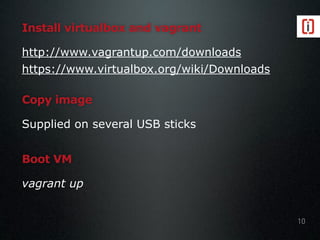
Install virtualbox and vagrant
http://www.vagrantup.com/downloads
https://www.virtualbox.org/wiki/Downloads
10
Copy image
Supplied on several USB sticks
Boot VM
vagrant up
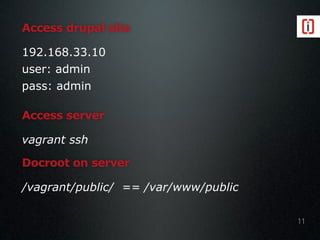
Access drupal site
192.168.33.10
user: admin
pass: admin
11
Access server
vagrant ssh
Docroot on server
/vagrant/public/ == /var/www/public
Introducing basic
concepts
12
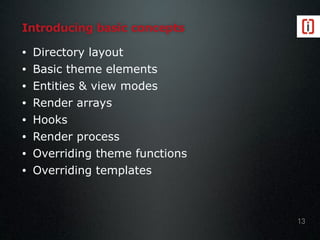
Introducing basic concepts
• Directory layout
• Basic theme elements
• Entities & view modes
• Render arrays
• Hooks
• Render process
• Overriding theme functions
• Overriding templates
13
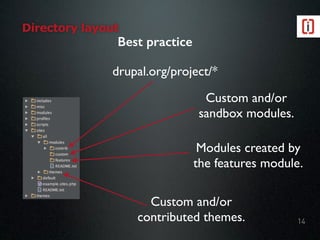
Directory layout
14
drupal.org/project/*
Custom and/or
sandbox modules.
Modules created by
the features module.
Custom and/or
contributed themes.
Best practice
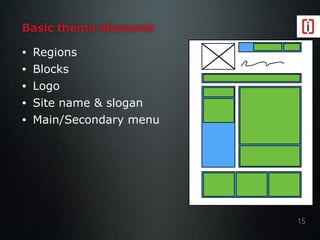
Basic theme elements
• Regions
• Blocks
• Logo
• Site name & slogan
• Main/Secondary menu
15
Entities & view modes
Entities are stored information (usually
content)
• Nodes
• Taxonomy terms
• Users
• etc.
16
Entities & view modes
View modes are different ways to display
entities
• Node
• Full (Default view mode)
• Teaser (configurable by default)
• Rss
• Taxonomy
• Taxonomy term page (Default view mode)
• User
• User account (Default view mode)
• etc.
17
Uitwerken
Adding your own view modes
Create a custom module
• Implement hook_entity_info_alter()
Use contrib module:
• Entity View Mode
• https://www.drupal.org/project/entity_view_mode
• Display suite
• https://www.drupal.org/project/ds
18
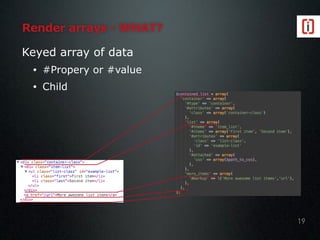
Keyed array of data
• #Propery or #value
• Child
Render arrays - WHAT?
19
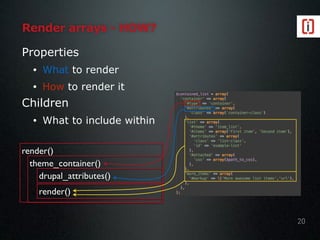
render()
theme_container()
drupal_attributes()
render()
Render arrays - HOW?
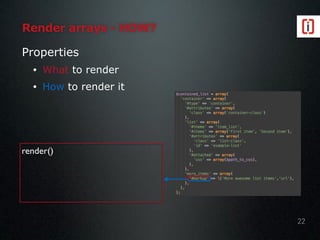
Properties
• What to render
• How to render it
Children
• What to include within
20
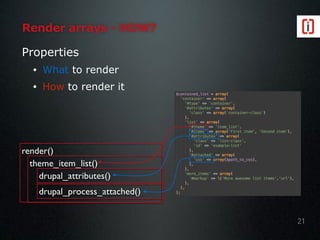
Properties
• What to render
• How to render it
render()
theme_item_list()
drupal_attributes()
drupal_process_attached()
Render arrays - HOW?
21
Render arrays - HOW?
Properties
• What to render
• How to render it
22
render()
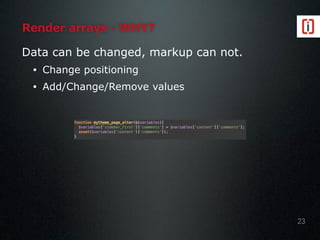
Render arrays - WHY?
Data can be changed, markup can not.
• Change positioning
• Add/Change/Remove values
23
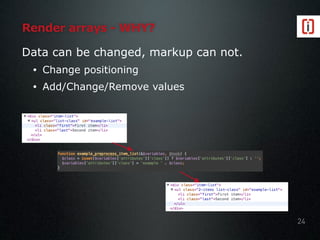
Render arrays - WHY?
Data can be changed, markup can not.
• Change positioning
• Add/Change/Remove values
24
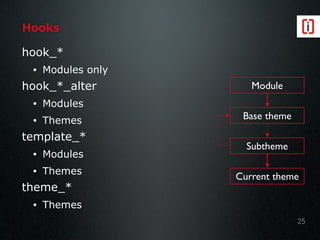
Hooks
hook_*
• Modules only
hook_*_alter
• Modules
• Themes
template_*
• Modules
• Themes
theme_*
• Themes
25
Module
Base theme
Subtheme
Current theme
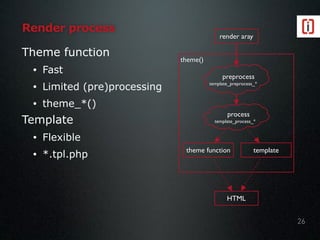
Theme function
• Fast
• Limited (pre)processing
• theme_*()
Template
• Flexible
• *.tpl.php
Render process
theme()
26
render aray
theme function template
HTML
process

template_process_*
preprocess

template_preprocess_*
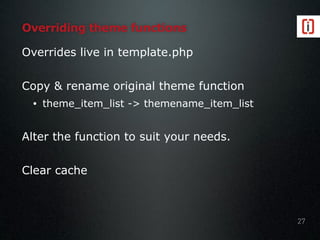
Overriding theme functions
Overrides live in template.php
Copy & rename original theme function
• theme_item_list -> themename_item_list
Alter the function to suit your needs.
Clear cache
27
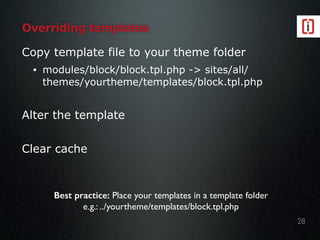
Overriding templates
Copy template file to your theme folder
• modules/block/block.tpl.php -> sites/all/
themes/yourtheme/templates/block.tpl.php
Alter the template
Clear cache
28
Best practice: Place your templates in a template folder
e.g.: ../yourtheme/templates/block.tpl.php
Design breakdown
29
Design breakdown
Identify regions
Determine additional requirements
30
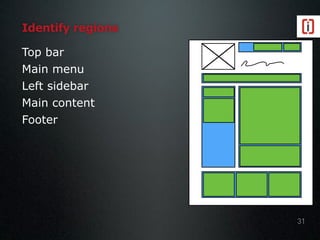
Identify regions
Top bar
Main menu
Left sidebar
Main content
Footer
31
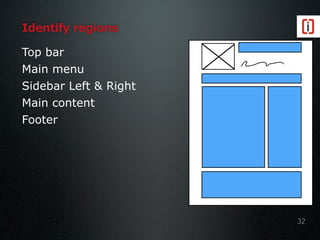
Identify regions
Top bar
Main menu
Sidebar Left & Right
Main content
Footer
32
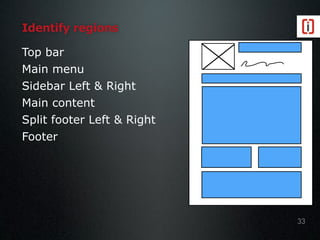
Identify regions
Top bar
Main menu
Sidebar Left & Right
Main content
Split footer Left & Right
Footer
33
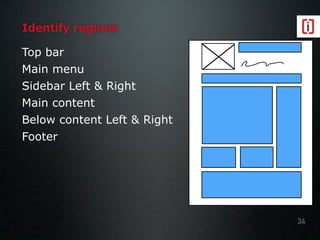
Identify regions
Top bar
Main menu
Sidebar Left & Right
Main content
Below content Left & Right
Footer
34
Determine additional requirements
Browser support
Slideshows
Fancy menu’s
etc.
35
Creating the theme
36
Where to start
Buy a theme
Start from scratch
Subtheme
• Start from scratch
• Starterkit
37
Creating the theme
Creating the .info file
• Theme from scratch
• Subtheme from scratch
• Define regions
• Define CSS/JS
‣ Override/disable CSS/JS
Other ways to add CSS/JS
Alter markup using templates
38
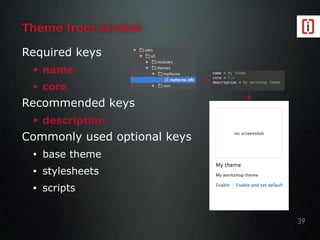
Theme from scratch
Required keys
• name
• core
Recommended keys
• description
Commonly used optional keys
• base theme
• stylesheets
• scripts
39
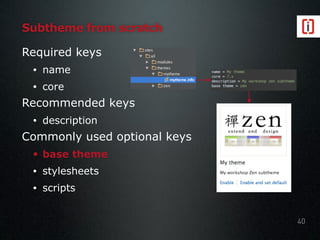
Subtheme from scratch
Required keys
• name
• core
Recommended keys
• description
Commonly used optional keys
• base theme
• stylesheets
• scripts
40
Exercises
41
1. Create a new theme
2. Change your theme to be a Zen subtheme
3. Compare your subtheme to Zen, what do you
notice?
Subtheme compared to Zen
Different regions
• Unless defined otherwise Drupal assumes
default regions: Header, Highlighted, Help,
Content, Left sidebar, Right sidebar, Footer
No stylesheets
• All stylesheets defined in basetheme.info are
inherited, but only if at least one stylesheet has
been defined in mytheme.info
• Zen conditionally defines stylesheets in
hook_preprocess_html
No Logo
42
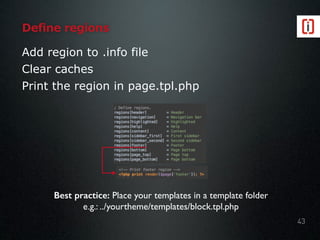
Add region to .info file
Clear caches
Print the region in page.tpl.php
Define regions
43
Best practice: Place your templates in a template folder
e.g.: ../yourtheme/templates/block.tpl.php
Exercises
44
1. Add zen’s regions to your info file
2. Add a custom region to your info file
3. Render the region in page.tpl.php
Hints:
• Copy zen’s page.tpl.php
• git checkout ex-1 for previous
exercise results
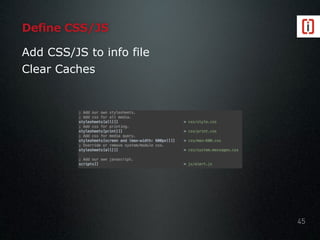
Define CSS/JS
Add CSS/JS to info file
Clear Caches
45
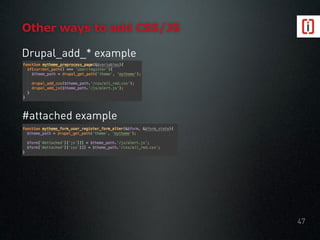
Other ways to add CSS/JS
Functions to use
• using drupal_add_css()
• using drupal_add_js()
• using [‘#attached’] in a render array()
Where to use them
• hook_preprocess_HOOK()
• hook_process_HOOK()
• hook_TYPE_alter()
46
#attached example
Drupal_add_* example
Other ways to add CSS/JS
47
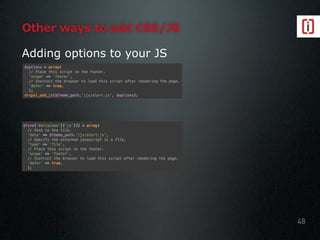
Other ways to add CSS/JS
Adding options to your JS
48
Other ways to add CSS/JS
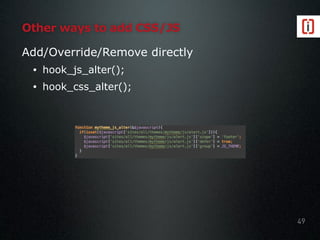
Add/Override/Remove directly
• hook_js_alter();
• hook_css_alter();
49
Exercise
50
Experiment
1. Define CSS in info file
2. Remove/override CSS in info file
3. Add css using drupal_add_css()
4. Add a “hello world” script using
drupal_add_js()
5. Add css using [‘#attached’]
6. Add a “hello world” script using [‘#attached’]
7. Place a script in the footer.
Hints:
• git checkout ex-2 for previous
exercise results
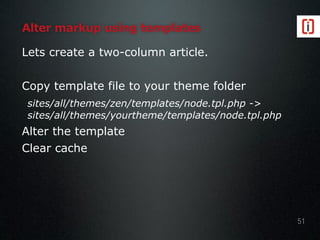
Alter markup using templates
Lets create a two-column article.
Copy template file to your theme folder
sites/all/themes/zen/templates/node.tpl.php ->
sites/all/themes/yourtheme/templates/node.tpl.php
Alter the template
Clear cache
51
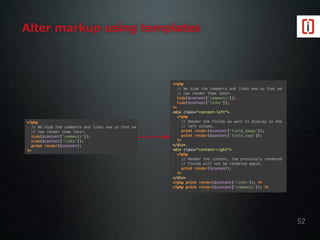
Alter markup using templates
52
Alter markup using templates
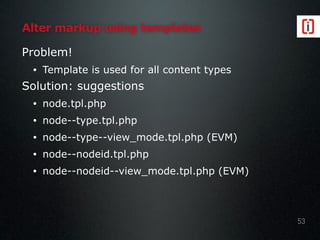
Problem!
• Template is used for all content types
Solution: suggestions
• node.tpl.php
• node--type.tpl.php
• node--type--view_mode.tpl.php (EVM)
• node--nodeid.tpl.php
• node--nodeid--view_mode.tpl.php (EVM)
53
Display the author on an article page.
• Render user with view mode teaser
• Use preprocessing
• Use a template
Exercise
54
Hints:
• user_load()
• user_view()
• $variables[‘theme_hook_suggestions’]
• git checkout ex-3 for previous exercise
results
Author name
Article title
Article text Article text
Article text Article text Article text
Common mistakes
55
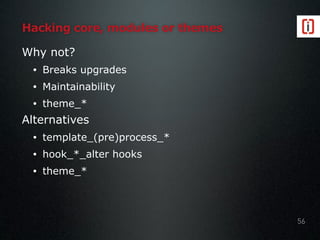
Hacking core, modules or themes
Why not?
• Breaks upgrades
• Maintainability
• theme_*
Alternatives
• template_(pre)process_*
• hook_*_alter hooks
• theme_*
56
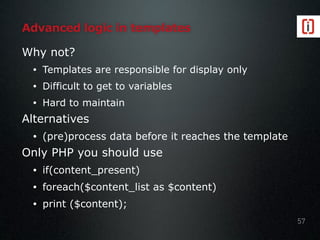
Advanced logic in templates
Why not?
• Templates are responsible for display only
• Difficult to get to variables
• Hard to maintain
Alternatives
• (pre)process data before it reaches the template
Only PHP you should use
• if(content_present)
• foreach($content_list as $content)
• print ($content);
57
Changing field ordering in templates
Why not?
• Hard to maintain
Alternatives
• Use view modes
58
Using global $user
Why not?
• Security!
Alternatives
• Use user_uid_optional_load()
59
Not using check_plain()/check_markup()
Why is this a problem?
• Security!
When to use them?
• Check_plain()
• Check_markup()
60
Happy theming
Thank you!
61

Drupal theming - a practical approach (European Drupal Days 2015)

  • 1.
    Subtitel 1 © Ibuildings 2014/2015- All rights reserved #DrupalDaysEU DRUPAL THEMING - a practical approach by Chris Jansen
  • 2.
    #DrupalDaysEU © Ibuildings 2014/2015- All rights reserved Gold Sponsors
  • 3.
    #DrupalDaysEU © Ibuildings 2014/2015- All rights reserved Media Sponsors Silver Sponsors
  • 4.
    A practical approachto the basics Chris Jansen 20 march 2015, Milan Drupal theming
  • 5.
  • 6.
  • 7.
    Topics Tools and materials Introducingbasic concepts Design breakdown Creating the theme Common mistakes 7
  • 8.
  • 9.
  • 10.
    Install virtualbox andvagrant http://www.vagrantup.com/downloads https://www.virtualbox.org/wiki/Downloads 10 Copy image Supplied on several USB sticks Boot VM vagrant up
  • 11.
    Access drupal site 192.168.33.10 user:admin pass: admin 11 Access server vagrant ssh Docroot on server /vagrant/public/ == /var/www/public
  • 12.
  • 13.
    Introducing basic concepts •Directory layout • Basic theme elements • Entities & view modes • Render arrays • Hooks • Render process • Overriding theme functions • Overriding templates 13
  • 14.
    Directory layout 14 drupal.org/project/* Custom and/or sandboxmodules. Modules created by the features module. Custom and/or contributed themes. Best practice
  • 15.
    Basic theme elements •Regions • Blocks • Logo • Site name & slogan • Main/Secondary menu 15
  • 16.
    Entities & viewmodes Entities are stored information (usually content) • Nodes • Taxonomy terms • Users • etc. 16
  • 17.
    Entities & viewmodes View modes are different ways to display entities • Node • Full (Default view mode) • Teaser (configurable by default) • Rss • Taxonomy • Taxonomy term page (Default view mode) • User • User account (Default view mode) • etc. 17 Uitwerken
  • 18.
    Adding your ownview modes Create a custom module • Implement hook_entity_info_alter() Use contrib module: • Entity View Mode • https://www.drupal.org/project/entity_view_mode • Display suite • https://www.drupal.org/project/ds 18
  • 19.
    Keyed array ofdata • #Propery or #value • Child Render arrays - WHAT? 19
  • 20.
    render() theme_container() drupal_attributes() render() Render arrays -HOW? Properties • What to render • How to render it Children • What to include within 20
  • 21.
    Properties • What torender • How to render it render() theme_item_list() drupal_attributes() drupal_process_attached() Render arrays - HOW? 21
  • 22.
    Render arrays -HOW? Properties • What to render • How to render it 22 render()
  • 23.
    Render arrays -WHY? Data can be changed, markup can not. • Change positioning • Add/Change/Remove values 23
  • 24.
    Render arrays -WHY? Data can be changed, markup can not. • Change positioning • Add/Change/Remove values 24
  • 25.
    Hooks hook_* • Modules only hook_*_alter •Modules • Themes template_* • Modules • Themes theme_* • Themes 25 Module Base theme Subtheme Current theme
  • 26.
    Theme function • Fast •Limited (pre)processing • theme_*() Template • Flexible • *.tpl.php Render process theme() 26 render aray theme function template HTML process
 template_process_* preprocess
 template_preprocess_*
  • 27.
    Overriding theme functions Overrideslive in template.php Copy & rename original theme function • theme_item_list -> themename_item_list Alter the function to suit your needs. Clear cache 27
  • 28.
    Overriding templates Copy templatefile to your theme folder • modules/block/block.tpl.php -> sites/all/ themes/yourtheme/templates/block.tpl.php Alter the template Clear cache 28 Best practice: Place your templates in a template folder e.g.: ../yourtheme/templates/block.tpl.php
  • 29.
  • 30.
  • 31.
    Identify regions Top bar Mainmenu Left sidebar Main content Footer 31
  • 32.
    Identify regions Top bar Mainmenu Sidebar Left & Right Main content Footer 32
  • 33.
    Identify regions Top bar Mainmenu Sidebar Left & Right Main content Split footer Left & Right Footer 33
  • 34.
    Identify regions Top bar Mainmenu Sidebar Left & Right Main content Below content Left & Right Footer 34
  • 35.
    Determine additional requirements Browsersupport Slideshows Fancy menu’s etc. 35
  • 36.
  • 37.
    Where to start Buya theme Start from scratch Subtheme • Start from scratch • Starterkit 37
  • 38.
    Creating the theme Creatingthe .info file • Theme from scratch • Subtheme from scratch • Define regions • Define CSS/JS ‣ Override/disable CSS/JS Other ways to add CSS/JS Alter markup using templates 38
  • 39.
    Theme from scratch Requiredkeys • name • core Recommended keys • description Commonly used optional keys • base theme • stylesheets • scripts 39
  • 40.
    Subtheme from scratch Requiredkeys • name • core Recommended keys • description Commonly used optional keys • base theme • stylesheets • scripts 40
  • 41.
    Exercises 41 1. Create anew theme 2. Change your theme to be a Zen subtheme 3. Compare your subtheme to Zen, what do you notice?
  • 42.
    Subtheme compared toZen Different regions • Unless defined otherwise Drupal assumes default regions: Header, Highlighted, Help, Content, Left sidebar, Right sidebar, Footer No stylesheets • All stylesheets defined in basetheme.info are inherited, but only if at least one stylesheet has been defined in mytheme.info • Zen conditionally defines stylesheets in hook_preprocess_html No Logo 42
  • 43.
    Add region to.info file Clear caches Print the region in page.tpl.php Define regions 43 Best practice: Place your templates in a template folder e.g.: ../yourtheme/templates/block.tpl.php
  • 44.
    Exercises 44 1. Add zen’sregions to your info file 2. Add a custom region to your info file 3. Render the region in page.tpl.php Hints: • Copy zen’s page.tpl.php • git checkout ex-1 for previous exercise results
  • 45.
    Define CSS/JS Add CSS/JSto info file Clear Caches 45
  • 46.
    Other ways toadd CSS/JS Functions to use • using drupal_add_css() • using drupal_add_js() • using [‘#attached’] in a render array() Where to use them • hook_preprocess_HOOK() • hook_process_HOOK() • hook_TYPE_alter() 46
  • 47.
  • 48.
    Other ways toadd CSS/JS Adding options to your JS 48
  • 49.
    Other ways toadd CSS/JS Add/Override/Remove directly • hook_js_alter(); • hook_css_alter(); 49
  • 50.
    Exercise 50 Experiment 1. Define CSSin info file 2. Remove/override CSS in info file 3. Add css using drupal_add_css() 4. Add a “hello world” script using drupal_add_js() 5. Add css using [‘#attached’] 6. Add a “hello world” script using [‘#attached’] 7. Place a script in the footer. Hints: • git checkout ex-2 for previous exercise results
  • 51.
    Alter markup usingtemplates Lets create a two-column article. Copy template file to your theme folder sites/all/themes/zen/templates/node.tpl.php -> sites/all/themes/yourtheme/templates/node.tpl.php Alter the template Clear cache 51
  • 52.
    Alter markup usingtemplates 52
  • 53.
    Alter markup usingtemplates Problem! • Template is used for all content types Solution: suggestions • node.tpl.php • node--type.tpl.php • node--type--view_mode.tpl.php (EVM) • node--nodeid.tpl.php • node--nodeid--view_mode.tpl.php (EVM) 53
  • 54.
    Display the authoron an article page. • Render user with view mode teaser • Use preprocessing • Use a template Exercise 54 Hints: • user_load() • user_view() • $variables[‘theme_hook_suggestions’] • git checkout ex-3 for previous exercise results Author name Article title Article text Article text Article text Article text Article text Article text Article text Article text Article text Article text Article text Article text Article text Article text Article text
  • 55.
  • 56.
    Hacking core, modulesor themes Why not? • Breaks upgrades • Maintainability • theme_* Alternatives • template_(pre)process_* • hook_*_alter hooks • theme_* 56
  • 57.
    Advanced logic intemplates Why not? • Templates are responsible for display only • Difficult to get to variables • Hard to maintain Alternatives • (pre)process data before it reaches the template Only PHP you should use • if(content_present) • foreach($content_list as $content) • print ($content); 57
  • 58.
    Changing field orderingin templates Why not? • Hard to maintain Alternatives • Use view modes 58
  • 59.
    Using global $user Whynot? • Security! Alternatives • Use user_uid_optional_load() 59
  • 60.
    Not using check_plain()/check_markup() Whyis this a problem? • Security! When to use them? • Check_plain() • Check_markup() 60
  • 61.