Marek PiÄ…tek - CCoE Talks, 09.10.2018
Do's and Don'ts in AWS
Cloud is secure...
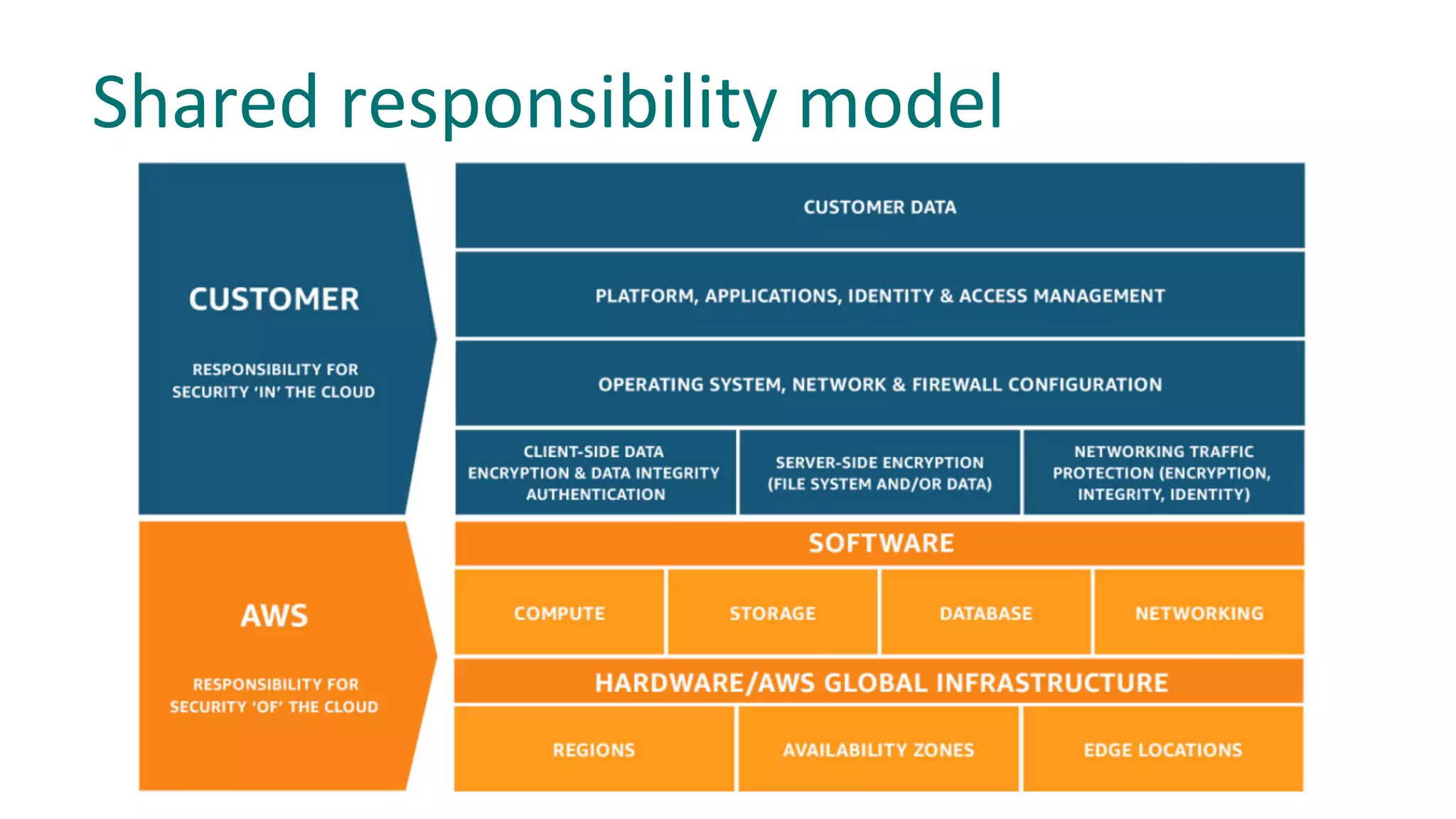
Shared responsibility model
§ Users have to use federated accounts to access AWS
console and cli. To access cli as federated user
please use #aada.
§ Use IAM Roles for AWS Services
§ IAM Users should be used only when “service account”
access is needed and role-based access is not possible.
§ Don’t create IAM Users.
Every IAM user will be deleted automatically.
Don’t use IAM Users
IAM policies should follow standard security advice:
§ Grant least privilege
§ Start with a minimum set of permissions
§ Add additional permissions when necessary
Grant Least Privileges
Don’t:
{
"Statement": [
{
"Effect": "Allow",
"Action": "s3:*",
"Resource": "*"
}
]
}
Do:
"Statement": [
{
"Effect": "Allow",
"Action": "s3:ListBucket",
"Resource": "arn:aws:s3:::<BUCKET-NAME>"
},
{
"Effect": "Allow",
"Action": [
"s3:PutObject",
"s3:GetObject"
],
"Resource": "arn:aws:s3:::<BUCKET-NAME>/*"
}
]
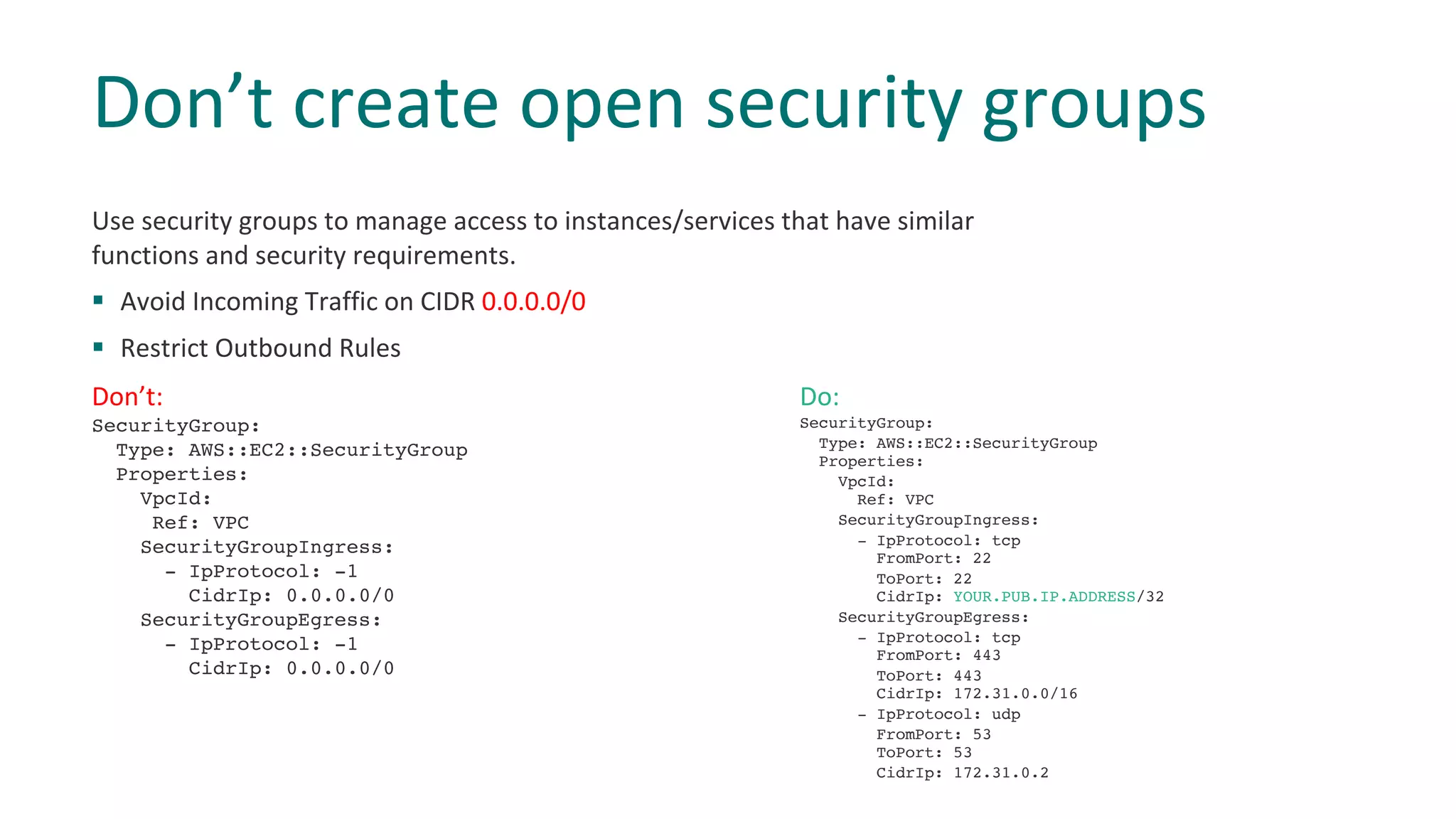
Use security groups to manage access to instances/services that have similar
functions and security requirements.
§ Avoid Incoming Traffic on CIDR 0.0.0.0/0
§ Restrict Outbound Rules
Don’t create open security groups
Don’t:
SecurityGroup:
Type: AWS::EC2::SecurityGroup
Properties:
VpcId:
Ref: VPC
SecurityGroupIngress:
- IpProtocol: -1
CidrIp: 0.0.0.0/0
SecurityGroupEgress:
- IpProtocol: -1
CidrIp: 0.0.0.0/0
Do:
SecurityGroup:
Type: AWS::EC2::SecurityGroup
Properties:
VpcId:
Ref: VPC
SecurityGroupIngress:
- IpProtocol: tcp
FromPort: 22
ToPort: 22
CidrIp: YOUR.PUB.IP.ADDRESS/32
SecurityGroupEgress:
- IpProtocol: tcp
FromPort: 443
ToPort: 443
CidrIp: 172.31.0.0/16
- IpProtocol: udp
FromPort: 53
ToPort: 53
CidrIp: 172.31.0.2
7
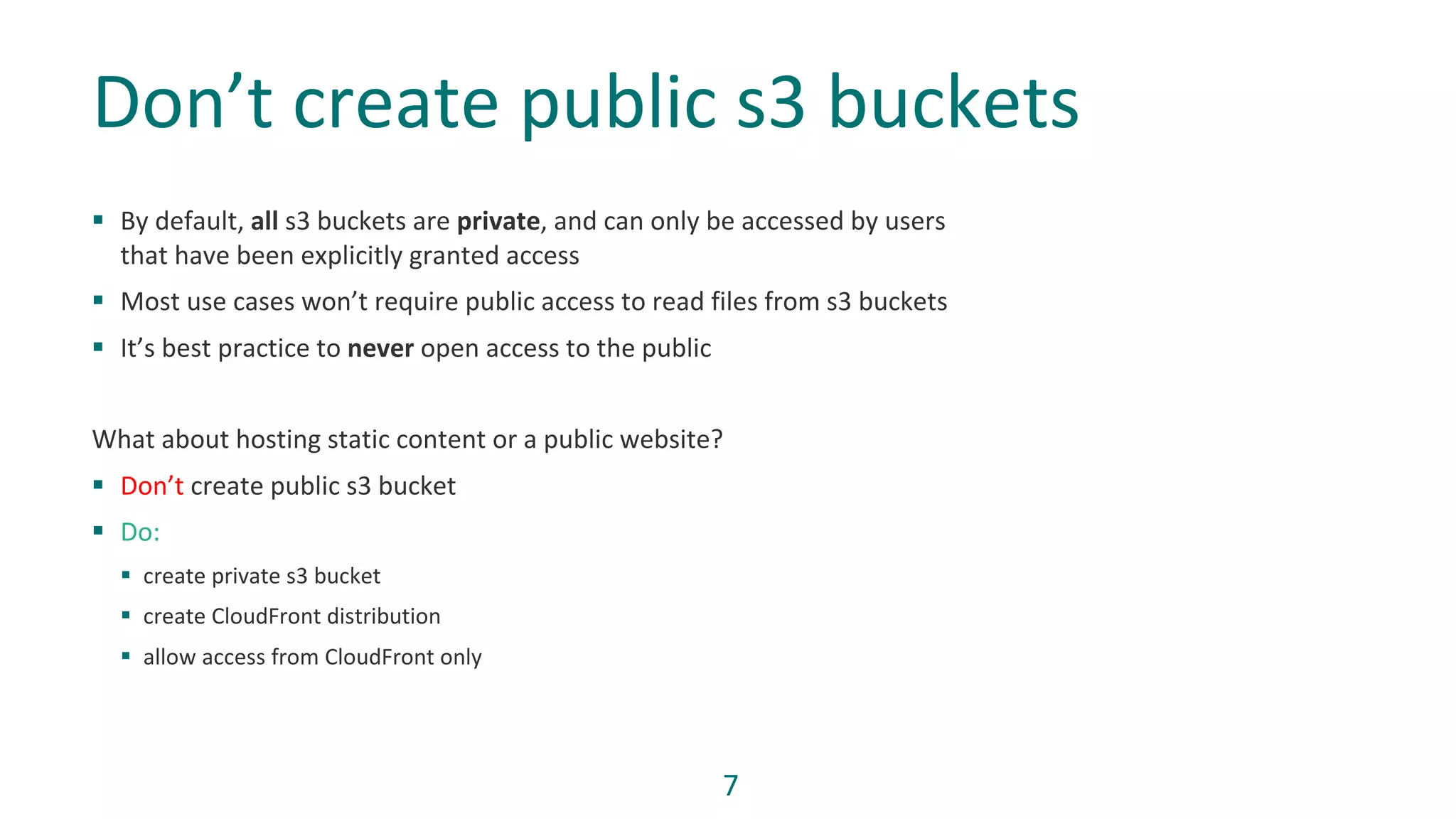
§ By default, all s3 buckets are private, and can only be accessed by users
that have been explicitly granted access
§ Most use cases won’t require public access to read files from s3 buckets
§ It’s best practice to never open access to the public
What about hosting static content or a public website?
§ Don’t create public s3 bucket
§ Do:
§ create private s3 bucket
§ create CloudFront distribution
§ allow access from CloudFront only
Don’t create public s3 buckets
8
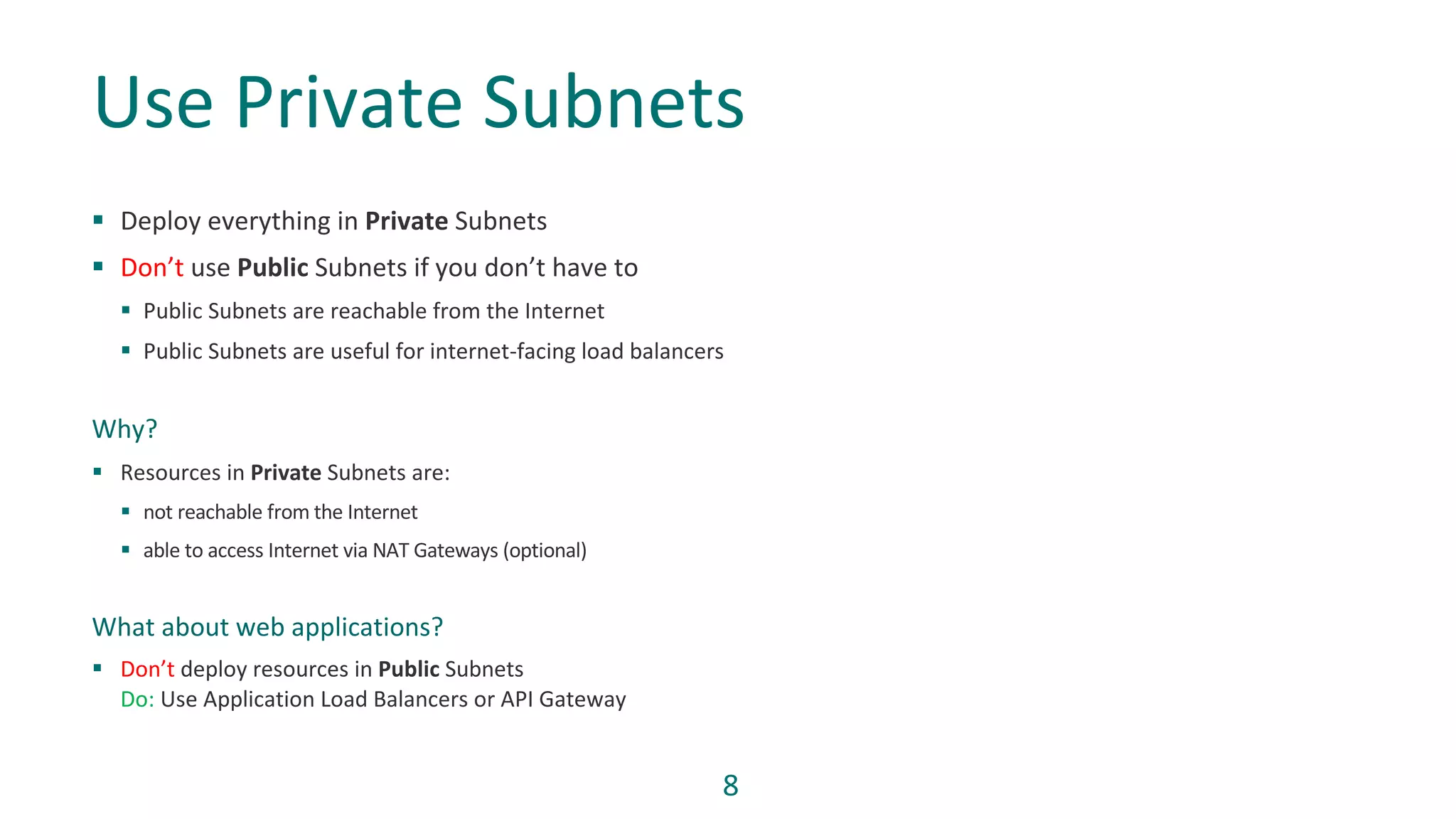
§ Deploy everything in Private Subnets
§ Don’t use Public Subnets if you don’t have to
§ Public Subnets are reachable from the Internet
§ Public Subnets are useful for internet-facing load balancers
Why?
§ Resources in Private Subnets are:
§ not reachable from the Internet
§ able to access Internet via NAT Gateways (optional)
What about web applications?
§ Don’t deploy resources in Public Subnets
Do: Use Application Load Balancers or API Gateway
Use Private Subnets
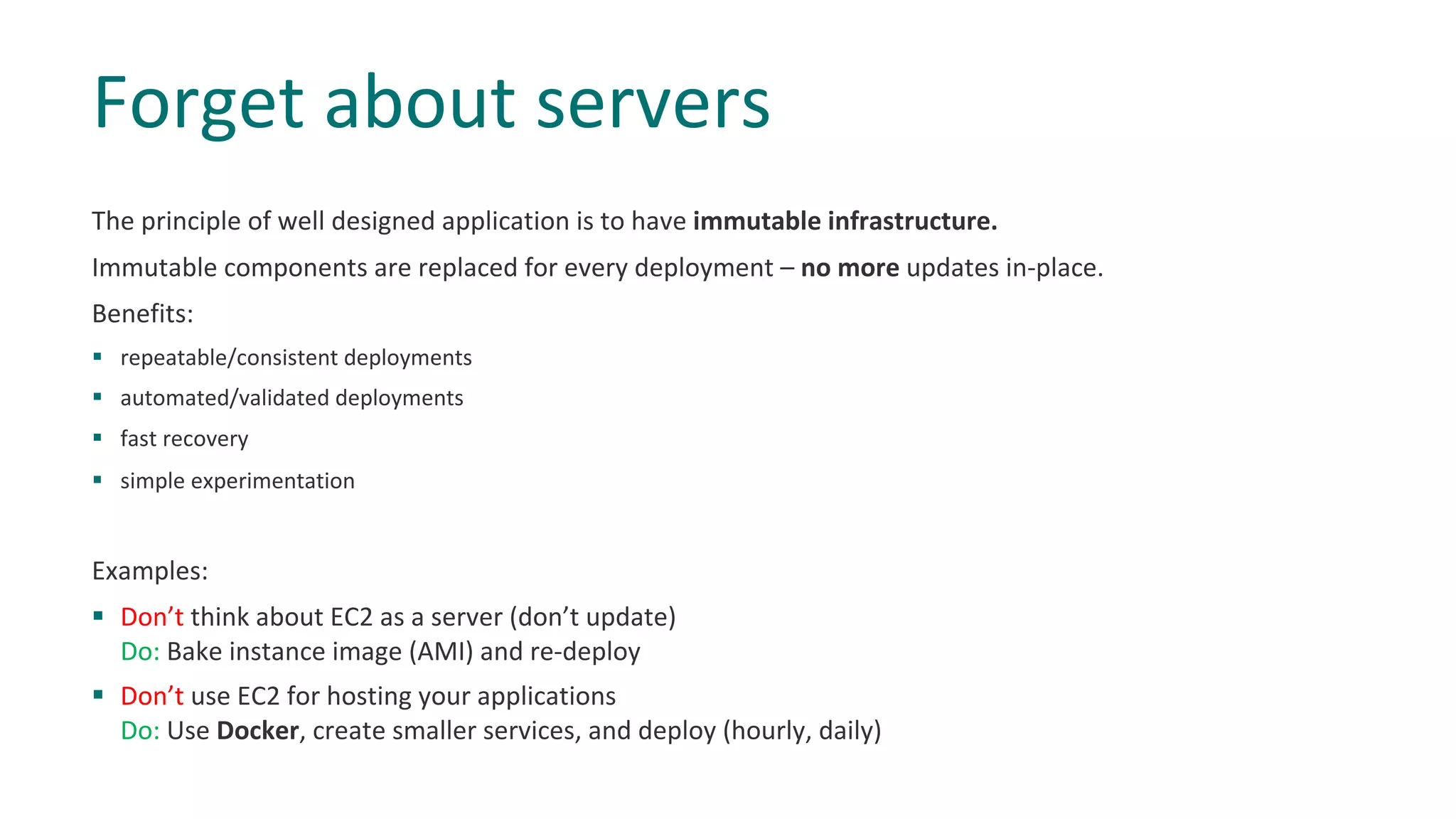
The principle of well designed application is to have immutable infrastructure.
Immutable components are replaced for every deployment – no more updates in-place.
Benefits:
§ repeatable/consistent deployments
§ automated/validated deployments
§ fast recovery
§ simple experimentation
Examples:
§ Don’t think about EC2 as a server (don’t update)
Do: Bake instance image (AMI) and re-deploy
§ Don’t use EC2 for hosting your applications
Do: Use Docker, create smaller services, and deploy (hourly, daily)
Forget about servers
Core concept of cloud is to offer elasticity and high availability.
To be able to achieve that, your system has to have ability:
§ to scale up and down at any time
§ to sustain a failure of availability zone or region.
To do so without failure, your system cannot relay on local state.
“Everything fails, all the time!”
Werner Vogels
Solution:
§ Don’t keep state on EC2 instance
Do: Use ElastiCache Service or DynamoDB
Don’t use local state
Why?
§ Helps to reduce operational overhead and risk
§ Automates common activities
§ provides full-lifecycle services
Examples:
§ Don’t install SQL Server on EC2 Instance
Do: Use Relational Database Service (RDS)
§ Don’t use EC2 instance with nginx for load balancing
Do: Use Application Load Balancer (ALB) for HTTP(S) traffic
§ Don’t build a cluster of MQ servers to handle message queuing
Do: Use Simple Queue Service (SQS) or Amazon MQ
Use AWS Managed services
§ IaC – Infrastructure as code is the process of managing and provisioning computer data centers through
machine-readable definition files, rather than physical hardware configuration or interactive configuration
tools.
Why?
§ Speed and simplicity
§ Configuration consistency
§ Minimization of human error
“Never Do Anything Twice. If any task has to be repeated manually,
immediately see if it can be automated.”
Keep your cloud in code
If you are not sure HOW should you do something:
§ Ask your teammates
§ Read documentation
§ Ask us on Slack
Worth reading:
§ AWS Cloud Security Best Practices
§ AWS Well Architected Framework
§ Technical blogs
“I will always choose a lazy person to do a difficult job,
because , he will find an easy way to do it.”
Bill Gates
Listen and learn from others
Any questions?
Thank you

Dos and don'ts in AWS

  • 1.
    Marek PiÄ…tek -CCoE Talks, 09.10.2018 Do's and Don'ts in AWS
  • 2.
  • 3.
  • 4.
    § Users haveto use federated accounts to access AWS console and cli. To access cli as federated user please use #aada. § Use IAM Roles for AWS Services § IAM Users should be used only when “service account” access is needed and role-based access is not possible. § Don’t create IAM Users. Every IAM user will be deleted automatically. Don’t use IAM Users
  • 5.
    IAM policies shouldfollow standard security advice: § Grant least privilege § Start with a minimum set of permissions § Add additional permissions when necessary Grant Least Privileges Don’t: { "Statement": [ { "Effect": "Allow", "Action": "s3:*", "Resource": "*" } ] } Do: "Statement": [ { "Effect": "Allow", "Action": "s3:ListBucket", "Resource": "arn:aws:s3:::<BUCKET-NAME>" }, { "Effect": "Allow", "Action": [ "s3:PutObject", "s3:GetObject" ], "Resource": "arn:aws:s3:::<BUCKET-NAME>/*" } ]
  • 6.
    Use security groupsto manage access to instances/services that have similar functions and security requirements. § Avoid Incoming Traffic on CIDR 0.0.0.0/0 § Restrict Outbound Rules Don’t create open security groups Don’t: SecurityGroup: Type: AWS::EC2::SecurityGroup Properties: VpcId: Ref: VPC SecurityGroupIngress: - IpProtocol: -1 CidrIp: 0.0.0.0/0 SecurityGroupEgress: - IpProtocol: -1 CidrIp: 0.0.0.0/0 Do: SecurityGroup: Type: AWS::EC2::SecurityGroup Properties: VpcId: Ref: VPC SecurityGroupIngress: - IpProtocol: tcp FromPort: 22 ToPort: 22 CidrIp: YOUR.PUB.IP.ADDRESS/32 SecurityGroupEgress: - IpProtocol: tcp FromPort: 443 ToPort: 443 CidrIp: 172.31.0.0/16 - IpProtocol: udp FromPort: 53 ToPort: 53 CidrIp: 172.31.0.2
  • 7.
    7 § By default,all s3 buckets are private, and can only be accessed by users that have been explicitly granted access § Most use cases won’t require public access to read files from s3 buckets § It’s best practice to never open access to the public What about hosting static content or a public website? § Don’t create public s3 bucket § Do: § create private s3 bucket § create CloudFront distribution § allow access from CloudFront only Don’t create public s3 buckets
  • 8.
    8 § Deploy everythingin Private Subnets § Don’t use Public Subnets if you don’t have to § Public Subnets are reachable from the Internet § Public Subnets are useful for internet-facing load balancers Why? § Resources in Private Subnets are: § not reachable from the Internet § able to access Internet via NAT Gateways (optional) What about web applications? § Don’t deploy resources in Public Subnets Do: Use Application Load Balancers or API Gateway Use Private Subnets
  • 9.
    The principle ofwell designed application is to have immutable infrastructure. Immutable components are replaced for every deployment – no more updates in-place. Benefits: § repeatable/consistent deployments § automated/validated deployments § fast recovery § simple experimentation Examples: § Don’t think about EC2 as a server (don’t update) Do: Bake instance image (AMI) and re-deploy § Don’t use EC2 for hosting your applications Do: Use Docker, create smaller services, and deploy (hourly, daily) Forget about servers
  • 10.
    Core concept ofcloud is to offer elasticity and high availability. To be able to achieve that, your system has to have ability: § to scale up and down at any time § to sustain a failure of availability zone or region. To do so without failure, your system cannot relay on local state. “Everything fails, all the time!” Werner Vogels Solution: § Don’t keep state on EC2 instance Do: Use ElastiCache Service or DynamoDB Don’t use local state
  • 11.
    Why? § Helps toreduce operational overhead and risk § Automates common activities § provides full-lifecycle services Examples: § Don’t install SQL Server on EC2 Instance Do: Use Relational Database Service (RDS) § Don’t use EC2 instance with nginx for load balancing Do: Use Application Load Balancer (ALB) for HTTP(S) traffic § Don’t build a cluster of MQ servers to handle message queuing Do: Use Simple Queue Service (SQS) or Amazon MQ Use AWS Managed services
  • 12.
    § IaC –Infrastructure as code is the process of managing and provisioning computer data centers through machine-readable definition files, rather than physical hardware configuration or interactive configuration tools. Why? § Speed and simplicity § Configuration consistency § Minimization of human error “Never Do Anything Twice. If any task has to be repeated manually, immediately see if it can be automated.” Keep your cloud in code
  • 13.
    If you arenot sure HOW should you do something: § Ask your teammates § Read documentation § Ask us on Slack Worth reading: § AWS Cloud Security Best Practices § AWS Well Architected Framework § Technical blogs “I will always choose a lazy person to do a difficult job, because , he will find an easy way to do it.” Bill Gates Listen and learn from others
  • 14.