What’s in a name? Domain names that is…
What is a Domain Name?


Simply put, a domain is simply a series of letters or numbers that point
to an online resource. i.e. www.domain.com


So how do domains work with websites?


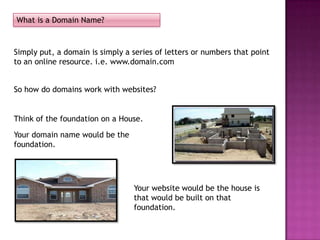
Think of the foundation on a House.

Your domain name would be the
foundation.


                                 Your website would be the house is
                                 that would be built on that
                                 foundation.
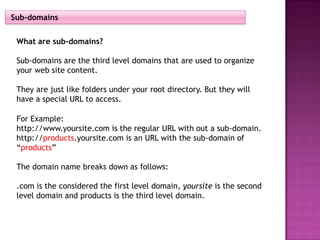
Sub-domains


 What are sub-domains?

 Sub-domains are the third level domains that are used to organize
 your web site content.

 They are just like folders under your root directory. But they will
 have a special URL to access.

 For Example:
 http://www.yoursite.com is the regular URL with out a sub-domain.
 http://products.yoursite.com is an URL with the sub-domain of
 “products”

 The domain name breaks down as follows:

 .com is the considered the first level domain, yoursite is the second
 level domain and products is the third level domain.
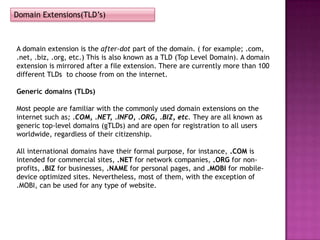
Domain Extensions(TLD’s)


A domain extension is the after-dot part of the domain. ( for example; .com,
.net, .biz, .org, etc.) This is also known as a TLD (Top Level Domain). A domain
extension is mirrored after a file extension. There are currently more than 100
different TLDs to choose from on the internet.

Generic domains (TLDs)

Most people are familiar with the commonly used domain extensions on the
internet such as; .COM, .NET, .INFO, .ORG, .BIZ, etc. They are all known as
generic top-level domains (gTLDs) and are open for registration to all users
worldwide, regardless of their citizenship.

All international domains have their formal purpose, for instance, .COM is
intended for commercial sites, .NET for network companies, .ORG for non-
profits, .BIZ for businesses, .NAME for personal pages, and .MOBI for mobile-
device optimized sites. Nevertheless, most of them, with the exception of
.MOBI, can be used for any type of website.
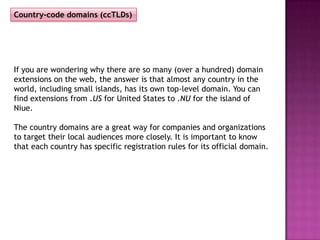
Country-code domains (ccTLDs)


If you are wondering why there are so many (over a hundred) domain
extensions on the web, the answer is that almost any country in the
world, including small islands, has its own top-level domain. You can
find extensions from .US for United States to .NU for the island of
Niue.

The country domains are a great way for companies and organizations
to target their local audiences more closely. It is important to know
that each country has specific registration rules for its official domain.
What our Customers need to know
The Basics:
      Who Makes the
      Rules?


ICANN (Internet Corporation for Assigned Names and
Numbers) – This is the governing body that handles
everything domain related. They also handle IP addresses and
legislations.
The requirements to transfer a domain to Brain Host are as follows;


•The domain has to have been registered for 60 days. This 60 day window is
also for any changes, whether it is new registrations, transfers between
registrars, or even whois changes(depending on registrar).
•This applies to a new domain registration as well as a new domain transfer. It
cannot be transferred until after the 60 day period.
•There must be a valid email address on the registration information. If a
customer has privacy protection, this would have to be removed before they
can transfer the domain. *may take 12-24 hours to remove
•An EPP (Extensible Provisioning Protocol) or Authorization code will be sent to
the customer (usually via email by their current registrar) for the transfer. This
is used as a security measure to validate the ownership of the domain.
•The domain must be unlocked – This is an extra security feature that prevents
the domain from being transferred. (*This may take an hour).
•The complete process to transfer a domain takes about 5-7 days.

(Domain Transfers are handled through tier 2 – General Support should
open a support ticket and send it to tier 2.)

                Next, we’ll break down each requirement.
The domain must have been registered for 60 days


The customer cannot transfer a domain name that
has been newly registered for a 60 day period. This
cannot be changed. (this rule has been set in place
by ICANN.) If the customer wishes to continue hosting
with Brain Host before the 60 day period they have
the option of pointing their domain to our name
servers.

  Brain Host Domain Name Servers:

  ns1.dnsace.com
  ns2.dnsace.com
The domain must be unlocked – This is an extra security feature that
prevents the domain from being transferred. (This process may take
an hour).


The domain must be UNLOCKED before
the customer begins the transfer process.
How to unlock a domain


If the customer is able to manage their domain themselves through
their registrar, ( i.e. Melbourne IT, Enom, etc.); the customer should
contact their registrar for the pr0per steps to unlock their domain.

If the customer does not manage their domain themselves, direct
the customer to contact their host/registrar for instructions on how
they should proceed or to request to have the domain name
unlocked for them.
There must be a valid email address on the registration information.


Make sure to verify the customer’s email address (their email should match
the whois information on record). This is to ensure that the customer
receives all communications from the registrar (i.e. EPP code) and Brain
Host in regards to their domain transfer; as well as for security purposes.
Privacy protection; *may take 12-24 hours to remove


       Privacy protection refers to domain privacy, usually through
       Who is, this would have to be removed before the transfer
       can take place.

       Once the domain is registered with the new registrar,
       domain privacy can be added back onto the domain.

       The customer should request privacy protection is removed
       through their current registrar. Or they can remove it
       themselves if they have access to manage their domain.
The EPP Code


An EPP (Extensible Provisioning Protocol) or Authorization code will be sent
to the customer (via email by their current registrar) for the transfer. This is
used as a security measure to validate the ownership of the domain.


If the customer is able to manage their domain through their registrar,
instruct them to follow the steps with that registrar to receive the EPP code.
Or they will need to contact their current registrar and request the procedure
to receive this code.

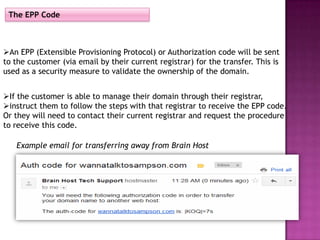
   Example email for transferring away from Brain Host
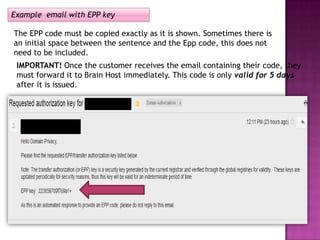
Example email with EPP key

The EPP code must be copied exactly as it is shown. Sometimes there is
an initial space between the sentence and the Epp code, this does not
need to be included.
 IMPORTANT! Once the customer receives the email containing their code, they
 must forward it to Brain Host immediately. This code is only valid for 5 days
 after it is issued.
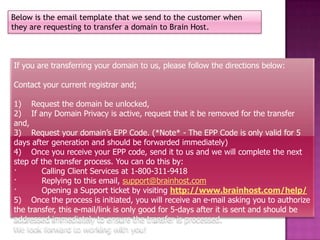
Below is the email template that we send to the customer when
they are requesting to transfer a domain to Brain Host.


If you are transferring your domain to us, please follow the directions below:

Contact your current registrar and;

1) Request the domain be unlocked,
2) If any Domain Privacy is active, request that it be removed for the transfer
and,
3) Request your domain’s EPP Code. (*Note* - The EPP Code is only valid for 5
days after generation and should be forwarded immediately)
4) Once you receive your EPP code, send it to us and we will complete the next
step of the transfer process. You can do this by:
·       Calling Client Services at 1-800-311-9418
·       Replying to this email, support@brainhost.com
·       Opening a Support ticket by visiting http://www.brainhost.com/help/
5) Once the process is initiated, you will receive an e-mail asking you to authorize
the transfer, this e-mail/link is only good for 5-days after it is sent and should be
addressed immediately to ensure the transfer is processed.
We look forward to working with you!
Summary


A domain name transfer is the process of changing the designated registrar
of a domain name. ICANN is the governing body who has defined the Policy
on the Transfer of Registrations between Registrars.


    The Process:

  Step 1:
  The customer verifies that their contact info (with whois) is correct,
  particularly the email address.

  Step 2:
  The customer obtains the authentication code (EPP code) from the old
  registrar, and removes any domain lock that has been placed on the
  registration. If the whois information had been out of date and is now
  updated, the customer should wait 12-24 hours before proceeding
  further, to allow time for the updated data to propagate.
Step 3:
The customer contacts the new registrar with whom they would like to
transfer the domain name and supplies the EPP code.

Step 4:
The new registrar begins the process of transferring the domain name.

Step 5:
The old registrar will contact the customer to confirm that they indeed
would like to transfer their domain. Once this is validated the old registrar
will release the domain to the new registrar.


Step 6:
The new registrar will notify the customer when the transfer is complete.


The complete process to transfer a domain takes about 5-7 days.
Important reminders


 Flippa Customers, may not only transfer domains, they may also transfer
websites, these files need to be migrated over to Brain Host as well. This is
handled by Tier 2


  After a transfer, the domain cannot be transferred again for 60 days,
 except back to the previous registrar.
What’s the Point to Pointing?
Point vs. Transfer


When a client points a domain to Brain Host, their registration stays
with their current registrar but Brain Host will host the site files.

There is no charge for this. The client must still have a hosting
package in order for the site to be online.

In order to point their domain the customer must change their DNS
to with their registrar to Brain Host Domain Name Servers.


  Brain Host Domain Name Servers:

  ns1.dnsace.com
  ns2.dnsace.com
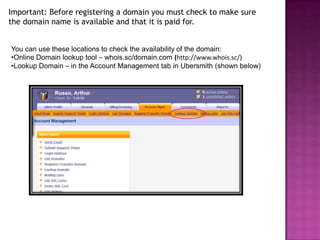
Important: Before registering a domain you must check to make sure
the domain name is available and that it is paid for.


You can use these locations to check the availability of the domain:
•Online Domain lookup tool – whois.sc/domain.com (http://www.whois.sc/)
•Lookup Domain – in the Account Management tab in Ubersmith (shown below)
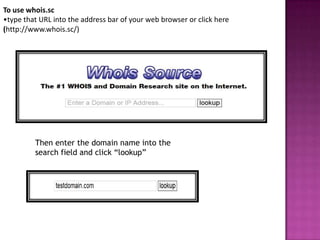
To use whois.sc
•type that URL into the address bar of your web browser or click here
(http://www.whois.sc/)


         Then enter the domain name into the
         search field and click “lookup”
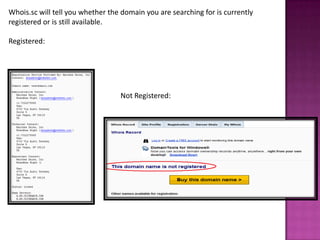
Whois.sc will tell you whether the domain you are searching for is currently
registered or is still available.

Registered:


                                  Not Registered:
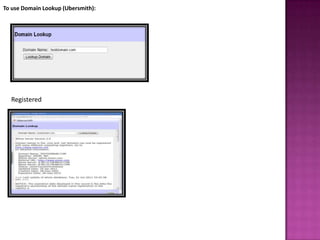
To use Domain Lookup (Ubersmith):


  Registered
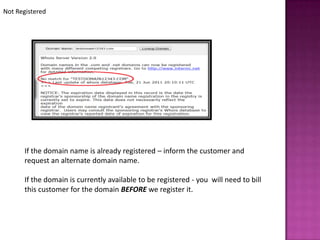
Not Registered


      If the domain name is already registered – inform the customer and
      request an alternate domain name.

      If the domain is currently available to be registered - you will need to bill
      this customer for the domain BEFORE we register it.
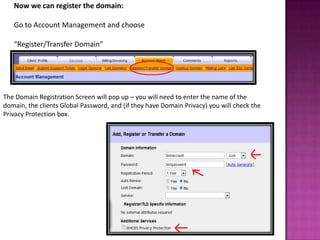
Now we can register the domain:

   Go to Account Management and choose

   “Register/Transfer Domain”


The Domain Registration Screen will pop up – you will need to enter the name of the
domain, the clients Global Password, and (if they have Domain Privacy) you will check the
Privacy Protection box.
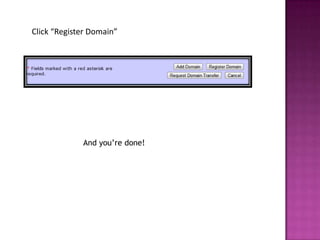
Click “Register Domain”


             And you’re done!
Revoking a Domain


  Revoking means to unregister a domain that has already been registered.
  We only do this for our customers within the first five days of their
  service start date. * This is not something that should be advertised to
  the customer.


  Domain Revoke Procedure
  This procedure is used when either cancelling an account or if the domain name has
  been misspelled or needs to be changed due to fraud, trademark infringement etc.
  •Remember
        When you are adding an Addon Domain to the Revoking Doc, make sure to
        include the extensions as well. For example; Domain.com/.net/.org/.info
        Make sure that you are notating the account with the correct domain in the
        comments so it can be verified that everything is spelled correctly. NEVER register
        the domain yourself, nor update the account with the corrected domain.
        also remember that this should be done within 5 days since the customer started
        their account (*please refrain from informing the customer of this time frame if
        possible)
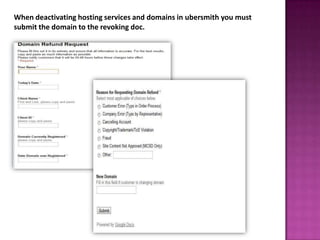
When deactivating hosting services and domains in ubersmith you must
submit the domain to the revoking doc.
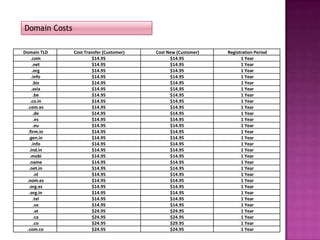
Domain Costs

Domain TLD     Cost Transfer (Customer)   Cost New (Customer)   Registration Period
     .com               $14.95                  $14.95                1 Year
      .net              $14.95                  $14.95                1 Year
      .org              $14.95                  $14.95                1 Year
     .info              $14.95                  $14.95                1 Year
      .biz              $14.95                  $14.95                1 Year
     .asia              $14.95                  $14.95                1 Year
       .be              $14.95                  $14.95                1 Year
    .co.in              $14.95                  $14.95                1 Year
  .com.es               $14.95                  $14.95                1 Year
       .de              $14.95                  $14.95                1 Year
       .es              $14.95                  $14.95                1 Year
       .eu              $14.95                  $14.95                1 Year
  .firm.in              $14.95                  $14.95                1 Year
   .gen.in              $14.95                  $14.95                1 Year
     .info              $14.95                  $14.95                1 Year
   .ind.in              $14.95                  $14.95                1 Year
    .mobi               $14.95                  $14.95                1 Year
   .name                $14.95                  $14.95                1 Year
   .net.in              $14.95                  $14.95                1 Year
        .nl             $14.95                  $14.95                1 Year
 .nom.es                $14.95                  $14.95                1 Year
   .org.es              $14.95                  $14.95                1 Year
   .org.in              $14.95                  $14.95                1 Year
       .tel             $14.95                  $14.95                1 Year
       .us              $14.95                  $14.95                1 Year
       .at              $24.95                  $24.95                1 Year
       .ca              $24.95                  $24.95                1 Year
       .co              $24.95                  $29.95                1 Year
 .com.co                $24.95                  $24.95                1 Year
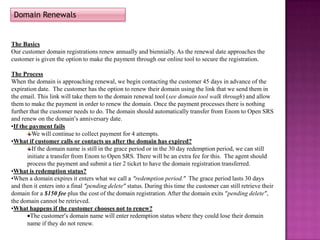
Domain Renewals


The Basics
Our customer domain registrations renew annually and biennially. As the renewal date approaches the
customer is given the option to make the payment through our online tool to secure the registration.

The Process
When the domain is approaching renewal, we begin contacting the customer 45 days in advance of the
expiration date. The customer has the option to renew their domain using the link that we send them in
the email. This link will take them to the domain renewal tool (see domain tool walk through) and allow
them to make the payment in order to renew the domain. Once the payment processes there is nothing
further that the customer needs to do. The domain should automatically transfer from Enom to Open SRS
and renew on the domain’s anniversary date.
•If the payment fails
         We will continue to collect payment for 4 attempts.
•What if customer calls or contacts us after the domain has expired?
         If the domain name is still in the grace period or in the 30 day redemption period, we can still
       initiate a transfer from Enom to Open SRS. There will be an extra fee for this. The agent should
       process the payment and submit a tier 2 ticket to have the domain registration transferred.
•What is redemption status?
•When a domain expires it enters what we call a “redemption period.” The grace period lasts 30 days
and then it enters into a final “pending delete” status. During this time the customer can still retrieve their
domain for a $150 fee plus the cost of the domain registration. After the domain exits “pending delete”,
the domain cannot be retrieved.
•What happens if the customer chooses not to renew?
        The customer’s domain name will enter redemption status where they could lose their domain
       name if they do not renew.
You have completed the tutorial

Domains - Slideshow

  • 1.
    What’s in aname? Domain names that is…
  • 2.
    What is aDomain Name? Simply put, a domain is simply a series of letters or numbers that point to an online resource. i.e. www.domain.com So how do domains work with websites? Think of the foundation on a House. Your domain name would be the foundation. Your website would be the house is that would be built on that foundation.
  • 3.
    Sub-domains What aresub-domains? Sub-domains are the third level domains that are used to organize your web site content. They are just like folders under your root directory. But they will have a special URL to access. For Example: http://www.yoursite.com is the regular URL with out a sub-domain. http://products.yoursite.com is an URL with the sub-domain of “products” The domain name breaks down as follows: .com is the considered the first level domain, yoursite is the second level domain and products is the third level domain.
  • 4.
    Domain Extensions(TLD’s) A domainextension is the after-dot part of the domain. ( for example; .com, .net, .biz, .org, etc.) This is also known as a TLD (Top Level Domain). A domain extension is mirrored after a file extension. There are currently more than 100 different TLDs to choose from on the internet. Generic domains (TLDs) Most people are familiar with the commonly used domain extensions on the internet such as; .COM, .NET, .INFO, .ORG, .BIZ, etc. They are all known as generic top-level domains (gTLDs) and are open for registration to all users worldwide, regardless of their citizenship. All international domains have their formal purpose, for instance, .COM is intended for commercial sites, .NET for network companies, .ORG for non- profits, .BIZ for businesses, .NAME for personal pages, and .MOBI for mobile- device optimized sites. Nevertheless, most of them, with the exception of .MOBI, can be used for any type of website.
  • 5.
    Country-code domains (ccTLDs) Ifyou are wondering why there are so many (over a hundred) domain extensions on the web, the answer is that almost any country in the world, including small islands, has its own top-level domain. You can find extensions from .US for United States to .NU for the island of Niue. The country domains are a great way for companies and organizations to target their local audiences more closely. It is important to know that each country has specific registration rules for its official domain.
  • 6.
    What our Customersneed to know
  • 7.
    The Basics: Who Makes the Rules? ICANN (Internet Corporation for Assigned Names and Numbers) – This is the governing body that handles everything domain related. They also handle IP addresses and legislations.
  • 8.
    The requirements totransfer a domain to Brain Host are as follows; •The domain has to have been registered for 60 days. This 60 day window is also for any changes, whether it is new registrations, transfers between registrars, or even whois changes(depending on registrar). •This applies to a new domain registration as well as a new domain transfer. It cannot be transferred until after the 60 day period. •There must be a valid email address on the registration information. If a customer has privacy protection, this would have to be removed before they can transfer the domain. *may take 12-24 hours to remove •An EPP (Extensible Provisioning Protocol) or Authorization code will be sent to the customer (usually via email by their current registrar) for the transfer. This is used as a security measure to validate the ownership of the domain. •The domain must be unlocked – This is an extra security feature that prevents the domain from being transferred. (*This may take an hour). •The complete process to transfer a domain takes about 5-7 days. (Domain Transfers are handled through tier 2 – General Support should open a support ticket and send it to tier 2.) Next, we’ll break down each requirement.
  • 9.
    The domain musthave been registered for 60 days The customer cannot transfer a domain name that has been newly registered for a 60 day period. This cannot be changed. (this rule has been set in place by ICANN.) If the customer wishes to continue hosting with Brain Host before the 60 day period they have the option of pointing their domain to our name servers. Brain Host Domain Name Servers: ns1.dnsace.com ns2.dnsace.com
  • 10.
    The domain mustbe unlocked – This is an extra security feature that prevents the domain from being transferred. (This process may take an hour). The domain must be UNLOCKED before the customer begins the transfer process.
  • 11.
    How to unlocka domain If the customer is able to manage their domain themselves through their registrar, ( i.e. Melbourne IT, Enom, etc.); the customer should contact their registrar for the pr0per steps to unlock their domain. If the customer does not manage their domain themselves, direct the customer to contact their host/registrar for instructions on how they should proceed or to request to have the domain name unlocked for them.
  • 12.
    There must bea valid email address on the registration information. Make sure to verify the customer’s email address (their email should match the whois information on record). This is to ensure that the customer receives all communications from the registrar (i.e. EPP code) and Brain Host in regards to their domain transfer; as well as for security purposes.
  • 13.
    Privacy protection; *maytake 12-24 hours to remove Privacy protection refers to domain privacy, usually through Who is, this would have to be removed before the transfer can take place. Once the domain is registered with the new registrar, domain privacy can be added back onto the domain. The customer should request privacy protection is removed through their current registrar. Or they can remove it themselves if they have access to manage their domain.
  • 14.
    The EPP Code AnEPP (Extensible Provisioning Protocol) or Authorization code will be sent to the customer (via email by their current registrar) for the transfer. This is used as a security measure to validate the ownership of the domain. If the customer is able to manage their domain through their registrar, instruct them to follow the steps with that registrar to receive the EPP code. Or they will need to contact their current registrar and request the procedure to receive this code. Example email for transferring away from Brain Host
  • 15.
    Example email withEPP key The EPP code must be copied exactly as it is shown. Sometimes there is an initial space between the sentence and the Epp code, this does not need to be included. IMPORTANT! Once the customer receives the email containing their code, they must forward it to Brain Host immediately. This code is only valid for 5 days after it is issued.
  • 16.
    Below is theemail template that we send to the customer when they are requesting to transfer a domain to Brain Host. If you are transferring your domain to us, please follow the directions below: Contact your current registrar and; 1) Request the domain be unlocked, 2) If any Domain Privacy is active, request that it be removed for the transfer and, 3) Request your domain’s EPP Code. (*Note* - The EPP Code is only valid for 5 days after generation and should be forwarded immediately) 4) Once you receive your EPP code, send it to us and we will complete the next step of the transfer process. You can do this by: · Calling Client Services at 1-800-311-9418 · Replying to this email, support@brainhost.com · Opening a Support ticket by visiting http://www.brainhost.com/help/ 5) Once the process is initiated, you will receive an e-mail asking you to authorize the transfer, this e-mail/link is only good for 5-days after it is sent and should be addressed immediately to ensure the transfer is processed. We look forward to working with you!
  • 17.
    Summary A domain nametransfer is the process of changing the designated registrar of a domain name. ICANN is the governing body who has defined the Policy on the Transfer of Registrations between Registrars. The Process: Step 1: The customer verifies that their contact info (with whois) is correct, particularly the email address. Step 2: The customer obtains the authentication code (EPP code) from the old registrar, and removes any domain lock that has been placed on the registration. If the whois information had been out of date and is now updated, the customer should wait 12-24 hours before proceeding further, to allow time for the updated data to propagate.
  • 18.
    Step 3: The customercontacts the new registrar with whom they would like to transfer the domain name and supplies the EPP code. Step 4: The new registrar begins the process of transferring the domain name. Step 5: The old registrar will contact the customer to confirm that they indeed would like to transfer their domain. Once this is validated the old registrar will release the domain to the new registrar. Step 6: The new registrar will notify the customer when the transfer is complete. The complete process to transfer a domain takes about 5-7 days.
  • 19.
    Important reminders  FlippaCustomers, may not only transfer domains, they may also transfer websites, these files need to be migrated over to Brain Host as well. This is handled by Tier 2  After a transfer, the domain cannot be transferred again for 60 days, except back to the previous registrar.
  • 20.
    What’s the Pointto Pointing?
  • 21.
    Point vs. Transfer Whena client points a domain to Brain Host, their registration stays with their current registrar but Brain Host will host the site files. There is no charge for this. The client must still have a hosting package in order for the site to be online. In order to point their domain the customer must change their DNS to with their registrar to Brain Host Domain Name Servers. Brain Host Domain Name Servers: ns1.dnsace.com ns2.dnsace.com
  • 23.
    Important: Before registeringa domain you must check to make sure the domain name is available and that it is paid for. You can use these locations to check the availability of the domain: •Online Domain lookup tool – whois.sc/domain.com (http://www.whois.sc/) •Lookup Domain – in the Account Management tab in Ubersmith (shown below)
  • 24.
    To use whois.sc •typethat URL into the address bar of your web browser or click here (http://www.whois.sc/) Then enter the domain name into the search field and click “lookup”
  • 25.
    Whois.sc will tellyou whether the domain you are searching for is currently registered or is still available. Registered: Not Registered:
  • 26.
    To use DomainLookup (Ubersmith): Registered
  • 27.
    Not Registered If the domain name is already registered – inform the customer and request an alternate domain name. If the domain is currently available to be registered - you will need to bill this customer for the domain BEFORE we register it.
  • 28.
    Now we canregister the domain: Go to Account Management and choose “Register/Transfer Domain” The Domain Registration Screen will pop up – you will need to enter the name of the domain, the clients Global Password, and (if they have Domain Privacy) you will check the Privacy Protection box.
  • 29.
    Click “Register Domain” And you’re done!
  • 30.
    Revoking a Domain Revoking means to unregister a domain that has already been registered. We only do this for our customers within the first five days of their service start date. * This is not something that should be advertised to the customer. Domain Revoke Procedure This procedure is used when either cancelling an account or if the domain name has been misspelled or needs to be changed due to fraud, trademark infringement etc. •Remember When you are adding an Addon Domain to the Revoking Doc, make sure to include the extensions as well. For example; Domain.com/.net/.org/.info Make sure that you are notating the account with the correct domain in the comments so it can be verified that everything is spelled correctly. NEVER register the domain yourself, nor update the account with the corrected domain. also remember that this should be done within 5 days since the customer started their account (*please refrain from informing the customer of this time frame if possible)
  • 31.
    When deactivating hostingservices and domains in ubersmith you must submit the domain to the revoking doc.
  • 32.
    Domain Costs Domain TLD Cost Transfer (Customer) Cost New (Customer) Registration Period .com $14.95 $14.95 1 Year .net $14.95 $14.95 1 Year .org $14.95 $14.95 1 Year .info $14.95 $14.95 1 Year .biz $14.95 $14.95 1 Year .asia $14.95 $14.95 1 Year .be $14.95 $14.95 1 Year .co.in $14.95 $14.95 1 Year .com.es $14.95 $14.95 1 Year .de $14.95 $14.95 1 Year .es $14.95 $14.95 1 Year .eu $14.95 $14.95 1 Year .firm.in $14.95 $14.95 1 Year .gen.in $14.95 $14.95 1 Year .info $14.95 $14.95 1 Year .ind.in $14.95 $14.95 1 Year .mobi $14.95 $14.95 1 Year .name $14.95 $14.95 1 Year .net.in $14.95 $14.95 1 Year .nl $14.95 $14.95 1 Year .nom.es $14.95 $14.95 1 Year .org.es $14.95 $14.95 1 Year .org.in $14.95 $14.95 1 Year .tel $14.95 $14.95 1 Year .us $14.95 $14.95 1 Year .at $24.95 $24.95 1 Year .ca $24.95 $24.95 1 Year .co $24.95 $29.95 1 Year .com.co $24.95 $24.95 1 Year
  • 33.
    Domain Renewals The Basics Ourcustomer domain registrations renew annually and biennially. As the renewal date approaches the customer is given the option to make the payment through our online tool to secure the registration. The Process When the domain is approaching renewal, we begin contacting the customer 45 days in advance of the expiration date. The customer has the option to renew their domain using the link that we send them in the email. This link will take them to the domain renewal tool (see domain tool walk through) and allow them to make the payment in order to renew the domain. Once the payment processes there is nothing further that the customer needs to do. The domain should automatically transfer from Enom to Open SRS and renew on the domain’s anniversary date. •If the payment fails We will continue to collect payment for 4 attempts. •What if customer calls or contacts us after the domain has expired? If the domain name is still in the grace period or in the 30 day redemption period, we can still initiate a transfer from Enom to Open SRS. There will be an extra fee for this. The agent should process the payment and submit a tier 2 ticket to have the domain registration transferred. •What is redemption status? •When a domain expires it enters what we call a “redemption period.” The grace period lasts 30 days and then it enters into a final “pending delete” status. During this time the customer can still retrieve their domain for a $150 fee plus the cost of the domain registration. After the domain exits “pending delete”, the domain cannot be retrieved. •What happens if the customer chooses not to renew? The customer’s domain name will enter redemption status where they could lose their domain name if they do not renew.
  • 34.
    You have completedthe tutorial