Displaying a Specified Folder ONLY
In a Document and Media Library
Instructions for if you want just one folder to be showing in a Document and
Media Display Portlet are as follows:
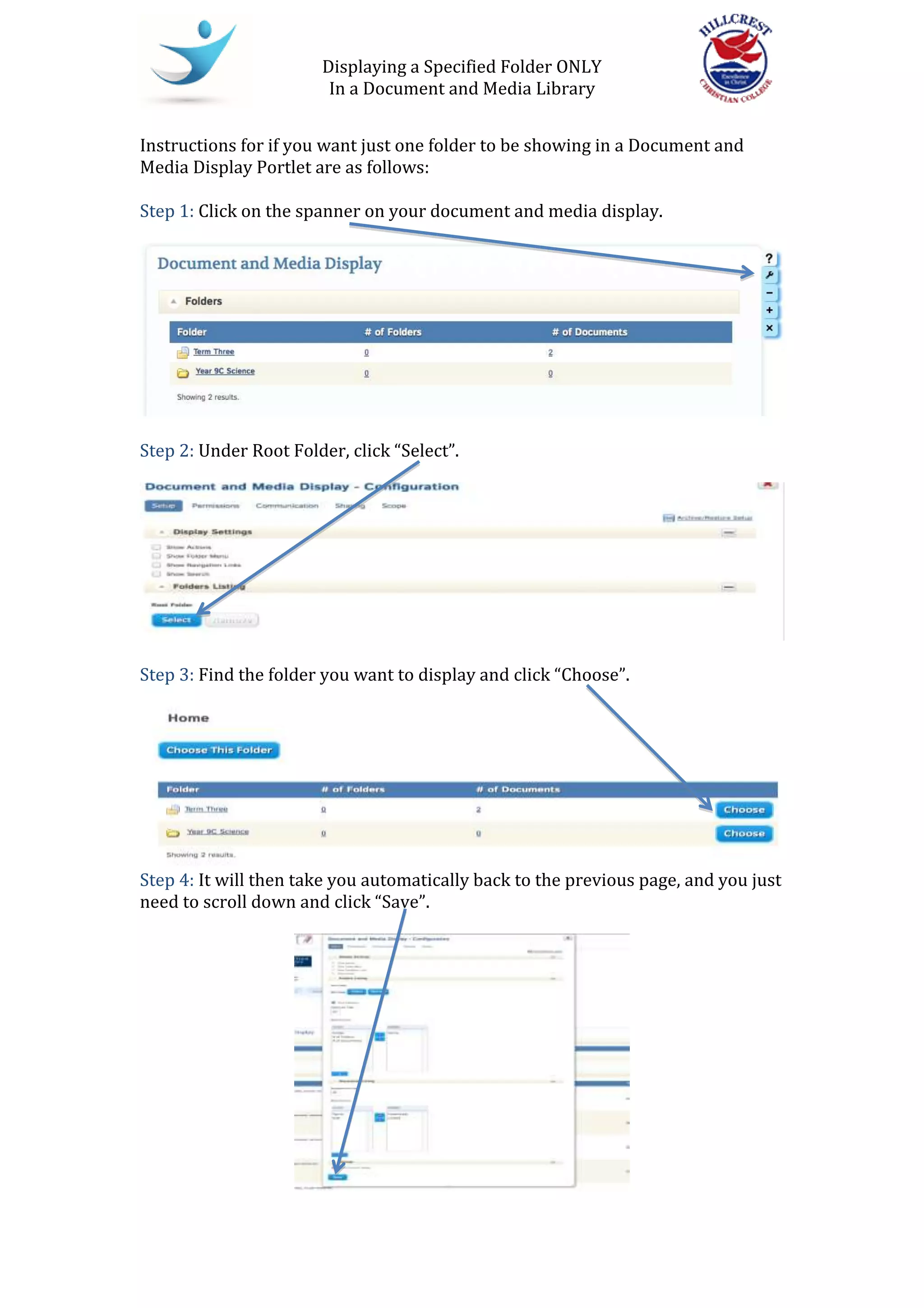
Step 1: Click on the spanner on your document and media display.
Step 2: Under Root Folder, click “Select”.
Step 3: Find the folder you want to display and click “Choose”.
Step 4: It will then take you automatically back to the previous page, and you just
need to scroll down and click “Save”.

Documentmediadisplayscope

  • 1.
    Displaying a SpecifiedFolder ONLY In a Document and Media Library Instructions for if you want just one folder to be showing in a Document and Media Display Portlet are as follows: Step 1: Click on the spanner on your document and media display. Step 2: Under Root Folder, click “Select”. Step 3: Find the folder you want to display and click “Choose”. Step 4: It will then take you automatically back to the previous page, and you just need to scroll down and click “Save”.