Goran Blažič
a.k.a. goranche
facebook - twitter - github - linkedin - @me.com
Documenting code
in Xcode
WHY?
Why waste time writing words
the compiler doesn’t understand?
Code should be self-describing…
And a nice ! to you too!
public extension SequenceType {
func categorise<K: Hashable>(keyFunc: Generator.Element -> K)
-> [K:[Generator.Element]] {
var dict: [K:[Generator.Element]] = [:]
for el in self {
let key = keyFunc(el)
if case nil = dict[key]?.append(el) {
dict[key] = [el]
}
}
return dict
}
}
Code should be self-describing…
And a nice ! to you too!
— Goran Blažič
CODE WILL BE SELF-DOCUMENTING
TO THE ORIGINAL AUTHOR ONLY…
FOR 1 WEEK… TOPS!
”
“
OK, OK, WE’RE
DOKULIEVERS…
Yeah…
sorry about that one "
WHAT DO WE WANT TO ACHIEVE?
QUICK HELP VIEW
WHAT DO WE WANT TO ACHIEVE?
QUICK HELP VIEW
WHAT DO WE WANT TO ACHIEVE?
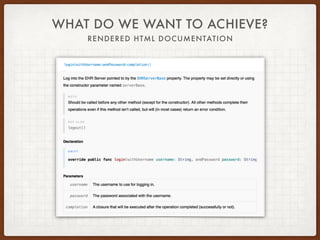
RENDERED HTML DOCUMENTATION
WHAT DO WE WANT TO ACHIEVE?
RENDERED HTML DOCUMENTATION
BUT FIRST…
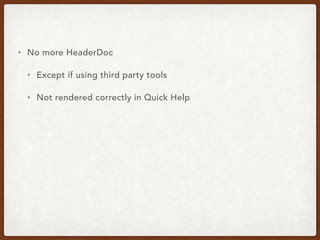
• No more HeaderDoc
• Except if using third party tools
• Not rendered correctly in Quick Help
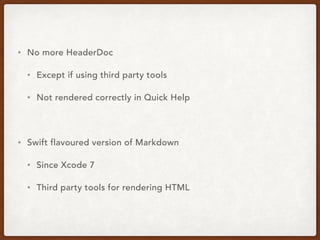
• No more HeaderDoc
• Except if using third party tools
• Not rendered correctly in Quick Help
• Swift flavoured version of Markdown
• Since Xcode 7
• Third party tools for rendering HTML
IN MARKDOWN - CONFUSED SHOULD BE YOU, YES
BASIC MARKUP
• Documentation comments

/** … */ for multi-line comments; /// for single-line comments
IN MARKDOWN - CONFUSED SHOULD BE YOU, YES
BASIC MARKUP
• Documentation comments

/** … */ for multi-line comments; /// for single-line comments
• Separate paragraphs with blank lines
IN MARKDOWN - CONFUSED SHOULD BE YOU, YES
BASIC MARKUP
• Documentation comments

/** … */ for multi-line comments; /// for single-line comments
• Separate paragraphs with blank lines
• Unordered lists with - + * •
IN MARKDOWN - CONFUSED SHOULD BE YOU, YES
BASIC MARKUP
• Documentation comments

/** … */ for multi-line comments; /// for single-line comments
• Separate paragraphs with blank lines
• Unordered lists with - + * •
• Ordered lists use arabic numbers, followed by a period “ 1. “ or a
right parenthesis “ 1) “
IN MARKDOWN - CONFUSED SHOULD BE YOU, YES
BASIC MARKUP
• Documentation comments

/** … */ for multi-line comments; /// for single-line comments
• Separate paragraphs with blank lines
• Unordered lists with - + * •
• Ordered lists use arabic numbers, followed by a period “ 1. “ or a
right parenthesis “ 1) “
• Headers are marked with preceding # character
IN MARKDOWN - CONFUSED SHOULD BE YOU, YES
BASIC MARKUP
• Documentation comments

/** … */ for multi-line comments; /// for single-line comments
• Separate paragraphs with blank lines
• Unordered lists with - + * •
• Ordered lists use arabic numbers, followed by a period “ 1. “ or a
right parenthesis “ 1) “
• Headers are marked with preceding # character
• Even links and images work (well… links at least)
/**
# Lists
You can apply *italic*, **bold**, or `code` inline styles.
## Unordered Lists
- Lists can be fun to use
- Be sure to use a single indent level
- Sub-list formatting
- isn't the best… (being nice here)
## Ordered Lists
1. Where would we be without ordered lists
2. Not that I’ve ever used them in code documentation
3. Still, for sorted items, why not
4. Arabic numerals are the only kind supported
*/
/**
# Lists
You can apply *italic*, **bold**, or `code` inline styles.
## Unordered Lists
- Lists can be fun to use
- Be sure to use a single indent level
- Sub-list formatting
- isn't the best… (being nice here)
## Ordered Lists
1. Where would we be without ordered lists
2. Not that I’ve ever used them in code documentation
3. Still, for sorted items, why not
4. Arabic numerals are the only kind supported
*/
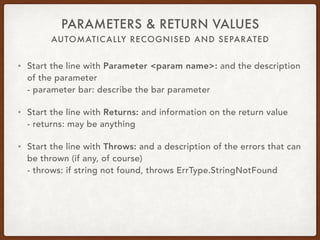
AUTOMATICALLY RECOGNISED AND SEPARATED
PARAMETERS & RETURN VALUES
• Start the line with Parameter <param name>: and the description
of the parameter

- parameter bar: describe the bar parameter
AUTOMATICALLY RECOGNISED AND SEPARATED
PARAMETERS & RETURN VALUES
• Start the line with Parameter <param name>: and the description
of the parameter

- parameter bar: describe the bar parameter
• Start the line with Returns: and information on the return value

- returns: may be anything
AUTOMATICALLY RECOGNISED AND SEPARATED
PARAMETERS & RETURN VALUES
• Start the line with Parameter <param name>: and the description
of the parameter

- parameter bar: describe the bar parameter
• Start the line with Returns: and information on the return value

- returns: may be anything
• Start the line with Throws: and a description of the errors that can
be thrown (if any, of course)

- throws: if string not found, throws ErrType.StringNotFound
AUTOMATICALLY RECOGNISED AND SEPARATED
PARAMETERS & RETURN VALUES
• Start the line with Parameter <param name>: and the description
of the parameter

- parameter bar: describe the bar parameter
• Start the line with Returns: and information on the return value

- returns: may be anything
• Start the line with Throws: and a description of the errors that can
be thrown (if any, of course)

- throws: if string not found, throws ErrType.StringNotFound
• Parameters may be grouped into a sublist by using the
Parameters: prefix, should you have a long list of params #
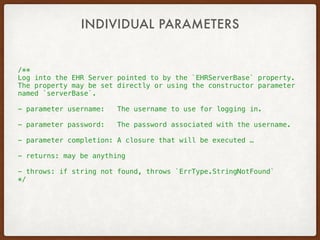
/**
Log into the EHR Server pointed to by the `EHRServerBase` property.
The property may be set directly or using the constructor parameter
named `serverBase`.
- parameter username: The username to use for logging in.
- parameter password: The password associated with the username.
- parameter completion: A closure that will be executed …
- returns: may be anything
- throws: if string not found, throws `ErrType.StringNotFound`
*/
INDIVIDUAL PARAMETERS
/**
Log into the EHR Server pointed to by the `EHRServerBase` property.
The property may be set directly or using the constructor parameter
named `serverBase`.
- parameters:
- username: The username to use for logging in.
- password: The password associated with the username.
- completion: A closure that will be executed …
- returns: may be anything
- throws: if string not found, throws `ErrType.StringNotFound`
*/
LIST OF PARAMETERS
ALSO BROKEN OUT INTO SECTIONS
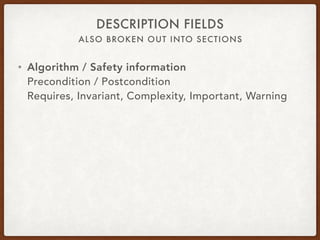
DESCRIPTION FIELDS
• Algorithm / Safety information

Precondition / Postcondition

Requires, Invariant, Complexity, Important, Warning
ALSO BROKEN OUT INTO SECTIONS
DESCRIPTION FIELDS
• Algorithm / Safety information

Precondition / Postcondition

Requires, Invariant, Complexity, Important, Warning
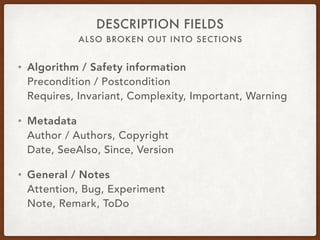
• Metadata

Author / Authors, Copyright

Date, SeeAlso, Since, Version
ALSO BROKEN OUT INTO SECTIONS
DESCRIPTION FIELDS
• Algorithm / Safety information

Precondition / Postcondition

Requires, Invariant, Complexity, Important, Warning
• Metadata

Author / Authors, Copyright

Date, SeeAlso, Since, Version
• General / Notes

Attention, Bug, Experiment

Note, Remark, ToDo
CODE IN THE COMMENTS… WAIT, WHAT?!?
CODE BLOCK
• You may embed code blocks in the documentation comments
• Useful for demonstrating proper usage
• Might use for describing implementation details
CODE IN THE COMMENTS… WAIT, WHAT?!?
CODE BLOCK
• You may embed code blocks in the documentation comments
• Useful for demonstrating proper usage
• Might use for describing implementation details
• Inset the code block by at least 4 spaces

(this didn’t work for me, also, it looks weird)
CODE IN THE COMMENTS… WAIT, WHAT?!?
CODE BLOCK
• You may embed code blocks in the documentation comments
• Useful for demonstrating proper usage
• Might use for describing implementation details
• Inset the code block by at least 4 spaces

(this didn’t work for me, also, it looks weird)
• Use standard fenced code: three backticks ( ` : option + < ) or
tildes ( ~ : option + n) marking the beginning and end of a block
of code
/**
- Experiment: Proper use of this function is demonstrated
by the following code
```
let input = "foobar"
let foobar = foo(bar: input)
```
*/
HOW DOES THIS LOOK IN A
REAL WORLD EXAMPLE?
HOW DOES THIS LOOK IN A
REAL WORLD EXAMPLE?
I’D SAY QUITE GOOD…
$%
NOT REALLY RELATED TO DOCUMENTATION, BUT STILL
SOME OTHER USEFUL MARKS
• // MARK:

adds a visual marker in the jump bar

if followed by a single dash, will be preceded by a
horizontal divider

it’s similar to Obj-C “#pragma mark”
NOT REALLY RELATED TO DOCUMENTATION, BUT STILL
SOME OTHER USEFUL MARKS
• // MARK:

adds a visual marker in the jump bar

if followed by a single dash, will be preceded by a
horizontal divider

it’s similar to Obj-C “#pragma mark”
• // TODO:

adds a todo comment that’s listed in the jump bar
NOT REALLY RELATED TO DOCUMENTATION, BUT STILL
SOME OTHER USEFUL MARKS
• // MARK:

adds a visual marker in the jump bar

if followed by a single dash, will be preceded by a
horizontal divider

it’s similar to Obj-C “#pragma mark”
• // TODO:

adds a todo comment that’s listed in the jump bar
• // FIXME:

adds a fixme comment that’s listed in the jump bar
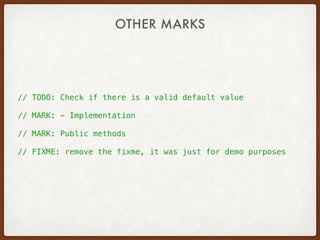
// TODO: Check if there is a valid default value
// MARK: - Implementation
// MARK: Public methods
// FIXME: remove the fixme, it was just for demo purposes
OTHER MARKS
// TODO: Check if there is a valid default value
// MARK: - Implementation
// MARK: Public methods
// FIXME: remove the fixme, it was just for demo purposes
OTHER MARKS
RENDERING
HTML DOCS
A.K.A. I WAS TOO LAZY TO TRY ANYTHING ELSE… &
JUST USE JAZZY
• https://github.com/realm/jazzy
A.K.A. I WAS TOO LAZY TO TRY ANYTHING ELSE… &
JUST USE JAZZY
• https://github.com/realm/jazzy
• optionally create a .jazzy.yaml file

I’d recommend doing so
A.K.A. I WAS TOO LAZY TO TRY ANYTHING ELSE… &
JUST USE JAZZY
• https://github.com/realm/jazzy
• optionally create a .jazzy.yaml file

I’d recommend doing so
• read the documentation
A.K.A. I WAS TOO LAZY TO TRY ANYTHING ELSE… &
JUST USE JAZZY
• https://github.com/realm/jazzy
• optionally create a .jazzy.yaml file

I’d recommend doing so
• read the documentation
• run it in your project root
A.K.A. I WAS TOO LAZY TO TRY ANYTHING ELSE… &
JUST USE JAZZY
• https://github.com/realm/jazzy
• optionally create a .jazzy.yaml file

I’d recommend doing so
• read the documentation
• run it in your project root
• open the new index.html file
A.K.A. I WAS TOO LAZY TO TRY ANYTHING ELSE… &
JUST USE JAZZY
• https://github.com/realm/jazzy
• optionally create a .jazzy.yaml file

I’d recommend doing so
• read the documentation
• run it in your project root
• open the new index.html file
• go for a drink, you’ve deserved it '
DEMO?
BUT DON’T GO TOO FAR WITH IT…
YES, DOCUMENT YOUR WORK
• public interfaces should be documented
• including properties!
BUT DON’T GO TOO FAR WITH IT…
YES, DOCUMENT YOUR WORK
• public interfaces should be documented
• including properties!
• if you work in a team, much more should be considered public
• what classes will other team members use?
• make their life a bit easier
BUT DON’T GO TOO FAR WITH IT…
YES, DOCUMENT YOUR WORK
• public interfaces should be documented
• including properties!
• if you work in a team, much more should be considered public
• what classes will other team members use?
• make their life a bit easier
• automate as much as possible
• make jazzy a part of your deployment / integration
• use Xcode plugins / extensions to make documenting easier
Q & A
AND NOW FOR THE OBLIGATORY
WAIT FOR IT…
THE DEPTHS OF THE INTERWEBZ ARE LIMITLESS
MORE INFO CAN BE FOUND…
• Google
THE DEPTHS OF THE INTERWEBZ ARE LIMITLESS
MORE INFO CAN BE FOUND…
• Google
• Apple documentation
• Quick Help
• Markup Formatting Reference

Documenting with xcode

  • 1.
    Goran Blažič a.k.a. goranche facebook- twitter - github - linkedin - @me.com Documenting code in Xcode
  • 2.
    WHY? Why waste timewriting words the compiler doesn’t understand?
  • 3.
    Code should beself-describing…
  • 4.
    Code should beself-describing… And a nice ! to you too!
  • 5.
    public extension SequenceType{ func categorise<K: Hashable>(keyFunc: Generator.Element -> K) -> [K:[Generator.Element]] { var dict: [K:[Generator.Element]] = [:] for el in self { let key = keyFunc(el) if case nil = dict[key]?.append(el) { dict[key] = [el] } } return dict } } Code should be self-describing… And a nice ! to you too!
  • 6.
    — Goran Blažič CODEWILL BE SELF-DOCUMENTING TO THE ORIGINAL AUTHOR ONLY… FOR 1 WEEK… TOPS! ” “
  • 8.
  • 9.
    WHAT DO WEWANT TO ACHIEVE? QUICK HELP VIEW
  • 10.
    WHAT DO WEWANT TO ACHIEVE? QUICK HELP VIEW
  • 11.
    WHAT DO WEWANT TO ACHIEVE? RENDERED HTML DOCUMENTATION
  • 12.
    WHAT DO WEWANT TO ACHIEVE? RENDERED HTML DOCUMENTATION
  • 13.
  • 14.
    • No moreHeaderDoc • Except if using third party tools • Not rendered correctly in Quick Help
  • 15.
    • No moreHeaderDoc • Except if using third party tools • Not rendered correctly in Quick Help • Swift flavoured version of Markdown • Since Xcode 7 • Third party tools for rendering HTML
  • 16.
    IN MARKDOWN -CONFUSED SHOULD BE YOU, YES BASIC MARKUP • Documentation comments
 /** … */ for multi-line comments; /// for single-line comments
  • 17.
    IN MARKDOWN -CONFUSED SHOULD BE YOU, YES BASIC MARKUP • Documentation comments
 /** … */ for multi-line comments; /// for single-line comments • Separate paragraphs with blank lines
  • 18.
    IN MARKDOWN -CONFUSED SHOULD BE YOU, YES BASIC MARKUP • Documentation comments
 /** … */ for multi-line comments; /// for single-line comments • Separate paragraphs with blank lines • Unordered lists with - + * •
  • 19.
    IN MARKDOWN -CONFUSED SHOULD BE YOU, YES BASIC MARKUP • Documentation comments
 /** … */ for multi-line comments; /// for single-line comments • Separate paragraphs with blank lines • Unordered lists with - + * • • Ordered lists use arabic numbers, followed by a period “ 1. “ or a right parenthesis “ 1) “
  • 20.
    IN MARKDOWN -CONFUSED SHOULD BE YOU, YES BASIC MARKUP • Documentation comments
 /** … */ for multi-line comments; /// for single-line comments • Separate paragraphs with blank lines • Unordered lists with - + * • • Ordered lists use arabic numbers, followed by a period “ 1. “ or a right parenthesis “ 1) “ • Headers are marked with preceding # character
  • 21.
    IN MARKDOWN -CONFUSED SHOULD BE YOU, YES BASIC MARKUP • Documentation comments
 /** … */ for multi-line comments; /// for single-line comments • Separate paragraphs with blank lines • Unordered lists with - + * • • Ordered lists use arabic numbers, followed by a period “ 1. “ or a right parenthesis “ 1) “ • Headers are marked with preceding # character • Even links and images work (well… links at least)
  • 22.
    /** # Lists You canapply *italic*, **bold**, or `code` inline styles. ## Unordered Lists - Lists can be fun to use - Be sure to use a single indent level - Sub-list formatting - isn't the best… (being nice here) ## Ordered Lists 1. Where would we be without ordered lists 2. Not that I’ve ever used them in code documentation 3. Still, for sorted items, why not 4. Arabic numerals are the only kind supported */
  • 23.
    /** # Lists You canapply *italic*, **bold**, or `code` inline styles. ## Unordered Lists - Lists can be fun to use - Be sure to use a single indent level - Sub-list formatting - isn't the best… (being nice here) ## Ordered Lists 1. Where would we be without ordered lists 2. Not that I’ve ever used them in code documentation 3. Still, for sorted items, why not 4. Arabic numerals are the only kind supported */
  • 24.
    AUTOMATICALLY RECOGNISED ANDSEPARATED PARAMETERS & RETURN VALUES • Start the line with Parameter <param name>: and the description of the parameter
 - parameter bar: describe the bar parameter
  • 25.
    AUTOMATICALLY RECOGNISED ANDSEPARATED PARAMETERS & RETURN VALUES • Start the line with Parameter <param name>: and the description of the parameter
 - parameter bar: describe the bar parameter • Start the line with Returns: and information on the return value
 - returns: may be anything
  • 26.
    AUTOMATICALLY RECOGNISED ANDSEPARATED PARAMETERS & RETURN VALUES • Start the line with Parameter <param name>: and the description of the parameter
 - parameter bar: describe the bar parameter • Start the line with Returns: and information on the return value
 - returns: may be anything • Start the line with Throws: and a description of the errors that can be thrown (if any, of course)
 - throws: if string not found, throws ErrType.StringNotFound
  • 27.
    AUTOMATICALLY RECOGNISED ANDSEPARATED PARAMETERS & RETURN VALUES • Start the line with Parameter <param name>: and the description of the parameter
 - parameter bar: describe the bar parameter • Start the line with Returns: and information on the return value
 - returns: may be anything • Start the line with Throws: and a description of the errors that can be thrown (if any, of course)
 - throws: if string not found, throws ErrType.StringNotFound • Parameters may be grouped into a sublist by using the Parameters: prefix, should you have a long list of params #
  • 28.
    /** Log into theEHR Server pointed to by the `EHRServerBase` property. The property may be set directly or using the constructor parameter named `serverBase`. - parameter username: The username to use for logging in. - parameter password: The password associated with the username. - parameter completion: A closure that will be executed … - returns: may be anything - throws: if string not found, throws `ErrType.StringNotFound` */ INDIVIDUAL PARAMETERS
  • 29.
    /** Log into theEHR Server pointed to by the `EHRServerBase` property. The property may be set directly or using the constructor parameter named `serverBase`. - parameters: - username: The username to use for logging in. - password: The password associated with the username. - completion: A closure that will be executed … - returns: may be anything - throws: if string not found, throws `ErrType.StringNotFound` */ LIST OF PARAMETERS
  • 30.
    ALSO BROKEN OUTINTO SECTIONS DESCRIPTION FIELDS • Algorithm / Safety information
 Precondition / Postcondition
 Requires, Invariant, Complexity, Important, Warning
  • 31.
    ALSO BROKEN OUTINTO SECTIONS DESCRIPTION FIELDS • Algorithm / Safety information
 Precondition / Postcondition
 Requires, Invariant, Complexity, Important, Warning • Metadata
 Author / Authors, Copyright
 Date, SeeAlso, Since, Version
  • 32.
    ALSO BROKEN OUTINTO SECTIONS DESCRIPTION FIELDS • Algorithm / Safety information
 Precondition / Postcondition
 Requires, Invariant, Complexity, Important, Warning • Metadata
 Author / Authors, Copyright
 Date, SeeAlso, Since, Version • General / Notes
 Attention, Bug, Experiment
 Note, Remark, ToDo
  • 34.
    CODE IN THECOMMENTS… WAIT, WHAT?!? CODE BLOCK • You may embed code blocks in the documentation comments • Useful for demonstrating proper usage • Might use for describing implementation details
  • 35.
    CODE IN THECOMMENTS… WAIT, WHAT?!? CODE BLOCK • You may embed code blocks in the documentation comments • Useful for demonstrating proper usage • Might use for describing implementation details • Inset the code block by at least 4 spaces
 (this didn’t work for me, also, it looks weird)
  • 36.
    CODE IN THECOMMENTS… WAIT, WHAT?!? CODE BLOCK • You may embed code blocks in the documentation comments • Useful for demonstrating proper usage • Might use for describing implementation details • Inset the code block by at least 4 spaces
 (this didn’t work for me, also, it looks weird) • Use standard fenced code: three backticks ( ` : option + < ) or tildes ( ~ : option + n) marking the beginning and end of a block of code
  • 37.
    /** - Experiment: Properuse of this function is demonstrated by the following code ``` let input = "foobar" let foobar = foo(bar: input) ``` */
  • 38.
    HOW DOES THISLOOK IN A REAL WORLD EXAMPLE?
  • 39.
    HOW DOES THISLOOK IN A REAL WORLD EXAMPLE? I’D SAY QUITE GOOD… $%
  • 40.
    NOT REALLY RELATEDTO DOCUMENTATION, BUT STILL SOME OTHER USEFUL MARKS • // MARK:
 adds a visual marker in the jump bar
 if followed by a single dash, will be preceded by a horizontal divider
 it’s similar to Obj-C “#pragma mark”
  • 41.
    NOT REALLY RELATEDTO DOCUMENTATION, BUT STILL SOME OTHER USEFUL MARKS • // MARK:
 adds a visual marker in the jump bar
 if followed by a single dash, will be preceded by a horizontal divider
 it’s similar to Obj-C “#pragma mark” • // TODO:
 adds a todo comment that’s listed in the jump bar
  • 42.
    NOT REALLY RELATEDTO DOCUMENTATION, BUT STILL SOME OTHER USEFUL MARKS • // MARK:
 adds a visual marker in the jump bar
 if followed by a single dash, will be preceded by a horizontal divider
 it’s similar to Obj-C “#pragma mark” • // TODO:
 adds a todo comment that’s listed in the jump bar • // FIXME:
 adds a fixme comment that’s listed in the jump bar
  • 43.
    // TODO: Checkif there is a valid default value // MARK: - Implementation // MARK: Public methods // FIXME: remove the fixme, it was just for demo purposes OTHER MARKS
  • 44.
    // TODO: Checkif there is a valid default value // MARK: - Implementation // MARK: Public methods // FIXME: remove the fixme, it was just for demo purposes OTHER MARKS
  • 45.
  • 46.
    A.K.A. I WASTOO LAZY TO TRY ANYTHING ELSE… & JUST USE JAZZY • https://github.com/realm/jazzy
  • 47.
    A.K.A. I WASTOO LAZY TO TRY ANYTHING ELSE… & JUST USE JAZZY • https://github.com/realm/jazzy • optionally create a .jazzy.yaml file
 I’d recommend doing so
  • 48.
    A.K.A. I WASTOO LAZY TO TRY ANYTHING ELSE… & JUST USE JAZZY • https://github.com/realm/jazzy • optionally create a .jazzy.yaml file
 I’d recommend doing so • read the documentation
  • 49.
    A.K.A. I WASTOO LAZY TO TRY ANYTHING ELSE… & JUST USE JAZZY • https://github.com/realm/jazzy • optionally create a .jazzy.yaml file
 I’d recommend doing so • read the documentation • run it in your project root
  • 50.
    A.K.A. I WASTOO LAZY TO TRY ANYTHING ELSE… & JUST USE JAZZY • https://github.com/realm/jazzy • optionally create a .jazzy.yaml file
 I’d recommend doing so • read the documentation • run it in your project root • open the new index.html file
  • 51.
    A.K.A. I WASTOO LAZY TO TRY ANYTHING ELSE… & JUST USE JAZZY • https://github.com/realm/jazzy • optionally create a .jazzy.yaml file
 I’d recommend doing so • read the documentation • run it in your project root • open the new index.html file • go for a drink, you’ve deserved it '
  • 52.
  • 55.
    BUT DON’T GOTOO FAR WITH IT… YES, DOCUMENT YOUR WORK • public interfaces should be documented • including properties!
  • 56.
    BUT DON’T GOTOO FAR WITH IT… YES, DOCUMENT YOUR WORK • public interfaces should be documented • including properties! • if you work in a team, much more should be considered public • what classes will other team members use? • make their life a bit easier
  • 57.
    BUT DON’T GOTOO FAR WITH IT… YES, DOCUMENT YOUR WORK • public interfaces should be documented • including properties! • if you work in a team, much more should be considered public • what classes will other team members use? • make their life a bit easier • automate as much as possible • make jazzy a part of your deployment / integration • use Xcode plugins / extensions to make documenting easier
  • 58.
    Q & A ANDNOW FOR THE OBLIGATORY WAIT FOR IT…
  • 59.
    THE DEPTHS OFTHE INTERWEBZ ARE LIMITLESS MORE INFO CAN BE FOUND… • Google
  • 60.
    THE DEPTHS OFTHE INTERWEBZ ARE LIMITLESS MORE INFO CAN BE FOUND… • Google • Apple documentation • Quick Help • Markup Formatting Reference