Coding Conventions [Part I]
An Enterprise-grade Micro Services Framework
For Node.js
MIT Licensed
Roshan Kulkarni
Hardik Patel

Mindstix Labs
Why Have Code Conventions
• 80% of the lifetime cost of a piece of software goes to
maintenance.
• Hardly any software is maintained for its whole life by
the original author.
• Code conventions improve the readability of the
software, allowing engineers to understand new code
more quickly and thoroughly.
• If you ship your source code as a product, you need
to make sure it is as well packaged and clean as any
other product you create.
THANK YOU!
Java Files
• Java Software uses the following file suffixes:
• Java source - .java
• Java Bytecode - .class
• Frequently used file names include:
• GNUmakefile - The preferred name for makefiles.
• README - The preferred name for the file that summarises the
contents of a particular directory.
• A file consists of sections that should be separated by blank lines and
an optional comment identifying each section.
• Files longer than 2000 lines are cumbersome and should be avoided.
THANK YOU!
Java Source Files
• Each Java source file contains a single public class
or interface. When private classes and interfaces are
associated with a public class, you can put them in
the same source file as the public class. The public
class should be the first class or interface in the file.
• Java source files have the following ordering:
• Beginning comments.
• Package and Import statements.
• Class and interface declarations.
THANK YOU!
Java Source Files
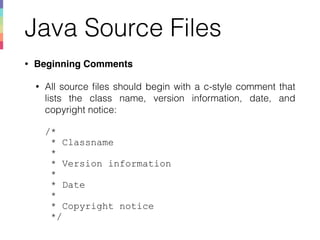
• Beginning Comments
• All source files should begin with a c-style comment that
lists the class name, version information, date, and
copyright notice:


/*

* Classname

*

* Version information

*

* Date

*

* Copyright notice

*/
THANK YOU!
Java Source Files
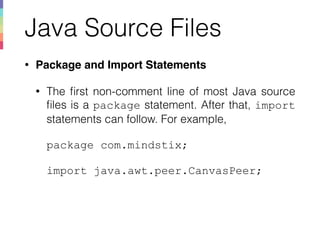
• Package and Import Statements
• The first non-comment line of most Java source
files is a package statement. After that, import
statements can follow. For example, 


package com.mindstix;


import java.awt.peer.CanvasPeer;
THANK YOU!
Java Source Files
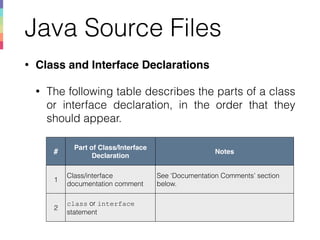
• Class and Interface Declarations
• The following table describes the parts of a class
or interface declaration, in the order that they
should appear. 


THANK YOU!
#
Part of Class/Interface
Declaration
Notes
1
Class/interface
documentation comment
See ‘Documentation Comments’ section
below.
2
class or interface
statement
Java Source Files
THANK YOU!
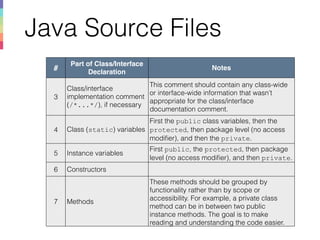
#
Part of Class/Interface
Declaration
Notes
3
Class/interface
implementation comment 

(/*...*/), if necessary
This comment should contain any class-wide
or interface-wide information that wasn’t
appropriate for the class/interface
documentation comment.
4 Class (static) variables
First the public class variables, then the
protected, then package level (no access
modifier), and then the private.
5 Instance variables
First public, the protected, then package
level (no access modifier), and then private.
6 Constructors
7 Methods
These methods should be grouped by
functionality rather than by scope or
accessibility. For example, a private class
method can be in between two public
instance methods. The goal is to make
reading and understanding the code easier.
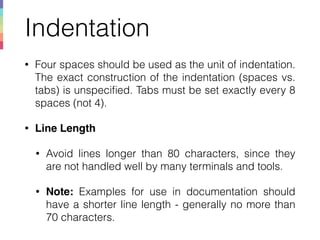
Indentation
• Four spaces should be used as the unit of indentation.
The exact construction of the indentation (spaces vs.
tabs) is unspecified. Tabs must be set exactly every 8
spaces (not 4).
• Line Length
• Avoid lines longer than 80 characters, since they
are not handled well by many terminals and tools.
• Note: Examples for use in documentation should
have a shorter line length - generally no more than
70 characters.
THANK YOU!
Indentation
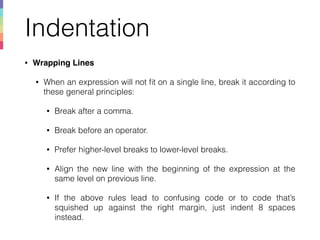
• Wrapping Lines
• When an expression will not fit on a single line, break it according to
these general principles:
• Break after a comma.
• Break before an operator.
• Prefer higher-level breaks to lower-level breaks.
• Align the new line with the beginning of the expression at the
same level on previous line.
• If the above rules lead to confusing code or to code that’s
squished up against the right margin, just indent 8 spaces
instead.
THANK YOU!
Indentation
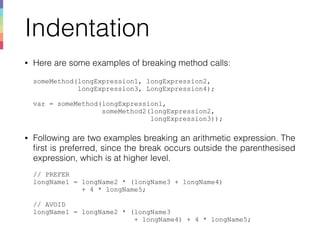
• Here are some examples of breaking method calls:


someMethod(longExpression1, longExpression2, 

longExpression3, LongExpression4);


var = someMethod(longExpression1,

someMethod2(longExpression2,

longExpression3));
• Following are two examples breaking an arithmetic expression. The
first is preferred, since the break occurs outside the parenthesised
expression, which is at higher level.


// PREFER

longName1 = longName2 * (longName3 + longName4) 

+ 4 * longName5;


// AVOID 

longName1 = longName2 * (longName3 

+ longName4) + 4 * longName5;
THANK YOU!
Indentation
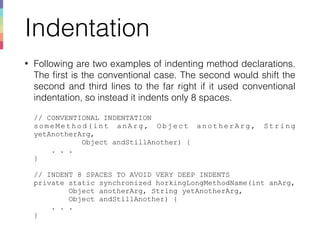
• Following are two examples of indenting method declarations.
The first is the conventional case. The second would shift the
second and third lines to the far right if it used conventional
indentation, so instead it indents only 8 spaces.


// CONVENTIONAL INDENTATION

someMethod(int anArg, Object anotherArg, String
yetAnotherArg,

Object andStillAnother) {

. . .

}


// INDENT 8 SPACES TO AVOID VERY DEEP INDENTS

private static synchronized horkingLongMethodName(int anArg, 

Object anotherArg, String yetAnotherArg,

Object andStillAnother) {

. . .

}THANK YOU!
Indentation
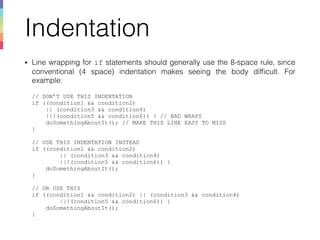
• Line wrapping for if statements should generally use the 8-space rule, since
conventional (4 space) indentation makes seeing the body difficult. For
example:


// DON’T USE THIS INDENTATION

if ((condition1 && condition2)

|| (condition3 && condition4)

||!(condition5 && condition6)) { // BAD WRAPS

doSomethingAboutIt(); // MAKE THIS LINE EASY TO MISS

}


// USE THIS INDENTATION INSTEAD

if ((condition1 && condition2)

|| (condition3 && condition4)

||!(condition5 && condition6)) {

doSomethingAboutIt();

}


// OR USE THIS

if ((condition1 && condition2) || (condition3 && condition4)

||!(condition5 && condition6)) {

doSomethingAboutIt();

}THANK YOU!
Indentation
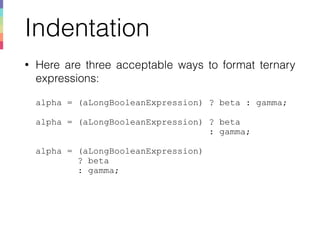
• Here are three acceptable ways to format ternary
expressions:


alpha = (aLongBooleanExpression) ? beta : gamma;


alpha = (aLongBooleanExpression) ? beta

: gamma;


alpha = (aLongBooleanExpression) 

? beta

: gamma;
THANK YOU!
To be covered Next…
• Comments
• Declarations
• Statements
• White Space
• Naming Conventions
• Programming Practices
• Code Examples
THANK YOU!

1. Coding Conventions [Part 1]

  • 1.
    Coding Conventions [PartI] An Enterprise-grade Micro Services Framework For Node.js MIT Licensed Roshan Kulkarni Hardik Patel
 Mindstix Labs
  • 2.
    Why Have CodeConventions • 80% of the lifetime cost of a piece of software goes to maintenance. • Hardly any software is maintained for its whole life by the original author. • Code conventions improve the readability of the software, allowing engineers to understand new code more quickly and thoroughly. • If you ship your source code as a product, you need to make sure it is as well packaged and clean as any other product you create. THANK YOU!
  • 3.
    Java Files • JavaSoftware uses the following file suffixes: • Java source - .java • Java Bytecode - .class • Frequently used file names include: • GNUmakefile - The preferred name for makefiles. • README - The preferred name for the file that summarises the contents of a particular directory. • A file consists of sections that should be separated by blank lines and an optional comment identifying each section. • Files longer than 2000 lines are cumbersome and should be avoided. THANK YOU!
  • 4.
    Java Source Files •Each Java source file contains a single public class or interface. When private classes and interfaces are associated with a public class, you can put them in the same source file as the public class. The public class should be the first class or interface in the file. • Java source files have the following ordering: • Beginning comments. • Package and Import statements. • Class and interface declarations. THANK YOU!
  • 5.
    Java Source Files •Beginning Comments • All source files should begin with a c-style comment that lists the class name, version information, date, and copyright notice:
 
 /*
 * Classname
 *
 * Version information
 *
 * Date
 *
 * Copyright notice
 */ THANK YOU!
  • 6.
    Java Source Files •Package and Import Statements • The first non-comment line of most Java source files is a package statement. After that, import statements can follow. For example, 
 
 package com.mindstix;
 
 import java.awt.peer.CanvasPeer; THANK YOU!
  • 7.
    Java Source Files •Class and Interface Declarations • The following table describes the parts of a class or interface declaration, in the order that they should appear. 
 
 THANK YOU! # Part of Class/Interface Declaration Notes 1 Class/interface documentation comment See ‘Documentation Comments’ section below. 2 class or interface statement
  • 8.
    Java Source Files THANKYOU! # Part of Class/Interface Declaration Notes 3 Class/interface implementation comment 
 (/*...*/), if necessary This comment should contain any class-wide or interface-wide information that wasn’t appropriate for the class/interface documentation comment. 4 Class (static) variables First the public class variables, then the protected, then package level (no access modifier), and then the private. 5 Instance variables First public, the protected, then package level (no access modifier), and then private. 6 Constructors 7 Methods These methods should be grouped by functionality rather than by scope or accessibility. For example, a private class method can be in between two public instance methods. The goal is to make reading and understanding the code easier.
  • 9.
    Indentation • Four spacesshould be used as the unit of indentation. The exact construction of the indentation (spaces vs. tabs) is unspecified. Tabs must be set exactly every 8 spaces (not 4). • Line Length • Avoid lines longer than 80 characters, since they are not handled well by many terminals and tools. • Note: Examples for use in documentation should have a shorter line length - generally no more than 70 characters. THANK YOU!
  • 10.
    Indentation • Wrapping Lines •When an expression will not fit on a single line, break it according to these general principles: • Break after a comma. • Break before an operator. • Prefer higher-level breaks to lower-level breaks. • Align the new line with the beginning of the expression at the same level on previous line. • If the above rules lead to confusing code or to code that’s squished up against the right margin, just indent 8 spaces instead. THANK YOU!
  • 11.
    Indentation • Here aresome examples of breaking method calls:
 
 someMethod(longExpression1, longExpression2, 
 longExpression3, LongExpression4);
 
 var = someMethod(longExpression1,
 someMethod2(longExpression2,
 longExpression3)); • Following are two examples breaking an arithmetic expression. The first is preferred, since the break occurs outside the parenthesised expression, which is at higher level.
 
 // PREFER
 longName1 = longName2 * (longName3 + longName4) 
 + 4 * longName5;
 
 // AVOID 
 longName1 = longName2 * (longName3 
 + longName4) + 4 * longName5; THANK YOU!
  • 12.
    Indentation • Following aretwo examples of indenting method declarations. The first is the conventional case. The second would shift the second and third lines to the far right if it used conventional indentation, so instead it indents only 8 spaces.
 
 // CONVENTIONAL INDENTATION
 someMethod(int anArg, Object anotherArg, String yetAnotherArg,
 Object andStillAnother) {
 . . .
 }
 
 // INDENT 8 SPACES TO AVOID VERY DEEP INDENTS
 private static synchronized horkingLongMethodName(int anArg, 
 Object anotherArg, String yetAnotherArg,
 Object andStillAnother) {
 . . .
 }THANK YOU!
  • 13.
    Indentation • Line wrappingfor if statements should generally use the 8-space rule, since conventional (4 space) indentation makes seeing the body difficult. For example:
 
 // DON’T USE THIS INDENTATION
 if ((condition1 && condition2)
 || (condition3 && condition4)
 ||!(condition5 && condition6)) { // BAD WRAPS
 doSomethingAboutIt(); // MAKE THIS LINE EASY TO MISS
 }
 
 // USE THIS INDENTATION INSTEAD
 if ((condition1 && condition2)
 || (condition3 && condition4)
 ||!(condition5 && condition6)) {
 doSomethingAboutIt();
 }
 
 // OR USE THIS
 if ((condition1 && condition2) || (condition3 && condition4)
 ||!(condition5 && condition6)) {
 doSomethingAboutIt();
 }THANK YOU!
  • 14.
    Indentation • Here arethree acceptable ways to format ternary expressions:
 
 alpha = (aLongBooleanExpression) ? beta : gamma;
 
 alpha = (aLongBooleanExpression) ? beta
 : gamma;
 
 alpha = (aLongBooleanExpression) 
 ? beta
 : gamma; THANK YOU!
  • 15.
    To be coveredNext… • Comments • Declarations • Statements • White Space • Naming Conventions • Programming Practices • Code Examples THANK YOU!