Focused
 Strong
Specific
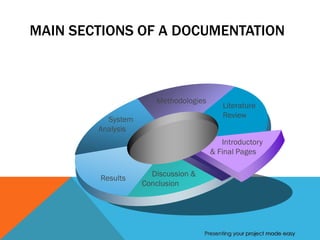
MAIN SECTIONS OF A DOCUMENTATION


                      Methodologies
                                          Literature
                                          Review
          System
        Analysis
                                         Introductory
                                      & Final Pages

                     Discussion &
        Results
                   Conclusion


                                    Presenting your project made easy
INTRODUCTORY PAGES
Front Page (Main Cover).
 Mansoura University’s logo, Computer and Control Systems
  Department, Project’s Title, Supervisors Name (s), Team Members
  Names, Date (M/Y), Sponsors’ logos, and …
 This phrase: “A Graduation Project Submitted in the partial
  fulfillment of B.S. degree in Computer Science & Information
  Systems.”
 Qur’anic Verse / Quote …


                                             Presenting your project made easy
ABSTRACT
Abstract (Preface) …
 An Abstract shouldn’t exceed about 200 – 500 words in a paper,
  and about 2 pages (Maximum) in a Documentation.
 The English Abstract should be translated at least into “Arabic.”
 Do not cite references in the abstract.


                                                Presenting your project made easy
ACKNOWLEDGMENT & DEDICATIONS
Acknowledgment
 The preferred spelling of the word “acknowledgment” in American
  English is without an “e” after the “g.”
 Use the singular heading even if you have many acknowledgments.
 Avoid expressions such as “One of us (S.B.A.) would like to thank ...
  .” Instead, write “F. A. Author thanks ... .”
Dedications


                                                 Presenting your project made easy
THE REMAINING INTRODUCTORY
PAGES
Table of Contents
List of …
 Figures.
 Tables.
 Equations. (Optional)
 Abbreviations. (Optional)
Document Organization (Structure)
Chapter 1: Introduction                       which usually
  includes sections such as Overview, Motivation, Problem
  Statement, Objective (s), Scope of the work, Solution
  Approaches, Tools Used, … etc.


                                              Presenting your project made easy
CONTENTS OF A LITERATURE REVIEW
Reviewing the different scopes and related domains.
Reviewing main modules in the selected scope.
Reviewing the main approaches and methodologies per module
 State implicitly/briefly the Advantages/Disadvantages as reviewed
  for each approach.
 A simple indirect comparative study may be conducted (in tables
  form).
 At least one chapter in the documentation, but may reach three.
 An example to illustrate all aspects of literature review: Voice
  Recognition


                                                Presenting your project made easy
METHODOLOGIES (PROPOSED SYSTEM)
Detail the researched & implemented methods.
 Determine the scope of the project in more details.
 Use appendices to make a better document structure.

Detail any comparative aspects with other approaches.


                                             Presenting your project made easy
SYSTEM ANALYSIS & DESIGN
Only one chapter.
Block Diagram.
Requirements Specification: System’s Software & Hardware
  Requirements.
Assumptions & Dependencies.
Software lifecycle and time plan.
UML (Unified Modeling Language) Diagrams.
 e.g. Use Case Diagram, Class Diagram, Sequence Diagram,
  Collaboration Diagram, Activity Diagram, State Machine Diagram,
  … etc.


                                              Presenting your project made easy
RESULTS & EXPERIMENTS

Conducted Results.


Comparative Study against other approaches


                                    Presenting your project made easy
DISCUSSION & CONCLUSION
Discuss the achieved results.
Conclude/Summarize the contributions.
 A conclusion section is not required. Although a conclusion may
  review the main points of the paper.
 Do not replicate the abstract as the conclusion.
 A conclusion might elaborate on the importance of the work or
  suggest applications and extensions.
Future Work.


                                               Presenting your project made easy
THE REMAINING FINAL PAGES
References
Appendices
Glossary
Notes


                            Presenting your project made easy
GENERAL GUIDELINES & STANDARDS
Nearly all pages should be numbered (Roman/English numbers).
Not more than a couple of – formal – fonts per page.
Standard indexing & font sizes for paragraphs, sub-titles, sections’
   titles, and chapters’ titles (e.g. 12, 14, 16 and 22).
Don’t write a paragraph consisting of one line.
Usually, in documentations, roman numerals are used only in
   numbering the introductory pages … English numbers are used
   to number the whole document starting the chapters.
Define all symbols and abbreviations before using them (whether in
   text or list of abbreviations).


                                                  Presenting your project made easy
GENERAL GUIDELINES & STANDARDS
Figures, Tables, and Equations should be indexed, and they have to
   be referred to within the text.
Figure explanation should be below the figures; table explanations
   should be above the tables.
Avoid placing figures and tables before their first mention in the text.
Use the abbreviation “Fig. 1,” even at the beginning of a sentence.
Do not change the font sizes or line spacing to compress more text
   into a limited number of pages.
Use italics for ensuring ; do not underline.


                                                  Presenting your project made easy
GENERAL GUIDELINES & STANDARDS
If you are using Word, use either the Microsoft Equation Editor or the
    MathType add-on (http://www.mathtype.com) for equations in
    your paper/document (Insert | Object | Create New | Microsoft
    Equation or MathType Equation).
Use one space after complete sentence and colons.
Avoid dangling participles, such as, “Using (1), the potential was
   calculated.” [It is not clear who or what used (1).] Write instead,
   “The potential was calculated by using (1),” or “Using (1), we
   calculated the potential.”
Use a zero before decimal points: “0.25,” not “.25.”
Indicate sample dimensions as “0.1 cm × 0.2 cm,” not “0.1 × 0.2
   cm2.”


                                                  Presenting your project made easy
GENERAL GUIDELINES & STANDARDS
The abbreviation for “seconds” is “s,” not “sec.”
Do not mix complete spellings and abbreviations of units: use
   “Wb/m2” or “webers per square meter,” not “webers/m2.”
When expressing a range of values, write “7 to 9” or “7-9,” not
  “7~9.”
A parenthetical statement at the end of a sentence is punctuated
   outside of the closing parenthesis (like this). (A parenthetical
   sentence is punctuated within the parentheses)


                                                    Presenting your project made easy
GENERAL GUIDELINES & STANDARDS
Avoid contractions; for example, write “do not” instead of “don’t.”
The serial comma is preferred: “A, B, and C” instead of “A, B and C.”
If you wish, you may write in the first person singular or plural and
    use the active voice (“I observed that ...” or “We observed that ...”
    instead of “It was observed that ...”).
Remember to check spelling.


                                                  Presenting your project made easy
SOME COMMON MISTAKES
The word “data” is plural, not singular.
The subscript for the permeability of vacuum µ0 is zero, not a
   lowercase letter “o.”
Use the word “whereas” instead of “while” (unless you are referring
   to simultaneous events).
Do not use the word “essentially” to mean “approximately” or
   “effectively.”
Do not use the word “issue” as a euphemism for “problem.”


                                                Presenting your project made easy
SOME COMMON MISTAKES
Be aware of the different meanings of the homophones “affect”
   (usually a verb) and “effect” (usually a noun), “complement” and
   “compliment,” “discreet” and “discrete,” “principal” (e.g.,
   “principal investigator”) and “principle” (e.g., “principle of
   measurement”).
Prefixes such as “non,” “sub,” “micro,” “multi,” and “ultra” are not
   independent words; they should be joined to the words they
   modify, usually without a hyphen “nonlinear” “non-linear”
The abbreviation “i.e.,” means “that is,” and the abbreviation “e.g.,”
   means “for example” (these abbreviations are not italicized).


                                                 Presenting your project made easy
Everything that is or was,
    Began with a dream
Thanks
  

Documentation

  • 2.
  • 3.
    MAIN SECTIONS OFA DOCUMENTATION Methodologies Literature Review System Analysis Introductory & Final Pages Discussion & Results Conclusion Presenting your project made easy
  • 4.
    INTRODUCTORY PAGES Front Page(Main Cover).  Mansoura University’s logo, Computer and Control Systems Department, Project’s Title, Supervisors Name (s), Team Members Names, Date (M/Y), Sponsors’ logos, and …  This phrase: “A Graduation Project Submitted in the partial fulfillment of B.S. degree in Computer Science & Information Systems.”  Qur’anic Verse / Quote … Presenting your project made easy
  • 5.
    ABSTRACT Abstract (Preface) … An Abstract shouldn’t exceed about 200 – 500 words in a paper, and about 2 pages (Maximum) in a Documentation.  The English Abstract should be translated at least into “Arabic.”  Do not cite references in the abstract. Presenting your project made easy
  • 6.
    ACKNOWLEDGMENT & DEDICATIONS Acknowledgment The preferred spelling of the word “acknowledgment” in American English is without an “e” after the “g.”  Use the singular heading even if you have many acknowledgments.  Avoid expressions such as “One of us (S.B.A.) would like to thank ... .” Instead, write “F. A. Author thanks ... .” Dedications Presenting your project made easy
  • 7.
    THE REMAINING INTRODUCTORY PAGES Tableof Contents List of …  Figures.  Tables.  Equations. (Optional)  Abbreviations. (Optional) Document Organization (Structure) Chapter 1: Introduction which usually includes sections such as Overview, Motivation, Problem Statement, Objective (s), Scope of the work, Solution Approaches, Tools Used, … etc. Presenting your project made easy
  • 8.
    CONTENTS OF ALITERATURE REVIEW Reviewing the different scopes and related domains. Reviewing main modules in the selected scope. Reviewing the main approaches and methodologies per module  State implicitly/briefly the Advantages/Disadvantages as reviewed for each approach.  A simple indirect comparative study may be conducted (in tables form).  At least one chapter in the documentation, but may reach three.  An example to illustrate all aspects of literature review: Voice Recognition Presenting your project made easy
  • 9.
    METHODOLOGIES (PROPOSED SYSTEM) Detailthe researched & implemented methods.  Determine the scope of the project in more details.  Use appendices to make a better document structure. Detail any comparative aspects with other approaches. Presenting your project made easy
  • 10.
    SYSTEM ANALYSIS &DESIGN Only one chapter. Block Diagram. Requirements Specification: System’s Software & Hardware Requirements. Assumptions & Dependencies. Software lifecycle and time plan. UML (Unified Modeling Language) Diagrams.  e.g. Use Case Diagram, Class Diagram, Sequence Diagram, Collaboration Diagram, Activity Diagram, State Machine Diagram, … etc. Presenting your project made easy
  • 11.
    RESULTS & EXPERIMENTS ConductedResults. Comparative Study against other approaches Presenting your project made easy
  • 12.
    DISCUSSION & CONCLUSION Discussthe achieved results. Conclude/Summarize the contributions.  A conclusion section is not required. Although a conclusion may review the main points of the paper.  Do not replicate the abstract as the conclusion.  A conclusion might elaborate on the importance of the work or suggest applications and extensions. Future Work. Presenting your project made easy
  • 13.
    THE REMAINING FINALPAGES References Appendices Glossary Notes Presenting your project made easy
  • 14.
    GENERAL GUIDELINES &STANDARDS Nearly all pages should be numbered (Roman/English numbers). Not more than a couple of – formal – fonts per page. Standard indexing & font sizes for paragraphs, sub-titles, sections’ titles, and chapters’ titles (e.g. 12, 14, 16 and 22). Don’t write a paragraph consisting of one line. Usually, in documentations, roman numerals are used only in numbering the introductory pages … English numbers are used to number the whole document starting the chapters. Define all symbols and abbreviations before using them (whether in text or list of abbreviations). Presenting your project made easy
  • 15.
    GENERAL GUIDELINES &STANDARDS Figures, Tables, and Equations should be indexed, and they have to be referred to within the text. Figure explanation should be below the figures; table explanations should be above the tables. Avoid placing figures and tables before their first mention in the text. Use the abbreviation “Fig. 1,” even at the beginning of a sentence. Do not change the font sizes or line spacing to compress more text into a limited number of pages. Use italics for ensuring ; do not underline. Presenting your project made easy
  • 16.
    GENERAL GUIDELINES &STANDARDS If you are using Word, use either the Microsoft Equation Editor or the MathType add-on (http://www.mathtype.com) for equations in your paper/document (Insert | Object | Create New | Microsoft Equation or MathType Equation). Use one space after complete sentence and colons. Avoid dangling participles, such as, “Using (1), the potential was calculated.” [It is not clear who or what used (1).] Write instead, “The potential was calculated by using (1),” or “Using (1), we calculated the potential.” Use a zero before decimal points: “0.25,” not “.25.” Indicate sample dimensions as “0.1 cm × 0.2 cm,” not “0.1 × 0.2 cm2.” Presenting your project made easy
  • 17.
    GENERAL GUIDELINES &STANDARDS The abbreviation for “seconds” is “s,” not “sec.” Do not mix complete spellings and abbreviations of units: use “Wb/m2” or “webers per square meter,” not “webers/m2.” When expressing a range of values, write “7 to 9” or “7-9,” not “7~9.” A parenthetical statement at the end of a sentence is punctuated outside of the closing parenthesis (like this). (A parenthetical sentence is punctuated within the parentheses) Presenting your project made easy
  • 18.
    GENERAL GUIDELINES &STANDARDS Avoid contractions; for example, write “do not” instead of “don’t.” The serial comma is preferred: “A, B, and C” instead of “A, B and C.” If you wish, you may write in the first person singular or plural and use the active voice (“I observed that ...” or “We observed that ...” instead of “It was observed that ...”). Remember to check spelling. Presenting your project made easy
  • 19.
    SOME COMMON MISTAKES Theword “data” is plural, not singular. The subscript for the permeability of vacuum µ0 is zero, not a lowercase letter “o.” Use the word “whereas” instead of “while” (unless you are referring to simultaneous events). Do not use the word “essentially” to mean “approximately” or “effectively.” Do not use the word “issue” as a euphemism for “problem.” Presenting your project made easy
  • 20.
    SOME COMMON MISTAKES Beaware of the different meanings of the homophones “affect” (usually a verb) and “effect” (usually a noun), “complement” and “compliment,” “discreet” and “discrete,” “principal” (e.g., “principal investigator”) and “principle” (e.g., “principle of measurement”). Prefixes such as “non,” “sub,” “micro,” “multi,” and “ultra” are not independent words; they should be joined to the words they modify, usually without a hyphen “nonlinear” “non-linear” The abbreviation “i.e.,” means “that is,” and the abbreviation “e.g.,” means “for example” (these abbreviations are not italicized). Presenting your project made easy
  • 21.
    Everything that isor was, Began with a dream
  • 22.