Deliver Docker Containers
Continuously on AWS
Philipp Garbe
@pgarbe
● Philipp Garbe
● Lead Developer @AutoScout24
● AWS
● Continuous Delivery
● Docker
About Me
What About You?
“Hello ECS”
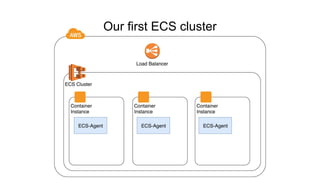
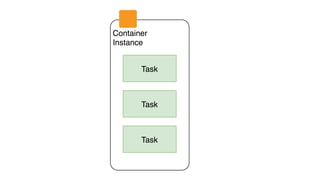
Our first ECS cluster
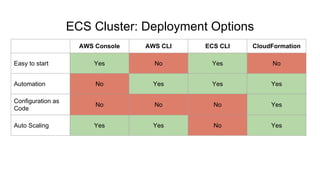
ECS Cluster: Deployment Options
AWS Console AWS CLI ECS CLI CloudFormation
Easy to start Yes No Yes No
Automation No Yes Yes Yes
Configuration as
Code
No No No Yes
Auto Scaling Yes Yes No Yes
AWSTemplateFormatVersion: '2010-09-09'
Parameters:
KeyName:
Type: AWS::EC2::KeyPair::KeyName
Description: EC2 KeyPair to enable SSH access.
...
Resources:
ECSCluster:
Type: AWS::ECS::Cluster
ECSAutoScalingGroup:
Type: AWS::AutoScaling::AutoScalingGroup
Properties:
VPCZoneIdentifier: !Ref: ServiceSubnets
LaunchConfigurationName: !Ref: LaunchConfig
MinSize: !Ref: ClusterMinSize
MaxSize: !Ref: ClusterMaxSize
LaunchConfig:
Type: AWS::AutoScaling::LaunchConfiguration
Metadata:
AWS::CloudFormation::Init:
config:
commands:
01_add_instance_to_cluster:
command: !Sub |
#!/bin/bash
echo ECS_CLUSTER=${ECSCluster} >> /etc/ecs/ecs.config
Properties:
ImageId: !FindInMap: [AWSRegionToAMI, Ref: AWS::Region, AMIID]
InstanceType: !Ref: InstanceType
IamInstanceProfile: !Ref: EC2InstanceProfile
KeyName: !Ref: KeyName
...
Outputs:
ClusterName:
Value: !Ref: ECSCluster
Export:
Name: !Sub "${AWS::StackName}-ClusterName"
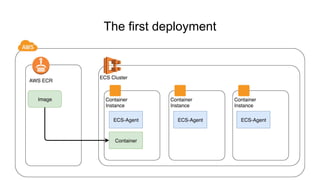
The first deployment
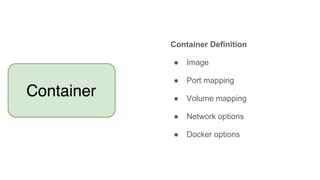
Container Definition
● Image
● Port mapping
● Volume mapping
● Network options
● Docker options
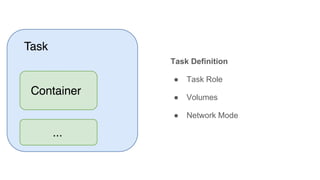
Task Definition
● Task Role
● Volumes
● Network Mode
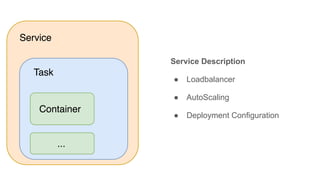
Service Description
● Loadbalancer
● AutoScaling
● Deployment Configuration
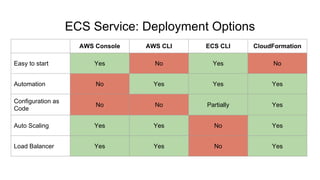
ECS Service: Deployment Options
AWS Console AWS CLI ECS CLI CloudFormation
Easy to start Yes No Yes No
Automation No Yes Yes Yes
Configuration as
Code
No No Partially Yes
Auto Scaling Yes Yes No Yes
Load Balancer Yes Yes No Yes
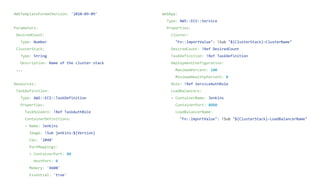
AWSTemplateFormatVersion: '2010-09-09'
Parameters:
DesiredCount:
Type: Number
ClusterStack:
Type: String
Description: Name of the cluster stack
...
Resources:
TaskDefinition:
Type: AWS::ECS::TaskDefinition
Properties:
TaskRoleArn: !Ref TaskAuthRole
ContainerDefinitions:
- Name: Jenkins
Image: !Sub jenkins:${Version}
Cpu: '2048'
PortMappings:
- ContainerPort: 80
HostPort: 0
Memory: '4608'
Essential: 'true'
WebApp:
Type: AWS::ECS::Service
Properties:
Cluster:
"Fn::ImportValue": !Sub "${ClusterStack}-ClusterName"
DesiredCount: !Ref DesiredCount
TaskDefinition: !Ref TaskDefinition
DeploymentConfiguration:
MaximumPercent: 100
MinimumHealthyPercent: 0
Role: !Ref ServiceAuthRole
LoadBalancers:
- ContainerName: Jenkins
ContainerPort: 8080
LoadBalancerName:
"Fn::ImportValue": !Sub "${ClusterStack}-LoadBalancerName"
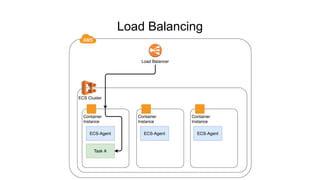
Load Balancing
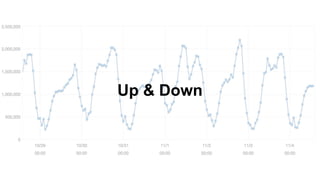
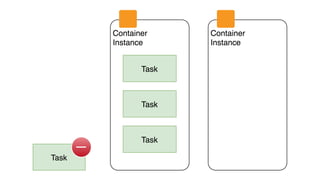
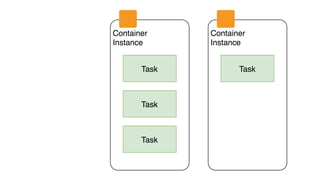
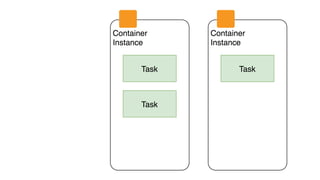
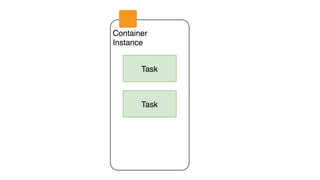
Up & Down
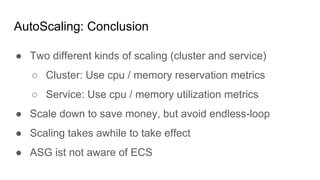
● Two different kinds of scaling (cluster and service)
○ Cluster: Use cpu / memory reservation metrics
○ Service: Use cpu / memory utilization metrics
● Scale down to save money, but avoid endless-loop
● Scaling takes awhile to take effect
● ASG ist not aware of ECS
AutoScaling: Conclusion
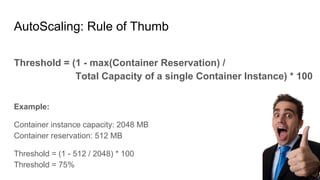
AutoScaling: Rule of Thumb
Threshold = (1 - max(Container Reservation) /
Total Capacity of a single Container Instance) * 100
Example:
Container instance capacity: 2048 MB
Container reservation: 512 MB
Threshold = (1 - 512 / 2048) * 100
Threshold = 75%
Deploy Continuously
ECS Service
● Latest is not a version
● Providing a new task definition triggers deployment
● Deployment strategy based on minimum healthy percent
and maximum percent
ECS Cluster
● Use AutoScaling Group
● UpdatePolicy defines deployment strategy
● Ensure Docker and ECS-Agent is running
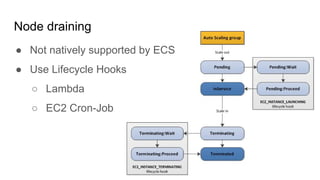
Node draining
● Not natively supported by ECS
● Use Lifecycle Hooks
○ Lambda
○ EC2 Cron-Job
Last but not least: Security
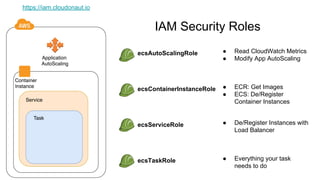
IAM Security Roles
ecsAutoScalingRole
ecsContainerInstanceRole
ecsServiceRole
ecsTaskRole
● Read CloudWatch Metrics
● Modify App AutoScaling
● ECR: Get Images
● ECS: De/Register
Container Instances
● De/Register Instances with
Load Balancer
● Everything your task
needs to do
https://iam.cloudonaut.io
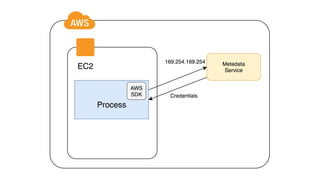
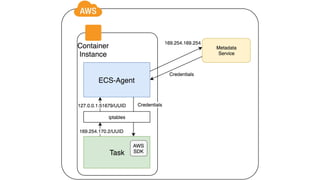
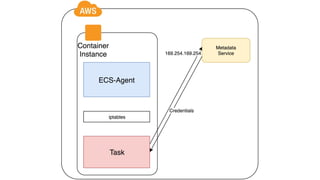
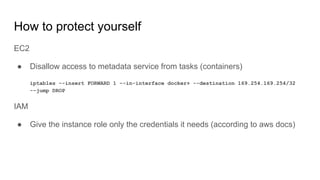
How to protect yourself
EC2
● Disallow access to metadata service from tasks (containers)
iptables --insert FORWARD 1 --in-interface docker+ --destination 169.254.169.254/32
--jump DROP
IAM
● Give the instance role only the credentials it needs (according to aws docs)
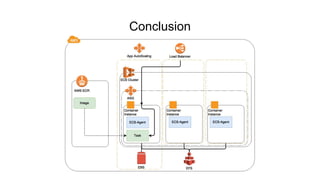
Conclusion
Questions?
https://autoscout24.github.io/hiring
Philipp Garbe
http://garbe.io
@pgarbe
https://github.com/pgarbe

Docker Container automatisiert nach AWS deployen - Continuous Lifecycle 2016

  • 1.
    Deliver Docker Containers Continuouslyon AWS Philipp Garbe @pgarbe
  • 2.
    ● Philipp Garbe ●Lead Developer @AutoScout24 ● AWS ● Continuous Delivery ● Docker About Me
  • 3.
  • 4.
  • 5.
  • 6.
    ECS Cluster: DeploymentOptions AWS Console AWS CLI ECS CLI CloudFormation Easy to start Yes No Yes No Automation No Yes Yes Yes Configuration as Code No No No Yes Auto Scaling Yes Yes No Yes
  • 7.
    AWSTemplateFormatVersion: '2010-09-09' Parameters: KeyName: Type: AWS::EC2::KeyPair::KeyName Description:EC2 KeyPair to enable SSH access. ... Resources: ECSCluster: Type: AWS::ECS::Cluster ECSAutoScalingGroup: Type: AWS::AutoScaling::AutoScalingGroup Properties: VPCZoneIdentifier: !Ref: ServiceSubnets LaunchConfigurationName: !Ref: LaunchConfig MinSize: !Ref: ClusterMinSize MaxSize: !Ref: ClusterMaxSize LaunchConfig: Type: AWS::AutoScaling::LaunchConfiguration Metadata: AWS::CloudFormation::Init: config: commands: 01_add_instance_to_cluster: command: !Sub | #!/bin/bash echo ECS_CLUSTER=${ECSCluster} >> /etc/ecs/ecs.config Properties: ImageId: !FindInMap: [AWSRegionToAMI, Ref: AWS::Region, AMIID] InstanceType: !Ref: InstanceType IamInstanceProfile: !Ref: EC2InstanceProfile KeyName: !Ref: KeyName ... Outputs: ClusterName: Value: !Ref: ECSCluster Export: Name: !Sub "${AWS::StackName}-ClusterName"
  • 8.
  • 9.
    Container Definition ● Image ●Port mapping ● Volume mapping ● Network options ● Docker options
  • 10.
    Task Definition ● TaskRole ● Volumes ● Network Mode
  • 11.
    Service Description ● Loadbalancer ●AutoScaling ● Deployment Configuration
  • 12.
    ECS Service: DeploymentOptions AWS Console AWS CLI ECS CLI CloudFormation Easy to start Yes No Yes No Automation No Yes Yes Yes Configuration as Code No No Partially Yes Auto Scaling Yes Yes No Yes Load Balancer Yes Yes No Yes
  • 13.
    AWSTemplateFormatVersion: '2010-09-09' Parameters: DesiredCount: Type: Number ClusterStack: Type:String Description: Name of the cluster stack ... Resources: TaskDefinition: Type: AWS::ECS::TaskDefinition Properties: TaskRoleArn: !Ref TaskAuthRole ContainerDefinitions: - Name: Jenkins Image: !Sub jenkins:${Version} Cpu: '2048' PortMappings: - ContainerPort: 80 HostPort: 0 Memory: '4608' Essential: 'true' WebApp: Type: AWS::ECS::Service Properties: Cluster: "Fn::ImportValue": !Sub "${ClusterStack}-ClusterName" DesiredCount: !Ref DesiredCount TaskDefinition: !Ref TaskDefinition DeploymentConfiguration: MaximumPercent: 100 MinimumHealthyPercent: 0 Role: !Ref ServiceAuthRole LoadBalancers: - ContainerName: Jenkins ContainerPort: 8080 LoadBalancerName: "Fn::ImportValue": !Sub "${ClusterStack}-LoadBalancerName"
  • 14.
  • 15.
  • 25.
    ● Two differentkinds of scaling (cluster and service) ○ Cluster: Use cpu / memory reservation metrics ○ Service: Use cpu / memory utilization metrics ● Scale down to save money, but avoid endless-loop ● Scaling takes awhile to take effect ● ASG ist not aware of ECS AutoScaling: Conclusion
  • 26.
    AutoScaling: Rule ofThumb Threshold = (1 - max(Container Reservation) / Total Capacity of a single Container Instance) * 100 Example: Container instance capacity: 2048 MB Container reservation: 512 MB Threshold = (1 - 512 / 2048) * 100 Threshold = 75%
  • 27.
  • 28.
    ECS Service ● Latestis not a version ● Providing a new task definition triggers deployment ● Deployment strategy based on minimum healthy percent and maximum percent
  • 29.
    ECS Cluster ● UseAutoScaling Group ● UpdatePolicy defines deployment strategy ● Ensure Docker and ECS-Agent is running
  • 30.
    Node draining ● Notnatively supported by ECS ● Use Lifecycle Hooks ○ Lambda ○ EC2 Cron-Job
  • 31.
    Last but notleast: Security
  • 32.
    IAM Security Roles ecsAutoScalingRole ecsContainerInstanceRole ecsServiceRole ecsTaskRole ●Read CloudWatch Metrics ● Modify App AutoScaling ● ECR: Get Images ● ECS: De/Register Container Instances ● De/Register Instances with Load Balancer ● Everything your task needs to do https://iam.cloudonaut.io
  • 36.
    How to protectyourself EC2 ● Disallow access to metadata service from tasks (containers) iptables --insert FORWARD 1 --in-interface docker+ --destination 169.254.169.254/32 --jump DROP IAM ● Give the instance role only the credentials it needs (according to aws docs)
  • 37.
  • 38.
  • 39.