http://drupal.org
 Community DO & LDO as developer
           workspace
GIT, sandbox, projects, documentation, patching
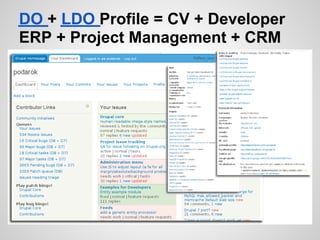
DO + LDO Profile = CV + Developer
ERP + Project Management + CRM
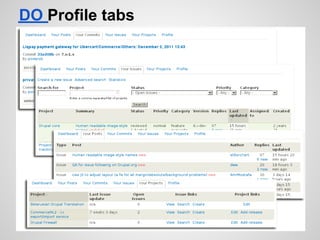
DO Profile tabs
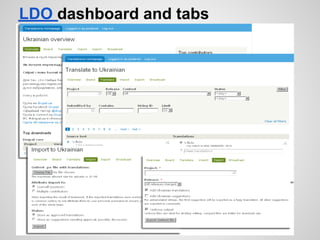
LDO dashboard and tabs
LDO attribution
1. Install l10n_client and l10n_update for every
   user site and connect it to L.D.O under own
   user ID
2. Upload own translations into L.D.O
   translation queue
3. Upload user translated strings under Multiple
   Contributors account
4. Check in D.O. Profile an I contributed
   Drupal translations option.
5. Join http://drupal.ua/groups/i18n group at
   http://drupal.ua
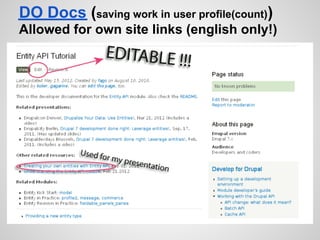
DO Docs (saving work in user profile(count))
Allowed for own site links (english only!)
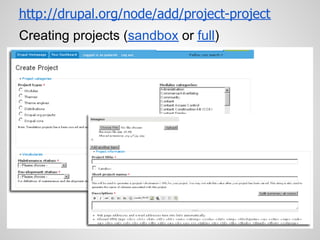
http://drupal.org/node/add/project-project
Creating projects (sandbox or full)
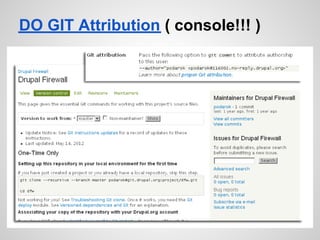
DO GIT Attribution ( console!!! )
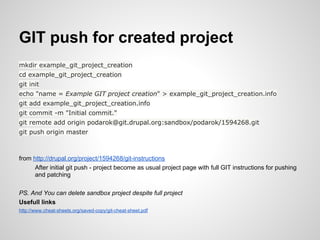
GIT push for created project
mkdir example_git_project_creation
cd example_git_project_creation
git init
echo "name = Example GIT project creation" > example_git_project_creation.info
git add example_git_project_creation.info
git commit -m "Initial commit."
git remote add origin podarok@git.drupal.org:sandbox/podarok/1594268.git
git push origin master


from http://drupal.org/project/1594268/git-instructions
      After initial git push - project become as usual project page with full GIT instructions for pushing
      and patching

PS. And You can delete sandbox project despite full project
Usefull links
http://www.cheat-sheets.org/saved-copy/git-cheat-sheet.pdf
Creating patch for any project
1. Clone the project into local directory
       git clone --recursive --branch master podarok@git.drupal.org:project/dfw.git
       cd dfw
2. Make changes in files with any type of editor
3. Create .patch file for issue queue
       git diff > [description]-[issue-number]-[comment-number].patch
4. Upload [description]-[issue-number]-[comment-number].patch file into previously created issue at
DO for selected project http://drupal.org/node/add/project-issue/PROJECT_NAME


In every project there is a short cheat sheet for GIT instructions
FE. http://drupal.org/project/dfw/git-instructions
Any project http://drupal.org/project/PROJECT_NAME/git-instructions


Usefull Links
  ●    Advanced patch contributor guide
  ●    Troubleshooting 'git clone'
  ●    Identifying yourself to GIT
  ●    Branching and tagging
  ●    Coder module project
Fixing errors in Drupal code http:
//drupal.org/node/317

1. Search it at project issue queue
2. Search it at http://drupal.org and local Drupal
   community sites (FE http://drupal.ua) and
   search engines
3. Post an issue into issue queue with #123456
   links to relative issues in issue description
   like "support request"
4. Make patch if You can fix it.
5. Make patch - You can fix it!
6. Connect to other developers from
   community for help making patch
Andriy Podanenko @podarok

Questions?

Do + ldo for developers(full)

  • 1.
    http://drupal.org Community DO& LDO as developer workspace GIT, sandbox, projects, documentation, patching
  • 2.
    DO + LDOProfile = CV + Developer ERP + Project Management + CRM
  • 3.
  • 4.
  • 5.
    LDO attribution 1. Installl10n_client and l10n_update for every user site and connect it to L.D.O under own user ID 2. Upload own translations into L.D.O translation queue 3. Upload user translated strings under Multiple Contributors account 4. Check in D.O. Profile an I contributed Drupal translations option. 5. Join http://drupal.ua/groups/i18n group at http://drupal.ua
  • 6.
    DO Docs (savingwork in user profile(count)) Allowed for own site links (english only!)
  • 7.
  • 8.
    DO GIT Attribution( console!!! )
  • 9.
    GIT push forcreated project mkdir example_git_project_creation cd example_git_project_creation git init echo "name = Example GIT project creation" > example_git_project_creation.info git add example_git_project_creation.info git commit -m "Initial commit." git remote add origin podarok@git.drupal.org:sandbox/podarok/1594268.git git push origin master from http://drupal.org/project/1594268/git-instructions After initial git push - project become as usual project page with full GIT instructions for pushing and patching PS. And You can delete sandbox project despite full project Usefull links http://www.cheat-sheets.org/saved-copy/git-cheat-sheet.pdf
  • 10.
    Creating patch forany project 1. Clone the project into local directory git clone --recursive --branch master podarok@git.drupal.org:project/dfw.git cd dfw 2. Make changes in files with any type of editor 3. Create .patch file for issue queue git diff > [description]-[issue-number]-[comment-number].patch 4. Upload [description]-[issue-number]-[comment-number].patch file into previously created issue at DO for selected project http://drupal.org/node/add/project-issue/PROJECT_NAME In every project there is a short cheat sheet for GIT instructions FE. http://drupal.org/project/dfw/git-instructions Any project http://drupal.org/project/PROJECT_NAME/git-instructions Usefull Links ● Advanced patch contributor guide ● Troubleshooting 'git clone' ● Identifying yourself to GIT ● Branching and tagging ● Coder module project
  • 11.
    Fixing errors inDrupal code http: //drupal.org/node/317 1. Search it at project issue queue 2. Search it at http://drupal.org and local Drupal community sites (FE http://drupal.ua) and search engines 3. Post an issue into issue queue with #123456 links to relative issues in issue description like "support request" 4. Make patch if You can fix it. 5. Make patch - You can fix it! 6. Connect to other developers from community for help making patch
  • 12.