Local development with Vagrant 
Andriy Podanenko 
Software Architect, DevOp 
Propeople 
@podarok
Plan 
● What is Vagrant? 
● Provisioning, puppet, ansible 
● Generating configs with puphpet.com 
● How puphpet.com works internally
What is Vagrant 
● Layer on top ov virtual machine providers 
− Virtualbox 
− Vmware 
● Command line tool 
● Text file to control the settings 
● Plenty of boxes available on internet
Vagrant commands 
● vagrant up 
● vagrant ssh 
● vagrant provision 
● vagrant halt 
● vagrant destroy 
● vagrant reload --provision
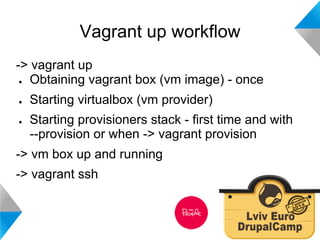
Vagrant up workflow 
-> vagrant up 
● Obtaining vagrant box (vm image) - once 
● Starting virtualbox (vm provider) 
● Starting provisioners stack - first time and with 
--provision or when -> vagrant provision 
-> vm box up and running 
-> vagrant ssh
Vagrant configuration 
● Ruby syntax 
● Box, ram, cpu 
Vagrant.configure("2") do |config| 
config.vm.box = 'ubuntu-1404' 
config.vm.box_url = 'http://.../ubuntu-1404-x64.box' 
config.vm.provider :virtualbox do |vb| 
vb.customize ["modifyvm", :id, "--memory", "2048"] 
vb.customize ["modifyvm", :id, "--cpus", "2"] 
end 
end
Vagrant boxes 
● https://vagrantcloud.com 
● http://www.vagrantbox.es
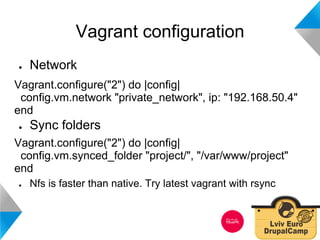
Vagrant configuration 
● Network 
Vagrant.configure("2") do |config| 
config.vm.network "private_network", ip: "192.168.50.4" 
end 
● Sync folders 
Vagrant.configure("2") do |config| 
config.vm.synced_folder "project/", "/var/www/project" 
end 
● Nfs is faster than native. Try latest vagrant with rsync
Vagrant provisioning 
● Shell 
● Puppet (model driven) 
● Chef (procedural) 
● Ansible 
● Salt 
● Docker 
● ...
Combining provisioners 
# Shell provision 
config.vm.provision "shell" do |s| 
s.path = "puphpet/shell/initial-setup.sh" 
s.args = "/vagrant/puphpet" 
end 
# Ansible provision 
config.vm.provision "ansible" do |ansible| 
ansible.playbook = "playbook.yml" 
end 
# Puppet provision 
config.vm.provision :puppet do |puppet| 
ssh_username = !data['ssh']['username'].nil? ? data['ssh']['username'] : "vagrant" 
puppet.facter = { 
"ssh_username" => "#{ssh_username}", 
"provisioner_type" => ENV['VAGRANT_DEFAULT_PROVIDER'], 
} 
puppet.manifests_path = "#{data['vm']['provision']['puppet']['manifests_path']}" 
puppet.manifest_file = "#{data['vm']['provision']['puppet']['manifest_file']}" 
end
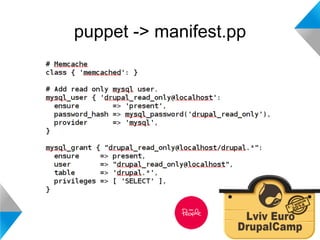
puppet -> manifest.pp
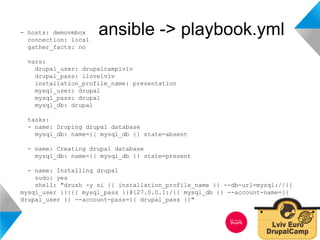
- hosts: demovmbox ansible -> playbook.yml 
connection: local 
gather_facts: no 
vars: 
drupal_user: drupalcamplviv 
drupal_pass: ilovelviv 
installation_profile_name: presentation 
mysql_user: drupal 
mysql_pass: drupal 
mysql_db: drupal 
tasks: 
- name: Droping drupal database 
mysql_db: name={{ mysql_db }} state=absent 
- name: Creating drupal database 
mysql_db: name={{ mysql_db }} state=present 
- name: Installing drupal 
sudo: yes 
shell: "drush -y si {{ installation_profile_name }} --db-url=mysql://{{ 
mysql_user }}:{{ mysql_pass }}@127.0.0.1:/{{ mysql_db }} --account-name={{ 
drupal_user }} --account-pass={{ drupal_pass }}"
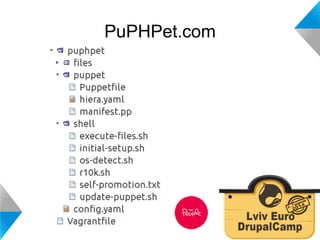
PuPHPet.com 
Demo
vagrant up demo 
Demo
PuPHPet.com
PuPHPet.com 
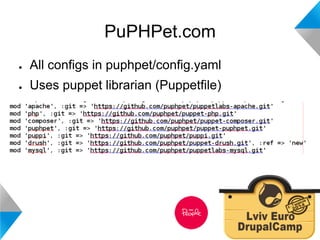
● All configs in puphpet/config.yaml 
● Uses puppet librarian (Puppetfile)
Extending configs 
● Use another puppet module 
− Add it to the Puppetfile 
− Modify manifest.pp 
● Add another provisioner 
− Add it to Vagrantfile 
− insert provisioner’s needed files to vagrant tree
Contributing to puphpet.com 
● Symfony app 
● Each config element is a separate bundle that 
provides UI and manifest.pp part 
● Remember about all OS (debian + centos)
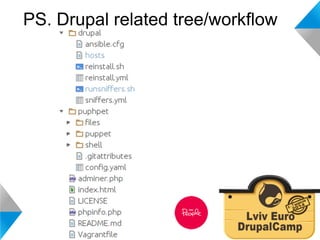
PS. Drupal related tree/workflow
Usefull links 
● http://puphpet.drupal.ua/ 
● http://puphpet.com 
●● 
http://www.puppetcookbook.com/ 
● https://docs.vagrantup.com/v2/provisioning 
● http://docs.ansible.com/playbooks.html 
●● 
https://github.com/podarok/ansible-vagrant-examples 
●● 
https://www.drupal.org/project/vdd
Local development with Vagrant 
Questions? 
Andriy Podanenko 
Software Architect 
Propeople 
@podarok

Start using vagrant now!

  • 1.
    Local development withVagrant Andriy Podanenko Software Architect, DevOp Propeople @podarok
  • 2.
    Plan ● Whatis Vagrant? ● Provisioning, puppet, ansible ● Generating configs with puphpet.com ● How puphpet.com works internally
  • 3.
    What is Vagrant ● Layer on top ov virtual machine providers − Virtualbox − Vmware ● Command line tool ● Text file to control the settings ● Plenty of boxes available on internet
  • 4.
    Vagrant commands ●vagrant up ● vagrant ssh ● vagrant provision ● vagrant halt ● vagrant destroy ● vagrant reload --provision
  • 5.
    Vagrant up workflow -> vagrant up ● Obtaining vagrant box (vm image) - once ● Starting virtualbox (vm provider) ● Starting provisioners stack - first time and with --provision or when -> vagrant provision -> vm box up and running -> vagrant ssh
  • 6.
    Vagrant configuration ●Ruby syntax ● Box, ram, cpu Vagrant.configure("2") do |config| config.vm.box = 'ubuntu-1404' config.vm.box_url = 'http://.../ubuntu-1404-x64.box' config.vm.provider :virtualbox do |vb| vb.customize ["modifyvm", :id, "--memory", "2048"] vb.customize ["modifyvm", :id, "--cpus", "2"] end end
  • 7.
    Vagrant boxes ●https://vagrantcloud.com ● http://www.vagrantbox.es
  • 8.
    Vagrant configuration ●Network Vagrant.configure("2") do |config| config.vm.network "private_network", ip: "192.168.50.4" end ● Sync folders Vagrant.configure("2") do |config| config.vm.synced_folder "project/", "/var/www/project" end ● Nfs is faster than native. Try latest vagrant with rsync
  • 9.
    Vagrant provisioning ●Shell ● Puppet (model driven) ● Chef (procedural) ● Ansible ● Salt ● Docker ● ...
  • 10.
    Combining provisioners #Shell provision config.vm.provision "shell" do |s| s.path = "puphpet/shell/initial-setup.sh" s.args = "/vagrant/puphpet" end # Ansible provision config.vm.provision "ansible" do |ansible| ansible.playbook = "playbook.yml" end # Puppet provision config.vm.provision :puppet do |puppet| ssh_username = !data['ssh']['username'].nil? ? data['ssh']['username'] : "vagrant" puppet.facter = { "ssh_username" => "#{ssh_username}", "provisioner_type" => ENV['VAGRANT_DEFAULT_PROVIDER'], } puppet.manifests_path = "#{data['vm']['provision']['puppet']['manifests_path']}" puppet.manifest_file = "#{data['vm']['provision']['puppet']['manifest_file']}" end
  • 11.
  • 12.
    - hosts: demovmboxansible -> playbook.yml connection: local gather_facts: no vars: drupal_user: drupalcamplviv drupal_pass: ilovelviv installation_profile_name: presentation mysql_user: drupal mysql_pass: drupal mysql_db: drupal tasks: - name: Droping drupal database mysql_db: name={{ mysql_db }} state=absent - name: Creating drupal database mysql_db: name={{ mysql_db }} state=present - name: Installing drupal sudo: yes shell: "drush -y si {{ installation_profile_name }} --db-url=mysql://{{ mysql_user }}:{{ mysql_pass }}@127.0.0.1:/{{ mysql_db }} --account-name={{ drupal_user }} --account-pass={{ drupal_pass }}"
  • 13.
  • 14.
  • 15.
  • 16.
    PuPHPet.com ● Allconfigs in puphpet/config.yaml ● Uses puppet librarian (Puppetfile)
  • 17.
    Extending configs ●Use another puppet module − Add it to the Puppetfile − Modify manifest.pp ● Add another provisioner − Add it to Vagrantfile − insert provisioner’s needed files to vagrant tree
  • 18.
    Contributing to puphpet.com ● Symfony app ● Each config element is a separate bundle that provides UI and manifest.pp part ● Remember about all OS (debian + centos)
  • 19.
    PS. Drupal relatedtree/workflow
  • 20.
    Usefull links ●http://puphpet.drupal.ua/ ● http://puphpet.com ●● http://www.puppetcookbook.com/ ● https://docs.vagrantup.com/v2/provisioning ● http://docs.ansible.com/playbooks.html ●● https://github.com/podarok/ansible-vagrant-examples ●● https://www.drupal.org/project/vdd
  • 21.
    Local development withVagrant Questions? Andriy Podanenko Software Architect Propeople @podarok