
DISCOVERER TO OBIEE MIGRATION
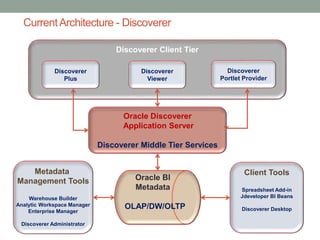
CurrentArchitecture - Discoverer
Oracle BI
Metadata
OLAP/DW/OLTP
Discoverer Client Tier
Client Tools
Spreadsheet Add-in
Jdeveloper BI Beans
Discoverer Desktop
Metadata
Management Tools
Warehouse Builder
Analytic Workspace Manager
Enterprise Manager
Discoverer Administrator
Oracle Discoverer
Application Server
Discoverer Middle Tier Services
Discoverer
Portlet Provider
Discoverer
Viewer
Discoverer
Plus
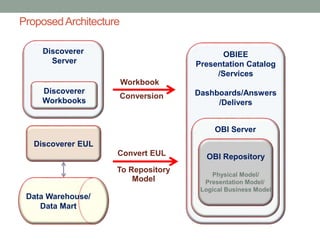
ProposedArchitecture
Data Warehouse/
Data Mart
Discoverer EUL
Discoverer
Server
Discoverer
Workbooks
OBIEE
Presentation Catalog
/Services
Dashboards/Answers
/Delivers
OBI Server
OBI Repository
Physical Model/
Presentation Model/
Logical Business Model
Convert EUL
To Repository
Model
Workbook
Conversion
ConversionApproach
Step 1:
• Convert End User Layer to OBIEE Repository Model
Step 2:
• Migration of the Workbooks
Step 3:
• Configure Security ( Users & Roles )
Important Considerations
• There is a fundamental difference between OBIEE and Discoverer in
the preferred relationship model. In the Business Model layer of the
OBIEE repository, the relationships between tables should represent
a star schema - as a minimum requirement there is a dimension
table and a fact table. In comparison, Oracle Discoverer doesn’t
demand any special type of relationship between data. For that
reason, if the Discoverer data model doesn’t represent star
schemas, changes may be needed after migration in order to
respect this structure. Otherwise the repository will not be available
and enabled for queries.
• Note: Although Oracle indicates that the metadata conversion utility
only migrates to version 10g and that the Upgrade Assistant must be
run to obtain a repository for version 11g, the repository version
generated using the utility is actually in the correct format for
11g with version 11.1.1.3 and 11.1.1.5.
Discussion points
OBIEE does not have:
• Native access to OLAP cubes. OBIEE access data through
materialized views
• User interface
 No ability to drill up
 Wizards for using analytical and time-series functions
 Wizards for creating reports in Answers
Thank You

Discoverer to obiee migration

  • 1.
  • 2.
    CurrentArchitecture - Discoverer OracleBI Metadata OLAP/DW/OLTP Discoverer Client Tier Client Tools Spreadsheet Add-in Jdeveloper BI Beans Discoverer Desktop Metadata Management Tools Warehouse Builder Analytic Workspace Manager Enterprise Manager Discoverer Administrator Oracle Discoverer Application Server Discoverer Middle Tier Services Discoverer Portlet Provider Discoverer Viewer Discoverer Plus
  • 3.
    ProposedArchitecture Data Warehouse/ Data Mart DiscovererEUL Discoverer Server Discoverer Workbooks OBIEE Presentation Catalog /Services Dashboards/Answers /Delivers OBI Server OBI Repository Physical Model/ Presentation Model/ Logical Business Model Convert EUL To Repository Model Workbook Conversion
  • 4.
    ConversionApproach Step 1: • ConvertEnd User Layer to OBIEE Repository Model Step 2: • Migration of the Workbooks Step 3: • Configure Security ( Users & Roles )
  • 5.
    Important Considerations • Thereis a fundamental difference between OBIEE and Discoverer in the preferred relationship model. In the Business Model layer of the OBIEE repository, the relationships between tables should represent a star schema - as a minimum requirement there is a dimension table and a fact table. In comparison, Oracle Discoverer doesn’t demand any special type of relationship between data. For that reason, if the Discoverer data model doesn’t represent star schemas, changes may be needed after migration in order to respect this structure. Otherwise the repository will not be available and enabled for queries. • Note: Although Oracle indicates that the metadata conversion utility only migrates to version 10g and that the Upgrade Assistant must be run to obtain a repository for version 11g, the repository version generated using the utility is actually in the correct format for 11g with version 11.1.1.3 and 11.1.1.5.
  • 6.
    Discussion points OBIEE doesnot have: • Native access to OLAP cubes. OBIEE access data through materialized views • User interface  No ability to drill up  Wizards for using analytical and time-series functions  Wizards for creating reports in Answers
  • 7.