CREATE A WIRELESS nETWORK


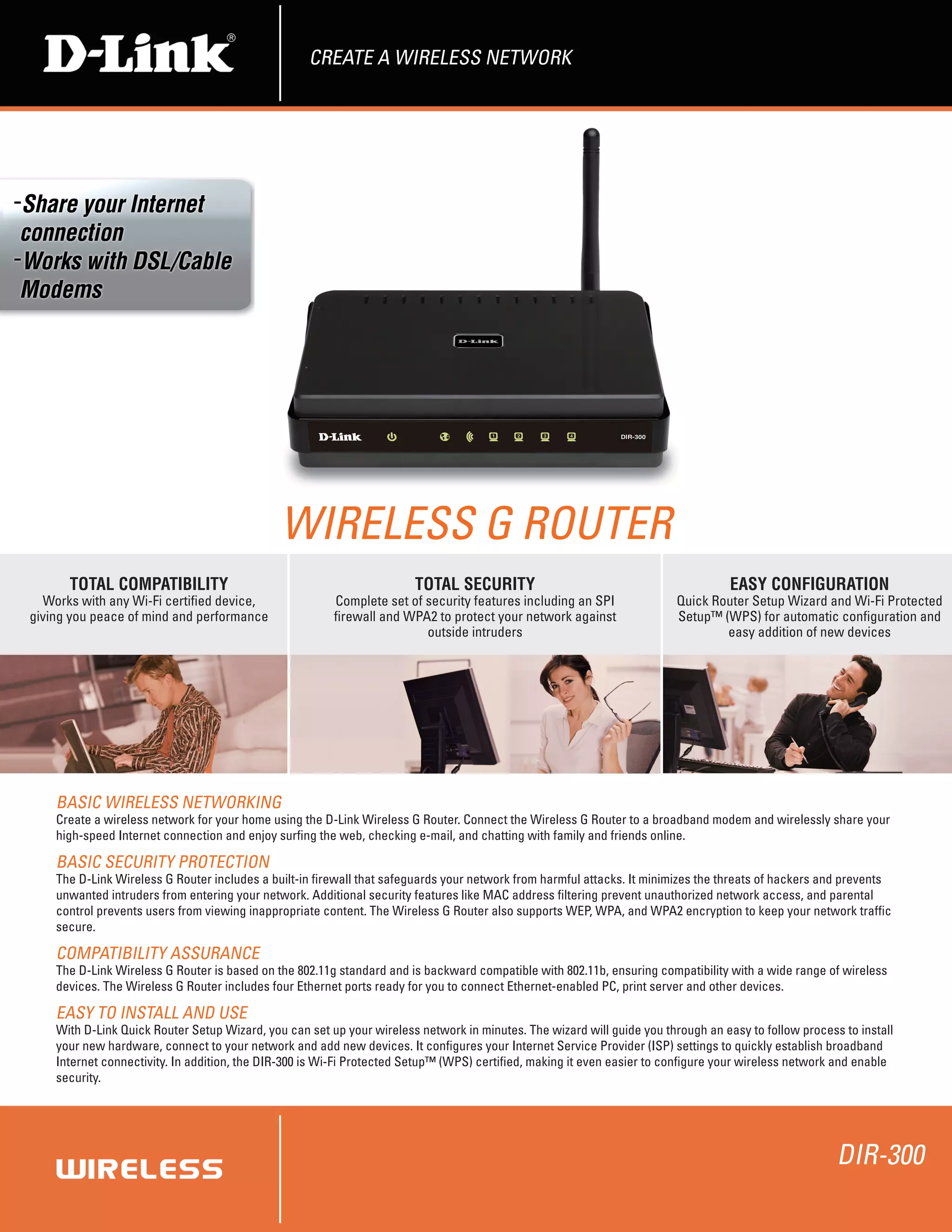
                                              WIRELESS G ROUTER
      TOTAL COMPATIBILITY                                              TOTAL SECURITY                                              EASY CONFIGURATION
  Works with any Wi-Fi certified device,                Complete set of security features including an SPI               Quick Router Setup Wizard and Wi-Fi Protected
giving you peace of mind and performance                firewall and WPA2 to protect your network against                Setup™ (WPS) for automatic configuration and
                                                                        outside intruders                                        easy addition of new devices


    BASIC WIRELESS nETWORKInG
    Create a wireless network for your home using the D-Link Wireless G Router. Connect the Wireless G Router to a broadband modem and wirelessly share your
    high-speed Internet connection and enjoy surfing the web, checking e-mail, and chatting with family and friends online.

    BASIC SECURITY PROTECTIOn
    The D-Link Wireless G Router includes a built-in firewall that safeguards your network from harmful attacks. It minimizes the threats of hackers and prevents
    unwanted intruders from entering your network. Additional security features like MAC address filtering prevent unauthorized network access, and parental
    control prevents users from viewing inappropriate content. The Wireless G Router also supports WEP, WPA, and WPA2 encryption to keep your network traffic
    secure.

    COMPATIBILITY ASSURAnCE
    The D-Link Wireless G Router is based on the 802.11g standard and is backward compatible with 802.11b, ensuring compatibility with a wide range of wireless
    devices. The Wireless G Router includes four Ethernet ports ready for you to connect Ethernet-enabled PC, print server and other devices.

    EASY TO InSTALL AnD USE
    With D-Link Quick Router Setup Wizard, you can set up your wireless network in minutes. The wizard will guide you through an easy to follow process to install
    your new hardware, connect to your network and add new devices. It configures your Internet Service Provider (ISP) settings to quickly establish broadband
    Internet connectivity. In addition, the DIR-300 is Wi-Fi Protected Setup™ (WPS) certified, making it even easier to configure your wireless network and enable
    security.


                                                                                                                                                       DIR-300
CREATE A WIRELESS NETWORK


                                                                                                                                                                                                                                       DIR-300
WHAT THIS PRODUCT DOES
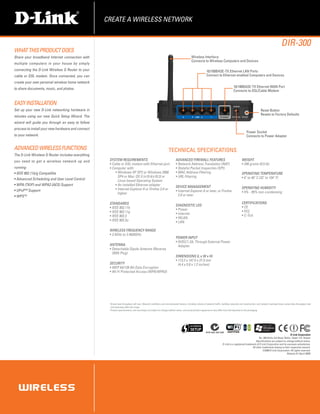
Share your broadband Internet connection with                                                                                             Wireless Interface
                                                                                                                                          Connects to Wireless Computers and Devices
multiple computers in your house by simply
connecting the D-Link Wireless G Router to your                                                                                                          10/100BASE-TX Ethernet LAN Ports
cable or DSL modem. Once connected, you can                                                                                                              Connect to Ethernet-enabled Computers and Devices
create your own personal wireless home network
                                                                                                                                                                                     10/100BASE-TX Ethernet WAN Port
to share documents, music, and photos.
                                                                                                                                                                                     Connects to DSL/Cable Modem


EASY Installation
Set up your new D-Link networking hardware in                                                                                                                                                                     Reset Button
                                                                                                                                                                                                                  Resets to Factory Defaults
minutes using our new Quick Setup Wizard. The
wizard will guide you through an easy to follow
process to install your new hardware and connect
                                                                                                                                                                                                   Power Socket
to your network.                                                                                                                                                                                   Connects to Power Adapter


ADVANCED WIRELESS FUNCTIONS                                                                                       TECHNICAL SPECIFICATIONS
The D-Link Wireless G Router includes everything
you need to get a wireless network up and           SYSTEM REQUIREMENTS                                                  ADVANCED FIREWALL FEATURES                                           WEIGHT
                                                    ƒƒCable or DSL modem with Ethernet port                              ƒƒNetwork Address Translation (NAT)                                  ƒƒ246 grams (0.5 lb)
running:                                            ƒƒComputer with:                                                     ƒƒStateful Packet Inspection (SPI)
ƒƒIEEE 802.11b/g Compatible                             ƒƒWindows XP SP2 or Windows 2000                                 ƒƒMAC Address Filtering                                              OPERATING TEMPERATURE
                                                          SP4 or Mac OS X (v10.4/v10.3) or                               ƒƒURL Filtering                                                      ƒƒ0˚ to 40˚ C (32˚ to 104˚ F)
ƒƒAdvanced Scheduling and User Level Control              Linux-based Operating System
ƒƒWPA (TKIP) and WPA2 (AES) Support                     ƒƒAn installed Ethernet adapter                                  DEVICE MANAGEMENT                                                    OPERATING HUMIDITY
ƒƒUPnPTM Support                                        ƒƒInternet Explorer 6 or Firefox 2.0 or                          ƒƒInternet Explorer 6 or later, or Firefox                           ƒƒ5% - 95% non-condensing
                                                          higher                                                           2.0 or later
ƒƒWPSTM
                                                    STANDARDS                                                                                                                                 CERTIFICATIONS
                                                                                                                         DIAGNOSTIC LED                                                       ƒƒCE
                                                    ƒƒIEEE 802.11b                                                       ƒƒPower
                                                    ƒƒIEEE 802.11g                                                                                                                            ƒƒFCC
                                                                                                                         ƒƒInternet
                                                    ƒƒIEEE 802.3                                                                                                                              ƒƒC-Tick
                                                                                                                         ƒƒWLAN
                                                    ƒƒIEEE 802.3u                                                        ƒƒLAN

                                                    WIRELESS FREQUENCY RANGE
                                                    ƒƒ2.4GHz to 2.4835GHz
                                                                                                                         POWER INPUT
                                                                                                                         ƒƒ5VDC/1.2A, Through External Power
                                                    ANTENNA                                                                Adapter
                                                    ƒƒDetachable Dipole Antenna (Reverse
                                                      SMA Plug)
                                                                                                                         DIMENSIONS (L x W x H)
                                                                                                                         ƒƒ113.2 x 147.5 x 31.5 mm
                                                    SECURITY                                                               (4.4 x 5.8 x 1.2 inches)
                                                    ƒƒWEP 64/128-Bit Data Encryption
                                                    ƒƒWi-Fi Protected Access (WPA/WPA2)


                                                      Actual data throughput will vary. Network conditions and environmental factors, including volume of network traffic, building materials and construction, and network overhead lower actual data throughput rate
                                                    1.

                                                      and adversely affect the range.
                                                    2.
                                                      P
                                                       roduct specifications, size and shape are subject to change without notice, and actual product appearance may differ from that depicted on the packaging.


                                                                                                                                                         ACN 052 202 838
                                                                                                                                                                                                                                            D-Link Corporation
                                                                                                                                                                                                              No. 289 Xinhu 3rd Road, Neihu, Taipei 114, Taiwan
                                                                                                                                                                                                           Specifications are subject to change without notice.
                                                                                                                                                                          D-Link is a registered trademark of D-Link Corporation and its overseas subsidiaries.
                                                                                                                                                                                                       All other trademarks belong to their respective owners.
                                                                                                                                                                                                                  ©2009 D-Link Corporation. All rights reserved.
                                                                                                                                                                                                                                         Release 01 (April 2009)

Dir 300

  • 1.
    CREATE A WIRELESSnETWORK WIRELESS G ROUTER TOTAL COMPATIBILITY TOTAL SECURITY EASY CONFIGURATION Works with any Wi-Fi certified device, Complete set of security features including an SPI Quick Router Setup Wizard and Wi-Fi Protected giving you peace of mind and performance firewall and WPA2 to protect your network against Setup™ (WPS) for automatic configuration and outside intruders easy addition of new devices BASIC WIRELESS nETWORKInG Create a wireless network for your home using the D-Link Wireless G Router. Connect the Wireless G Router to a broadband modem and wirelessly share your high-speed Internet connection and enjoy surfing the web, checking e-mail, and chatting with family and friends online. BASIC SECURITY PROTECTIOn The D-Link Wireless G Router includes a built-in firewall that safeguards your network from harmful attacks. It minimizes the threats of hackers and prevents unwanted intruders from entering your network. Additional security features like MAC address filtering prevent unauthorized network access, and parental control prevents users from viewing inappropriate content. The Wireless G Router also supports WEP, WPA, and WPA2 encryption to keep your network traffic secure. COMPATIBILITY ASSURAnCE The D-Link Wireless G Router is based on the 802.11g standard and is backward compatible with 802.11b, ensuring compatibility with a wide range of wireless devices. The Wireless G Router includes four Ethernet ports ready for you to connect Ethernet-enabled PC, print server and other devices. EASY TO InSTALL AnD USE With D-Link Quick Router Setup Wizard, you can set up your wireless network in minutes. The wizard will guide you through an easy to follow process to install your new hardware, connect to your network and add new devices. It configures your Internet Service Provider (ISP) settings to quickly establish broadband Internet connectivity. In addition, the DIR-300 is Wi-Fi Protected Setup™ (WPS) certified, making it even easier to configure your wireless network and enable security. DIR-300
  • 2.
    CREATE A WIRELESSNETWORK DIR-300 WHAT THIS PRODUCT DOES Share your broadband Internet connection with Wireless Interface Connects to Wireless Computers and Devices multiple computers in your house by simply connecting the D-Link Wireless G Router to your 10/100BASE-TX Ethernet LAN Ports cable or DSL modem. Once connected, you can Connect to Ethernet-enabled Computers and Devices create your own personal wireless home network 10/100BASE-TX Ethernet WAN Port to share documents, music, and photos. Connects to DSL/Cable Modem EASY Installation Set up your new D-Link networking hardware in Reset Button Resets to Factory Defaults minutes using our new Quick Setup Wizard. The wizard will guide you through an easy to follow process to install your new hardware and connect Power Socket to your network. Connects to Power Adapter ADVANCED WIRELESS FUNCTIONS TECHNICAL SPECIFICATIONS The D-Link Wireless G Router includes everything you need to get a wireless network up and SYSTEM REQUIREMENTS ADVANCED FIREWALL FEATURES WEIGHT ƒƒCable or DSL modem with Ethernet port ƒƒNetwork Address Translation (NAT) ƒƒ246 grams (0.5 lb) running: ƒƒComputer with: ƒƒStateful Packet Inspection (SPI) ƒƒIEEE 802.11b/g Compatible ƒƒWindows XP SP2 or Windows 2000 ƒƒMAC Address Filtering OPERATING TEMPERATURE SP4 or Mac OS X (v10.4/v10.3) or ƒƒURL Filtering ƒƒ0˚ to 40˚ C (32˚ to 104˚ F) ƒƒAdvanced Scheduling and User Level Control Linux-based Operating System ƒƒWPA (TKIP) and WPA2 (AES) Support ƒƒAn installed Ethernet adapter DEVICE MANAGEMENT OPERATING HUMIDITY ƒƒUPnPTM Support ƒƒInternet Explorer 6 or Firefox 2.0 or ƒƒInternet Explorer 6 or later, or Firefox ƒƒ5% - 95% non-condensing higher 2.0 or later ƒƒWPSTM STANDARDS CERTIFICATIONS DIAGNOSTIC LED ƒƒCE ƒƒIEEE 802.11b ƒƒPower ƒƒIEEE 802.11g ƒƒFCC ƒƒInternet ƒƒIEEE 802.3 ƒƒC-Tick ƒƒWLAN ƒƒIEEE 802.3u ƒƒLAN WIRELESS FREQUENCY RANGE ƒƒ2.4GHz to 2.4835GHz POWER INPUT ƒƒ5VDC/1.2A, Through External Power ANTENNA Adapter ƒƒDetachable Dipole Antenna (Reverse SMA Plug) DIMENSIONS (L x W x H) ƒƒ113.2 x 147.5 x 31.5 mm SECURITY (4.4 x 5.8 x 1.2 inches) ƒƒWEP 64/128-Bit Data Encryption ƒƒWi-Fi Protected Access (WPA/WPA2) Actual data throughput will vary. Network conditions and environmental factors, including volume of network traffic, building materials and construction, and network overhead lower actual data throughput rate 1. and adversely affect the range. 2. P roduct specifications, size and shape are subject to change without notice, and actual product appearance may differ from that depicted on the packaging. ACN 052 202 838 D-Link Corporation No. 289 Xinhu 3rd Road, Neihu, Taipei 114, Taiwan Specifications are subject to change without notice. D-Link is a registered trademark of D-Link Corporation and its overseas subsidiaries. All other trademarks belong to their respective owners. ©2009 D-Link Corporation. All rights reserved. Release 01 (April 2009)