DIGITAL CONTROL TECHNOLOGY
& MICRO PROCESSORS
Technology Mandatory: Digital Technologies
What is this unit all about?
As a young person in the 21st century you are surrounded by technology. You are living in
an era where there are gizmos and gadgets that can do all sorts of things to help you with
organisation, communication and entertainment. Did you know that electronic devices, even
simple ones like a TV remote control, use a computer program to tell them what to do?
What if you could control what an electronic device does? Well you can by writing your
own simple computer program which is referred to as coding. A computer program is
referred to as ‘code’.
In this unit of work, you will learn about coding and how to use it in the creation of a
variety of projects that are known as control technologies. You will use the skills learnt
throughout the unit to ultimately design your own projects that you can build and enjoy.
CONTROL TECHNOLOGIES
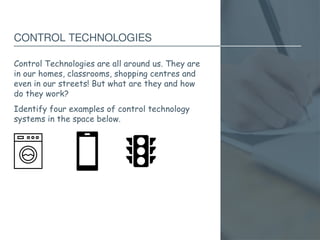
Control Technologies are all around us. They are
in our homes, classrooms, shopping centres and
even in our streets! But what are they and how
do they work?
Identify four examples of control technology
systems in the space below.
A SIMPLE EXAMPLE OF A CONTROL TECHNOLOGY
SYSTEM (1OF 3)
• Traffic lights
A SIMPLE EXAMPLE OF A CONTROL TECHNOLOGY
SYSTEM (2 OF 3)
• Refrigerator
A SIMPLE EXAMPLE OF A CONTROL TECHNOLOGY
SYSTEM (3 OF 3)
• Dishwasher
INPUT PROCESSING OUTPUT (IPO) CHARTS
Component categories for hardware:
Input
Device
(sensor)
Processor
(decision
maker)
Output
Device
(actuator)
TICKLE ME ELMO
The following YouTube clip, LOL Elmo will show
you how ‘Tickle Me Elmo’ works. After watching
it, complete the following questions in the space
provided.
• What makes Elmo move?
• What happens when you press the button on
Elmo’s hands or feet?
• How do you think Elmo knows to move/vibrate
when the button has been pushed?
INPUT PROCESSING OUTPUT (IPO) CHARTS EXAMPLE
Automatic sensor light:
Input
Device
(sensor)
Processor
(decision
maker)
Output
Device
(actuator)
INPUT PROCESSING OUTPUT (IPO) CHARTS EXAMPLE
(CONTINUED)
Automatic headlights on car:
Input
Device
(sensor)
Processor
(decision
maker)
Output
Device
(actuator)
REMOTE CONTROL FOR A TELEVISION
WORDBANK
Case (back)
Case (front)
Circuit, wiring and
components
Inputs
Microcontroller
Outputs
Power supply
(batteries)
Printed circuit board
(PCB)
Using the word bank, label the components of the remote
WHAT IS A MICROCONTROLLER?
• A microcontroller is a programmable device that receives data
from inputs in order to produce one or more outputs.
• A microcontroller is made up of small microchips that contain
microscopic circuits called integrated circuits that can be
programmed to carry out simple functions. Once programmed,
there is no need to use a computer to operate them.
• Another name for a Microcontroller is a Programmable Logic
Controller (PLC).
HOW DOES A MICROCONTROLLER WORK?
• A microcontroller can only work if it has been programmed.
• The program is written on a computer which is called a sketch.
The program is then uploaded to the microcontroller chip via a
USB cable connection.
• The microcontroller can then be disconnected from the
computer an alternate power supply can be connected. This
allows the microcontroller to be an independent control
technology system.
INPUTS – SENSORS
SWITCHES – OPEN AND CLOSED CIRCUITS
MOTION SENSORS
LIGHT SENSORS
SOUND SENSORS
PRESSURE SENSORS
THERMAL SENSORS
MECHANICAL SENSORS – POTENTIOMETER
LEVEL SENSORS
OUTPUTS – ACTUATORS
LIGHT
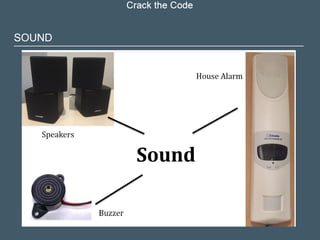
SOUND
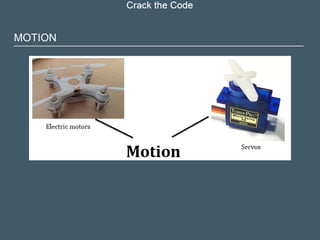
MOTION
PSEUDOCODE
• Pseudocode is the term for writing programming
code in plain English.
• It involves writing step-by-step explicit instructions
in a logical sequence.
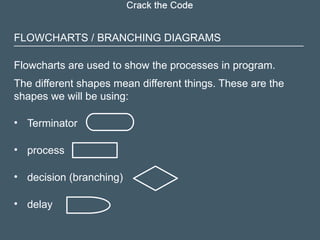
FLOWCHARTS / BRANCHING DIAGRAMS
Flowcharts are used to show the processes in program.
The different shapes mean different things. These are the
shapes we will be using:
• Terminator
• process
• decision (branching)
• delay
EXAMPLE OF EMERGENCY VEHICLE FLASHING
LIGHTS FLOW CHART
BINARY NUMBERS PAGE
30
Computers have different programming languages, you may have
heard of some of them such as C, HTML, Python or Scratch.
Regardless of what language you program in they all convert to
binary numbers when running through the computer. This is
because computer processors only work at base level as “on” or
“off”. They are a digital machine and only have zero or one (off or
on) as a state to calculate. Every computer regardless of its age or
specification works on binary numbers at its core. You need to
understand that binary is a counting system that is used to tell a
computer what to do.
BINARY NUMBERS (CONTINUED)
All a programming language does is make the binary system easier
to understand and use by acting as an interpreter between plain
human speak and computer speak. It is theoretically possible to
program a computer using binary only, but this would be an
enormous task and it is much more efficient using a programming
language instead. These languages have dictionaries of
commands, syntax and terminology preloaded for you to use.
BINARY
BUTTON SKETCH FLOW CHART
COMPARISON OPERATORS FOR IF STATEMENT
Symbol Meaning
== Equal to
!= Not equal to
< Less than
> Greater than
<= Less than or equal to
>= Greater than or equal to
COMMANDS IN ARDUINO PAGE
36
Using the Integer Command
• There are shortcuts in coding that tell the computer what to do with a
minimum of commands/lines of code. In the challenges to tinker with
you were asked to make two LED’s flash on and off at the same time.
• The command you can use in your code/sketch is the “int” command. An
example of how to code/sketch this is below – with the initial blink sketch
comments // removed. You will notice the rest of the code is basically the
same as blink, except that instead of the pin number being in the loop the
name you gave the pin is there.
VARIABLES
int buttonPin = 7; int ledPin = 12; int buttonState = 0;
TOGGLE SKETCH

Digital control technologies-class-presentation.pptx

  • 1.
    DIGITAL CONTROL TECHNOLOGY &MICRO PROCESSORS Technology Mandatory: Digital Technologies
  • 2.
    What is thisunit all about? As a young person in the 21st century you are surrounded by technology. You are living in an era where there are gizmos and gadgets that can do all sorts of things to help you with organisation, communication and entertainment. Did you know that electronic devices, even simple ones like a TV remote control, use a computer program to tell them what to do? What if you could control what an electronic device does? Well you can by writing your own simple computer program which is referred to as coding. A computer program is referred to as ‘code’. In this unit of work, you will learn about coding and how to use it in the creation of a variety of projects that are known as control technologies. You will use the skills learnt throughout the unit to ultimately design your own projects that you can build and enjoy.
  • 3.
    CONTROL TECHNOLOGIES Control Technologiesare all around us. They are in our homes, classrooms, shopping centres and even in our streets! But what are they and how do they work? Identify four examples of control technology systems in the space below.
  • 4.
    A SIMPLE EXAMPLEOF A CONTROL TECHNOLOGY SYSTEM (1OF 3) • Traffic lights
  • 5.
    A SIMPLE EXAMPLEOF A CONTROL TECHNOLOGY SYSTEM (2 OF 3) • Refrigerator
  • 6.
    A SIMPLE EXAMPLEOF A CONTROL TECHNOLOGY SYSTEM (3 OF 3) • Dishwasher
  • 7.
    INPUT PROCESSING OUTPUT(IPO) CHARTS Component categories for hardware: Input Device (sensor) Processor (decision maker) Output Device (actuator)
  • 8.
    TICKLE ME ELMO Thefollowing YouTube clip, LOL Elmo will show you how ‘Tickle Me Elmo’ works. After watching it, complete the following questions in the space provided. • What makes Elmo move? • What happens when you press the button on Elmo’s hands or feet? • How do you think Elmo knows to move/vibrate when the button has been pushed?
  • 9.
    INPUT PROCESSING OUTPUT(IPO) CHARTS EXAMPLE Automatic sensor light: Input Device (sensor) Processor (decision maker) Output Device (actuator)
  • 10.
    INPUT PROCESSING OUTPUT(IPO) CHARTS EXAMPLE (CONTINUED) Automatic headlights on car: Input Device (sensor) Processor (decision maker) Output Device (actuator)
  • 11.
    REMOTE CONTROL FORA TELEVISION WORDBANK Case (back) Case (front) Circuit, wiring and components Inputs Microcontroller Outputs Power supply (batteries) Printed circuit board (PCB) Using the word bank, label the components of the remote
  • 12.
    WHAT IS AMICROCONTROLLER? • A microcontroller is a programmable device that receives data from inputs in order to produce one or more outputs. • A microcontroller is made up of small microchips that contain microscopic circuits called integrated circuits that can be programmed to carry out simple functions. Once programmed, there is no need to use a computer to operate them. • Another name for a Microcontroller is a Programmable Logic Controller (PLC).
  • 13.
    HOW DOES AMICROCONTROLLER WORK? • A microcontroller can only work if it has been programmed. • The program is written on a computer which is called a sketch. The program is then uploaded to the microcontroller chip via a USB cable connection. • The microcontroller can then be disconnected from the computer an alternate power supply can be connected. This allows the microcontroller to be an independent control technology system.
  • 14.
  • 15.
    SWITCHES – OPENAND CLOSED CIRCUITS
  • 16.
  • 17.
  • 18.
  • 19.
  • 20.
  • 21.
  • 22.
  • 23.
  • 24.
  • 25.
  • 26.
  • 27.
    PSEUDOCODE • Pseudocode isthe term for writing programming code in plain English. • It involves writing step-by-step explicit instructions in a logical sequence.
  • 28.
    FLOWCHARTS / BRANCHINGDIAGRAMS Flowcharts are used to show the processes in program. The different shapes mean different things. These are the shapes we will be using: • Terminator • process • decision (branching) • delay
  • 29.
    EXAMPLE OF EMERGENCYVEHICLE FLASHING LIGHTS FLOW CHART
  • 30.
    BINARY NUMBERS PAGE 30 Computershave different programming languages, you may have heard of some of them such as C, HTML, Python or Scratch. Regardless of what language you program in they all convert to binary numbers when running through the computer. This is because computer processors only work at base level as “on” or “off”. They are a digital machine and only have zero or one (off or on) as a state to calculate. Every computer regardless of its age or specification works on binary numbers at its core. You need to understand that binary is a counting system that is used to tell a computer what to do.
  • 31.
    BINARY NUMBERS (CONTINUED) Alla programming language does is make the binary system easier to understand and use by acting as an interpreter between plain human speak and computer speak. It is theoretically possible to program a computer using binary only, but this would be an enormous task and it is much more efficient using a programming language instead. These languages have dictionaries of commands, syntax and terminology preloaded for you to use.
  • 32.
  • 33.
  • 34.
    COMPARISON OPERATORS FORIF STATEMENT Symbol Meaning == Equal to != Not equal to < Less than > Greater than <= Less than or equal to >= Greater than or equal to
  • 35.
    COMMANDS IN ARDUINOPAGE 36 Using the Integer Command • There are shortcuts in coding that tell the computer what to do with a minimum of commands/lines of code. In the challenges to tinker with you were asked to make two LED’s flash on and off at the same time. • The command you can use in your code/sketch is the “int” command. An example of how to code/sketch this is below – with the initial blink sketch comments // removed. You will notice the rest of the code is basically the same as blink, except that instead of the pin number being in the loop the name you gave the pin is there.
  • 36.
    VARIABLES int buttonPin =7; int ledPin = 12; int buttonState = 0;
  • 37.

Editor's Notes

  • #4 Teacher notes: Traffic lights function by using a timer for busy intersection or sensors on the road to send a signal to the lights that there is a car waiting. Once the light sequence activates, the green light is on for a set amount of time then it turns off and the yellow light is on for a shorter period of time, followed by the red light. The system re-activates by a time sequence or again once a care pulls up and the sensor sends a signal again and repeats the sequence.
  • #5 Teacher notes: A refrigerator uses a temperature sensor which detects the current temperature. If the temperature is higher than the specified temperature, the compressor starts up to cool the air to the required temperature. This is the whirring sound you hear when the fridge is on. The compressor turns off when the set air temperature is met and restarts as soon as the temperature rises again.
  • #6 Teacher notes: A dishwasher is programmed to complete a series of different functions e.g. rinse, heavy duty wash, regular wash, eco wash etc. Each process in programmed and connected to a different input (button) so when a particular button is pushed, it tells the dishwasher which process/cycle to perform. Some buttons when pushed include a combination of different cycles and the dishwasher is programmed to follow this sequence. Additional discussion: * Televisions The signal sent from the remote control is captured by the Television microcontroller. The microcontroller controls the television amplifier subsystem (for example, volume, base, and treble), the picture subsystem (for example, brightness , hue, and contrast), and the receiver subsystem (channel selection). * Other products that have control technology Home: DVD player, Sound systems, Telephone, mobile phones, security systems, camera, sewing machine, musical instruments, exercise machines, video games consoles (Play station), Personal computers, fridges, microwave oven, cable boxes (Foxtel) Office: Computers, printers, telephones, fax machines, security systems, air conditioners, mobile phones, pages, display boards
  • #7 Teacher notes: The input device/component receives information from it’s environment and sends the information to the processer which is programmed to send instructions to the output device/component (actuator) to perform a certain task. There are many different sensor and actuator technologies which we will be looking at in more detail throughout this unit. Processor Technology options include: Microcontrollers Microprocessors Personal computers (laptops, desktops, tablets, etc.) Mechanical devices (for example, pneumatics) Electronic circuits that do not contain microcontrollers or microprocessors Note: There are control systems that do not have inputs, however all control systems will have an output, otherwise it will have nothing to control.
  • #9 Teacher notes: An outdoor sensor light on a house works by the sensor detecting movement, sending a signal to the microprocessor. The microprocessor then turns on the light to illuminate for a set period of time. The system will reactivate once the sensor detects movement again.
  • #10 Teacher notes: Sensor detects low levels of light e.g. driving through a tunnel, driving at dusk, and sends a signal to the microprocessor which turn on the headlights. When there is increase in light detected in the environment, the lights turn off.
  • #12 Teacher notes: PLCs – Typically used in machinery, essentially a microcontroller in a box. This is an older technology
  • #13 Teacher notes: Read to class. Students complete words in glossary of terms at the start of the folio. Note: There are many different brands of microcontrollers: Arduino Raspberry Pi Lego Arduino and Raspberry Pi are the most popular for this type of coding.
  • #14 Teacher notes: Read/explain/discuss slide
  • #15 Teacher Notes Switches allow the circuit to be open or closed. When a button/switch is pushed, the circuit becomes closed and becomes active. When the switch is in the off position, the circuit is open and therefore is not active. Light switch: Moving the toggle moves the switch to the on or off position. Rotary switch on an oven: turning the knob makes different connections for the different functions. The keypad: these switches only stay on while the button is held down. Push buttons on a washing machine. These only stay switched on while the button is held down. These pushbutton switches are called momentary contact as they release once you remove your finger.
  • #16 Teacher Notes: Motion sensors detect movement which sends a signal to the processor which activates an output. Speed camera: when a speed is detected that is above the speed limit it takes a photo.  Outdoor motion sensor: When movement is detected it turns a light on for a set period. Usually this type of detector also has a light sensor so it only works at night. Sensor tap: When the sensor detects your hands under the spout it activates an electronic valve that lets the water flow. Automatic hand dryers: Like the tap, they only operate when they detect your hands.
  • #17 Teacher Notes: A light sensor detects low levels of light and sends a signal to the processor which activates the output. The camera has a very sensitive light sensor that can record an image electronically. Street lights have a sensor so they only turn on when it is dark.
  • #18 Teacher Notes: Sound sensors work by turning sound into an electrical signal. They are generally analogue signals and need to be converted to digital. Microphone turns sound into an electric signal allowing it to be recorded or sent to someone else. Guitar tuner: The guitar tuner works by detecting the frequency of the sound and comparing it to the correct frequency for each string. It then indicates which way you need to adjust the tune to make it correct. Voice activated controls: These systems can recognise words in order to provide instructions to the microprocessor. Siri is an example of this.
  • #19 Teacher Notes: Pressure sensors work by sending a signal to a processor when pressure is applied e.g. on a keypad for a house alarm. Once the signal is processed, an output occurs e.g. deactivates the house alarm The keypad detects pressure on each button to provide a signal to the microcontroller. Some shoes have sensors inside them to detect pressure when walking. This signal to the microprocessor makes LEDs light up. Scales are used to measure the weight of things. It does this by detecting the pressure applied to the top. Other pressure sensors include oil pressure sensors in an engine.
  • #20 Teacher Notes: Thermal sensors work by sensing a predetermined temperature which signals the processor which activates an output e.g. light turns on or off. Air conditioning controllers are easily adjusted by the user and provide an input to the controller when the temperature is too high or too low. Oven thermostats are similar. You can see when the temperature is low as ovens usually have a light to indicate when the element is heating the oven.
  • #21 Teacher notes: Mechanical sensors rely on something moving to trigger them. The motion could be from a person in the case of the volume control or from the speed of a wheel. Volume control knobs can be turned by hand to adjust the volume. They have a potentiometer behind the knob that varies the input to the system so it can adjust the sound as required. Temperature selector on an iron. This adjusts the iron controller to turn the heating element on or off to adjust the temperature. (Some irons have a mechanical temperature control and are not electronically controlled). Micro switches are used to detect movement in mechanical systems and tell the processor when this happens so it can control other parts of the system. This switch was on a lift and stops the motors when the door is fully opened.
  • #22 Teacher Notes: Level sensors work by detecting the level of a liquid and sending a signal which could be either digital or analogue back to the controller. This is usually done with a float that moves up and down in the tank. The fuel level sensor sits inside the fuel tank. A float on an arm moves a potentiometer in order to vary the voltage input to the controller. A bilge pump switch uses a float to detect water in the bottom of a boat and can turn on an alarm or a pump. Other level sensors are used in water tanks and brake fluid reservoirs in cars.
  • #23 Teacher notes: Read/explain/discuss slide
  • #24 Teacher Notes: Sensor sends signal to the processor which activates the output which is light e.g. street lights, LED Displays, children’s night light Traffic lights control traffic based on a number of inputs including the time of day, the sensors in the road and the pedestrian pushbuttons at a crossing. LED displays are very common now as they are easily read and are very efficient. Automatic lights operate when they detect both dark and movement.
  • #25 Teacher Notes: Sensor sends signal to the processor which activates the output which is sound e.g. speaker, house alarm speaker. Speakers can be used to produce a wide range of sounds where as buzzers produce very basic sounds. Alarm sirens are designed to be very loud.
  • #26 Teacher Notes: Sensor sends signal to the processor which activates the output which is movement e.g. Electric motors and servos. Drones use motors that are controlles by microprocessors that receive inputs from the remote control. Servo motors produce more precise movement that can be used to control the position of items. You may have seen them used to control the steering on remote control cars.
  • #27 Teacher notes: Example of Pseudocode for an airconditioner: Start the program; Measure temperature; If temperature < 20 degrees Celsius then turn on heat; If temperature > 22 degrees Celsius then turn off heat; go back to start;
  • #28 Flowcharts can assist in planning the processing that has to happen in an algorithm. We use specific symbols for each action. The terminator is used at the start or end to indicate where the code should begin and stop The process rectangle should be use every time the computer needs to do something. The Rhombus (diamond) indicates a decision such as an if statement. The D shape is used for a delay.
  • #30 Teacher notes: Read/explain/discuss slide
  • #31 Teacher notes: Read/explain/discuss slide
  • #32 This shows the difference between decimal and binary counting systems.
  • #33 Basic flowchart showing branching.
  • #34 The == is used as we are comparing two values. If we are declaring a value then we use a single =
  • #35 Teacher notes: Read/explain/discuss slide
  • #36 Declaring a variable is like writing a name on a cup/box and then putting a number in the box. When the computer sees the name it uses the number you put in the box. You can change the number in the box in the code. buttonState is a good example. When we read the button, we can put a 1 or 0 in the box depending on whether the button is on or off.
  • #37 This is a flowchart for the toggle switch. It is actually quite complex. Very few students will fully understand this in Stage 4.