DevOps, Kubernetes & Istio
John Jardin
JHB Office365 User Group
About John Jardin
• Integration and Cloud Architect
• Over 16 years development and
consulting
• Core focuses include:
• Integration & Cloud Architecture
• Full stack Application Development
• Coaching & Mentoring
2 4/11/2018
Agenda
3 4/11/2018
• The Hero’s Journey
• Rise of the Monolith
• Attack of the Microbes
• Containment
• Army of One
• Watcher on the Wall
• The End
The Hero’s Journey
4 4/11/2018
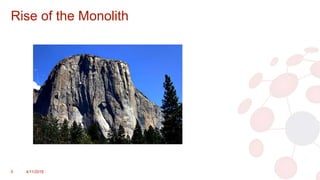
Rise of the Monolith
5 4/11/2018
Rise of the Monolith
• Your application is potentially a Monolith if:
• It exists only for the platform it runs on
• User Interface and logic exists in the same design
• Functions are made up of hundreds of lines of code and are only
accessed natively
• Incremental updates require the entire application’s design to be
deployed
• Deployments of updates and fixes take weeks or even months
6 4/11/2018
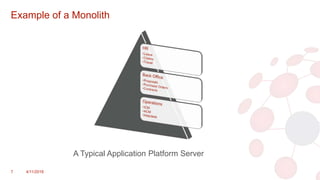
Example of a Monolith
7 4/11/2018
A Typical Application Platform Server
Rise of the Monolith cont.
• Our Challenge List:
• If something crashes, chances are everything goes down
• Code conflicts caused by multiple developers working on the same
design
• Duplication of logic across multiple applications
• Unable to scale processes as and when needed
• Updates and features take too long to deploy to production
• Dev, QA and Production environments are most likely different from
each other
8 4/11/2018
Attack of the Microbes
9 4/11/2018
Attack of the Microbes
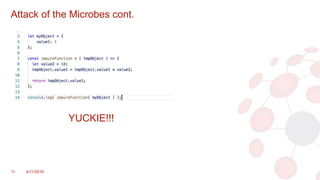
• Stage 1: Micro-Functions
• Breakdown your functions into re-usable/modular code blocks
• Each function should do one thing and do it well
• Simplify and optimize the code with the function
• Lightweight (max 80-100 lines of code)
• Aim for a “Pure Function” strategy:
• No dependencies other than what is passed to the function
• The code cannot fail and always returns something
10 4/11/2018
Attack of the Microbes cont.
11 4/11/2018
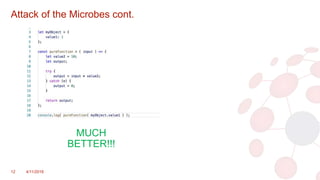
YUCKIE!!!
Attack of the Microbes cont.
12 4/11/2018
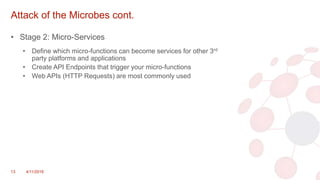
MUCH
BETTER!!!
Attack of the Microbes cont.
• Stage 2: Micro-Services
• Define which micro-functions can become services for other 3rd
party platforms and applications
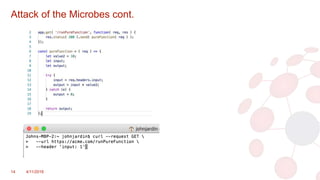
• Create API Endpoints that trigger your micro-functions
• Web APIs (HTTP Requests) are most commonly used
13 4/11/2018
Attack of the Microbes cont.
14 4/11/2018
Attack of the Microbes cont.
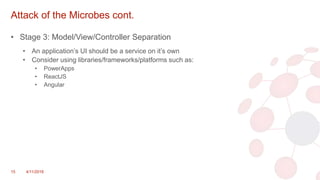
• Stage 3: Model/View/Controller Separation
• An application’s UI should be a service on it’s own
• Consider using libraries/frameworks/platforms such as:
• PowerApps
• ReactJS
• Angular
15 4/11/2018
Attack of the Microbes cont.
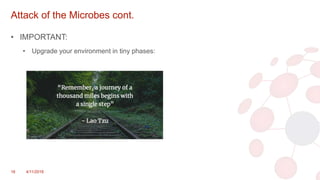
• IMPORTANT:
• Upgrade your environment in tiny phases:
16 4/11/2018
Attack of the Microbes cont.
• The Challenge List:
• If something crashes, chances are everything goes down
• Code conflicts caused by multiple developers working on the same
design
• Duplication of logic across multiple applications
• Unable to scale processes as and when needed
• Updates and features take too long to deploy to production
• Dev, QA and Production environments are most likely different from
each other
• Ensuring there is sufficient security to the environment now that 3rd
parties can access it
17 4/11/2018
• What have we made better
• What are new challenges
Containment
18 4/11/2018
Containment
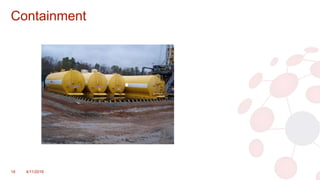
• Containerization
• A lightweight alternative to full machine virtualization
• Encapsulates an application in a container with its own operating
environment
• Popular container technologies:
• Docker
• Rkt (pronounced ”Rocket”)
• etc.
• A container can host almost any kind of application runtime:
• ASP.NET
• NodeJS
• Python
• etc.
19 4/11/2018
Containment cont.
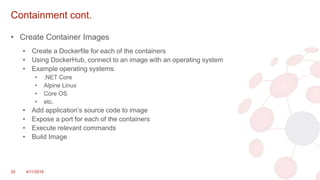
• Create Container Images
• Create a Dockerfile for each of the containers
• Using DockerHub, connect to an image with an operating system
• Example operating systems:
• .NET Core
• Alpine Linux
• Core OS
• etc.
• Add application’s source code to image
• Expose a port for each of the containers
• Execute relevant commands
• Build Image
20 4/11/2018
Containment cont.
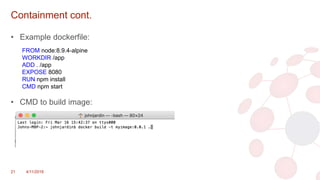
• Example dockerfile:
• CMD to build image:
21 4/11/2018
FROM node:8.9.4-alpine
WORKDIR /app
ADD . /app
EXPOSE 8080
RUN npm install
CMD npm start
Containment cont.
• The Challenge List:
• If something crashes, chances are everything goes down
• Code conflicts caused by multiple developers working on the same
design
• Duplication of logic across multiple applications
• Unable to scale processes as and when needed
• Updates and features take too long to deploy to production
• Dev, QA and Production environments are most likely different from
each other
• Ensuring there is sufficient security to the environment now that 3rd
parties can access it
• New skills required to setup and deploy containers
• Management of services and containers adds complexity to
Operations
22 4/11/2018
• What have we made better
• What are new challenges
Army of One
23 4/11/2018
Army of One
• Many systems exist for container orchestration:
• Kubernetes (Recommended)
• Docker Swarm
• Apache Mesos
• etc.
• These systems allows for automated deployment,
management and scaling of containers
24 4/11/2018
Army of One cont.
• Benefits of container orchestration:
• High Availability
• Clustering containers across multiple Machines and VMs
• Run on-premise or in the cloud
• Seamless disaster recovery
• Scaling containers and services as and when needed
• Continuous delivery of updates and fixes with no downtime
• Auto restarting of services when failures occur
25 4/11/2018
Army of One cont.
• Recommended solutions for on-premise:
• Microsoft Azure Stack
• Minikube (For development and testing)(Low Availability)
• Cloud platforms that support Kubernetes:
• Microsoft Azure
• Google Cloud
• Amazon Web Services
• IBM Cloud
26 4/11/2018
Army of One cont.
• The Challenge List:
• If something crashes, chances are everything goes down
• Unable to scale processes as and when needed
• Updates and features take too long to deploy to production
• Dev, QA and Production environments are most likely different from
each other
• Ensuring there is sufficient security to the environment now that 3rd
parties can access it
• Management of services and containers adds complexity to
Operations
• Transparency and reporting on performance of services
• A/B Testing of new updates and features
• Purposely injecting faults and latency to create better services
27 4/11/2018
• What have we made better
• What are new challenges
Watcher on the Wall
28 4/11/2018
Overview of Istio
• Provides a uniform way to connect, manage and secure
microservices
• Manages traffic flows between microservices
• Enforces access policies
• Provides metrics, logs and traces for all traffic within a
cluster
• Service to service authentication
• Can be deployed on Kubernetes, Nomad and Consul
• No changes to microservices/apps needed for Istio to work
29 4/11/2018
Deploying Istio
• Istio exists in its own namespace on Kubernetes and is
made up of pre-defined container images
• “istioctl” is used along with “kubectl” for Istio-related
operations:
• kubectl create -f <istioctl kube-inject -f <your-app-spec>.yaml)
30 4/11/2018
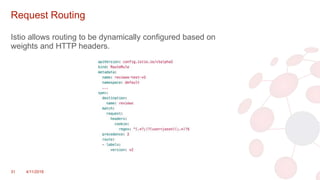
Request Routing
Istio allows routing to be dynamically configured based on
weights and HTTP headers.
31 4/11/2018
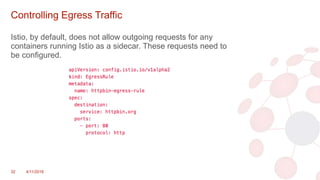
Controlling Egress Traffic
Istio, by default, does not allow outgoing requests for any
containers running Istio as a sidecar. These requests need to
be configured.
32 4/11/2018
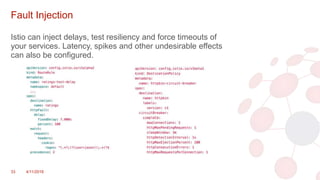
Fault Injection
Istio can inject delays, test resiliency and force timeouts of
your services. Latency, spikes and other undesirable effects
can also be configured.
33 4/11/2018
Access Control
• The following access control methods can be configured for
Istio:
• TLS Authentication
• Basic Access Control (Uses Kubernetes labels)
• Role-based Access Control (RBAC)
• Secure Access Control
34 4/11/2018
Watcher on the Wall cont.
• The Challenge List:
• Updates and features take too long to deploy to production
• Ensuring there is sufficient security to the environment now that 3rd
parties can access it
• Transparency and reporting on performance of services
• A/B Testing of new updates and features
• Purposely injecting faults and latency to create better services
• Dynamic routing and load balancing
35 4/11/2018
• What have we made better
• What are new challenges
Closing
36 4/11/2018
Closing
For more information, check out:
• Istio – https://istio.io
• Kubernetes - https://kubernetes.io
• Docker – https://www.docker.com
• The 12 Factor App - https://12factor.net
37 4/11/2018
Contact John Jardin
• Email: john@agilite.io
• Website: https://agilite.io
• Blog: http://www.bleedingcode.com
38 4/11/2018
The End
39 4/11/2018

DevOps, Kubernetes and Istio

  • 1.
    DevOps, Kubernetes &Istio John Jardin JHB Office365 User Group
  • 2.
    About John Jardin •Integration and Cloud Architect • Over 16 years development and consulting • Core focuses include: • Integration & Cloud Architecture • Full stack Application Development • Coaching & Mentoring 2 4/11/2018
  • 3.
    Agenda 3 4/11/2018 • TheHero’s Journey • Rise of the Monolith • Attack of the Microbes • Containment • Army of One • Watcher on the Wall • The End
  • 4.
  • 5.
    Rise of theMonolith 5 4/11/2018
  • 6.
    Rise of theMonolith • Your application is potentially a Monolith if: • It exists only for the platform it runs on • User Interface and logic exists in the same design • Functions are made up of hundreds of lines of code and are only accessed natively • Incremental updates require the entire application’s design to be deployed • Deployments of updates and fixes take weeks or even months 6 4/11/2018
  • 7.
    Example of aMonolith 7 4/11/2018 A Typical Application Platform Server
  • 8.
    Rise of theMonolith cont. • Our Challenge List: • If something crashes, chances are everything goes down • Code conflicts caused by multiple developers working on the same design • Duplication of logic across multiple applications • Unable to scale processes as and when needed • Updates and features take too long to deploy to production • Dev, QA and Production environments are most likely different from each other 8 4/11/2018
  • 9.
    Attack of theMicrobes 9 4/11/2018
  • 10.
    Attack of theMicrobes • Stage 1: Micro-Functions • Breakdown your functions into re-usable/modular code blocks • Each function should do one thing and do it well • Simplify and optimize the code with the function • Lightweight (max 80-100 lines of code) • Aim for a “Pure Function” strategy: • No dependencies other than what is passed to the function • The code cannot fail and always returns something 10 4/11/2018
  • 11.
    Attack of theMicrobes cont. 11 4/11/2018 YUCKIE!!!
  • 12.
    Attack of theMicrobes cont. 12 4/11/2018 MUCH BETTER!!!
  • 13.
    Attack of theMicrobes cont. • Stage 2: Micro-Services • Define which micro-functions can become services for other 3rd party platforms and applications • Create API Endpoints that trigger your micro-functions • Web APIs (HTTP Requests) are most commonly used 13 4/11/2018
  • 14.
    Attack of theMicrobes cont. 14 4/11/2018
  • 15.
    Attack of theMicrobes cont. • Stage 3: Model/View/Controller Separation • An application’s UI should be a service on it’s own • Consider using libraries/frameworks/platforms such as: • PowerApps • ReactJS • Angular 15 4/11/2018
  • 16.
    Attack of theMicrobes cont. • IMPORTANT: • Upgrade your environment in tiny phases: 16 4/11/2018
  • 17.
    Attack of theMicrobes cont. • The Challenge List: • If something crashes, chances are everything goes down • Code conflicts caused by multiple developers working on the same design • Duplication of logic across multiple applications • Unable to scale processes as and when needed • Updates and features take too long to deploy to production • Dev, QA and Production environments are most likely different from each other • Ensuring there is sufficient security to the environment now that 3rd parties can access it 17 4/11/2018 • What have we made better • What are new challenges
  • 18.
  • 19.
    Containment • Containerization • Alightweight alternative to full machine virtualization • Encapsulates an application in a container with its own operating environment • Popular container technologies: • Docker • Rkt (pronounced ”Rocket”) • etc. • A container can host almost any kind of application runtime: • ASP.NET • NodeJS • Python • etc. 19 4/11/2018
  • 20.
    Containment cont. • CreateContainer Images • Create a Dockerfile for each of the containers • Using DockerHub, connect to an image with an operating system • Example operating systems: • .NET Core • Alpine Linux • Core OS • etc. • Add application’s source code to image • Expose a port for each of the containers • Execute relevant commands • Build Image 20 4/11/2018
  • 21.
    Containment cont. • Exampledockerfile: • CMD to build image: 21 4/11/2018 FROM node:8.9.4-alpine WORKDIR /app ADD . /app EXPOSE 8080 RUN npm install CMD npm start
  • 22.
    Containment cont. • TheChallenge List: • If something crashes, chances are everything goes down • Code conflicts caused by multiple developers working on the same design • Duplication of logic across multiple applications • Unable to scale processes as and when needed • Updates and features take too long to deploy to production • Dev, QA and Production environments are most likely different from each other • Ensuring there is sufficient security to the environment now that 3rd parties can access it • New skills required to setup and deploy containers • Management of services and containers adds complexity to Operations 22 4/11/2018 • What have we made better • What are new challenges
  • 23.
    Army of One 234/11/2018
  • 24.
    Army of One •Many systems exist for container orchestration: • Kubernetes (Recommended) • Docker Swarm • Apache Mesos • etc. • These systems allows for automated deployment, management and scaling of containers 24 4/11/2018
  • 25.
    Army of Onecont. • Benefits of container orchestration: • High Availability • Clustering containers across multiple Machines and VMs • Run on-premise or in the cloud • Seamless disaster recovery • Scaling containers and services as and when needed • Continuous delivery of updates and fixes with no downtime • Auto restarting of services when failures occur 25 4/11/2018
  • 26.
    Army of Onecont. • Recommended solutions for on-premise: • Microsoft Azure Stack • Minikube (For development and testing)(Low Availability) • Cloud platforms that support Kubernetes: • Microsoft Azure • Google Cloud • Amazon Web Services • IBM Cloud 26 4/11/2018
  • 27.
    Army of Onecont. • The Challenge List: • If something crashes, chances are everything goes down • Unable to scale processes as and when needed • Updates and features take too long to deploy to production • Dev, QA and Production environments are most likely different from each other • Ensuring there is sufficient security to the environment now that 3rd parties can access it • Management of services and containers adds complexity to Operations • Transparency and reporting on performance of services • A/B Testing of new updates and features • Purposely injecting faults and latency to create better services 27 4/11/2018 • What have we made better • What are new challenges
  • 28.
    Watcher on theWall 28 4/11/2018
  • 29.
    Overview of Istio •Provides a uniform way to connect, manage and secure microservices • Manages traffic flows between microservices • Enforces access policies • Provides metrics, logs and traces for all traffic within a cluster • Service to service authentication • Can be deployed on Kubernetes, Nomad and Consul • No changes to microservices/apps needed for Istio to work 29 4/11/2018
  • 30.
    Deploying Istio • Istioexists in its own namespace on Kubernetes and is made up of pre-defined container images • “istioctl” is used along with “kubectl” for Istio-related operations: • kubectl create -f <istioctl kube-inject -f <your-app-spec>.yaml) 30 4/11/2018
  • 31.
    Request Routing Istio allowsrouting to be dynamically configured based on weights and HTTP headers. 31 4/11/2018
  • 32.
    Controlling Egress Traffic Istio,by default, does not allow outgoing requests for any containers running Istio as a sidecar. These requests need to be configured. 32 4/11/2018
  • 33.
    Fault Injection Istio caninject delays, test resiliency and force timeouts of your services. Latency, spikes and other undesirable effects can also be configured. 33 4/11/2018
  • 34.
    Access Control • Thefollowing access control methods can be configured for Istio: • TLS Authentication • Basic Access Control (Uses Kubernetes labels) • Role-based Access Control (RBAC) • Secure Access Control 34 4/11/2018
  • 35.
    Watcher on theWall cont. • The Challenge List: • Updates and features take too long to deploy to production • Ensuring there is sufficient security to the environment now that 3rd parties can access it • Transparency and reporting on performance of services • A/B Testing of new updates and features • Purposely injecting faults and latency to create better services • Dynamic routing and load balancing 35 4/11/2018 • What have we made better • What are new challenges
  • 36.
  • 37.
    Closing For more information,check out: • Istio – https://istio.io • Kubernetes - https://kubernetes.io • Docker – https://www.docker.com • The 12 Factor App - https://12factor.net 37 4/11/2018
  • 38.
    Contact John Jardin •Email: john@agilite.io • Website: https://agilite.io • Blog: http://www.bleedingcode.com 38 4/11/2018
  • 39.

Editor's Notes

  • #5 This is all bleeding edge technology right now Too many buzzwords at the moment I’m here to simplify these technologies To understand Istio, we have to go back to the beginning Part 1 is a crash course on microservices and containerization Part 2 is Istio with some demos
  • #7 What constitutes a Monolithic application? Let’s rather understand the reasons it would be labeled one
  • #10 We cannot continue like this!!! So where do we start?
  • #12 We cannot continue like this!!! So where do we start?
  • #13 We cannot continue like this!!! So where do we start?
  • #15 We cannot continue like this!!! So where do we start?
  • #20 Other Container Technologies: Solaris Microsoft
  • #25 Open Source System for Container Orchestration Automate deployment, scaling and management of containerized applications
  • #31 Demo Kubernetes Dashboard to show Istio in its own namespace with containers
  • #32 Show example of app using 1 version in 1 scenario and another version in another scenario