
© 2018, Amazon Web Services, Inc. or its Affiliates. All rights reserved.
Tom Laszewski, AWS Enterprise Technologist
May, 2019
AWS Best Practices:
DevOps, CI/CD, Cost
Management, and Security
© 2018, Amazon Web Services, Inc. or its Affiliates. All rights reserved.
© 2018, Amazon Web Services, Inc. or its Affiliates. All rights reserved.© 2017, Amazon Web Services, Inc. or its Affiliates. All rights reserved.
DevOps and CI/CD
© 2018, Amazon Web Services, Inc. or its Affiliates. All rights reserved.
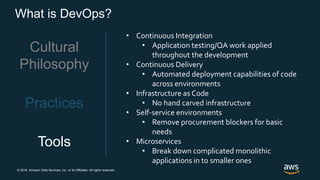
What is DevOps?
Cultural
Philosophy
Practices
Tools
• Tearing down barriers
• Between teams
• Mid-process
• Enable the smart people you are spending time
and money hiring to make smart decisions
• Increase visibility to the big picture and the results
of work being done
© 2018, Amazon Web Services, Inc. or its Affiliates. All rights reserved.
What is DevOps?
Cultural
Philosophy
Practices
Tools
• Continuous Integration
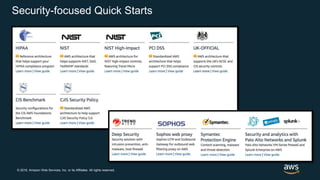
• Application testing/QA work applied
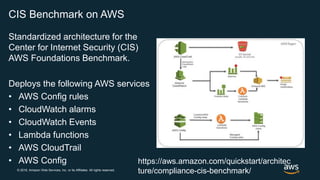
throughout the development
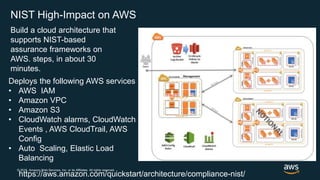
• Continuous Delivery
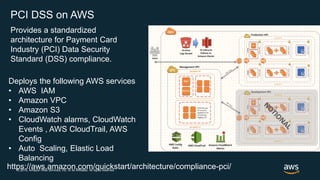
• Automated deployment capabilities of code
across environments
• Infrastructure as Code
• No hand carved infrastructure
• Self-service environments
• Remove procurement blockers for basic
needs
• Microservices
• Break down complicated monolithic
applications in to smaller ones
© 2018, Amazon Web Services, Inc. or its Affiliates. All rights reserved.
What is DevOps?
Cultural
Philosophy
Practices
Tools
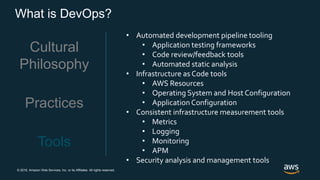
• Automated development pipeline tooling
• Application testing frameworks
• Code review/feedback tools
• Automated static analysis
• Infrastructure as Code tools
• AWS Resources
• Operating System and Host Configuration
• Application Configuration
• Consistent infrastructure measurement tools
• Metrics
• Logging
• Monitoring
• APM
• Security analysis and management tools
© 2018, Amazon Web Services, Inc. or its Affiliates. All rights reserved.
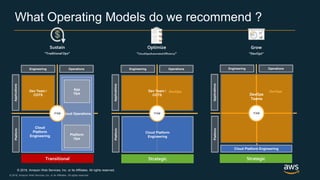
What Operating Models do we recommend ?
Sustain
“TraditionalOps”
Grow
“DevOps”
Optimize
“CloudOps/Automated Efficiency”
OperationsEngineering
PlatformApplications
DevOpsDev Team /
COTS
Cloud Platform
Engineering
ITSM
OperationsEngineering
PlatformApplications
DevOps
DevOps
Teams
ITSM
Cloud Platform Engineering
OperationsEngineering
PlatformApplications
DevOpsDev Team /
COTS
Cloud
Platform
Engineering
Cloud Operations
App
Ops
Platform
Ops
ITSM
Transitional Strategic Strategic
© 2018, Amazon Web Services, Inc. or its Affiliates. All rights reserved.
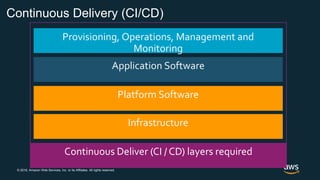
Continuous Delivery (CI/CD)
Provisioning, Operations, Management and
Monitoring
Application Software
© 2018, Amazon Web Services, Inc. or its Affiliates. All rights reserved.
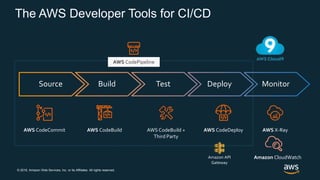
The AWS Developer Tools for CI/CD
AWS CodeBuild +
Third Party
AWS CodeCommit AWS CodeBuild AWS CodeDeploy AWS X-Ray
Source Build Test Deploy Monitor
AWS CodePipeline
Amazon CloudWatchAmazon API
Gateway
© 2018, Amazon Web Services, Inc. or its Affiliates. All rights reserved.
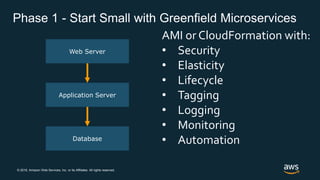
Phase 1 - Start Small with Greenfield Microservices
Web Server
Application Server
Database
AMI or CloudFormation with:
• Security
• Elasticity
• Lifecycle
• Tagging
• Logging
• Monitoring
• Automation
© 2018, Amazon Web Services, Inc. or its Affiliates. All rights reserved.
A look back at
development and
operations at Amazon.com
© 2018, Amazon Web Services, Inc. or its Affiliates. All rights reserved.
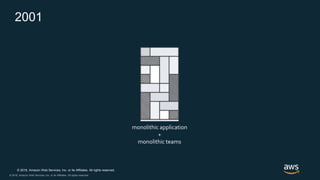
2001
monolithic application
+
monolithic teams
© 2018, Amazon Web Services, Inc. or its Affiliates. All rights reserved.
Guiding Principals
• APIs/Microservices Management
• Continuous Integration/Delivery
• Infrastructure as Code
• Monitoring/Metrics/Logging/APM
• Communication & Collaboration (ChatOps)
© 2018, Amazon Web Services, Inc. or its Affiliates. All rights reserved.
Lessons Learned
• Shared culture
• Highly autonomous teams
• Productization
• Mostly shared toolchains
• Cloud Platform Engineering
© 2018, Amazon Web Services, Inc. or its Affiliates. All rights reserved.
Governance
• Thorough onboarding/training
• Regular technical and business metric reviews
• Regular sharing of new tools, services, technologies
• Public sharing of COEs; “Correction of Errors”
• Configuration management
© 2018, Amazon Web Services, Inc. or its Affiliates. All rights reserved.
DevOps – Don’t Take It Just From Us
Capital One’s moved from traditional waterfall to DevOps:
• 100s of code commits per day,
• Integration from once a month to every 15 minutes
• QA from once per month to 4 times per day
• Deployment from manual to completely automated
• Production release from monthly/quarterly to once per sprint
• Utilize Game Days
• Chaos Engineering
© 2018, Amazon Web Services, Inc. or its Affiliates. All rights reserved.
There is no compression algorithm for experience
© 2018, Amazon Web Services, Inc. or its Affiliates. All rights reserved.© 2017, Amazon Web Services, Inc. or its Affiliates. All rights reserved.
Cost Management
© 2018, Amazon Web Services, Inc. or its Affiliates. All rights reserved.
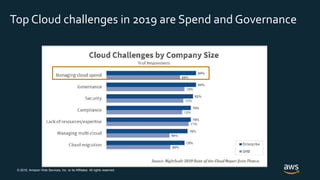
Top Cloud challenges in 2019 are Spend and Governance
© 2018, Amazon Web Services, Inc. or its Affiliates. All rights reserved.
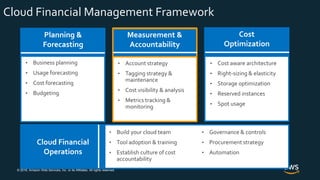
Cost
Optimization
• Cost aware architecture
• Right-sizing & elasticity
• Storage optimization
• Reserved instances
• Spot usage
Measurement &
Accountability
• Account strategy
• Tagging strategy &
maintenance
• Cost visibility & analysis
• Metrics tracking &
monitoring
Planning &
Forecasting
• Business planning
• Usage forecasting
• Cost forecasting
• Budgeting
Cloud Financial
Operations
• Governance & controls
• Procurement strategy
• Automation
• Build your cloud team
• Tool adoption & training
• Establish culture of cost
accountability
Cloud Financial Management Framework
© 2018, Amazon Web Services, Inc. or its Affiliates. All rights reserved.
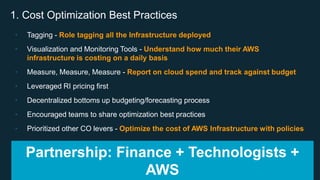
• Tagging - Role tagging all the Infrastructure deployed
• Visualization and Monitoring Tools - Understand how much their AWS
infrastructure is costing on a daily basis
• Measure, Measure, Measure - Report on cloud spend and track against budget
• Leveraged RI pricing first
• Decentralized bottoms up budgeting/forecasting process
• Encouraged teams to share optimization best practices
• Prioritized other CO levers - Optimize the cost of AWS Infrastructure with policies
1. Cost Optimization Best Practices
Partnership: Finance + Technologists +
AWS
© 2018, Amazon Web Services, Inc. or its Affiliates. All rights reserved.
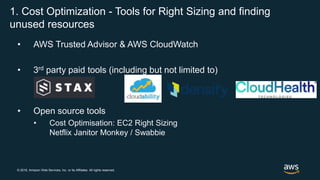
• AWS Trusted Advisor & AWS CloudWatch
• 3rd party paid tools (including but not limited to)
• Open source tools
• Cost Optimisation: EC2 Right Sizing
Netflix Janitor Monkey / Swabbie
1. Cost Optimization - Tools for Right Sizing and finding
unused resources
© 2018, Amazon Web Services, Inc. or its Affiliates. All rights reserved.
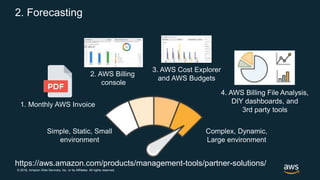
2. Forecasting
Simple, Static, Small
environment
Complex, Dynamic,
Large environment
1. Monthly AWS Invoice
2. AWS Billing
console
3. AWS Cost Explorer
and AWS Budgets
4. AWS Billing File Analysis,
DIY dashboards, and
3rd party tools
https://aws.amazon.com/products/management-tools/partner-solutions/
© 2018, Amazon Web Services, Inc. or its Affiliates. All rights reserved.
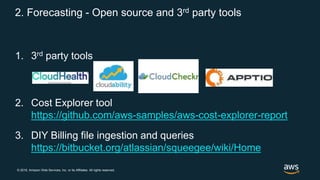
2. Forecasting - Open source and 3rd party tools
1. 3rd party tools
2. Cost Explorer tool
https://github.com/aws-samples/aws-cost-explorer-report
3. DIY Billing file ingestion and queries
https://bitbucket.org/atlassian/squeegee/wiki/Home
© 2018, Amazon Web Services, Inc. or its Affiliates. All rights reserved.
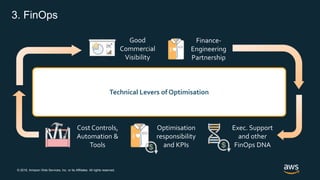
3. FinOps
Good
Commercial
Visibility
Finance-
Engineering
Partnership
Cost Controls,
Automation &
Tools
Optimisation
responsibility
and KPIs
Exec. Support
and other
FinOps DNA
Right Size &
Decommission unused
Resources
Use Reserved
Instances
Increase
Elasticity
Match Storage
to Need
Design for
Cost
Use Spot
Instances
Technical Levers of Optimisation
© 2018, Amazon Web Services, Inc. or its Affiliates. All rights reserved.© 2017, Amazon Web Services, Inc. or its Affiliates. All rights reserved.
Security
Shared responsibility, Industry specific Quick
Starts
© 2018, Amazon Web Services, Inc. or its Affiliates. All rights reserved.
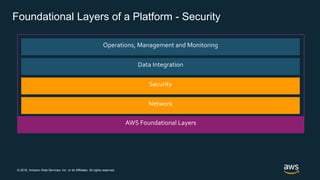
Operations, Management and Monitoring
Data Integration
Foundational Layers of a Platform - Security
© 2018, Amazon Web Services, Inc. or its Affiliates. All rights reserved.
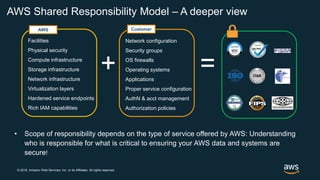
AWS Shared Responsibility Model – A deeper view
Facilities
Physical security
Compute infrastructure
Storage infrastructure
Network infrastructure
Virtualization layers
Hardened service endpoints
Rich IAM capabilities
Network configuration
Security groups
OS firewalls
Operating systems
Applications
Proper service configuration
AuthN & acct management
Authorization policies
+ =
Customer
• Scope of responsibility depends on the type of service offered by AWS: Understanding
who is responsible for what is critical to ensuring your AWS data and systems are
secure!
AWS
© 2018, Amazon Web Services, Inc. or its Affiliates. All rights reserved.
Security-focused Quick Starts
© 2018, Amazon Web Services, Inc. or its Affiliates. All rights reserved.
CIS Benchmark on AWS
Standardized architecture for the
Center for Internet Security (CIS)
AWS Foundations Benchmark.
Deploys the following AWS services
• AWS Config rules
• CloudWatch alarms
• CloudWatch Events
• Lambda functions
• AWS CloudTrail
• AWS Config https://aws.amazon.com/quickstart/architec
ture/compliance-cis-benchmark/
© 2018, Amazon Web Services, Inc. or its Affiliates. All rights reserved.
NIST High-Impact on AWS
https://aws.amazon.com/quickstart/architecture/compliance-nist/
Build a cloud architecture that
supports NIST-based
assurance frameworks on
AWS. steps, in about 30
minutes.
Deploys the following AWS services
• AWS IAM
• Amazon VPC
• Amazon S3
• CloudWatch alarms, CloudWatch
Events , AWS CloudTrail, AWS
Config
• Auto Scaling, Elastic Load
Balancing
© 2018, Amazon Web Services, Inc. or its Affiliates. All rights reserved.
PCI DSS on AWS
https://aws.amazon.com/quickstart/architecture/compliance-pci/
Provides a standardized
architecture for Payment Card
Industry (PCI) Data Security
Standard (DSS) compliance.
Deploys the following AWS services
• AWS IAM
• Amazon VPC
• Amazon S3
• CloudWatch alarms, CloudWatch
Events , AWS CloudTrail, AWS
Config
• Auto Scaling, Elastic Load
Balancing
© 2018, Amazon Web Services, Inc. or its Affiliates. All rights reserved.
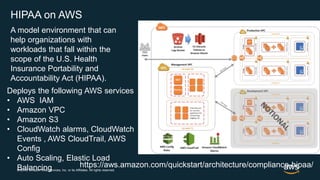
HIPAA on AWS
https://aws.amazon.com/quickstart/architecture/compliance-hipaa/
A model environment that can
help organizations with
workloads that fall within the
scope of the U.S. Health
Insurance Portability and
Accountability Act (HIPAA).
Deploys the following AWS services
• AWS IAM
• Amazon VPC
• Amazon S3
• CloudWatch alarms, CloudWatch
Events , AWS CloudTrail, AWS
Config
• Auto Scaling, Elastic Load
Balancing
© 2018, Amazon Web Services, Inc. or its Affiliates. All rights reserved.
BOLD

DevOps, CI/CD, cost management, and security on AWS

  • 1.
    © 2018, AmazonWeb Services, Inc. or its Affiliates. All rights reserved. Tom Laszewski, AWS Enterprise Technologist May, 2019 AWS Best Practices: DevOps, CI/CD, Cost Management, and Security
  • 2.
    © 2018, AmazonWeb Services, Inc. or its Affiliates. All rights reserved.
  • 3.
    © 2018, AmazonWeb Services, Inc. or its Affiliates. All rights reserved.© 2017, Amazon Web Services, Inc. or its Affiliates. All rights reserved. DevOps and CI/CD
  • 4.
    © 2018, AmazonWeb Services, Inc. or its Affiliates. All rights reserved. What is DevOps? Cultural Philosophy Practices Tools • Tearing down barriers • Between teams • Mid-process • Enable the smart people you are spending time and money hiring to make smart decisions • Increase visibility to the big picture and the results of work being done
  • 5.
    © 2018, AmazonWeb Services, Inc. or its Affiliates. All rights reserved. What is DevOps? Cultural Philosophy Practices Tools • Continuous Integration • Application testing/QA work applied throughout the development • Continuous Delivery • Automated deployment capabilities of code across environments • Infrastructure as Code • No hand carved infrastructure • Self-service environments • Remove procurement blockers for basic needs • Microservices • Break down complicated monolithic applications in to smaller ones
  • 6.
    © 2018, AmazonWeb Services, Inc. or its Affiliates. All rights reserved. What is DevOps? Cultural Philosophy Practices Tools • Automated development pipeline tooling • Application testing frameworks • Code review/feedback tools • Automated static analysis • Infrastructure as Code tools • AWS Resources • Operating System and Host Configuration • Application Configuration • Consistent infrastructure measurement tools • Metrics • Logging • Monitoring • APM • Security analysis and management tools
  • 7.
    © 2018, AmazonWeb Services, Inc. or its Affiliates. All rights reserved. © 2018, Amazon Web Services, Inc. or its Affiliates. All rights reserved. What Operating Models do we recommend ? Sustain “TraditionalOps” Grow “DevOps” Optimize “CloudOps/Automated Efficiency” OperationsEngineering PlatformApplications DevOpsDev Team / COTS Cloud Platform Engineering ITSM OperationsEngineering PlatformApplications DevOps DevOps Teams ITSM Cloud Platform Engineering OperationsEngineering PlatformApplications DevOpsDev Team / COTS Cloud Platform Engineering Cloud Operations App Ops Platform Ops ITSM Transitional Strategic Strategic
  • 8.
    © 2018, AmazonWeb Services, Inc. or its Affiliates. All rights reserved. Continuous Delivery (CI/CD) Provisioning, Operations, Management and Monitoring Application Software
  • 9.
    © 2018, AmazonWeb Services, Inc. or its Affiliates. All rights reserved. The AWS Developer Tools for CI/CD AWS CodeBuild + Third Party AWS CodeCommit AWS CodeBuild AWS CodeDeploy AWS X-Ray Source Build Test Deploy Monitor AWS CodePipeline Amazon CloudWatchAmazon API Gateway
  • 10.
    © 2018, AmazonWeb Services, Inc. or its Affiliates. All rights reserved. Phase 1 - Start Small with Greenfield Microservices Web Server Application Server Database AMI or CloudFormation with: • Security • Elasticity • Lifecycle • Tagging • Logging • Monitoring • Automation
  • 11.
    © 2018, AmazonWeb Services, Inc. or its Affiliates. All rights reserved. A look back at development and operations at Amazon.com
  • 12.
    © 2018, AmazonWeb Services, Inc. or its Affiliates. All rights reserved. © 2018, Amazon Web Services, Inc. or its Affiliates. All rights reserved. 2001 monolithic application + monolithic teams
  • 13.
    © 2018, AmazonWeb Services, Inc. or its Affiliates. All rights reserved. © 2018, Amazon Web Services, Inc. or its Affiliates. All rights reserved. Guiding Principals • APIs/Microservices Management • Continuous Integration/Delivery • Infrastructure as Code • Monitoring/Metrics/Logging/APM • Communication & Collaboration (ChatOps)
  • 14.
    © 2018, AmazonWeb Services, Inc. or its Affiliates. All rights reserved. © 2018, Amazon Web Services, Inc. or its Affiliates. All rights reserved. Lessons Learned • Shared culture • Highly autonomous teams • Productization • Mostly shared toolchains • Cloud Platform Engineering
  • 15.
    © 2018, AmazonWeb Services, Inc. or its Affiliates. All rights reserved. © 2018, Amazon Web Services, Inc. or its Affiliates. All rights reserved. Governance • Thorough onboarding/training • Regular technical and business metric reviews • Regular sharing of new tools, services, technologies • Public sharing of COEs; “Correction of Errors” • Configuration management
  • 16.
    © 2018, AmazonWeb Services, Inc. or its Affiliates. All rights reserved. © 2018, Amazon Web Services, Inc. or its Affiliates. All rights reserved. DevOps – Don’t Take It Just From Us Capital One’s moved from traditional waterfall to DevOps: • 100s of code commits per day, • Integration from once a month to every 15 minutes • QA from once per month to 4 times per day • Deployment from manual to completely automated • Production release from monthly/quarterly to once per sprint • Utilize Game Days • Chaos Engineering
  • 17.
    © 2018, AmazonWeb Services, Inc. or its Affiliates. All rights reserved. There is no compression algorithm for experience
  • 18.
    © 2018, AmazonWeb Services, Inc. or its Affiliates. All rights reserved.© 2017, Amazon Web Services, Inc. or its Affiliates. All rights reserved. Cost Management
  • 19.
    © 2018, AmazonWeb Services, Inc. or its Affiliates. All rights reserved. Top Cloud challenges in 2019 are Spend and Governance
  • 20.
    © 2018, AmazonWeb Services, Inc. or its Affiliates. All rights reserved. Cost Optimization • Cost aware architecture • Right-sizing & elasticity • Storage optimization • Reserved instances • Spot usage Measurement & Accountability • Account strategy • Tagging strategy & maintenance • Cost visibility & analysis • Metrics tracking & monitoring Planning & Forecasting • Business planning • Usage forecasting • Cost forecasting • Budgeting Cloud Financial Operations • Governance & controls • Procurement strategy • Automation • Build your cloud team • Tool adoption & training • Establish culture of cost accountability Cloud Financial Management Framework
  • 21.
    © 2018, AmazonWeb Services, Inc. or its Affiliates. All rights reserved. • Tagging - Role tagging all the Infrastructure deployed • Visualization and Monitoring Tools - Understand how much their AWS infrastructure is costing on a daily basis • Measure, Measure, Measure - Report on cloud spend and track against budget • Leveraged RI pricing first • Decentralized bottoms up budgeting/forecasting process • Encouraged teams to share optimization best practices • Prioritized other CO levers - Optimize the cost of AWS Infrastructure with policies 1. Cost Optimization Best Practices Partnership: Finance + Technologists + AWS
  • 22.
    © 2018, AmazonWeb Services, Inc. or its Affiliates. All rights reserved. • AWS Trusted Advisor & AWS CloudWatch • 3rd party paid tools (including but not limited to) • Open source tools • Cost Optimisation: EC2 Right Sizing Netflix Janitor Monkey / Swabbie 1. Cost Optimization - Tools for Right Sizing and finding unused resources
  • 23.
    © 2018, AmazonWeb Services, Inc. or its Affiliates. All rights reserved. 2. Forecasting Simple, Static, Small environment Complex, Dynamic, Large environment 1. Monthly AWS Invoice 2. AWS Billing console 3. AWS Cost Explorer and AWS Budgets 4. AWS Billing File Analysis, DIY dashboards, and 3rd party tools https://aws.amazon.com/products/management-tools/partner-solutions/
  • 24.
    © 2018, AmazonWeb Services, Inc. or its Affiliates. All rights reserved. 2. Forecasting - Open source and 3rd party tools 1. 3rd party tools 2. Cost Explorer tool https://github.com/aws-samples/aws-cost-explorer-report 3. DIY Billing file ingestion and queries https://bitbucket.org/atlassian/squeegee/wiki/Home
  • 25.
    © 2018, AmazonWeb Services, Inc. or its Affiliates. All rights reserved. 3. FinOps Good Commercial Visibility Finance- Engineering Partnership Cost Controls, Automation & Tools Optimisation responsibility and KPIs Exec. Support and other FinOps DNA Right Size & Decommission unused Resources Use Reserved Instances Increase Elasticity Match Storage to Need Design for Cost Use Spot Instances Technical Levers of Optimisation
  • 26.
    © 2018, AmazonWeb Services, Inc. or its Affiliates. All rights reserved.© 2017, Amazon Web Services, Inc. or its Affiliates. All rights reserved. Security Shared responsibility, Industry specific Quick Starts
  • 27.
    © 2018, AmazonWeb Services, Inc. or its Affiliates. All rights reserved. Operations, Management and Monitoring Data Integration Foundational Layers of a Platform - Security
  • 28.
    © 2018, AmazonWeb Services, Inc. or its Affiliates. All rights reserved. AWS Shared Responsibility Model – A deeper view Facilities Physical security Compute infrastructure Storage infrastructure Network infrastructure Virtualization layers Hardened service endpoints Rich IAM capabilities Network configuration Security groups OS firewalls Operating systems Applications Proper service configuration AuthN & acct management Authorization policies + = Customer • Scope of responsibility depends on the type of service offered by AWS: Understanding who is responsible for what is critical to ensuring your AWS data and systems are secure! AWS
  • 29.
    © 2018, AmazonWeb Services, Inc. or its Affiliates. All rights reserved. Security-focused Quick Starts
  • 30.
    © 2018, AmazonWeb Services, Inc. or its Affiliates. All rights reserved. CIS Benchmark on AWS Standardized architecture for the Center for Internet Security (CIS) AWS Foundations Benchmark. Deploys the following AWS services • AWS Config rules • CloudWatch alarms • CloudWatch Events • Lambda functions • AWS CloudTrail • AWS Config https://aws.amazon.com/quickstart/architec ture/compliance-cis-benchmark/
  • 31.
    © 2018, AmazonWeb Services, Inc. or its Affiliates. All rights reserved. NIST High-Impact on AWS https://aws.amazon.com/quickstart/architecture/compliance-nist/ Build a cloud architecture that supports NIST-based assurance frameworks on AWS. steps, in about 30 minutes. Deploys the following AWS services • AWS IAM • Amazon VPC • Amazon S3 • CloudWatch alarms, CloudWatch Events , AWS CloudTrail, AWS Config • Auto Scaling, Elastic Load Balancing
  • 32.
    © 2018, AmazonWeb Services, Inc. or its Affiliates. All rights reserved. PCI DSS on AWS https://aws.amazon.com/quickstart/architecture/compliance-pci/ Provides a standardized architecture for Payment Card Industry (PCI) Data Security Standard (DSS) compliance. Deploys the following AWS services • AWS IAM • Amazon VPC • Amazon S3 • CloudWatch alarms, CloudWatch Events , AWS CloudTrail, AWS Config • Auto Scaling, Elastic Load Balancing
  • 33.
    © 2018, AmazonWeb Services, Inc. or its Affiliates. All rights reserved. HIPAA on AWS https://aws.amazon.com/quickstart/architecture/compliance-hipaa/ A model environment that can help organizations with workloads that fall within the scope of the U.S. Health Insurance Portability and Accountability Act (HIPAA). Deploys the following AWS services • AWS IAM • Amazon VPC • Amazon S3 • CloudWatch alarms, CloudWatch Events , AWS CloudTrail, AWS Config • Auto Scaling, Elastic Load Balancing
  • 34.
    © 2018, AmazonWeb Services, Inc. or its Affiliates. All rights reserved. © 2018, Amazon Web Services, Inc. or its Affiliates. All rights reserved. BOLD

Editor's Notes

  • #2 DevOps pipelines – how does one think about choosing between some legacy tools (such as Terraform versus CloudFormation. Build Pipeline, Code Pipeline versus Jenkins etc. ) versus going all in the AWS stack , what are companies doing, best practices.  Cost management – strategies , role intermediaries such as Cloudreach can play in rolling our efficient cost strategies Security -  industry specific capabilities, shared responsibility model a good framework , depending on the industry you need more sometimes in terms of access to AWS resources  
  • #9 Capabilities (primitives): shared code repository, self-testing, automation of builds, automation of packaging, provisioning, deployment orchestration, configuration management, performance management, cost management, instrumentation, automate workflow, fleet management, audit, cloning environments, standardization, monitoring, bug tracking, issue tracking, ChatOps, metrics dashboard, and project management AWS Services (tools): AWS CloudFormation, AWS Systems Manager, AWS Config, AWS CloudWatch, AWS CloudTrail, AWS Service Catalog, AWS CodeCommit, AWS CodeDeploy, AWS OpsWorks, Amazon EKS CI/CD non-technical requirements : run what you build, organization shift (two pizza teams’, ‘productization’), culture (ownership, MVP, builders, one way and two way doors), agile processes Architecture shift : API-based, microservices (single purpose), loosely- coupled/highly decoupled, guardrails with governance Infrastructure Landing zone including network, security, logging, monitoring, sandbox environments, dev, QA, prod, Identity and Access mgt, private secrets, account management Platform Software Compute, storage, databases, caching, messaging, application servers, load balancing, DNS, analytics, archiving, DR, backup, content delivery, Application Software Custom applications, ISV business applications, Open source business applications This slide is so busy. I’m not sure what input I can provide here. Maybe ditch all of the text and just have the graphic and talk through that? The question from one of our portcos is around (below). Maybe this is somehow answering that? DevOps pipelines – how does one think about choosing between some legacy tools (such as Terraform versus CloudFormation. Build Pipeline, Code Pipeline versus Jenkins etc. ) versus going all in the AWS stack , what are companies doing, best practices.
  • #11 Does this slide have other slides which are supposed to follow? This says Phase 1. Are there others?
  • #12  I’m not sure this story naturally ties into the topic but please let me know otherwise.
  • #17  I think if you can have 2-3 bullets about a midmarket success that would be preferred and only a couple of bullets.
  • #21 So how do we get this cost visibility? Let’s look at some specific examples. On the left we have the Monthly AWS Invoice. This provides a view once a month and breaks down cost by service. Second we have the AWS Billing console which provides a little more information over several months. Third we have AWS Cost Explorer. Cost Explorer is a free tool able to show you costs at a very detailed level. Not only does it show you costs, it also shows how optimized you are. I recommend you try this free service if you haven’t done so already. Finally we have other options such as 3rd party tools that provide more advanced cost services, you can also analyse detailed AWS billing files, or develop your own dashboards. [CLICK] The question you have to ask is on this scale of Small, Simple, and Static to Large, Complex, and Dynamic environment – where do you sit? Depending on your answer, the most appropriate tool will vary. As mentioned my strong recommendation is to start from AWS Cost Explorer number 3. and after trying it, decide if you want something simpler or something more advanced after that. Also have a look at AWS Budgets which provides automatic warnings on budgets and targets for spend, usage, and optimisation.
  • #22 Here are the practices we adopted to manage our cloud spend as predictably and efficiently as possible. Allocate cloud costs to each cost center or team. Uncover waste. Take action to optimize spend with policies. Managing cloud spend efficiently depends on a close partnership between tech leads and finance teams. We are a Small but excellent team that collaborated over months to learn what to measure and fine tune process. We now have a better understanding of the interplay between cloud and finance and are able to ask better questions to stay ahead. Prior to this partnership, we took cloud as an automation and DevOps activity, and finance as just a necessary detail. We rarely sat together to compare notes. This is no longer the case. CFO/Financial controllers must understand the cloud model of consumption, purchasing options, and the monthly billing process and accompanying data (detailed billing and/or usage files). Because there are fundamental differences between the cloud (such as pay as you go pricing, and detailed billing and usage information) and an on-premises operation it is essential that the financial team can continue its functions with this new mode of operation and information
  • #23 Cost Optimisation: EC2 Right Sizing https://aws.amazon.com/answers/account-management/cost-optimization-ec2-right-sizing/ Netflix Janitor Monkey / Swabbie https://medium.com/netflix-techblog/janitor-monkey-keeping-the-cloud-tidy-and-clean-d517ad74d648 https://github.com/spinnaker/swabbie
  • #24 So how do we get this cost visibility? Let’s look at some specific examples. On the left we have the Monthly AWS Invoice. This provides a view once a month and breaks down cost by service. Second we have the AWS Billing console which provides a little more information over several months. Third we have AWS Cost Explorer. Cost Explorer is a free tool able to show you costs at a very detailed level. Not only does it show you costs, it also shows how optimized you are. I recommend you try this free service if you haven’t done so already. Finally we have other options such as 3rd party tools that provide more advanced cost services, you can also analyse detailed AWS billing files, or develop your own dashboards. [CLICK] The question you have to ask is on this scale of Small, Simple, and Static to Large, Complex, and Dynamic environment – where do you sit? Depending on your answer, the most appropriate tool will vary. As mentioned my strong recommendation is to start from AWS Cost Explorer number 3. and after trying it, decide if you want something simpler or something more advanced after that. Also have a look at AWS Budgets which provides automatic warnings on budgets and targets for spend, usage, and optimisation.
  • #26 FinOps is the enabler of ongoing Cost Optimisation. Establishing Good Commercial Visibility and a Finance-Engineering Partnership are the first steps
  • #27 Security -  industry specific capabilities, shared responsibility model a good framework , depending on the industry you need more sometimes in terms of access to AWS resources
  • #28 Security (Network, Data, Identity & Access) Capabilities: Transport encryption, key/cert management/control/rotation, high performance, strong protocols, robust perimeter, DDoS mitigation tools, mature RBAC, Secret management, intrusion detection, RBAC, Transport encryption, encryption at rest, key/cert management/control/rotation, Secret management, directory integration, roles, permission AWS Services: AWS Certificate Manager, AWS Shield, AWS Firewall Manager, AWS WAF, AWS Certificate Manager, AWS Secrets Manager, AWS Key Management Service, AWS CloudHSM, Amazon Macie, Amazon GuardDuty, AWS Organizations, AWS IAM, Amazon Directory Service, Amazon Cloud Directory
  • #31 I would consolidate URLs all on ons slide at the end
  • #32 This Quick Start sets up a standardized AWS Cloud environment that helps support: NIST SP 800-53 (Rev. 4) NIST SP 800-122 NIST SP 800-171 FedRAMP TIC Overlay (pilot) DoD Cloud Computing SRG The Quick Start template automatically configures the AWS resources and deploys a multi-tier, Linux-based web application in a few simple steps, in about 30 minutes. The security controls matrix (Microsoft Excel spreadsheet) shows how the Quick Start components map to NIST, TIC, and DoD Cloud SRG security requirements. This Quick Start is part of a set of AWS compliance offerings, which provide security-focused architecture solutions to help Managed Service Providers (MSPs), cloud provisioning teams, developers, integrators, and information security teams follow strict security, compliance, and risk management controls. For additional Quick Starts in this category, see the Quick Start catalog. Use this Quick Start to build a cloud architecture that supports NIST-based assurance frameworks on AWS. The deployment includes the following components and features: Basic AWS Identity and Access Management (IAM) configuration with custom IAM policies, with associated groups, roles, and instance profiles. Standard, external-facing Amazon Virtual Private Cloud (Amazon VPC) Multi-AZ architecture with separate subnets for different application tiers and private (back-end) subnets for application and database. The Multi-AZ architecture helps ensure high availability. Amazon Simple Storage Service (Amazon S3) buckets for encrypted web content, logging, and backup data. Standard Amazon VPC security groups for Amazon Elastic Compute Cloud (Amazon EC2) instances and load balancers used in the sample application stack. The security groups limit access to only necessary services. Three-tier Linux web application using Auto Scaling and Elastic Load Balancing, which can be modified or bootstrapped with customer applications. A secured bastion login host to facilitate command-line Secure Shell (SSH) access to Amazon EC2 instances for troubleshooting and systems administration activities. Encrypted, Multi-AZ Amazon Relational Database Service (Amazon RDS) MySQL database. Logging, monitoring, and alerts using AWS CloudTrail, Amazon CloudWatch, and AWS Config rules (where available).
  • #33 Three-tier Linux web application using Auto Scaling and Elastic Load Balancing, which can be modified or bootstrapped with customer applications. S Quick Starts reference deployment Standardized Architecture for PCI DSS Compliance on AWS Deploy an AWS architecture that helps support Payment Card Industry requirements This Quick Start sets up an AWS Cloud environment that provides a standardized architecture for Payment Card Industry (PCI) Data Security Standard (DSS) compliance. PCI DSS helps ensure that companies maintain a secure environment for storing, processing, and transmitting credit card information. The Quick Start relies on the requirements of PCI DSS version 3.1. The Quick Start template automatically configures the AWS resources and deploys a multi-tier, Linux-based web application in a few simple steps, in about 30 minutes. The Quick Start also includes a security controls reference (Microsoft Excel spreadsheet), which shows how the Quick Start components and configuration map to PCI DSS controls. This Quick Start is part of a set of AWS compliance offerings, which provide security-focused architecture solutions to help Managed Service Providers (MSPs), cloud provisioning teams, developers, integrators, and information security teams follow strict security, compliance, and risk management controls. For additional Quick Starts in this category, see the Quick Start catalog. This Quick Start was developed by AWS technical consultants and solutions architects. This Quick Start supports the AWS GovCloud (US) Region. Use this Quick Start to build a cloud architecture that supports PCI DSS requirements. The deployment includes the following components and features: Basic AWS Identity and Access Management (IAM) configuration with custom IAM policies, with associated groups, roles, and instance profiles. Standard, external-facing Amazon Virtual Private Cloud (Amazon VPC) Multi-AZ architecture with separate subnets for different application tiers and private (back-end) subnets for application and database. The Multi-AZ architecture helps ensure high availability. Amazon Simple Storage Service (Amazon S3) buckets for encrypted web content, logging, and backup data. Standard Amazon VPC security groups for Amazon Elastic Compute Cloud (Amazon EC2) instances and load balancers used in the sample application stack. The security groups limit access to only necessary services. Three-tier Linux web application using Auto Scaling and Elastic Load Balancing, which can be modified or bootstrapped with customer applications. A secured bastion login host to facilitate command-line Secure Shell (SSH) access to EC2 instances for troubleshooting and systems administration activities. Encrypted, Multi-AZ Amazon Relational Database Service (Amazon RDS) MySQL database. Logging, monitoring, and alerts using AWS CloudTrail, Amazon CloudWatch, and AWS Config rules (where available).
  • #34 This Quick Start deploys a model environment that can help organizations with workloads that fall within the scope of the U.S. Health Insurance Portability and Accountability Act (HIPAA). The Quick Start architecture maps to certain technical requirements imposed by HIPAA regulations. The Quick Start includes AWS CloudFormation templates, which automatically configure the AWS resources and deploy an example multi-tier, Linux-based web application in a few simple steps, in about 30 minutes. The security controls reference shows how Quick Start architecture decisions, components, and configurations map to HIPAA regulatory requirements. The Quick Start also includes a deployment guide, which describes the reference architecture in detail and provides step-by-step instructions for deploying, configuring, and validating the AWS environment. This Quick Start is part of a set of AWS compliance offerings, which provide security-focused architecture solutions to help Managed Service Providers (MSPs), cloud provisioning teams, developers, integrators, and information security teams follow strict security, compliance, and risk management controls. For additional Quick Starts in this category, see the Quick Start catalog. This Quick Start deploys the following components and features: Basic AWS Identity and Access Management (IAM) configuration with custom IAM policies, with associated groups, roles, and instance profiles. Standard, external-facing Amazon Virtual Private Cloud (Amazon VPC) Multi-AZ architecture with separate subnets for different application tiers and private (back-end) subnets for application and database. The Multi-AZ architecture helps ensure high availability. Amazon Simple Storage Service (Amazon S3) buckets for encrypted web content, logging, and backup data. Standard Amazon VPC security groups for Amazon Elastic Compute Cloud (Amazon EC2) instances and load balancers used in the sample application stack. The security groups limit access to only necessary services. Three-tier Linux web application using Auto Scaling and Elastic Load Balancing, which can be modified or bootstrapped with customer applications. A secured bastion login host to facilitate command-line Secure Shell (SSH) access to EC2 instances for troubleshooting and systems administration activities. Encrypted, Multi-AZ Amazon Relational Database Service (Amazon RDS) MySQL database. Logging, monitoring, and alerts using AWS CloudTrail, Amazon CloudWatch, and AWS Config rules.
  • #35 INCORPORATE THE CORTEZ SHIP EXAMPLE, MAYBE WITH IMAGERY IN THE BACKGROUND. LIKE A GALLEON. IN 1519 CORTES ARRIVED WITH HIS ARMY IN MEXICO. ONE OF HIS FIRST ACTIONS WAS TO BURN THE SHIPS THEY HAD ARRIVED IN. Not expecting you to burn your data centers or take your Exadata machines to the boston harbor (reenact the boston tea party) toss them into the ocean. This is fine. Consider what can be done to make it more powerful…this is our big close. The developers, engineers, operators, security people at your organizations a tinkering with AWS, give them an opportunity to apply these skills with pilots and large transformations. Leaders from Capital One, Liberty Mutual, and GE have set bold agendas, and set cloud policies and manisfestos to have 50 applications moved to AWS in 50 days, close x number of data centers over 3 years, or move to cloud native architectures. What action are you going to take in the next 48 hours?