TELKOMNIKA, Vol.16, No.6, December 2018, pp. 2828~2834
ISSN: 1693-6930, accredited First Grade by Kemenristekdikti, Decree No: 21/E/KPT/2018
DOI:10.12928/TELKOMNIKA.v16i6.10033  2828
Received May 26, 2018; Revised October 20, 2018; Accepted November 3, 2018
Development of a Modular Unit of a Higher Level
Framework or Tool for Basic Programming Course
Teaching Through E-learning Mode
Radhika Pathi*1
, G.V. Rao2
, P. Rama Krishna3
, P. Bharath Kumar4
1,3,4
Department of Computer Science Engineering, VNR Vignana Jyothi Institute of Engineering and
Technology, Vignana Jyothi Nagar, Nizampet Rd, Pragathi Nagar, Hyderabad, Telangana 500090, India
2
DRS International School, Survey No. 523, Opp.Apparel Park, Gundla Pochampally, Maisammaguda,
Doolapally, Hyderabad, Telangana 500014, India
*Corresponding author, e-mail: radhika.pathi123@gmail.com1
, gvrao1234@gmail.com2
,
peddarapuramakrishna@gmail.com3
, bharathkumar_p@vnrvjiet.in4
Abstract
This paper reports about the development of a modular unit of a higher level framework or tool
whose intended objective is the creation of animated lessons for basic programming (CS1) course in
computer science discipline with visual aids. The goal of such lessons is to address the difficulties faced by
the novice programmers in CS1 course.This module here after referred to as ‘type writer’allows instructors
to render programmes or code snippets in a live typing manner as opposed to their sudden or en-block
placement on the presentation area like a Power Point Slide; a commonly used approach in the present
day eLearning.This project is planned to be executed in two stages and ‘type writer’ is the outcome of the
first stage. This would be combined with another two modules that are planned to be developed in the
second stage, to make the complete tool. The entire tool would be developed in Action Script 3.0 language
that works on Adobe Flash Platform.
Keywords: elearning, online learning, basic programming, introductory computer programming, online
course deliver, student engagement, computer science education
Copyright © 2018 Universitas Ahmad Dahlan. All rights reserved.
1. Introduction
E-Learning is universally accepted as the most promising technology [1-2] to address
several pressing issues of the contemporary educational arena. As such, many institutions of
higher education are swiftly augmenting this mode of delivery to the traditional class room
approach. Various disciplines that were once available only through class room like computer
science, economics and biology and so on are also now offered through online. Interestingly,
surveys indicate that the learning outcomes of online courses are on par with those achieved in
face-to-face setting [3], raising confidence about the sustainability of this delivery mode.
Technical Issues Still to be Addressed
However still there are some important technical issues to be addressed for effective
delivery of certain subjects [4] through online. For instance basic programing course, often
referred to as CS1, in Computer Science (CS) Education is one such course. As programming
is a core skill that is expected of computer science graduates, it is very common for universities
to offer CS1 in the first year itself. Further, students of non-computer science background also
very often opt for this course, either as a non-major or out of interest as programming is
perceived as a competitive edge for the entry into the careers.Sadly however, this course is
fraught with certain serious issues like high failure and dropout rates and poor engagement of
the students [5-7] even in traditional class room scenario, indicating obvious complexity of its
delivery through online.
Studies on High Dropout Rates in CS1 Courses
This issue of novice programmers difficulty [8-9] had been a serious concern for CS
faculty for a long time now. Several educational research groups have conducted work on this
topic to understand the learning processes and thus to ascertain specific sources of their
TELKOMNIKA ISSN: 1693-6930 
Development of a Modular Unit of a Higher Level Framework... (Radhika Pathi)
2829
difficulty and propose appropriate pedagogic strategies. Results of several studies indicate that
basic programming primarily requires knowledge and its application capability at two levels.
Firstly, students are expected to know, at lower level, the fundamentals of the programming
language used like syntax and semantics. And then they should have the ability to make use of
them in writing actual code statements. Secondly, at the next level, students should be able to
solve the given problem by hand and subsequently they should be able to convert this solution
into an actual programme. Performance of a novice programmer highly depends on how good
she is at these aspects.
An important observation made by researchers is, even after having sound conceptual
or syntactical knowledge students often fail to apply them in actual coding. For instance a
student might well understand what does a pointer mean in C/C++ language but yet fail to use it
in programme statements. This is one important source of difficulty, at lower level. However, a
major source of difficulty or mental block is identified in the second aspect i.e. conversion of the
solution obtained by hand into an equivalent programme. Quite often this process poses a great
challenge for a novice, because this in turn involves two internal stages: writing up of an
algorithm for the step by step solution obtained by hand and then converting it into an equivalent
code.
Proposal of Visual Aids
Based on proposals of several groups of educational research like George [10] and also
on our own CS1 teaching experience [11] we hope that use of visualization may be of much
help to address the novices’ difficulties. Visual aids can take the teaching-leaning process in a
gradual manner by alternatively discussing the sub-tasks of the solution, corresponding
algorithmic steps and their subsequent conversion into actual code. Such gradual and
visualized approach of teaching is hoped to be immensely helpful for the students to absorb the
methodology of programme writing. Further these visual aids are also expected to be helpful in
introducing fun in learning and there by promoting the students engagement and interactivity.
It may be noted here that usage of visual aids is not new in computer science
education. They have been used for a long time in this area. However they are mainly applied
for algorithm visualization with much less emphasis on other aspects of the programming.We
plan therefore, to employ visual aids in all aspects of program teaching rather than for only
algorithms, to address the above discussed difficulties of learning programmers. Obviously such
a practice demands for a good Rapid Content Authoring Tool (RCAT) of eLearning that allows
development of animated lessons [12] with inclusion of text, programming code, graphic
diagrams in an integrated way. An important feature required of this tool is that the programming
code should be rendered in a type writing manner so as to get the feel of a live instructor’s
coding activity.
Absence of Suitable RCATs
It appears however, that are no such tools, either commercial or of open source type,
available which can provide all these functionalities. Our survey for such tools had yielded
negative results.Of course live programming lessons are provided these days through videos.
And also there are several authoring tools [13-14] which allow inclusion of text and graphics into
the animated lessons. But then bringing different parts of lessons made by such heterogeneous
technologies or tools seamlessly into a single lesson is a very complicated process and error
prone. This scenario prompted us to undertake the task of development of a tool with the stated
features so as to rapidly author animated lessons in general and basic programming course in
particular in an integrated visual approach. In this paper we report about a module which brings
type writing effect to be used for animated or live typing of the programs. Work related to
modules that allow animated text and graphics display and voice mixing along with
demonstrative sample lesson is shown below.
2. Research Method
2.1. Selection of Platform for the Tool
Several options like Adobe Flash, Silver Light, and HTML5.0 and so on are available
these days to develop animation content. Among these Adobe Flash is the most prevalently and
passionately used platform for animation programing of web or stand-alone type. Hence we
 ISSN: 1693-6930
TELKOMNIKA Vol. 16, No. 6, December 2018: 2828-2834
2830
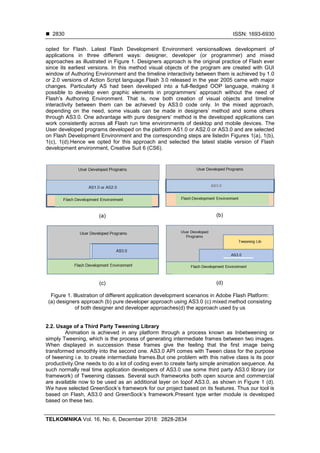
opted for Flash. Latest Flash Development Environment versionsallows development of
applications in three different ways: designer, developer (or programmer) and mixed
approaches as illustrated in Figure 1. Designers approach is the original practice of Flash ever
since its earliest versions. In this method visual objects of the program are created with GUI
window of Authoring Environment and the timeline interactivity between them is achieved by 1.0
or 2.0 versions of Action Script language.Flash 3.0 released in the year 2005 came with major
changes. Particularly AS had been developed into a full-fledged OOP language, making it
possible to develop even graphic elements in programmers’ approach without the need of
Flash’s Authoring Environment. That is, now both creation of visual objects and timeline
interactivity between them can be achieved by AS3.0 code only. In the mixed approach,
depending on the need, some visuals can be made in designers’ method and some others
through AS3.0. One advantage with pure designers’ method is the developed applications can
work consistently across all Flash run time environments of desktop and mobile devices. The
User developed programs developed on the platform AS1.0 or AS2.0 or AS3.0 and are selected
on Flash Development Environment and the corresponding steps are listedin Figures 1(a), 1(b),
1(c), 1(d).Hence we opted for this approach and selected the latest stable version of Flash
development environment, Creative Suit 6 (CS6).
(a) (b)
(c) (d)
Figure 1. Illustration of different application development scenarios in Adobe Flash Platform:
(a) designers approach (b) pure developer approach using AS3.0 (c) mixed method consisting
of both designer and developer approaches(d) the approach used by us
2.2. Usage of a Third Party Tweening Library
Animation is achieved in any platform through a process known as Inbetweening or
simply Tweening, which is the process of generating intermediate frames between two images.
When displayed in succession these frames give the feeling that the first image being
transformed smoothly into the second one. AS3.0 API comes with Tween class for the purpose
of tweening i.e. to create intermediate frames.But one problem with this native class is its poor
productivity.One needs to do a lot of coding even to create fairly simple animation sequence. As
such normally real time application developers of AS3.0 use some third party AS3.0 library (or
framework) of Tweening classes. Several such frameworks both open source and commercial
are available now to be used as an additional layer on topof AS3.0, as shown in Figure 1 (d).
We have selected GreenSock’s framework for our project based on its features. Thus our tool is
based on Flash, AS3.0 and GreenSock’s framework.Present type writer module is developed
based on these two.
TELKOMNIKA ISSN: 1693-6930 
Development of a Modular Unit of a Higher Level Framework... (Radhika Pathi)
2831
2.3. Structure of the Type Writer Module
At present this module consists of three AS3.0 classes and an xml file.One of the AS3.0
class provides the core functionality of type writing effect. The type writing effect is created by
sequentially rendering the characters from the supplied string one by one with adjustable speed
and time gaps. The sequential character rendering from the given string is achieved through an
algorithm devised by us making use of Green Sock’s Tween Max class, which is one of the
several very useful classes that come with the library.
This core class also deliver the following features.1) It allows marking of keywords of
the programming language with different colour. 2) Provides scope for typing substrings at a
given position of an already typed string.In fact this activity is very crucial to get the feel of typing
activity that happens in a real code editor. We call this as non-liner typing as it proceeds quite
different from the normal typing which happens from starting to the end of a given text
sequentially. As a matter of fact requirement of this non-linear rendering is what makes the
algorithm of the module very complex in the first place. 3) Further it allows interspersed play of
audio so that the programming lesson can proceed gradually with suitable explanation. These
aspects of the module are expected to come in handy for instructors to teach other computer
science subjects also wherever some code or pseudo code snippets are to be used as samples.
Second AS3.0 class of the module is used to determine the index of a given anchor
position in a string. Knowledge of such indices is necessary for the non-linear typing mentioned
above. Third AS3.0 class stores some predefined text formats that are to be called into the core
program when needed. The XML file of the module is used to feed data to the core class. Data
in this case is the code or programme to be typed and is in the form of a string.This set of
classes meet the minimum requirement of the module. Additional features can be added with
inclusion of relevant extra classes. Finally we note that Flash’s TLF2.0 framework is used to
display the text or code because it supports Unicode character usage. Complete description of
the source code would take several pages and hence we choose to provide that in a future
communications.
3. Results and Analysis
3.1. Demonstration ofVisual Aid for Java Programming
The main objective of the completed tool is creation of animated lessons with full text,
visual graphics, code rendered in type writing manner interspersed with explanation. As noted
before demonstration of such a complete lesson would be the part of a future communication.
Here we just demonstrate the development of visual aid module along with its presently
included features.We consider a simple Java program for this purpose that is given below:
class Student{
int id=1;
String name="Johny";
public static void main(String args[]){
Student s=new Student();
System.out.println(s.id);
System.out.println(s.name);
}
}
Typing activity of this class proceeds in stages and in a non-linear manner. Different
stages of the typed programme is as shown in the rows of the following table. In the first stage
only body of the class gets typed without any member variables or methods. Next in second
stage member variables get typed as shown in second row. In the third stage the only method
i.e. the main method of the class gets typed without any of its member variables or code. In the
final or fourth stage the content of the method body gets typed completing the program.This
non-linear approach mimics the typing of a live instructor’s coding in a class. In this manner
programs of any length and complexity can be got typed with this module.The final stage of
module along with animation in Figure 2 is shown below.
Code of the Stage
class Student{
int id=1;
 ISSN: 1693-6930
TELKOMNIKA Vol. 16, No. 6, December 2018: 2828-2834
2832
String name="Johny";
public static void main(String args[]){
Student s=new Student();
System.out.println(s.id);
System.out.println(s.name);
}
}
Screen Shot of the Typed Code
Figure 2. Screenshot of our animated lesson for Java sample program
We include an animated clip or applet of this program being typed with this paper. The
clip is in Shock Wave Format (SWF) and is embedded in an html file for easy display in a
browser. It may be seen from the animated clip that the keywords of the language get changed
to different colour just after their last character get typed, very much like in a program editor.
The proposed animated clip can be viewed on three types of screens desktop, mobile [14],
touch screens there by enabling Mobile Learning technologies in combination with E-Learning
Technologies [13].Testing has been done on Laptop, Desktop and Tabs and Mobile phone there
by showing that this animated lessons work on all types of diseases. Table1 shows the
specifications ofdevices thatour animated lessons work on.
Table 1. Table Specifications
Device Operating System Display Size CPU Memory Internal
HP Elite Desk Win 10 Pro 64-bit - vPro 1680 x
1050(~104.3 ppi
pixel density)
1 x
Core i7 7700/3.6 GHz
1TB
Storage,16GB
RAM
DELL INSPIRON Windows 10-8GB RAM 1400 x
1050(~87.5 ppi
pixel density)
Intel CORE I5-7400 1TB
Hard Drive
LG OPTIMUS G
PRO
Android 4.4 (KitKat) 1080 x 1920
pixels (~401 ppi
pixel density)
Quad-core 1.7 GHz
Krait 300
32/16/GB
storage, 2
GB RAM
Samsung Galaxy
A5
Android 5.0 (Lollipop) 720 x 1280
pixels (~294 ppi
pixel density)
Quad-core 1.2 GHz
Cortex-A53
16 GB storage,
2 GB RAM
OnePlus 2 Android 6.0 (Marshmallow) 1080x 1920
pixels (~401 ppi
pixel density)
Quad-core 1.82 GHz
Cortex-A57
64 GB storage,
4 GB RAM
There are significant advantages with the lessons developed by this tool. For instance
instructor can quickly swap a code block successively with many alternatives explaining the
TELKOMNIKA ISSN: 1693-6930 
Development of a Modular Unit of a Higher Level Framework... (Radhika Pathi)
2833
significance of all those versions. This would help the student learn a wide range of nuances of
a concept quickly and easily. Such quick swapping of code snippets can’t be easily achieved in
a live class with general editors. Also instructors can leave parts of a program and ask the
students to experiment with different alternatives to find out the results for themselves in actual
programing environment. Such interactive exercises would be immensely helpful for the student
in the learning process. We selected topics of Java like OOPS Concepts, Classes and Objects,
Constructors, Destructors, Inheritance. We have made anlaysis by conducting pretest without
using our animated clips in just a normal classroom with chalk and talk method discussed the
concepts of Java.There has been absenteeism in the class and students who were absent
couldn’t listen to the class. Later on we made our animated lessons available to the students
online and they could listen to the classes online at their own capapcity.There has been an
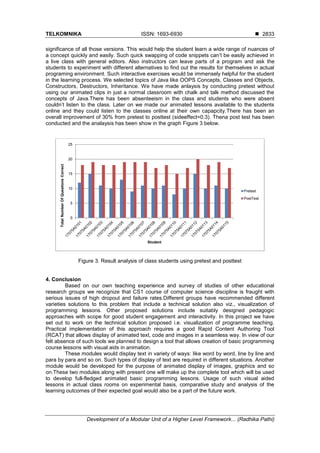
overall improvement of 30% from pretest to posttest (sideeffect=0.3). Thena post test has been
conducted and the analaysis has been show in the graph Figure 3 below.
Figure 3. Result analysis of class students using pretest and posttest
4. Conclusion
Based on our own teaching experience and survey of studies of other educational
research groups we recognize that CS1 course of computer science discipline is fraught with
serious issues of high dropout and failure rates.Different groups have recommended different
varieties solutions to this problem that include a technical solution also viz., visualization of
programming lessons. Other proposed solutions include suitably designed pedagogic
approaches with scope for good student engagement and interactivity. In this project we have
set out to work on the technical solution proposed i.e. visualization of programme teaching.
Practical implementation of this approach requires a good Rapid Content Authoring Tool
(RCAT) that allows display of animated text, code and images in a seamless way. In view of our
felt absence of such tools we planned to design a tool that allows creation of basic programming
course lessons with visual aids in animation.
These modules would display text in variety of ways: like word by word, line by line and
para by para and so on. Such types of display of text are required in different situations. Another
module would be developed for the purpose of animated display of images, graphics and so
on.These two modules along with present one will make up the complete tool which will be used
to develop full-fledged animated basic programming lessons. Usage of such visual aided
lessons in actual class rooms on experimental basis, comparative study and analysis of the
learning outcomes of their expected goal would also be a part of the future work.
0
5
10
15
20
25
TotalNumberOfQuestionsCorrect
Student
Pretest
PostTest
 ISSN: 1693-6930
TELKOMNIKA Vol. 16, No. 6, December 2018: 2828-2834
2834
Acknowledgement
Ms Radhika Pathi, gratefully acknowledges the funding received for this project from
University Grants Commission (UGC), Ministry of Human Resource Development, Govt. of
India, under Minor Research Project grant scheme with Ref. No. F MRP-4567/14(SERO/UGC)
and herself being the project’s Principal Investigator.
It is also pleasure for her to acknowledge the constant cooperation and support
extended by all the members of the Management of VNRVJIET. Particularly the continuous
awareness on latest developments in educational arena created by President, Dr.D. N. Rao and
Director of Innovation & Incubation, Dr. A. S. Rao, has served as a motivating force behind this
work.
References
[1] EL-Sheikh E M. Techniques for Engaging Students in an Online Computer Programming Course.
Journal of Systemics, Cybernetics and Informatics.2009; 7(1). ISSN: 1690-4524.
[2] Fares S C, Fares M A. A Redesigned Pedagogy in Introductory Programming Reduces Failure and
Withdrawal Rates by Half. World Academy of Science, Engineering and Technology International
Journal of Social, Education, Economics and Management Engineering. 2014; 8(5).
[3] Ford M, Venema S. Assessing the Success of an Introductory Programming Course.Journal of
Information Technology Education. 2010; 9.
[4] Chieu V M. An Operational Approach for Building Learning Environments Supporting Cognitive
Flexibility. Educational Technology & Society.2007; 10(3): 32-46.
[5] Bennedsen J, Caspersen ME. Failure rates in introductory programming. ACM SIGcSE Bulletin.
2007.
[6] Wang, Ming-Te and Jessica Degol. Staying Engaged: Knowledge and Research Needs in Student
Engagement. Child development perspectives. (2014); 8(3): 137-143.
[7] Kay J, Barg M, Fekete A, Greening T, Hollands O, Kingston J, Crawford K. Problems-based Learning
for Foundation Computer Science Courses. Computer Science Education. 2000; 10(2): 109-128.
[8] Kinnunen P, Malmi L. Why Students Drop Out CS1 Course? Proceedings of the Second International
workshop on computing education research. Canterbury. 2006.
[9] Kirsti Ala-Mutka. Problems in Learning and Teaching Programming-a Literature Study for Developing
Visualizations in the Codewitz-Minerva project. Codewitz Needs Anal. 2004: 1–13.
[10] GeorgeC. Using visualization to Aid Program Construction Tasks. Proceeding of the 33rd SIGCSE
Technical Symposium on Computer Science Education. 2002: 191-195.
[11] Corney M, Teague D, Thomas. R N, Engaging Students in Programming. Proceeding of 12th
Australasian Computing Education Conference (ACE 2010). Brisbane. 2010.
[12] Maryam Khademi , Maryam Haghshenas and Hoda Kabir, A Review On Authoring Tools. Proceeding
of 5th International Conference on Distance Learning and Education IPCSIT (2011) IACSIT Press,
Singapore.2011; 2.
[13] Alsaadat K. Mobile Learning Technologies.International Journal of Electrical and Computer
Engineering.2017; 7(5).
[14] Setiawan A, Handojo A, HadiR. Indonesian Culture Learning Application based on Android.
International Journal of Electrical and Computer Engineering (IJECE).2017; 7(1).

Development of a Modular Unit of a Higher Level Framework or Tool for Basic Programming Course Teaching Through E-learning Mode

  • 1.
    TELKOMNIKA, Vol.16, No.6,December 2018, pp. 2828~2834 ISSN: 1693-6930, accredited First Grade by Kemenristekdikti, Decree No: 21/E/KPT/2018 DOI:10.12928/TELKOMNIKA.v16i6.10033  2828 Received May 26, 2018; Revised October 20, 2018; Accepted November 3, 2018 Development of a Modular Unit of a Higher Level Framework or Tool for Basic Programming Course Teaching Through E-learning Mode Radhika Pathi*1 , G.V. Rao2 , P. Rama Krishna3 , P. Bharath Kumar4 1,3,4 Department of Computer Science Engineering, VNR Vignana Jyothi Institute of Engineering and Technology, Vignana Jyothi Nagar, Nizampet Rd, Pragathi Nagar, Hyderabad, Telangana 500090, India 2 DRS International School, Survey No. 523, Opp.Apparel Park, Gundla Pochampally, Maisammaguda, Doolapally, Hyderabad, Telangana 500014, India *Corresponding author, e-mail: radhika.pathi123@gmail.com1 , gvrao1234@gmail.com2 , peddarapuramakrishna@gmail.com3 , bharathkumar_p@vnrvjiet.in4 Abstract This paper reports about the development of a modular unit of a higher level framework or tool whose intended objective is the creation of animated lessons for basic programming (CS1) course in computer science discipline with visual aids. The goal of such lessons is to address the difficulties faced by the novice programmers in CS1 course.This module here after referred to as ‘type writer’allows instructors to render programmes or code snippets in a live typing manner as opposed to their sudden or en-block placement on the presentation area like a Power Point Slide; a commonly used approach in the present day eLearning.This project is planned to be executed in two stages and ‘type writer’ is the outcome of the first stage. This would be combined with another two modules that are planned to be developed in the second stage, to make the complete tool. The entire tool would be developed in Action Script 3.0 language that works on Adobe Flash Platform. Keywords: elearning, online learning, basic programming, introductory computer programming, online course deliver, student engagement, computer science education Copyright © 2018 Universitas Ahmad Dahlan. All rights reserved. 1. Introduction E-Learning is universally accepted as the most promising technology [1-2] to address several pressing issues of the contemporary educational arena. As such, many institutions of higher education are swiftly augmenting this mode of delivery to the traditional class room approach. Various disciplines that were once available only through class room like computer science, economics and biology and so on are also now offered through online. Interestingly, surveys indicate that the learning outcomes of online courses are on par with those achieved in face-to-face setting [3], raising confidence about the sustainability of this delivery mode. Technical Issues Still to be Addressed However still there are some important technical issues to be addressed for effective delivery of certain subjects [4] through online. For instance basic programing course, often referred to as CS1, in Computer Science (CS) Education is one such course. As programming is a core skill that is expected of computer science graduates, it is very common for universities to offer CS1 in the first year itself. Further, students of non-computer science background also very often opt for this course, either as a non-major or out of interest as programming is perceived as a competitive edge for the entry into the careers.Sadly however, this course is fraught with certain serious issues like high failure and dropout rates and poor engagement of the students [5-7] even in traditional class room scenario, indicating obvious complexity of its delivery through online. Studies on High Dropout Rates in CS1 Courses This issue of novice programmers difficulty [8-9] had been a serious concern for CS faculty for a long time now. Several educational research groups have conducted work on this topic to understand the learning processes and thus to ascertain specific sources of their
  • 2.
    TELKOMNIKA ISSN: 1693-6930 Development of a Modular Unit of a Higher Level Framework... (Radhika Pathi) 2829 difficulty and propose appropriate pedagogic strategies. Results of several studies indicate that basic programming primarily requires knowledge and its application capability at two levels. Firstly, students are expected to know, at lower level, the fundamentals of the programming language used like syntax and semantics. And then they should have the ability to make use of them in writing actual code statements. Secondly, at the next level, students should be able to solve the given problem by hand and subsequently they should be able to convert this solution into an actual programme. Performance of a novice programmer highly depends on how good she is at these aspects. An important observation made by researchers is, even after having sound conceptual or syntactical knowledge students often fail to apply them in actual coding. For instance a student might well understand what does a pointer mean in C/C++ language but yet fail to use it in programme statements. This is one important source of difficulty, at lower level. However, a major source of difficulty or mental block is identified in the second aspect i.e. conversion of the solution obtained by hand into an equivalent programme. Quite often this process poses a great challenge for a novice, because this in turn involves two internal stages: writing up of an algorithm for the step by step solution obtained by hand and then converting it into an equivalent code. Proposal of Visual Aids Based on proposals of several groups of educational research like George [10] and also on our own CS1 teaching experience [11] we hope that use of visualization may be of much help to address the novices’ difficulties. Visual aids can take the teaching-leaning process in a gradual manner by alternatively discussing the sub-tasks of the solution, corresponding algorithmic steps and their subsequent conversion into actual code. Such gradual and visualized approach of teaching is hoped to be immensely helpful for the students to absorb the methodology of programme writing. Further these visual aids are also expected to be helpful in introducing fun in learning and there by promoting the students engagement and interactivity. It may be noted here that usage of visual aids is not new in computer science education. They have been used for a long time in this area. However they are mainly applied for algorithm visualization with much less emphasis on other aspects of the programming.We plan therefore, to employ visual aids in all aspects of program teaching rather than for only algorithms, to address the above discussed difficulties of learning programmers. Obviously such a practice demands for a good Rapid Content Authoring Tool (RCAT) of eLearning that allows development of animated lessons [12] with inclusion of text, programming code, graphic diagrams in an integrated way. An important feature required of this tool is that the programming code should be rendered in a type writing manner so as to get the feel of a live instructor’s coding activity. Absence of Suitable RCATs It appears however, that are no such tools, either commercial or of open source type, available which can provide all these functionalities. Our survey for such tools had yielded negative results.Of course live programming lessons are provided these days through videos. And also there are several authoring tools [13-14] which allow inclusion of text and graphics into the animated lessons. But then bringing different parts of lessons made by such heterogeneous technologies or tools seamlessly into a single lesson is a very complicated process and error prone. This scenario prompted us to undertake the task of development of a tool with the stated features so as to rapidly author animated lessons in general and basic programming course in particular in an integrated visual approach. In this paper we report about a module which brings type writing effect to be used for animated or live typing of the programs. Work related to modules that allow animated text and graphics display and voice mixing along with demonstrative sample lesson is shown below. 2. Research Method 2.1. Selection of Platform for the Tool Several options like Adobe Flash, Silver Light, and HTML5.0 and so on are available these days to develop animation content. Among these Adobe Flash is the most prevalently and passionately used platform for animation programing of web or stand-alone type. Hence we
  • 3.
     ISSN: 1693-6930 TELKOMNIKAVol. 16, No. 6, December 2018: 2828-2834 2830 opted for Flash. Latest Flash Development Environment versionsallows development of applications in three different ways: designer, developer (or programmer) and mixed approaches as illustrated in Figure 1. Designers approach is the original practice of Flash ever since its earliest versions. In this method visual objects of the program are created with GUI window of Authoring Environment and the timeline interactivity between them is achieved by 1.0 or 2.0 versions of Action Script language.Flash 3.0 released in the year 2005 came with major changes. Particularly AS had been developed into a full-fledged OOP language, making it possible to develop even graphic elements in programmers’ approach without the need of Flash’s Authoring Environment. That is, now both creation of visual objects and timeline interactivity between them can be achieved by AS3.0 code only. In the mixed approach, depending on the need, some visuals can be made in designers’ method and some others through AS3.0. One advantage with pure designers’ method is the developed applications can work consistently across all Flash run time environments of desktop and mobile devices. The User developed programs developed on the platform AS1.0 or AS2.0 or AS3.0 and are selected on Flash Development Environment and the corresponding steps are listedin Figures 1(a), 1(b), 1(c), 1(d).Hence we opted for this approach and selected the latest stable version of Flash development environment, Creative Suit 6 (CS6). (a) (b) (c) (d) Figure 1. Illustration of different application development scenarios in Adobe Flash Platform: (a) designers approach (b) pure developer approach using AS3.0 (c) mixed method consisting of both designer and developer approaches(d) the approach used by us 2.2. Usage of a Third Party Tweening Library Animation is achieved in any platform through a process known as Inbetweening or simply Tweening, which is the process of generating intermediate frames between two images. When displayed in succession these frames give the feeling that the first image being transformed smoothly into the second one. AS3.0 API comes with Tween class for the purpose of tweening i.e. to create intermediate frames.But one problem with this native class is its poor productivity.One needs to do a lot of coding even to create fairly simple animation sequence. As such normally real time application developers of AS3.0 use some third party AS3.0 library (or framework) of Tweening classes. Several such frameworks both open source and commercial are available now to be used as an additional layer on topof AS3.0, as shown in Figure 1 (d). We have selected GreenSock’s framework for our project based on its features. Thus our tool is based on Flash, AS3.0 and GreenSock’s framework.Present type writer module is developed based on these two.
  • 4.
    TELKOMNIKA ISSN: 1693-6930 Development of a Modular Unit of a Higher Level Framework... (Radhika Pathi) 2831 2.3. Structure of the Type Writer Module At present this module consists of three AS3.0 classes and an xml file.One of the AS3.0 class provides the core functionality of type writing effect. The type writing effect is created by sequentially rendering the characters from the supplied string one by one with adjustable speed and time gaps. The sequential character rendering from the given string is achieved through an algorithm devised by us making use of Green Sock’s Tween Max class, which is one of the several very useful classes that come with the library. This core class also deliver the following features.1) It allows marking of keywords of the programming language with different colour. 2) Provides scope for typing substrings at a given position of an already typed string.In fact this activity is very crucial to get the feel of typing activity that happens in a real code editor. We call this as non-liner typing as it proceeds quite different from the normal typing which happens from starting to the end of a given text sequentially. As a matter of fact requirement of this non-linear rendering is what makes the algorithm of the module very complex in the first place. 3) Further it allows interspersed play of audio so that the programming lesson can proceed gradually with suitable explanation. These aspects of the module are expected to come in handy for instructors to teach other computer science subjects also wherever some code or pseudo code snippets are to be used as samples. Second AS3.0 class of the module is used to determine the index of a given anchor position in a string. Knowledge of such indices is necessary for the non-linear typing mentioned above. Third AS3.0 class stores some predefined text formats that are to be called into the core program when needed. The XML file of the module is used to feed data to the core class. Data in this case is the code or programme to be typed and is in the form of a string.This set of classes meet the minimum requirement of the module. Additional features can be added with inclusion of relevant extra classes. Finally we note that Flash’s TLF2.0 framework is used to display the text or code because it supports Unicode character usage. Complete description of the source code would take several pages and hence we choose to provide that in a future communications. 3. Results and Analysis 3.1. Demonstration ofVisual Aid for Java Programming The main objective of the completed tool is creation of animated lessons with full text, visual graphics, code rendered in type writing manner interspersed with explanation. As noted before demonstration of such a complete lesson would be the part of a future communication. Here we just demonstrate the development of visual aid module along with its presently included features.We consider a simple Java program for this purpose that is given below: class Student{ int id=1; String name="Johny"; public static void main(String args[]){ Student s=new Student(); System.out.println(s.id); System.out.println(s.name); } } Typing activity of this class proceeds in stages and in a non-linear manner. Different stages of the typed programme is as shown in the rows of the following table. In the first stage only body of the class gets typed without any member variables or methods. Next in second stage member variables get typed as shown in second row. In the third stage the only method i.e. the main method of the class gets typed without any of its member variables or code. In the final or fourth stage the content of the method body gets typed completing the program.This non-linear approach mimics the typing of a live instructor’s coding in a class. In this manner programs of any length and complexity can be got typed with this module.The final stage of module along with animation in Figure 2 is shown below. Code of the Stage class Student{ int id=1;
  • 5.
     ISSN: 1693-6930 TELKOMNIKAVol. 16, No. 6, December 2018: 2828-2834 2832 String name="Johny"; public static void main(String args[]){ Student s=new Student(); System.out.println(s.id); System.out.println(s.name); } } Screen Shot of the Typed Code Figure 2. Screenshot of our animated lesson for Java sample program We include an animated clip or applet of this program being typed with this paper. The clip is in Shock Wave Format (SWF) and is embedded in an html file for easy display in a browser. It may be seen from the animated clip that the keywords of the language get changed to different colour just after their last character get typed, very much like in a program editor. The proposed animated clip can be viewed on three types of screens desktop, mobile [14], touch screens there by enabling Mobile Learning technologies in combination with E-Learning Technologies [13].Testing has been done on Laptop, Desktop and Tabs and Mobile phone there by showing that this animated lessons work on all types of diseases. Table1 shows the specifications ofdevices thatour animated lessons work on. Table 1. Table Specifications Device Operating System Display Size CPU Memory Internal HP Elite Desk Win 10 Pro 64-bit - vPro 1680 x 1050(~104.3 ppi pixel density) 1 x Core i7 7700/3.6 GHz 1TB Storage,16GB RAM DELL INSPIRON Windows 10-8GB RAM 1400 x 1050(~87.5 ppi pixel density) Intel CORE I5-7400 1TB Hard Drive LG OPTIMUS G PRO Android 4.4 (KitKat) 1080 x 1920 pixels (~401 ppi pixel density) Quad-core 1.7 GHz Krait 300 32/16/GB storage, 2 GB RAM Samsung Galaxy A5 Android 5.0 (Lollipop) 720 x 1280 pixels (~294 ppi pixel density) Quad-core 1.2 GHz Cortex-A53 16 GB storage, 2 GB RAM OnePlus 2 Android 6.0 (Marshmallow) 1080x 1920 pixels (~401 ppi pixel density) Quad-core 1.82 GHz Cortex-A57 64 GB storage, 4 GB RAM There are significant advantages with the lessons developed by this tool. For instance instructor can quickly swap a code block successively with many alternatives explaining the
  • 6.
    TELKOMNIKA ISSN: 1693-6930 Development of a Modular Unit of a Higher Level Framework... (Radhika Pathi) 2833 significance of all those versions. This would help the student learn a wide range of nuances of a concept quickly and easily. Such quick swapping of code snippets can’t be easily achieved in a live class with general editors. Also instructors can leave parts of a program and ask the students to experiment with different alternatives to find out the results for themselves in actual programing environment. Such interactive exercises would be immensely helpful for the student in the learning process. We selected topics of Java like OOPS Concepts, Classes and Objects, Constructors, Destructors, Inheritance. We have made anlaysis by conducting pretest without using our animated clips in just a normal classroom with chalk and talk method discussed the concepts of Java.There has been absenteeism in the class and students who were absent couldn’t listen to the class. Later on we made our animated lessons available to the students online and they could listen to the classes online at their own capapcity.There has been an overall improvement of 30% from pretest to posttest (sideeffect=0.3). Thena post test has been conducted and the analaysis has been show in the graph Figure 3 below. Figure 3. Result analysis of class students using pretest and posttest 4. Conclusion Based on our own teaching experience and survey of studies of other educational research groups we recognize that CS1 course of computer science discipline is fraught with serious issues of high dropout and failure rates.Different groups have recommended different varieties solutions to this problem that include a technical solution also viz., visualization of programming lessons. Other proposed solutions include suitably designed pedagogic approaches with scope for good student engagement and interactivity. In this project we have set out to work on the technical solution proposed i.e. visualization of programme teaching. Practical implementation of this approach requires a good Rapid Content Authoring Tool (RCAT) that allows display of animated text, code and images in a seamless way. In view of our felt absence of such tools we planned to design a tool that allows creation of basic programming course lessons with visual aids in animation. These modules would display text in variety of ways: like word by word, line by line and para by para and so on. Such types of display of text are required in different situations. Another module would be developed for the purpose of animated display of images, graphics and so on.These two modules along with present one will make up the complete tool which will be used to develop full-fledged animated basic programming lessons. Usage of such visual aided lessons in actual class rooms on experimental basis, comparative study and analysis of the learning outcomes of their expected goal would also be a part of the future work. 0 5 10 15 20 25 TotalNumberOfQuestionsCorrect Student Pretest PostTest
  • 7.
     ISSN: 1693-6930 TELKOMNIKAVol. 16, No. 6, December 2018: 2828-2834 2834 Acknowledgement Ms Radhika Pathi, gratefully acknowledges the funding received for this project from University Grants Commission (UGC), Ministry of Human Resource Development, Govt. of India, under Minor Research Project grant scheme with Ref. No. F MRP-4567/14(SERO/UGC) and herself being the project’s Principal Investigator. It is also pleasure for her to acknowledge the constant cooperation and support extended by all the members of the Management of VNRVJIET. Particularly the continuous awareness on latest developments in educational arena created by President, Dr.D. N. Rao and Director of Innovation & Incubation, Dr. A. S. Rao, has served as a motivating force behind this work. References [1] EL-Sheikh E M. Techniques for Engaging Students in an Online Computer Programming Course. Journal of Systemics, Cybernetics and Informatics.2009; 7(1). ISSN: 1690-4524. [2] Fares S C, Fares M A. A Redesigned Pedagogy in Introductory Programming Reduces Failure and Withdrawal Rates by Half. World Academy of Science, Engineering and Technology International Journal of Social, Education, Economics and Management Engineering. 2014; 8(5). [3] Ford M, Venema S. Assessing the Success of an Introductory Programming Course.Journal of Information Technology Education. 2010; 9. [4] Chieu V M. An Operational Approach for Building Learning Environments Supporting Cognitive Flexibility. Educational Technology & Society.2007; 10(3): 32-46. [5] Bennedsen J, Caspersen ME. Failure rates in introductory programming. ACM SIGcSE Bulletin. 2007. [6] Wang, Ming-Te and Jessica Degol. Staying Engaged: Knowledge and Research Needs in Student Engagement. Child development perspectives. (2014); 8(3): 137-143. [7] Kay J, Barg M, Fekete A, Greening T, Hollands O, Kingston J, Crawford K. Problems-based Learning for Foundation Computer Science Courses. Computer Science Education. 2000; 10(2): 109-128. [8] Kinnunen P, Malmi L. Why Students Drop Out CS1 Course? Proceedings of the Second International workshop on computing education research. Canterbury. 2006. [9] Kirsti Ala-Mutka. Problems in Learning and Teaching Programming-a Literature Study for Developing Visualizations in the Codewitz-Minerva project. Codewitz Needs Anal. 2004: 1–13. [10] GeorgeC. Using visualization to Aid Program Construction Tasks. Proceeding of the 33rd SIGCSE Technical Symposium on Computer Science Education. 2002: 191-195. [11] Corney M, Teague D, Thomas. R N, Engaging Students in Programming. Proceeding of 12th Australasian Computing Education Conference (ACE 2010). Brisbane. 2010. [12] Maryam Khademi , Maryam Haghshenas and Hoda Kabir, A Review On Authoring Tools. Proceeding of 5th International Conference on Distance Learning and Education IPCSIT (2011) IACSIT Press, Singapore.2011; 2. [13] Alsaadat K. Mobile Learning Technologies.International Journal of Electrical and Computer Engineering.2017; 7(5). [14] Setiawan A, Handojo A, HadiR. Indonesian Culture Learning Application based on Android. International Journal of Electrical and Computer Engineering (IJECE).2017; 7(1).