
Developing a Digitisation Framework for your Organisation (Feel the Fear and Do It Anyway) Rose Holley University of Auckland LIANZA Conference 2003
Overview University of Auckland Library Digital Projects Librarian – new job Jan 2001 My experiences from the last 3 years What we did and what we learnt.
Digitisation - globally Major projects underway worldwide Cross sectoral Collaborations  Wide range of resources and users Large amounts of funding New technologies
Digitisation - locally It will happen  It will benefit our organisations and our users We want to do it efficiently and effectively We must plan strategically
Digitisation Benefits Support institutional objectives by: Efficient management of resources Preservation of original resources Increasing access to resources Creation of unique NZ/Pacific resources
Strategic Planning Necessary because digitisation affects the Infrastructure: IT Staff  Service Delivery Organisation Structure YOU NEED A FRAMEWORK
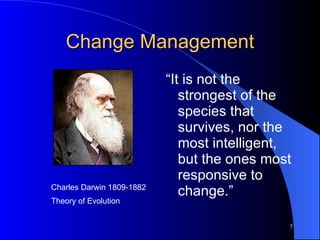
Change Management “ It is not the strongest of the species that survives, nor the most intelligent, but the ones most responsive to change.” Charles Darwin 1809-1882 Theory of Evolution
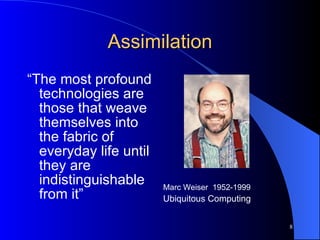
Assimilation “ The most profound technologies are those that weave themselves into the fabric of everyday life until they are indistinguishable from it” Marc Weiser  1952-1999 Ubiquitous Computing
Building the Framework Inventory of Projects Raising Awareness Training and re-skilling staff Developing networks, relationships and collaborations Obtaining Funding Instigating Digitisation Projects Enhancing the IT Infrastructure Strategic Planning and Policy
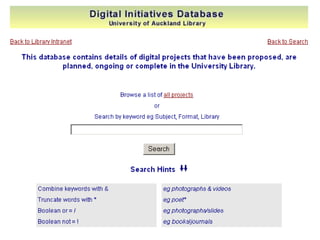
Inventory of Projects Aim: To identify all potential projects, and create a database of potential projects with rough costings. What we did: Seminar on digitisation for all staff Questionnaires + project proposal forms to 15 libraries Follow up by personal visits
 
What we learnt: Lack of awareness  “ Too much extra work and who would do it?” Consultancy approach Usage of materials
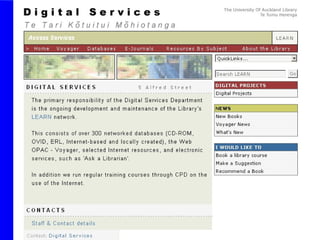
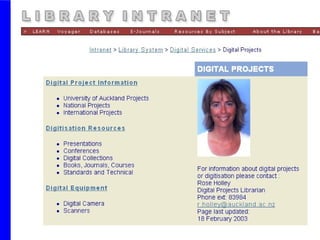
2. Raising Awareness Aim: Raising the awareness of University Staff about the benefits of digitisation What we did: Digitisation seminars (Library) Articles – Library staff newsletter Conference paper for UofA staff Intranet Page (Library), Internet Page. Talking to people
 
 
What we learnt: High interest about digitisation Interest from other faculties  External interest Practical applications pique interest Invoked fear in people (Of technology, change, extra work, mistakes)
3. Training/ re-skilling staff Aim: To develop and enhance knowledge and expertise in house What we did: Sent key staff on training courses Passed on training to other staff e.g scanning workshop Read about digitisation issues and projects in journals, web resources and listservs
Types of training required: - Project Management XML Scanning Workshops Metadata Digitisation  principles and practice TEI (Text Encoding) Copyright and Intellectual Property Rights Software specific (e.g. Databases, Photoshop, Image Management, OCR)
What we learnt Some staff have natural aptitude, skills or interest in some areas (eg photography, image manipulation) Practical training must be timely and followed up with practice e.g scanning. Digitisation training is scarce in NZ. Training is expensive and limited so invest wisely.
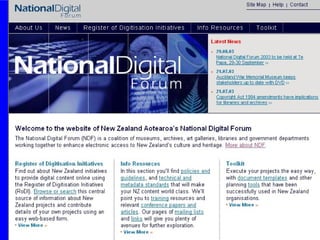
4. Developing networks, relationships and collaborations.   Aim: To establish useful contacts for help and collaboration.   What we did: Joined international digital listservs Networked at conferences and on training Talked with the NL and NLA Participated in the National Digital Forum
 
What we learnt: Initial isolation Diglib listserv really helped Sharing of experiences internationally Politics with collaborations (competition vs collaboration) NZ has advantage of learning from others mistakes
5. Obtaining Funding Aim: To get money for projects! What we did: Applied for University Funding e.g. Teaching Improvement Grants, Vice Chancellors Development Fund. Established a small budget for ongoing digitisation.
What we learnt.. Digitisation is expensive (cost cannot be recovered) Special funds cover an initial project (but ongoing maintenance is a BIG problem) Getting less money than we applied for (= major revisions of project plans) Small pilot project applications successful
Cont.. National and government funding almost non-existent International funding has catches e.g. someone else keeps raw data, or it has to be publicly accessible. Digitisation fund needs to be built into the budget
6. Instigating Digitisation Projects Aim: to create and deliver our own resources digitally (eg Exam Papers, Art Images,Poetry) What we did: 4 pilot projects Detailed project plans Outsourced some work Built on pilot projects
What we learnt…. Just do it – start Pilot project addresses all the issues you will face in a big project Work with those that are interested Get an advocate, champion at top level Managing people and politics is usually more challenging than the technology
Cont.. A good project plan and understanding the process is essential esp if outsourcing Double the time you think you need esp if copyright issues are involved Must support core  mission Small team better than big Outcomes always worth the effort
7. Enhancing the IT Infrastructure Aim: Trained staff are able to fully utilise existing and new technology to create, deliver and manage digital projects.  Key Components of Infrastructure: Hardware e.g Scanners Software  e.g Photoshop LMS/Digital Object Mgt System Network Authentication System IT Staff
What we did: Audit of existing hardware/software that would be useful (who, what, where?) Utilisation of current systems e.g LMS, Access, Inmagic (how?) Purchased additional hardware/software (Scanner, Server, Storage Device, Encompass, Mr Sid, Map Catalogue, Finereader) Training on new software
What we learnt… We could do it! Some projects could be completed within existing IT Infrastructure Planning for the future was important e.g. storage requirements Don’t wait until everything is perfect – just start!
8. Strategic Planning and Policy Aim: To have a clear Digitisation Policy and to be able to plan and achieve digitisation effectively What we did: Wrote a comprehensive Digitisation Policy including selection guidelines, goals, standards, approaches, quality control Included major projects, training, awareness and IT infrastructure tasks in the Library Strategic Plan
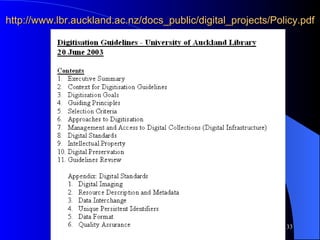
http://www.lbr.auckland.ac.nz/docs_public/digital_projects/Policy.pdf
What we learnt… Should have done this first not last! Writing a digitisation policy was hard Policy needs to be updated regularly Needed a context document saying why we needed a policy Having tasks in the Strategy Plan ensures they get done
Achieved - Inventory of Projects Raising Awareness Training and re-skilling staff Developing networks, relationships and collaborations Obtaining Funding Instigating Digitisation Projects Enhancing the IT Infrastructure Strategic Planning and Policy
Developing the Framework Setting up a ‘Digitisation Centre’ at the University. Building Digitisation into the normal workflow processes Maintaining a digitisation budget for ongoing work Seeking national and international funding for new projects Looking for collaborations Continuing to develop the IT infrastructure and expand our knowledge and expertise
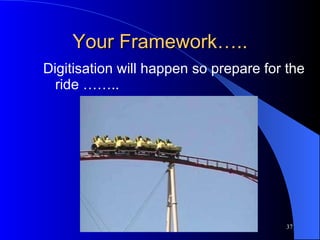
Your Framework….. Digitisation will happen so prepare for the ride ……..
8 Tips ….. RESPONSIBILITY  (make someone responsible for digitisation in your org, or create a digitisation steering group) AUDIT  (Useful hardware/software, staff skills, possible projects) POLICY  (Develop one) STRATEGY  (Build activities and projects into Strategic Plan)
…… TRAINING  (Attend some)  FUNDING  (Look for opportunities and collaborations PILOT PROJECT  (Start one) AWARENESS  (NDF website, diglib listserv, talking)
Feel the Fear and Do It Anyway! Questions? …..
Contacts Rose Holley [email_address] http://www.auckland.ac.nz/lbr/genlib/digital_projects.htm National Digital Forum Website: http://ndf.natlib.govt.nz

Developing a Digitisation Framework for your Library. 2003

  • 1.
    Developing a DigitisationFramework for your Organisation (Feel the Fear and Do It Anyway) Rose Holley University of Auckland LIANZA Conference 2003
  • 2.
    Overview University ofAuckland Library Digital Projects Librarian – new job Jan 2001 My experiences from the last 3 years What we did and what we learnt.
  • 3.
    Digitisation - globallyMajor projects underway worldwide Cross sectoral Collaborations Wide range of resources and users Large amounts of funding New technologies
  • 4.
    Digitisation - locallyIt will happen It will benefit our organisations and our users We want to do it efficiently and effectively We must plan strategically
  • 5.
    Digitisation Benefits Supportinstitutional objectives by: Efficient management of resources Preservation of original resources Increasing access to resources Creation of unique NZ/Pacific resources
  • 6.
    Strategic Planning Necessarybecause digitisation affects the Infrastructure: IT Staff Service Delivery Organisation Structure YOU NEED A FRAMEWORK
  • 7.
    Change Management “It is not the strongest of the species that survives, nor the most intelligent, but the ones most responsive to change.” Charles Darwin 1809-1882 Theory of Evolution
  • 8.
    Assimilation “ Themost profound technologies are those that weave themselves into the fabric of everyday life until they are indistinguishable from it” Marc Weiser 1952-1999 Ubiquitous Computing
  • 9.
    Building the FrameworkInventory of Projects Raising Awareness Training and re-skilling staff Developing networks, relationships and collaborations Obtaining Funding Instigating Digitisation Projects Enhancing the IT Infrastructure Strategic Planning and Policy
  • 10.
    Inventory of ProjectsAim: To identify all potential projects, and create a database of potential projects with rough costings. What we did: Seminar on digitisation for all staff Questionnaires + project proposal forms to 15 libraries Follow up by personal visits
  • 11.
  • 12.
    What we learnt:Lack of awareness “ Too much extra work and who would do it?” Consultancy approach Usage of materials
  • 13.
    2. Raising AwarenessAim: Raising the awareness of University Staff about the benefits of digitisation What we did: Digitisation seminars (Library) Articles – Library staff newsletter Conference paper for UofA staff Intranet Page (Library), Internet Page. Talking to people
  • 14.
  • 15.
  • 16.
    What we learnt:High interest about digitisation Interest from other faculties External interest Practical applications pique interest Invoked fear in people (Of technology, change, extra work, mistakes)
  • 17.
    3. Training/ re-skillingstaff Aim: To develop and enhance knowledge and expertise in house What we did: Sent key staff on training courses Passed on training to other staff e.g scanning workshop Read about digitisation issues and projects in journals, web resources and listservs
  • 18.
    Types of trainingrequired: - Project Management XML Scanning Workshops Metadata Digitisation principles and practice TEI (Text Encoding) Copyright and Intellectual Property Rights Software specific (e.g. Databases, Photoshop, Image Management, OCR)
  • 19.
    What we learntSome staff have natural aptitude, skills or interest in some areas (eg photography, image manipulation) Practical training must be timely and followed up with practice e.g scanning. Digitisation training is scarce in NZ. Training is expensive and limited so invest wisely.
  • 20.
    4. Developing networks,relationships and collaborations. Aim: To establish useful contacts for help and collaboration. What we did: Joined international digital listservs Networked at conferences and on training Talked with the NL and NLA Participated in the National Digital Forum
  • 21.
  • 22.
    What we learnt:Initial isolation Diglib listserv really helped Sharing of experiences internationally Politics with collaborations (competition vs collaboration) NZ has advantage of learning from others mistakes
  • 23.
    5. Obtaining FundingAim: To get money for projects! What we did: Applied for University Funding e.g. Teaching Improvement Grants, Vice Chancellors Development Fund. Established a small budget for ongoing digitisation.
  • 24.
    What we learnt..Digitisation is expensive (cost cannot be recovered) Special funds cover an initial project (but ongoing maintenance is a BIG problem) Getting less money than we applied for (= major revisions of project plans) Small pilot project applications successful
  • 25.
    Cont.. National andgovernment funding almost non-existent International funding has catches e.g. someone else keeps raw data, or it has to be publicly accessible. Digitisation fund needs to be built into the budget
  • 26.
    6. Instigating DigitisationProjects Aim: to create and deliver our own resources digitally (eg Exam Papers, Art Images,Poetry) What we did: 4 pilot projects Detailed project plans Outsourced some work Built on pilot projects
  • 27.
    What we learnt….Just do it – start Pilot project addresses all the issues you will face in a big project Work with those that are interested Get an advocate, champion at top level Managing people and politics is usually more challenging than the technology
  • 28.
    Cont.. A goodproject plan and understanding the process is essential esp if outsourcing Double the time you think you need esp if copyright issues are involved Must support core mission Small team better than big Outcomes always worth the effort
  • 29.
    7. Enhancing theIT Infrastructure Aim: Trained staff are able to fully utilise existing and new technology to create, deliver and manage digital projects. Key Components of Infrastructure: Hardware e.g Scanners Software e.g Photoshop LMS/Digital Object Mgt System Network Authentication System IT Staff
  • 30.
    What we did:Audit of existing hardware/software that would be useful (who, what, where?) Utilisation of current systems e.g LMS, Access, Inmagic (how?) Purchased additional hardware/software (Scanner, Server, Storage Device, Encompass, Mr Sid, Map Catalogue, Finereader) Training on new software
  • 31.
    What we learnt…We could do it! Some projects could be completed within existing IT Infrastructure Planning for the future was important e.g. storage requirements Don’t wait until everything is perfect – just start!
  • 32.
    8. Strategic Planningand Policy Aim: To have a clear Digitisation Policy and to be able to plan and achieve digitisation effectively What we did: Wrote a comprehensive Digitisation Policy including selection guidelines, goals, standards, approaches, quality control Included major projects, training, awareness and IT infrastructure tasks in the Library Strategic Plan
  • 33.
  • 34.
    What we learnt…Should have done this first not last! Writing a digitisation policy was hard Policy needs to be updated regularly Needed a context document saying why we needed a policy Having tasks in the Strategy Plan ensures they get done
  • 35.
    Achieved - Inventoryof Projects Raising Awareness Training and re-skilling staff Developing networks, relationships and collaborations Obtaining Funding Instigating Digitisation Projects Enhancing the IT Infrastructure Strategic Planning and Policy
  • 36.
    Developing the FrameworkSetting up a ‘Digitisation Centre’ at the University. Building Digitisation into the normal workflow processes Maintaining a digitisation budget for ongoing work Seeking national and international funding for new projects Looking for collaborations Continuing to develop the IT infrastructure and expand our knowledge and expertise
  • 37.
    Your Framework….. Digitisationwill happen so prepare for the ride ……..
  • 38.
    8 Tips …..RESPONSIBILITY (make someone responsible for digitisation in your org, or create a digitisation steering group) AUDIT (Useful hardware/software, staff skills, possible projects) POLICY (Develop one) STRATEGY (Build activities and projects into Strategic Plan)
  • 39.
    …… TRAINING (Attend some) FUNDING (Look for opportunities and collaborations PILOT PROJECT (Start one) AWARENESS (NDF website, diglib listserv, talking)
  • 40.
    Feel the Fearand Do It Anyway! Questions? …..
  • 41.
    Contacts Rose Holley[email_address] http://www.auckland.ac.nz/lbr/genlib/digital_projects.htm National Digital Forum Website: http://ndf.natlib.govt.nz