Demystifying JSON in SQL
Server
BY KRISTIN FERRIER
About Me – Kristin Ferrier
 18+ Years in IT
 Principal Consultant at Ferrier Solutions
 Full stack web developer with specialty and passion for data
 Twitter: @SQLEnergy
 Techlahoma Slack: @EnergyDev
 GitHub: @EnergyDev
What we’ll cover
 What is JSON?
 Why use JSON?
 JSON functionality in SQL Server (most of our time will be spent here)
 Built-in functions
 OPENJSON
 FORJSON
 More…
What is JSON?
JSON is data
What is JSON?
JSON is data
in the form of a JavaScript object
But with stricter rules
Like a string must be enclosed in quotation marks
Above is a practical definition. Officially JSON is “a data exchange format that was created from a subset of the literal object notation in JavaScript”
JSON Example
[
{
"QuoteID": 1,
"Franchise": "Star Wars",
"Character": "Yoda",
"QuoteText": "Do. Or do not. There is no try."
},
{
"QuoteID": 2,
"Franchise": "The Librarians",
"Character": "Cassandra",
"QuoteText": "Mathemagics. I like it.."
}
]
Why JSON?
 JSON is a very popular data format used for exchanging data in modern web and
mobile applications.
Web / Mobile App Web API
JSON
JSON
Why JSON over XML?
 With respect to XML
 JSON is more popular in modern development
 JSON is lighter
 JSON support in SQL Server is simpler
Side by Side
JSON XML
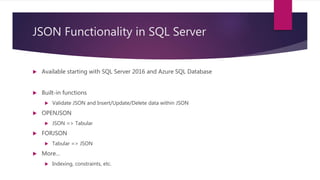
JSON Functionality in SQL Server
 Available starting with SQL Server 2016 and Azure SQL Database
 Built-in functions
 Validate JSON and Insert/Update/Delete data within JSON
 OPENJSON
 JSON => Tabular
 FORJSON
 Tabular => JSON
 More…
 Indexing, constraints, etc.
JSON Built-in Functions
 ISJSON – Validate that text is formatted as JSON
ISJSON(@json)-> bit (0, 1, or null)
 JSON_VALUE – Extract value from JSON text
JSON_VALUE(@json, '$.FranchiseID') -> NVARCHAR(4000)
 JSON_QUERY – Extract JSON fragment from JSON text
JSON_QUERY(@json, '$.Characters') -> NVARCHAR(MAX)
 JSON_MODIFY – Update, delete, or add properties in JSON text
JSON_MODIFY(@json, '$.FranchiseProducer', 'Devlin') -> NVARCHAR(MAX)
JSON Built-in Functions
DEMO TIME
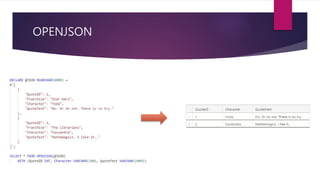
OPENJSON
 Converts JSON to table data
OPENJSON
OPENJSON
DEMO TIME
FOR JSON
 Tabular data => JSON
 FOR JSON AUTO
 Defaults JSON structure
 Some customization
 Requires FROM clause
 FOR JSON PATH
 Customize overall JSON structure
 Doesn’t require FROM clause
FOR JSON
FOR JSON
DEMO TIME
Additional features
 ISJSON constraints on JSON fields
CONSTRAINT ensure_episodeJson CHECK (ISJSON(EpisodeJson) = 1)
 Indexing
ALTER TABLE dbo.Episode
ADD vDirector AS JSON_VALUE(EpisodeJSON, '$.director')
CREATE INDEX idx_episode_json_director
ON dbo.Episode(vDirector)
Q&A and Thank You
Q&A
Catch up with me later
 Twitter @SQLEnergy
 Techlahoma Slack @EnergyDev

Demystifying JSON in SQL Server

  • 1.
    Demystifying JSON inSQL Server BY KRISTIN FERRIER
  • 2.
    About Me –Kristin Ferrier  18+ Years in IT  Principal Consultant at Ferrier Solutions  Full stack web developer with specialty and passion for data  Twitter: @SQLEnergy  Techlahoma Slack: @EnergyDev  GitHub: @EnergyDev
  • 3.
    What we’ll cover What is JSON?  Why use JSON?  JSON functionality in SQL Server (most of our time will be spent here)  Built-in functions  OPENJSON  FORJSON  More…
  • 4.
  • 5.
    What is JSON? JSONis data in the form of a JavaScript object But with stricter rules Like a string must be enclosed in quotation marks Above is a practical definition. Officially JSON is “a data exchange format that was created from a subset of the literal object notation in JavaScript”
  • 6.
    JSON Example [ { "QuoteID": 1, "Franchise":"Star Wars", "Character": "Yoda", "QuoteText": "Do. Or do not. There is no try." }, { "QuoteID": 2, "Franchise": "The Librarians", "Character": "Cassandra", "QuoteText": "Mathemagics. I like it.." } ]
  • 7.
    Why JSON?  JSONis a very popular data format used for exchanging data in modern web and mobile applications. Web / Mobile App Web API JSON JSON
  • 8.
    Why JSON overXML?  With respect to XML  JSON is more popular in modern development  JSON is lighter  JSON support in SQL Server is simpler
  • 9.
  • 10.
    JSON Functionality inSQL Server  Available starting with SQL Server 2016 and Azure SQL Database  Built-in functions  Validate JSON and Insert/Update/Delete data within JSON  OPENJSON  JSON => Tabular  FORJSON  Tabular => JSON  More…  Indexing, constraints, etc.
  • 11.
    JSON Built-in Functions ISJSON – Validate that text is formatted as JSON ISJSON(@json)-> bit (0, 1, or null)  JSON_VALUE – Extract value from JSON text JSON_VALUE(@json, '$.FranchiseID') -> NVARCHAR(4000)  JSON_QUERY – Extract JSON fragment from JSON text JSON_QUERY(@json, '$.Characters') -> NVARCHAR(MAX)  JSON_MODIFY – Update, delete, or add properties in JSON text JSON_MODIFY(@json, '$.FranchiseProducer', 'Devlin') -> NVARCHAR(MAX)
  • 12.
  • 13.
  • 14.
  • 15.
  • 16.
    FOR JSON  Tabulardata => JSON  FOR JSON AUTO  Defaults JSON structure  Some customization  Requires FROM clause  FOR JSON PATH  Customize overall JSON structure  Doesn’t require FROM clause
  • 17.
  • 18.
  • 19.
    Additional features  ISJSONconstraints on JSON fields CONSTRAINT ensure_episodeJson CHECK (ISJSON(EpisodeJson) = 1)  Indexing ALTER TABLE dbo.Episode ADD vDirector AS JSON_VALUE(EpisodeJSON, '$.director') CREATE INDEX idx_episode_json_director ON dbo.Episode(vDirector)
  • 20.
    Q&A and ThankYou Q&A Catch up with me later  Twitter @SQLEnergy  Techlahoma Slack @EnergyDev