© 2019, Amazon Web Services, Inc. or its affiliates. All rights reserved.
Deep Learning 모델의 효과적인
분산 트레이닝과 모델 최적화 방법
김무현, Data Scientist
AWS ML Solutions Lab
© 2019, Amazon Web Services, Inc. or its affiliates. All rights reserved.
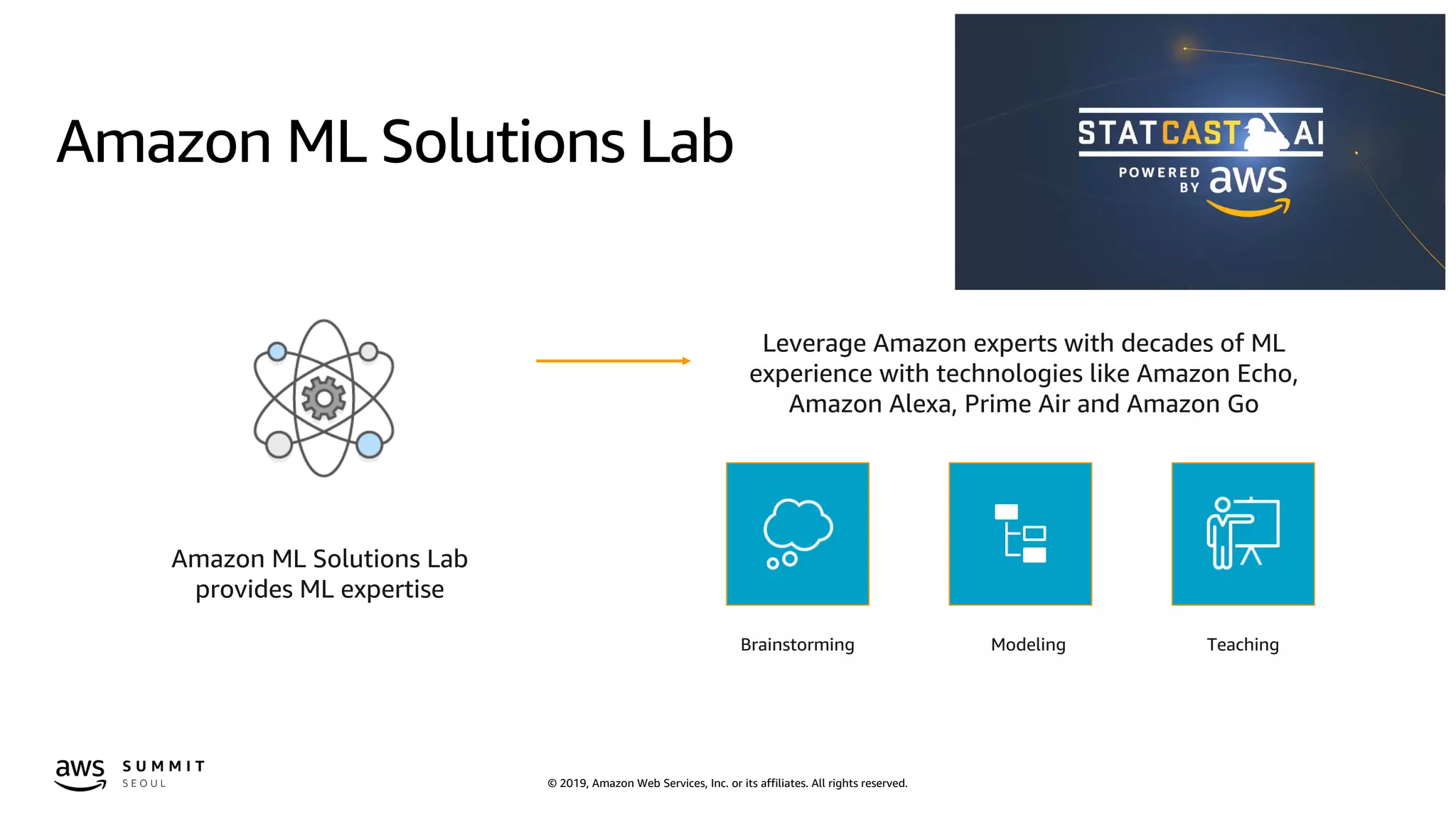
Amazon ML Solutions Lab
Brainstorming Modeling Teaching
Leverage Amazon experts with decades of ML
experience with technologies like Amazon Echo,
Amazon Alexa, Prime Air and Amazon Go
Amazon ML Solutions Lab
provides ML expertise
© 2019, Amazon Web Services, Inc. or its affiliates. All rights reserved.© 2019, Amazon Web Services, Inc. or its affiliates. All rights reserved.
Now let’s make it as
fast, efficient and inexpensive
as possible
Put machine learning in the
hands of every developer
© 2019, Amazon Web Services, Inc. or its affiliates. All rights reserved.
© 2018, Amazon Web Services, Inc. or its Affiliates. All rights reserved. Amazon Trademark
M L F R A M E W O R K S &
I N F R A S T R U C T U R E
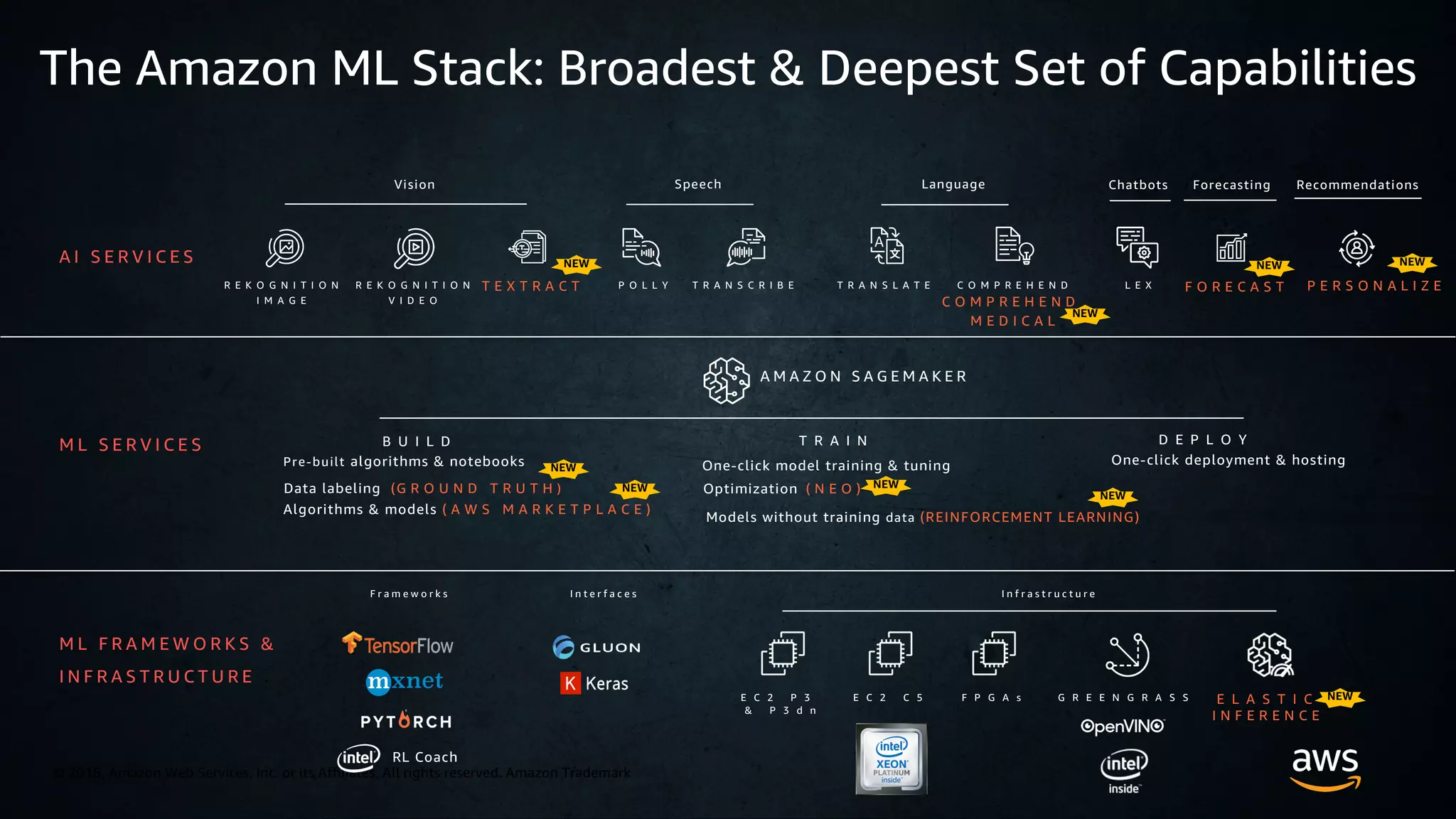
The Amazon ML Stack: Broadest & Deepest Set of Capabilities
A I S E R V I C E S
R E K O G N I T I O N
I M A G E
P O L L Y T R A N S C R I B E T R A N S L A T E C O M P R E H E N D
C O M P R E H E N D
M E D I C A L
L E XR E K O G N I T I O N
V I D E O
Vision Speech Chatbots
A M A Z O N S A G E M A K E R
B U I L D T R A I N
F O R E C A S TT E X T R A C T P E R S O N A L I Z E
D E P L O Y
Pre-built algorithms & notebooks
Data labeling (G R O U N D T R U T H )
One-click model training & tuning
Optimization ( N E O )
One-click deployment & hosting
M L S E R V I C E S
F r a m e w o r k s I n t e r f a c e s I n f r a s t r u c t u r e
E C 2 P 3
& P 3 d n
E C 2 C 5 F P G A s G R E E N G R A S S E L A S T I C
I N F E R E N C E
Models without training data (REINFORCEMENT LEARNING)
Algorithms & models ( A W S M A R K E T P L A C E )
Language Forecasting Recommendations
NEW NEWNEW
NEW
NEW
NEWNEW
NEW
NEW
RL Coach
© 2019, Amazon Web Services, Inc. or its affiliates. All rights reserved.
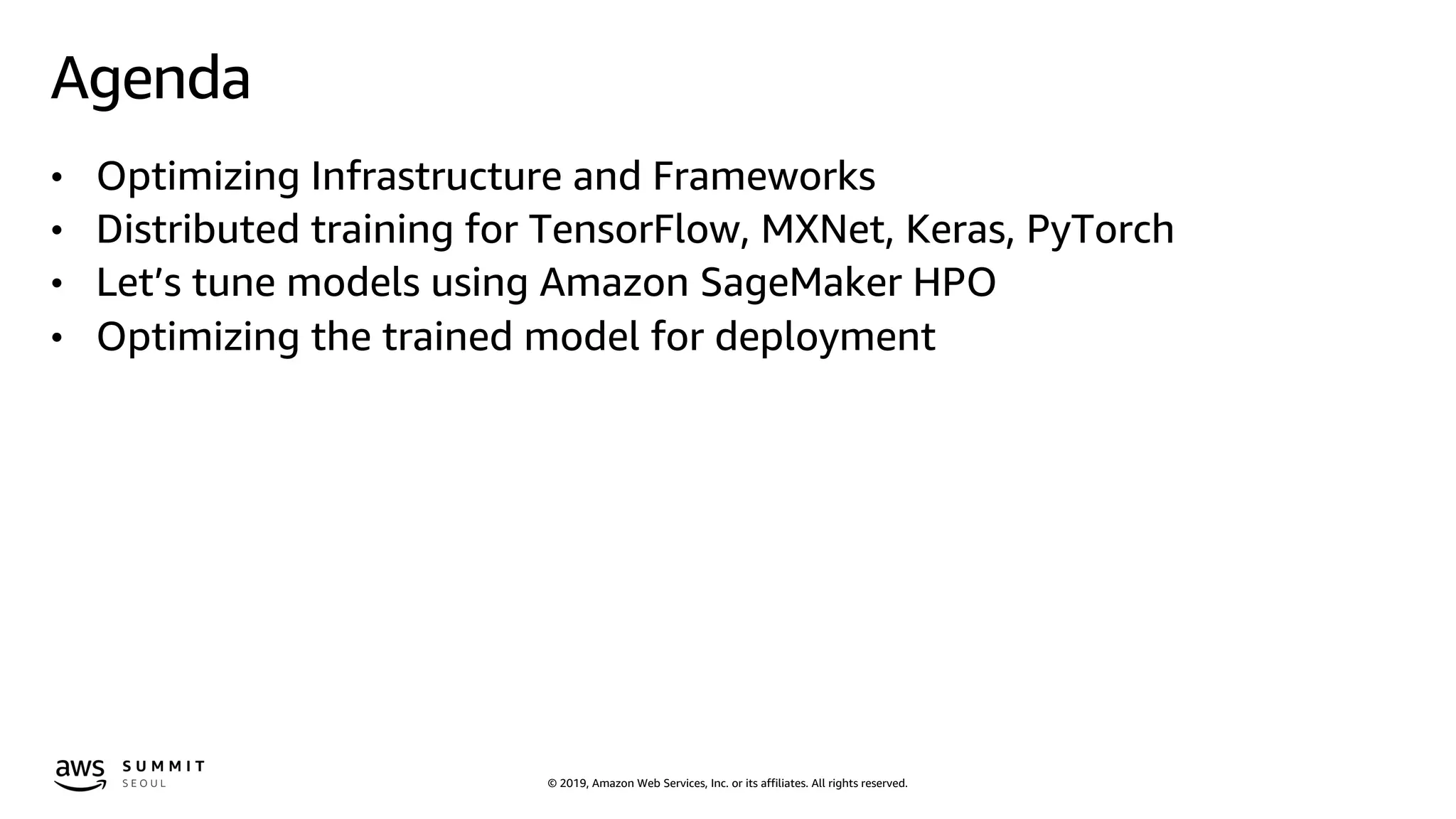
Agenda
• Optimizing Infrastructure and Frameworks
• Distributed training for TensorFlow, MXNet, Keras, PyTorch
• Let’s tune models using Amazon SageMaker HPO
• Optimizing the trained model for deployment
© 2019, Amazon Web Services, Inc. or its affiliates. All rights reserved.
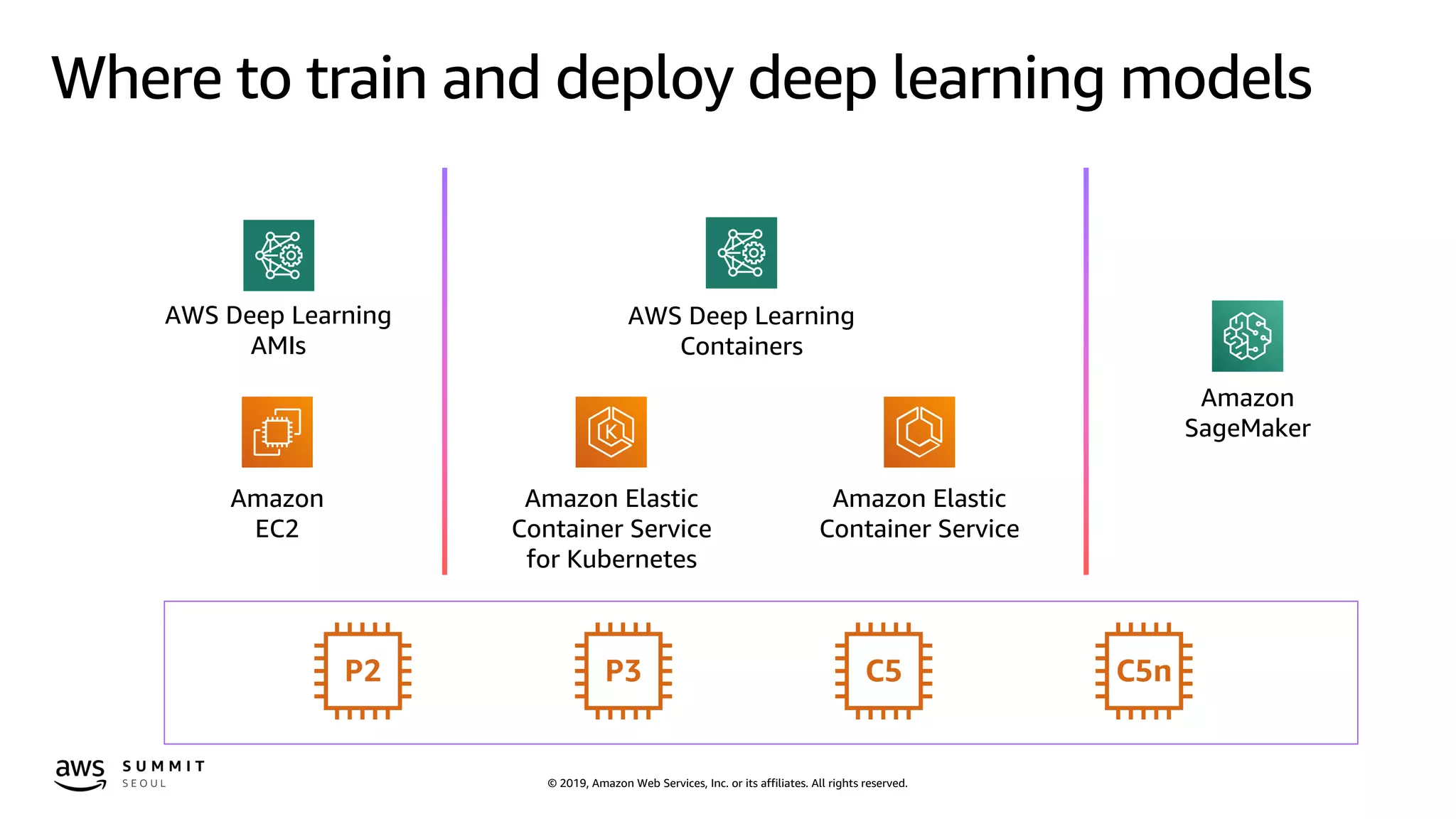
Where to train and deploy deep learning models
Amazon
SageMaker
Amazon Elastic
Container Service
for Kubernetes
Amazon Elastic
Container Service
AWS Deep Learning
Containers
Amazon
EC2
AWS Deep Learning
AMIs
© 2019, Amazon Web Services, Inc. or its affiliates. All rights reserved.
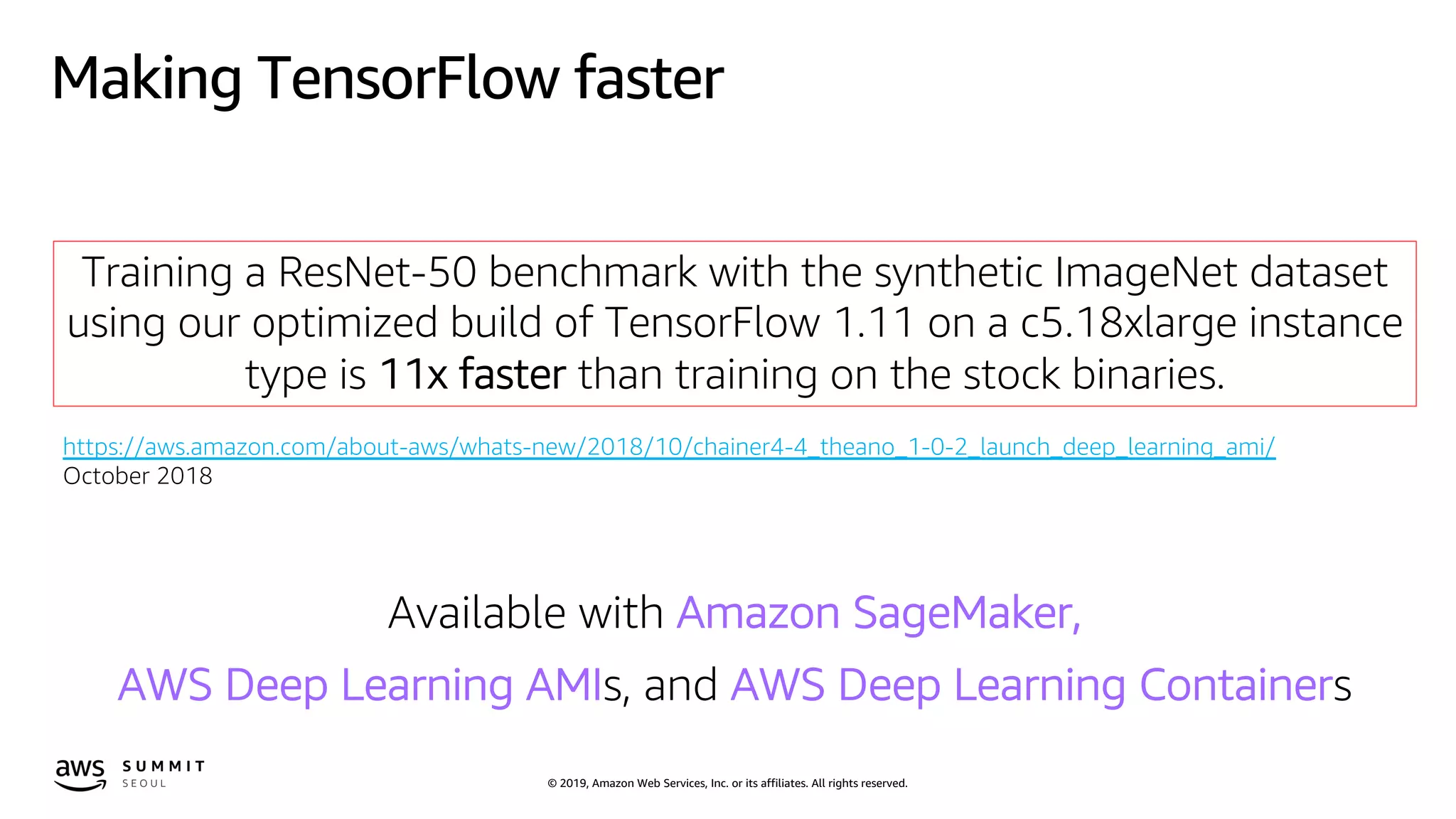
Making TensorFlow faster
Training a ResNet-50 benchmark with the synthetic ImageNet dataset
using our optimized build of TensorFlow 1.11 on a c5.18xlarge instance
type is 11x faster than training on the stock binaries.
https://aws.amazon.com/about-aws/whats-new/2018/10/chainer4-4_theano_1-0-2_launch_deep_learning_ami/
October 2018
Available with Amazon SageMaker,
AWS Deep Learning AMIs, and AWS Deep Learning Containers
© 2019, Amazon Web Services, Inc. or its affiliates. All rights reserved.
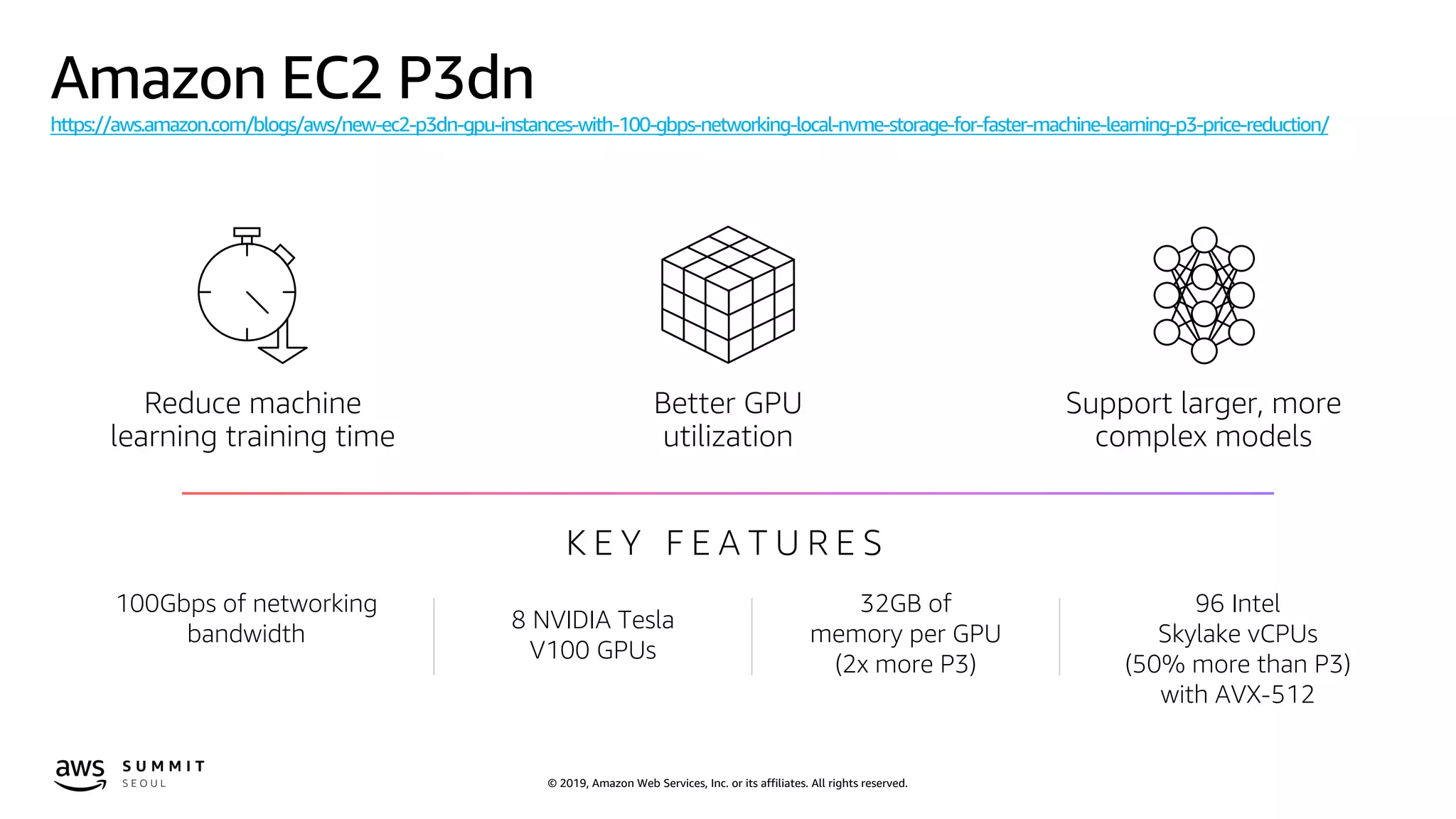
Amazon EC2 P3dn
https://aws.amazon.com/blogs/aws/new-ec2-p3dn-gpu-instances-with-100-gbps-networking-local-nvme-storage-for-faster-machine-learning-p3-price-reduction/
Reduce machine
learning training time
Better GPU
utilization
Support larger, more
complex models
K E Y F E A T U R E S
100Gbps of networking
bandwidth
8 NVIDIA Tesla
V100 GPUs
32GB of
memory per GPU
(2x more P3)
96 Intel
Skylake vCPUs
(50% more than P3)
with AVX-512
© 2019, Amazon Web Services, Inc. or its affiliates. All rights reserved.
Amazon EC2 P3 instance type has the most powerful GPU, NVIDIA V100
But
Are you fully utilizing GPUs?
© 2019, Amazon Web Services, Inc. or its affiliates. All rights reserved.
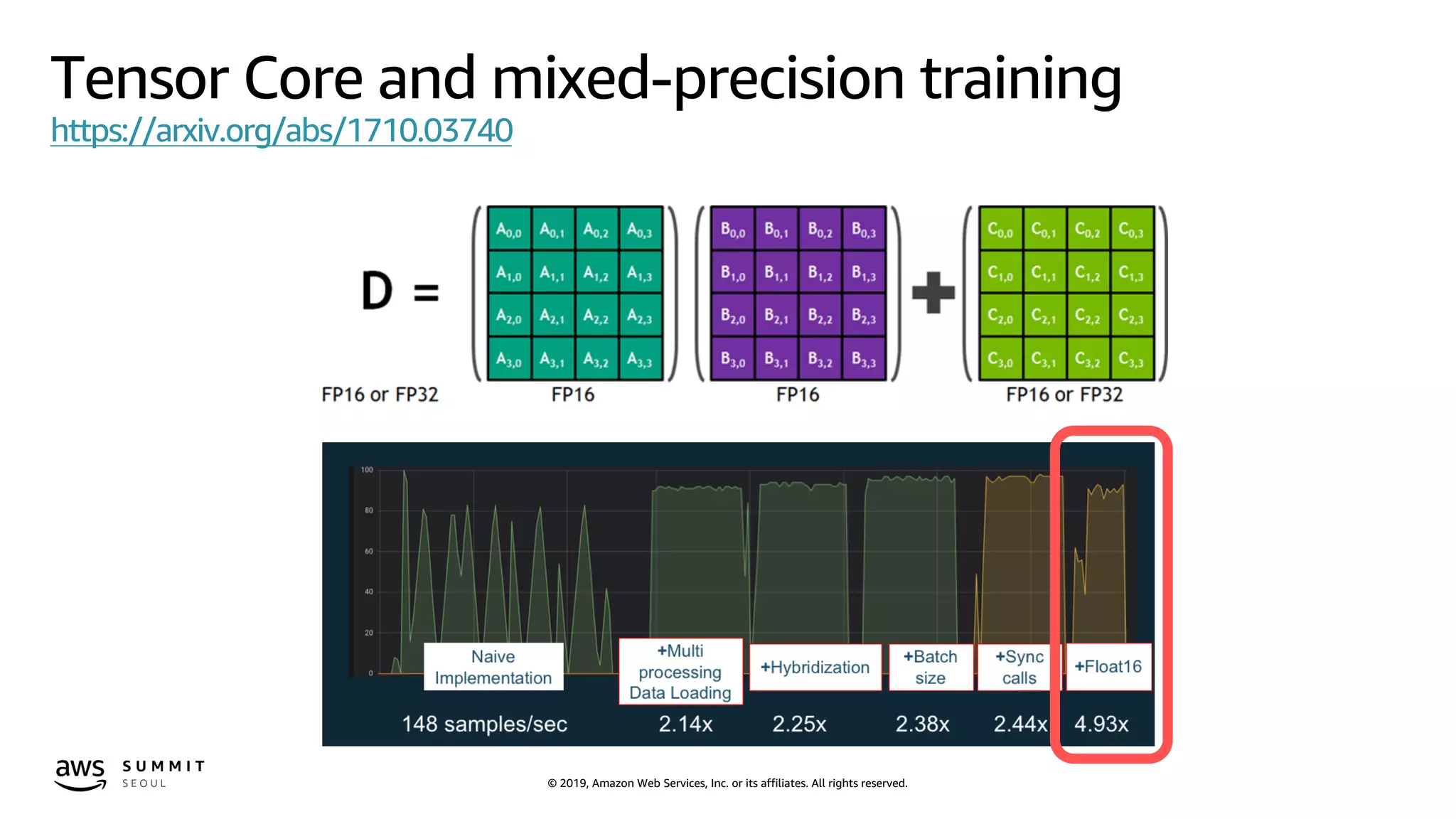
Tensor Core and mixed-precision training
https://arxiv.org/abs/1710.03740
© 2019, Amazon Web Services, Inc. or its affiliates. All rights reserved.
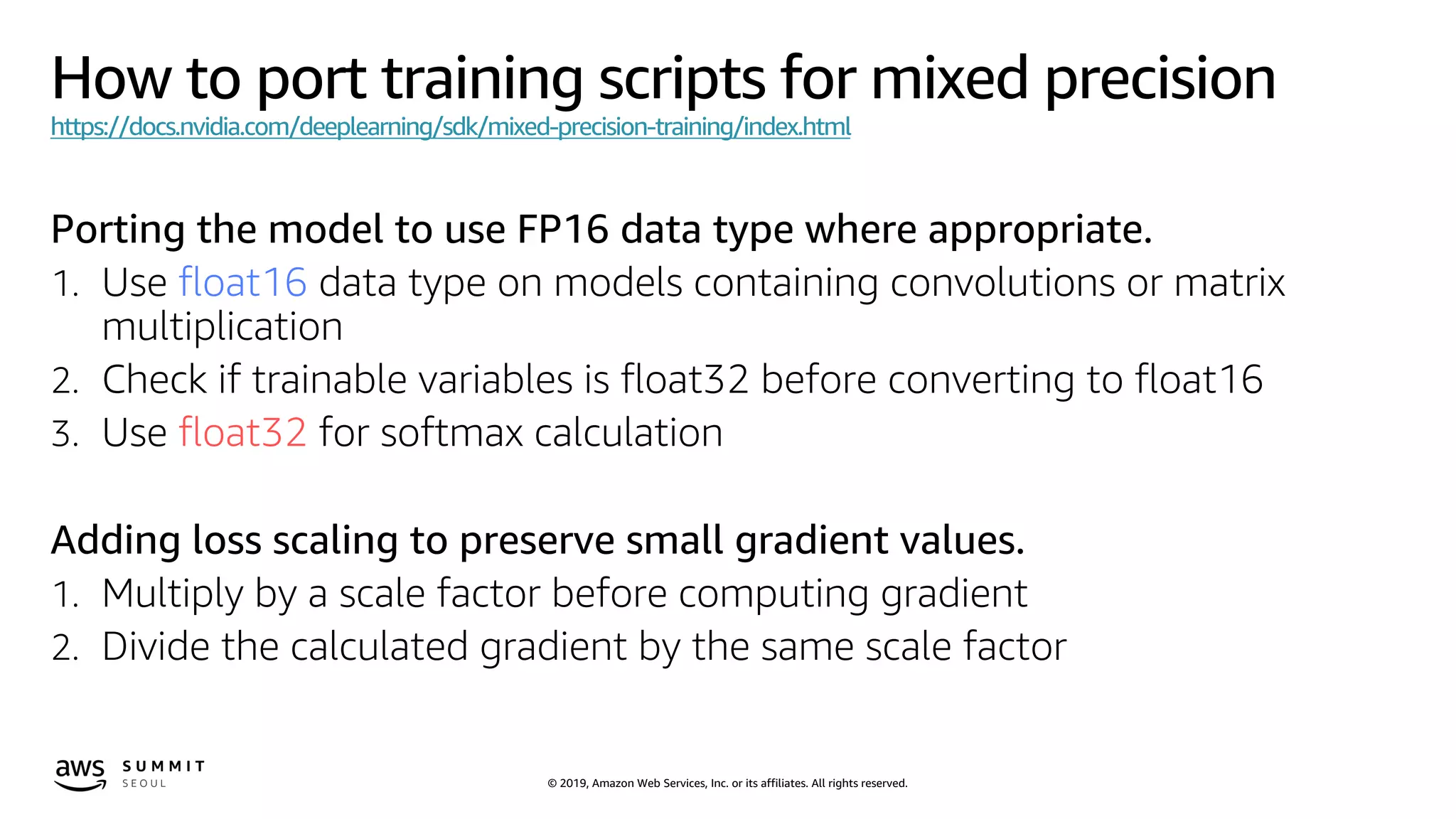
How to port training scripts for mixed precision
https://docs.nvidia.com/deeplearning/sdk/mixed-precision-training/index.html
Porting the model to use FP16 data type where appropriate.
1. Use float16 data type on models containing convolutions or matrix
multiplication
2. Check if trainable variables is float32 before converting to float16
3. Use float32 for softmax calculation
Adding loss scaling to preserve small gradient values.
1. Multiply by a scale factor before computing gradient
2. Divide the calculated gradient by the same scale factor
© 2019, Amazon Web Services, Inc. or its affiliates. All rights reserved.
Code snip for mix-precision training in TensorFlow
x = tf.placeholder(tf.float32, [None, 784])
W1 = tf.Variable(tf.truncated_normal([784, FLAGS.num_hunits]))
b1 = tf.Variable(tf.zeros([FLAGS.num_hunits]))
z = tf.nn.relu(tf.matmul(x, W1) + b1)
W2 = tf.Variable(tf.truncated_normal([FLAGS.num_hunits, 10]))
b2 = tf.Variable(tf.zeros([10]))
y = tf.matmul(z, W2) + b2
y_ = tf.placeholder(tf.int64, [None])
cross_entropy = tf.losses.sparse_softmax_cross_entropy(labels=y_,
logits=y)
train_step =
tf.train.GradientDescentOptimizer(0.5).minimize(cross_entropy)
data = tf.placeholder(tf.float16, shape=(None, 784))
W1 = tf.get_variable('w1', (784, FLAGS.num_hunits), tf.float16)
b1 = tf.get_variable('b1', (FLAGS.num_hunits), tf.float16,
initializer=tf.zeros_initializer())
z = tf.nn.relu(tf.matmul(data, W1) + b1)
W2 = tf.get_variable('w2', (FLAGS.num_hunits, 10), tf.float16)
b2 = tf.get_variable('b2', (10), tf.float16,
initializer=tf.zeros_initializer())
y = tf.matmul(z, W2) + b2
y_ = tf.placeholder(tf.int64, shape=(None))
loss = tf.losses.sparse_softmax_cross_entropy(y_,
tf.cast(y, tf.float32))
* Source code from https://github.com/khcs/fp16-demo-tf
MLP normal implementation MLP mixed-precision implementation
© 2019, Amazon Web Services, Inc. or its affiliates. All rights reserved.
Code snip for mix-precision training in TensorFlow
sess = tf.InteractiveSession()
tf.global_variables_initializer().run()
# Train
for _ in range(3000):
batch_xs, batch_ys = mnist.train.next_batch(100)
sess.run(train_step, feed_dict={x: batch_xs, y_: batch_ys})
def gradients_with_loss_scaling(loss, variables, loss_scale):
return [grad / loss_scale
for grad in tf.gradients(loss * loss_scale, variables)]
with tf.device('/gpu:0'), 
tf.variable_scope(
'fp32_storage', custom_getter=float32_variable_storage_getter):
data, target, logits, loss = create_model(nbatch, nin, nout, dtype)
variables = tf.get_collection(tf.GraphKeys.TRAINABLE_VARIABLES)
grads = gradients_with_loss_scaling(loss, variables, loss_scale)
optimizer = tf.train.MomentumOptimizer(learning_rate, momentum)
training_step_op = optimizer.apply_gradients(zip(grads, variables))
init_op = tf.global_variables_initializer()
sess.run(init_op)
for step in range(6000):
batch_xs, batch_ys = mnist.train.next_batch(100)
np_loss, _ = sess.run([loss, training_step_op],
feed_dict={data: batch_xs, target: batch_ys})* Source code from https://github.com/khcs/fp16-demo-tf
MLP normal implementation MLP mixed-precision implementation
© 2019, Amazon Web Services, Inc. or its affiliates. All rights reserved.
For other Deep Learning frameworks such as Apache MXNet, PyTorch, etc
please refer to
AWS Deep Learning AMI Developer Guide
https://docs.aws.amazon.com/dlami/latest/devguide/tutorial-gpu-opt-training.html
NVIDIA Deep Learning SDK
https://docs.nvidia.com/deeplearning/sdk/mixed-precision-training/index.html
© 2019, Amazon Web Services, Inc. or its affiliates. All rights reserved.© 2019, Amazon Web Services, Inc. or its affiliates. All rights reserved.
© 2019, Amazon Web Services, Inc. or its affiliates. All rights reserved.
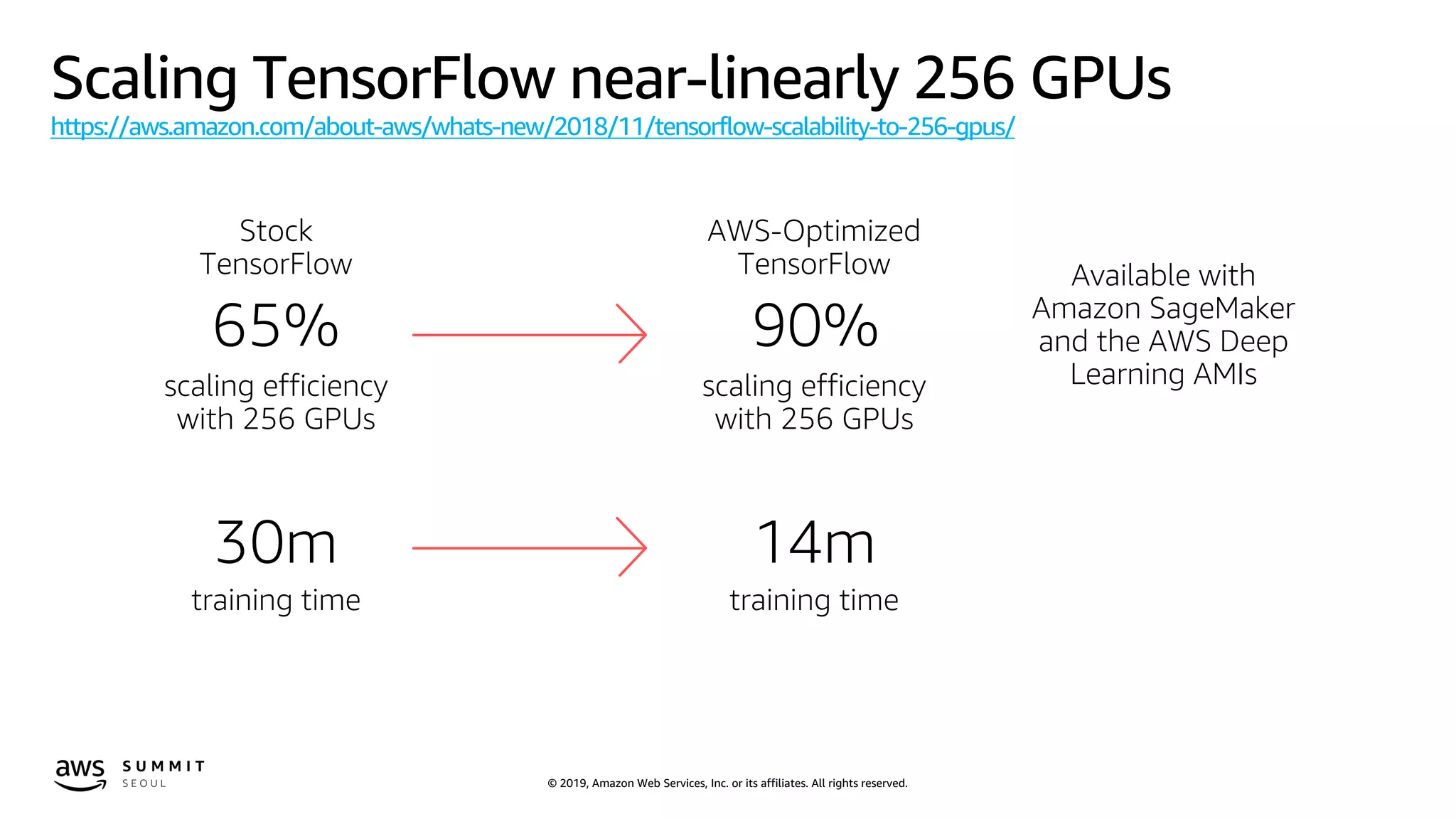
Scaling TensorFlow near-linearly 256 GPUs
https://aws.amazon.com/about-aws/whats-new/2018/11/tensorflow-scalability-to-256-gpus/
Stock
TensorFlow
65%
scaling efficiency
with 256 GPUs
30m
training time
AWS-Optimized
TensorFlow
90%
scaling efficiency
with 256 GPUs
Available with
Amazon SageMaker
and the AWS Deep
Learning AMIs
14m
training time
© 2019, Amazon Web Services, Inc. or its affiliates. All rights reserved.
I also have huge amount of data or large models for training
How to scale deep learning training tasks?
© 2019, Amazon Web Services, Inc. or its affiliates. All rights reserved.
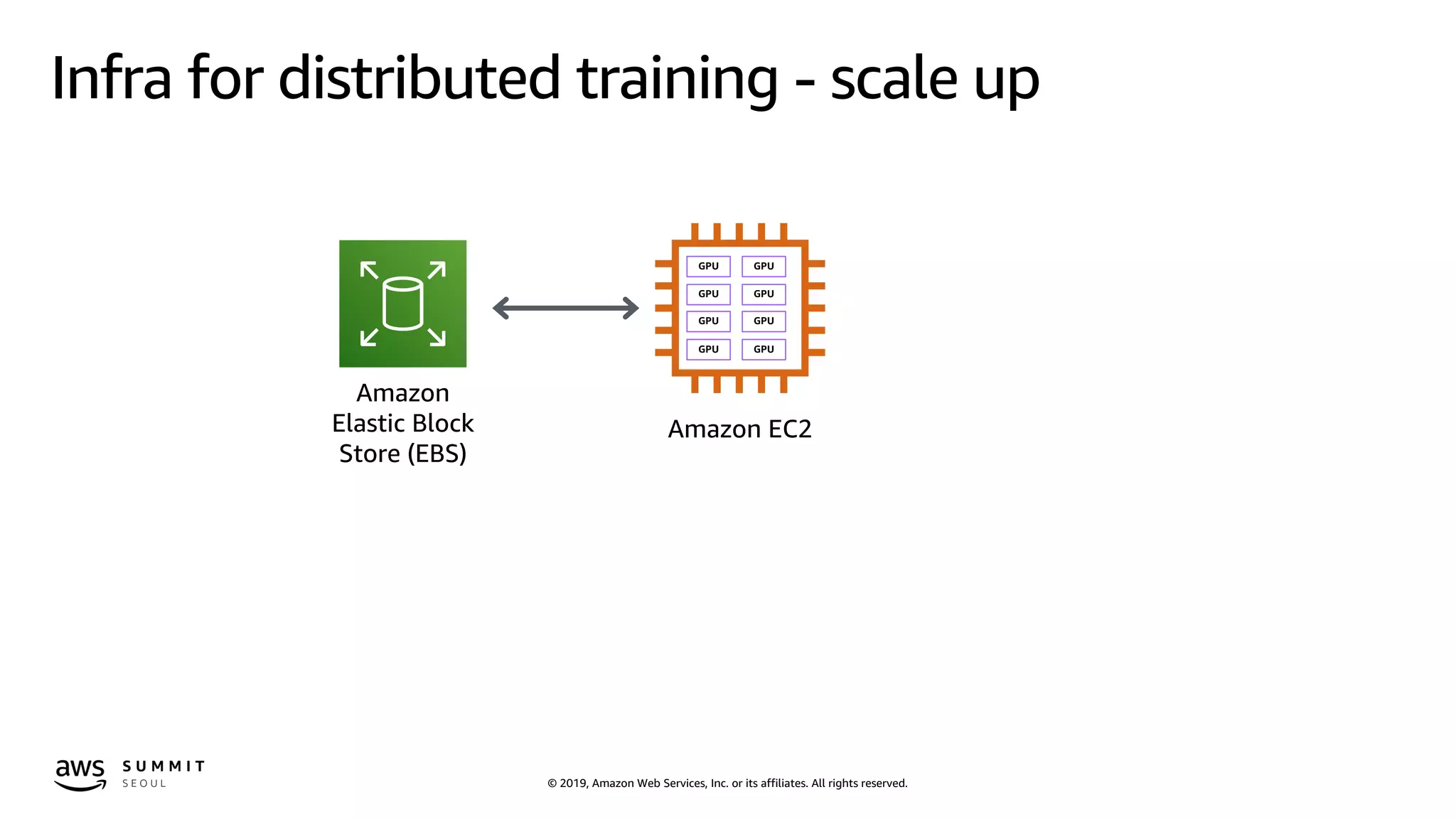
Infra for distributed training - scale up
Amazon
Elastic Block
Store (EBS)
Amazon EC2
GPU GPU
GPU GPU
GPU GPU
GPU GPU
© 2019, Amazon Web Services, Inc. or its affiliates. All rights reserved.
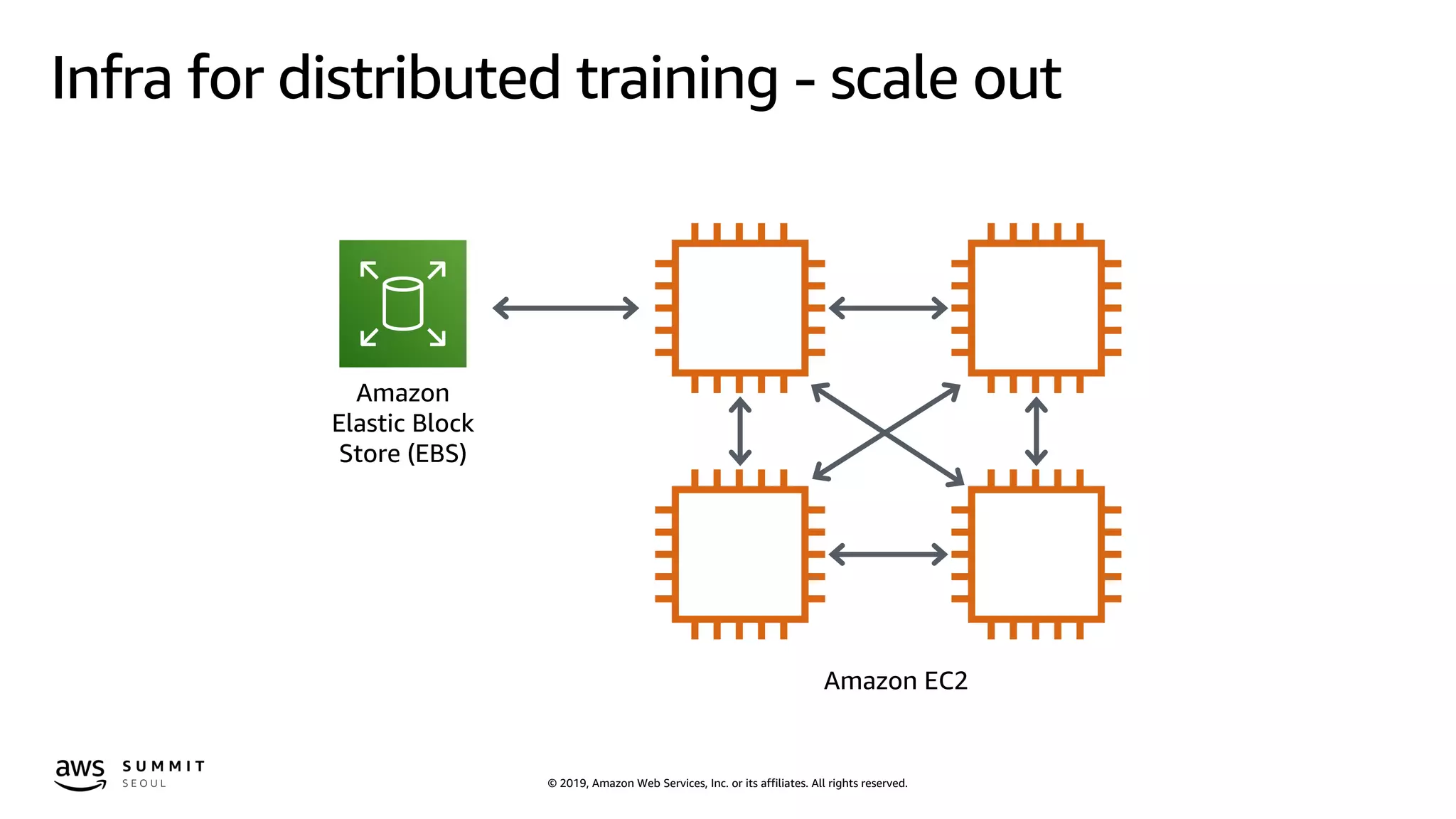
Infra for distributed training - scale out
Amazon
Elastic Block
Store (EBS)
Amazon EC2
© 2019, Amazon Web Services, Inc. or its affiliates. All rights reserved.
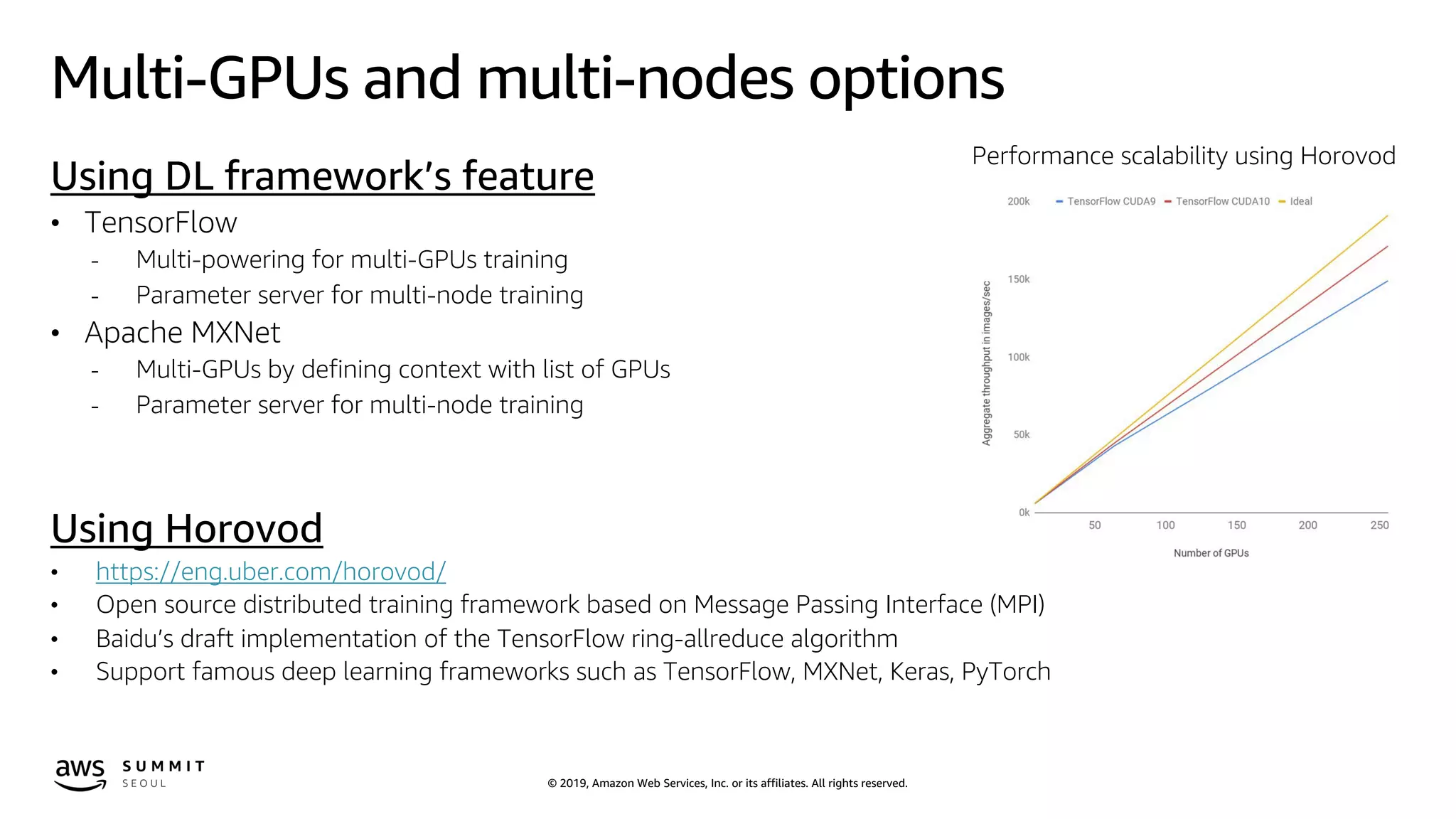
Multi-GPUs and multi-nodes options
Using DL framework’s feature
• TensorFlow
- Multi-powering for multi-GPUs training
- Parameter server for multi-node training
• Apache MXNet
- Multi-GPUs by defining context with list of GPUs
- Parameter server for multi-node training
Using Horovod
• https://eng.uber.com/horovod/
• Open source distributed training framework based on Message Passing Interface (MPI)
• Baidu’s draft implementation of the TensorFlow ring-allreduce algorithm
• Support famous deep learning frameworks such as TensorFlow, MXNet, Keras, PyTorch
Performance scalability using Horovod
© 2019, Amazon Web Services, Inc. or its affiliates. All rights reserved.
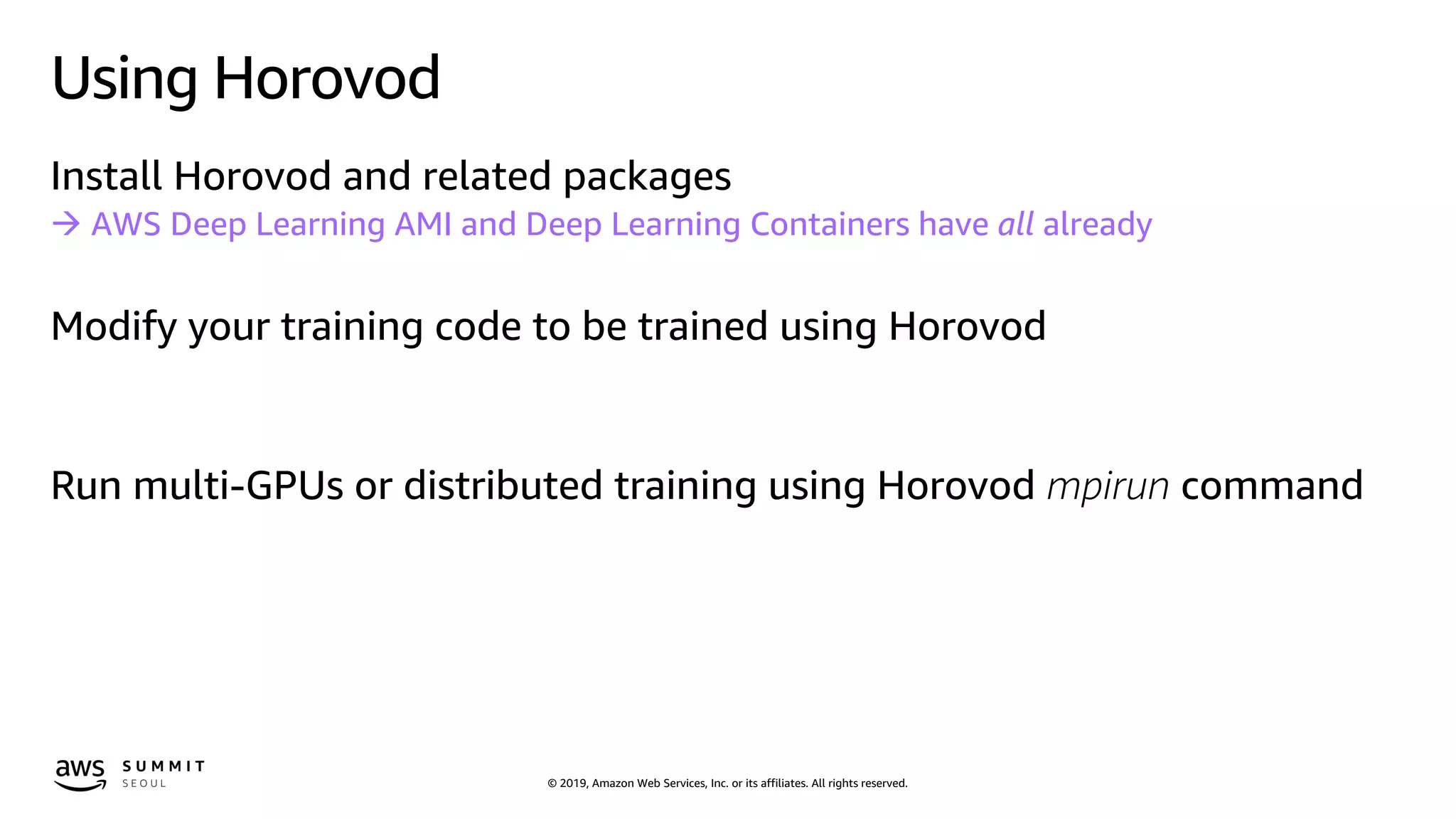
Using Horovod
Install Horovod and related packages
à AWS Deep Learning AMI and Deep Learning Containers have all already
Modify your training code to be trained using Horovod
Run multi-GPUs or distributed training using Horovod mpirun command
© 2019, Amazon Web Services, Inc. or its affiliates. All rights reserved.
Using Horovod with TensorFlow
import tensorflow as tf
import horovod.tensorflow as hvd
# Initialize Horovod
hvd.init()
# Pin GPU to be used to process local rank (one GPU per
process)
config = tf.ConfigProto()
config.gpu_options.visible_device_list = str(hvd.local_rank())
# Build model...
loss = ...
opt = tf.train.AdagradOptimizer(0.01 * hvd.size())
# Add Horovod Distributed Optimizer
opt = hvd.DistributedOptimizer(opt)
# Add hook to broadcast variables from rank 0 to all other
processes during
# initialization.
hooks = [hvd.BroadcastGlobalVariablesHook(0)]
# Make training operation
train_op = opt.minimize(loss)
# Save checkpoints only on worker 0 to prevent other workers
from corrupting them.
checkpoint_dir = '/tmp/train_logs' if hvd.rank() == 0 else None
# The MonitoredTrainingSession takes care of session
initialization,
# restoring from a checkpoint, saving to a checkpoint, and
closing when done
# or an error occurs.
with
tf.train.MonitoredTrainingSession(checkpoint_dir=checkpoint_dir,
config=config,
hooks=hooks) as mon_sess:
while not mon_sess.should_stop():
# Perform synchronous training.
mon_sess.run(train_op)
( source code from https://github.com/horovod/horovod )
© 2019, Amazon Web Services, Inc. or its affiliates. All rights reserved.
Using Horovod with Apache MXNet
import mxnet as mx
import horovod.mxnet as hvd
from mxnet import autograd
# Initialize Horovod
hvd.init()
# Pin GPU to be used to process local rank
context = mx.gpu(hvd.local_rank())
num_workers = hvd.size()
# Build model
model = ...
model.hybridize()
# Create optimizer
optimizer_params = ...
opt = mx.optimizer.create('sgd', **optimizer_params)
# Initialize parameters
model.initialize(initializer, ctx=context)
# Fetch and broadcast parameters
params = model.collect_params()
if params is not None:
hvd.broadcast_parameters(params, root_rank=0)
# Create DistributedTrainer, a subclass of gluon.Trainer
trainer = hvd.DistributedTrainer(params, opt)
# Create loss function
loss_fn = ...
# Train model
for epoch in range(num_epoch):
train_data.reset()
for nbatch, batch in enumerate(train_data, start=1):
data = batch.data[0].as_in_context(context)
label = batch.label[0].as_in_context(context)
with autograd.record():
output = model(data.astype(dtype, copy=False))
loss = loss_fn(output, label)
loss.backward()
trainer.step(batch_size)
( source code from https://github.com/horovod/horovod )
© 2019, Amazon Web Services, Inc. or its affiliates. All rights reserved.
Using Horovod with Keras
import keras
import horovod.keras as hvd
# Horovod: initialize Horovod.
hvd.init()
# Horovod: pin GPU to be used to process local rank (one GPU
per process)
config = tf.ConfigProto()
config.gpu_options.allow_growth = True
config.gpu_options.visible_device_list = str(hvd.local_rank())
# Horovod: adjust number of epochs based on number of GPUs.
epochs = int(math.ceil(12.0 / hvd.size()))
model = ...
# Horovod: adjust learning rate based on number of GPUs.
opt = keras.optimizers.Adadelta(1.0 * hvd.size())
# Horovod: add Horovod Distributed Optimizer.
opt = hvd.DistributedOptimizer(opt)
model.compile(loss=keras.losses.categorical_crossentropy,
optimizer=opt, metrics=['accuracy'])))
callbacks = [
# Horovod: broadcast initial variable states from rank 0 to
all other processes.
# This is necessary to ensure consistent initialization of
all workers when
# training is started with random weights or restored from a
checkpoint.
hvd.callbacks.BroadcastGlobalVariablesCallback(0),
]
# Horovod: save checkpoints only on worker 0 to prevent other
workers from corrupting them.
if hvd.rank() == 0:
callbacks.append(keras.callbacks.ModelCheckpoint(
'./checkpoint-{epoch}.h5'))
model.fit(x_train, y_train,
batch_size=batch_size,
callbacks=callbacks,
epochs=epochs,
verbose=1,
validation_data=(x_test, y_test))
( source code from https://github.com/horovod/horovod )
© 2019, Amazon Web Services, Inc. or its affiliates. All rights reserved.
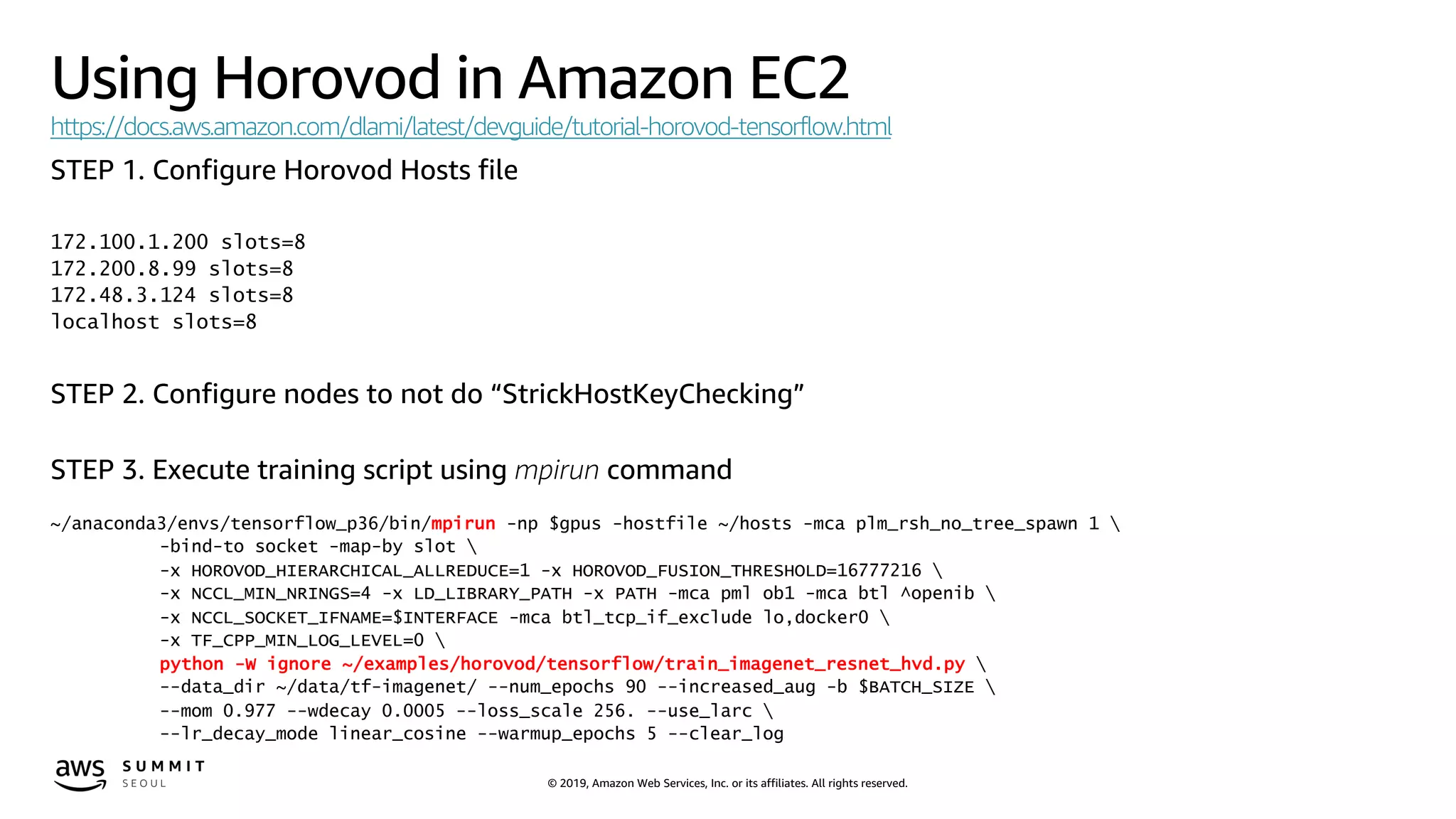
Using Horovod in Amazon EC2
https://docs.aws.amazon.com/dlami/latest/devguide/tutorial-horovod-tensorflow.html
STEP 1. Configure Horovod Hosts file
172.100.1.200 slots=8
172.200.8.99 slots=8
172.48.3.124 slots=8
localhost slots=8
STEP 2. Configure nodes to not do “StrickHostKeyChecking”
STEP 3. Execute training script using mpirun command
~/anaconda3/envs/tensorflow_p36/bin/mpirun -np $gpus -hostfile ~/hosts -mca plm_rsh_no_tree_spawn 1 
-bind-to socket -map-by slot 
-x HOROVOD_HIERARCHICAL_ALLREDUCE=1 -x HOROVOD_FUSION_THRESHOLD=16777216 
-x NCCL_MIN_NRINGS=4 -x LD_LIBRARY_PATH -x PATH -mca pml ob1 -mca btl ^openib 
-x NCCL_SOCKET_IFNAME=$INTERFACE -mca btl_tcp_if_exclude lo,docker0 
-x TF_CPP_MIN_LOG_LEVEL=0 
python -W ignore ~/examples/horovod/tensorflow/train_imagenet_resnet_hvd.py 
--data_dir ~/data/tf-imagenet/ --num_epochs 90 --increased_aug -b $BATCH_SIZE 
--mom 0.977 --wdecay 0.0005 --loss_scale 256. --use_larc 
--lr_decay_mode linear_cosine --warmup_epochs 5 --clear_log
© 2019, Amazon Web Services, Inc. or its affiliates. All rights reserved.
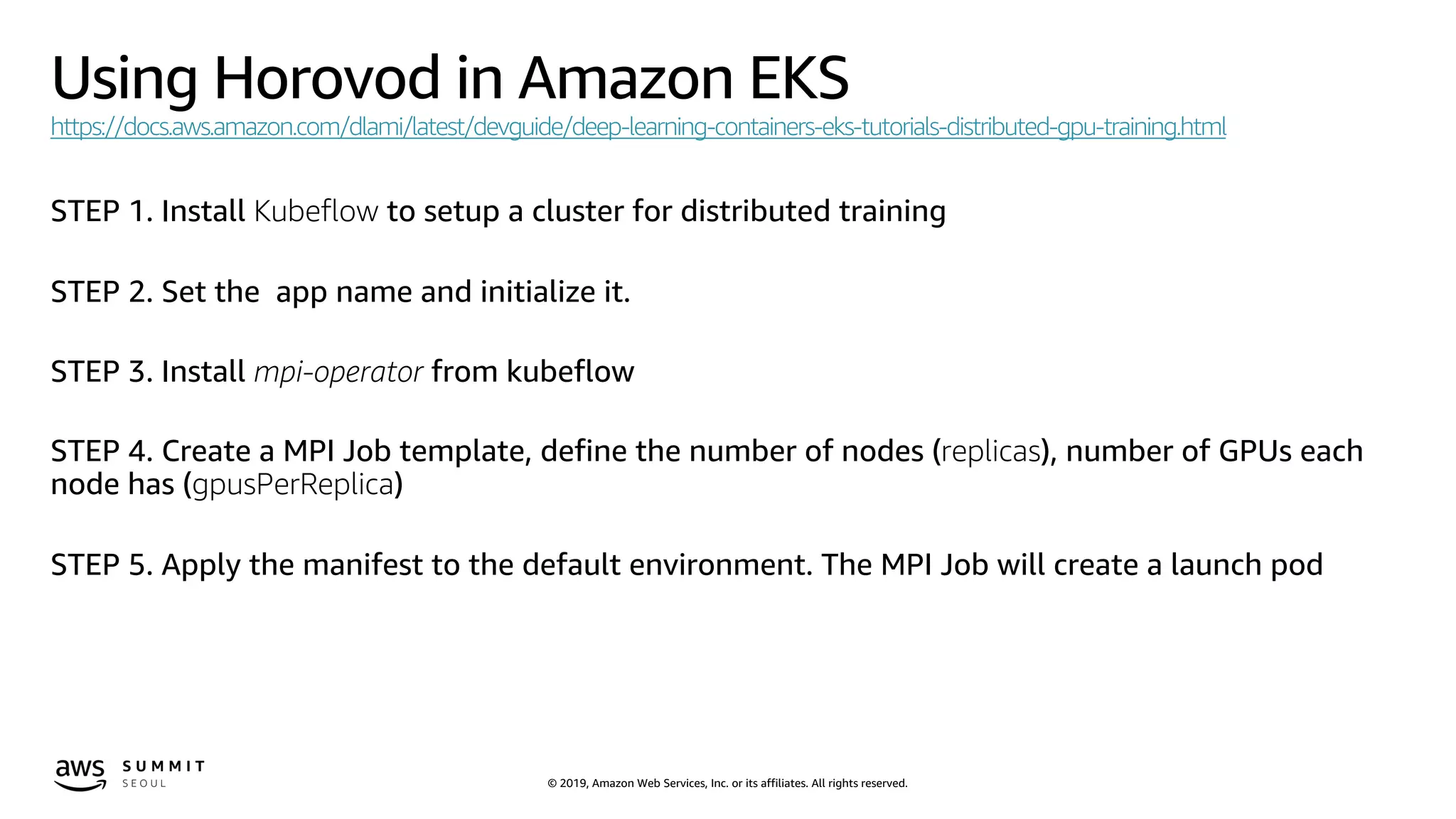
Using Horovod in Amazon EKS
https://docs.aws.amazon.com/dlami/latest/devguide/deep-learning-containers-eks-tutorials-distributed-gpu-training.html
STEP 1. Install Kubeflow to setup a cluster for distributed training
STEP 2. Set the app name and initialize it.
STEP 3. Install mpi-operator from kubeflow
STEP 4. Create a MPI Job template, define the number of nodes (replicas), number of GPUs each
node has (gpusPerReplica)
STEP 5. Apply the manifest to the default environment. The MPI Job will create a launch pod
© 2019, Amazon Web Services, Inc. or its affiliates. All rights reserved.
Using Horovod in Amazon SageMaker
from sagemaker.tensorflow import TensorFlow
distributions = {'mpi': {'enabled': True, "processes_per_host": 2}}
# METHOD 1 - Using Amazon SageMaker provided VPC
estimator = TensorFlow(entry_point=train_script,
role=sagemaker_iam_role,
train_instance_count=2,
train_instance_type='ml.p3.8xlarge',
script_mode=True,
framework_version='1.12',
distributions=distributions)
# METHOD 2 - Using your own VPC for training performance improvement
estimator = TensorFlow(entry_point=train_script,
role=sagemaker_iam_role,
train_instance_count=2,
train_instance_type='ml.p3.8xlarge',
script_mode=True,
framework_version='1.12',
distributions=distributions,
security_group_ids=['sg-0919a36a89a15222f'],
subnets=['subnet-0c07198f3eb022ede', 'subnet-055b2819caae2fd1f’])
estimator.fit({"train":s3_train_path, "test":s3_test_path})
© 2019, Amazon Web Services, Inc. or its affiliates. All rights reserved.© 2019, Amazon Web Services, Inc. or its affiliates. All rights reserved.
© 2019, Amazon Web Services, Inc. or its affiliates. All rights reserved.
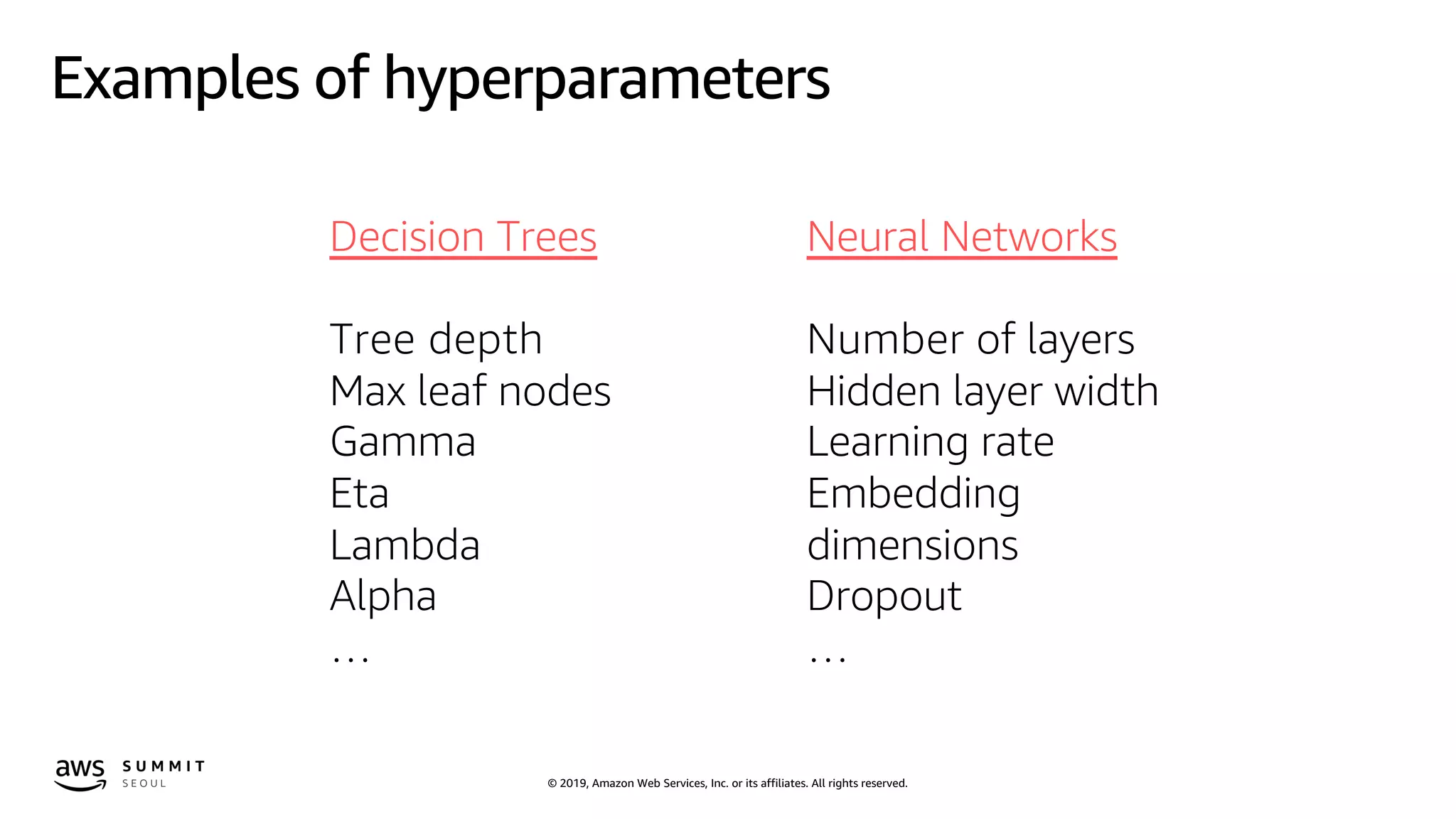
Examples of hyperparameters
Neural Networks
Number of layers
Hidden layer width
Learning rate
Embedding
dimensions
Dropout
…
Decision Trees
Tree depth
Max leaf nodes
Gamma
Eta
Lambda
Alpha
…
© 2019, Amazon Web Services, Inc. or its affiliates. All rights reserved.
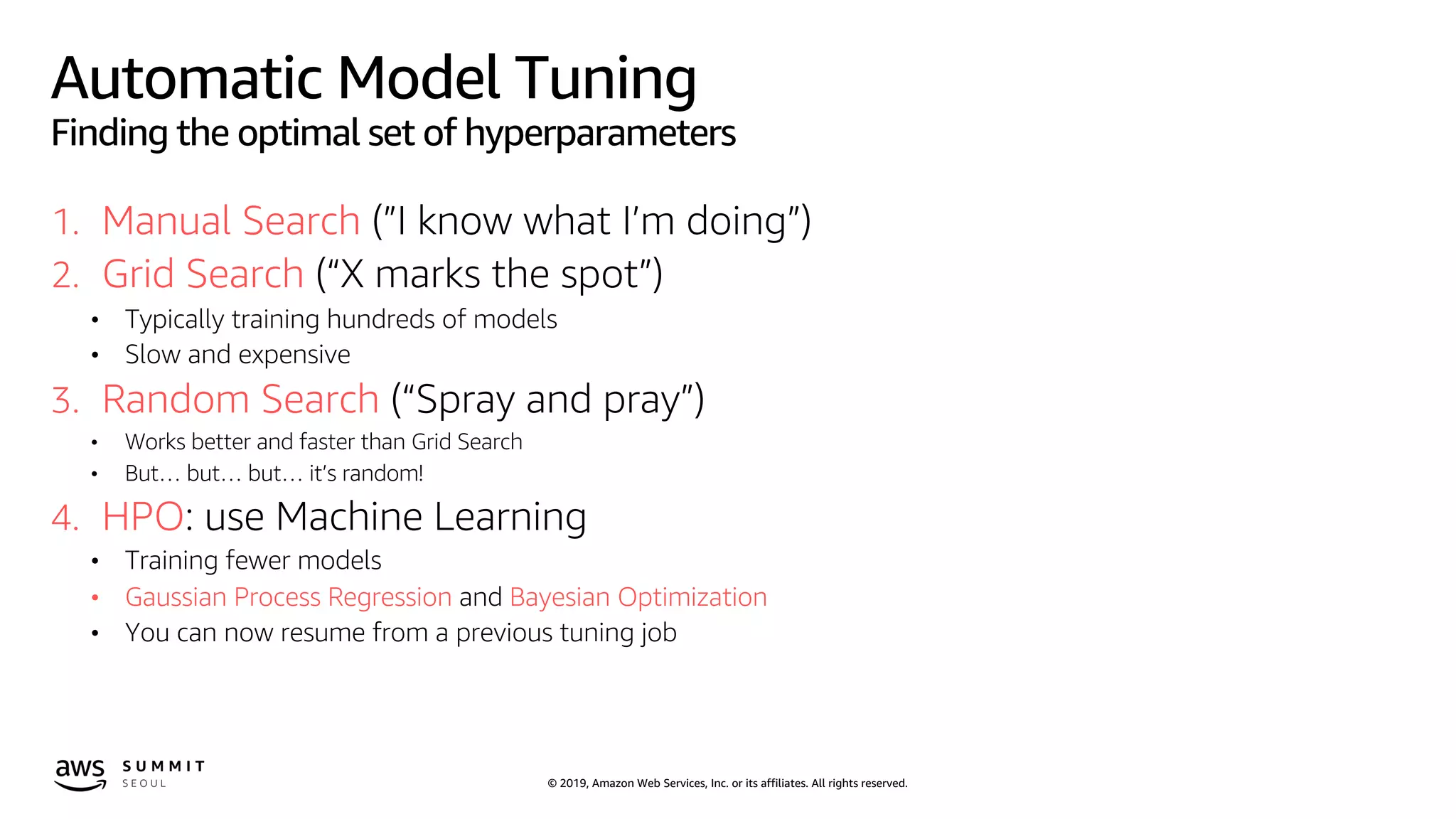
Automatic Model Tuning
Finding the optimal set of hyperparameters
1. Manual Search (”I know what I’m doing”)
2. Grid Search (“X marks the spot”)
• Typically training hundreds of models
• Slow and expensive
3. Random Search (“Spray and pray”)
• Works better and faster than Grid Search
• But… but… but… it’s random!
4. HPO: use Machine Learning
• Training fewer models
• Gaussian Process Regression and Bayesian Optimization
• You can now resume from a previous tuning job
© 2019, Amazon Web Services, Inc. or its affiliates. All rights reserved.
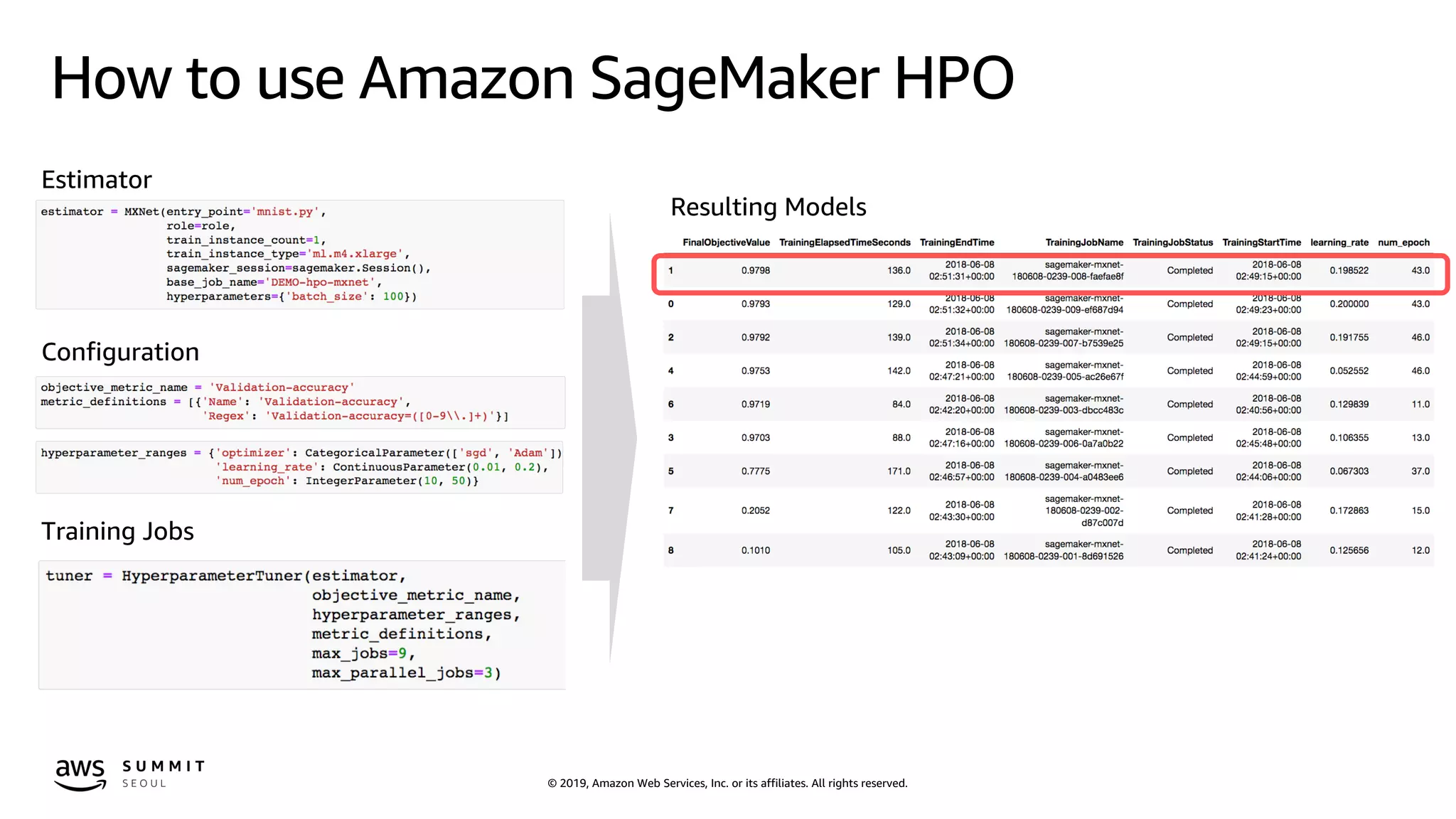
How to use Amazon SageMaker HPO
Configuration
Training Jobs
Resulting Models
Estimator
© 2019, Amazon Web Services, Inc. or its affiliates. All rights reserved.© 2019, Amazon Web Services, Inc. or its affiliates. All rights reserved.
© 2019, Amazon Web Services, Inc. or its affiliates. All rights reserved.
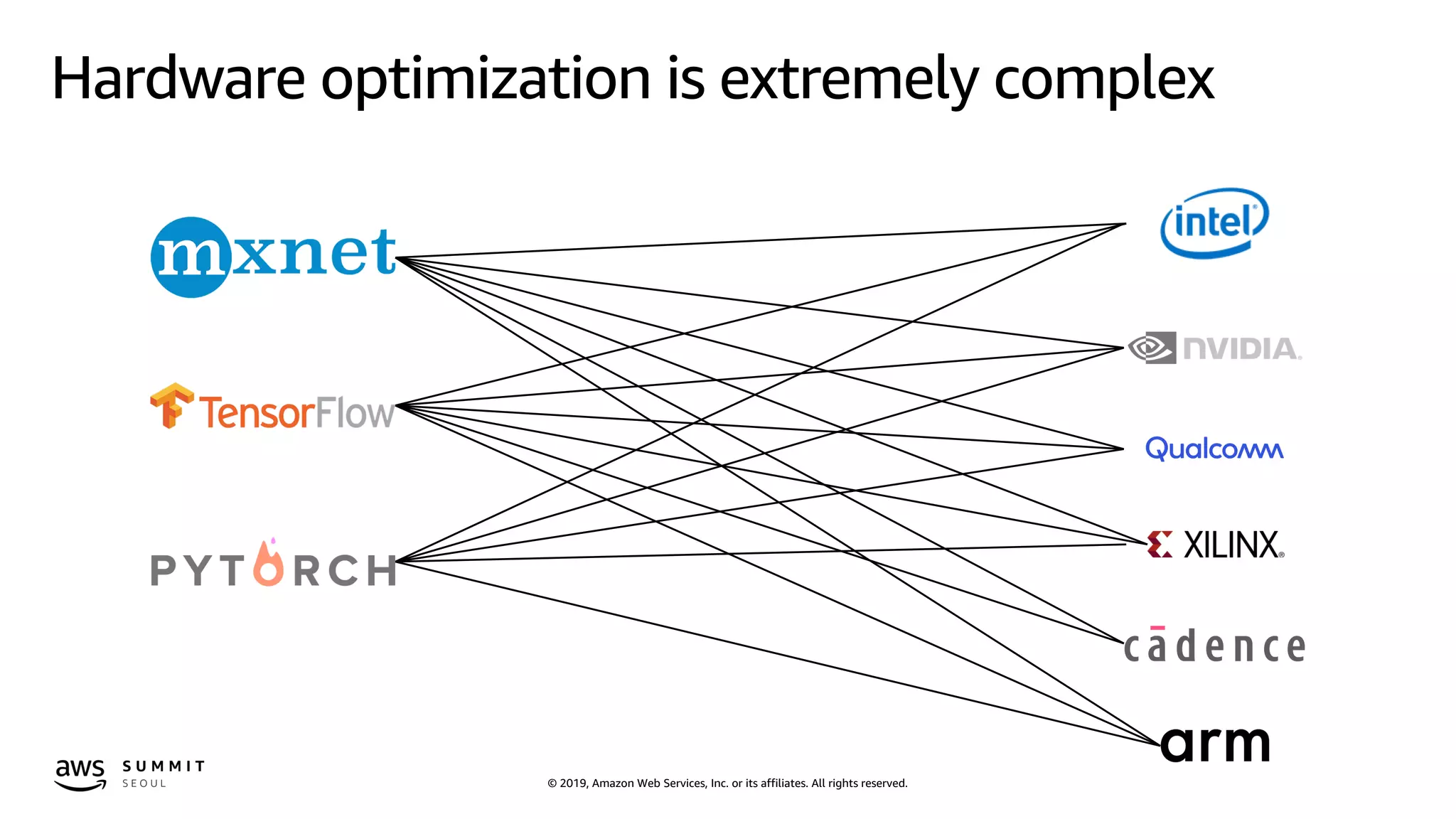
Hardware optimization is extremely complex
© 2019, Amazon Web Services, Inc. or its affiliates. All rights reserved.
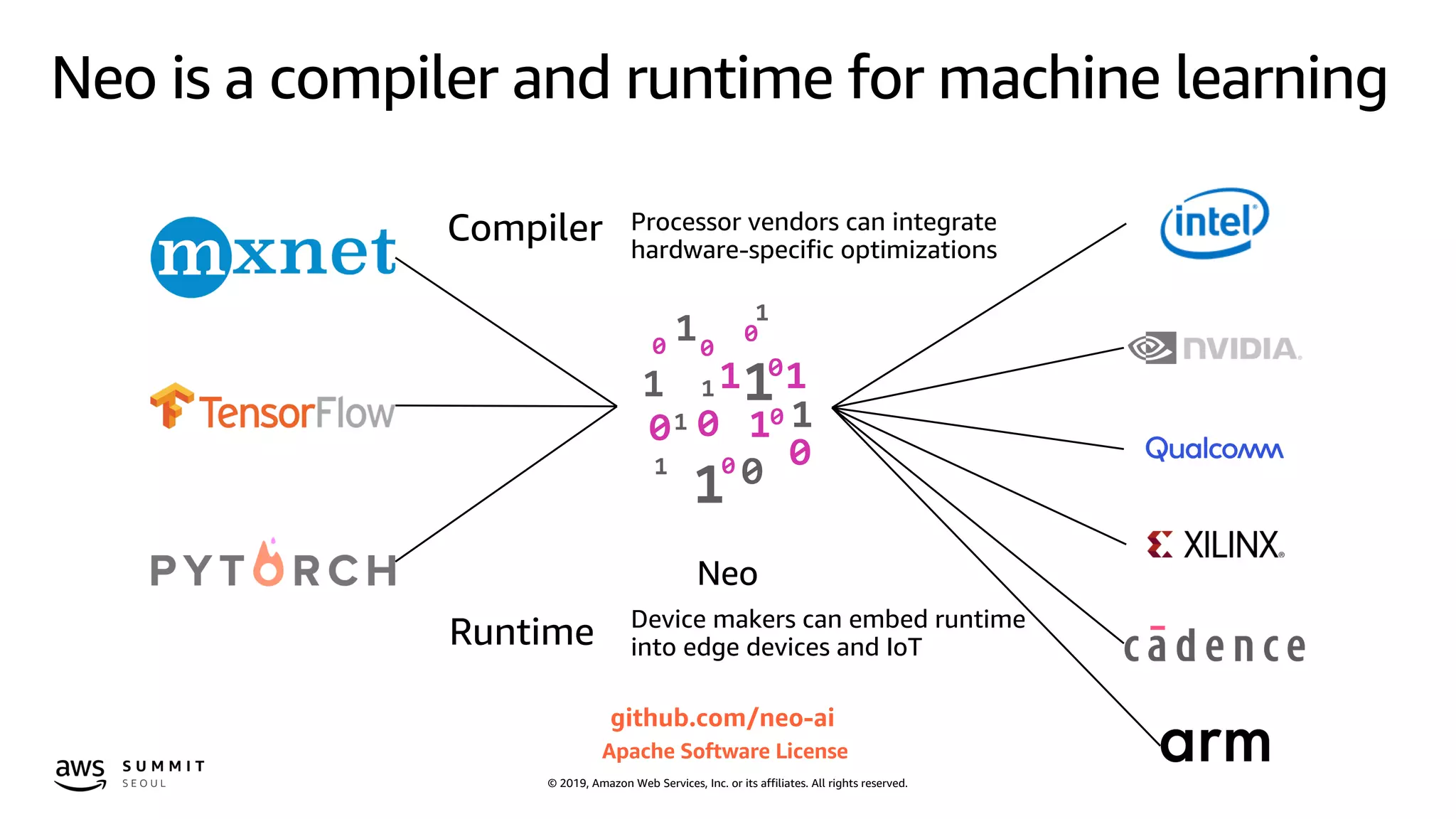
Neo is a compiler and runtime for machine learning
Compiler
Runtime
Processor vendors can integrate
hardware-specific optimizations
Device makers can embed runtime
into edge devices and IoT
github.com/neo-ai
Apache Software License
Neo
© 2019, Amazon Web Services, Inc. or its affiliates. All rights reserved.
How to compile a model
https://docs.aws.amazon.com/sagemaker/latest/dg/neo-job-compilation-cli.html
Configure the compilation job
{
"RoleArn":$ROLE_ARN,
"InputConfig": {
"S3Uri":"s3://jsimon-neo/model.tar.gz",
"DataInputConfig": "{"data": [1, 3, 224, 224]}",
"Framework": "MXNET"
},
"OutputConfig": {
"S3OutputLocation": "s3://jsimon-neo/",
"TargetDevice": "rasp3b"
},
"StoppingCondition": {
"MaxRuntimeInSeconds": 300
}
}
Compile the model
$ aws sagemaker create-compilation-job
--cli-input-json file://config.json
--compilation-job-name resnet50-mxnet-pi
$ aws s3 cp s3://jsimon-neo/model-
rasp3b.tar.gz .
$ gtar tfz model-rasp3b.tar.gz
compiled.params
compiled_model.json
compiled.so
Predict with the compiled model
from dlr import DLRModel
model = DLRModel('resnet50', input_shape,
output_shape, device)
out = model.run(input_data)
© 2019, Amazon Web Services, Inc. or its affiliates. All rights reserved.
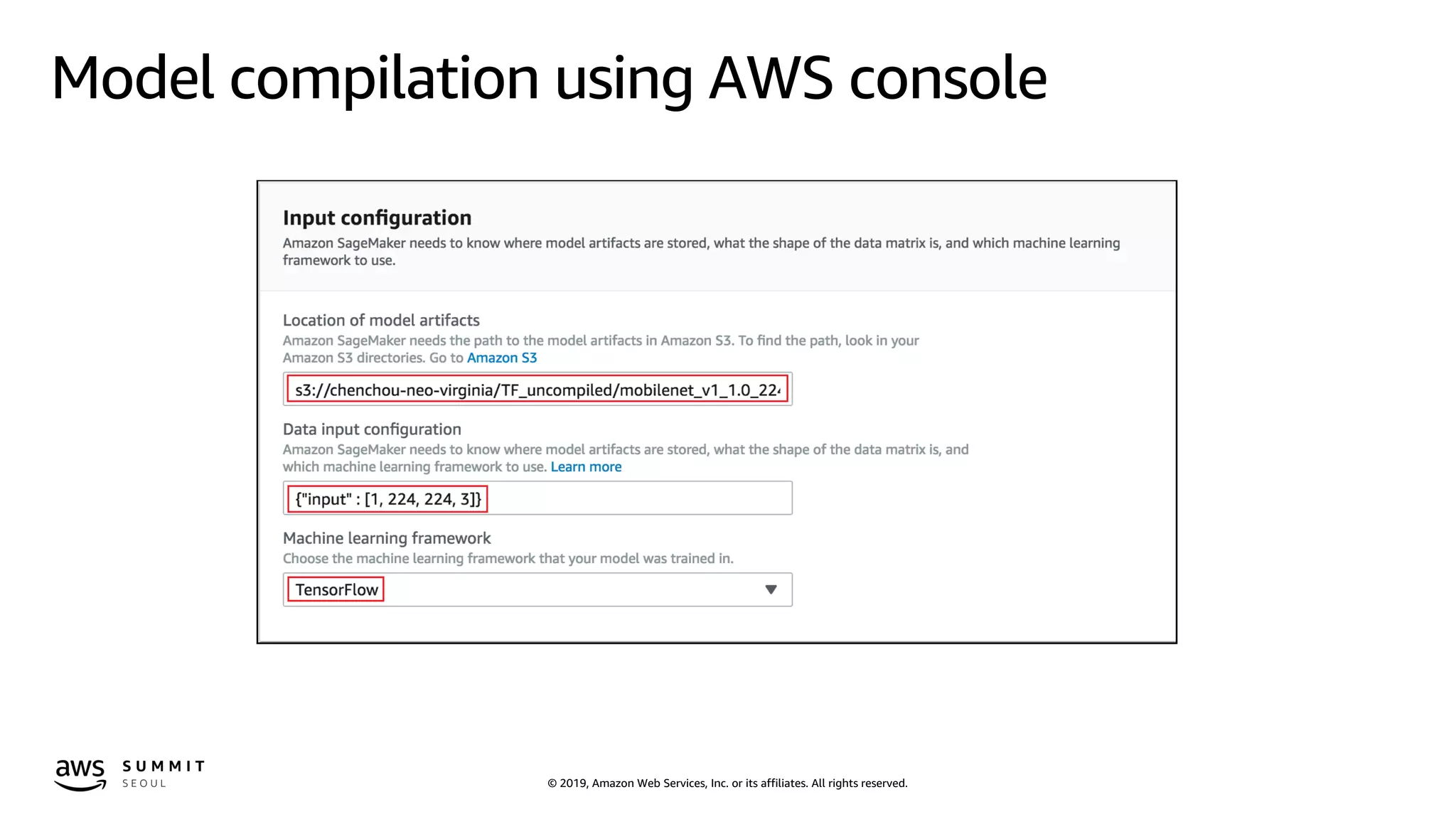
Model compilation using AWS console
© 2019, Amazon Web Services, Inc. or its affiliates. All rights reserved.
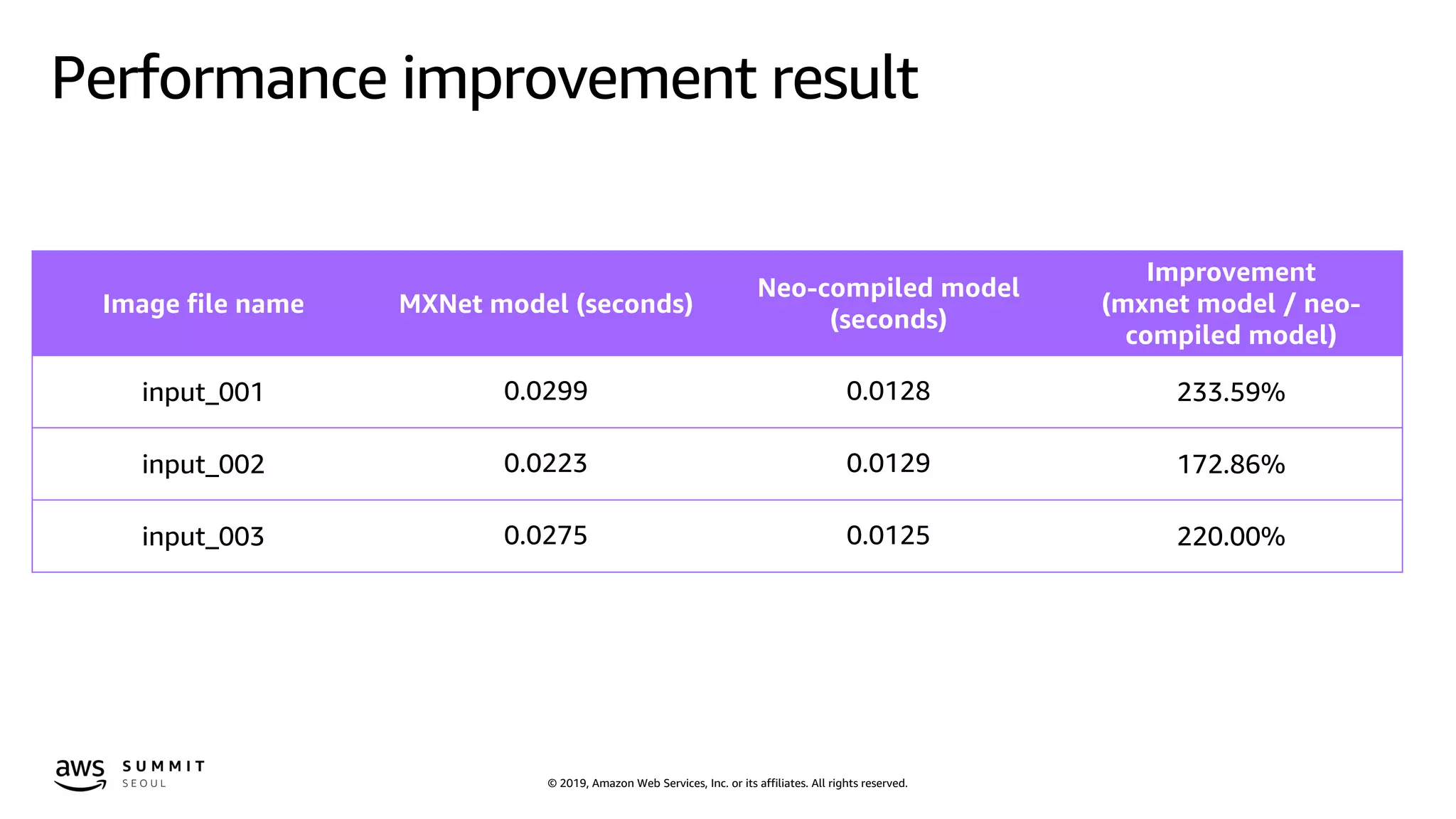
Performance improvement result
Image file name MXNet model (seconds)
Neo-compiled model
(seconds)
Improvement
(mxnet model / neo-
compiled model)
input_001 0.0299 0.0128 233.59%
input_002 0.0223 0.0129 172.86%
input_003 0.0275 0.0125 220.00%
© 2019, Amazon Web Services, Inc. or its affiliates. All rights reserved.
Do I need really
that much complex & deep
neural networks
to meet the required accuracy?
© 2019, Amazon Web Services, Inc. or its affiliates. All rights reserved.
Compressing deep learning models
• Compression is the process of reducing the size of a trained network,
either by removing certain layers or by shrinking layers, while
maintaining accuracy.
• A smaller model will predict faster and require less memory.
• The number of possible combinations makes is difficult to perform this
task manually, or even programmatically.
• Reinforcement learning to the rescue!
© 2019, Amazon Web Services, Inc. or its affiliates. All rights reserved.
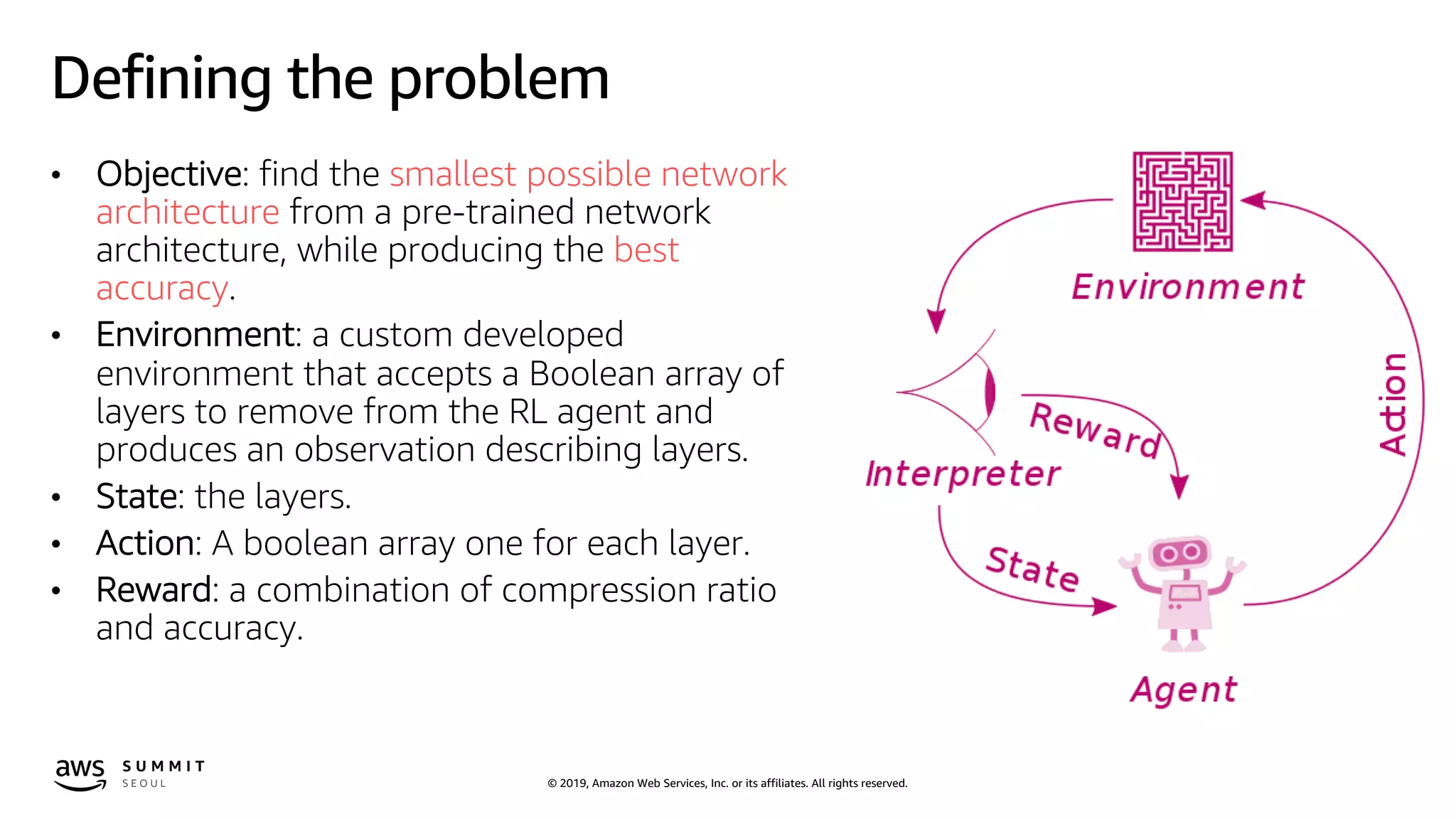
Defining the problem
• Objective: find the smallest possible network
architecture from a pre-trained network
architecture, while producing the best
accuracy.
• Environment: a custom developed
environment that accepts a Boolean array of
layers to remove from the RL agent and
produces an observation describing layers.
• State: the layers.
• Action: A boolean array one for each layer.
• Reward: a combination of compression ratio
and accuracy.
© 2019, Amazon Web Services, Inc. or its affiliates. All rights reserved.
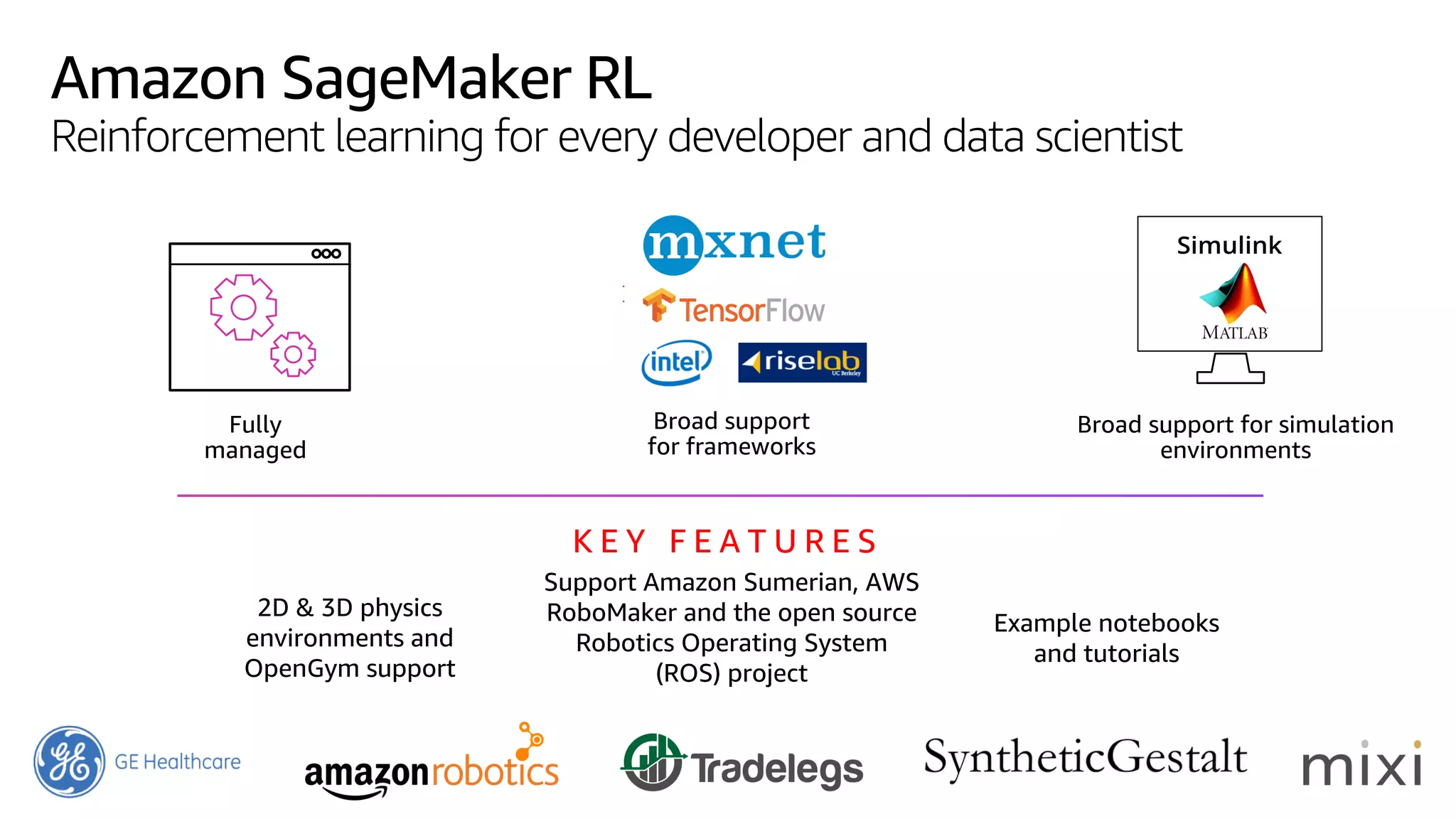
Amazon SageMaker RL
Reinforcement learning for every developer and data scientist
Broad support
for frameworks
Broad support for simulation
environments
2D & 3D physics
environments and
OpenGym support
Support Amazon Sumerian, AWS
RoboMaker and the open source
Robotics Operating System
(ROS) project
Fully
managed
Example notebooks
and tutorials
K E Y F E A T U R E S
© 2019, Amazon Web Services, Inc. or its affiliates. All rights reserved.© 2019, Amazon Web Services, Inc. or its affiliates. All rights reserved.
https://github.com/awslabs/amazon-sagemaker-
examples/tree/master/reinforcement_learning/rl_network_compression_ray_custom
© 2019, Amazon Web Services, Inc. or its affiliates. All rights reserved.
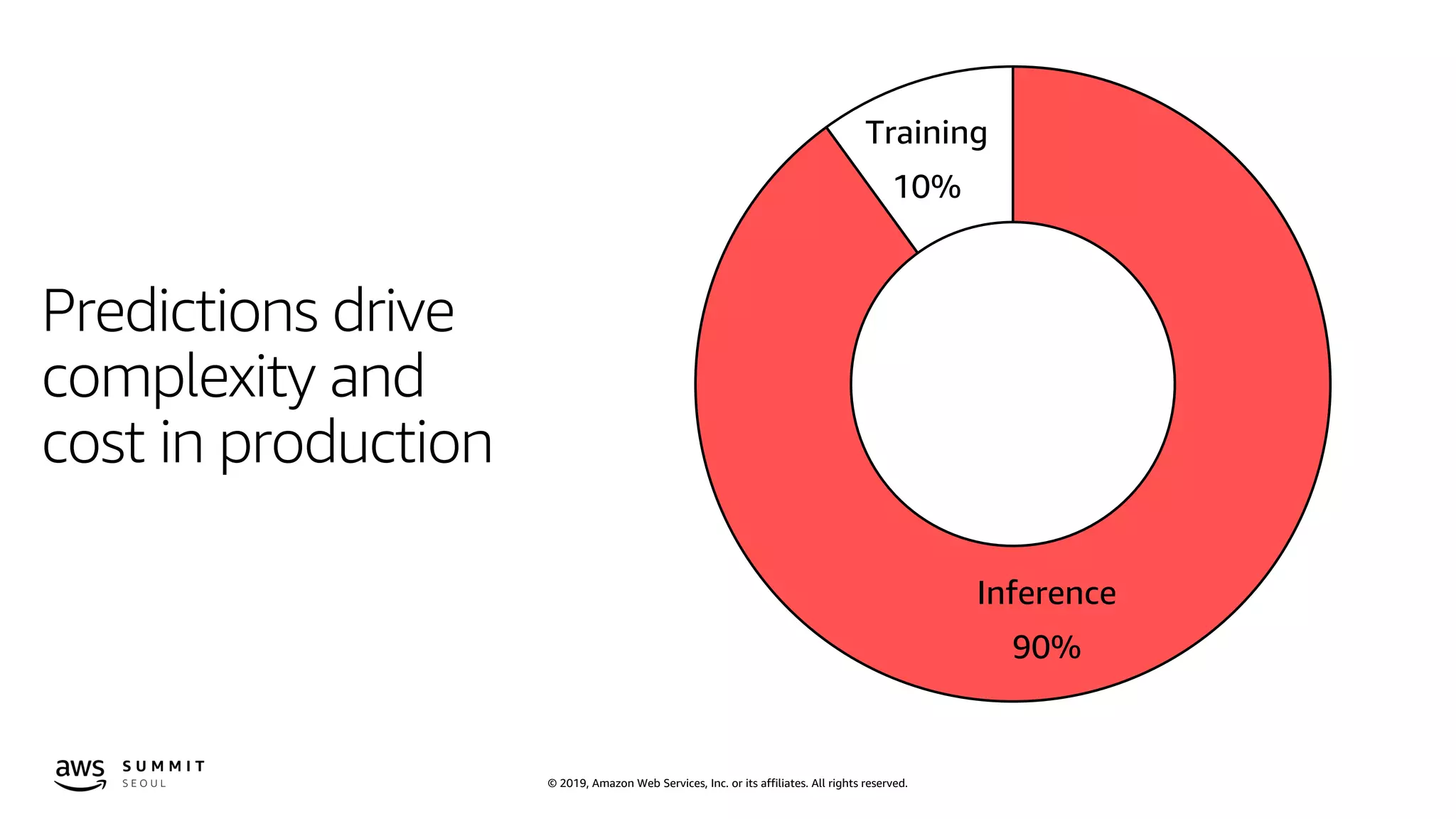
Predictions drive
complexity and
cost in production
Training
10%
Inference
90%
© 2019, Amazon Web Services, Inc. or its affiliates. All rights reserved.
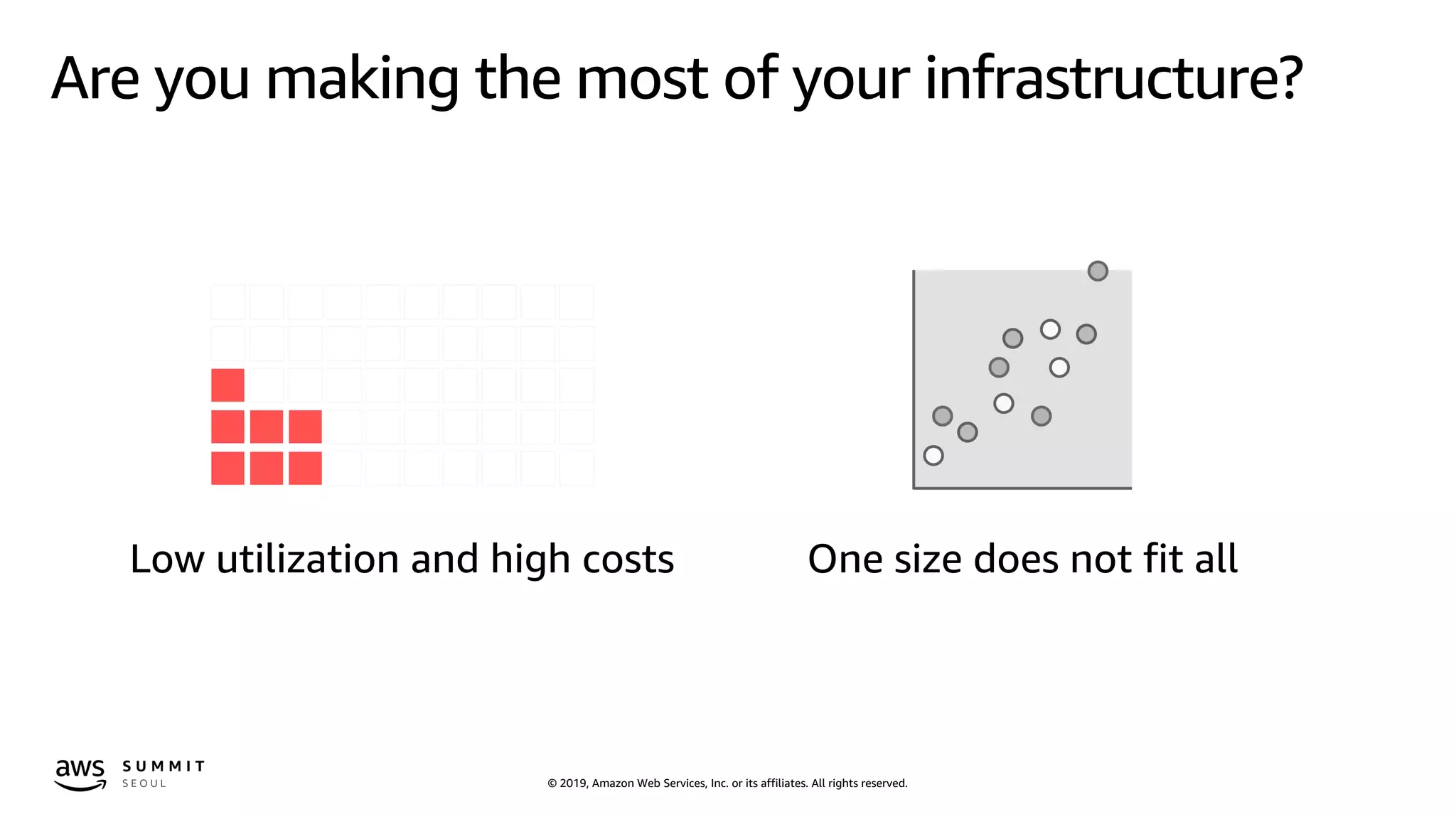
Are you making the most of your infrastructure?
One size does not fit allLow utilization and high costs
© 2019, Amazon Web Services, Inc. or its affiliates. All rights reserved.
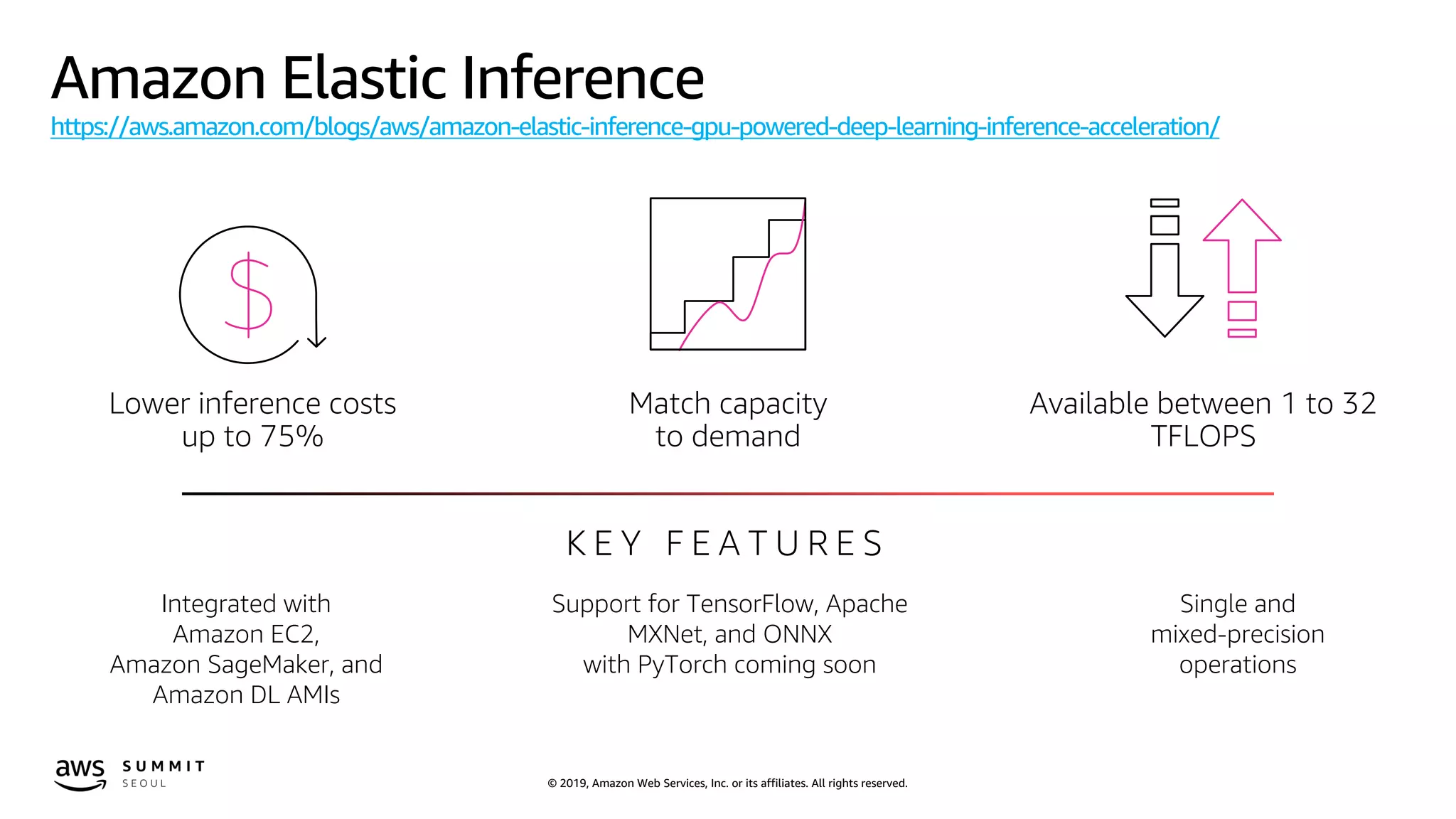
Amazon Elastic Inference
https://aws.amazon.com/blogs/aws/amazon-elastic-inference-gpu-powered-deep-learning-inference-acceleration/
Match capacity
to demand
Available between 1 to 32
TFLOPS
K E Y F E A T U R E S
Integrated with
Amazon EC2,
Amazon SageMaker, and
Amazon DL AMIs
Support for TensorFlow, Apache
MXNet, and ONNX
with PyTorch coming soon
Single and
mixed-precision
operations
Lower inference costs
up to 75%
© 2019, Amazon Web Services, Inc. or its affiliates. All rights reserved.
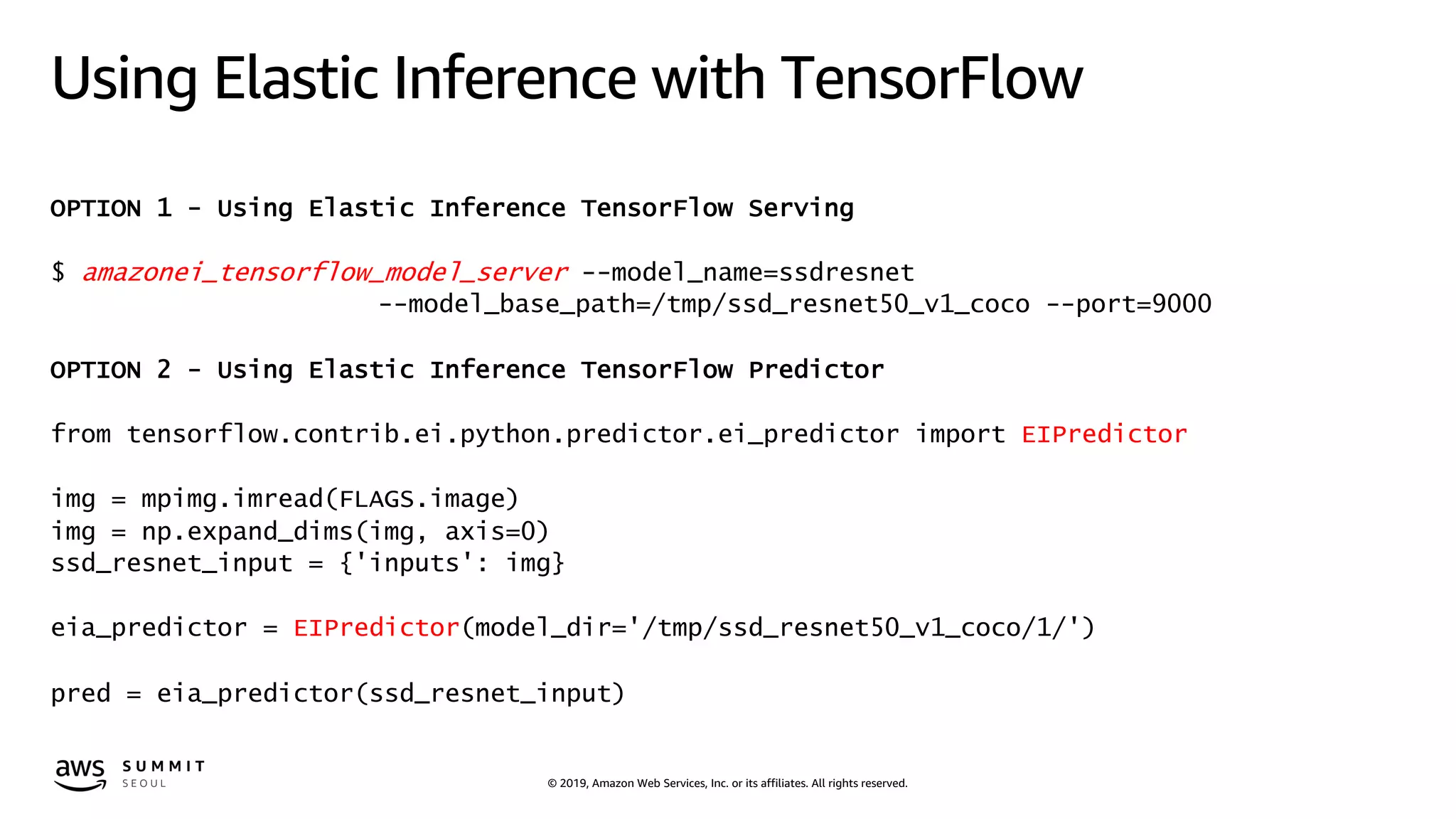
Using Elastic Inference with TensorFlow
OPTION 1 - Using Elastic Inference TensorFlow Serving
$ amazonei_tensorflow_model_server --model_name=ssdresnet
--model_base_path=/tmp/ssd_resnet50_v1_coco --port=9000
OPTION 2 - Using Elastic Inference TensorFlow Predictor
from tensorflow.contrib.ei.python.predictor.ei_predictor import EIPredictor
img = mpimg.imread(FLAGS.image)
img = np.expand_dims(img, axis=0)
ssd_resnet_input = {'inputs': img}
eia_predictor = EIPredictor(model_dir='/tmp/ssd_resnet50_v1_coco/1/')
pred = eia_predictor(ssd_resnet_input)
© 2019, Amazon Web Services, Inc. or its affiliates. All rights reserved.
Using Elastic Inference with Apache MXNet
OPTION 1 - Use EI with the MXNet Symbol API
import mxnet as mx
data = mx.sym.var('data', shape=(1,))
sym = mx.sym.exp(data)
# Pass mx.eia() as context during simple bind operation
executor = sym.simple_bind(ctx=mx.eia(), grad_req='null')
# Forward call is performed on remote accelerator
executor.forward(data=mx.nd.ones((1,)))
print('Inference %d, output = %s' % (i, executor.outputs[0]))
OPTION 2 - Use EI with the Module API
ctx = mx.eia()
sym, arg_params, aux_params = mx.model.load_checkpoint('resnet-152', 0)
mod = mx.mod.Module(symbol=sym, context=ctx, label_names=None)
© 2019, Amazon Web Services, Inc. or its affiliates. All rights reserved.
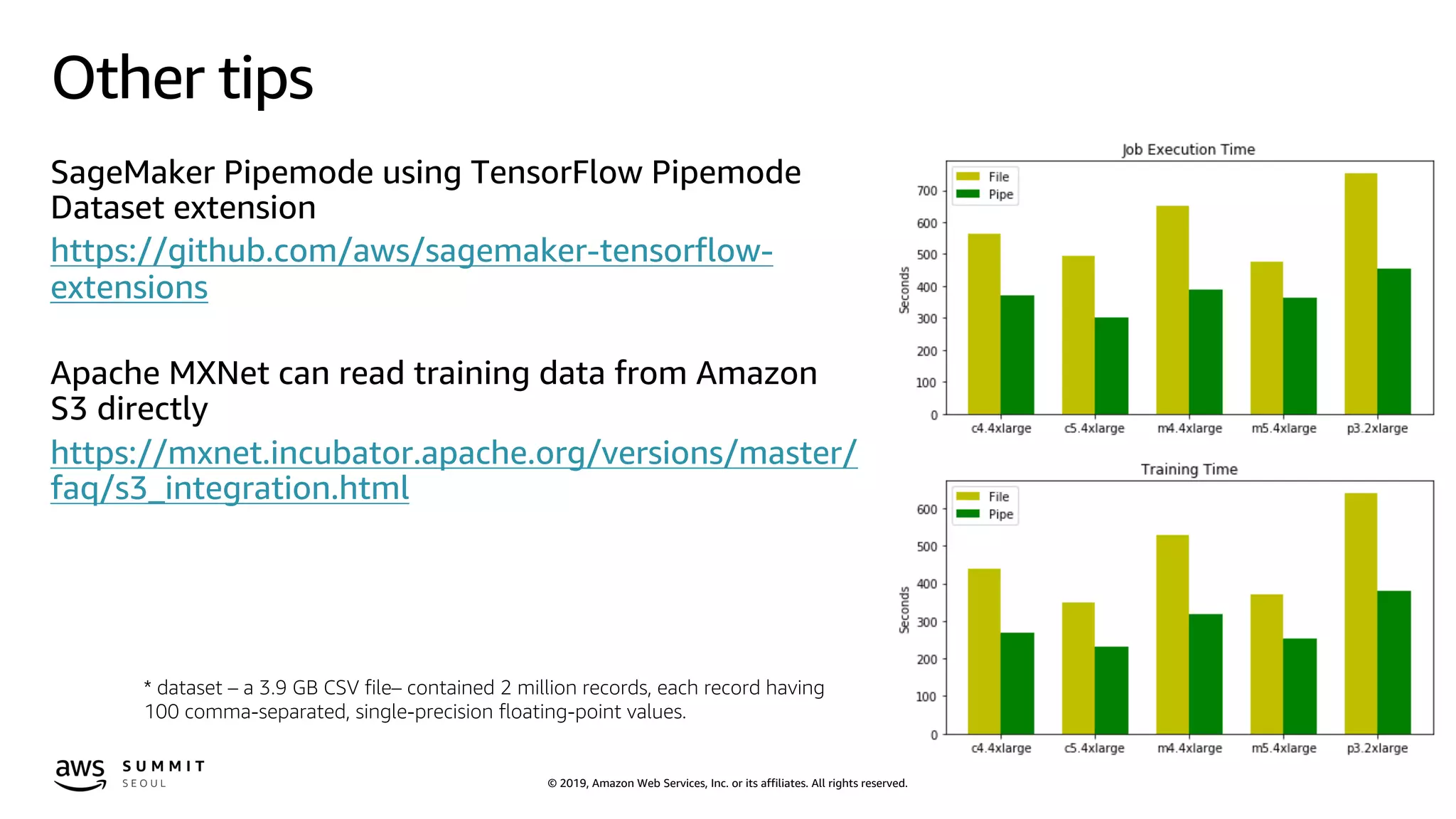
Other tips
SageMaker Pipemode using TensorFlow Pipemode
Dataset extension
https://github.com/aws/sagemaker-tensorflow-
extensions
Apache MXNet can read training data from Amazon
S3 directly
https://mxnet.incubator.apache.org/versions/master/
faq/s3_integration.html
* dataset – a 3.9 GB CSV file– contained 2 million records, each record having
100 comma-separated, single-precision floating-point values.
© 2019, Amazon Web Services, Inc. or its affiliates. All rights reserved.
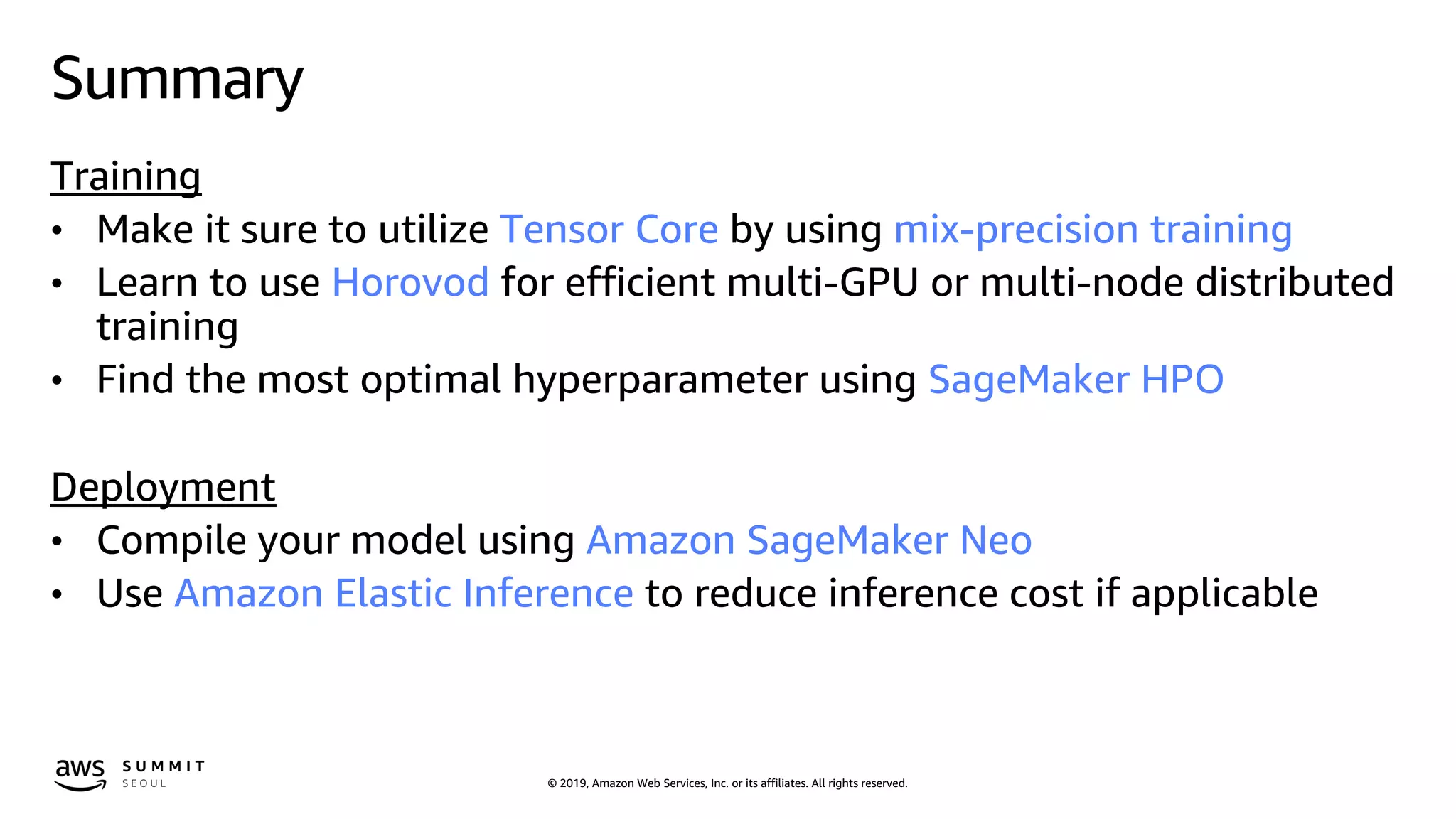
Summary
Training
• Make it sure to utilize Tensor Core by using mix-precision training
• Learn to use Horovod for efficient multi-GPU or multi-node distributed
training
• Find the most optimal hyperparameter using SageMaker HPO
Deployment
• Compile your model using Amazon SageMaker Neo
• Use Amazon Elastic Inference to reduce inference cost if applicable
© 2019, Amazon Web Services, Inc. or its affiliates. All rights reserved.
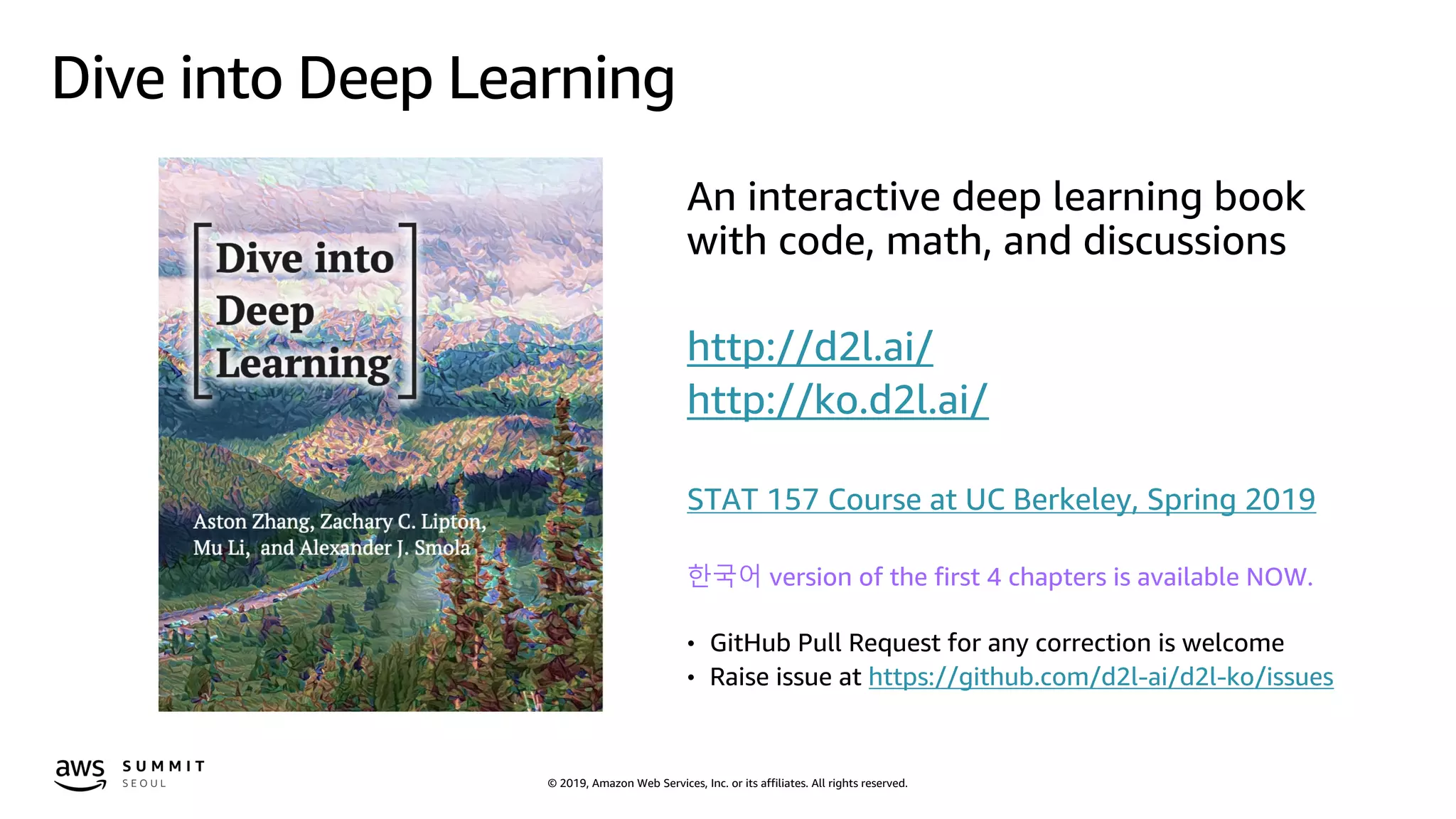
Dive into Deep Learning
An interactive deep learning book
with code, math, and discussions
http://d2l.ai/
http://ko.d2l.ai/
STAT 157 Course at UC Berkeley, Spring 2019
한국어 version of the first 4 chapters is available NOW.
• GitHub Pull Request for any correction is welcome
• Raise issue at https://github.com/d2l-ai/d2l-ko/issues
© 2019, Amazon Web Services, Inc. or its affiliates. All rights reserved.
Getting started
https://ml.aws
https://aws.amazon.com/blogs/machine-learning
https://aws.amazon.com/sagemaker
https://github.com/awslabs/amazon-sagemaker-examples
https://medium.com/@julsimon

Deep Learning 모델의 효과적인 분산 트레이닝과 모델 최적화 방법 - 김무현 데이터 사이언티스트, AWS :: AWS Summit Seoul 2019

  • 1.
    © 2019, AmazonWeb Services, Inc. or its affiliates. All rights reserved. Deep Learning 모델의 효과적인 분산 트레이닝과 모델 최적화 방법 김무현, Data Scientist AWS ML Solutions Lab
  • 2.
    © 2019, AmazonWeb Services, Inc. or its affiliates. All rights reserved. Amazon ML Solutions Lab Brainstorming Modeling Teaching Leverage Amazon experts with decades of ML experience with technologies like Amazon Echo, Amazon Alexa, Prime Air and Amazon Go Amazon ML Solutions Lab provides ML expertise
  • 3.
    © 2019, AmazonWeb Services, Inc. or its affiliates. All rights reserved.© 2019, Amazon Web Services, Inc. or its affiliates. All rights reserved. Now let’s make it as fast, efficient and inexpensive as possible Put machine learning in the hands of every developer
  • 4.
    © 2019, AmazonWeb Services, Inc. or its affiliates. All rights reserved. © 2018, Amazon Web Services, Inc. or its Affiliates. All rights reserved. Amazon Trademark M L F R A M E W O R K S & I N F R A S T R U C T U R E The Amazon ML Stack: Broadest & Deepest Set of Capabilities A I S E R V I C E S R E K O G N I T I O N I M A G E P O L L Y T R A N S C R I B E T R A N S L A T E C O M P R E H E N D C O M P R E H E N D M E D I C A L L E XR E K O G N I T I O N V I D E O Vision Speech Chatbots A M A Z O N S A G E M A K E R B U I L D T R A I N F O R E C A S TT E X T R A C T P E R S O N A L I Z E D E P L O Y Pre-built algorithms & notebooks Data labeling (G R O U N D T R U T H ) One-click model training & tuning Optimization ( N E O ) One-click deployment & hosting M L S E R V I C E S F r a m e w o r k s I n t e r f a c e s I n f r a s t r u c t u r e E C 2 P 3 & P 3 d n E C 2 C 5 F P G A s G R E E N G R A S S E L A S T I C I N F E R E N C E Models without training data (REINFORCEMENT LEARNING) Algorithms & models ( A W S M A R K E T P L A C E ) Language Forecasting Recommendations NEW NEWNEW NEW NEW NEWNEW NEW NEW RL Coach
  • 5.
    © 2019, AmazonWeb Services, Inc. or its affiliates. All rights reserved. Agenda • Optimizing Infrastructure and Frameworks • Distributed training for TensorFlow, MXNet, Keras, PyTorch • Let’s tune models using Amazon SageMaker HPO • Optimizing the trained model for deployment
  • 6.
    © 2019, AmazonWeb Services, Inc. or its affiliates. All rights reserved.
  • 7.
    © 2019, AmazonWeb Services, Inc. or its affiliates. All rights reserved. Where to train and deploy deep learning models Amazon SageMaker Amazon Elastic Container Service for Kubernetes Amazon Elastic Container Service AWS Deep Learning Containers Amazon EC2 AWS Deep Learning AMIs
  • 8.
    © 2019, AmazonWeb Services, Inc. or its affiliates. All rights reserved. Making TensorFlow faster Training a ResNet-50 benchmark with the synthetic ImageNet dataset using our optimized build of TensorFlow 1.11 on a c5.18xlarge instance type is 11x faster than training on the stock binaries. https://aws.amazon.com/about-aws/whats-new/2018/10/chainer4-4_theano_1-0-2_launch_deep_learning_ami/ October 2018 Available with Amazon SageMaker, AWS Deep Learning AMIs, and AWS Deep Learning Containers
  • 9.
    © 2019, AmazonWeb Services, Inc. or its affiliates. All rights reserved. Amazon EC2 P3dn https://aws.amazon.com/blogs/aws/new-ec2-p3dn-gpu-instances-with-100-gbps-networking-local-nvme-storage-for-faster-machine-learning-p3-price-reduction/ Reduce machine learning training time Better GPU utilization Support larger, more complex models K E Y F E A T U R E S 100Gbps of networking bandwidth 8 NVIDIA Tesla V100 GPUs 32GB of memory per GPU (2x more P3) 96 Intel Skylake vCPUs (50% more than P3) with AVX-512
  • 10.
    © 2019, AmazonWeb Services, Inc. or its affiliates. All rights reserved. Amazon EC2 P3 instance type has the most powerful GPU, NVIDIA V100 But Are you fully utilizing GPUs?
  • 11.
    © 2019, AmazonWeb Services, Inc. or its affiliates. All rights reserved. Tensor Core and mixed-precision training https://arxiv.org/abs/1710.03740
  • 12.
    © 2019, AmazonWeb Services, Inc. or its affiliates. All rights reserved. How to port training scripts for mixed precision https://docs.nvidia.com/deeplearning/sdk/mixed-precision-training/index.html Porting the model to use FP16 data type where appropriate. 1. Use float16 data type on models containing convolutions or matrix multiplication 2. Check if trainable variables is float32 before converting to float16 3. Use float32 for softmax calculation Adding loss scaling to preserve small gradient values. 1. Multiply by a scale factor before computing gradient 2. Divide the calculated gradient by the same scale factor
  • 13.
    © 2019, AmazonWeb Services, Inc. or its affiliates. All rights reserved. Code snip for mix-precision training in TensorFlow x = tf.placeholder(tf.float32, [None, 784]) W1 = tf.Variable(tf.truncated_normal([784, FLAGS.num_hunits])) b1 = tf.Variable(tf.zeros([FLAGS.num_hunits])) z = tf.nn.relu(tf.matmul(x, W1) + b1) W2 = tf.Variable(tf.truncated_normal([FLAGS.num_hunits, 10])) b2 = tf.Variable(tf.zeros([10])) y = tf.matmul(z, W2) + b2 y_ = tf.placeholder(tf.int64, [None]) cross_entropy = tf.losses.sparse_softmax_cross_entropy(labels=y_, logits=y) train_step = tf.train.GradientDescentOptimizer(0.5).minimize(cross_entropy) data = tf.placeholder(tf.float16, shape=(None, 784)) W1 = tf.get_variable('w1', (784, FLAGS.num_hunits), tf.float16) b1 = tf.get_variable('b1', (FLAGS.num_hunits), tf.float16, initializer=tf.zeros_initializer()) z = tf.nn.relu(tf.matmul(data, W1) + b1) W2 = tf.get_variable('w2', (FLAGS.num_hunits, 10), tf.float16) b2 = tf.get_variable('b2', (10), tf.float16, initializer=tf.zeros_initializer()) y = tf.matmul(z, W2) + b2 y_ = tf.placeholder(tf.int64, shape=(None)) loss = tf.losses.sparse_softmax_cross_entropy(y_, tf.cast(y, tf.float32)) * Source code from https://github.com/khcs/fp16-demo-tf MLP normal implementation MLP mixed-precision implementation
  • 14.
    © 2019, AmazonWeb Services, Inc. or its affiliates. All rights reserved. Code snip for mix-precision training in TensorFlow sess = tf.InteractiveSession() tf.global_variables_initializer().run() # Train for _ in range(3000): batch_xs, batch_ys = mnist.train.next_batch(100) sess.run(train_step, feed_dict={x: batch_xs, y_: batch_ys}) def gradients_with_loss_scaling(loss, variables, loss_scale): return [grad / loss_scale for grad in tf.gradients(loss * loss_scale, variables)] with tf.device('/gpu:0'), tf.variable_scope( 'fp32_storage', custom_getter=float32_variable_storage_getter): data, target, logits, loss = create_model(nbatch, nin, nout, dtype) variables = tf.get_collection(tf.GraphKeys.TRAINABLE_VARIABLES) grads = gradients_with_loss_scaling(loss, variables, loss_scale) optimizer = tf.train.MomentumOptimizer(learning_rate, momentum) training_step_op = optimizer.apply_gradients(zip(grads, variables)) init_op = tf.global_variables_initializer() sess.run(init_op) for step in range(6000): batch_xs, batch_ys = mnist.train.next_batch(100) np_loss, _ = sess.run([loss, training_step_op], feed_dict={data: batch_xs, target: batch_ys})* Source code from https://github.com/khcs/fp16-demo-tf MLP normal implementation MLP mixed-precision implementation
  • 15.
    © 2019, AmazonWeb Services, Inc. or its affiliates. All rights reserved. For other Deep Learning frameworks such as Apache MXNet, PyTorch, etc please refer to AWS Deep Learning AMI Developer Guide https://docs.aws.amazon.com/dlami/latest/devguide/tutorial-gpu-opt-training.html NVIDIA Deep Learning SDK https://docs.nvidia.com/deeplearning/sdk/mixed-precision-training/index.html
  • 16.
    © 2019, AmazonWeb Services, Inc. or its affiliates. All rights reserved.© 2019, Amazon Web Services, Inc. or its affiliates. All rights reserved.
  • 17.
    © 2019, AmazonWeb Services, Inc. or its affiliates. All rights reserved. Scaling TensorFlow near-linearly 256 GPUs https://aws.amazon.com/about-aws/whats-new/2018/11/tensorflow-scalability-to-256-gpus/ Stock TensorFlow 65% scaling efficiency with 256 GPUs 30m training time AWS-Optimized TensorFlow 90% scaling efficiency with 256 GPUs Available with Amazon SageMaker and the AWS Deep Learning AMIs 14m training time
  • 18.
    © 2019, AmazonWeb Services, Inc. or its affiliates. All rights reserved. I also have huge amount of data or large models for training How to scale deep learning training tasks?
  • 19.
    © 2019, AmazonWeb Services, Inc. or its affiliates. All rights reserved. Infra for distributed training - scale up Amazon Elastic Block Store (EBS) Amazon EC2 GPU GPU GPU GPU GPU GPU GPU GPU
  • 20.
    © 2019, AmazonWeb Services, Inc. or its affiliates. All rights reserved. Infra for distributed training - scale out Amazon Elastic Block Store (EBS) Amazon EC2
  • 21.
    © 2019, AmazonWeb Services, Inc. or its affiliates. All rights reserved. Multi-GPUs and multi-nodes options Using DL framework’s feature • TensorFlow - Multi-powering for multi-GPUs training - Parameter server for multi-node training • Apache MXNet - Multi-GPUs by defining context with list of GPUs - Parameter server for multi-node training Using Horovod • https://eng.uber.com/horovod/ • Open source distributed training framework based on Message Passing Interface (MPI) • Baidu’s draft implementation of the TensorFlow ring-allreduce algorithm • Support famous deep learning frameworks such as TensorFlow, MXNet, Keras, PyTorch Performance scalability using Horovod
  • 22.
    © 2019, AmazonWeb Services, Inc. or its affiliates. All rights reserved. Using Horovod Install Horovod and related packages à AWS Deep Learning AMI and Deep Learning Containers have all already Modify your training code to be trained using Horovod Run multi-GPUs or distributed training using Horovod mpirun command
  • 23.
    © 2019, AmazonWeb Services, Inc. or its affiliates. All rights reserved. Using Horovod with TensorFlow import tensorflow as tf import horovod.tensorflow as hvd # Initialize Horovod hvd.init() # Pin GPU to be used to process local rank (one GPU per process) config = tf.ConfigProto() config.gpu_options.visible_device_list = str(hvd.local_rank()) # Build model... loss = ... opt = tf.train.AdagradOptimizer(0.01 * hvd.size()) # Add Horovod Distributed Optimizer opt = hvd.DistributedOptimizer(opt) # Add hook to broadcast variables from rank 0 to all other processes during # initialization. hooks = [hvd.BroadcastGlobalVariablesHook(0)] # Make training operation train_op = opt.minimize(loss) # Save checkpoints only on worker 0 to prevent other workers from corrupting them. checkpoint_dir = '/tmp/train_logs' if hvd.rank() == 0 else None # The MonitoredTrainingSession takes care of session initialization, # restoring from a checkpoint, saving to a checkpoint, and closing when done # or an error occurs. with tf.train.MonitoredTrainingSession(checkpoint_dir=checkpoint_dir, config=config, hooks=hooks) as mon_sess: while not mon_sess.should_stop(): # Perform synchronous training. mon_sess.run(train_op) ( source code from https://github.com/horovod/horovod )
  • 24.
    © 2019, AmazonWeb Services, Inc. or its affiliates. All rights reserved. Using Horovod with Apache MXNet import mxnet as mx import horovod.mxnet as hvd from mxnet import autograd # Initialize Horovod hvd.init() # Pin GPU to be used to process local rank context = mx.gpu(hvd.local_rank()) num_workers = hvd.size() # Build model model = ... model.hybridize() # Create optimizer optimizer_params = ... opt = mx.optimizer.create('sgd', **optimizer_params) # Initialize parameters model.initialize(initializer, ctx=context) # Fetch and broadcast parameters params = model.collect_params() if params is not None: hvd.broadcast_parameters(params, root_rank=0) # Create DistributedTrainer, a subclass of gluon.Trainer trainer = hvd.DistributedTrainer(params, opt) # Create loss function loss_fn = ... # Train model for epoch in range(num_epoch): train_data.reset() for nbatch, batch in enumerate(train_data, start=1): data = batch.data[0].as_in_context(context) label = batch.label[0].as_in_context(context) with autograd.record(): output = model(data.astype(dtype, copy=False)) loss = loss_fn(output, label) loss.backward() trainer.step(batch_size) ( source code from https://github.com/horovod/horovod )
  • 25.
    © 2019, AmazonWeb Services, Inc. or its affiliates. All rights reserved. Using Horovod with Keras import keras import horovod.keras as hvd # Horovod: initialize Horovod. hvd.init() # Horovod: pin GPU to be used to process local rank (one GPU per process) config = tf.ConfigProto() config.gpu_options.allow_growth = True config.gpu_options.visible_device_list = str(hvd.local_rank()) # Horovod: adjust number of epochs based on number of GPUs. epochs = int(math.ceil(12.0 / hvd.size())) model = ... # Horovod: adjust learning rate based on number of GPUs. opt = keras.optimizers.Adadelta(1.0 * hvd.size()) # Horovod: add Horovod Distributed Optimizer. opt = hvd.DistributedOptimizer(opt) model.compile(loss=keras.losses.categorical_crossentropy, optimizer=opt, metrics=['accuracy']))) callbacks = [ # Horovod: broadcast initial variable states from rank 0 to all other processes. # This is necessary to ensure consistent initialization of all workers when # training is started with random weights or restored from a checkpoint. hvd.callbacks.BroadcastGlobalVariablesCallback(0), ] # Horovod: save checkpoints only on worker 0 to prevent other workers from corrupting them. if hvd.rank() == 0: callbacks.append(keras.callbacks.ModelCheckpoint( './checkpoint-{epoch}.h5')) model.fit(x_train, y_train, batch_size=batch_size, callbacks=callbacks, epochs=epochs, verbose=1, validation_data=(x_test, y_test)) ( source code from https://github.com/horovod/horovod )
  • 26.
    © 2019, AmazonWeb Services, Inc. or its affiliates. All rights reserved. Using Horovod in Amazon EC2 https://docs.aws.amazon.com/dlami/latest/devguide/tutorial-horovod-tensorflow.html STEP 1. Configure Horovod Hosts file 172.100.1.200 slots=8 172.200.8.99 slots=8 172.48.3.124 slots=8 localhost slots=8 STEP 2. Configure nodes to not do “StrickHostKeyChecking” STEP 3. Execute training script using mpirun command ~/anaconda3/envs/tensorflow_p36/bin/mpirun -np $gpus -hostfile ~/hosts -mca plm_rsh_no_tree_spawn 1 -bind-to socket -map-by slot -x HOROVOD_HIERARCHICAL_ALLREDUCE=1 -x HOROVOD_FUSION_THRESHOLD=16777216 -x NCCL_MIN_NRINGS=4 -x LD_LIBRARY_PATH -x PATH -mca pml ob1 -mca btl ^openib -x NCCL_SOCKET_IFNAME=$INTERFACE -mca btl_tcp_if_exclude lo,docker0 -x TF_CPP_MIN_LOG_LEVEL=0 python -W ignore ~/examples/horovod/tensorflow/train_imagenet_resnet_hvd.py --data_dir ~/data/tf-imagenet/ --num_epochs 90 --increased_aug -b $BATCH_SIZE --mom 0.977 --wdecay 0.0005 --loss_scale 256. --use_larc --lr_decay_mode linear_cosine --warmup_epochs 5 --clear_log
  • 27.
    © 2019, AmazonWeb Services, Inc. or its affiliates. All rights reserved. Using Horovod in Amazon EKS https://docs.aws.amazon.com/dlami/latest/devguide/deep-learning-containers-eks-tutorials-distributed-gpu-training.html STEP 1. Install Kubeflow to setup a cluster for distributed training STEP 2. Set the app name and initialize it. STEP 3. Install mpi-operator from kubeflow STEP 4. Create a MPI Job template, define the number of nodes (replicas), number of GPUs each node has (gpusPerReplica) STEP 5. Apply the manifest to the default environment. The MPI Job will create a launch pod
  • 28.
    © 2019, AmazonWeb Services, Inc. or its affiliates. All rights reserved. Using Horovod in Amazon SageMaker from sagemaker.tensorflow import TensorFlow distributions = {'mpi': {'enabled': True, "processes_per_host": 2}} # METHOD 1 - Using Amazon SageMaker provided VPC estimator = TensorFlow(entry_point=train_script, role=sagemaker_iam_role, train_instance_count=2, train_instance_type='ml.p3.8xlarge', script_mode=True, framework_version='1.12', distributions=distributions) # METHOD 2 - Using your own VPC for training performance improvement estimator = TensorFlow(entry_point=train_script, role=sagemaker_iam_role, train_instance_count=2, train_instance_type='ml.p3.8xlarge', script_mode=True, framework_version='1.12', distributions=distributions, security_group_ids=['sg-0919a36a89a15222f'], subnets=['subnet-0c07198f3eb022ede', 'subnet-055b2819caae2fd1f’]) estimator.fit({"train":s3_train_path, "test":s3_test_path})
  • 29.
    © 2019, AmazonWeb Services, Inc. or its affiliates. All rights reserved.© 2019, Amazon Web Services, Inc. or its affiliates. All rights reserved.
  • 30.
    © 2019, AmazonWeb Services, Inc. or its affiliates. All rights reserved.© 2019, Amazon Web Services, Inc. or its affiliates. All rights reserved.
  • 31.
    © 2019, AmazonWeb Services, Inc. or its affiliates. All rights reserved. Examples of hyperparameters Neural Networks Number of layers Hidden layer width Learning rate Embedding dimensions Dropout … Decision Trees Tree depth Max leaf nodes Gamma Eta Lambda Alpha …
  • 32.
    © 2019, AmazonWeb Services, Inc. or its affiliates. All rights reserved. Automatic Model Tuning Finding the optimal set of hyperparameters 1. Manual Search (”I know what I’m doing”) 2. Grid Search (“X marks the spot”) • Typically training hundreds of models • Slow and expensive 3. Random Search (“Spray and pray”) • Works better and faster than Grid Search • But… but… but… it’s random! 4. HPO: use Machine Learning • Training fewer models • Gaussian Process Regression and Bayesian Optimization • You can now resume from a previous tuning job
  • 33.
    © 2019, AmazonWeb Services, Inc. or its affiliates. All rights reserved. How to use Amazon SageMaker HPO Configuration Training Jobs Resulting Models Estimator
  • 34.
    © 2019, AmazonWeb Services, Inc. or its affiliates. All rights reserved.© 2019, Amazon Web Services, Inc. or its affiliates. All rights reserved.
  • 35.
    © 2019, AmazonWeb Services, Inc. or its affiliates. All rights reserved.© 2019, Amazon Web Services, Inc. or its affiliates. All rights reserved.
  • 36.
    © 2019, AmazonWeb Services, Inc. or its affiliates. All rights reserved. Hardware optimization is extremely complex
  • 37.
    © 2019, AmazonWeb Services, Inc. or its affiliates. All rights reserved. Neo is a compiler and runtime for machine learning Compiler Runtime Processor vendors can integrate hardware-specific optimizations Device makers can embed runtime into edge devices and IoT github.com/neo-ai Apache Software License Neo
  • 38.
    © 2019, AmazonWeb Services, Inc. or its affiliates. All rights reserved. How to compile a model https://docs.aws.amazon.com/sagemaker/latest/dg/neo-job-compilation-cli.html Configure the compilation job { "RoleArn":$ROLE_ARN, "InputConfig": { "S3Uri":"s3://jsimon-neo/model.tar.gz", "DataInputConfig": "{"data": [1, 3, 224, 224]}", "Framework": "MXNET" }, "OutputConfig": { "S3OutputLocation": "s3://jsimon-neo/", "TargetDevice": "rasp3b" }, "StoppingCondition": { "MaxRuntimeInSeconds": 300 } } Compile the model $ aws sagemaker create-compilation-job --cli-input-json file://config.json --compilation-job-name resnet50-mxnet-pi $ aws s3 cp s3://jsimon-neo/model- rasp3b.tar.gz . $ gtar tfz model-rasp3b.tar.gz compiled.params compiled_model.json compiled.so Predict with the compiled model from dlr import DLRModel model = DLRModel('resnet50', input_shape, output_shape, device) out = model.run(input_data)
  • 39.
    © 2019, AmazonWeb Services, Inc. or its affiliates. All rights reserved. Model compilation using AWS console
  • 40.
    © 2019, AmazonWeb Services, Inc. or its affiliates. All rights reserved. Performance improvement result Image file name MXNet model (seconds) Neo-compiled model (seconds) Improvement (mxnet model / neo- compiled model) input_001 0.0299 0.0128 233.59% input_002 0.0223 0.0129 172.86% input_003 0.0275 0.0125 220.00%
  • 41.
    © 2019, AmazonWeb Services, Inc. or its affiliates. All rights reserved. Do I need really that much complex & deep neural networks to meet the required accuracy?
  • 42.
    © 2019, AmazonWeb Services, Inc. or its affiliates. All rights reserved. Compressing deep learning models • Compression is the process of reducing the size of a trained network, either by removing certain layers or by shrinking layers, while maintaining accuracy. • A smaller model will predict faster and require less memory. • The number of possible combinations makes is difficult to perform this task manually, or even programmatically. • Reinforcement learning to the rescue!
  • 43.
    © 2019, AmazonWeb Services, Inc. or its affiliates. All rights reserved. Defining the problem • Objective: find the smallest possible network architecture from a pre-trained network architecture, while producing the best accuracy. • Environment: a custom developed environment that accepts a Boolean array of layers to remove from the RL agent and produces an observation describing layers. • State: the layers. • Action: A boolean array one for each layer. • Reward: a combination of compression ratio and accuracy.
  • 44.
    © 2019, AmazonWeb Services, Inc. or its affiliates. All rights reserved. Amazon SageMaker RL Reinforcement learning for every developer and data scientist Broad support for frameworks Broad support for simulation environments 2D & 3D physics environments and OpenGym support Support Amazon Sumerian, AWS RoboMaker and the open source Robotics Operating System (ROS) project Fully managed Example notebooks and tutorials K E Y F E A T U R E S
  • 45.
    © 2019, AmazonWeb Services, Inc. or its affiliates. All rights reserved.© 2019, Amazon Web Services, Inc. or its affiliates. All rights reserved. https://github.com/awslabs/amazon-sagemaker- examples/tree/master/reinforcement_learning/rl_network_compression_ray_custom
  • 46.
    © 2019, AmazonWeb Services, Inc. or its affiliates. All rights reserved. Predictions drive complexity and cost in production Training 10% Inference 90%
  • 47.
    © 2019, AmazonWeb Services, Inc. or its affiliates. All rights reserved. Are you making the most of your infrastructure? One size does not fit allLow utilization and high costs
  • 48.
    © 2019, AmazonWeb Services, Inc. or its affiliates. All rights reserved. Amazon Elastic Inference https://aws.amazon.com/blogs/aws/amazon-elastic-inference-gpu-powered-deep-learning-inference-acceleration/ Match capacity to demand Available between 1 to 32 TFLOPS K E Y F E A T U R E S Integrated with Amazon EC2, Amazon SageMaker, and Amazon DL AMIs Support for TensorFlow, Apache MXNet, and ONNX with PyTorch coming soon Single and mixed-precision operations Lower inference costs up to 75%
  • 49.
    © 2019, AmazonWeb Services, Inc. or its affiliates. All rights reserved. Using Elastic Inference with TensorFlow OPTION 1 - Using Elastic Inference TensorFlow Serving $ amazonei_tensorflow_model_server --model_name=ssdresnet --model_base_path=/tmp/ssd_resnet50_v1_coco --port=9000 OPTION 2 - Using Elastic Inference TensorFlow Predictor from tensorflow.contrib.ei.python.predictor.ei_predictor import EIPredictor img = mpimg.imread(FLAGS.image) img = np.expand_dims(img, axis=0) ssd_resnet_input = {'inputs': img} eia_predictor = EIPredictor(model_dir='/tmp/ssd_resnet50_v1_coco/1/') pred = eia_predictor(ssd_resnet_input)
  • 50.
    © 2019, AmazonWeb Services, Inc. or its affiliates. All rights reserved. Using Elastic Inference with Apache MXNet OPTION 1 - Use EI with the MXNet Symbol API import mxnet as mx data = mx.sym.var('data', shape=(1,)) sym = mx.sym.exp(data) # Pass mx.eia() as context during simple bind operation executor = sym.simple_bind(ctx=mx.eia(), grad_req='null') # Forward call is performed on remote accelerator executor.forward(data=mx.nd.ones((1,))) print('Inference %d, output = %s' % (i, executor.outputs[0])) OPTION 2 - Use EI with the Module API ctx = mx.eia() sym, arg_params, aux_params = mx.model.load_checkpoint('resnet-152', 0) mod = mx.mod.Module(symbol=sym, context=ctx, label_names=None)
  • 51.
    © 2019, AmazonWeb Services, Inc. or its affiliates. All rights reserved. Other tips SageMaker Pipemode using TensorFlow Pipemode Dataset extension https://github.com/aws/sagemaker-tensorflow- extensions Apache MXNet can read training data from Amazon S3 directly https://mxnet.incubator.apache.org/versions/master/ faq/s3_integration.html * dataset – a 3.9 GB CSV file– contained 2 million records, each record having 100 comma-separated, single-precision floating-point values.
  • 52.
    © 2019, AmazonWeb Services, Inc. or its affiliates. All rights reserved. Summary Training • Make it sure to utilize Tensor Core by using mix-precision training • Learn to use Horovod for efficient multi-GPU or multi-node distributed training • Find the most optimal hyperparameter using SageMaker HPO Deployment • Compile your model using Amazon SageMaker Neo • Use Amazon Elastic Inference to reduce inference cost if applicable
  • 53.
    © 2019, AmazonWeb Services, Inc. or its affiliates. All rights reserved. Dive into Deep Learning An interactive deep learning book with code, math, and discussions http://d2l.ai/ http://ko.d2l.ai/ STAT 157 Course at UC Berkeley, Spring 2019 한국어 version of the first 4 chapters is available NOW. • GitHub Pull Request for any correction is welcome • Raise issue at https://github.com/d2l-ai/d2l-ko/issues
  • 54.
    © 2019, AmazonWeb Services, Inc. or its affiliates. All rights reserved. Getting started https://ml.aws https://aws.amazon.com/blogs/machine-learning https://aws.amazon.com/sagemaker https://github.com/awslabs/amazon-sagemaker-examples https://medium.com/@julsimon