Deep Dive:
Security Trimming in Fusion
Vrinda Davda
Senior Engineer
Nicholas Dipiazza
Sr Software Engineer
Connectors team
Rakesh Maski
Senior Engineer
SPEAKERS
1.What is security trimming?
2.How does the old security filtering approach work?
o Index Time
o Query Time
3.Problems with old approach
4.New security filtering approach
o Index time
o Query time
5.Supported operations - add/update/delete ACLs
6.Use cases and Demo
A G E N D A
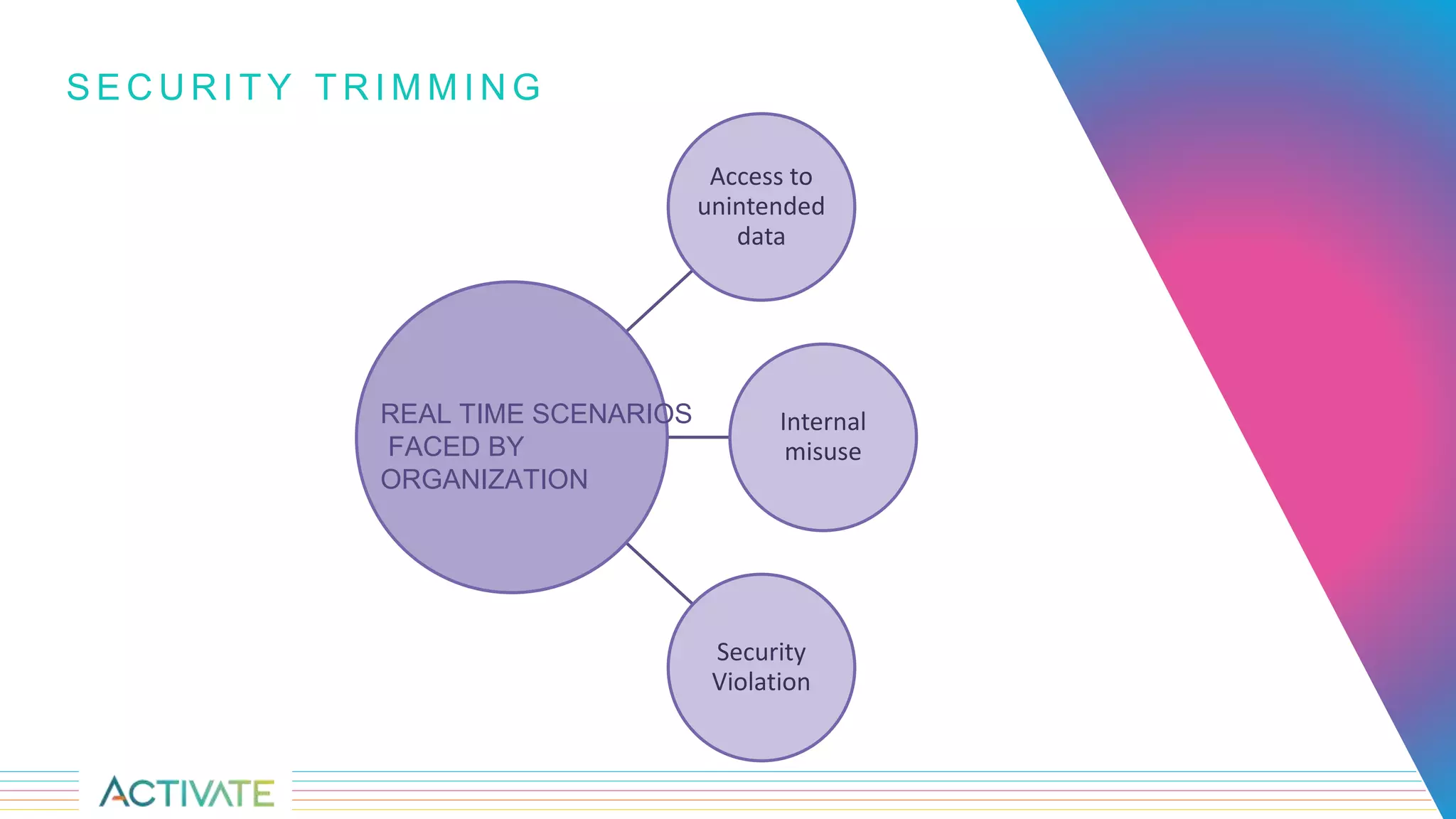
Access to
unintended
data
Internal
misuse
Security
Violation
S E C U R I T Y T R I M M I N G
REAL TIME SCENARIOS
FACED BY
ORGANIZATION
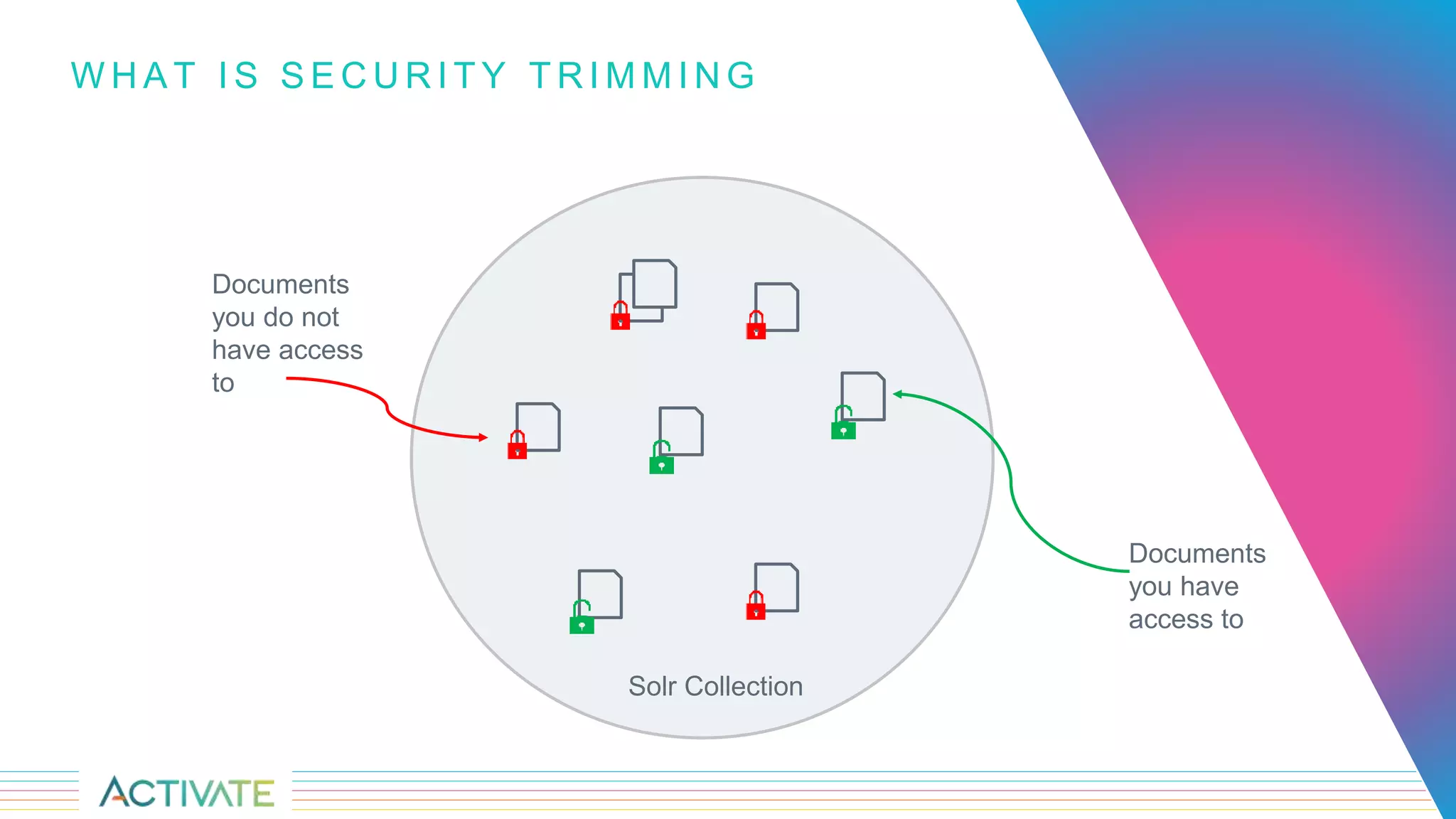
W H A T I S S E C U R I T Y T R I M M I N G
Documents
you have
access to
Documents
you do not
have access
to
Solr Collection
Old Approach
• While crawling documents
through a data source,
Fusion stores Access
Control List(ACL) metadata
as SOLR fields in the
content document.
• The Security Trimming
query stage matches this
information against the ID of
the user running the search
query.
S E C U R I T Y T R I M M I N G I N F U S I O N – O L D A P P R O A C H
"acls_ss":["SP_ALLOW_GROUP_ADFSCOMMUNICATION SITE MEMBERS",
"SP_ALLOW_GROUP_ADFSCOMMUNICATION SITE OWNERS",
"SP_ALLOW_GROUP_ADFSCOMMUNICATION SITE VISITORS",
"SP_ALLOW_GROUP_ADFSEVERYONE EXCEPT EXTERNAL USERS",
"SP_ALLOW_GROUP_ADFSSHAREPOINT SERVICE ADMINISTRATOR",
"SP_ALLOW_USER_ADMIN2@ADFS.LAB.LUCIDWORKS.COM",
"SP_ALLOW_USER_DBENSON@AZURE.LAB.LUCIDWORKS.COM"]
I N D E X T I M E – O L D A P P R O A C H
• ACLs are retrieved for each document, and an
additional trip is made to get nested group
relationships (for example, LDAP groups).
• Permissions are flattened (Denormalized) and set
into the field “acl_ss”
V 1 C O N N E C T O R I N D E X W O R K F L O W – O L D A P P R O A C H
LDAP
Data
Source
Parser
Index
Pipeline
"id":"https://lucidworksfusiondev.sharepoint.com/LoadTest
"acls_ss":["SP_ALLOW_GROUP_ADFSCOMMUNICATION SITE MEMBERS",
"SP_ALLOW_GROUP_ADFSCOMMUNICATION SITE OWNERS",
"SP_ALLOW_GROUP_ADFSCOMMUNICATION SITE VISITORS",
"SP_ALLOW_GROUP_ADFSCOMPANY ADMINISTRATOR",
"SP_ALLOW_GROUP_ADFSEVERYONE EXCEPT EXTERNAL USERS",
"SP_ALLOW_GROUP_ADFSSHAREPOINT SERVICE
ADMINISTRATOR",
"SP_ALLOW_USER_ADMIN2@ADFS.LAB.LUCIDWORKS.COM",
"SP_ALLOW_USER_DBENSON@AZURE.LAB.LUCIDWORKS.COM"],
"_lw_data_source_s":"SpDefault",
"body_t":"# ESP Forecast Informationn#n# …
Q U E R Y T I M E – O L D A P P R O A C H
• The purpose of the security trimming stage is to add fq's to
remove content that a user should NOT see.
• User principal is passed as query parameter, query stage
makes an internal connection to 3rd party system (such as
LDAP, SharePoint) to resolve group memberships.
• This is an internal connection to the Connectors service
cluster and lists all datasources in the current collection, builds
an fq based on each datasource it finds.
• If the datasource had security trimming enabled, the fq will be
built and will be trimmed. Otherwise, there will be no filtering
imposed on the datasource.
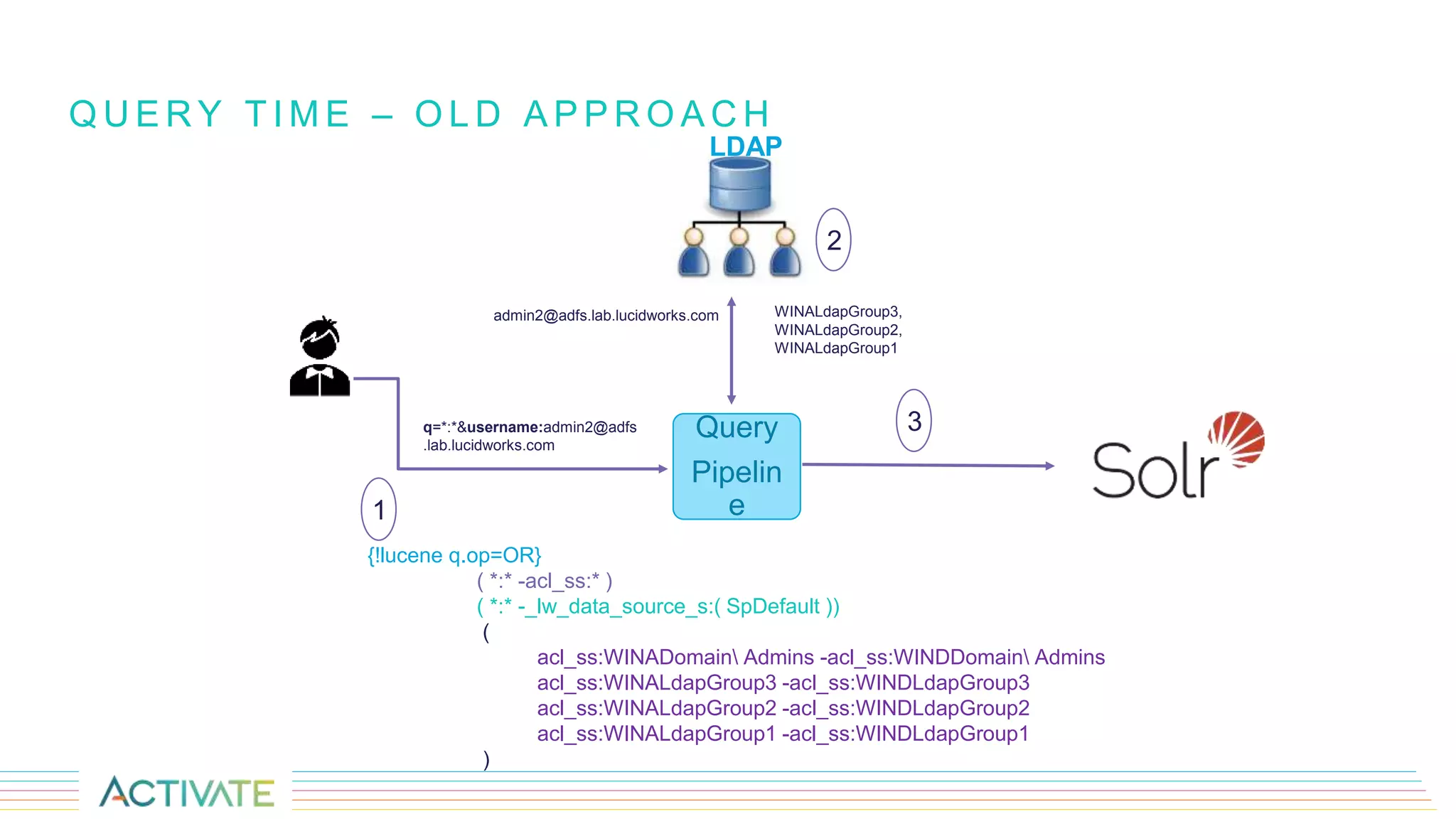
Q U E R Y T I M E – O L D A P P R O A C H
{!lucene q.op=OR}
( *:* -acl_ss:* )
( *:* -_lw_data_source_s:( SpDefault ))
(
acl_ss:WINADomain Admins -acl_ss:WINDDomain Admins
acl_ss:WINALdapGroup3 -acl_ss:WINDLdapGroup3
acl_ss:WINALdapGroup2 -acl_ss:WINDLdapGroup2
acl_ss:WINALdapGroup1 -acl_ss:WINDLdapGroup1
)
Query
Pipelin
e
q=*:*&username:admin2@adfs
.lab.lucidworks.com
admin2@adfs.lab.lucidworks.com WINALdapGroup3,
WINALdapGroup2,
WINALdapGroup1
LDAP
1
2
3
PROBLEMS WITH OLD SECURITY FILTERING APPROACH
• Every single datasource would have to have its own fq.
• Security trimming performance will degrade with the
increase in number of datasources.
• Permissions duplication - Denormalized/Flattened
permissions.
• Permissions(ACLs) not updated on incremental
crawling.
• QTime might vary depending the on the group
hierarchy size.
• Relies on 3rd party servers (example: LDAP) and if they
are down, security filtering will not work as it wont be
able to resolve permissions.
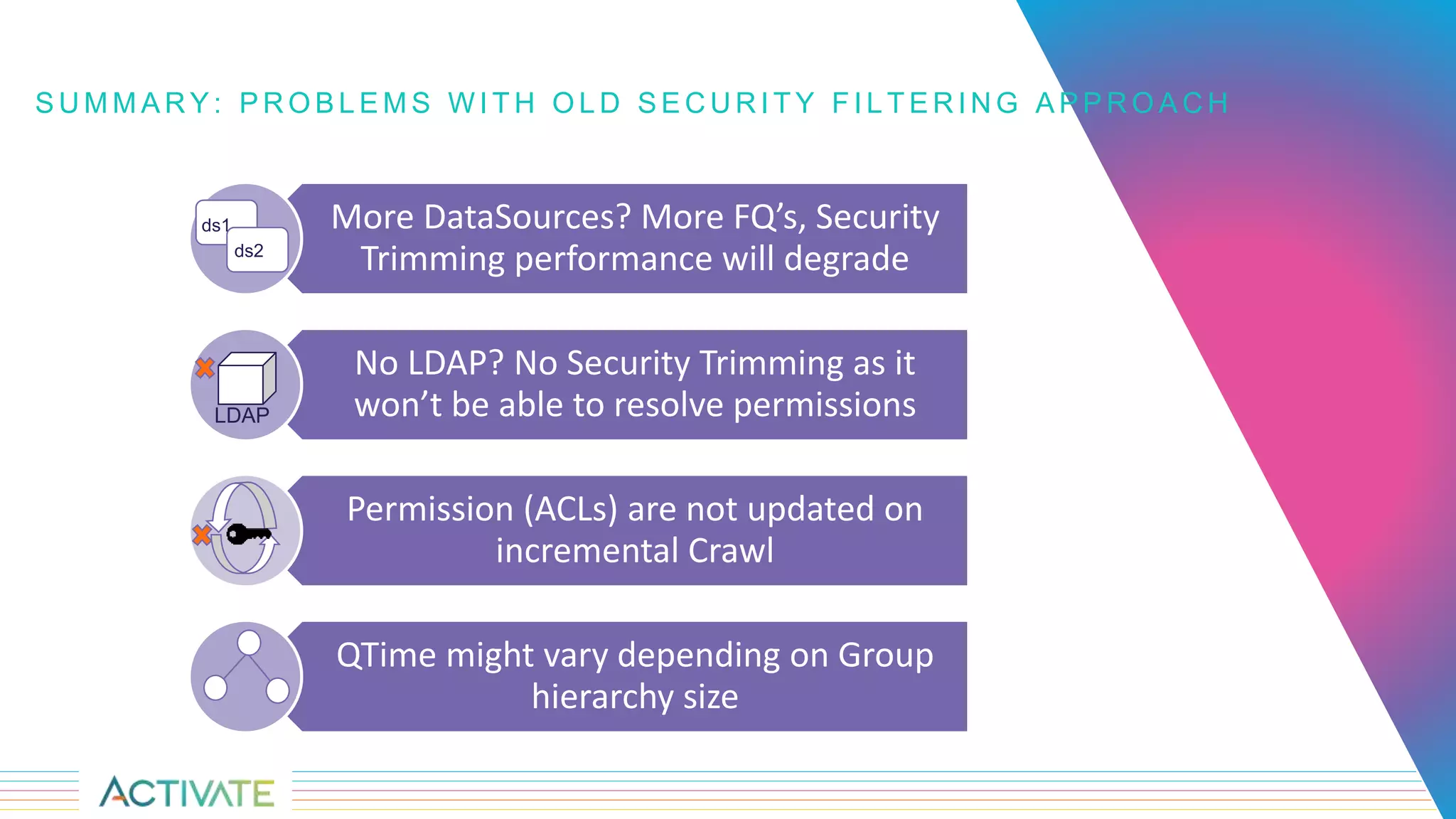
S U M M A R Y : P R O B L E M S W I T H O L D S E C U R I T Y F I L T E R I N G A P P R O A C H
More DataSources? More FQ’s, Security
Trimming performance will degrade
No LDAP? No Security Trimming as it
won’t be able to resolve permissions
Permission (ACLs) are not updated on
incremental Crawl
QTime might vary depending on Group
hierarchy size
LDAP
ds1
ds2
New Approach
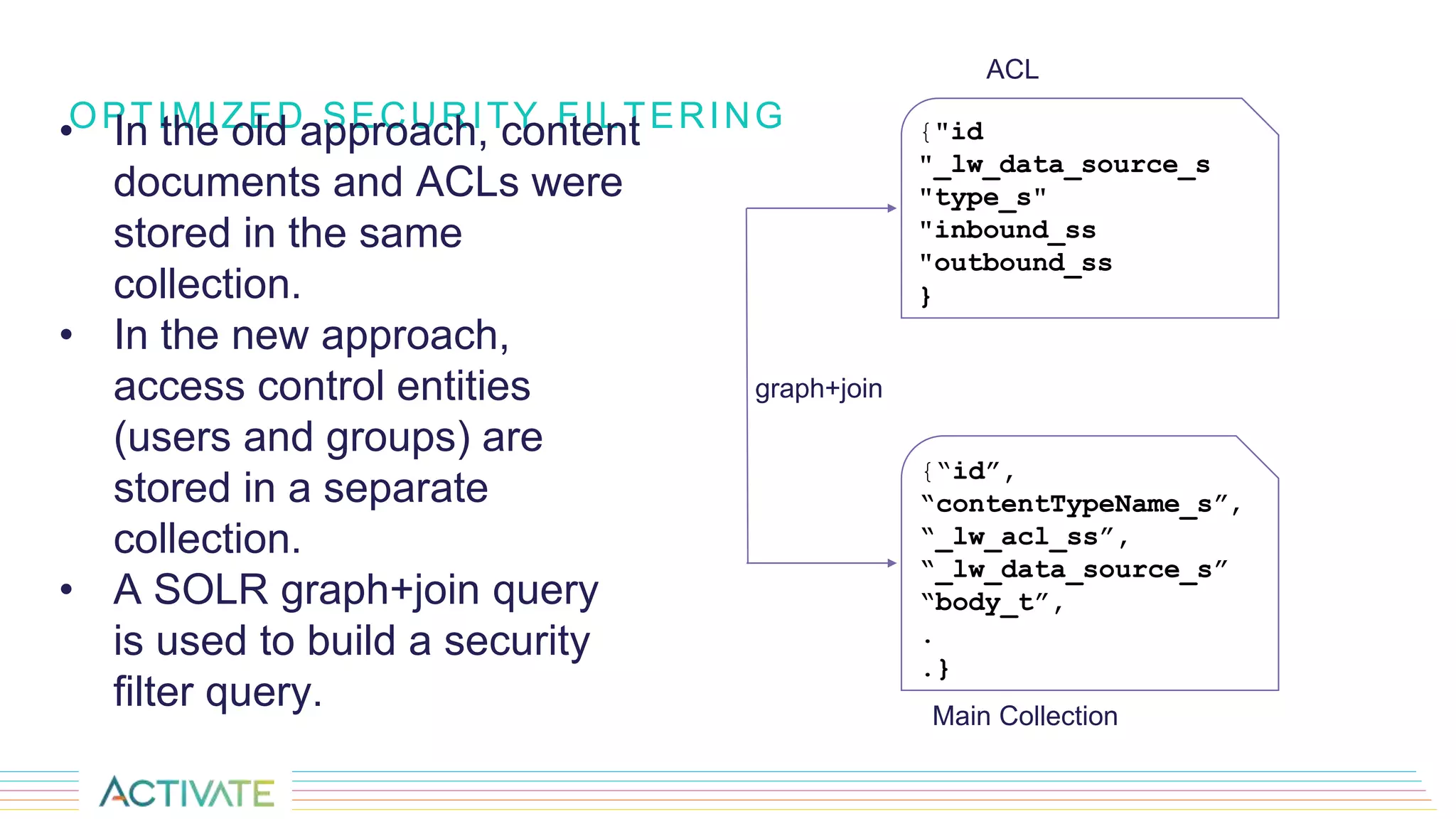
OPTIMIZED SECURITY FILTERING• In the old approach, content
documents and ACLs were
stored in the same
collection.
• In the new approach,
access control entities
(users and groups) are
stored in a separate
collection.
• A SOLR graph+join query
is used to build a security
filter query.
{"id
"_lw_data_source_s
"type_s"
"inbound_ss
"outbound_ss
}
{“id”,
“contentTypeName_s”,
“_lw_acl_ss”,
“_lw_data_source_s”
“body_t”,
.
.}
ACL
Main Collection
graph+join
SOLR COLLECTIONS- MAIN COLLECTION
The _lw_acl_ss field contains the direct users and/or groups that can access the document.
Note: It does not contain the nested groups, just the direct groups and users.
{"id":"https://lwdemo.sharepoint.com/sites/corpa/Shared
Documents/001/001912.ppt",
"parent_s":"https://lwdemo.sharepoint.com/sites/corpa/Shared
Documents/001/001912.ppt",
"contentTypeName_s":"Document",
"_lw_acl_ss":["740c6a0b-85e2-48a0-a494-
e0f1759d4aa7:site:2386a403-8d76-4737-b774-
dabad52201e3:web:7a2f544f-e3ed-444e-8de3-178c2c9b5848:3”. . .
"],
"_lw_data_source_s":"SPv1Optimised",
"editorValue_s":"Nicholas DiPiazza",
"body_t":”Enterprise Resource Management ProgramnnCPIC,
"_version_":1643660287496159232}]
SIDECAR COLLECTION- ACL
Field Description
Id ID of the access control
type_s Type of access control (group, user, role assignment, role definition , etc)
outbound_ss Outbound edges, i.e. parent objects can be represented with this field
inbound_ss Inbound edges i.e. list of access controls which are owned by the current
access control
{ "id":"ADFSADMINISTRATORS",
"dn_s":"CN=Administrators,CN=Builtin,DC=adfs,DC=lab,DC=lucidworks,DC=com",
"base_s":"dc=adfs,dc=lab,dc=lucidworks,dc=com",
"_lw_data_source_s":"AclAD",
"type_s":"ldapGroup",
"when_changed_s":"20190611155947.0Z",
"outbound_ss":["ADFSADMINISTRATORS"],
"inbound_ss":["CN=Administrator,CN=Users,DC=adfs,DC=lab,DC=lucidworks,DC=com",
"CN=Domain Admins,CN=Users,DC=adfs,DC=lab,DC=lucidworks,DC=com",
"CN=Enterprise Admins,CN=Users,DC=adfs,DC=lab,DC=lucidworks,DC=com",
"CN=admin2,CN=Users,DC=adfs,DC=lab,DC=lucidworks,DC=com",
"ADFSADMINISTRATORS"],
"_version_":1643736564827684871},
Domain Admins
ldapGroup-dn
admin2
ldapUser-dn
ADFSADMINISTRATORS
ldapGroup-dn
Enterprise Admins
ldapGroup-dn
INDEX WORK FLOW – NEW APPROACH
LDAP
Data
Source
Parser
Index
Pipeline
ACL Collection
Content Collection
Schedule
LDAP
Connector
{"id":"ADFSNICHOLAS",
"_lw_data_source_s":"AD-ACLs",
"type_s":"user",
"inbound_ss":["ADFSNICHOLAS"],
"outbound_ss":["ADFSNICHOLAS", "all-users"],
"_version_":1643660598409428998},
{ "id":"740c6a0b-85e2-48a0-a494-e0f1759d4aa7:…
"_lw_data_source_s":"SPv1Optimised",
"type_s":"sharepointGroup",
"inbound_ss":["740c… "all-users"],
"outbound_ss":["740c6a0b-… :4"],
"_version_":1643659978005807105},
{"id":"https://lwdemo.share point.com/sites/corpa/Shared
Documents/001/001912.ppt",
"contentTypeName_s":"Document",
"_lw_acl_ss":["740c6a0b-85e2-48a0-a494-
e0f1759d4aa7:site:2386a403-8d76-4737-b774-
dabad52201e3:web:7a2f544f-e3ed-444e-8de3-
178c2c9b5848:3", …."],
"_lw_data_source_s":"SPv1Optimised",
"body_t":"Enterprise Resource Management Program”}
1
2
a
b
c
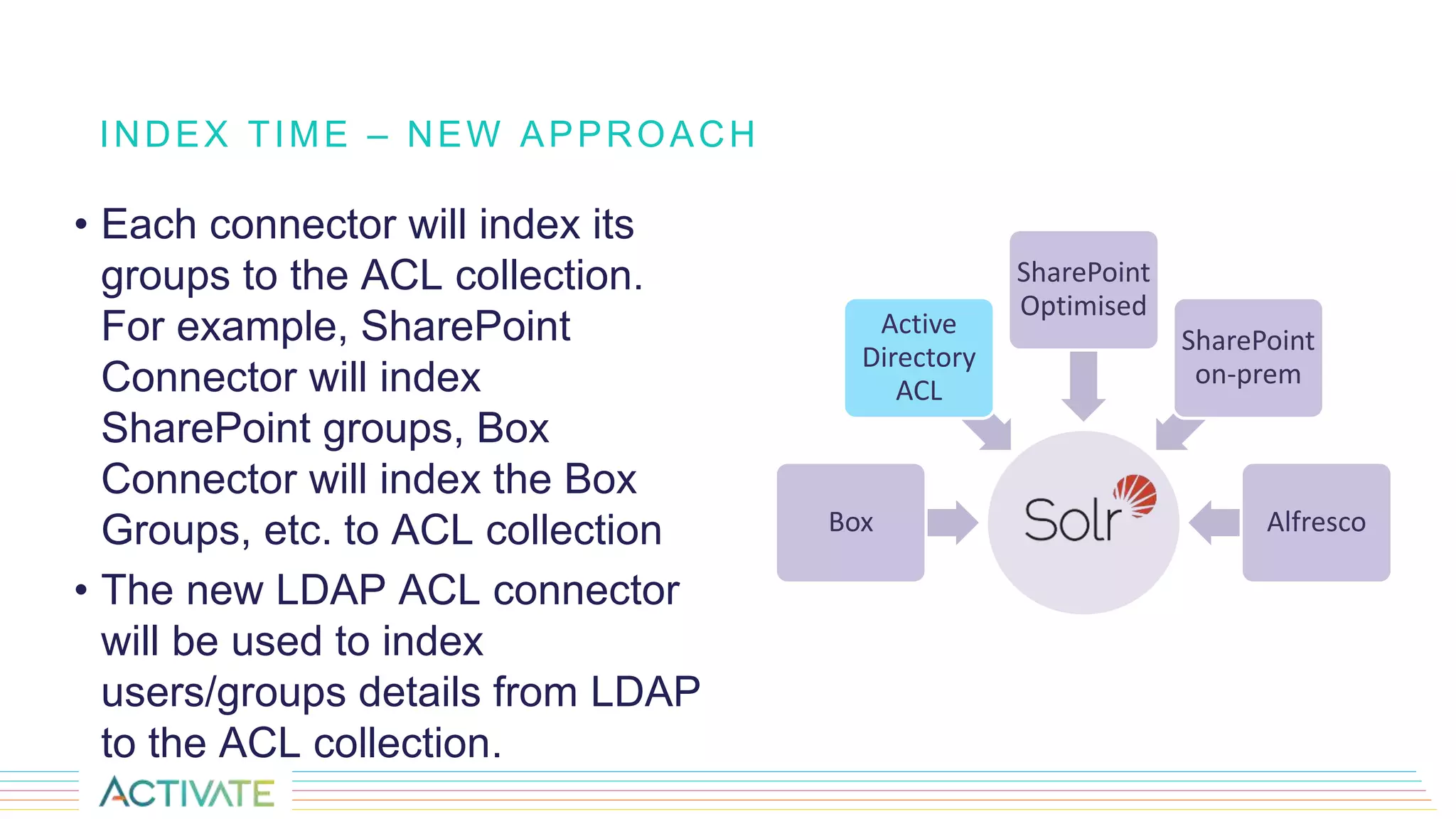
• Each connector will index its
groups to the ACL collection.
For example, SharePoint
Connector will index
SharePoint groups, Box
Connector will index the Box
Groups, etc. to ACL collection
• The new LDAP ACL connector
will be used to index
users/groups details from LDAP
to the ACL collection.
INDEX TIME – NEW APPROACH
Box
Active
Directory
ACL
SharePoint
Optimised
SharePoint
on-prem
Alfresco
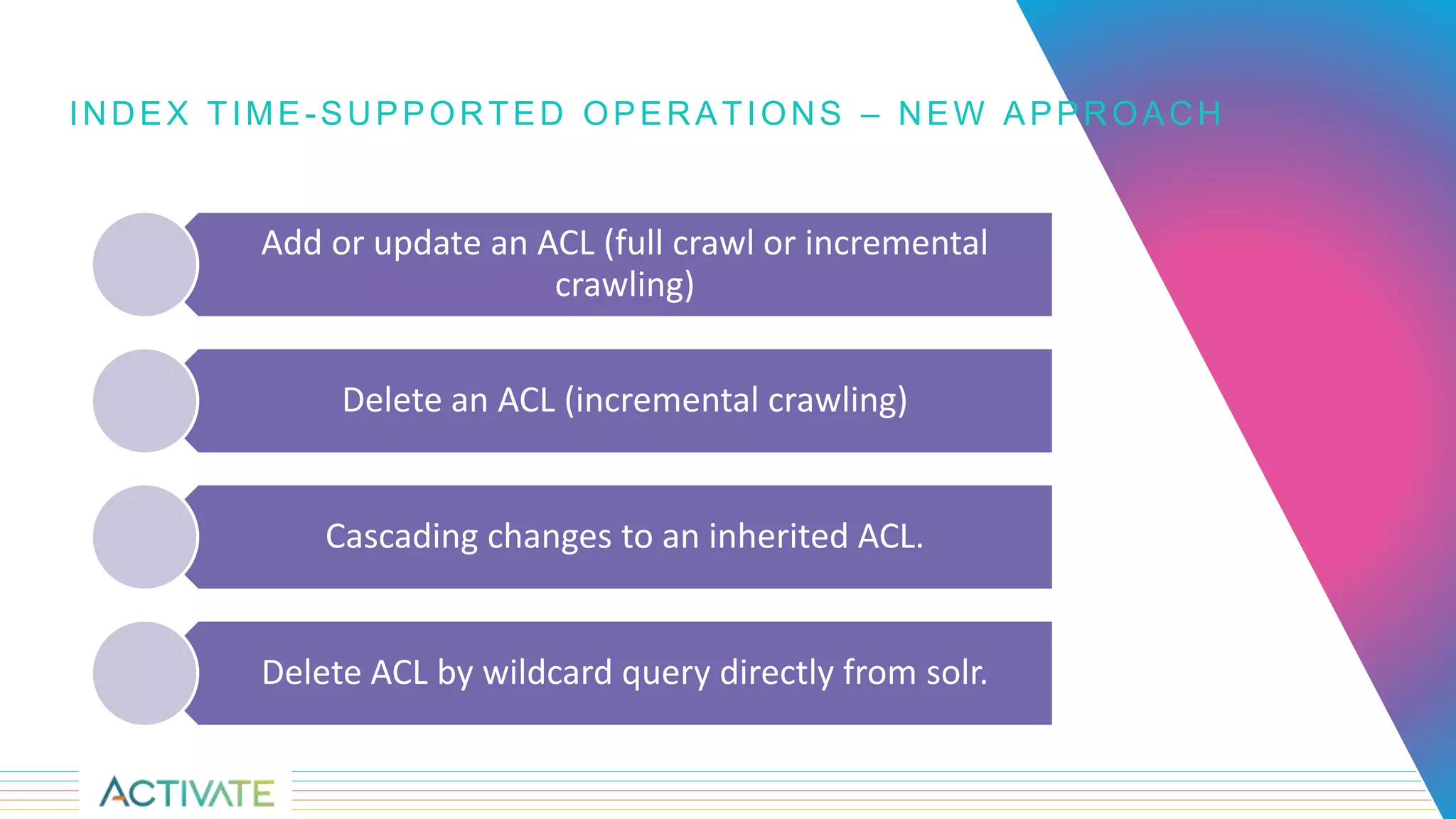
INDEX TIME-SUPPORTED OPERATIONS – NEW APPROACH
Add or update an ACL (full crawl or incremental
crawling)
Delete an ACL (incremental crawling)
Cascading changes to an inherited ACL.
Delete ACL by wildcard query directly from solr.
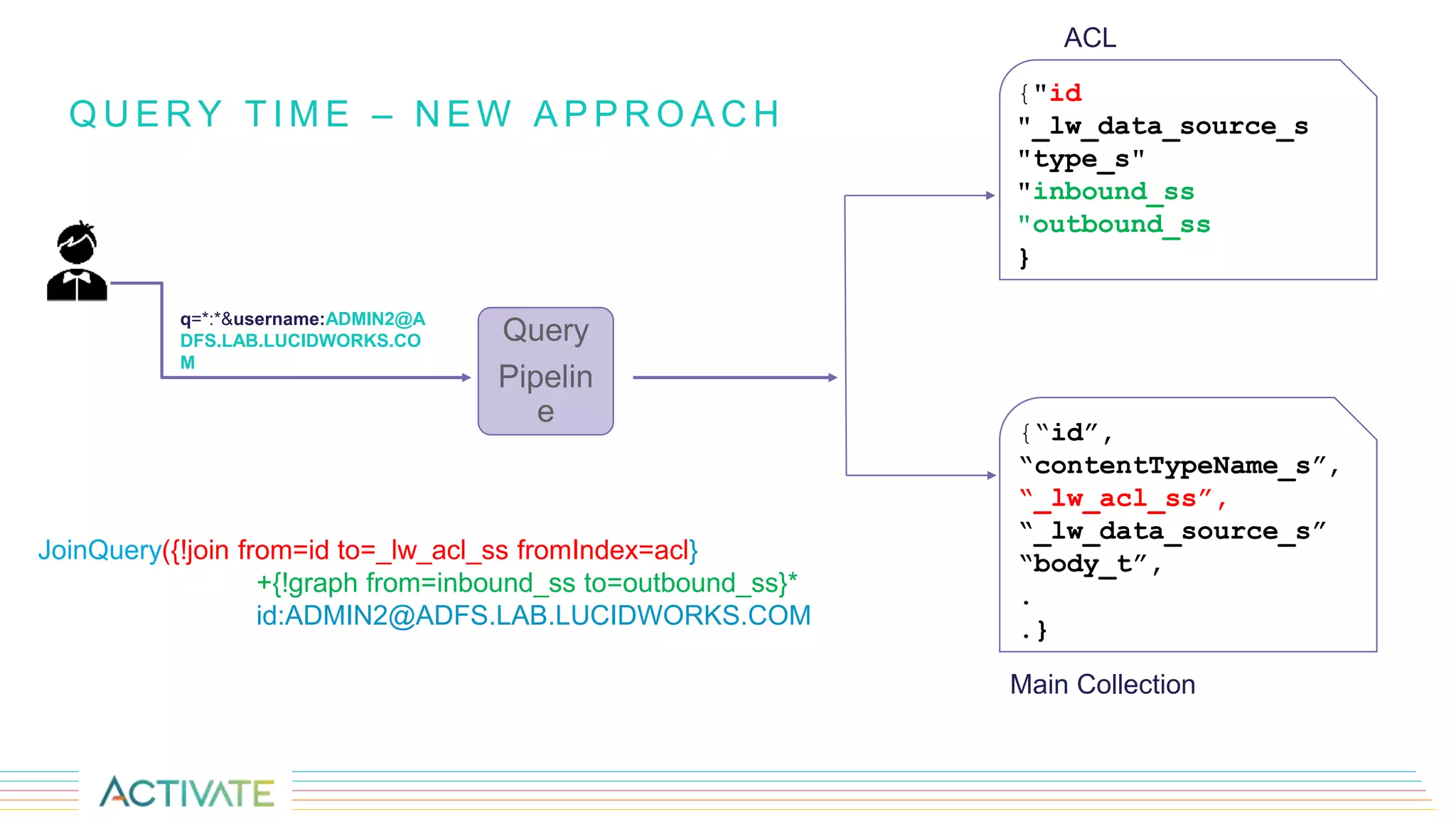
Q U E R Y T I M E – N E W A P P R O A C H
JoinQuery({!join from=id to=_lw_acl_ss fromIndex=acl}
+{!graph from=inbound_ss to=outbound_ss}*
id:ADMIN2@ADFS.LAB.LUCIDWORKS.COM
Query
Pipelin
e
q=*:*&username:ADMIN2@A
DFS.LAB.LUCIDWORKS.CO
M
{"id
"_lw_data_source_s
"type_s"
"inbound_ss
"outbound_ss
}
{“id”,
“contentTypeName_s”,
“_lw_acl_ss”,
“_lw_data_source_s”
“body_t”,
.
.}
ACL
Main Collection
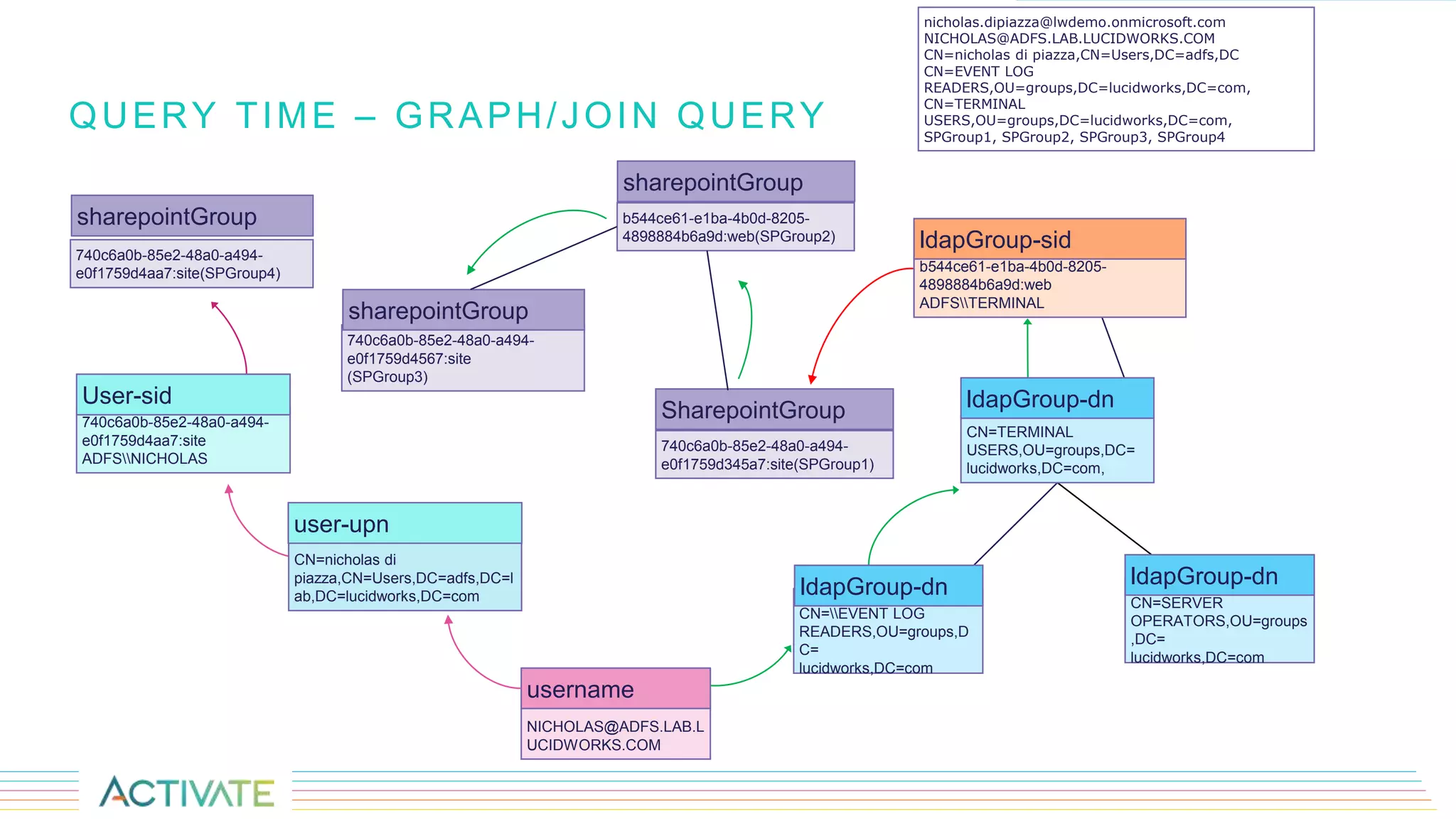
QUERY TIME – GRAPH/JOIN QUERY
NICHOLAS@ADFS.LAB.L
UCIDWORKS.COM
username
CN=EVENT LOG
READERS,OU=groups,D
C=
lucidworks,DC=com
ldapGroup-dn
b544ce61-e1ba-4b0d-8205-
4898884b6a9d:web(SPGroup2)
sharepointGroup
CN=nicholas di
piazza,CN=Users,DC=adfs,DC=l
ab,DC=lucidworks,DC=com
user-upn
CN=SERVER
OPERATORS,OU=groups
,DC=
lucidworks,DC=com
ldapGroup-dn
CN=TERMINAL
USERS,OU=groups,DC=
lucidworks,DC=com,
ldapGroup-dn
b544ce61-e1ba-4b0d-8205-
4898884b6a9d:web
ADFSTERMINAL
ldapGroup-sid
740c6a0b-85e2-48a0-a494-
e0f1759d345a7:site(SPGroup1)
SharepointGroup740c6a0b-85e2-48a0-a494-
e0f1759d4aa7:site
ADFSNICHOLAS
User-sid
740c6a0b-85e2-48a0-a494-
e0f1759d4567:site
(SPGroup3)
sharepointGroup
nicholas.dipiazza@lwdemo.onmicrosoft.com
NICHOLAS@ADFS.LAB.LUCIDWORKS.COM
CN=nicholas di piazza,CN=Users,DC=adfs,DC
CN=EVENT LOG
READERS,OU=groups,DC=lucidworks,DC=com,
CN=TERMINAL
USERS,OU=groups,DC=lucidworks,DC=com,
SPGroup1, SPGroup2, SPGroup3, SPGroup4
740c6a0b-85e2-48a0-a494-
e0f1759d4aa7:site(SPGroup4)
sharepointGroup
C A S E S T U D Y
Scenario where we want to crawl
more than one datasource with the
same query filter.
https://www.youtube.com/watch?v=rlr
V4-0I_78
DEMO
R E F E R E N C E S
• https://doc.lucidworks.com/release-notes/fusion-
server/4.2.4-release-notes.html#new-features
• https://doc.lucidworks.com/fusion-server/4.2/reference-
guides/connectors/sharepoint-online-connector-and-
datasource-configuration.html
THANK YOU
rakesh.maski@lucidworks.com
vrinda.davda@lucidworks.com
nicholas.dipiazza@lucidworks.com

Deep Dive: Security Trimming in Fusion

  • 2.
  • 3.
    Vrinda Davda Senior Engineer NicholasDipiazza Sr Software Engineer Connectors team Rakesh Maski Senior Engineer SPEAKERS
  • 4.
    1.What is securitytrimming? 2.How does the old security filtering approach work? o Index Time o Query Time 3.Problems with old approach 4.New security filtering approach o Index time o Query time 5.Supported operations - add/update/delete ACLs 6.Use cases and Demo A G E N D A
  • 5.
    Access to unintended data Internal misuse Security Violation S EC U R I T Y T R I M M I N G REAL TIME SCENARIOS FACED BY ORGANIZATION
  • 6.
    W H AT I S S E C U R I T Y T R I M M I N G Documents you have access to Documents you do not have access to Solr Collection
  • 7.
  • 8.
    • While crawlingdocuments through a data source, Fusion stores Access Control List(ACL) metadata as SOLR fields in the content document. • The Security Trimming query stage matches this information against the ID of the user running the search query. S E C U R I T Y T R I M M I N G I N F U S I O N – O L D A P P R O A C H "acls_ss":["SP_ALLOW_GROUP_ADFSCOMMUNICATION SITE MEMBERS", "SP_ALLOW_GROUP_ADFSCOMMUNICATION SITE OWNERS", "SP_ALLOW_GROUP_ADFSCOMMUNICATION SITE VISITORS", "SP_ALLOW_GROUP_ADFSEVERYONE EXCEPT EXTERNAL USERS", "SP_ALLOW_GROUP_ADFSSHAREPOINT SERVICE ADMINISTRATOR", "SP_ALLOW_USER_ADMIN2@ADFS.LAB.LUCIDWORKS.COM", "SP_ALLOW_USER_DBENSON@AZURE.LAB.LUCIDWORKS.COM"]
  • 9.
    I N DE X T I M E – O L D A P P R O A C H • ACLs are retrieved for each document, and an additional trip is made to get nested group relationships (for example, LDAP groups). • Permissions are flattened (Denormalized) and set into the field “acl_ss”
  • 10.
    V 1 CO N N E C T O R I N D E X W O R K F L O W – O L D A P P R O A C H LDAP Data Source Parser Index Pipeline "id":"https://lucidworksfusiondev.sharepoint.com/LoadTest "acls_ss":["SP_ALLOW_GROUP_ADFSCOMMUNICATION SITE MEMBERS", "SP_ALLOW_GROUP_ADFSCOMMUNICATION SITE OWNERS", "SP_ALLOW_GROUP_ADFSCOMMUNICATION SITE VISITORS", "SP_ALLOW_GROUP_ADFSCOMPANY ADMINISTRATOR", "SP_ALLOW_GROUP_ADFSCOMPANY ADMINISTRATOR", "SP_ALLOW_GROUP_ADFSEVERYONE EXCEPT EXTERNAL USERS", "SP_ALLOW_GROUP_ADFSSHAREPOINT SERVICE ADMINISTRATOR", "SP_ALLOW_USER_ADMIN2@ADFS.LAB.LUCIDWORKS.COM", "SP_ALLOW_USER_DBENSON@AZURE.LAB.LUCIDWORKS.COM"], "_lw_data_source_s":"SpDefault", "body_t":"# ESP Forecast Informationn#n# …
  • 11.
    Q U ER Y T I M E – O L D A P P R O A C H • The purpose of the security trimming stage is to add fq's to remove content that a user should NOT see. • User principal is passed as query parameter, query stage makes an internal connection to 3rd party system (such as LDAP, SharePoint) to resolve group memberships. • This is an internal connection to the Connectors service cluster and lists all datasources in the current collection, builds an fq based on each datasource it finds. • If the datasource had security trimming enabled, the fq will be built and will be trimmed. Otherwise, there will be no filtering imposed on the datasource.
  • 12.
    Q U ER Y T I M E – O L D A P P R O A C H {!lucene q.op=OR} ( *:* -acl_ss:* ) ( *:* -_lw_data_source_s:( SpDefault )) ( acl_ss:WINADomain Admins -acl_ss:WINDDomain Admins acl_ss:WINALdapGroup3 -acl_ss:WINDLdapGroup3 acl_ss:WINALdapGroup2 -acl_ss:WINDLdapGroup2 acl_ss:WINALdapGroup1 -acl_ss:WINDLdapGroup1 ) Query Pipelin e q=*:*&username:admin2@adfs .lab.lucidworks.com admin2@adfs.lab.lucidworks.com WINALdapGroup3, WINALdapGroup2, WINALdapGroup1 LDAP 1 2 3
  • 13.
    PROBLEMS WITH OLDSECURITY FILTERING APPROACH • Every single datasource would have to have its own fq. • Security trimming performance will degrade with the increase in number of datasources. • Permissions duplication - Denormalized/Flattened permissions. • Permissions(ACLs) not updated on incremental crawling. • QTime might vary depending the on the group hierarchy size. • Relies on 3rd party servers (example: LDAP) and if they are down, security filtering will not work as it wont be able to resolve permissions.
  • 14.
    S U MM A R Y : P R O B L E M S W I T H O L D S E C U R I T Y F I L T E R I N G A P P R O A C H More DataSources? More FQ’s, Security Trimming performance will degrade No LDAP? No Security Trimming as it won’t be able to resolve permissions Permission (ACLs) are not updated on incremental Crawl QTime might vary depending on Group hierarchy size LDAP ds1 ds2
  • 15.
  • 16.
    OPTIMIZED SECURITY FILTERING•In the old approach, content documents and ACLs were stored in the same collection. • In the new approach, access control entities (users and groups) are stored in a separate collection. • A SOLR graph+join query is used to build a security filter query. {"id "_lw_data_source_s "type_s" "inbound_ss "outbound_ss } {“id”, “contentTypeName_s”, “_lw_acl_ss”, “_lw_data_source_s” “body_t”, . .} ACL Main Collection graph+join
  • 17.
    SOLR COLLECTIONS- MAINCOLLECTION The _lw_acl_ss field contains the direct users and/or groups that can access the document. Note: It does not contain the nested groups, just the direct groups and users. {"id":"https://lwdemo.sharepoint.com/sites/corpa/Shared Documents/001/001912.ppt", "parent_s":"https://lwdemo.sharepoint.com/sites/corpa/Shared Documents/001/001912.ppt", "contentTypeName_s":"Document", "_lw_acl_ss":["740c6a0b-85e2-48a0-a494- e0f1759d4aa7:site:2386a403-8d76-4737-b774- dabad52201e3:web:7a2f544f-e3ed-444e-8de3-178c2c9b5848:3”. . . "], "_lw_data_source_s":"SPv1Optimised", "editorValue_s":"Nicholas DiPiazza", "body_t":”Enterprise Resource Management ProgramnnCPIC, "_version_":1643660287496159232}]
  • 18.
    SIDECAR COLLECTION- ACL FieldDescription Id ID of the access control type_s Type of access control (group, user, role assignment, role definition , etc) outbound_ss Outbound edges, i.e. parent objects can be represented with this field inbound_ss Inbound edges i.e. list of access controls which are owned by the current access control { "id":"ADFSADMINISTRATORS", "dn_s":"CN=Administrators,CN=Builtin,DC=adfs,DC=lab,DC=lucidworks,DC=com", "base_s":"dc=adfs,dc=lab,dc=lucidworks,dc=com", "_lw_data_source_s":"AclAD", "type_s":"ldapGroup", "when_changed_s":"20190611155947.0Z", "outbound_ss":["ADFSADMINISTRATORS"], "inbound_ss":["CN=Administrator,CN=Users,DC=adfs,DC=lab,DC=lucidworks,DC=com", "CN=Domain Admins,CN=Users,DC=adfs,DC=lab,DC=lucidworks,DC=com", "CN=Enterprise Admins,CN=Users,DC=adfs,DC=lab,DC=lucidworks,DC=com", "CN=admin2,CN=Users,DC=adfs,DC=lab,DC=lucidworks,DC=com", "ADFSADMINISTRATORS"], "_version_":1643736564827684871}, Domain Admins ldapGroup-dn admin2 ldapUser-dn ADFSADMINISTRATORS ldapGroup-dn Enterprise Admins ldapGroup-dn
  • 19.
    INDEX WORK FLOW– NEW APPROACH LDAP Data Source Parser Index Pipeline ACL Collection Content Collection Schedule LDAP Connector {"id":"ADFSNICHOLAS", "_lw_data_source_s":"AD-ACLs", "type_s":"user", "inbound_ss":["ADFSNICHOLAS"], "outbound_ss":["ADFSNICHOLAS", "all-users"], "_version_":1643660598409428998}, { "id":"740c6a0b-85e2-48a0-a494-e0f1759d4aa7:… "_lw_data_source_s":"SPv1Optimised", "type_s":"sharepointGroup", "inbound_ss":["740c… "all-users"], "outbound_ss":["740c6a0b-… :4"], "_version_":1643659978005807105}, {"id":"https://lwdemo.share point.com/sites/corpa/Shared Documents/001/001912.ppt", "contentTypeName_s":"Document", "_lw_acl_ss":["740c6a0b-85e2-48a0-a494- e0f1759d4aa7:site:2386a403-8d76-4737-b774- dabad52201e3:web:7a2f544f-e3ed-444e-8de3- 178c2c9b5848:3", …."], "_lw_data_source_s":"SPv1Optimised", "body_t":"Enterprise Resource Management Program”} 1 2 a b c
  • 20.
    • Each connectorwill index its groups to the ACL collection. For example, SharePoint Connector will index SharePoint groups, Box Connector will index the Box Groups, etc. to ACL collection • The new LDAP ACL connector will be used to index users/groups details from LDAP to the ACL collection. INDEX TIME – NEW APPROACH Box Active Directory ACL SharePoint Optimised SharePoint on-prem Alfresco
  • 21.
    INDEX TIME-SUPPORTED OPERATIONS– NEW APPROACH Add or update an ACL (full crawl or incremental crawling) Delete an ACL (incremental crawling) Cascading changes to an inherited ACL. Delete ACL by wildcard query directly from solr.
  • 22.
    Q U ER Y T I M E – N E W A P P R O A C H JoinQuery({!join from=id to=_lw_acl_ss fromIndex=acl} +{!graph from=inbound_ss to=outbound_ss}* id:ADMIN2@ADFS.LAB.LUCIDWORKS.COM Query Pipelin e q=*:*&username:ADMIN2@A DFS.LAB.LUCIDWORKS.CO M {"id "_lw_data_source_s "type_s" "inbound_ss "outbound_ss } {“id”, “contentTypeName_s”, “_lw_acl_ss”, “_lw_data_source_s” “body_t”, . .} ACL Main Collection
  • 23.
    QUERY TIME –GRAPH/JOIN QUERY NICHOLAS@ADFS.LAB.L UCIDWORKS.COM username CN=EVENT LOG READERS,OU=groups,D C= lucidworks,DC=com ldapGroup-dn b544ce61-e1ba-4b0d-8205- 4898884b6a9d:web(SPGroup2) sharepointGroup CN=nicholas di piazza,CN=Users,DC=adfs,DC=l ab,DC=lucidworks,DC=com user-upn CN=SERVER OPERATORS,OU=groups ,DC= lucidworks,DC=com ldapGroup-dn CN=TERMINAL USERS,OU=groups,DC= lucidworks,DC=com, ldapGroup-dn b544ce61-e1ba-4b0d-8205- 4898884b6a9d:web ADFSTERMINAL ldapGroup-sid 740c6a0b-85e2-48a0-a494- e0f1759d345a7:site(SPGroup1) SharepointGroup740c6a0b-85e2-48a0-a494- e0f1759d4aa7:site ADFSNICHOLAS User-sid 740c6a0b-85e2-48a0-a494- e0f1759d4567:site (SPGroup3) sharepointGroup nicholas.dipiazza@lwdemo.onmicrosoft.com NICHOLAS@ADFS.LAB.LUCIDWORKS.COM CN=nicholas di piazza,CN=Users,DC=adfs,DC CN=EVENT LOG READERS,OU=groups,DC=lucidworks,DC=com, CN=TERMINAL USERS,OU=groups,DC=lucidworks,DC=com, SPGroup1, SPGroup2, SPGroup3, SPGroup4 740c6a0b-85e2-48a0-a494- e0f1759d4aa7:site(SPGroup4) sharepointGroup
  • 24.
    C A SE S T U D Y Scenario where we want to crawl more than one datasource with the same query filter. https://www.youtube.com/watch?v=rlr V4-0I_78 DEMO
  • 25.
    R E FE R E N C E S • https://doc.lucidworks.com/release-notes/fusion- server/4.2.4-release-notes.html#new-features • https://doc.lucidworks.com/fusion-server/4.2/reference- guides/connectors/sharepoint-online-connector-and- datasource-configuration.html
  • 26.