Chapter 2
Connecting and
Communicating
Online
Discovering Computers 2016
Tools, Apps, Devices, and the Impact of Technology
Objectives Overview
Discuss the evolution
of the Internet
Briefly describe
various broadband
Internet connections
Describe the purpose
of an IP address and
its relationship to a
domain name
Describe features of
browsers and identify
the components of a
web address
Describe ways to
compose effective
search text
© 2016 Cengage Learning®. May not be scanned, copied
or duplicated, or posted to a publicly accessible website,
2
See Page 56
for Detailed Objectives
Objectives Overview
Explain benefits and
risks of using online
social networks
Describe uses of
various types of
websites
Explain how the web
uses graphics,
animation, audio,
video, and virtual
reality
Explain how email,
email lists, instant
messaging, chat rooms,
online discussions, VoIP,
and FTP work
Identify the rules of
netiquette
© 2016 Cengage Learning®. May not be scanned, copied
or duplicated, or posted to a publicly accessible website,
3
See Page 56
for Detailed Objectives
The Internet
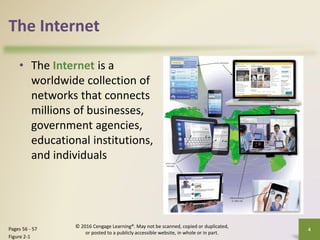
• The Internet is a
worldwide collection of
networks that connects
millions of businesses,
government agencies,
educational institutions,
and individuals
© 2016 Cengage Learning®. May not be scanned, copied or duplicated,
or posted to a publicly accessible website, in whole or in part.
4
Pages 56 - 57
Figure 2-1
The Internet
• The Internet originated as ARPANET in September
1969 and had two main goals:
© 2016 Cengage Learning®. May not be scanned, copied
or duplicated, or posted to a publicly accessible website,
5
Page 56
Allow scientists at
different physical
locations to share
information and work
together
Function even if part of
the network were
disabled or destroyed
by a disaster
The Internet
1969 ARPANET
becomes
functional
1984 ARPANET
has more than
1,000 individual
computers
linked as hosts
Today Millions of
hosts connect to
the Internet
© 2016 Cengage Learning®. May not be scanned, copied
or duplicated, or posted to a publicly accessible website,
6
Page 56
Connecting to the Internet
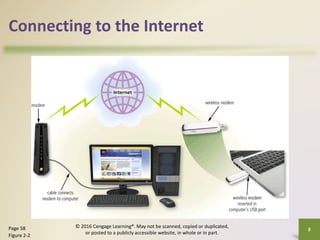
• With wired connections, a computer or device
physically attaches via a cable or wire to a
communications device
• Computers without a communications device can
use a wireless modem or other communications
device that enables wireless connectivity
7
Page 58
© 2016 Cengage Learning®. May not be scanned, copied or duplicated,
or posted to a publicly accessible website, in whole or in part.
Connecting to the Internet
8
Page 58
Figure 2-2
© 2016 Cengage Learning®. May not be scanned, copied or duplicated,
or posted to a publicly accessible website, in whole or in part.
Connecting to the Internet
Wired
• Cable Internet
service
• DSL (digital
subscriber line)
• Fiber to the
Premises (FTTP)
Wireless
• Wi-Fi (wireless
fidelity)
• Mobile broadband
• Fixed wireless
• Satellite Internet
Service
9
Page 59
© 2016 Cengage Learning®. May not be scanned, copied or duplicated,
or posted to a publicly accessible website, in whole or in part.
Connecting to the Internet
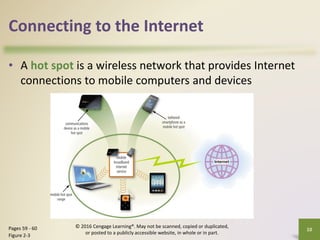
• A hot spot is a wireless network that provides Internet
connections to mobile computers and devices
10
Pages 59 - 60
Figure 2-3
© 2016 Cengage Learning®. May not be scanned, copied or duplicated,
or posted to a publicly accessible website, in whole or in part.
Connecting to the Internet
© 2016 Cengage Learning®. May not be scanned, copied
or duplicated, or posted to a publicly accessible website,
11
Page 58
• An Internet service provider (ISP) is a business
that provides individuals and organizations access
to the Internet free or for a fee
• Bandwidth represents the amount of data that
travels over a network
– Megabyte (MB)
– Gigabyte (GB)
Connecting to the Internet
© 2016 Cengage Learning®. May not be scanned, copied
or duplicated, or posted to a publicly accessible website,
12
Page 62
Figure 2-4
Connecting to the Internet
• An IP address is a sequence of numbers that uniquely
identifies each computer or device connected to the
Internet
• A domain name is a text-based name that corresponds to
the IP address
• A DNS server translates the domain name into its
associated IP address
© 2016 Cengage Learning®. May not be scanned, copied
or duplicated, or posted to a publicly accessible website,
13
Pages 62 - 64
Figure 2-5
Connecting to the Internet
© 2016 Cengage Learning®. May not be scanned, copied
or duplicated, or posted to a publicly accessible website,
14
Page 63
Table 2-3
Top-Level Domain
Connecting to the Internet
© 2016 Cengage Learning®. May not be scanned, copied
or duplicated, or posted to a publicly accessible website,
15
Page 64
Figure 2-6
The World Wide Web
• The World Wide Web (WWW), or web, consists of a
worldwide collection of electronic documents
(webpages)
• A website is a collection of related webpages and
associated items
• A web server is a computer that delivers requested
webpages to your computer
• Web 2.0 refers to websites that provide a means for
users to share personal information, allow users to
modify website content, and provide applications
through a browser
© 2016 Cengage Learning®. May not be scanned, copied
or duplicated, or posted to a publicly accessible website,
16
Page 65
The World Wide Web
• A browser is an application
that enables users with an
Internet connection to
access and view webpages
on a computer or mobile
device
• A home page is the first
page that a website
displays
• Current browsers typically
support tabbed browsing
© 2016 Cengage Learning®. May not be scanned, copied or duplicated,
or posted to a publicly accessible website, in whole or in part.
17
Pages 65 - 66
Figure 2-7
The World Wide Web
• A webpage has a unique address, called a web
address or URL
© 2016 Cengage Learning®. May not be scanned, copied
or duplicated, or posted to a publicly accessible website,
18
Page 68
Figure 2-8
The World Wide Web
• A web app is an application stored on a web
server that you access through a browser
– Web app hosts usually provide storage for users’ data
and information on their servers, known as cloud
storage
19
Pages 69 – 70
Figure 2-9
© 2016 Cengage Learning®. May not be scanned, copied or duplicated,
or posted to a publicly accessible website, in whole or in part.
Types of Websites
• A web search engine is software that finds
websites, webpages, images, videos, news, maps,
and other information related to a specific topic
• A subject directory classifies webpages in an
organized set of categories, such as sports or
shopping, and related subcategories
© 2016 Cengage Learning®. May not be scanned, copied
or duplicated, or posted to a publicly accessible website,
20
Pages 71 - 72
Types of Websites
• Search operators can help to refine your search
© 2016 Cengage Learning®. May not be scanned, copied
or duplicated, or posted to a publicly accessible website,
21
Page 72
Table 2-4
Types of Websites
• There are several types of websites
© 2016 Cengage Learning®. May not be scanned, copied
or duplicated, or posted to a publicly accessible website,
22
Pages 71 – 76
Search engine
Online social
network
Informational
and research
Media sharing Bookmarking
News, weather,
sports, and other
mass media
Types of Websites
Educational
Business,
governmental, and
organizational
Blogs
Wiki and
collaboration
Health and fitness Science
23
Pages 77 – 79
© 2016 Cengage Learning®. May not be scanned, copied or duplicated,
or posted to a publicly accessible website, in whole or in part.
Types of Websites
Entertainment
Banking and
finance
Travel and
tourism
Mapping
Retail and
auctions
24
Pages 79 – 82
© 2016 Cengage Learning®. May not be scanned, copied or duplicated,
or posted to a publicly accessible website, in whole or in part.
Types of Websites
Careers and
employment
E-commerce Portals
Content
aggregation
Website
creation and
management
25
Pages 82 – 84
© 2016 Cengage Learning®. May not be scanned, copied or duplicated,
or posted to a publicly accessible website, in whole or in part.
Types of Websites
• Web publishing is the creation and maintenance
of websites
26
Page 84
© 2016 Cengage Learning®. May not be scanned, copied or duplicated,
or posted to a publicly accessible website, in whole or in part.
Maintain
the
website
Host the
website
Create
the
website
Design
the
website
Plan the
website
Digital Media on the Web
• Multimedia refers to any application that
combines text with media
© 2016 Cengage Learning®. May not be scanned, copied
or duplicated, or posted to a publicly accessible website,
27
Page 85
Digital Media on the Web
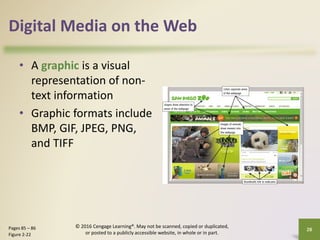
• A graphic is a visual
representation of non-
text information
• Graphic formats include
BMP, GIF, JPEG, PNG,
and TIFF
© 2016 Cengage Learning®. May not be scanned, copied or duplicated,
or posted to a publicly accessible website, in whole or in part.
28
Pages 85 – 86
Figure 2-22
Digital Media on the Web
• An infographic is a
visual representation of
data and information,
designed to
communicate quickly,
simplify complex
concepts, or present
patterns or trends
© 2016 Cengage Learning®. May not be scanned, copied or duplicated,
or posted to a publicly accessible website, in whole or in part.
29
Page 86
Figure 2-23
Digital Media on the Web
• Animation is the appearance of motion created by
displaying a series of still images in sequence
© 2016 Cengage Learning®. May not be scanned, copied
or duplicated, or posted to a publicly accessible website,
30
Page 86
Digital Media on the Web
• Audio includes music, speech, or any other sound
– Compressed to reduce file size
• You listen to audio on your computer using a media
player
© 2016 Cengage Learning®. May not be scanned, copied
or duplicated, or posted to a publicly accessible website,
31
Pages 86 - 87
Figure 2-24
Digital Media on the Web
• Video consists of images displayed in motion
• Virtual reality (VR) is the use of computers to simulate a
real or imagined environment that appears as a three-
dimensional space
© 2016 Cengage Learning®. May not be scanned, copied
or duplicated, or posted to a publicly accessible website,
32
Pages 87 - 88
Figure 2-25
Digital Media on the Web
A plug-in, or add-on, is a
program that extends
the capability of a
browser
© 2016 Cengage Learning®. May not be scanned, copied
or duplicated, or posted to a publicly accessible website,
33
Page 88
Other Internet Services
• Email is the
transmission of
messages and files via a
computer network
• An email program
allows you to create,
send, receive, forward,
store, print, and delete
email messages
© 2016 Cengage Learning®. May not be scanned, copied or duplicated,
or posted to a publicly accessible website, in whole or in part.
34
Page 88
Other Internet Services
© 2016 Cengage Learning®. May not be scanned, copied
or duplicated, or posted to a publicly accessible website,
35
Page 89
Figure 2-26
Other Internet Services
• An email list is a group of email addresses used for mass
distribution of a message
© 2016 Cengage Learning®. May not be scanned, copied
or duplicated, or posted to a publicly accessible website,
36
Page 90
Figure 2-27
Other Internet Services
• Instant messaging services notify you when one
or more of your established contacts are online
and then allows you to exchange messages or files
or join a private chat room with them
© 2016 Cengage Learning®. May not be scanned, copied
or duplicated, or posted to a publicly accessible website,
37
Page 90
Figure 2-28
Other Internet Services
• A chat is a real-time
typed conversation that
takes place on a
computer or mobile
device with many other
online users
• A chat room is a website
or application that
permits users to chat with
others who are online at
the same time
© 2016 Cengage Learning®. May not be scanned, copied or duplicated,
or posted to a publicly accessible website, in whole or in part.
38
Page 91
Figure 2-29
Other Internet Services
• An online discussion is an online area in which
users have written discussions about a particular
subject
39
Page 91
Figure 2-30
© 2016 Cengage Learning®. May not be scanned, copied or duplicated,
or posted to a publicly accessible website, in whole or in part.
Other Internet Services
• VoIP (Voice over IP) enables users to speak to other
users via their Internet connection
© 2016 Cengage Learning®. May not be scanned, copied or duplicated,
or posted to a publicly accessible website, in whole or in part.
40
Page 92
Other Internet Services
• FTP (File Transfer Protocol) is an Internet standard
that permits file uploading and downloading to
and from other computers on the Internet
• Many operating systems include FTP capabilities
• An FTP server is a computer that allows users to
upload and/or download files using FTP
© 2016 Cengage Learning®. May not be scanned, copied
or duplicated, or posted to a publicly accessible website,
41
Page 92
Chapter Summary
Evolution of
the Internet
The web
Various types
of websites
and media
Other services
available on
the Internet
© 2016 Cengage Learning®. May not be scanned, copied
or duplicated, or posted to a publicly accessible website,
42
Page 95
Chapter 2
Connecting and
Communicating
Online
Discovering Computers 2016
Tools, Apps, Devices, and the Impact of Technology
Chapter 2 Complete

DC16 Chapter 2 (2).pdf

  • 1.
    Chapter 2 Connecting and Communicating Online DiscoveringComputers 2016 Tools, Apps, Devices, and the Impact of Technology
  • 2.
    Objectives Overview Discuss theevolution of the Internet Briefly describe various broadband Internet connections Describe the purpose of an IP address and its relationship to a domain name Describe features of browsers and identify the components of a web address Describe ways to compose effective search text © 2016 Cengage Learning®. May not be scanned, copied or duplicated, or posted to a publicly accessible website, 2 See Page 56 for Detailed Objectives
  • 3.
    Objectives Overview Explain benefitsand risks of using online social networks Describe uses of various types of websites Explain how the web uses graphics, animation, audio, video, and virtual reality Explain how email, email lists, instant messaging, chat rooms, online discussions, VoIP, and FTP work Identify the rules of netiquette © 2016 Cengage Learning®. May not be scanned, copied or duplicated, or posted to a publicly accessible website, 3 See Page 56 for Detailed Objectives
  • 4.
    The Internet • TheInternet is a worldwide collection of networks that connects millions of businesses, government agencies, educational institutions, and individuals © 2016 Cengage Learning®. May not be scanned, copied or duplicated, or posted to a publicly accessible website, in whole or in part. 4 Pages 56 - 57 Figure 2-1
  • 5.
    The Internet • TheInternet originated as ARPANET in September 1969 and had two main goals: © 2016 Cengage Learning®. May not be scanned, copied or duplicated, or posted to a publicly accessible website, 5 Page 56 Allow scientists at different physical locations to share information and work together Function even if part of the network were disabled or destroyed by a disaster
  • 6.
    The Internet 1969 ARPANET becomes functional 1984ARPANET has more than 1,000 individual computers linked as hosts Today Millions of hosts connect to the Internet © 2016 Cengage Learning®. May not be scanned, copied or duplicated, or posted to a publicly accessible website, 6 Page 56
  • 7.
    Connecting to theInternet • With wired connections, a computer or device physically attaches via a cable or wire to a communications device • Computers without a communications device can use a wireless modem or other communications device that enables wireless connectivity 7 Page 58 © 2016 Cengage Learning®. May not be scanned, copied or duplicated, or posted to a publicly accessible website, in whole or in part.
  • 8.
    Connecting to theInternet 8 Page 58 Figure 2-2 © 2016 Cengage Learning®. May not be scanned, copied or duplicated, or posted to a publicly accessible website, in whole or in part.
  • 9.
    Connecting to theInternet Wired • Cable Internet service • DSL (digital subscriber line) • Fiber to the Premises (FTTP) Wireless • Wi-Fi (wireless fidelity) • Mobile broadband • Fixed wireless • Satellite Internet Service 9 Page 59 © 2016 Cengage Learning®. May not be scanned, copied or duplicated, or posted to a publicly accessible website, in whole or in part.
  • 10.
    Connecting to theInternet • A hot spot is a wireless network that provides Internet connections to mobile computers and devices 10 Pages 59 - 60 Figure 2-3 © 2016 Cengage Learning®. May not be scanned, copied or duplicated, or posted to a publicly accessible website, in whole or in part.
  • 11.
    Connecting to theInternet © 2016 Cengage Learning®. May not be scanned, copied or duplicated, or posted to a publicly accessible website, 11 Page 58 • An Internet service provider (ISP) is a business that provides individuals and organizations access to the Internet free or for a fee • Bandwidth represents the amount of data that travels over a network – Megabyte (MB) – Gigabyte (GB)
  • 12.
    Connecting to theInternet © 2016 Cengage Learning®. May not be scanned, copied or duplicated, or posted to a publicly accessible website, 12 Page 62 Figure 2-4
  • 13.
    Connecting to theInternet • An IP address is a sequence of numbers that uniquely identifies each computer or device connected to the Internet • A domain name is a text-based name that corresponds to the IP address • A DNS server translates the domain name into its associated IP address © 2016 Cengage Learning®. May not be scanned, copied or duplicated, or posted to a publicly accessible website, 13 Pages 62 - 64 Figure 2-5
  • 14.
    Connecting to theInternet © 2016 Cengage Learning®. May not be scanned, copied or duplicated, or posted to a publicly accessible website, 14 Page 63 Table 2-3 Top-Level Domain
  • 15.
    Connecting to theInternet © 2016 Cengage Learning®. May not be scanned, copied or duplicated, or posted to a publicly accessible website, 15 Page 64 Figure 2-6
  • 16.
    The World WideWeb • The World Wide Web (WWW), or web, consists of a worldwide collection of electronic documents (webpages) • A website is a collection of related webpages and associated items • A web server is a computer that delivers requested webpages to your computer • Web 2.0 refers to websites that provide a means for users to share personal information, allow users to modify website content, and provide applications through a browser © 2016 Cengage Learning®. May not be scanned, copied or duplicated, or posted to a publicly accessible website, 16 Page 65
  • 17.
    The World WideWeb • A browser is an application that enables users with an Internet connection to access and view webpages on a computer or mobile device • A home page is the first page that a website displays • Current browsers typically support tabbed browsing © 2016 Cengage Learning®. May not be scanned, copied or duplicated, or posted to a publicly accessible website, in whole or in part. 17 Pages 65 - 66 Figure 2-7
  • 18.
    The World WideWeb • A webpage has a unique address, called a web address or URL © 2016 Cengage Learning®. May not be scanned, copied or duplicated, or posted to a publicly accessible website, 18 Page 68 Figure 2-8
  • 19.
    The World WideWeb • A web app is an application stored on a web server that you access through a browser – Web app hosts usually provide storage for users’ data and information on their servers, known as cloud storage 19 Pages 69 – 70 Figure 2-9 © 2016 Cengage Learning®. May not be scanned, copied or duplicated, or posted to a publicly accessible website, in whole or in part.
  • 20.
    Types of Websites •A web search engine is software that finds websites, webpages, images, videos, news, maps, and other information related to a specific topic • A subject directory classifies webpages in an organized set of categories, such as sports or shopping, and related subcategories © 2016 Cengage Learning®. May not be scanned, copied or duplicated, or posted to a publicly accessible website, 20 Pages 71 - 72
  • 21.
    Types of Websites •Search operators can help to refine your search © 2016 Cengage Learning®. May not be scanned, copied or duplicated, or posted to a publicly accessible website, 21 Page 72 Table 2-4
  • 22.
    Types of Websites •There are several types of websites © 2016 Cengage Learning®. May not be scanned, copied or duplicated, or posted to a publicly accessible website, 22 Pages 71 – 76 Search engine Online social network Informational and research Media sharing Bookmarking News, weather, sports, and other mass media
  • 23.
    Types of Websites Educational Business, governmental,and organizational Blogs Wiki and collaboration Health and fitness Science 23 Pages 77 – 79 © 2016 Cengage Learning®. May not be scanned, copied or duplicated, or posted to a publicly accessible website, in whole or in part.
  • 24.
    Types of Websites Entertainment Bankingand finance Travel and tourism Mapping Retail and auctions 24 Pages 79 – 82 © 2016 Cengage Learning®. May not be scanned, copied or duplicated, or posted to a publicly accessible website, in whole or in part.
  • 25.
    Types of Websites Careersand employment E-commerce Portals Content aggregation Website creation and management 25 Pages 82 – 84 © 2016 Cengage Learning®. May not be scanned, copied or duplicated, or posted to a publicly accessible website, in whole or in part.
  • 26.
    Types of Websites •Web publishing is the creation and maintenance of websites 26 Page 84 © 2016 Cengage Learning®. May not be scanned, copied or duplicated, or posted to a publicly accessible website, in whole or in part. Maintain the website Host the website Create the website Design the website Plan the website
  • 27.
    Digital Media onthe Web • Multimedia refers to any application that combines text with media © 2016 Cengage Learning®. May not be scanned, copied or duplicated, or posted to a publicly accessible website, 27 Page 85
  • 28.
    Digital Media onthe Web • A graphic is a visual representation of non- text information • Graphic formats include BMP, GIF, JPEG, PNG, and TIFF © 2016 Cengage Learning®. May not be scanned, copied or duplicated, or posted to a publicly accessible website, in whole or in part. 28 Pages 85 – 86 Figure 2-22
  • 29.
    Digital Media onthe Web • An infographic is a visual representation of data and information, designed to communicate quickly, simplify complex concepts, or present patterns or trends © 2016 Cengage Learning®. May not be scanned, copied or duplicated, or posted to a publicly accessible website, in whole or in part. 29 Page 86 Figure 2-23
  • 30.
    Digital Media onthe Web • Animation is the appearance of motion created by displaying a series of still images in sequence © 2016 Cengage Learning®. May not be scanned, copied or duplicated, or posted to a publicly accessible website, 30 Page 86
  • 31.
    Digital Media onthe Web • Audio includes music, speech, or any other sound – Compressed to reduce file size • You listen to audio on your computer using a media player © 2016 Cengage Learning®. May not be scanned, copied or duplicated, or posted to a publicly accessible website, 31 Pages 86 - 87 Figure 2-24
  • 32.
    Digital Media onthe Web • Video consists of images displayed in motion • Virtual reality (VR) is the use of computers to simulate a real or imagined environment that appears as a three- dimensional space © 2016 Cengage Learning®. May not be scanned, copied or duplicated, or posted to a publicly accessible website, 32 Pages 87 - 88 Figure 2-25
  • 33.
    Digital Media onthe Web A plug-in, or add-on, is a program that extends the capability of a browser © 2016 Cengage Learning®. May not be scanned, copied or duplicated, or posted to a publicly accessible website, 33 Page 88
  • 34.
    Other Internet Services •Email is the transmission of messages and files via a computer network • An email program allows you to create, send, receive, forward, store, print, and delete email messages © 2016 Cengage Learning®. May not be scanned, copied or duplicated, or posted to a publicly accessible website, in whole or in part. 34 Page 88
  • 35.
    Other Internet Services ©2016 Cengage Learning®. May not be scanned, copied or duplicated, or posted to a publicly accessible website, 35 Page 89 Figure 2-26
  • 36.
    Other Internet Services •An email list is a group of email addresses used for mass distribution of a message © 2016 Cengage Learning®. May not be scanned, copied or duplicated, or posted to a publicly accessible website, 36 Page 90 Figure 2-27
  • 37.
    Other Internet Services •Instant messaging services notify you when one or more of your established contacts are online and then allows you to exchange messages or files or join a private chat room with them © 2016 Cengage Learning®. May not be scanned, copied or duplicated, or posted to a publicly accessible website, 37 Page 90 Figure 2-28
  • 38.
    Other Internet Services •A chat is a real-time typed conversation that takes place on a computer or mobile device with many other online users • A chat room is a website or application that permits users to chat with others who are online at the same time © 2016 Cengage Learning®. May not be scanned, copied or duplicated, or posted to a publicly accessible website, in whole or in part. 38 Page 91 Figure 2-29
  • 39.
    Other Internet Services •An online discussion is an online area in which users have written discussions about a particular subject 39 Page 91 Figure 2-30 © 2016 Cengage Learning®. May not be scanned, copied or duplicated, or posted to a publicly accessible website, in whole or in part.
  • 40.
    Other Internet Services •VoIP (Voice over IP) enables users to speak to other users via their Internet connection © 2016 Cengage Learning®. May not be scanned, copied or duplicated, or posted to a publicly accessible website, in whole or in part. 40 Page 92
  • 41.
    Other Internet Services •FTP (File Transfer Protocol) is an Internet standard that permits file uploading and downloading to and from other computers on the Internet • Many operating systems include FTP capabilities • An FTP server is a computer that allows users to upload and/or download files using FTP © 2016 Cengage Learning®. May not be scanned, copied or duplicated, or posted to a publicly accessible website, 41 Page 92
  • 42.
    Chapter Summary Evolution of theInternet The web Various types of websites and media Other services available on the Internet © 2016 Cengage Learning®. May not be scanned, copied or duplicated, or posted to a publicly accessible website, 42 Page 95
  • 43.
    Chapter 2 Connecting and Communicating Online DiscoveringComputers 2016 Tools, Apps, Devices, and the Impact of Technology Chapter 2 Complete