DATE AND TIME
FORMATTER
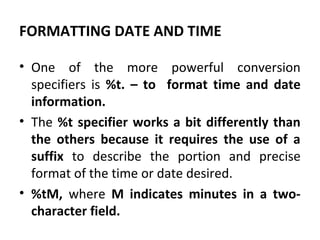
FORMATTING DATE AND TIME
• One of the more powerful conversion
specifiers is %t. – to format time and date
information.
• The %t specifier works a bit differently than
the others because it requires the use of a
suffix to describe the portion and precise
format of the time or date desired.
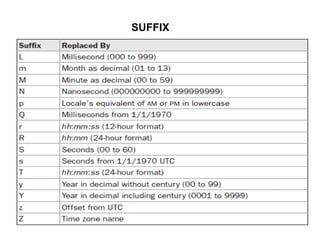
• %tM, where M indicates minutes in a two-
character field.
SUFFIX
FORMATTING TIME AND DATE.
import java.util.*;
class TimeDateFormat
{
public static void main(String args[])
{
Formatter fmt = new Formatter();
Calendar cal = Calendar.getInstance();
// Display standard 12-hour time format.
fmt.format("%tr", cal);
System.out.println(fmt);
// Display complete time and date
information.
fmt = new Formatter();
fmt.format("%tc", cal);
System.out.println(fmt);
// Display just hour and minute.
fmt = new Formatter();
fmt.format("%tl:%tM", cal, cal);
System.out.println(fmt);
// Display month by name and
number.
fmt = new Formatter();
fmt.format("%tB %tb %tm", cal, cal,
cal);
System.out.println(fmt);
}
}
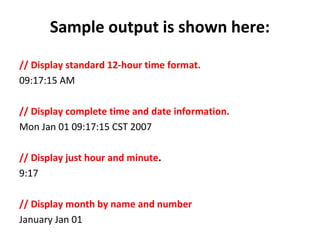
Sample output is shown here:
// Display standard 12-hour time format.
09:17:15 AM
// Display complete time and date information.
Mon Jan 01 09:17:15 CST 2007
// Display just hour and minute.
9:17
// Display month by name and number
January Jan 01
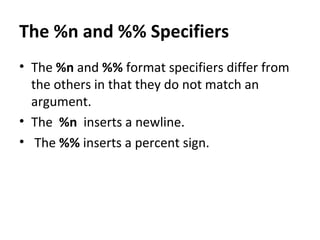
The %n and %% Specifiers
• The %n and %% format specifiers differ from
the others in that they do not match an
argument.
• The %n inserts a newline.
• The %% inserts a percent sign.
// Demonstrate the %n and %% format specifiers.
import java.util.*;
class FormatDemo3
{
public static void main(String args[])
{
Formatter fmt = new Formatter();
fmt.format("Copying file%nTransfer is %d%% complete", 88);
System.out.println(fmt);
}
}
Output:
Copying file
Transfer is 88% complete
Specifying a Minimum Field Width
• An integer placed between the % sign and the
format conversion code acts as a minimum
field-width specifier.
• This pads the output with spaces to ensure
that it reaches a certain minimum length.
// Demonstrate a field-width specifier
import java.util.*;
class FormatDemo4
{
public static void main(String args[])
{
Formatter fmt = new Formatter();
fmt.format("|%f|%n|%12f|%n|%012f|",
10.12345, 10.12345, 10.12345);
System.out.println(fmt);
}
}
Specifying Precision
• Aprecision specifier can be applied to the %f,
%e, %g, and %s format specifiers.
• It follows the minimum field-width specifier (if
there is one) and consists of a period followed
by an integer.
• Its exact meaning depends upon the type of
data to which it is applied.
Using the Format Flags
• Formatter recognizes a set of format flags
that lets you control various aspects of a
Conversion.
• All format flags are single characters, and a
format flag follows the % in a format
specification.
Date and time

Date and time

  • 1.
  • 2.
    FORMATTING DATE ANDTIME • One of the more powerful conversion specifiers is %t. – to format time and date information. • The %t specifier works a bit differently than the others because it requires the use of a suffix to describe the portion and precise format of the time or date desired. • %tM, where M indicates minutes in a two- character field.
  • 3.
  • 4.
    FORMATTING TIME ANDDATE. import java.util.*; class TimeDateFormat { public static void main(String args[]) { Formatter fmt = new Formatter(); Calendar cal = Calendar.getInstance(); // Display standard 12-hour time format. fmt.format("%tr", cal); System.out.println(fmt); // Display complete time and date information. fmt = new Formatter(); fmt.format("%tc", cal); System.out.println(fmt); // Display just hour and minute. fmt = new Formatter(); fmt.format("%tl:%tM", cal, cal); System.out.println(fmt); // Display month by name and number. fmt = new Formatter(); fmt.format("%tB %tb %tm", cal, cal, cal); System.out.println(fmt); } }
  • 5.
    Sample output isshown here: // Display standard 12-hour time format. 09:17:15 AM // Display complete time and date information. Mon Jan 01 09:17:15 CST 2007 // Display just hour and minute. 9:17 // Display month by name and number January Jan 01
  • 6.
    The %n and%% Specifiers • The %n and %% format specifiers differ from the others in that they do not match an argument. • The %n inserts a newline. • The %% inserts a percent sign.
  • 7.
    // Demonstrate the%n and %% format specifiers. import java.util.*; class FormatDemo3 { public static void main(String args[]) { Formatter fmt = new Formatter(); fmt.format("Copying file%nTransfer is %d%% complete", 88); System.out.println(fmt); } } Output: Copying file Transfer is 88% complete
  • 8.
    Specifying a MinimumField Width • An integer placed between the % sign and the format conversion code acts as a minimum field-width specifier. • This pads the output with spaces to ensure that it reaches a certain minimum length.
  • 9.
    // Demonstrate afield-width specifier import java.util.*; class FormatDemo4 { public static void main(String args[]) { Formatter fmt = new Formatter(); fmt.format("|%f|%n|%12f|%n|%012f|", 10.12345, 10.12345, 10.12345); System.out.println(fmt); } }
  • 10.
    Specifying Precision • Aprecisionspecifier can be applied to the %f, %e, %g, and %s format specifiers. • It follows the minimum field-width specifier (if there is one) and consists of a period followed by an integer. • Its exact meaning depends upon the type of data to which it is applied.
  • 11.
    Using the FormatFlags • Formatter recognizes a set of format flags that lets you control various aspects of a Conversion. • All format flags are single characters, and a format flag follows the % in a format specification.