Database System Concepts, 7th Ed.
©Silberschatz, Korth and Sudarshan
See www.db-book.com for conditions on re-use
Chapter 4 : Intermediate SQL
©Silberschatz, Korth and Sudarshan
4.2
Database System Concepts - 7th Edition
Outline
 Join Expressions
 Integrity Constraints
 SQL Data Types and Schemas
 Views
 Transactions
 Index Definition in SQL
 Authorization
4.1, 4.4, 4.5 then the rest…
©Silberschatz, Korth and Sudarshan
4.3
Database System Concepts - 7th Edition
Joined Relations
 Join operations take two relations and return as a result another
relation.
 A join operation is a Cartesian product which requires that tuples in the
two relations match (under some condition). It also specifies the
attributes that are present in the result of the join
 The join operations are typically used as subquery expressions in the
from clause
 Three types of joins:
• Natural join
• Inner join
• Outer join
©Silberschatz, Korth and Sudarshan
4.4
Database System Concepts - 7th Edition
2 or more relations in FROM
 So far we did :
• select name, course_id
from student, takes
where student.ID = takes.ID;
©Silberschatz, Korth and Sudarshan
4.5
Database System Concepts - 7th Edition
Natural Join in SQL
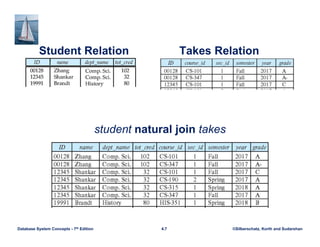
 Natural join matches tuples with the same values for all common
attributes, and retains only one copy of each common column.
 List the names of instructors along with the course ID of the courses that
they taught
• select name, course_id
from students, takes
where student.ID = takes.ID;
 Same query in SQL with “natural join” construct
• select name, course_id
from student natural join takes;
©Silberschatz, Korth and Sudarshan
4.6
Database System Concepts - 7th Edition
Natural Join in SQL (Cont.)
 The from clause can have multiple relations combined using natural join:
select A1, A2, … An
from r1 natural join r2 natural join .. natural join rn
where P ;
©Silberschatz, Korth and Sudarshan
4.7
Database System Concepts - 7th Edition
Student Relation Takes Relation
student natural join takes
©Silberschatz, Korth and Sudarshan
4.8
Database System Concepts - 7th Edition
Dangers in Natural Join
 Beware of unrelated attributes with same name which get equated
incorrectly
 Example -- List the names of students instructors along with the titles of
courses that they have taken
• Correct version
select name, title
from student natural join takes, course
where takes.course_id = course.course_id;
• Incorrect version
select name, title
from student natural join takes natural join course;
 This query omits all (student name, course title) pairs where the
student takes a course in a department other than the student's
own department.
 The correct version (above), correctly outputs such pairs.
©Silberschatz, Korth and Sudarshan
4.9
Database System Concepts - 7th Edition
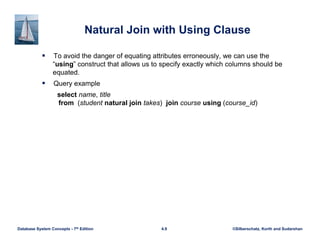
Natural Join with Using Clause
 To avoid the danger of equating attributes erroneously, we can use the
“using” construct that allows us to specify exactly which columns should be
equated.
 Query example
select name, title
from (student natural join takes) join course using (course_id)
©Silberschatz, Korth and Sudarshan
4.10
Database System Concepts - 7th Edition
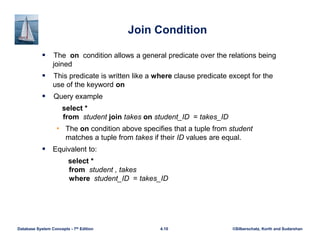
Join Condition
 The on condition allows a general predicate over the relations being
joined
 This predicate is written like a where clause predicate except for the
use of the keyword on
 Query example
select *
from student join takes on student_ID = takes_ID
• The on condition above specifies that a tuple from student
matches a tuple from takes if their ID values are equal.
 Equivalent to:
select *
from student , takes
where student_ID = takes_ID
©Silberschatz, Korth and Sudarshan
4.11
Database System Concepts - 7th Edition
Outer Join
 Suppose we wish to display a list of all students, displaying their ID,
and name, dept_name, and tot_cred, along with the courses that they
have taken.
• select * from student natural join takes;
 Unfortunately, this query does not work quite as intended
©Silberschatz, Korth and Sudarshan
4.12
Database System Concepts - 7th Edition
Outer Join
 An extension of the join operation that avoids loss of information.
 Computes the join and then adds tuples form one relation that does
not match tuples in the other relation to the result of the join.
 Uses null values.
 Three forms of outer join:
• left outer join
• right outer join
• full outer join
©Silberschatz, Korth and Sudarshan
4.13
Database System Concepts - 7th Edition
Outer Join Examples
 Relation course
 Relation prereq
 Observe that
course information is missing CS-437
prereq information is missing CS-315
 This breaks the integrity of the database but we allow it for the sake of
simplicity
©Silberschatz, Korth and Sudarshan
4.14
Database System Concepts - 7th Edition
Left Outer Join
 course natural left outer join prereq
 In relational algebra: course ⟕ prereq
©Silberschatz, Korth and Sudarshan
4.15
Database System Concepts - 7th Edition
Right Outer Join
 course natural right outer join prereq
 In relational algebra: course ⟖ prereq
©Silberschatz, Korth and Sudarshan
4.16
Database System Concepts - 7th Edition
Full Outer Join
 course natural full outer join prereq
 In relational algebra: course ⟗ prereq
©Silberschatz, Korth and Sudarshan
4.17
Database System Concepts - 7th Edition
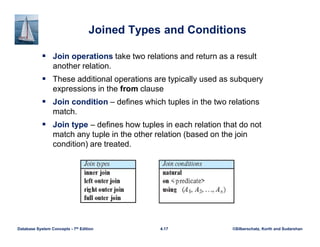
Joined Types and Conditions
 Join operations take two relations and return as a result
another relation.
 These additional operations are typically used as subquery
expressions in the from clause
 Join condition – defines which tuples in the two relations
match.
 Join type – defines how tuples in each relation that do not
match any tuple in the other relation (based on the join
condition) are treated.
©Silberschatz, Korth and Sudarshan
4.18
Database System Concepts - 7th Edition
Joined Relations – Examples
 course natural right outer join prereq
 course full outer join prereq using (course_id)
©Silberschatz, Korth and Sudarshan
4.19
Database System Concepts - 7th Edition
Joined Relations – Examples
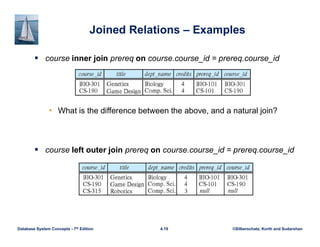
 course inner join prereq on course.course_id = prereq.course_id
• What is the difference between the above, and a natural join?
 course left outer join prereq on course.course_id = prereq.course_id
©Silberschatz, Korth and Sudarshan
4.20
Database System Concepts - 7th Edition
Joined Relations – Examples
 course natural right outer join prereq
 course full outer join prereq using (course_id)
©Silberschatz, Korth and Sudarshan
4.21
Database System Concepts - 7th Edition
Integrity Constraints
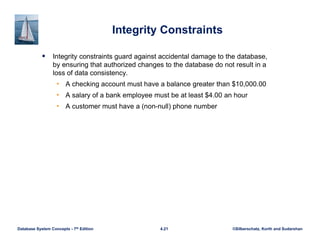
 Integrity constraints guard against accidental damage to the database,
by ensuring that authorized changes to the database do not result in a
loss of data consistency.
• A checking account must have a balance greater than $10,000.00
• A salary of a bank employee must be at least $4.00 an hour
• A customer must have a (non-null) phone number
©Silberschatz, Korth and Sudarshan
4.22
Database System Concepts - 7th Edition
Constraints on a Single Relation
 not null
 primary key
 unique
 check (P), where P is a predicate
©Silberschatz, Korth and Sudarshan
4.23
Database System Concepts - 7th Edition
Not Null Constraints
 not null
• Declare name and budget to be not null
name varchar(20) not null
budget numeric(12,2) not null
©Silberschatz, Korth and Sudarshan
4.24
Database System Concepts - 7th Edition
Unique Constraints
 unique ( A1, A2, …, Am)
• The unique specification states that the attributes A1, A2, …, Am
form a candidate key.
• Candidate keys are permitted to be null (in contrast to primary
keys).
©Silberschatz, Korth and Sudarshan
4.25
Database System Concepts - 7th Edition
The check clause
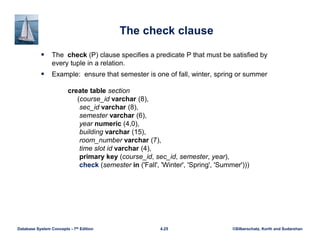
 The check (P) clause specifies a predicate P that must be satisfied by
every tuple in a relation.
 Example: ensure that semester is one of fall, winter, spring or summer
create table section
(course_id varchar (8),
sec_id varchar (8),
semester varchar (6),
year numeric (4,0),
building varchar (15),
room_number varchar (7),
time slot id varchar (4),
primary key (course_id, sec_id, semester, year),
check (semester in ('Fall', 'Winter', 'Spring', 'Summer')))
©Silberschatz, Korth and Sudarshan
4.26
Database System Concepts - 7th Edition
Referential Integrity
 Ensures that a value that appears in one relation for a given set of
attributes also appears for a certain set of attributes in another relation.
• Example: If “Biology” is a department name appearing in one of the
tuples in the instructor relation, then there exists a tuple in the
department relation for “Biology”.
 Let A be a set of attributes. Let R and S be two relations that contain
attributes A and where A is the primary key of S. A is said to be a
foreign key of R if for any values of A appearing in R these values also
appear in S.
©Silberschatz, Korth and Sudarshan
4.27
Database System Concepts - 7th Edition
Referential Integrity (Cont.)
 Foreign keys can be specified as part of the SQL create table
statement
foreign key (dept_name) references department
 By default, a foreign key references the primary-key attributes of the
referenced table.
 SQL allows a list of attributes of the referenced relation to be specified
explicitly.
foreign key (dept_name) references department (dept_name)
©Silberschatz, Korth and Sudarshan
4.28
Database System Concepts - 7th Edition
Cascading Actions in Referential Integrity
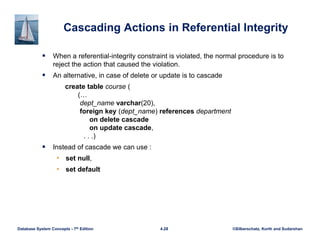
 When a referential-integrity constraint is violated, the normal procedure is to
reject the action that caused the violation.
 An alternative, in case of delete or update is to cascade
create table course (
(…
dept_name varchar(20),
foreign key (dept_name) references department
on delete cascade
on update cascade,
. . .)
 Instead of cascade we can use :
• set null,
• set default
©Silberschatz, Korth and Sudarshan
4.29
Database System Concepts - 7th Edition
Integrity Constraint Violation During Transactions
 Consider:
create table person (
ID char(10),
name char(40),
mother char(10),
father char(10),
primary key ID,
foreign key father references person,
foreign key mother references person)
 How to insert a tuple without causing constraint violation?
• Insert father and mother of a person before inserting person
• OR, set father and mother to null initially, update after inserting all
persons (not possible if father and mother attributes declared to be not
null)
• OR defer constraint checking
©Silberschatz, Korth and Sudarshan
4.30
Database System Concepts - 7th Edition
Complex Check Conditions
 The predicate in the check clause can be an arbitrary predicate that can
include a subquery.
check (time_slot_id in (select time_slot_id from time_slot))
The check condition states that the time_slot_id in each tuple in the
section relation is actually the identifier of a time slot in the time_slot
relation.
• The condition has to be checked not only when a tuple is inserted or
modified in section , but also when the relation time_slot changes
©Silberschatz, Korth and Sudarshan
4.31
Database System Concepts - 7th Edition
Assertions
 An assertion is a predicate expressing a condition that we wish the
database always to satisfy.
 The following constraints, can be expressed using assertions:
• For each tuple in the student relation, the value of the attribute
tot_cred must equal the sum of credits of courses that the student has
completed successfully.
 An instructor cannot teach in two different classrooms in a semester in the
same time slot
 An assertion in SQL takes the form:
create assertion <assertion-name> check (<predicate>);
©Silberschatz, Korth and Sudarshan
4.32
Database System Concepts - 7th Edition
Built-in Data Types in SQL
 date: Dates, containing a (4 digit) year, month and date
• Example: date '2005-7-27'
 time: Time of day, in hours, minutes and seconds.
• Example: time '09:00:30' time '09:00:30.75'
 timestamp: date plus time of day
• Example: timestamp '2005-7-27 09:00:30.75'
 interval: period of time
• Example: interval '1' day
• Subtracting a date/time/timestamp value from another gives an
interval value
• Interval values can be added to date/time/timestamp values
©Silberschatz, Korth and Sudarshan
4.33
Database System Concepts - 7th Edition
Large-Object Types
 Large objects (photos, videos, CAD files, etc.) are stored as a large
object:
• blob: binary large object -- object is a large collection of uninterpreted
binary data (whose interpretation is left to an application outside of
the database system)
• clob: character large object -- object is a large collection of character
data
 When a query returns a large object, a pointer is returned rather than the
large object itself.
©Silberschatz, Korth and Sudarshan
4.34
Database System Concepts - 7th Edition
User-Defined Types
 create type construct in SQL creates user-defined type
create type Dollars as numeric (12,2) final
 Example:
create table department
(dept_name varchar (20),
building varchar (15),
budget Dollars);
©Silberschatz, Korth and Sudarshan
4.35
Database System Concepts - 7th Edition
Domains
 create domain construct in SQL-92 creates user-defined domain
types
create domain person_name char(20) not null
 Types and domains are similar. Domains can have constraints,
such as not null, specified on them.
 Example:
create domain degree_level varchar(10)
constraint degree_level_test
check (value in ('Bachelors', 'Masters', 'Doctorate'));
©Silberschatz, Korth and Sudarshan
4.36
Database System Concepts - 7th Edition
Create Table Extensions
 You can create tables “like” others and also “from” query results
• Create table like
• Create table as
create table t1 as
(select * from instructor
where dept_name = 'Music’)
with data;
©Silberschatz, Korth and Sudarshan
4.37
Database System Concepts - 7th Edition
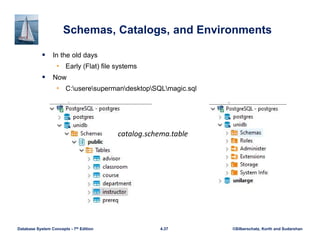
Schemas, Catalogs, and Environments
 In the old days
• Early (Flat) file systems
 Now
• C:useresupermandesktopSQLmagic.sql
catalog.schema.table
©Silberschatz, Korth and Sudarshan
4.38
Database System Concepts - 7th Edition
Views
 In some cases, it is not desirable for all users to see the entire logical
model (that is, all the actual relations stored in the database.)
 Consider a person who needs to know an instructors name and
department, but not the salary. This person should see a relation
described, in SQL, by
select ID, name, dept_name
from instructor
 A view provides a mechanism to hide certain data from the view of
certain users.
 Any relation that is not of the conceptual model but is made visible to a
user as a “virtual relation” is called a view.
©Silberschatz, Korth and Sudarshan
4.39
Database System Concepts - 7th Edition
View Definition
 A view is defined using the create view statement which has the form
create view v as < query expression >
where <query expression> is any legal SQL expression. The view name
is represented by v.
 Once a view is defined, the view name can be used to refer to the virtual
relation that the view generates.
 View definition is not the same as creating a new relation by evaluating
the query expression
• Rather, a view definition causes the saving of an expression; the
expression is substituted into queries using the view.
©Silberschatz, Korth and Sudarshan
4.40
Database System Concepts - 7th Edition
View Definition and Use
 A view of instructors without their salary
create view faculty as
select ID, name, dept_name
from instructor
 Find all instructors in the Biology department
select name
from faculty
where dept_name = 'Biology'
 Create a view of department salary totals
create view departments_total_salary(dept_name, total_salary) as
select dept_name, sum (salary)
from instructor
group by dept_name;
©Silberschatz, Korth and Sudarshan
4.41
Database System Concepts - 7th Edition
Views Defined Using Other Views
 One view may be used in the expression defining another view
 A view relation v1 is said to depend directly on a view relation v2 if v2 is
used in the expression defining v1
 A view relation v1 is said to depend on view relation v2 if either v1 depends
directly to v2 or there is a path of dependencies from v1 to v2
 A view relation v is said to be recursive if it depends on itself.
©Silberschatz, Korth and Sudarshan
4.42
Database System Concepts - 7th Edition
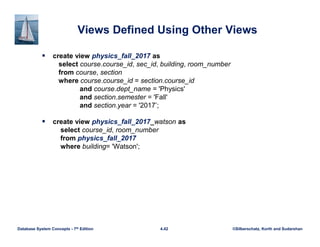
Views Defined Using Other Views
 create view physics_fall_2017 as
select course.course_id, sec_id, building, room_number
from course, section
where course.course_id = section.course_id
and course.dept_name = 'Physics'
and section.semester = 'Fall'
and section.year = '2017’;
 create view physics_fall_2017_watson as
select course_id, room_number
from physics_fall_2017
where building= 'Watson';
©Silberschatz, Korth and Sudarshan
4.43
Database System Concepts - 7th Edition
View Expansion
 Expand the view :
create view physics_fall_2017_watson as
select course_id, room_number
from physics_fall_2017
where building= 'Watson'
 To:
create view physics_fall_2017_watson as
select course_id, room_number
from (select course.course_id, building, room_number
from course, section
where course.course_id = section.course_id
and course.dept_name = 'Physics'
and section.semester = 'Fall'
and section.year = '2017')
where building= 'Watson';
©Silberschatz, Korth and Sudarshan
4.44
Database System Concepts - 7th Edition
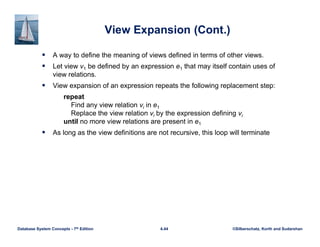
View Expansion (Cont.)
 A way to define the meaning of views defined in terms of other views.
 Let view v1 be defined by an expression e1 that may itself contain uses of
view relations.
 View expansion of an expression repeats the following replacement step:
repeat
Find any view relation vi in e1
Replace the view relation vi by the expression defining vi
until no more view relations are present in e1
 As long as the view definitions are not recursive, this loop will terminate
©Silberschatz, Korth and Sudarshan
4.45
Database System Concepts - 7th Edition
Materialized Views
 Certain database systems allow view relations to be physically stored.
• Physical copy created when the view is defined.
• Such views are called Materialized view:
 If relations used in the query are updated, the materialized view result
becomes out of date
• Need to maintain the view, by updating the view whenever the
underlying relations are updated.
©Silberschatz, Korth and Sudarshan
4.46
Database System Concepts - 7th Edition
Update of a View
 Add a new tuple to faculty view which we defined earlier
insert into faculty
values ('30765', 'Green', 'Music');
 This insertion must be represented by the insertion into the instructor
relation
• Must have a value for salary.
 Two approaches
• Reject the insert
• Inset the tuple
('30765', 'Green', 'Music', null)
into the instructor relation
©Silberschatz, Korth and Sudarshan
4.47
Database System Concepts - 7th Edition
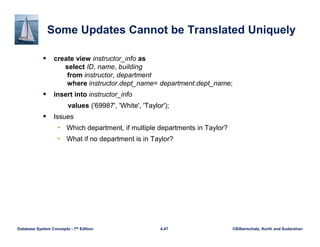
Some Updates Cannot be Translated Uniquely
 create view instructor_info as
select ID, name, building
from instructor, department
where instructor.dept_name= department.dept_name;
 insert into instructor_info
values ('69987', 'White', 'Taylor');
 Issues
• Which department, if multiple departments in Taylor?
• What if no department is in Taylor?
©Silberschatz, Korth and Sudarshan
4.48
Database System Concepts - 7th Edition
And Some Not at All
 create view history_instructors as
select *
from instructor
where dept_name= 'History';
 What happens if we insert
('25566', 'Brown', 'Biology', 100000)
into history_instructors?
©Silberschatz, Korth and Sudarshan
4.49
Database System Concepts - 7th Edition
View Updates in SQL
 Most SQL implementations allow updates only on simple views
• The from clause has only one database relation.
• The select clause contains only attribute names of the relation, and
does not have any expressions, aggregates, or distinct
specification.
• Any attribute not listed in the select clause can be set to null
• The query does not have a group by or having clause.
©Silberschatz, Korth and Sudarshan
4.50
Database System Concepts - 7th Edition
Transactions
 A transaction consists of a sequence of query and/or update
statements and is a “unit” of work
 The SQL standard specifies that a transaction begins implicitly when an
SQL statement is executed.
 The transaction must end with one of the following statements:
• Commit work. The updates performed by the transaction become
permanent in the database.
• Rollback work. All the updates performed by the SQL statements
in the transaction are undone.
 Atomic transaction
• either fully executed or rolled back as if it never occurred
 Isolation from concurrent transactions
©Silberschatz, Korth and Sudarshan
4.51
Database System Concepts - 7th Edition
Integrity Constraint Violation During Transactions
 Consider:
create table person (
ID char(10),
name char(40),
mother char(10),
father char(10),
primary key ID,
foreign key father references person,
foreign key mother references person)
 How to insert a tuple without causing constraint violation?
• Insert father and mother of a person before inserting person
• OR, set father and mother to null initially, update after inserting all
persons (not possible if father and mother attributes declared to be not
null)
• OR defer constraint checking
©Silberschatz, Korth and Sudarshan
4.52
Database System Concepts - 7th Edition
Index Creation
 Many queries reference only a small proportion of the records in a table.
 It is inefficient for the system to read every record to find a record with
particular value
 An index on an attribute of a relation is a data structure that allows the
database system to find those tuples in the relation that have a specified
value for that attribute efficiently, without scanning through all the tuples of
the relation.
 We create an index with the create index command
create index <name> on <relation-name> (attribute);
©Silberschatz, Korth and Sudarshan
4.53
Database System Concepts - 7th Edition
Index Creation Example
 create table student
(ID varchar (5),
name varchar (20) not null,
dept_name varchar (20),
tot_cred numeric (3,0) default 0,
primary key (ID))
 create index studentID_index on student(ID)
 The query:
select *
from student
where ID = '12345'
can be executed by using the index to find the required record, without
looking at all records of student
©Silberschatz, Korth and Sudarshan
4.54
Database System Concepts - 7th Edition
Authorization
 We may assign a user several forms of authorizations on parts of the
database.
• Read - allows reading, but not modification of data.
• Insert - allows insertion of new data, but not modification of existing
data.
• Update - allows modification, but not deletion of data.
• Delete - allows deletion of data.
 Each of these types of authorizations is called a privilege. We may
authorize the user all, none, or a combination of these types of privileges
on specified parts of a database, such as a relation or a view.
©Silberschatz, Korth and Sudarshan
4.55
Database System Concepts - 7th Edition
Authorization (Cont.)
 Forms of authorization to modify the database schema
• Index - allows creation and deletion of indices.
• Resources - allows creation of new relations.
• Alteration - allows addition or deletion of attributes in a relation.
• Drop - allows deletion of relations.
©Silberschatz, Korth and Sudarshan
4.56
Database System Concepts - 7th Edition
Authorization Specification in SQL
 The grant statement is used to confer authorization
grant <privilege list> on <relation or view > to <user list>
 <user list> is:
• a user-id
• public, which allows all valid users the privilege granted
• A role (more on this later)
 Example:
• grant select on department to Amit, Satoshi
 Granting a privilege on a view does not imply granting any privileges on
the underlying relations.
 The grantor of the privilege must already hold the privilege on the
specified item (or be the database administrator).
©Silberschatz, Korth and Sudarshan
4.57
Database System Concepts - 7th Edition
Privileges in SQL
 select: allows read access to relation, or the ability to query using the
view
• Example: grant users U1, U2, and U3 select authorization on the
instructor relation:
grant select on instructor to U1, U2, U3
 insert: the ability to insert tuples
 update: the ability to update using the SQL update statement
 delete: the ability to delete tuples.
 all privileges: used as a short form for all the allowable privileges
©Silberschatz, Korth and Sudarshan
4.58
Database System Concepts - 7th Edition
Revoking Authorization in SQL
 The revoke statement is used to revoke authorization.
revoke <privilege list> on <relation or view> from <user list>
 Example:
revoke select on student from U1, U2, U3
 <privilege-list> may be all to revoke all privileges the revokee may hold.
 If <revokee-list> includes public, all users lose the privilege except those
granted it explicitly.
 If the same privilege was granted twice to the same user by different
grantees, the user may retain the privilege after the revocation.
 All privileges that depend on the privilege being revoked are also
revoked.
©Silberschatz, Korth and Sudarshan
4.59
Database System Concepts - 7th Edition
Roles
 A role is a way to distinguish among various users as far as what these
users can access/update in the database.
 To create a role we use:
create a role <name>
 Example:
• create role instructor
 Once a role is created we can assign “users” to the role using:
• grant <role> to <users>
©Silberschatz, Korth and Sudarshan
4.60
Database System Concepts - 7th Edition
Roles Example
 create role instructor;
 grant instructor to Amit;
 Privileges can be granted to roles:
• grant select on takes to instructor;
 Roles can be granted to users, as well as to other roles
• create role teaching_assistant
• grant teaching_assistant to instructor;
 Instructor inherits all privileges of teaching_assistant
 Chain of roles
• create role dean;
• grant instructor to dean;
• grant dean to Satoshi;
©Silberschatz, Korth and Sudarshan
4.61
Database System Concepts - 7th Edition
Authorization on Views
 create view geo_instructor as
(select *
from instructor
where dept_name = 'Geology');
 grant select on geo_instructor to geo_staff
 Suppose that a geo_staff member issues
• select *
from geo_instructor;
 What if
• geo_staff does not have permissions on instructor?
• Creator of view did not have some permissions on instructor?
©Silberschatz, Korth and Sudarshan
4.62
Database System Concepts - 7th Edition
Other Authorization Features
 references privilege to create foreign key
• grant reference (dept_name) on department to Mariano;
• Why is this required?
 transfer of privileges
• grant select on department to Amit with grant option;
• revoke select on department from Amit, Satoshi cascade;
• revoke select on department from Amit, Satoshi restrict;
• And more!
©Silberschatz, Korth and Sudarshan
4.63
Database System Concepts - 7th Edition
End of Chapter 4

Database System Concepts ch4.pdf

  • 1.
    Database System Concepts,7th Ed. ©Silberschatz, Korth and Sudarshan See www.db-book.com for conditions on re-use Chapter 4 : Intermediate SQL
  • 2.
    ©Silberschatz, Korth andSudarshan 4.2 Database System Concepts - 7th Edition Outline  Join Expressions  Integrity Constraints  SQL Data Types and Schemas  Views  Transactions  Index Definition in SQL  Authorization 4.1, 4.4, 4.5 then the rest…
  • 3.
    ©Silberschatz, Korth andSudarshan 4.3 Database System Concepts - 7th Edition Joined Relations  Join operations take two relations and return as a result another relation.  A join operation is a Cartesian product which requires that tuples in the two relations match (under some condition). It also specifies the attributes that are present in the result of the join  The join operations are typically used as subquery expressions in the from clause  Three types of joins: • Natural join • Inner join • Outer join
  • 4.
    ©Silberschatz, Korth andSudarshan 4.4 Database System Concepts - 7th Edition 2 or more relations in FROM  So far we did : • select name, course_id from student, takes where student.ID = takes.ID;
  • 5.
    ©Silberschatz, Korth andSudarshan 4.5 Database System Concepts - 7th Edition Natural Join in SQL  Natural join matches tuples with the same values for all common attributes, and retains only one copy of each common column.  List the names of instructors along with the course ID of the courses that they taught • select name, course_id from students, takes where student.ID = takes.ID;  Same query in SQL with “natural join” construct • select name, course_id from student natural join takes;
  • 6.
    ©Silberschatz, Korth andSudarshan 4.6 Database System Concepts - 7th Edition Natural Join in SQL (Cont.)  The from clause can have multiple relations combined using natural join: select A1, A2, … An from r1 natural join r2 natural join .. natural join rn where P ;
  • 7.
    ©Silberschatz, Korth andSudarshan 4.7 Database System Concepts - 7th Edition Student Relation Takes Relation student natural join takes
  • 8.
    ©Silberschatz, Korth andSudarshan 4.8 Database System Concepts - 7th Edition Dangers in Natural Join  Beware of unrelated attributes with same name which get equated incorrectly  Example -- List the names of students instructors along with the titles of courses that they have taken • Correct version select name, title from student natural join takes, course where takes.course_id = course.course_id; • Incorrect version select name, title from student natural join takes natural join course;  This query omits all (student name, course title) pairs where the student takes a course in a department other than the student's own department.  The correct version (above), correctly outputs such pairs.
  • 9.
    ©Silberschatz, Korth andSudarshan 4.9 Database System Concepts - 7th Edition Natural Join with Using Clause  To avoid the danger of equating attributes erroneously, we can use the “using” construct that allows us to specify exactly which columns should be equated.  Query example select name, title from (student natural join takes) join course using (course_id)
  • 10.
    ©Silberschatz, Korth andSudarshan 4.10 Database System Concepts - 7th Edition Join Condition  The on condition allows a general predicate over the relations being joined  This predicate is written like a where clause predicate except for the use of the keyword on  Query example select * from student join takes on student_ID = takes_ID • The on condition above specifies that a tuple from student matches a tuple from takes if their ID values are equal.  Equivalent to: select * from student , takes where student_ID = takes_ID
  • 11.
    ©Silberschatz, Korth andSudarshan 4.11 Database System Concepts - 7th Edition Outer Join  Suppose we wish to display a list of all students, displaying their ID, and name, dept_name, and tot_cred, along with the courses that they have taken. • select * from student natural join takes;  Unfortunately, this query does not work quite as intended
  • 12.
    ©Silberschatz, Korth andSudarshan 4.12 Database System Concepts - 7th Edition Outer Join  An extension of the join operation that avoids loss of information.  Computes the join and then adds tuples form one relation that does not match tuples in the other relation to the result of the join.  Uses null values.  Three forms of outer join: • left outer join • right outer join • full outer join
  • 13.
    ©Silberschatz, Korth andSudarshan 4.13 Database System Concepts - 7th Edition Outer Join Examples  Relation course  Relation prereq  Observe that course information is missing CS-437 prereq information is missing CS-315  This breaks the integrity of the database but we allow it for the sake of simplicity
  • 14.
    ©Silberschatz, Korth andSudarshan 4.14 Database System Concepts - 7th Edition Left Outer Join  course natural left outer join prereq  In relational algebra: course ⟕ prereq
  • 15.
    ©Silberschatz, Korth andSudarshan 4.15 Database System Concepts - 7th Edition Right Outer Join  course natural right outer join prereq  In relational algebra: course ⟖ prereq
  • 16.
    ©Silberschatz, Korth andSudarshan 4.16 Database System Concepts - 7th Edition Full Outer Join  course natural full outer join prereq  In relational algebra: course ⟗ prereq
  • 17.
    ©Silberschatz, Korth andSudarshan 4.17 Database System Concepts - 7th Edition Joined Types and Conditions  Join operations take two relations and return as a result another relation.  These additional operations are typically used as subquery expressions in the from clause  Join condition – defines which tuples in the two relations match.  Join type – defines how tuples in each relation that do not match any tuple in the other relation (based on the join condition) are treated.
  • 18.
    ©Silberschatz, Korth andSudarshan 4.18 Database System Concepts - 7th Edition Joined Relations – Examples  course natural right outer join prereq  course full outer join prereq using (course_id)
  • 19.
    ©Silberschatz, Korth andSudarshan 4.19 Database System Concepts - 7th Edition Joined Relations – Examples  course inner join prereq on course.course_id = prereq.course_id • What is the difference between the above, and a natural join?  course left outer join prereq on course.course_id = prereq.course_id
  • 20.
    ©Silberschatz, Korth andSudarshan 4.20 Database System Concepts - 7th Edition Joined Relations – Examples  course natural right outer join prereq  course full outer join prereq using (course_id)
  • 21.
    ©Silberschatz, Korth andSudarshan 4.21 Database System Concepts - 7th Edition Integrity Constraints  Integrity constraints guard against accidental damage to the database, by ensuring that authorized changes to the database do not result in a loss of data consistency. • A checking account must have a balance greater than $10,000.00 • A salary of a bank employee must be at least $4.00 an hour • A customer must have a (non-null) phone number
  • 22.
    ©Silberschatz, Korth andSudarshan 4.22 Database System Concepts - 7th Edition Constraints on a Single Relation  not null  primary key  unique  check (P), where P is a predicate
  • 23.
    ©Silberschatz, Korth andSudarshan 4.23 Database System Concepts - 7th Edition Not Null Constraints  not null • Declare name and budget to be not null name varchar(20) not null budget numeric(12,2) not null
  • 24.
    ©Silberschatz, Korth andSudarshan 4.24 Database System Concepts - 7th Edition Unique Constraints  unique ( A1, A2, …, Am) • The unique specification states that the attributes A1, A2, …, Am form a candidate key. • Candidate keys are permitted to be null (in contrast to primary keys).
  • 25.
    ©Silberschatz, Korth andSudarshan 4.25 Database System Concepts - 7th Edition The check clause  The check (P) clause specifies a predicate P that must be satisfied by every tuple in a relation.  Example: ensure that semester is one of fall, winter, spring or summer create table section (course_id varchar (8), sec_id varchar (8), semester varchar (6), year numeric (4,0), building varchar (15), room_number varchar (7), time slot id varchar (4), primary key (course_id, sec_id, semester, year), check (semester in ('Fall', 'Winter', 'Spring', 'Summer')))
  • 26.
    ©Silberschatz, Korth andSudarshan 4.26 Database System Concepts - 7th Edition Referential Integrity  Ensures that a value that appears in one relation for a given set of attributes also appears for a certain set of attributes in another relation. • Example: If “Biology” is a department name appearing in one of the tuples in the instructor relation, then there exists a tuple in the department relation for “Biology”.  Let A be a set of attributes. Let R and S be two relations that contain attributes A and where A is the primary key of S. A is said to be a foreign key of R if for any values of A appearing in R these values also appear in S.
  • 27.
    ©Silberschatz, Korth andSudarshan 4.27 Database System Concepts - 7th Edition Referential Integrity (Cont.)  Foreign keys can be specified as part of the SQL create table statement foreign key (dept_name) references department  By default, a foreign key references the primary-key attributes of the referenced table.  SQL allows a list of attributes of the referenced relation to be specified explicitly. foreign key (dept_name) references department (dept_name)
  • 28.
    ©Silberschatz, Korth andSudarshan 4.28 Database System Concepts - 7th Edition Cascading Actions in Referential Integrity  When a referential-integrity constraint is violated, the normal procedure is to reject the action that caused the violation.  An alternative, in case of delete or update is to cascade create table course ( (… dept_name varchar(20), foreign key (dept_name) references department on delete cascade on update cascade, . . .)  Instead of cascade we can use : • set null, • set default
  • 29.
    ©Silberschatz, Korth andSudarshan 4.29 Database System Concepts - 7th Edition Integrity Constraint Violation During Transactions  Consider: create table person ( ID char(10), name char(40), mother char(10), father char(10), primary key ID, foreign key father references person, foreign key mother references person)  How to insert a tuple without causing constraint violation? • Insert father and mother of a person before inserting person • OR, set father and mother to null initially, update after inserting all persons (not possible if father and mother attributes declared to be not null) • OR defer constraint checking
  • 30.
    ©Silberschatz, Korth andSudarshan 4.30 Database System Concepts - 7th Edition Complex Check Conditions  The predicate in the check clause can be an arbitrary predicate that can include a subquery. check (time_slot_id in (select time_slot_id from time_slot)) The check condition states that the time_slot_id in each tuple in the section relation is actually the identifier of a time slot in the time_slot relation. • The condition has to be checked not only when a tuple is inserted or modified in section , but also when the relation time_slot changes
  • 31.
    ©Silberschatz, Korth andSudarshan 4.31 Database System Concepts - 7th Edition Assertions  An assertion is a predicate expressing a condition that we wish the database always to satisfy.  The following constraints, can be expressed using assertions: • For each tuple in the student relation, the value of the attribute tot_cred must equal the sum of credits of courses that the student has completed successfully.  An instructor cannot teach in two different classrooms in a semester in the same time slot  An assertion in SQL takes the form: create assertion <assertion-name> check (<predicate>);
  • 32.
    ©Silberschatz, Korth andSudarshan 4.32 Database System Concepts - 7th Edition Built-in Data Types in SQL  date: Dates, containing a (4 digit) year, month and date • Example: date '2005-7-27'  time: Time of day, in hours, minutes and seconds. • Example: time '09:00:30' time '09:00:30.75'  timestamp: date plus time of day • Example: timestamp '2005-7-27 09:00:30.75'  interval: period of time • Example: interval '1' day • Subtracting a date/time/timestamp value from another gives an interval value • Interval values can be added to date/time/timestamp values
  • 33.
    ©Silberschatz, Korth andSudarshan 4.33 Database System Concepts - 7th Edition Large-Object Types  Large objects (photos, videos, CAD files, etc.) are stored as a large object: • blob: binary large object -- object is a large collection of uninterpreted binary data (whose interpretation is left to an application outside of the database system) • clob: character large object -- object is a large collection of character data  When a query returns a large object, a pointer is returned rather than the large object itself.
  • 34.
    ©Silberschatz, Korth andSudarshan 4.34 Database System Concepts - 7th Edition User-Defined Types  create type construct in SQL creates user-defined type create type Dollars as numeric (12,2) final  Example: create table department (dept_name varchar (20), building varchar (15), budget Dollars);
  • 35.
    ©Silberschatz, Korth andSudarshan 4.35 Database System Concepts - 7th Edition Domains  create domain construct in SQL-92 creates user-defined domain types create domain person_name char(20) not null  Types and domains are similar. Domains can have constraints, such as not null, specified on them.  Example: create domain degree_level varchar(10) constraint degree_level_test check (value in ('Bachelors', 'Masters', 'Doctorate'));
  • 36.
    ©Silberschatz, Korth andSudarshan 4.36 Database System Concepts - 7th Edition Create Table Extensions  You can create tables “like” others and also “from” query results • Create table like • Create table as create table t1 as (select * from instructor where dept_name = 'Music’) with data;
  • 37.
    ©Silberschatz, Korth andSudarshan 4.37 Database System Concepts - 7th Edition Schemas, Catalogs, and Environments  In the old days • Early (Flat) file systems  Now • C:useresupermandesktopSQLmagic.sql catalog.schema.table
  • 38.
    ©Silberschatz, Korth andSudarshan 4.38 Database System Concepts - 7th Edition Views  In some cases, it is not desirable for all users to see the entire logical model (that is, all the actual relations stored in the database.)  Consider a person who needs to know an instructors name and department, but not the salary. This person should see a relation described, in SQL, by select ID, name, dept_name from instructor  A view provides a mechanism to hide certain data from the view of certain users.  Any relation that is not of the conceptual model but is made visible to a user as a “virtual relation” is called a view.
  • 39.
    ©Silberschatz, Korth andSudarshan 4.39 Database System Concepts - 7th Edition View Definition  A view is defined using the create view statement which has the form create view v as < query expression > where <query expression> is any legal SQL expression. The view name is represented by v.  Once a view is defined, the view name can be used to refer to the virtual relation that the view generates.  View definition is not the same as creating a new relation by evaluating the query expression • Rather, a view definition causes the saving of an expression; the expression is substituted into queries using the view.
  • 40.
    ©Silberschatz, Korth andSudarshan 4.40 Database System Concepts - 7th Edition View Definition and Use  A view of instructors without their salary create view faculty as select ID, name, dept_name from instructor  Find all instructors in the Biology department select name from faculty where dept_name = 'Biology'  Create a view of department salary totals create view departments_total_salary(dept_name, total_salary) as select dept_name, sum (salary) from instructor group by dept_name;
  • 41.
    ©Silberschatz, Korth andSudarshan 4.41 Database System Concepts - 7th Edition Views Defined Using Other Views  One view may be used in the expression defining another view  A view relation v1 is said to depend directly on a view relation v2 if v2 is used in the expression defining v1  A view relation v1 is said to depend on view relation v2 if either v1 depends directly to v2 or there is a path of dependencies from v1 to v2  A view relation v is said to be recursive if it depends on itself.
  • 42.
    ©Silberschatz, Korth andSudarshan 4.42 Database System Concepts - 7th Edition Views Defined Using Other Views  create view physics_fall_2017 as select course.course_id, sec_id, building, room_number from course, section where course.course_id = section.course_id and course.dept_name = 'Physics' and section.semester = 'Fall' and section.year = '2017’;  create view physics_fall_2017_watson as select course_id, room_number from physics_fall_2017 where building= 'Watson';
  • 43.
    ©Silberschatz, Korth andSudarshan 4.43 Database System Concepts - 7th Edition View Expansion  Expand the view : create view physics_fall_2017_watson as select course_id, room_number from physics_fall_2017 where building= 'Watson'  To: create view physics_fall_2017_watson as select course_id, room_number from (select course.course_id, building, room_number from course, section where course.course_id = section.course_id and course.dept_name = 'Physics' and section.semester = 'Fall' and section.year = '2017') where building= 'Watson';
  • 44.
    ©Silberschatz, Korth andSudarshan 4.44 Database System Concepts - 7th Edition View Expansion (Cont.)  A way to define the meaning of views defined in terms of other views.  Let view v1 be defined by an expression e1 that may itself contain uses of view relations.  View expansion of an expression repeats the following replacement step: repeat Find any view relation vi in e1 Replace the view relation vi by the expression defining vi until no more view relations are present in e1  As long as the view definitions are not recursive, this loop will terminate
  • 45.
    ©Silberschatz, Korth andSudarshan 4.45 Database System Concepts - 7th Edition Materialized Views  Certain database systems allow view relations to be physically stored. • Physical copy created when the view is defined. • Such views are called Materialized view:  If relations used in the query are updated, the materialized view result becomes out of date • Need to maintain the view, by updating the view whenever the underlying relations are updated.
  • 46.
    ©Silberschatz, Korth andSudarshan 4.46 Database System Concepts - 7th Edition Update of a View  Add a new tuple to faculty view which we defined earlier insert into faculty values ('30765', 'Green', 'Music');  This insertion must be represented by the insertion into the instructor relation • Must have a value for salary.  Two approaches • Reject the insert • Inset the tuple ('30765', 'Green', 'Music', null) into the instructor relation
  • 47.
    ©Silberschatz, Korth andSudarshan 4.47 Database System Concepts - 7th Edition Some Updates Cannot be Translated Uniquely  create view instructor_info as select ID, name, building from instructor, department where instructor.dept_name= department.dept_name;  insert into instructor_info values ('69987', 'White', 'Taylor');  Issues • Which department, if multiple departments in Taylor? • What if no department is in Taylor?
  • 48.
    ©Silberschatz, Korth andSudarshan 4.48 Database System Concepts - 7th Edition And Some Not at All  create view history_instructors as select * from instructor where dept_name= 'History';  What happens if we insert ('25566', 'Brown', 'Biology', 100000) into history_instructors?
  • 49.
    ©Silberschatz, Korth andSudarshan 4.49 Database System Concepts - 7th Edition View Updates in SQL  Most SQL implementations allow updates only on simple views • The from clause has only one database relation. • The select clause contains only attribute names of the relation, and does not have any expressions, aggregates, or distinct specification. • Any attribute not listed in the select clause can be set to null • The query does not have a group by or having clause.
  • 50.
    ©Silberschatz, Korth andSudarshan 4.50 Database System Concepts - 7th Edition Transactions  A transaction consists of a sequence of query and/or update statements and is a “unit” of work  The SQL standard specifies that a transaction begins implicitly when an SQL statement is executed.  The transaction must end with one of the following statements: • Commit work. The updates performed by the transaction become permanent in the database. • Rollback work. All the updates performed by the SQL statements in the transaction are undone.  Atomic transaction • either fully executed or rolled back as if it never occurred  Isolation from concurrent transactions
  • 51.
    ©Silberschatz, Korth andSudarshan 4.51 Database System Concepts - 7th Edition Integrity Constraint Violation During Transactions  Consider: create table person ( ID char(10), name char(40), mother char(10), father char(10), primary key ID, foreign key father references person, foreign key mother references person)  How to insert a tuple without causing constraint violation? • Insert father and mother of a person before inserting person • OR, set father and mother to null initially, update after inserting all persons (not possible if father and mother attributes declared to be not null) • OR defer constraint checking
  • 52.
    ©Silberschatz, Korth andSudarshan 4.52 Database System Concepts - 7th Edition Index Creation  Many queries reference only a small proportion of the records in a table.  It is inefficient for the system to read every record to find a record with particular value  An index on an attribute of a relation is a data structure that allows the database system to find those tuples in the relation that have a specified value for that attribute efficiently, without scanning through all the tuples of the relation.  We create an index with the create index command create index <name> on <relation-name> (attribute);
  • 53.
    ©Silberschatz, Korth andSudarshan 4.53 Database System Concepts - 7th Edition Index Creation Example  create table student (ID varchar (5), name varchar (20) not null, dept_name varchar (20), tot_cred numeric (3,0) default 0, primary key (ID))  create index studentID_index on student(ID)  The query: select * from student where ID = '12345' can be executed by using the index to find the required record, without looking at all records of student
  • 54.
    ©Silberschatz, Korth andSudarshan 4.54 Database System Concepts - 7th Edition Authorization  We may assign a user several forms of authorizations on parts of the database. • Read - allows reading, but not modification of data. • Insert - allows insertion of new data, but not modification of existing data. • Update - allows modification, but not deletion of data. • Delete - allows deletion of data.  Each of these types of authorizations is called a privilege. We may authorize the user all, none, or a combination of these types of privileges on specified parts of a database, such as a relation or a view.
  • 55.
    ©Silberschatz, Korth andSudarshan 4.55 Database System Concepts - 7th Edition Authorization (Cont.)  Forms of authorization to modify the database schema • Index - allows creation and deletion of indices. • Resources - allows creation of new relations. • Alteration - allows addition or deletion of attributes in a relation. • Drop - allows deletion of relations.
  • 56.
    ©Silberschatz, Korth andSudarshan 4.56 Database System Concepts - 7th Edition Authorization Specification in SQL  The grant statement is used to confer authorization grant <privilege list> on <relation or view > to <user list>  <user list> is: • a user-id • public, which allows all valid users the privilege granted • A role (more on this later)  Example: • grant select on department to Amit, Satoshi  Granting a privilege on a view does not imply granting any privileges on the underlying relations.  The grantor of the privilege must already hold the privilege on the specified item (or be the database administrator).
  • 57.
    ©Silberschatz, Korth andSudarshan 4.57 Database System Concepts - 7th Edition Privileges in SQL  select: allows read access to relation, or the ability to query using the view • Example: grant users U1, U2, and U3 select authorization on the instructor relation: grant select on instructor to U1, U2, U3  insert: the ability to insert tuples  update: the ability to update using the SQL update statement  delete: the ability to delete tuples.  all privileges: used as a short form for all the allowable privileges
  • 58.
    ©Silberschatz, Korth andSudarshan 4.58 Database System Concepts - 7th Edition Revoking Authorization in SQL  The revoke statement is used to revoke authorization. revoke <privilege list> on <relation or view> from <user list>  Example: revoke select on student from U1, U2, U3  <privilege-list> may be all to revoke all privileges the revokee may hold.  If <revokee-list> includes public, all users lose the privilege except those granted it explicitly.  If the same privilege was granted twice to the same user by different grantees, the user may retain the privilege after the revocation.  All privileges that depend on the privilege being revoked are also revoked.
  • 59.
    ©Silberschatz, Korth andSudarshan 4.59 Database System Concepts - 7th Edition Roles  A role is a way to distinguish among various users as far as what these users can access/update in the database.  To create a role we use: create a role <name>  Example: • create role instructor  Once a role is created we can assign “users” to the role using: • grant <role> to <users>
  • 60.
    ©Silberschatz, Korth andSudarshan 4.60 Database System Concepts - 7th Edition Roles Example  create role instructor;  grant instructor to Amit;  Privileges can be granted to roles: • grant select on takes to instructor;  Roles can be granted to users, as well as to other roles • create role teaching_assistant • grant teaching_assistant to instructor;  Instructor inherits all privileges of teaching_assistant  Chain of roles • create role dean; • grant instructor to dean; • grant dean to Satoshi;
  • 61.
    ©Silberschatz, Korth andSudarshan 4.61 Database System Concepts - 7th Edition Authorization on Views  create view geo_instructor as (select * from instructor where dept_name = 'Geology');  grant select on geo_instructor to geo_staff  Suppose that a geo_staff member issues • select * from geo_instructor;  What if • geo_staff does not have permissions on instructor? • Creator of view did not have some permissions on instructor?
  • 62.
    ©Silberschatz, Korth andSudarshan 4.62 Database System Concepts - 7th Edition Other Authorization Features  references privilege to create foreign key • grant reference (dept_name) on department to Mariano; • Why is this required?  transfer of privileges • grant select on department to Amit with grant option; • revoke select on department from Amit, Satoshi cascade; • revoke select on department from Amit, Satoshi restrict; • And more!
  • 63.
    ©Silberschatz, Korth andSudarshan 4.63 Database System Concepts - 7th Edition End of Chapter 4