Data Structures in
Python
Data Structure
 What is Data Structure?
 Organizing, managing and storing data is important as it enables easier
access and efficient modifications. Data Structures allows you to organize
your data in such a way that enables you to store collections of data, relate
them and perform operations on them accordingly.
 Philosophy
“Clever” ways to organize information in order to enable efficient
computation
Goals
 what the tools are for storing and processing common data
types
 which tools are appropriate for which need
 So that make good design choices as a programmer
 Another Goal is it must be rich in structure to reflect the actual relationship
of data in real world .The structure should be simple enough for efficient
processing of data .
Data
Built-in Data Structure
 Understand Data
 Understand the data according to its Nature.
 Map the data with available structure.
 choosing the right data structure for your data
Three W’s
Why we are using data?
What we are going to do with the data?
Where we are sending data i.e location or container?
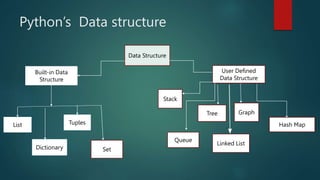
Python’s Data structure
Data Structure
Built-in Data
Structure
List Tuples
User Defined
Data Structure
Dictionary Set
Hash Map
Graph
Linked List
Tree
Stack
Queue
Built-in Data structure
List
Dictionary
Tuple
Set
Lists
 This Data structure use for storing and accesing objects which belongs in
a specific sequence.
 Lists are used to store multiple items in a single variable
 Lists in Python are linear containers used for storing data of various Data
Types. The ability to store a variety of data is what makes Lists a very
unique and vital Data Structure in Python.
Examples
 city_list=['Newyork','chicago', 'Los Angeles', 'Houston', 'Philadelphia',
'Dallas']
 squares = [‘1’, ‘4, 9’, ’16’]
 List with Mixed Data types
 My_list = [‘1’ ,”Hello”, ‘3.5’]
Example
 data = [{"id": ("1", "2", "3"), "name": ("Dannie", "Williams"),
"department": ("HR", "IT")},
{"id": ("4", "5", "6"), "name": ("jhon", "smith"),
"department": ("HR", "IT")},
{"id": ("7", "8", "9"), "name": ("Allen", "polard"),
"department": ("finance", "IT")},
{"id": ("10", "11", "12"), "name": ("Reema", "Ferguson"),
"department": ("business", "IT")},
{"id": ("13", "14", "15"), "name": ("patrick", "Donald"),
"department": ("business", "IT")}]
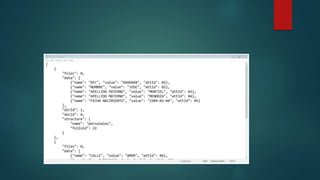
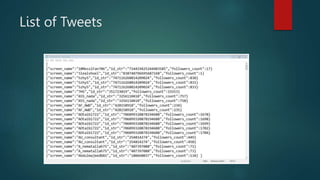
List of Tweets
Features of Lists
 Lists are ordered.
 Lists can contain any arbitrary objects.
 List elements can be accessed by index.
 Lists are mutable.
 Lists are dynamic.
Lists
 Syntax
 List_variables = [ val1,val2,val3…….]
 My_list = [1,2,3]
List Indices
 my_list =[1,2,3,4,5,6,7,8,9,10]
List Methods
 Append()
 Count
 Index()
 Insert()
 Pop()
 Remove()
 Reverse()
 Sort()
 Extend()
 If you want to remember these methods (ASPIRER)

Data Structures in Python.pptx

  • 1.
  • 2.
    Data Structure  Whatis Data Structure?  Organizing, managing and storing data is important as it enables easier access and efficient modifications. Data Structures allows you to organize your data in such a way that enables you to store collections of data, relate them and perform operations on them accordingly.  Philosophy “Clever” ways to organize information in order to enable efficient computation
  • 3.
    Goals  what thetools are for storing and processing common data types  which tools are appropriate for which need  So that make good design choices as a programmer  Another Goal is it must be rich in structure to reflect the actual relationship of data in real world .The structure should be simple enough for efficient processing of data .
  • 4.
  • 6.
    Built-in Data Structure Understand Data  Understand the data according to its Nature.  Map the data with available structure.  choosing the right data structure for your data
  • 7.
    Three W’s Why weare using data? What we are going to do with the data? Where we are sending data i.e location or container?
  • 8.
    Python’s Data structure DataStructure Built-in Data Structure List Tuples User Defined Data Structure Dictionary Set Hash Map Graph Linked List Tree Stack Queue
  • 9.
  • 10.
    Lists  This Datastructure use for storing and accesing objects which belongs in a specific sequence.  Lists are used to store multiple items in a single variable  Lists in Python are linear containers used for storing data of various Data Types. The ability to store a variety of data is what makes Lists a very unique and vital Data Structure in Python.
  • 11.
    Examples  city_list=['Newyork','chicago', 'LosAngeles', 'Houston', 'Philadelphia', 'Dallas']  squares = [‘1’, ‘4, 9’, ’16’]  List with Mixed Data types  My_list = [‘1’ ,”Hello”, ‘3.5’]
  • 12.
    Example  data =[{"id": ("1", "2", "3"), "name": ("Dannie", "Williams"), "department": ("HR", "IT")}, {"id": ("4", "5", "6"), "name": ("jhon", "smith"), "department": ("HR", "IT")}, {"id": ("7", "8", "9"), "name": ("Allen", "polard"), "department": ("finance", "IT")}, {"id": ("10", "11", "12"), "name": ("Reema", "Ferguson"), "department": ("business", "IT")}, {"id": ("13", "14", "15"), "name": ("patrick", "Donald"), "department": ("business", "IT")}]
  • 13.
  • 14.
    Features of Lists Lists are ordered.  Lists can contain any arbitrary objects.  List elements can be accessed by index.  Lists are mutable.  Lists are dynamic.
  • 15.
    Lists  Syntax  List_variables= [ val1,val2,val3…….]  My_list = [1,2,3]
  • 16.
    List Indices  my_list=[1,2,3,4,5,6,7,8,9,10]
  • 17.
    List Methods  Append() Count  Index()  Insert()  Pop()  Remove()  Reverse()  Sort()  Extend()  If you want to remember these methods (ASPIRER)