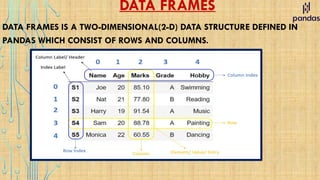
DATA FRAMES
DATA FRAMESIS A TWO-DIMENSIONAL(2-D) DATA STRUCTURE DEFINED IN
PANDAS WHICH CONSIST OF ROWS AND COLUMNS.
2.
DATA FRAMES
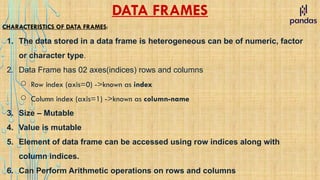
CHARACTERISTICS OFDATA FRAMES:
1. The data stored in a data frame is heterogeneous can be of numeric, factor
or character type.
2. Data Frame has 02 axes(indices) rows and columns
○ Row index (axis=0) ->known as index
○ Column index (axis=1) ->known as column-name
3. Size – Mutable
4. Value is mutable
5. Element of data frame can be accessed using row indices along with
column indices.
6. Can Perform Arithmetic operations on rows and columns
3.
CREATION OF DATAFRAMES
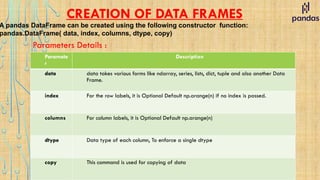
A pandas DataFrame can be created using the following constructor function:
pandas.DataFrame( data, index, columns, dtype, copy)
Parameters Details :
Paramete
r
Description
data data takes various forms like ndarray, series, lists, dict, tuple and also another Data
Frame.
index For the row labels, it is Optional Default np.arange(n) if no index is passed.
columns For column labels, it is Optional Default np.arange(n)
dtype Data type of each column, To enforce a single dtype
copy This command is used for copying of data
4.
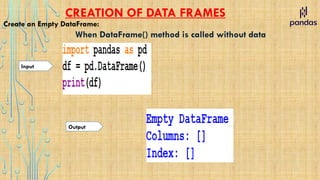
CREATION OF DATAFRAMES
Create an Empty DataFrame:
When DataFrame() method is called without data
Input
Output
5.
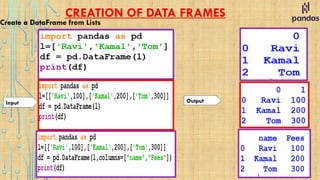
CREATION OF DATAFRAMES
Create a DataFrame from Lists
Output
Input
6.
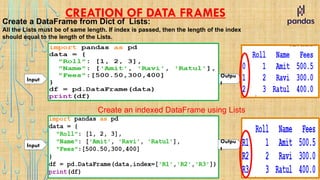
CREATION OF DATAFRAMES
Create a DataFrame from Dict of Lists:
All the Lists must be of same length. If index is passed, then the length of the index
should equal to the length of the Lists.
Outpu
t
Input
Create an indexed DataFrame using Lists
Outpu
t
Input
7.
CREATION OF DATAFRAMES
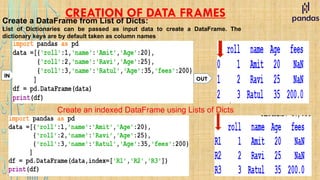
Create a DataFrame from List of Dicts:
List of Dictionaries can be passed as input data to create a DataFrame. The
dictionary keys are by default taken as column names
OUT
IN
Create an indexed DataFrame using Lists of Dicts
8.
CREATION OF DATAFRAMES
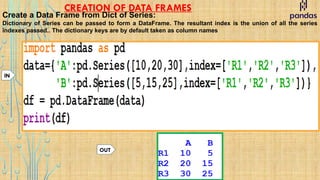
Create a Data Frame from Dict of Series:
Dictionary of Series can be passed to form a DataFrame. The resultant index is the union of all the series
indexes passed.. The dictionary keys are by default taken as column names
OUT
IN
9.
CREATION OF DATAFRAMES
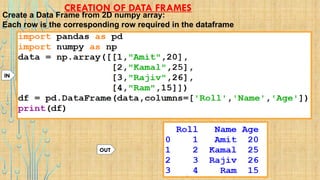
Create a Data Frame from 2D numpy array:
Each row is the corresponding row required in the dataframe
OUT
IN
10.
ATTRIBUTES OF DATAFRAMES
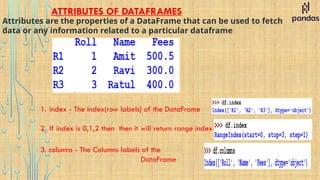
Attributesare the properties of a DataFrame that can be used to fetch
data or any information related to a particular dataframe
1. index - The index(row labels) of the DataFrame
2. If index is 0,1,2 then then it will return range index
3. columns - The Columns labels of the
DataFrame
11.
ATTRIBUTES OF DATAFRAMES
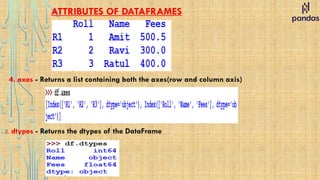
4.axes - Returns a list containing both the axes(row and column axis)
5. dtypes - Returns the dtypes of the DataFrame
12.
ATTRIBUTES OF DATAFRAMES
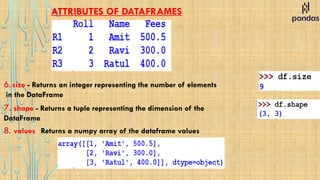
6.size - Returns an integer representing the number of elements
in the DataFrame
7. shape - Returns a tuple representing the dimension of the
DataFrame
8. values - Returns a numpy array of the dataframe values
13.
ATTRIBUTES OF DATAFRAMES
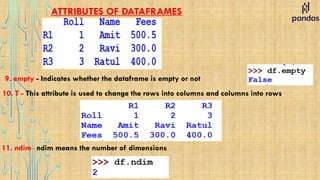
9.empty - Indicates whether the dataframe is empty or not
10. T - This attribute is used to change the rows into columns and columns into rows.
11. ndim - ndim means the number of dimensions
14.
ACCESSING DATAFRAME ELEMENTS
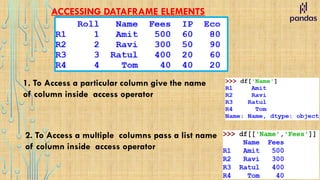
1.To Access a particular column give the name
of column inside access operator
2. To Access a multiple columns pass a list name
of column inside access operator
15.
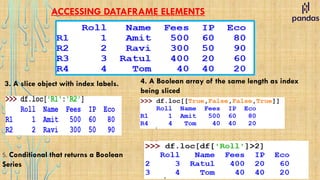
ACCESSING DATAFRAME ELEMENTS
ACCESSUSING LOC PROPERTY
It Access a group of rows and columns by label
.loc[] is primarily label based, but may also be used with a boolean array.
it allows input
1. A single label
2. A list or array of labels
3. A slice object with labels (both the start and the stop are included)
4. A boolean array of the same length as the axis being sliced, e.g. [True, False, True].
5. Conditional that returns a boolean Series
16.
ACCESSING DATAFRAME ELEMENTS
1.Single label. Note this returns
the row as a Series.
2. List of labels. Note using [ [ ] ] returns a
DataFrame
Indexing the rows
17.
ACCESSING DATAFRAME ELEMENTS
3.A slice object with index labels. 4. A Boolean array of the same length as index
being sliced
5. Conditional that returns a Boolean
Series
18.
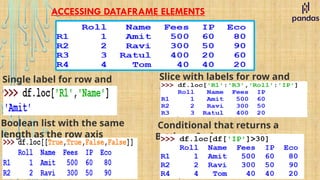
ACCESSING DATAFRAME ELEMENTS
Singlelabel for row and
column
Slice with labels for row and
column
Boolean list with the same
length as the row axis
Conditional that returns a
Boolean Series
19.
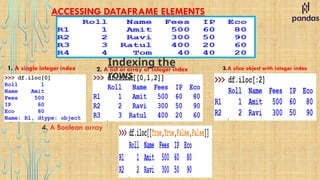
ACCESSING DATAFRAME ELEMENTS
ACCESSUSING ilOC PROPERTY
It Access a group of rows and columns by integer index
it allows input
1. A single integer index.
2. A list or array of integer index.
3. A slice object with integer index (start index included and the stop not included)
4. A boolean array of the same length as the axis being sliced, e.g. [True, False, True].
5. Conditional that returns a boolean Series
20.
ACCESSING DATAFRAME ELEMENTS
1.A single integer index 2. A list or array of integer index 3.A slice object with integer index
Indexing the
rows
4. A Boolean array
21.
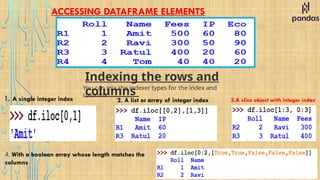
ACCESSING DATAFRAME ELEMENTS
Indexingthe rows and
columns
You can mix the indexer types for the index and
columns
1. A single integer index 2. A list or array of integer index 3.A slice object with integer index
4. With a boolean array whose length matches the
columns
22.
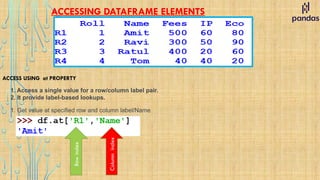
ACCESSING DATAFRAME ELEMENTS
1.Access a single value for a row/column label pair.
2. It provide label-based lookups.
ACCESS USING at PROPERTY
1. Get value at specified row and column label/Name
Row
index
Column
index
23.
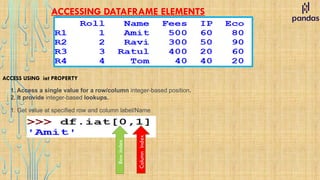
ACCESSING DATAFRAME ELEMENTS
1.Access a single value for a row/column integer-based position.
2. It provide integer-based lookups.
ACCESS USING iat PROPERTY
1. Get value at specified row and column label/Name
Column
index
Row
index
24.
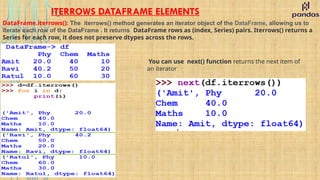
ITERROWS DATAFRAME ELEMENTS
DataFrame.iterrows():The iterrows() method generates an iterator object of the DataFrame, allowing us to
iterate each row of the DataFrame . It returns DataFrame rows as (index, Series) pairs. Iterrows() returns a
Series for each row, it does not preserve dtypes across the rows.
You can use next() function returns the next item of
an iterator
25.
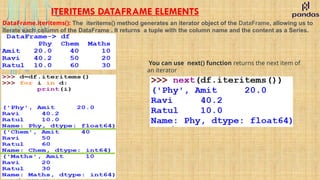
ITERITEMS DATAFRAME ELEMENTS
DataFrame.iteritems():The iteritems() method generates an iterator object of the DataFrame, allowing us to
iterate each column of the DataFrame . It returns a tuple with the column name and the content as a Series.
You can use next() function returns the next item of
an iterator
26.
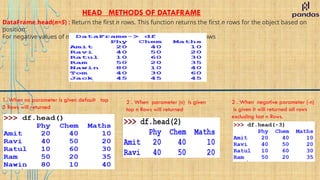
HEAD METHODS OFDATAFRAME
DataFrame.head(n=5) : Return the first n rows. This function returns the first n rows for the object based on
position.
For negative values of n, this function returns all rows except the last n rows
1. When no parameter is given default top
5 Rows will returned
2 . When parameter (n) is given
top n Rows will returned
2 . When negative parameter (-n)
is given it will returned all rows
excluding last n Rows.
27.
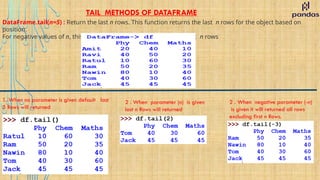
TAIL METHODS OFDATAFRAME
DataFrame.tail(n=5) : Return the last n rows. This function returns the last n rows for the object based on
position.
For negative values of n, this function returns all rows except the first n rows
1. When no parameter is given default last
5 Rows will returned
2 . When parameter (n) is given
last n Rows will returned
2 . When negative parameter (-n)
is given it will returned all rows
excluding first n Rows.
28.
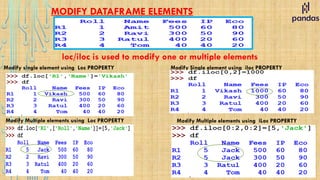
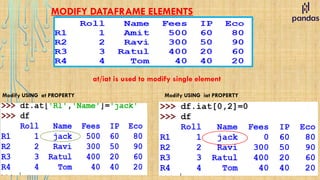
MODIFY DATAFRAME ELEMENTS
ModifySingle element using iloc PROPERTY
Modify single element using Loc PROPERTY
Modify Multiple elements using Loc PROPERTY Modify Multiple elements using iLoc PROPERTY
loc/iloc is used to modify one or multiple elements
MODIFY DATAFRAME ELEMENTS
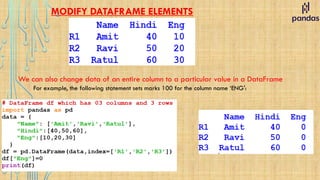
Wecan also change data of an entire column to a particular value in a DataFrame
For example, the following statement sets marks 100 for the column name ‘ENG':
31.
MODIFY DATAFRAME ELEMENTS
Wecan also change data of an entire row to a particular value in a DataFrame using LOC
For example if we want to change the record of R1 to [‘TOM’,100,100]
or
or
if we want to change the record of R1 to 0
if we want to change the All the records to 0
OUT
OUT
32.
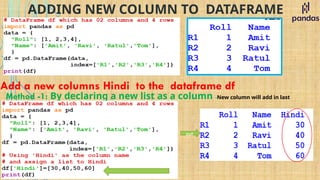
ADDING NEW COLUMNTO DATAFRAME
Add a new columns Hindi to the dataframe df
Method -1: By declaring a new list as a column -New column will add in last
out
33.
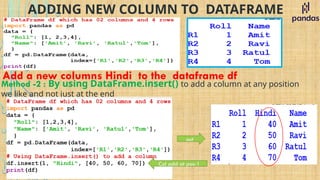
ADDING NEW COLUMNTO DATAFRAME
Add a new columns Hindi to the dataframe df
Method -2 : By using DataFrame.insert() to add a column at any position
we like and not just at the end
out
Col add at pos-1
34.
ADDING NEW ROWTO DATA FRAME
Add a new record [‘Tom’ ,80, 40 ] to the dataframe df
EX- 1 loc is used add a row at the last of dataframe
out
Add row at pos-R4
35.
ADDING NEW ROWTO DATA FRAME
Add a new record [‘Tom’ ,80, 40 ] to the dataframe df
EX- 2 if row inserted in between the dataframe existing row will replaced
out
Add row at pos-
R1
36.
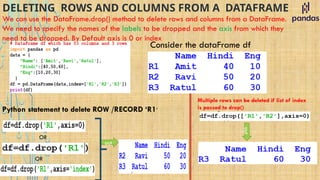
DELETING ROWS ANDCOLUMNS FROM A DATAFRAME
We can use the DataFrame.drop() method to delete rows and columns from a DataFrame.
We need to specify the names of the labels to be dropped and the axis from which they
need to be dropped. By Default axis is 0 or index
Consider the dataFrame df
Python statement to delete ROW /RECORD ‘R1’
OR
OR
out
Multiple rows can be deleted if list of index
is passed to drop()
out
37.
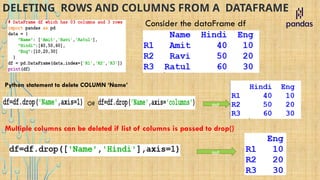
DELETING ROWS ANDCOLUMNS FROM A DATAFRAME
Consider the dataFrame df
Python statement to delete COLUMN ‘Name’
OR out
Multiple columns can be deleted if list of columns is passed to drop()
out
38.
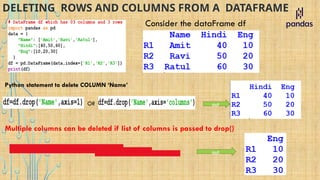
DELETING ROWS ANDCOLUMNS FROM A DATAFRAME
Consider the dataFrame df
Python statement to delete COLUMN ‘Name’
OR out
Multiple columns can be deleted if list of columns is passed to drop()
out
39.
BOOLEAN INDEXING INA DATAFRAME
Boolean indexing helps us to select the data from the DataFrames using a Boolean vector We need a
DataFrame with a Boolean index to use the Boolean indexing
Consider the dataFrame df
Now, we can access the DataFrame by passing Booleans to the methods loc[]
40.
BOOLEAN INDEXING INA DATAFRAME
Boolean indexing helps us to select the data from the DataFrames using a Boolean vector We need a
DataFrame with a Boolean index to use the Boolean indexing
Consider the dataFrame df
Now, we can access the DataFrame by passing Booleans to the methods loc[]
41.
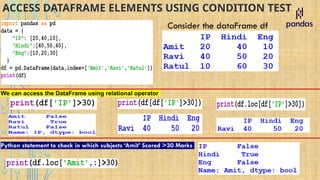
ACCESS DATAFRAME ELEMENTSUSING CONDITION TEST
Consider the dataFrame df
We can access the DataFrame using relational operator
We can access the DataFrame using relational operator
Python statement to check in which subjects ‘Amit’ Scored >30 Marks
We can access the DataFrame using relational operator
42.
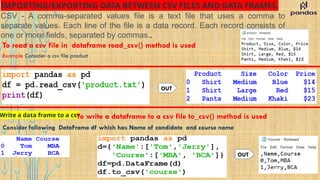
IMPORTING/EXPORTING DATA BETWEENCSV FILES AND DATA FRAMES.
CSV - A comma-separated values file is a text file that uses a comma to
separate values. Each line of the file is a data record. Each record consists of
one or more fields, separated by commas..
To read a csv file in dataframe read_csv() method is used
Example Consider a csv file product
OUT
Write a data frame to a csv
To write a dataframe to a csv file to_csv() method is used
Consider following DataFrame df which has Name of candidate and course name
OUT
![ACCESSING DATAFRAME ELEMENTS
ACCESS USING LOC PROPERTY
It Access a group of rows and columns by label
.loc[] is primarily label based, but may also be used with a boolean array.
it allows input
1. A single label
2. A list or array of labels
3. A slice object with labels (both the start and the stop are included)
4. A boolean array of the same length as the axis being sliced, e.g. [True, False, True].
5. Conditional that returns a boolean Series](https://image.slidesharecdn.com/dataframes-251210085443-af47f91b/85/Data-Frames-on-Python-Pandas-XII-IP-pptx-15-320.jpg)
![ACCESSING DATAFRAME ELEMENTS
1. Single label. Note this returns
the row as a Series.
2. List of labels. Note using [ [ ] ] returns a
DataFrame
Indexing the rows](https://image.slidesharecdn.com/dataframes-251210085443-af47f91b/85/Data-Frames-on-Python-Pandas-XII-IP-pptx-16-320.jpg)
![ACCESSING DATAFRAME ELEMENTS
ACCESS USING ilOC PROPERTY
It Access a group of rows and columns by integer index
it allows input
1. A single integer index.
2. A list or array of integer index.
3. A slice object with integer index (start index included and the stop not included)
4. A boolean array of the same length as the axis being sliced, e.g. [True, False, True].
5. Conditional that returns a boolean Series](https://image.slidesharecdn.com/dataframes-251210085443-af47f91b/85/Data-Frames-on-Python-Pandas-XII-IP-pptx-19-320.jpg)
![MODIFY DATAFRAME ELEMENTS
We can also change data of an entire row to a particular value in a DataFrame using LOC
For example if we want to change the record of R1 to [‘TOM’,100,100]
or
or
if we want to change the record of R1 to 0
if we want to change the All the records to 0
OUT
OUT](https://image.slidesharecdn.com/dataframes-251210085443-af47f91b/85/Data-Frames-on-Python-Pandas-XII-IP-pptx-31-320.jpg)
![ADDING NEW ROW TO DATA FRAME
Add a new record [‘Tom’ ,80, 40 ] to the dataframe df
EX- 1 loc is used add a row at the last of dataframe
out
Add row at pos-R4](https://image.slidesharecdn.com/dataframes-251210085443-af47f91b/85/Data-Frames-on-Python-Pandas-XII-IP-pptx-34-320.jpg)
![ADDING NEW ROW TO DATA FRAME
Add a new record [‘Tom’ ,80, 40 ] to the dataframe df
EX- 2 if row inserted in between the dataframe existing row will replaced
out
Add row at pos-
R1](https://image.slidesharecdn.com/dataframes-251210085443-af47f91b/85/Data-Frames-on-Python-Pandas-XII-IP-pptx-35-320.jpg)
![BOOLEAN INDEXING IN A DATAFRAME
Boolean indexing helps us to select the data from the DataFrames using a Boolean vector We need a
DataFrame with a Boolean index to use the Boolean indexing
Consider the dataFrame df
Now, we can access the DataFrame by passing Booleans to the methods loc[]](https://image.slidesharecdn.com/dataframes-251210085443-af47f91b/85/Data-Frames-on-Python-Pandas-XII-IP-pptx-39-320.jpg)
![BOOLEAN INDEXING IN A DATAFRAME
Boolean indexing helps us to select the data from the DataFrames using a Boolean vector We need a
DataFrame with a Boolean index to use the Boolean indexing
Consider the dataFrame df
Now, we can access the DataFrame by passing Booleans to the methods loc[]](https://image.slidesharecdn.com/dataframes-251210085443-af47f91b/85/Data-Frames-on-Python-Pandas-XII-IP-pptx-40-320.jpg)