대용량 데이타 쉽고 빠르게 분석하기
Demo Day. 
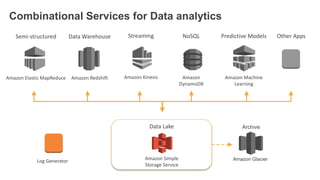
Amazon RedshiftAmazon Elastic MapReduce
Amazon Glacier
Amazon
DynamoDB
Amazon Machine
Learning
Amazon Kinesis
Combinational Services for Data analytics
Data WarehouseSemi-structured NoSQL Predictive Models Other AppsStreaming
Amazon Simple
Storage Service
Data Lake Archive
Log Generator
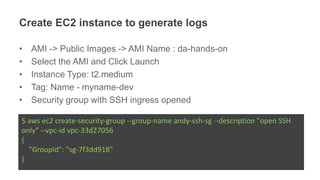
Create EC2 instance to generate logs
• AMI -> Public Images -> AMI Name : da-hands-on
• Select the AMI and Click Launch
• Instance Type: t2.medium
• Tag: Name - myname-dev
• Security group with SSH ingress opened
$ aws ec2 create-security-group --group-name andy-ssh-sg --description "open SSH
only" --vpc-id vpc-33d27056
{
"GroupId": "sg-7f3dd918"
}
$ aws ec2 authorize-security-group-ingress --group-id sg-7f3dd918 --protocol tcp --
port 22 --cidr 0.0.0.0/0
$ aws ec2 run-instances --image-id ami-5c2beb3d --count 1 --instance-type
t2.medium --key-name ilho_tokyo --security-group-ids sg-7f3dd918 --subnet-id
subnet-1a7bad43 --associate-public-ip-address
{
"OwnerId": "806506827877",
"ReservationId": "r-a58c5e2a",
"Groups": [],
"Instances": [
{
"Monitoring": {
…..................
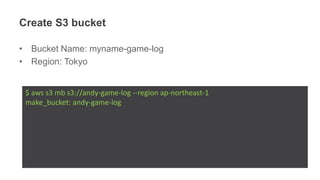
Create S3 bucket
• Bucket Name: myname-game-log
• Region: Tokyo
$ aws s3 mb s3://andy-game-log --region ap-northeast-1
make_bucket: andy-game-log
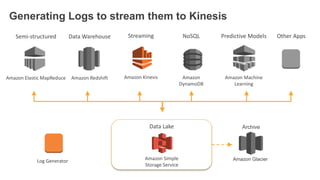
Amazon RedshiftAmazon Elastic MapReduce
Amazon Glacier
Amazon
DynamoDB
Amazon Machine
Learning
Amazon Kinesis
Generating Logs to stream them to Kinesis
Data WarehouseSemi-structured NoSQL Predictive Models Other AppsStreaming
Amazon Simple
Storage Service
Data Lake Archive
Log Generator
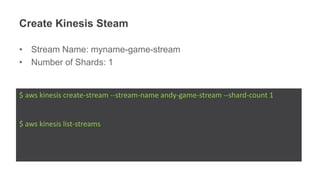
Create Kinesis Steam
• Stream Name: myname-game-stream
• Number of Shards: 1
$ aws kinesis create-stream --stream-name andy-game-stream --shard-count 1
$ aws kinesis list-streams
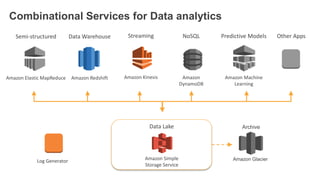
Amazon RedshiftAmazon Elastic MapReduce
Amazon Glacier
Amazon
DynamoDB
Amazon Machine
Learning
Amazon Kinesis
Combinational Services for Data analytics
Data WarehouseSemi-structured NoSQL Predictive Models Other AppsStreaming
Amazon Simple
Storage Service
Data Lake Archive
Log Generator
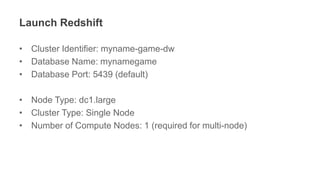
Launch Redshift
• Cluster Identifier: myname-game-dw
• Database Name: mynamegame
• Database Port: 5439 (default)
• Node Type: dc1.large
• Cluster Type: Single Node
• Number of Compute Nodes: 1 (required for multi-node)
$ aws redshift create-cluster --cluster-identifier andy-game-dw --db-name mydb --node-type
dc1.large --cluster-type single-node --publicly-accessible --master-username admin --master-
user-password GamingonAWS2016
{
"Cluster": {
"IamRoles": [],
"ClusterVersion": "1.0",
"NodeType": "dc1.large",
"PubliclyAccessible": true,
"Tags": [],
"MasterUsername": "admin",
"ClusterParameterGroups": [
{
"ParameterGroupName": "default.redshift-1.0",
"ParameterApplyStatus": "in-sync"
}
],
"Encrypted": false,
…....................
Let’s connect to EC2 instances
$ ssh -i [$mykey].pem ec2-user@xx.xx.xx.xx
Prepared python demo scripts
[ec2-user@ip-10-10-0-13 data_analytics_demo]$ ls -1
amazon_kclpy
amazon_kclpy_helper.py
config.json
config.py
config.pyc
consumer.properties
consumer.py
demo_util.py
demo_util.pyc
inserter.py
kcl
kinesis_helper.py
kinesis_helper.pyc
LICENSE
logs
reader.py
run_consumer.sh
simulator.py
summarizer.py
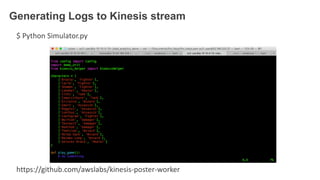
Generating Logs to Kinesis stream
$ Python Simulator.py
https://github.com/awslabs/kinesis-poster-worker
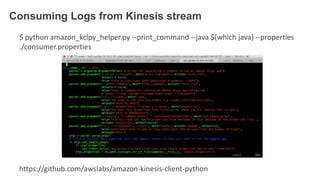
Consuming Logs from Kinesis stream
$ python amazon_kclpy_helper.py --print_command --java $(which java) --properties
./consumer.properties
https://github.com/awslabs/amazon-kinesis-client-python
Checking Logs files in S3 bucket
$ aws s3 ls myname-game-log
Amazon RedshiftAmazon Elastic MapReduce
Amazon Glacier
Amazon
DynamoDB
Amazon Machine
Learning
Amazon Kinesis
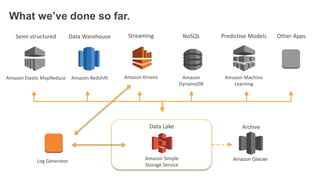
What we’ve done so far.
Data WarehouseSemi-structured NoSQL Predictive Models Other AppsStreaming
Amazon Simple
Storage Service
Data Lake Archive
Log Generator
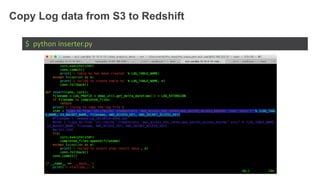
Copy Log data from S3 to Redshift
$ python inserter.py
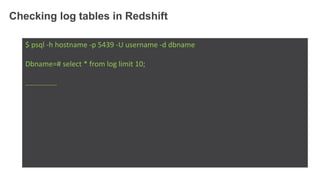
Checking log tables in Redshift
$ psql -h hostname -p 5439 -U username -d dbname
Dbname=# select * from log limit 10;
….............
Amazon RedshiftAmazon Elastic MapReduce
Amazon Glacier
Amazon
DynamoDB
Amazon Machine
Learning
Amazon Kinesis
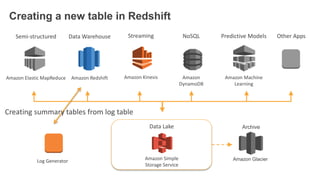
Creating a new table in Redshift
Data WarehouseSemi-structured NoSQL Predictive Models Other AppsStreaming
Amazon Simple
Storage Service
Data Lake Archive
Log Generator
Creating summary tables from log table
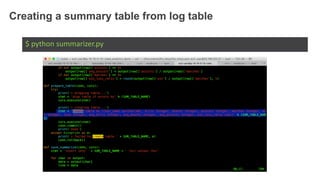
Creating a summary table from log table
$ python summarizer.py
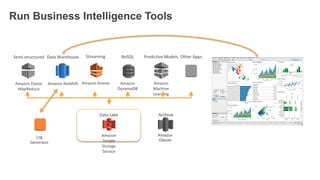
Run Business Intelligence Tools
Amazon RedshiftAmazon Elastic
MapReduce
Amazon
Glacier
Amazon
DynamoDB
Amazon
Machine
Learning
Amazon Kinesis
Data WarehouseSemi-structured NoSQL Predictive Models Other AppsStreaming
Amazon
Simple
Storage
Service
Data Lake Archive
Log
Generator
Adding ElasticSearch
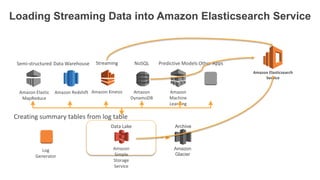
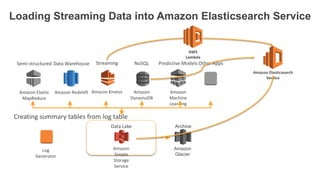
Loading Streaming Data into Amazon Elasticsearch Service
Amazon RedshiftAmazon Elastic
MapReduce
Amazon
Glacier
Amazon
DynamoDB
Amazon
Machine
Learning
Amazon Kinesis
Data WarehouseSemi-structured NoSQL Predictive Models Other AppsStreaming
Amazon
Simple
Storage
Service
Data Lake Archive
Log
Generator
Creating summary tables from log table
Amazon Elasticsearch
Service
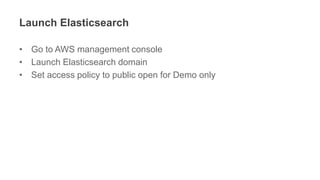
Launch Elasticsearch
• Go to AWS management console
• Launch Elasticsearch domain
• Set access policy to public open for Demo only
Loading Streaming Data into Amazon Elasticsearch Service
Amazon RedshiftAmazon Elastic
MapReduce
Amazon
Glacier
Amazon
DynamoDB
Amazon
Machine
Learning
Amazon Kinesis
Data WarehouseSemi-structured NoSQL Predictive Models Other AppsStreaming
Amazon
Simple
Storage
Service
Data Lake Archive
Log
Generator
Creating summary tables from log table
Amazon Elasticsearch
Service
AWS
Lambda
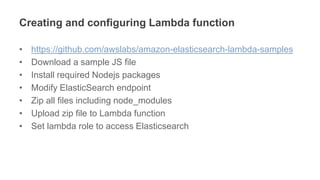
Creating and configuring Lambda function
• https://github.com/awslabs/amazon-elasticsearch-lambda-samples
• Download a sample JS file
• Install required Nodejs packages
• Modify ElasticSearch endpoint
• Zip all files including node_modules
• Upload zip file to Lambda function
• Set lambda role to access Elasticsearch
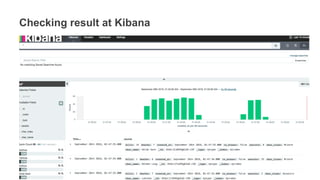
Checking result at Kibana
• Query
• Result
Querying Amazon Kinesis Streams
Directly with SQL and Spark Streaming?
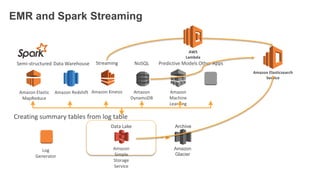
EMR and Spark Streaming
Amazon RedshiftAmazon Elastic
MapReduce
Amazon
Glacier
Amazon
DynamoDB
Amazon
Machine
Learning
Amazon Kinesis
Data WarehouseSemi-structured NoSQL Predictive Models Other AppsStreaming
Amazon
Simple
Storage
Service
Data Lake Archive
Log
Generator
Creating summary tables from log table
Amazon Elasticsearch
Service
AWS
Lambda
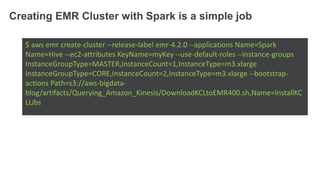
Creating EMR Cluster with Spark is a simple job
$ aws emr create-cluster --release-label emr-4.2.0 --applications Name=Spark
Name=Hive --ec2-attributes KeyName=myKey --use-default-roles --instance-groups
InstanceGroupType=MASTER,InstanceCount=1,InstanceType=m3.xlarge
InstanceGroupType=CORE,InstanceCount=2,InstanceType=m3.xlarge --bootstrap-
actions Path=s3://aws-bigdata-
blog/artifacts/Querying_Amazon_Kinesis/DownloadKCLtoEMR400.sh,Name=InstallKC
LLibs
Managing resources is easy. But building
logics is complicating.
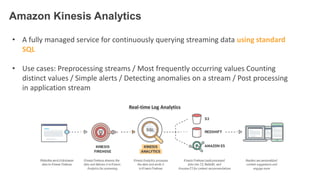
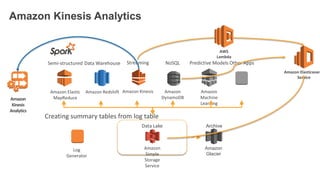
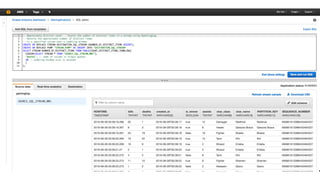
• A fully managed service for continuously querying streaming data using standard
SQL
• Use cases: Preprocessing streams / Most frequently occurring values Counting
distinct values / Simple alerts / Detecting anomalies on a stream / Post processing
in application stream
Real-time Log Analytics
Amazon Kinesis Analytics
Amazon RedshiftAmazon Elastic
MapReduce
Amazon
Glacier
Amazon
DynamoDB
Amazon
Machine
Learning
Amazon Kinesis
Data WarehouseSemi-structured NoSQL Predictive Models Other AppsStreaming
Amazon
Simple
Storage
Service
Data Lake Archive
Log
Generator
Creating summary tables from log table
Amazon Elasticsearc
Service
AWS
Lambda
Amazon
Kinesis
Analytics
Demo.
Adding Amazon Machine Learning
Adding Amazon Machine Learning is your
homework. 
Amazon Machine Learning 게임에서 활용해보기
:: 김일호 :: AWS Summit Seoul 2016
https://www.youtube.com/watch?v=Bs1QZMlwmLM&feature=youtu.be
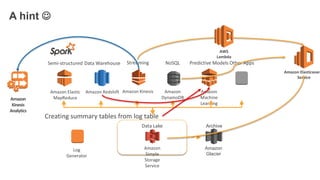
A hint 
Amazon RedshiftAmazon Elastic
MapReduce
Amazon
Glacier
Amazon
DynamoDB
Amazon
Machine
Learning
Amazon Kinesis
Data WarehouseSemi-structured NoSQL Predictive Models Other AppsStreaming
Amazon
Simple
Storage
Service
Data Lake Archive
Log
Generator
Creating summary tables from log table
Amazon Elasticsearc
Service
AWS
Lambda
Amazon
Kinesis
Analytics
Thank you!

대용량 데이타 쉽고 빠르게 분석하기 :: 김일호 솔루션즈 아키텍트 :: Gaming on AWS 2016

  • 1.
    대용량 데이타 쉽고빠르게 분석하기
  • 2.
  • 3.
    Amazon RedshiftAmazon ElasticMapReduce Amazon Glacier Amazon DynamoDB Amazon Machine Learning Amazon Kinesis Combinational Services for Data analytics Data WarehouseSemi-structured NoSQL Predictive Models Other AppsStreaming Amazon Simple Storage Service Data Lake Archive Log Generator
  • 4.
    Create EC2 instanceto generate logs • AMI -> Public Images -> AMI Name : da-hands-on • Select the AMI and Click Launch • Instance Type: t2.medium • Tag: Name - myname-dev • Security group with SSH ingress opened $ aws ec2 create-security-group --group-name andy-ssh-sg --description "open SSH only" --vpc-id vpc-33d27056 { "GroupId": "sg-7f3dd918" }
  • 5.
    $ aws ec2authorize-security-group-ingress --group-id sg-7f3dd918 --protocol tcp -- port 22 --cidr 0.0.0.0/0 $ aws ec2 run-instances --image-id ami-5c2beb3d --count 1 --instance-type t2.medium --key-name ilho_tokyo --security-group-ids sg-7f3dd918 --subnet-id subnet-1a7bad43 --associate-public-ip-address { "OwnerId": "806506827877", "ReservationId": "r-a58c5e2a", "Groups": [], "Instances": [ { "Monitoring": { …..................
  • 6.
    Create S3 bucket •Bucket Name: myname-game-log • Region: Tokyo $ aws s3 mb s3://andy-game-log --region ap-northeast-1 make_bucket: andy-game-log
  • 7.
    Amazon RedshiftAmazon ElasticMapReduce Amazon Glacier Amazon DynamoDB Amazon Machine Learning Amazon Kinesis Generating Logs to stream them to Kinesis Data WarehouseSemi-structured NoSQL Predictive Models Other AppsStreaming Amazon Simple Storage Service Data Lake Archive Log Generator
  • 8.
    Create Kinesis Steam •Stream Name: myname-game-stream • Number of Shards: 1 $ aws kinesis create-stream --stream-name andy-game-stream --shard-count 1 $ aws kinesis list-streams
  • 9.
    Amazon RedshiftAmazon ElasticMapReduce Amazon Glacier Amazon DynamoDB Amazon Machine Learning Amazon Kinesis Combinational Services for Data analytics Data WarehouseSemi-structured NoSQL Predictive Models Other AppsStreaming Amazon Simple Storage Service Data Lake Archive Log Generator
  • 10.
    Launch Redshift • ClusterIdentifier: myname-game-dw • Database Name: mynamegame • Database Port: 5439 (default) • Node Type: dc1.large • Cluster Type: Single Node • Number of Compute Nodes: 1 (required for multi-node)
  • 11.
    $ aws redshiftcreate-cluster --cluster-identifier andy-game-dw --db-name mydb --node-type dc1.large --cluster-type single-node --publicly-accessible --master-username admin --master- user-password GamingonAWS2016 { "Cluster": { "IamRoles": [], "ClusterVersion": "1.0", "NodeType": "dc1.large", "PubliclyAccessible": true, "Tags": [], "MasterUsername": "admin", "ClusterParameterGroups": [ { "ParameterGroupName": "default.redshift-1.0", "ParameterApplyStatus": "in-sync" } ], "Encrypted": false, …....................
  • 12.
    Let’s connect toEC2 instances $ ssh -i [$mykey].pem ec2-user@xx.xx.xx.xx
  • 13.
    Prepared python demoscripts [ec2-user@ip-10-10-0-13 data_analytics_demo]$ ls -1 amazon_kclpy amazon_kclpy_helper.py config.json config.py config.pyc consumer.properties consumer.py demo_util.py demo_util.pyc inserter.py kcl kinesis_helper.py kinesis_helper.pyc LICENSE logs reader.py run_consumer.sh simulator.py summarizer.py
  • 14.
    Generating Logs toKinesis stream $ Python Simulator.py https://github.com/awslabs/kinesis-poster-worker
  • 15.
    Consuming Logs fromKinesis stream $ python amazon_kclpy_helper.py --print_command --java $(which java) --properties ./consumer.properties https://github.com/awslabs/amazon-kinesis-client-python
  • 16.
    Checking Logs filesin S3 bucket $ aws s3 ls myname-game-log
  • 17.
    Amazon RedshiftAmazon ElasticMapReduce Amazon Glacier Amazon DynamoDB Amazon Machine Learning Amazon Kinesis What we’ve done so far. Data WarehouseSemi-structured NoSQL Predictive Models Other AppsStreaming Amazon Simple Storage Service Data Lake Archive Log Generator
  • 18.
    Copy Log datafrom S3 to Redshift $ python inserter.py
  • 19.
    Checking log tablesin Redshift $ psql -h hostname -p 5439 -U username -d dbname Dbname=# select * from log limit 10; ….............
  • 20.
    Amazon RedshiftAmazon ElasticMapReduce Amazon Glacier Amazon DynamoDB Amazon Machine Learning Amazon Kinesis Creating a new table in Redshift Data WarehouseSemi-structured NoSQL Predictive Models Other AppsStreaming Amazon Simple Storage Service Data Lake Archive Log Generator Creating summary tables from log table
  • 21.
    Creating a summarytable from log table $ python summarizer.py
  • 22.
    Run Business IntelligenceTools Amazon RedshiftAmazon Elastic MapReduce Amazon Glacier Amazon DynamoDB Amazon Machine Learning Amazon Kinesis Data WarehouseSemi-structured NoSQL Predictive Models Other AppsStreaming Amazon Simple Storage Service Data Lake Archive Log Generator
  • 23.
  • 24.
    Loading Streaming Datainto Amazon Elasticsearch Service Amazon RedshiftAmazon Elastic MapReduce Amazon Glacier Amazon DynamoDB Amazon Machine Learning Amazon Kinesis Data WarehouseSemi-structured NoSQL Predictive Models Other AppsStreaming Amazon Simple Storage Service Data Lake Archive Log Generator Creating summary tables from log table Amazon Elasticsearch Service
  • 25.
    Launch Elasticsearch • Goto AWS management console • Launch Elasticsearch domain • Set access policy to public open for Demo only
  • 26.
    Loading Streaming Datainto Amazon Elasticsearch Service Amazon RedshiftAmazon Elastic MapReduce Amazon Glacier Amazon DynamoDB Amazon Machine Learning Amazon Kinesis Data WarehouseSemi-structured NoSQL Predictive Models Other AppsStreaming Amazon Simple Storage Service Data Lake Archive Log Generator Creating summary tables from log table Amazon Elasticsearch Service AWS Lambda
  • 27.
    Creating and configuringLambda function • https://github.com/awslabs/amazon-elasticsearch-lambda-samples • Download a sample JS file • Install required Nodejs packages • Modify ElasticSearch endpoint • Zip all files including node_modules • Upload zip file to Lambda function • Set lambda role to access Elasticsearch
  • 28.
    Checking result atKibana • Query • Result
  • 29.
    Querying Amazon KinesisStreams Directly with SQL and Spark Streaming?
  • 30.
    EMR and SparkStreaming Amazon RedshiftAmazon Elastic MapReduce Amazon Glacier Amazon DynamoDB Amazon Machine Learning Amazon Kinesis Data WarehouseSemi-structured NoSQL Predictive Models Other AppsStreaming Amazon Simple Storage Service Data Lake Archive Log Generator Creating summary tables from log table Amazon Elasticsearch Service AWS Lambda
  • 31.
    Creating EMR Clusterwith Spark is a simple job $ aws emr create-cluster --release-label emr-4.2.0 --applications Name=Spark Name=Hive --ec2-attributes KeyName=myKey --use-default-roles --instance-groups InstanceGroupType=MASTER,InstanceCount=1,InstanceType=m3.xlarge InstanceGroupType=CORE,InstanceCount=2,InstanceType=m3.xlarge --bootstrap- actions Path=s3://aws-bigdata- blog/artifacts/Querying_Amazon_Kinesis/DownloadKCLtoEMR400.sh,Name=InstallKC LLibs
  • 32.
    Managing resources iseasy. But building logics is complicating.
  • 33.
    • A fullymanaged service for continuously querying streaming data using standard SQL • Use cases: Preprocessing streams / Most frequently occurring values Counting distinct values / Simple alerts / Detecting anomalies on a stream / Post processing in application stream Real-time Log Analytics Amazon Kinesis Analytics
  • 34.
    Amazon Kinesis Analytics AmazonRedshiftAmazon Elastic MapReduce Amazon Glacier Amazon DynamoDB Amazon Machine Learning Amazon Kinesis Data WarehouseSemi-structured NoSQL Predictive Models Other AppsStreaming Amazon Simple Storage Service Data Lake Archive Log Generator Creating summary tables from log table Amazon Elasticsearc Service AWS Lambda Amazon Kinesis Analytics
  • 35.
  • 37.
  • 38.
    Adding Amazon MachineLearning is your homework.  Amazon Machine Learning 게임에서 활용해보기 :: 김일호 :: AWS Summit Seoul 2016 https://www.youtube.com/watch?v=Bs1QZMlwmLM&feature=youtu.be
  • 39.
    A hint  AmazonRedshiftAmazon Elastic MapReduce Amazon Glacier Amazon DynamoDB Amazon Machine Learning Amazon Kinesis Data WarehouseSemi-structured NoSQL Predictive Models Other AppsStreaming Amazon Simple Storage Service Data Lake Archive Log Generator Creating summary tables from log table Amazon Elasticsearc Service AWS Lambda Amazon Kinesis Analytics
  • 40.