AMBIENT INTELLIGENCE
tech days•
2015
#mstechdays techdays.microsoft.fr
select * from techdays2015.speaker_principals
Christophe LAPORTE
Consultant Formateur Indépendant
Blog http://conseilit.wordpress.com/
Twitter @Conseilit
Email christophe_laporte@hotmail.fr
Nadia BEN EL KADI
SQL Server Team
Microsoft France
Blog : http://blogs.technet.com/b/dataplatforminsider/
tech.days 2015#mstechdaysSESSION
Agenda – SQL Server & la virtualisation
 Introduction
 Why virtualizing
 Advantages of virtualization
 Demo / Deployement
 Virtualization Support rules & Best Practices
 Virtualization HA scenarios
 Troubleshooting & Monitoring & Good to know
 Case Study
 Virtualization & cloud : A sample usage scenario
 Conclusion
tech.days 2015#mstechdaysSESSION
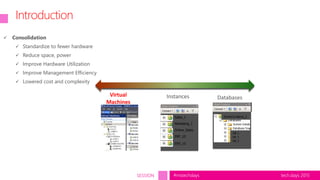
Introduction
DatabasesInstancesVirtual
Machines
Sales_1
Marketing_1
Online_Sales
ERP_10
ERP_10
DB_1
DB_2
DB_3
Consolidate_1
 Consolidation
 Standardize to fewer hardware
 Reduce space, power
 Improve Hardware Utilization
 Improve Management Efficiency
 Lowered cost and complexity
tech.days 2015#mstechdaysSESSION
Pourquoi virtualiser ?
• Historiquement
• Consolidation
• Maintenance de matériel obsolète
• Peu adapté à de lourdes charges de travail (OLTP / DWH)
• Actuellement
• Le matériel à évolué
• CPU / RAM / Réseau (10Gb, RDMA)
• Disques (SAN Full Flash / SSD, Cartes Flash)
• Les hyperviseurs ont aussi évolué
• Gestion des ressources
• Performance
• Les serveurs bases de données peuvent être candidat à la
virtualisation
tech.days 2015#mstechdaysSESSION
Avantages de la virtualisation
• Faible adhérence au matériel
• Migrations facilitées
• Mise à jour hyperviseur
• Flexibilité
• Modification (à chaud) de la configuration d’une VM
• Redimensionnement à chaud des VHDX
• Limitation de la bande passant disque si nécessaire
• Affectation de ressources à l’instant T et non pas en fonction de la durée de vie du
projet
• Nombre de CPU
• Mémoire
• Dépannage
• Clonage à chaud (ou export depuis un checkpoint) d’une VM
tech.days 2015#mstechdaysSESSION
SQL Server virtualization
tech.days 2015#mstechdaysSESSION
SQL Server support for virtualization
http://support.microsoft.com/kb/956893/en-us
tech.days 2015#mstechdaysSESSION
SQL Server
tech.days 2015#mstechdaysSESSION
HOST
 Better when the host supports SLAT (Second Level Address Translation) and NUMA (Non-Uniform Memory Access)
Most modern servers provide these features
 Take Care of the overcommitting : (VP:LP) ratio
 Antivirus (extensions VHD/VHDX/AVHD/AVHDX)
 Let enough Memory for the HOST for the VMs management
 Monitor Memory usage to prevent performance issues
tech.days 2015#mstechdaysSESSION
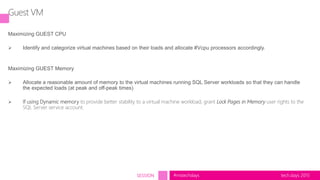
Guest VM
Maximizing GUEST CPU
 Identify and categorize virtual machines based on their loads and allocate #Vcpu processors accordingly.
Maximizing GUEST Memory
 Allocate a reasonable amount of memory to the virtual machines running SQL Server workloads so that they can handle
the expected loads (at peak and off-peak times)
 If using Dynamic memory to provide better stability to a virtual machine workload, grant Lock Pages in Memory user rights to the
SQL Server service account.
tech.days 2015#mstechdaysSESSION
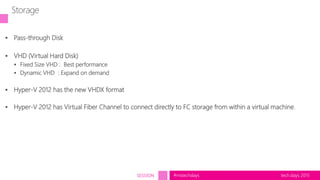
 Pass-through Disk
 VHD (Virtual Hard Disk)
 Fixed Size VHD : Best performance
 Dynamic VHD : Expand on demand
 Hyper-V 2012 has the new VHDX format
 Hyper-V 2012 has Virtual Fiber Channel to connect directly to FC storage from within a virtual machine.
Storage
tech.days 2015#mstechdaysSESSION
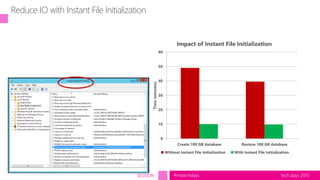
Reduce IO with Instant File Initialization
0
10
20
30
40
50
60
Create 100 GB database Restore 100 GB database
Time(minutes)
Impact of Instant File Initialization
Without Instant File Initialization With Instant File Initialization
tech.days 2015#mstechdaysSESSION
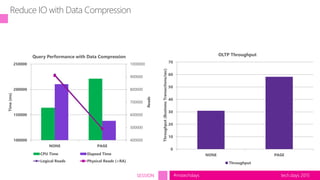
Reduce IO with Data Compression
400000
500000
600000
700000
800000
900000
1000000
100000
150000
200000
250000
NONE PAGE
Reads
Time(ms)
Query Performance with Data Compression
CPU Time Elapsed Time
Logical Reads Physical Reads (+RA)
0
10
20
30
40
50
60
70
NONE PAGE
Throughput(BusinessTransactions/sec)
OLTP Throughput
Throughput
tech.days 2015#mstechdaysSESSION
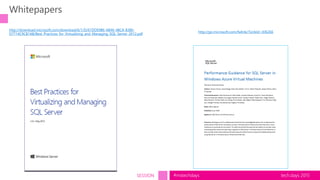
Whitepapers
http://go.microsoft.com/fwlink/?LinkId=306266
http://download.microsoft.com/download/6/1/D/61DDE9B6-AB46-48CA-8380-
D7714C9CB1AB/Best_Practices_for_Virtualizing_and_Managing_SQL_Server_2012.pdf
tech.days 2015#mstechdaysSESSION
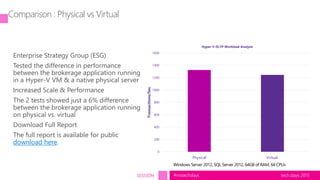
Comparison : Physical vs Virtual
Enterprise Strategy Group (ESG)
Tested the difference in performance
between the brokerage application running
in a Hyper-V VM & a native physical server
Increased Scale & Performance
The 2 tests showed just a 6% difference
between the brokerage application running
on physical vs. virtual
Download Full Report
The full report is available for public
download here.
0
200
400
600
800
1000
1200
1400
1600
Physical Virtual
Transactions/Sec
Hyper-V OLTP Workload Analysis
tech.days 2015#mstechdaysSESSION
Points d’attention
• Diagnostic
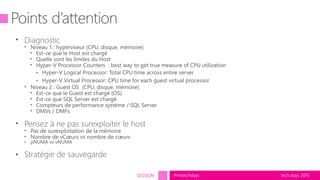
• Niveau 1 : hyperviseur (CPU, disque, mémoire)
• Est-ce que le Host est chargé
• Quelle sont les limites du Host
• Hyper-V Processor Counters : best way to get true measure of CPU utilization
• Hyper-V Logical Processor: Total CPU time across entire server
• Hyper-V Virtual Processor: CPU time for each guest virtual processor
• Niveau 2 : Guest OS (CPU, disque, mémoire)
• Est-ce que le Guest est chargé (OS)
• Est-ce que SQL Server est chargé
• Compteurs de performance système / SQL Server
• DMVs / DMFs
• Pensez à ne pas surexploiter le host
• Pas de surexploitation de la mémoire
• Nombre de vCœurs vs nombre de cœurs
• pNUMA vs vNUMA
• Stratégie de sauvegarde
tech.days 2015#mstechdaysSESSION
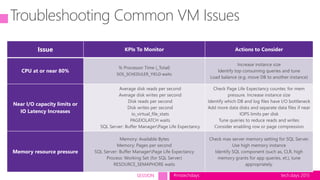
Troubleshooting Common VM Issues
Issue KPIs To Monitor Actions to Consider
CPU at or near 80%
% Processor Time (_Total)
SOS_SCHEDULER_YIELD waits
Increase instance size
Identify top consuming queries and tune
Load balance (e.g. move DB to another instance)
Near I/O capacity limits or
IO Latency Increases
Average disk reads per second
Average disk writes per second
Disk reads per second
Disk writes per second
io_virtual_file_stats
PAGEIOLATCH waits
SQL Server: Buffer ManagerPage Life Expectancy
Check Page Life Expectancy counter, for mem
pressure. Increase instance size
Identify which DB and log files have I/O bottleneck
Add more data disks and separate data files if near
IOPS limits per disk
Tune queries to reduce reads and writes
Consider enabling row or page compression
Memory resource pressure
Memory: Available Bytes
Memory: Pages per second
SQL Server: Buffer ManagerPage Life Expectancy
Process: Working Set (for SQL Server)
RESOURCE_SEMAPHORE waits
Check max server memory setting for SQL Server.
Use high memory instance
Identify SQL component (such as, CLR, high
memory grants for app queries, et.), tune
appropriately.
tech.days 2015#mstechdaysSESSION
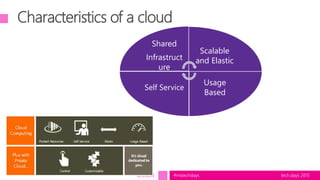
Characteristics of a cloud
Shared
Infrastruct
ure
Scalable
and Elastic
Usage
Based
Self Service
tech.days 2015#mstechdaysSESSION
Exemple : Catalogue de services
Self Service provisioning
tech.days 2015#mstechdaysSESSION
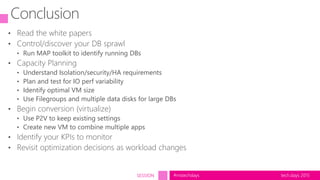
Conclusion
• Read the white papers
• Control/discover your DB sprawl
• Run MAP toolkit to identify running DBs
• Capacity Planning
• Understand Isolation/security/HA requirements
• Plan and test for IO perf variability
• Identify optimal VM size
• Use Filegroups and multiple data disks for large DBs
• Begin conversion (virtualize)
• Use P2V to keep existing settings
• Create new VM to combine multiple apps
• Identify your KPIs to monitor
• Revisit optimization decisions as workload changes
© 2015 Microsoft Corporation. All rights reserved.
tech days•
2015
#mstechdays techdays.microsoft.fr

SQL Server & la virtualisation : « 45 minutes inside » !

  • 1.
  • 2.
    select * fromtechdays2015.speaker_principals Christophe LAPORTE Consultant Formateur Indépendant Blog http://conseilit.wordpress.com/ Twitter @Conseilit Email christophe_laporte@hotmail.fr Nadia BEN EL KADI SQL Server Team Microsoft France Blog : http://blogs.technet.com/b/dataplatforminsider/
  • 3.
    tech.days 2015#mstechdaysSESSION Agenda –SQL Server & la virtualisation  Introduction  Why virtualizing  Advantages of virtualization  Demo / Deployement  Virtualization Support rules & Best Practices  Virtualization HA scenarios  Troubleshooting & Monitoring & Good to know  Case Study  Virtualization & cloud : A sample usage scenario  Conclusion
  • 4.
    tech.days 2015#mstechdaysSESSION Introduction DatabasesInstancesVirtual Machines Sales_1 Marketing_1 Online_Sales ERP_10 ERP_10 DB_1 DB_2 DB_3 Consolidate_1  Consolidation Standardize to fewer hardware  Reduce space, power  Improve Hardware Utilization  Improve Management Efficiency  Lowered cost and complexity
  • 5.
    tech.days 2015#mstechdaysSESSION Pourquoi virtualiser? • Historiquement • Consolidation • Maintenance de matériel obsolète • Peu adapté à de lourdes charges de travail (OLTP / DWH) • Actuellement • Le matériel à évolué • CPU / RAM / Réseau (10Gb, RDMA) • Disques (SAN Full Flash / SSD, Cartes Flash) • Les hyperviseurs ont aussi évolué • Gestion des ressources • Performance • Les serveurs bases de données peuvent être candidat à la virtualisation
  • 6.
    tech.days 2015#mstechdaysSESSION Avantages dela virtualisation • Faible adhérence au matériel • Migrations facilitées • Mise à jour hyperviseur • Flexibilité • Modification (à chaud) de la configuration d’une VM • Redimensionnement à chaud des VHDX • Limitation de la bande passant disque si nécessaire • Affectation de ressources à l’instant T et non pas en fonction de la durée de vie du projet • Nombre de CPU • Mémoire • Dépannage • Clonage à chaud (ou export depuis un checkpoint) d’une VM
  • 7.
  • 8.
    tech.days 2015#mstechdaysSESSION SQL Serversupport for virtualization http://support.microsoft.com/kb/956893/en-us
  • 9.
  • 10.
  • 11.
    tech.days 2015#mstechdaysSESSION HOST  Betterwhen the host supports SLAT (Second Level Address Translation) and NUMA (Non-Uniform Memory Access) Most modern servers provide these features  Take Care of the overcommitting : (VP:LP) ratio  Antivirus (extensions VHD/VHDX/AVHD/AVHDX)  Let enough Memory for the HOST for the VMs management  Monitor Memory usage to prevent performance issues
  • 12.
    tech.days 2015#mstechdaysSESSION Guest VM MaximizingGUEST CPU  Identify and categorize virtual machines based on their loads and allocate #Vcpu processors accordingly. Maximizing GUEST Memory  Allocate a reasonable amount of memory to the virtual machines running SQL Server workloads so that they can handle the expected loads (at peak and off-peak times)  If using Dynamic memory to provide better stability to a virtual machine workload, grant Lock Pages in Memory user rights to the SQL Server service account.
  • 13.
    tech.days 2015#mstechdaysSESSION  Pass-throughDisk  VHD (Virtual Hard Disk)  Fixed Size VHD : Best performance  Dynamic VHD : Expand on demand  Hyper-V 2012 has the new VHDX format  Hyper-V 2012 has Virtual Fiber Channel to connect directly to FC storage from within a virtual machine. Storage
  • 14.
    tech.days 2015#mstechdaysSESSION Reduce IOwith Instant File Initialization 0 10 20 30 40 50 60 Create 100 GB database Restore 100 GB database Time(minutes) Impact of Instant File Initialization Without Instant File Initialization With Instant File Initialization
  • 15.
    tech.days 2015#mstechdaysSESSION Reduce IOwith Data Compression 400000 500000 600000 700000 800000 900000 1000000 100000 150000 200000 250000 NONE PAGE Reads Time(ms) Query Performance with Data Compression CPU Time Elapsed Time Logical Reads Physical Reads (+RA) 0 10 20 30 40 50 60 70 NONE PAGE Throughput(BusinessTransactions/sec) OLTP Throughput Throughput
  • 16.
  • 17.
    tech.days 2015#mstechdaysSESSION Comparison :Physical vs Virtual Enterprise Strategy Group (ESG) Tested the difference in performance between the brokerage application running in a Hyper-V VM & a native physical server Increased Scale & Performance The 2 tests showed just a 6% difference between the brokerage application running on physical vs. virtual Download Full Report The full report is available for public download here. 0 200 400 600 800 1000 1200 1400 1600 Physical Virtual Transactions/Sec Hyper-V OLTP Workload Analysis
  • 18.
  • 19.
    tech.days 2015#mstechdaysSESSION Points d’attention •Diagnostic • Niveau 1 : hyperviseur (CPU, disque, mémoire) • Est-ce que le Host est chargé • Quelle sont les limites du Host • Hyper-V Processor Counters : best way to get true measure of CPU utilization • Hyper-V Logical Processor: Total CPU time across entire server • Hyper-V Virtual Processor: CPU time for each guest virtual processor • Niveau 2 : Guest OS (CPU, disque, mémoire) • Est-ce que le Guest est chargé (OS) • Est-ce que SQL Server est chargé • Compteurs de performance système / SQL Server • DMVs / DMFs • Pensez à ne pas surexploiter le host • Pas de surexploitation de la mémoire • Nombre de vCœurs vs nombre de cœurs • pNUMA vs vNUMA • Stratégie de sauvegarde
  • 20.
    tech.days 2015#mstechdaysSESSION Troubleshooting CommonVM Issues Issue KPIs To Monitor Actions to Consider CPU at or near 80% % Processor Time (_Total) SOS_SCHEDULER_YIELD waits Increase instance size Identify top consuming queries and tune Load balance (e.g. move DB to another instance) Near I/O capacity limits or IO Latency Increases Average disk reads per second Average disk writes per second Disk reads per second Disk writes per second io_virtual_file_stats PAGEIOLATCH waits SQL Server: Buffer ManagerPage Life Expectancy Check Page Life Expectancy counter, for mem pressure. Increase instance size Identify which DB and log files have I/O bottleneck Add more data disks and separate data files if near IOPS limits per disk Tune queries to reduce reads and writes Consider enabling row or page compression Memory resource pressure Memory: Available Bytes Memory: Pages per second SQL Server: Buffer ManagerPage Life Expectancy Process: Working Set (for SQL Server) RESOURCE_SEMAPHORE waits Check max server memory setting for SQL Server. Use high memory instance Identify SQL component (such as, CLR, high memory grants for app queries, et.), tune appropriately.
  • 21.
    tech.days 2015#mstechdaysSESSION Characteristics ofa cloud Shared Infrastruct ure Scalable and Elastic Usage Based Self Service
  • 22.
    tech.days 2015#mstechdaysSESSION Exemple :Catalogue de services Self Service provisioning
  • 23.
    tech.days 2015#mstechdaysSESSION Conclusion • Readthe white papers • Control/discover your DB sprawl • Run MAP toolkit to identify running DBs • Capacity Planning • Understand Isolation/security/HA requirements • Plan and test for IO perf variability • Identify optimal VM size • Use Filegroups and multiple data disks for large DBs • Begin conversion (virtualize) • Use P2V to keep existing settings • Create new VM to combine multiple apps • Identify your KPIs to monitor • Revisit optimization decisions as workload changes
  • 24.
    © 2015 MicrosoftCorporation. All rights reserved. tech days• 2015 #mstechdays techdays.microsoft.fr