Cyber Security
Training Presentation
[name] [date]
Learning objectives
 Understand the scale of the threat
 Know who our adversaries are and
what they can do
 The red flags to look for
 Our company’s cyber security policy
Security incidents are:
“... attempts to gain unauthorised access to a system or data
… modification of firmware, software or hardware without consent
… unauthorised use of systems or data
…malicious disruption or denial of service…”
And significant incidents:
“…impact on the UK’s national security or economic wellbeing
…impact on the continued operation of an organisation”
National Cyber Security Centre
What is a security incident?
The scale of the threat
Cyber incidents are on the rise…
We fight 50,000 cyber attacks a day
CEO, energy company, EY report
2 million computer misuse offences every year
BBC website
UK businesses faced a 22% increase in cyber
incidents over the last year
IT Pro
UK businesses lost to cyber crime were
£1 billion+
IT Pro
Who commits cybercrime?
Nation States
Script Kiddies –
teens doing it for
the kudos
Organised
criminal gangs
Hacktivists
YES YES YES
YES
Cyber terrorists
YES
Insiders
YES
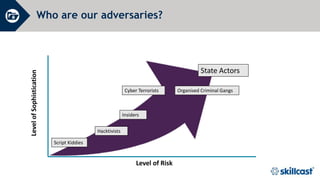
Who are our adversaries?
Level of Risk
Level
of
Sophistication
Script Kiddies
State Actors
Hacktivists
Organised Criminal Gangs
Cyber Terrorists
Insiders
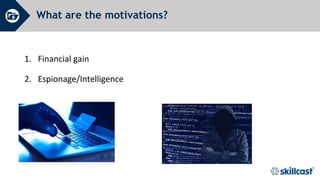
What are the motivations?
1. Financial gain
2. Espionage/Intelligence
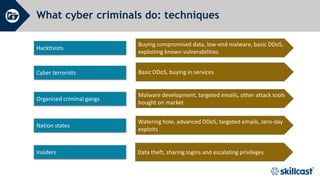
What cyber criminals do: techniques
Buying compromised data, low-end malware, basic DDoS,
exploiting known vulnerabilities
Hacktivists
Basic DDoS, buying in services
Cyber terrorists
Malware development, targeted emails, other attack tools
bought on market
Organised criminal gangs
Watering hole, advanced DDoS, targeted emails, zero-day
exploits
Nation states
Data theft, sharing logins and escalating privileges
Insiders
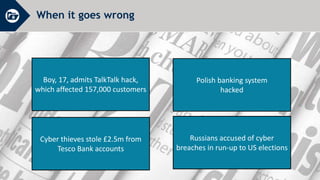
When it goes wrong
Boy, 17, admits TalkTalk hack,
which affected 157,000 customers
Polish banking system
hacked
Russians accused of cyber
breaches in run-up to US elections
Cyber thieves stole £2.5m from
Tesco Bank accounts
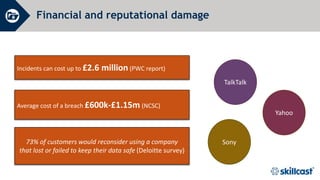
Financial and reputational damage
Incidents can cost up to £2.6 million (PWC report)
73% of customers would reconsider using a company
that lost or failed to keep their data safe (Deloitte survey)
TalkTalk
Sony
Yahoo
Average cost of a breach £600k-£1.15m (NCSC)
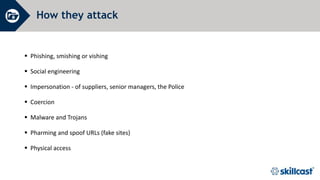
How they attack
 Phishing, smishing or vishing
 Social engineering
 Impersonation - of suppliers, senior managers, the Police
 Coercion
 Malware and Trojans
 Pharming and spoof URLs (fake sites)
 Physical access
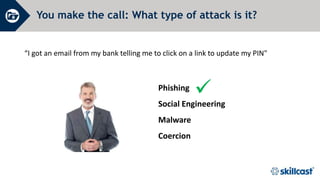
You make the call: What type of attack is it?
“I got an email from my bank telling me to click on a link to update my PIN"

Phishing
Social Engineering
Malware
Coercion
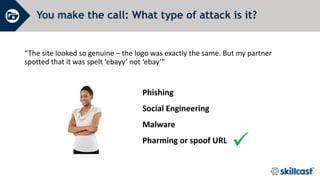
You make the call: What type of attack is it?
“The site looked so genuine – the logo was exactly the same. But my partner
spotted that it was spelt ‘ebayy’ not ‘ebay’"

Phishing
Social Engineering
Malware
Pharming or spoof URL
Phishing
Social Engineering
Coercion
Malware
You make the call: What type of attack is it?
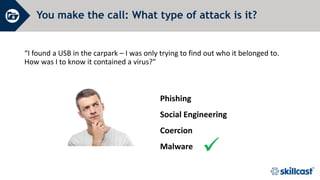
“I found a USB in the carpark – I was only trying to find out who it belonged to.
How was I to know it contained a virus?"

You make the call: What type of attack is it?
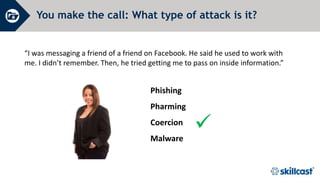
“I was messaging a friend of a friend on Facebook. He said he used to work with
me. I didn’t remember. Then, he tried getting me to pass on inside information.”

Phishing
Pharming
Coercion
Malware
Our Cyber Security Policy
1. Encouraging everyone to get involved
2. Appointing people with responsibility for cyber security
3. Having an incident management plan – so we know what to do
4. Requiring everyone to read and implement our Cyber Security Policy
Do…
 Read our Company's Cyber Security Policy - make sure you understand the rules and why they're important
 Be vigilant - cyber criminals can attack anywhere, when you’re working at home, travelling on the Tube, on
your way to a meeting, etc
 Keep anti-virus software up-to-date - download updates or patches as soon as they’re available
 Promptly report signs your device may be infected - e.g. high CPU, slower response, duplicated files,
ghosting
 Keep backup copies of all data - this makes us less vulnerable to ransomware attacks
 Tell your manager - if you click on a link or download something by accident – the sooner we know, the
quicker we can resolve it
Don’t…
 Respond to or click on the links in unsolicited emails
 Advertise where you work on social media profiles - keep information to a minimum (you may be
targeted because of where you work)
 Download unauthorised software to our IT systems
 Connect external devices to our network – e.g. USBs. If you find a USB, hand it in to IT
 Access social media, gaming or adult sites using work devices – as well as breaching our conduct rules,
they are often infected with malware
 Use public WiFi to connect to our data or network – anything you type can be seen by others!
Questions, comments or concerns?
Next steps
Call _____ on _____ if you need information or guidance
Call _____ on _____ if you need to raise concerns
Access self-study courses on our e-learning portal for further training [or
optionally – Complete your mandatory training on our corporate e-learning
portal]
About Skillcast
 Skillcast provides digital learning content, technology
and services to help you train your staff, automate your
compliance processes and generate management
reports to help you keep track of it all.
 Our best-selling Compliance Essentials Library provides
a complete and comprehensive off-the-shelf
compliance solution for UK businesses.
Register for a free trial at
https://www.skillcast.com/free-trial
Copyright © 2022 Skillcast. All Rights Reserved.

cyber-security-training-presentation-q320.ppt

  • 1.
  • 2.
    Learning objectives  Understandthe scale of the threat  Know who our adversaries are and what they can do  The red flags to look for  Our company’s cyber security policy
  • 3.
    Security incidents are: “...attempts to gain unauthorised access to a system or data … modification of firmware, software or hardware without consent … unauthorised use of systems or data …malicious disruption or denial of service…” And significant incidents: “…impact on the UK’s national security or economic wellbeing …impact on the continued operation of an organisation” National Cyber Security Centre What is a security incident?
  • 4.
    The scale ofthe threat Cyber incidents are on the rise… We fight 50,000 cyber attacks a day CEO, energy company, EY report 2 million computer misuse offences every year BBC website UK businesses faced a 22% increase in cyber incidents over the last year IT Pro UK businesses lost to cyber crime were £1 billion+ IT Pro
  • 5.
    Who commits cybercrime? NationStates Script Kiddies – teens doing it for the kudos Organised criminal gangs Hacktivists YES YES YES YES Cyber terrorists YES Insiders YES
  • 6.
    Who are ouradversaries? Level of Risk Level of Sophistication Script Kiddies State Actors Hacktivists Organised Criminal Gangs Cyber Terrorists Insiders
  • 7.
    What are themotivations? 1. Financial gain 2. Espionage/Intelligence
  • 8.
    What cyber criminalsdo: techniques Buying compromised data, low-end malware, basic DDoS, exploiting known vulnerabilities Hacktivists Basic DDoS, buying in services Cyber terrorists Malware development, targeted emails, other attack tools bought on market Organised criminal gangs Watering hole, advanced DDoS, targeted emails, zero-day exploits Nation states Data theft, sharing logins and escalating privileges Insiders
  • 9.
    When it goeswrong Boy, 17, admits TalkTalk hack, which affected 157,000 customers Polish banking system hacked Russians accused of cyber breaches in run-up to US elections Cyber thieves stole £2.5m from Tesco Bank accounts
  • 10.
    Financial and reputationaldamage Incidents can cost up to £2.6 million (PWC report) 73% of customers would reconsider using a company that lost or failed to keep their data safe (Deloitte survey) TalkTalk Sony Yahoo Average cost of a breach £600k-£1.15m (NCSC)
  • 11.
    How they attack Phishing, smishing or vishing  Social engineering  Impersonation - of suppliers, senior managers, the Police  Coercion  Malware and Trojans  Pharming and spoof URLs (fake sites)  Physical access
  • 12.
    You make thecall: What type of attack is it? “I got an email from my bank telling me to click on a link to update my PIN"  Phishing Social Engineering Malware Coercion
  • 13.
    You make thecall: What type of attack is it? “The site looked so genuine – the logo was exactly the same. But my partner spotted that it was spelt ‘ebayy’ not ‘ebay’"  Phishing Social Engineering Malware Pharming or spoof URL
  • 14.
    Phishing Social Engineering Coercion Malware You makethe call: What type of attack is it? “I found a USB in the carpark – I was only trying to find out who it belonged to. How was I to know it contained a virus?" 
  • 15.
    You make thecall: What type of attack is it? “I was messaging a friend of a friend on Facebook. He said he used to work with me. I didn’t remember. Then, he tried getting me to pass on inside information.”  Phishing Pharming Coercion Malware
  • 16.
    Our Cyber SecurityPolicy 1. Encouraging everyone to get involved 2. Appointing people with responsibility for cyber security 3. Having an incident management plan – so we know what to do 4. Requiring everyone to read and implement our Cyber Security Policy
  • 17.
    Do…  Read ourCompany's Cyber Security Policy - make sure you understand the rules and why they're important  Be vigilant - cyber criminals can attack anywhere, when you’re working at home, travelling on the Tube, on your way to a meeting, etc  Keep anti-virus software up-to-date - download updates or patches as soon as they’re available  Promptly report signs your device may be infected - e.g. high CPU, slower response, duplicated files, ghosting  Keep backup copies of all data - this makes us less vulnerable to ransomware attacks  Tell your manager - if you click on a link or download something by accident – the sooner we know, the quicker we can resolve it
  • 18.
    Don’t…  Respond toor click on the links in unsolicited emails  Advertise where you work on social media profiles - keep information to a minimum (you may be targeted because of where you work)  Download unauthorised software to our IT systems  Connect external devices to our network – e.g. USBs. If you find a USB, hand it in to IT  Access social media, gaming or adult sites using work devices – as well as breaching our conduct rules, they are often infected with malware  Use public WiFi to connect to our data or network – anything you type can be seen by others!
  • 19.
  • 20.
    Next steps Call _____on _____ if you need information or guidance Call _____ on _____ if you need to raise concerns Access self-study courses on our e-learning portal for further training [or optionally – Complete your mandatory training on our corporate e-learning portal]
  • 21.
    About Skillcast  Skillcastprovides digital learning content, technology and services to help you train your staff, automate your compliance processes and generate management reports to help you keep track of it all.  Our best-selling Compliance Essentials Library provides a complete and comprehensive off-the-shelf compliance solution for UK businesses. Register for a free trial at https://www.skillcast.com/free-trial Copyright © 2022 Skillcast. All Rights Reserved.

Editor's Notes

  • #2 Welcome to this session on Cyber Security. Thank you for attending. This session should take us around 20 mins.
  • #3 In this session we’ll look at: The scale of the threat Who are our adversaries? What we can do Our company’s cyber security policy
  • #4 [Ask delegates] What is a cyber security incident? [Brainstorm ideas, making a note on the flipchart of any that match the definition below.] According to the National Cyber Security Centre, security breaches include: “…attempts to gain unauthorised access to a system and/or to data …the unauthorised use of systems and/or data …modification of a system's firmware, software or hardware without the system-owner's consent …malicious disruption and/or denial of service…” Significant cyber security incidents are those which: “…Impact on the UK’s national security or economic wellbeing …Have potential to cause a major impact to the continued operation of an organisation…”
  • #5 [Ask delegates] What is the scale of the threat? How big a problem do you think cyber security is now? And how big do you think it will be in future? [Brainstorm ideas, making a note on the flipchart of any current examples.] [Talk through the statistics as shown, one at a time.]
  • #6 Let’s spend a few minutes thinking about who commits cybercrime. [Allow delegates time to consider this, introducing ideas if required] There are a number of different players: Nation states Script Kiddies – stereotypical hackers/teens doing it for the kudos with friends (as in the TalkTalk hack) Organised criminal gangs Hacktivists Cyber terrorists Insiders
  • #7 [Discuss with delegates:] There’s no typical profile of a ‘hacker’. Cyber criminals may pose a high or low risk, they may operate at a low- or high-level, and be sophisticated or not. [Ask them to guess where different adversaries would sit on the chart before clicking to reveal the answer.] [Give delegates time to discuss and review before moving on.]
  • #8 Different adversaries may be motivated by different things too. For some groups, the end-game will be financial – they simply want money to finance their operations. However, for others, their motivation may be a desire to gain intelligence – about what payments are made and where, or intelligence on a country (espionage).
  • #9 Cyber criminals may also use different methods to launch attacks. Here are some examples of what they do. [Insiders may accidentally or deliberately expose us to cyber crime – they may face coercion, social engineering attacks, etc.]
  • #10 And they are often successful. Here are some examples of cases that have made the headlines recently. [As an add-on, discuss other recent cases, if required.]
  • #11 Cyber incidents can have serious consequences on any company, including financial and reputational damage. This depends on the scale of the breach – but estimates by PWC show that incidents can cost up to £2.6 million. When you factor in the disruption to normal BAU activities, the cost and time of an investigation, regulatory fines, and fixing the source of the breach, that estimate soon looks conservative. But, it’s not just the financial impact. The reputational damage can be just as significant, as you may recall with these cases. A survey by Deloitte confirms what we already know – a cyber attack would scare most customers away! [Discuss recent cases – eg TalkTalk, Sony, Yahoo – and any others in the headlines]
  • #12 To reduce the risks, you’ll need to be vigilant and look out for signs of attack. The main methods used are: Phishing, smishing or vishing – this is where malicious messages are sent by email, text message or phone to get you to hand over sensitive information (such as passwords, PIN numbers, payment details, etc) Social engineering – deceiving or manipulating people into revealing confidential, sensitive or personal information (such as account or payment details, PIN numbers, passwords, etc), often to commit fraud or identity theft Impersonation of suppliers, senior managers, the Police – by masquerading as authority figures, people feel pressured to comply with the demands made by cybercriminals Coercion – key players in an organisation may be targeted (either online or in person) and coerced into helping cybercriminals, sometimes for financial gain Malware and Trojans – an abbreviation of ‘MALicious softWARE’; it’s used to gather sensitive or private information, disrupt normal activity, display advertising, etc. It may be embedded in a link in an email, in websites (eg adult content, gaming and gambling sites), etc ‘with harmful intent’. A Trojan is a type of virus used to hack a computer system by misleading the user of its real intent (often sent by email) Pharming/Spoof URLs (fake sites) – a form of cyber attack where legitimate website visitors are redirected to a fake site Physical access – cybercriminals may masquerade as legitimate visitors (attending training or promotional events) to gain intelligence or launch attacks ‘within the walls’. This is more risky and hence less common. But, it’s why it’s important to challenge all unescorted visitors. [Discuss the different methods that cyber criminals may use, including recent threats.]
  • #13 Take a look at this example and decide what type of attack it is. [Allow for thinking time before clicking next] This is an example of phishing. Thousands of emails may be sent out at random, inviting recipients to divulge personal and/or financial information. [Note: Another variation is where emails are sent selectively to key targets in our company – eg those named on the website in prominent positions (such as Accounts) – informing them of a change of payment details with a supplier. By clicking on the link, you may download a virus or malware, etc.]
  • #14 Take a look at this example and decide what type of attack it is. [Allow for thinking time before clicking next] This is an example of a pharming or spoof URL. A bogus website is created which mimics a genuine site, waiting to collect personal and/or payment information from any unsuspecting visitors. Large numbers of people can be targeted in one go.
  • #15 Take a look at this example and decide what type of attack it is. [Allow for thinking time before clicking next] This is an example of malware. Cyber criminals have been known to drop infected USB memory sticks and other external devices near company premises, hoping for just one person to ‘bite’ and infect the entire system.
  • #16 Take a look at this example and decide what type of attack it is. [Allow for thinking time before clicking next] This is an example of coercion. By masquerading as an acquaintance or former work colleague, cyber criminals can trick you into revealing inside information. Or they may be blatant, even offering to pay you to be their ‘mole’.
  • #17 Our Cyber Security policy sets out our rules, processes and procedures designed to protect us from cyber crime. We are committed to preventing cyber crime by: Encouraging everyone to get involved and play their part Appointing people with responsibility for cyber security Having an incident management plan – so we know what to do Requiring everyone to read and implement our Cyber Security Policy
  • #18 Here's what you should do: Read our Company's Cyber Security Policy – make sure you understand the rules and why they're important Be vigilant – cyber criminals can attack anywhere, when you’re working at home, travelling on the Tube, on your way to a meeting, etc Keep anti-virus software up-to-date – download updates or patches as soon as they’re available Promptly report any signs that your machine may be infected – eg high CPU, slower response, duplicated files, ghosting, etc Keep backup copies of all data – this makes us less vulnerable to ransomware attacks Tell your manager if you click on a link or download something by accident – the sooner we know, the quicker we can resolve it
  • #19 Don't: Respond or click on the links in unsolicited emails Advertise where you work on social media – keep information to a minimum (you may be targeted because of where you work) Download unauthorised software to our IT systems Connect external devices (such as USBs) to our network – if you find a USB, hand it in to IT Access social media, gaming or adult sites using work devices – as well as breaching our conduct rules, these sites are often infected with malware Use public WiFi to connect to our data or network – anything you type can be seen by others!
  • #20 Do you have any questions?
  • #21 You can get more help and information on this issue from these contacts. Or, for a more in-depth look at this topic, access our self-study course.