CYBER
SECURITY
Information for TEENAGERS
Why
Cyber Security
is
Important?
Cybersecurity is important because it
protects all categories of data from
theft and damage. This includes
sensitive data, personally identifiable
information (PII), protected health
information (PHI), personal
information, intellectual property,
data, and governmental and industry
information systems.
1
2
3
4
5
Data Theft - According to CNBC, cyber attackers know that
students often have little understanding of how to properly guard
personal and financial data being input online, typically for the
first time. Experts say hackers can use this data for identity theft,
credit fraud and more.
Mobile Malware - Researchers at Check Point found that attacks
targeting mobile devices have risen by 50% since 2018. With
more students moving from a desktop or laptop to smartphone
use, it is more important than ever to take mobile security
seriously.
Malicious Social Media Messaging - According to a study on
cybersecurity threats amid the COVID-19 pandemic, hackers are
taking advantage of platforms such as Facebook and WhatsApp
with scams to lure victims to phishing websites, which can
compromise personal information.
Camfecting - Many students today have a desktop webcam or
camera built into their phone, tablet or laptop. Unfortunately this
can open the door to camfecting, where hackers are able to
remotely access and take control of a webcam.
Social Engineering - Social engineering scams are among the top
cybersecurity threats faced by higher education students,
according to EducationDive. These attacks rely on manipulating
users into revealing confidential information.
1
2
3
4
5
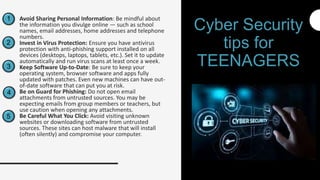
Avoid Sharing Personal Information: Be mindful about
the information you divulge online — such as school
names, email addresses, home addresses and telephone
numbers.
Invest in Virus Protection: Ensure you have antivirus
protection with anti-phishing support installed on all
devices (desktops, laptops, tablets, etc.). Set it to update
automatically and run virus scans at least once a week.
Keep Software Up-to-Date: Be sure to keep your
operating system, browser software and apps fully
updated with patches. Even new machines can have out-
of-date software that can put you at risk.
Be on Guard for Phishing: Do not open email
attachments from untrusted sources. You may be
expecting emails from group members or teachers, but
use caution when opening any attachments.
Be Careful What You Click: Avoid visiting unknown
websites or downloading software from untrusted
sources. These sites can host malware that will install
(often silently) and compromise your computer.
Cyber Security
tips for
TEENAGERS
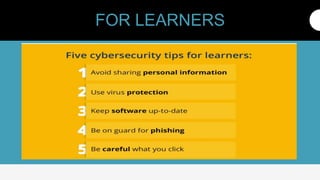
FOR LEARNERS

Cyber Security for Teenagers/Students

  • 1.
  • 2.
    Why Cyber Security is Important? Cybersecurity isimportant because it protects all categories of data from theft and damage. This includes sensitive data, personally identifiable information (PII), protected health information (PHI), personal information, intellectual property, data, and governmental and industry information systems.
  • 3.
    1 2 3 4 5 Data Theft -According to CNBC, cyber attackers know that students often have little understanding of how to properly guard personal and financial data being input online, typically for the first time. Experts say hackers can use this data for identity theft, credit fraud and more. Mobile Malware - Researchers at Check Point found that attacks targeting mobile devices have risen by 50% since 2018. With more students moving from a desktop or laptop to smartphone use, it is more important than ever to take mobile security seriously. Malicious Social Media Messaging - According to a study on cybersecurity threats amid the COVID-19 pandemic, hackers are taking advantage of platforms such as Facebook and WhatsApp with scams to lure victims to phishing websites, which can compromise personal information. Camfecting - Many students today have a desktop webcam or camera built into their phone, tablet or laptop. Unfortunately this can open the door to camfecting, where hackers are able to remotely access and take control of a webcam. Social Engineering - Social engineering scams are among the top cybersecurity threats faced by higher education students, according to EducationDive. These attacks rely on manipulating users into revealing confidential information.
  • 4.
    1 2 3 4 5 Avoid Sharing PersonalInformation: Be mindful about the information you divulge online — such as school names, email addresses, home addresses and telephone numbers. Invest in Virus Protection: Ensure you have antivirus protection with anti-phishing support installed on all devices (desktops, laptops, tablets, etc.). Set it to update automatically and run virus scans at least once a week. Keep Software Up-to-Date: Be sure to keep your operating system, browser software and apps fully updated with patches. Even new machines can have out- of-date software that can put you at risk. Be on Guard for Phishing: Do not open email attachments from untrusted sources. You may be expecting emails from group members or teachers, but use caution when opening any attachments. Be Careful What You Click: Avoid visiting unknown websites or downloading software from untrusted sources. These sites can host malware that will install (often silently) and compromise your computer. Cyber Security tips for TEENAGERS
  • 5.