CUSTOMIZING
STUDENT
LEARNING
Jamie Harris
“There are no one-size-fits-all approaches to the work of
teaching.Teachers must be mindful of whom they are teaching
and the range of needs that students will bring into the
classroom. Moreover, the social context that shapes students’
experiences is vast and complexly integral to what decisions are
made, how decisions are made, and why.”
(Milner, 2011, p. 67)
■ Student needs within the classroom differ due to diverse student
populations
■ Therefore, lessons should be proactively developed to ensure all
students, regardless of gender, cultural backgrounds, abilities, or socio-
economic status, succeed in learning the required content and afforded
equitable access to technology to enhance or support their learning.
Differentiated Instruction (DI)
■ The process of purposefully designing and providing instruction to include different
content, strategies, and products to help every student master the required learning
goals
■ Requires teachers to know and understand students’ abilities, interests, and learning
preferences (referred to as “learning profile”)
– Use learning style inventories, surveys, pre-assessments to learn more about
student backgrounds and interests, even technology use
– Provide flexibility and choice for students based on learning profile
■ DOES NOT mean varying activities, lengthening or shortening assignments, or just
trying different teaching strategies
■ DOES include varying:
– content (through the use of video clips,WebQuests, newspaper articles)
– processes (teacher writes a storyboard, creates a game, assigns learning groups)
– products created by students to demonstrate learning (concept map, blog post,
digital portfolio)
Universal Design for Learning (UDL)
■ An instructional approach in which teacher remove learning barriers by providing
flexibility in materials, methods, and assessments
■ Similar to Differentiated Instruction, but has origins in special education and learning
disabilities
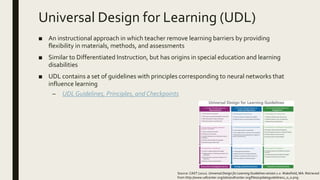
■ UDL contains a set of guidelines with principles corresponding to neural networks that
influence learning
– UDLGuidelines, Principles, and Checkpoints
Source: CAST (2011). Universal Design for Learning Guidelines version 2.0. Wakefield, MA. Retrieved
from http://www.udlcenter.org/sites/udlcenter.org/files/updateguidelines2_0_0.png
Universal Design for Learning (UDL)
■ Guidelines and Neural Networks
– Provide multiple means of representation
■ Corresponds to “Recognition Networks” which help identify patterns and process
what should be learned
■ Teachers should present content in different ways with different media (provide
multiple examples, highlight critical features, use multiple media and formats to
access information)
– Provide multiple means for action and expression
■ Corresponds to “Strategic Networks” that control processes for planning, executing,
and monitoring actions; how things can be learned
■ Teachers should provide opportunities to practice skills with varied levels of support
and ongoing feedback (provide multiple tools for construction/composition, multiple
media for communication)
– Provide multiple means for engagement
■ Corresponds to “Affective Networks” that relate to feelings and emotions; process
the why of learning
■ Teachers should offer choices of media and tools
Universal Design for Learning (UDL)
■ Relies heavily on technology to help provide flexibility in developing and
implementing
– Learning goals
■ shouldn’t rely on one medium (although specific skills may be tied to one medium)
■ allow for flexibility in determining which media are used to help students build
knowledge and skills to achieve standards
– Learning activities
■ provide students with choices in media, tools, and context in which learning will take
place
■ provide multiple examples that tap into different senses
■ include activities with varied levels of difficulty
– Assessing student progress
■ does not always need to be paper-pencil based
■ digital tools such as games, simulations, and manipulatives allow for assessment
strategies to be included during learning process
AssistiveTechnologies
■ Digital technologies can be helpful to all students, but especially those with special
needs
■ Assistive technologies are any item, piece of equipment, or product system that
increases or improves the functional capabilities of individuals with disabilities
■ For students with disabilities, these tools are required to support their learning
■ These technologies vary from
– Low-tech items including calculators, spell checkers, and enlarging onscreen print
– Mid-tech items such as scanning reading pens, word-processing software, and
Braille notetakers
– High-tech items including eye-tracking technology, text-to-speech software, and
voice-recognition systems
■ While these types of special technologies may be required for some students, there
are common accessibility features within certain hardware and software that can be
used by all students to support learning
Learner-Centered Environments
■ Focus is on attending to the diverse interests, talents, and needs of students
■ Supported through differentiating instruction and using digital technologies based on
the principles of universal design for learning
■ Learner-centered environments should be structured to support diverse social,
cognitive, and metacognitive needs of learners
– Supporting social needs of students can be achieved through creating collaborative
learning environments
– Supporting cognitive needs of students can be achieved through promoting content
learning
– Supporting metacognitive needs of students can be achieved through promoting
reflection
EquitableAccess
■ Regardless of location, background, abilities or socio-economic status, all students
should be provided equal access to digital technologies, especially in the classroom
■ Attempts to decrease the digital divide or disparity among students who have access
to digital tools and resources and those that do not
■ In the classroom, teachers can help decrease the digital divide by providing:
– Access to up-to-date hardware, software, and connectivity
– Access to meaningful, high-quality, and culturally responsive content
– Access to educators who know how to use digital tools and resources
■ Teachers should select technologies based on individual and cultural needs of students
and ensure all students have equal opportunities to use all the technology resources
available in the classroom
Cultural Needs
■ Becoming a more culturally responsive teacher allows for better understanding and
consideration of the needs of students
■ Teachers should become culturally responsive by understanding his/her own cultural
background, the culture of the community in which the school is located, the school
culture, and the culture of his/her peers
■ Creating a classroom in which students develop cultural understanding and respect for
cultural diversity builds a learning community in which each member feels respected
and valued
Customizing Learning
■ Student needs within the classroom differ due to diverse student populations
■ Lessons should be proactively developed to include all students regardless of gender,
cultural backgrounds, abilities, or socio-economic status
■ Two frameworks used to personalize and customize learning include:
– Differentiated Instruction (DI)
– Universal Design for Learning (UDL)
■ Technologies, both digital and assistive, can help supplement and enhance learner
abilities within diverse student populations
■ Providing learner-centered environments can help support learning needs of students
■ Teachers must keep in mind cultural needs of students and provide equitable access to
technology
References
Milner, H. (2011). Culturally relevant pedagogy in a diverse urban classroom. Urban
Review, 43(1), 66-89. Retrieved from Academic Search Premier database.

Customizing student learning presentation

  • 1.
  • 2.
    “There are noone-size-fits-all approaches to the work of teaching.Teachers must be mindful of whom they are teaching and the range of needs that students will bring into the classroom. Moreover, the social context that shapes students’ experiences is vast and complexly integral to what decisions are made, how decisions are made, and why.” (Milner, 2011, p. 67) ■ Student needs within the classroom differ due to diverse student populations ■ Therefore, lessons should be proactively developed to ensure all students, regardless of gender, cultural backgrounds, abilities, or socio- economic status, succeed in learning the required content and afforded equitable access to technology to enhance or support their learning.
  • 3.
    Differentiated Instruction (DI) ■The process of purposefully designing and providing instruction to include different content, strategies, and products to help every student master the required learning goals ■ Requires teachers to know and understand students’ abilities, interests, and learning preferences (referred to as “learning profile”) – Use learning style inventories, surveys, pre-assessments to learn more about student backgrounds and interests, even technology use – Provide flexibility and choice for students based on learning profile ■ DOES NOT mean varying activities, lengthening or shortening assignments, or just trying different teaching strategies ■ DOES include varying: – content (through the use of video clips,WebQuests, newspaper articles) – processes (teacher writes a storyboard, creates a game, assigns learning groups) – products created by students to demonstrate learning (concept map, blog post, digital portfolio)
  • 4.
    Universal Design forLearning (UDL) ■ An instructional approach in which teacher remove learning barriers by providing flexibility in materials, methods, and assessments ■ Similar to Differentiated Instruction, but has origins in special education and learning disabilities ■ UDL contains a set of guidelines with principles corresponding to neural networks that influence learning – UDLGuidelines, Principles, and Checkpoints Source: CAST (2011). Universal Design for Learning Guidelines version 2.0. Wakefield, MA. Retrieved from http://www.udlcenter.org/sites/udlcenter.org/files/updateguidelines2_0_0.png
  • 5.
    Universal Design forLearning (UDL) ■ Guidelines and Neural Networks – Provide multiple means of representation ■ Corresponds to “Recognition Networks” which help identify patterns and process what should be learned ■ Teachers should present content in different ways with different media (provide multiple examples, highlight critical features, use multiple media and formats to access information) – Provide multiple means for action and expression ■ Corresponds to “Strategic Networks” that control processes for planning, executing, and monitoring actions; how things can be learned ■ Teachers should provide opportunities to practice skills with varied levels of support and ongoing feedback (provide multiple tools for construction/composition, multiple media for communication) – Provide multiple means for engagement ■ Corresponds to “Affective Networks” that relate to feelings and emotions; process the why of learning ■ Teachers should offer choices of media and tools
  • 6.
    Universal Design forLearning (UDL) ■ Relies heavily on technology to help provide flexibility in developing and implementing – Learning goals ■ shouldn’t rely on one medium (although specific skills may be tied to one medium) ■ allow for flexibility in determining which media are used to help students build knowledge and skills to achieve standards – Learning activities ■ provide students with choices in media, tools, and context in which learning will take place ■ provide multiple examples that tap into different senses ■ include activities with varied levels of difficulty – Assessing student progress ■ does not always need to be paper-pencil based ■ digital tools such as games, simulations, and manipulatives allow for assessment strategies to be included during learning process
  • 7.
    AssistiveTechnologies ■ Digital technologiescan be helpful to all students, but especially those with special needs ■ Assistive technologies are any item, piece of equipment, or product system that increases or improves the functional capabilities of individuals with disabilities ■ For students with disabilities, these tools are required to support their learning ■ These technologies vary from – Low-tech items including calculators, spell checkers, and enlarging onscreen print – Mid-tech items such as scanning reading pens, word-processing software, and Braille notetakers – High-tech items including eye-tracking technology, text-to-speech software, and voice-recognition systems ■ While these types of special technologies may be required for some students, there are common accessibility features within certain hardware and software that can be used by all students to support learning
  • 8.
    Learner-Centered Environments ■ Focusis on attending to the diverse interests, talents, and needs of students ■ Supported through differentiating instruction and using digital technologies based on the principles of universal design for learning ■ Learner-centered environments should be structured to support diverse social, cognitive, and metacognitive needs of learners – Supporting social needs of students can be achieved through creating collaborative learning environments – Supporting cognitive needs of students can be achieved through promoting content learning – Supporting metacognitive needs of students can be achieved through promoting reflection
  • 9.
    EquitableAccess ■ Regardless oflocation, background, abilities or socio-economic status, all students should be provided equal access to digital technologies, especially in the classroom ■ Attempts to decrease the digital divide or disparity among students who have access to digital tools and resources and those that do not ■ In the classroom, teachers can help decrease the digital divide by providing: – Access to up-to-date hardware, software, and connectivity – Access to meaningful, high-quality, and culturally responsive content – Access to educators who know how to use digital tools and resources ■ Teachers should select technologies based on individual and cultural needs of students and ensure all students have equal opportunities to use all the technology resources available in the classroom
  • 10.
    Cultural Needs ■ Becominga more culturally responsive teacher allows for better understanding and consideration of the needs of students ■ Teachers should become culturally responsive by understanding his/her own cultural background, the culture of the community in which the school is located, the school culture, and the culture of his/her peers ■ Creating a classroom in which students develop cultural understanding and respect for cultural diversity builds a learning community in which each member feels respected and valued
  • 11.
    Customizing Learning ■ Studentneeds within the classroom differ due to diverse student populations ■ Lessons should be proactively developed to include all students regardless of gender, cultural backgrounds, abilities, or socio-economic status ■ Two frameworks used to personalize and customize learning include: – Differentiated Instruction (DI) – Universal Design for Learning (UDL) ■ Technologies, both digital and assistive, can help supplement and enhance learner abilities within diverse student populations ■ Providing learner-centered environments can help support learning needs of students ■ Teachers must keep in mind cultural needs of students and provide equitable access to technology
  • 12.
    References Milner, H. (2011).Culturally relevant pedagogy in a diverse urban classroom. Urban Review, 43(1), 66-89. Retrieved from Academic Search Premier database.