Copyright © 2016 Splunk Inc.
Battelle
Stephen Hosom
Security Engineering Technical Lead
2
About Battelle
• World’s largest nonprofit research and development organization.
• Founded by Gordon Battelle, with funding from his will
• Mission: “Translate scientific discovery and technology advances into
societal advances”
• 22,000 employees in > 60 locations globally
• Headquarters: Columbus, OH
• Operates in 2 primary ways:
– Funds research
– Manages the world’s leading national labs (Dept of Energy)
3
About Me / Our Team
• Security Engineering Technical Lead
• Three security teams:
• Policy
• Engineering
• Operations
• Self-taught with Splunk
4
Before Splunk
• 3 disparate log systems
• X – Vendor product, difficult to upgrade and unstable
• Y – Free product, difficult to optimize and keep running
• Raw Logs on Disk – Unwieldy but reliable.
• Spent LOTS of time just keeping everything running
• Operational challenges referencing 3 different log
analysis tools.
A horrifyingly
complex
environment
where keeping
everything
running was a
challenge
5
Choosing Splunk
• Started looking at replacement tools for a vendor
product.
• Used Splunk at a prior organization
• Started an evaluation that spanned multiple months
and gradually increased in size.
• Eventually realized that we would be able to shrink
from 3 tools to just one—and would also save money
doing so
• Project approved based on cost savings
A single box
with a single
interface for all
of the
information
security logs
6
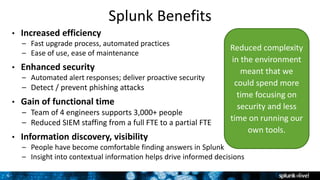
Splunk Benefits
• Increased efficiency
– Fast upgrade process, automated practices
– Ease of use, ease of maintenance
• Enhanced security
– Automated alert responses; deliver proactive security
– Detect / prevent phishing attacks
• Gain of functional time
– Team of 4 engineers supports 3,000+ people
– Reduced SIEM staffing from a full FTE to a partial FTE
• Information discovery, visibility
– People have become comfortable finding answers in Splunk
– Insight into contextual information helps drive informed decisions
Reduced complexity
in the environment
meant that we
could spend more
time focusing on
security and less
time on running our
own tools.
7
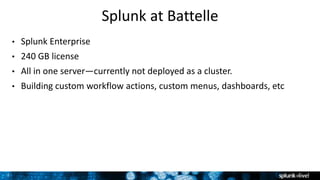
Splunk at Battelle
• Splunk Enterprise
• 240 GB license
• All in one server—currently not deployed as a cluster.
• Building custom workflow actions, custom menus, dashboards, etc
8
Logs, 3rd-Party and Internal Tools at Battelle
• Windows, Exchange, Active Directory, Linux
• Vulnerability Management Data
• Antivirus Logs
• Firewall Logs
• Network Logs
• Intrusion Detection Logs
• Custom internal security tools/applications (open source)
• Authentication servers, VPN endpoints
• Malware Analysis
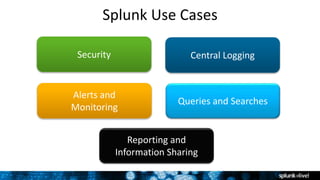
Splunk Use Cases
Alerts and
Monitoring
Security
Reporting and
Information Sharing
Central Logging
Queries and Searches
10
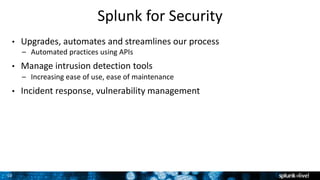
Splunk for Security
• Upgrades, automates and streamlines our process
– Automated practices using APIs
• Manage intrusion detection tools
– Increasing ease of use, ease of maintenance
• Incident response, vulnerability management
11
Basic Alerting
12
Splunk for Central Logging and Mgmt
• Central logging and communication point for
everything
• Easy to get info from all tools and custom apps into
Splunk and back out again
• Provides means to explore logs, analyze info, find
meaningful patterns
• Used as instrumentation layer for security tools
• Help with DFARS and CIS compliance
We use Splunk to
tie everything
together and
verify stability of
our security
infrastructure.
13
Monitoring our Security Infrastructure
14
Splunk for Alerts and Threat Detection
• Customize alert actions and automated incident
responses
• Send tasks to Slack
• Validate employee permissions
• Report and review account modifications daily
• Detect suspicious emails such as phishing campaigns
– Charts, graphs, and reports of trending email subjects,
senders, links, etc.
In our
environment, we
use Splunk to
explore our logs as
much as we use it
to alert and report
on them.
15
Automation of IR Tasks
16
Splunk for Queries and Searches
• Heavy users of search and reporting app
– Create commands for enhanced searches
– Customize and automate responses to alerts
• Add custom queries and lookups ourselves
• Use APIs to hook into tools and automate queries
• Added documentation on using Splunk into Splunk
– Never have to leave the tool to learn how to do something
– Everyone loves it!
Extending Splunk
is the most
powerful part of
Splunk.
17
Documenting Splunk in Splunk
18
Splunk for Reporting and Info Sharing
• Customized reports tracked and shared by teams
– Employee permissions / account changes
(incident response and identity management)
– Failed login and vulnerability reports
• Dashboards emailed daily as reports
• Phishing dashboard reviewed regularly
– Patterns stand out (same subject lines, etc.)
Reporting shared with Network Team
“We easily
identify patterns
in the phishing
dashboard—a
thousand emails
with the same
subject line or
‘click on this IP
address or link.’”
19
Bandwidth by ASN – A Network Problem
20
Favorite Splunk Story
• During POC, ported over one day logs to old, unimpressive “boneyard”
server
• In 8 minutes, it was all indexed and ready to search
• That was faster than our “speedy” VMs
• Performance was insane – we watched in awe as Splunk indexed data as
fast as we could send it
21
Users
• 30 defined users
• Security team (tools management, intrusion detection)
• Response team (vulnerability management)
• Account / identity management team (validate employee
permission changes in network)
• Exchange Server team
• Network team
22
Splunk Tips and Tricks….
• Don’t be afraid to add search macros, lookup tables
and custom actions
• Once you get started, they aren’t terribly difficult and
you can customize everything
• We use custom searches to look up the ownership of
IP addresses, the top 1 million domains, and other
contextual info
23
Splunking Ahead….
• More workflow actions, more API usage
• More custom search commands
Thank You

Customer Presentation

  • 1.
    Copyright © 2016Splunk Inc. Battelle Stephen Hosom Security Engineering Technical Lead
  • 2.
    2 About Battelle • World’slargest nonprofit research and development organization. • Founded by Gordon Battelle, with funding from his will • Mission: “Translate scientific discovery and technology advances into societal advances” • 22,000 employees in > 60 locations globally • Headquarters: Columbus, OH • Operates in 2 primary ways: – Funds research – Manages the world’s leading national labs (Dept of Energy)
  • 3.
    3 About Me /Our Team • Security Engineering Technical Lead • Three security teams: • Policy • Engineering • Operations • Self-taught with Splunk
  • 4.
    4 Before Splunk • 3disparate log systems • X – Vendor product, difficult to upgrade and unstable • Y – Free product, difficult to optimize and keep running • Raw Logs on Disk – Unwieldy but reliable. • Spent LOTS of time just keeping everything running • Operational challenges referencing 3 different log analysis tools. A horrifyingly complex environment where keeping everything running was a challenge
  • 5.
    5 Choosing Splunk • Startedlooking at replacement tools for a vendor product. • Used Splunk at a prior organization • Started an evaluation that spanned multiple months and gradually increased in size. • Eventually realized that we would be able to shrink from 3 tools to just one—and would also save money doing so • Project approved based on cost savings A single box with a single interface for all of the information security logs
  • 6.
    6 Splunk Benefits • Increasedefficiency – Fast upgrade process, automated practices – Ease of use, ease of maintenance • Enhanced security – Automated alert responses; deliver proactive security – Detect / prevent phishing attacks • Gain of functional time – Team of 4 engineers supports 3,000+ people – Reduced SIEM staffing from a full FTE to a partial FTE • Information discovery, visibility – People have become comfortable finding answers in Splunk – Insight into contextual information helps drive informed decisions Reduced complexity in the environment meant that we could spend more time focusing on security and less time on running our own tools.
  • 7.
    7 Splunk at Battelle •Splunk Enterprise • 240 GB license • All in one server—currently not deployed as a cluster. • Building custom workflow actions, custom menus, dashboards, etc
  • 8.
    8 Logs, 3rd-Party andInternal Tools at Battelle • Windows, Exchange, Active Directory, Linux • Vulnerability Management Data • Antivirus Logs • Firewall Logs • Network Logs • Intrusion Detection Logs • Custom internal security tools/applications (open source) • Authentication servers, VPN endpoints • Malware Analysis
  • 9.
    Splunk Use Cases Alertsand Monitoring Security Reporting and Information Sharing Central Logging Queries and Searches
  • 10.
    10 Splunk for Security •Upgrades, automates and streamlines our process – Automated practices using APIs • Manage intrusion detection tools – Increasing ease of use, ease of maintenance • Incident response, vulnerability management
  • 11.
  • 12.
    12 Splunk for CentralLogging and Mgmt • Central logging and communication point for everything • Easy to get info from all tools and custom apps into Splunk and back out again • Provides means to explore logs, analyze info, find meaningful patterns • Used as instrumentation layer for security tools • Help with DFARS and CIS compliance We use Splunk to tie everything together and verify stability of our security infrastructure.
  • 13.
  • 14.
    14 Splunk for Alertsand Threat Detection • Customize alert actions and automated incident responses • Send tasks to Slack • Validate employee permissions • Report and review account modifications daily • Detect suspicious emails such as phishing campaigns – Charts, graphs, and reports of trending email subjects, senders, links, etc. In our environment, we use Splunk to explore our logs as much as we use it to alert and report on them.
  • 15.
  • 16.
    16 Splunk for Queriesand Searches • Heavy users of search and reporting app – Create commands for enhanced searches – Customize and automate responses to alerts • Add custom queries and lookups ourselves • Use APIs to hook into tools and automate queries • Added documentation on using Splunk into Splunk – Never have to leave the tool to learn how to do something – Everyone loves it! Extending Splunk is the most powerful part of Splunk.
  • 17.
  • 18.
    18 Splunk for Reportingand Info Sharing • Customized reports tracked and shared by teams – Employee permissions / account changes (incident response and identity management) – Failed login and vulnerability reports • Dashboards emailed daily as reports • Phishing dashboard reviewed regularly – Patterns stand out (same subject lines, etc.) Reporting shared with Network Team “We easily identify patterns in the phishing dashboard—a thousand emails with the same subject line or ‘click on this IP address or link.’”
  • 19.
    19 Bandwidth by ASN– A Network Problem
  • 20.
    20 Favorite Splunk Story •During POC, ported over one day logs to old, unimpressive “boneyard” server • In 8 minutes, it was all indexed and ready to search • That was faster than our “speedy” VMs • Performance was insane – we watched in awe as Splunk indexed data as fast as we could send it
  • 21.
    21 Users • 30 definedusers • Security team (tools management, intrusion detection) • Response team (vulnerability management) • Account / identity management team (validate employee permission changes in network) • Exchange Server team • Network team
  • 22.
    22 Splunk Tips andTricks…. • Don’t be afraid to add search macros, lookup tables and custom actions • Once you get started, they aren’t terribly difficult and you can customize everything • We use custom searches to look up the ownership of IP addresses, the top 1 million domains, and other contextual info
  • 23.
    23 Splunking Ahead…. • Moreworkflow actions, more API usage • More custom search commands
  • 24.

Editor's Notes

  • #3 We are a complicated organization; we have two primary ways that we operate. One is that we fund research and others that we manage many of the thoroughly funded national laboratories (Department of Energy lab).
  • #4 Biggest challenge is the amount of time that administration of the tools takes up. So I’d love to be adding things in that detect intrusions or make responding to intrusions faster but one of the biggest challenges we have is that the large portion of our time is just keeping things running and up-to-date.
  • #6 It was torture and pain because that was when search was still brand new. But it was just a horrifying difficult process to keep everything running and convenient to use….finally broke down and said you know what, what would it cost just to replace our three tools that we’re using for logging to one really a simple interface that’s easy to manage.
  • #11 We provide security for Battelle and all of Battelle’s business units. We do not provide security for the national labs. They provide their own financial security. “It’s goes back to ease of use, ease of maintenance. We were able to shrink our connotation from five servers to one or four servers to one. I think it was four I don’t remember. But yes, we went down from many servers to one or two, give us a functional time to do other things other than managing the box…which is really what we’re optimizing for with four people.” “The fact a SIEM upgrade used to take several weeks to complete, now it’s 20 minutes; the fact that we can run it on our own server and not run into proprietary hardware problems, the fact that because it has an API, we’ve been able to automate certain practices speeds up the response to [every thing].”
  • #13 We haven’t encountered something we didn’t have a the tool already to get the information into Splunk. And if we did encounter something that didn’t have it, which, I think, maybe one or two things didn’t, including internal custom applications, it was incredibly easy to get the information in and then back out again. “It’s made it a lot easier to explore logs for developing new signatures inside of other tools. So it’s a great way to get into the information, explore it, find patterns you want to look for in the future, and then either use Splunk to [explore] this pattern or the source file from another tool to build that pattern.”
  • #15 “We’re a pretty slack heavy group, at least the information security is. So we use Splunk to send everything up to slack. And then we have a chat box that does a bunch of stuff.” [fill in more specifics for use case]
  • #17 Being able to hook into it from other tools, and opt to do things like automate Splunk queries and add on to alerts is really cool. Just the fact that you guys even have an API puts Splunk leaps and bounds above most other security vendors. So if we want to add in a lookup that says, “Hey, tell me whether or not this domain is part of the top one million,” I can actually do that myself rather than [get] the canned vendor response which is, “Yes, we’ll add it to our product roadmap” and sometime in 2023, it will get done. Users love that documentation is in Splunk. And when I realized I could do that, I thought it was really awesome.   Don’t be afraid to add search macros and lookup tables and custom actions within Splunk. They’re not terribly difficult once you get started, and you can customize the heck out of everything.
  • #19  We have dashboards for is we’ve done a lot of reporting in dashboards. So while we don’t necessarily take a look at the dashboard, we might email out a dashboard once we’re done with the report. Last bullet: Some of our contractual obligations require us to engage in certain communities. One of them is the defense industrial [data]base, a well-documented public requirement. Anyone who does a certain a type of work with the government has to engage in an intelligence sharing community that notifies each other of attacks. We definitely use Splunk to compile all the information that we would share.
  • #21 My favorite story is during the POC [proof of concept]. I had a box that we took out of our boneyard - we have a room with the punctured servers that are intended to go back to the company that we were leasing hardware from. And the server that we used was wholeheartedly unimpressive, it had like 8 gigs of RAM and a basic CPU. But we sent a full day’s worth of our logs to this box over a period of about eight minutes and it indexed it all and was ready to search right then and there. And having experienced our [prior] search deployment with much better servers, or at least theoretically much better, because they’re VMs, it would have taken probably a couple of hours to index all of that. So the performance improvement was just insane. I remember sitting in my office (when I still had it) cackling like a mad man with one of the other engineers, while we watched the box index the information as fast as our other server could send it.