1
CSV Files
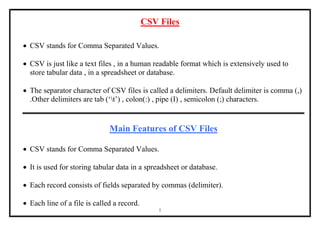
 CSV stands for Comma Separated Values.
 CSV is just like a text files , in a human readable format which is extensively used to
store tabular data , in a spreadsheet or database.
 The separator character of CSV files is called a delimiters. Default delimiter is comma (,)
.Other delimiters are tab (‘t’) , colon(:) , pipe (I) , semicolon (;) characters.
Main Features of CSV Files
 CSV stands for Comma Separated Values.
 It is used for storing tabular data in a spreadsheet or database.
 Each record consists of fields separated by commas (delimiter).
 Each line of a file is called a record.
2
Advantages of CSV Files
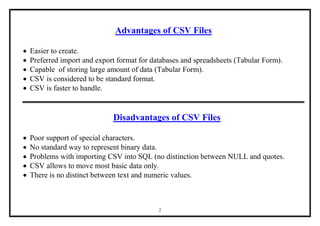
 Easier to create.
 Preferred import and export format for databases and spreadsheets (Tabular Form).
 Capable of storing large amount of data (Tabular Form).
 CSV is considered to be standard format.
 CSV is faster to handle.
Disadvantages of CSV Files
 Poor support of special characters.
 No standard way to represent binary data.
 Problems with importing CSV into SQL (no distinction between NULL and quotes.
 CSV allows to move most basic data only.
 There is no distinct between text and numeric values.
3
Python csv Module
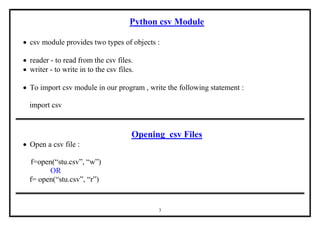
 csv module provides two types of objects :
 reader - to read from the csv files.
 writer - to write in to the csv files.
 To import csv module in our program , write the following statement :
import csv
Opening csv Files
 Open a csv file :
f=open(“stu.csv”, “w”)
OR
f= open(“stu.csv”, “r”)
4
Closing csv Files
 Close a csv file :
f.close( )
Role of Argument newline in Opening of csv files
 Newline argument specifies how would python handle new line characters while working
with csv files on different Operating systems.
 Different operating system store EOL characters differently.
5
EOL characters used in different Operating Systems
Symbol / Char Meaning Operating System
CR [r] Carriage Return Macintosh
LF [n] Line Feed Unix
CR / LF [rn] Carriage Return / Line Feed MS-Dos, Windows
NULL [0] Null Character Other OS
Note :
Additional optional argument as newline= ‘’(null string no space in between) with file open( )
will ensure that no translation of End of Line (EOL) character takes place.
6
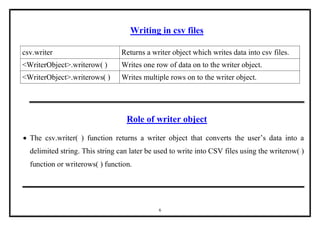
Writing in csv files
csv.writer Returns a writer object which writes data into csv files.
<WriterObject>.writerow( ) Writes one row of data on to the writer object.
<WriterObject>.writerows( ) Writes multiple rows on to the writer object.
Role of writer object
 The csv.writer( ) function returns a writer object that converts the user’s data into a
delimited string. This string can later be used to write into CSV files using the writerow( )
function or writerows( ) function.
7
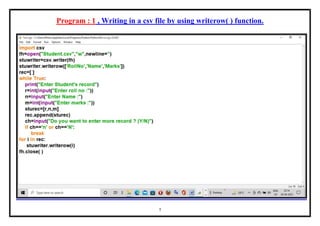
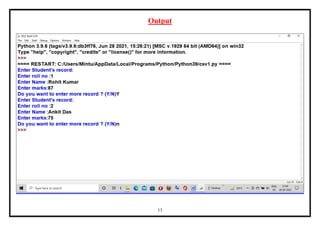
Program : 1 , Writing in a csv file by using writerow( ) function.
8
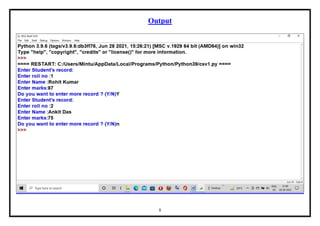
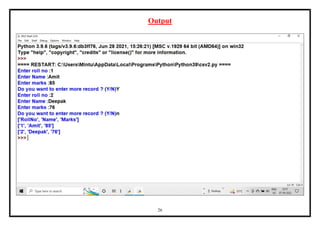
Output
9
Inside File [In Excel] - (By using newline argument in program)
10
Inside File [In Excel] - (Without using newline argument in program)
11
Inside File [In Notepad] - (By using newline argument in program)
12
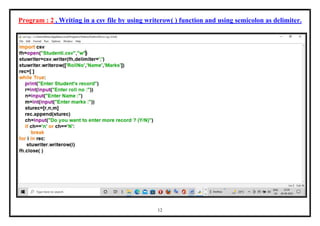
Program : 2 , Writing in a csv file by using writerow( ) function and using semicolon as delimiter.
13
Output
14
Inside File [In Notepad] - (Without using newline argument in program) Semicolon
15
Inside File [In Excel] - (Without using newline argument in program) Semicolon
16
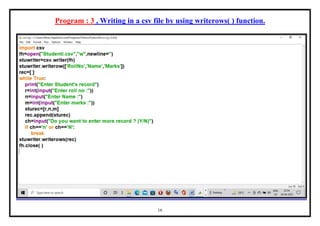
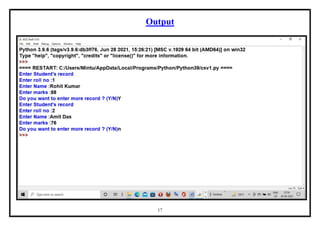
Program : 3 , Writing in a csv file by using writerows( ) function.
17
Output
18
Inside File [In Excel] - (By using newline argument in program)
19
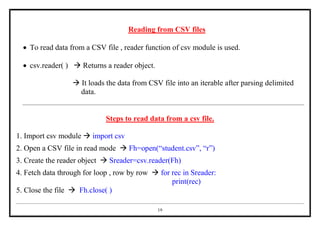
Reading from CSV files
 To read data from a CSV file , reader function of csv module is used.
 csv.reader( )  Returns a reader object.
 It loads the data from CSV file into an iterable after parsing delimited
data.
Steps to read data from a csv file.
1. Import csv module  import csv
2. Open a CSV file in read mode  Fh=open(“student.csv”, “r”)
3. Create the reader object  Sreader=csv.reader(Fh)
4. Fetch data through for loop , row by row  for rec in Sreader:
print(rec)
5. Close the file  Fh.close( )
20
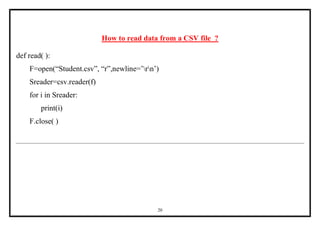
How to read data from a CSV file ?
def read( ):
F=open(“Student.csv”, “r”,newline=’rn’)
Sreader=csv.reader(f)
for i in Sreader:
print(i)
F.close( )
21
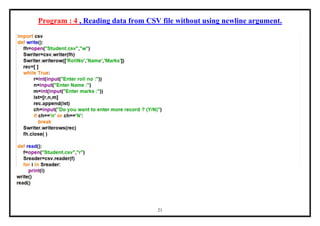
Program : 4 , Reading data from CSV file without using newline argument.
22
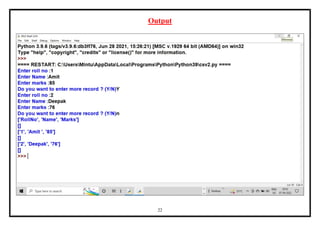
Output
23
Inside File [In Excel] - (Without using newline argument in program)
24
Inside File [In Notepad] - (Without using newline argument in program)
25
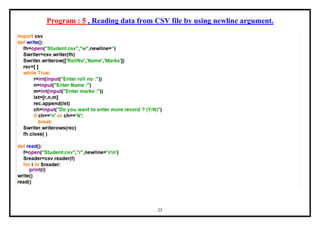
Program : 5 , Reading data from CSV file by using newline argument.
26
Output
27
Inside File [In Excel] - (By using newline argument in program)
28
Inside File [In Notepad] - (By using newline argument in program)

CSV Files-1.pdf

  • 1.
    1 CSV Files  CSVstands for Comma Separated Values.  CSV is just like a text files , in a human readable format which is extensively used to store tabular data , in a spreadsheet or database.  The separator character of CSV files is called a delimiters. Default delimiter is comma (,) .Other delimiters are tab (‘t’) , colon(:) , pipe (I) , semicolon (;) characters. Main Features of CSV Files  CSV stands for Comma Separated Values.  It is used for storing tabular data in a spreadsheet or database.  Each record consists of fields separated by commas (delimiter).  Each line of a file is called a record.
  • 2.
    2 Advantages of CSVFiles  Easier to create.  Preferred import and export format for databases and spreadsheets (Tabular Form).  Capable of storing large amount of data (Tabular Form).  CSV is considered to be standard format.  CSV is faster to handle. Disadvantages of CSV Files  Poor support of special characters.  No standard way to represent binary data.  Problems with importing CSV into SQL (no distinction between NULL and quotes.  CSV allows to move most basic data only.  There is no distinct between text and numeric values.
  • 3.
    3 Python csv Module csv module provides two types of objects :  reader - to read from the csv files.  writer - to write in to the csv files.  To import csv module in our program , write the following statement : import csv Opening csv Files  Open a csv file : f=open(“stu.csv”, “w”) OR f= open(“stu.csv”, “r”)
  • 4.
    4 Closing csv Files Close a csv file : f.close( ) Role of Argument newline in Opening of csv files  Newline argument specifies how would python handle new line characters while working with csv files on different Operating systems.  Different operating system store EOL characters differently.
  • 5.
    5 EOL characters usedin different Operating Systems Symbol / Char Meaning Operating System CR [r] Carriage Return Macintosh LF [n] Line Feed Unix CR / LF [rn] Carriage Return / Line Feed MS-Dos, Windows NULL [0] Null Character Other OS Note : Additional optional argument as newline= ‘’(null string no space in between) with file open( ) will ensure that no translation of End of Line (EOL) character takes place.
  • 6.
    6 Writing in csvfiles csv.writer Returns a writer object which writes data into csv files. <WriterObject>.writerow( ) Writes one row of data on to the writer object. <WriterObject>.writerows( ) Writes multiple rows on to the writer object. Role of writer object  The csv.writer( ) function returns a writer object that converts the user’s data into a delimited string. This string can later be used to write into CSV files using the writerow( ) function or writerows( ) function.
  • 7.
    7 Program : 1, Writing in a csv file by using writerow( ) function.
  • 8.
  • 9.
    9 Inside File [InExcel] - (By using newline argument in program)
  • 10.
    10 Inside File [InExcel] - (Without using newline argument in program)
  • 11.
    11 Inside File [InNotepad] - (By using newline argument in program)
  • 12.
    12 Program : 2, Writing in a csv file by using writerow( ) function and using semicolon as delimiter.
  • 13.
  • 14.
    14 Inside File [InNotepad] - (Without using newline argument in program) Semicolon
  • 15.
    15 Inside File [InExcel] - (Without using newline argument in program) Semicolon
  • 16.
    16 Program : 3, Writing in a csv file by using writerows( ) function.
  • 17.
  • 18.
    18 Inside File [InExcel] - (By using newline argument in program)
  • 19.
    19 Reading from CSVfiles  To read data from a CSV file , reader function of csv module is used.  csv.reader( )  Returns a reader object.  It loads the data from CSV file into an iterable after parsing delimited data. Steps to read data from a csv file. 1. Import csv module  import csv 2. Open a CSV file in read mode  Fh=open(“student.csv”, “r”) 3. Create the reader object  Sreader=csv.reader(Fh) 4. Fetch data through for loop , row by row  for rec in Sreader: print(rec) 5. Close the file  Fh.close( )
  • 20.
    20 How to readdata from a CSV file ? def read( ): F=open(“Student.csv”, “r”,newline=’rn’) Sreader=csv.reader(f) for i in Sreader: print(i) F.close( )
  • 21.
    21 Program : 4, Reading data from CSV file without using newline argument.
  • 22.
  • 23.
    23 Inside File [InExcel] - (Without using newline argument in program)
  • 24.
    24 Inside File [InNotepad] - (Without using newline argument in program)
  • 25.
    25 Program : 5, Reading data from CSV file by using newline argument.
  • 26.
  • 27.
    27 Inside File [InExcel] - (By using newline argument in program)
  • 28.
    28 Inside File [InNotepad] - (By using newline argument in program)