*TYPES OF FILES
*THERE ARE THREE TYPES OF FILES
*TEXT FILES
*BINARY FILES
*CSV FILES
*TEXT FILES
*STORES INFORMATION IN ASCII OR UNICODE
CHARACTERS. (NOTEPAD (
*EACH LINE OF TEXT IS TERMINATED WITH A
SPECIAL CHARCTER KNOWN AS END OF
LINE(EOL) (TAB)
*EXTENSION OF TEXT FILES IS .TXT
*DEFAULT MODE OF FILE (IF TYPE OF FILE IS NOT
MENTION THAT IT IS TEXT FILE.)
*BINARY FILES
*CONTAINS INFORMATION IN THE SAME FORMAT
IN WHICH THE INFORMATION IS HELF IN
MEMORY.
*THERE IS NO DELIMITED FOR A LINE.
*NO TRANSLATIONS ARE REQUIRED.
*MORE SECURE.
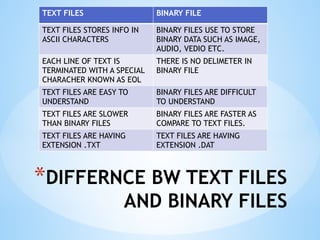
*DIFFERNCE BW TEXT FILES
AND BINARY FILES
TEXT FILES BINARY FILE
TEXT FILES STORES INFO IN
ASCII CHARACTERS
BINARY FILES USE TO STORE
BINARY DATA SUCH AS IMAGE,
AUDIO, VEDIO ETC.
EACH LINE OF TEXT IS
TERMINATED WITH A SPECIAL
CHARACHER KNOWN AS EOL
THERE IS NO DELIMETER IN
BINARY FILE
TEXT FILES ARE EASY TO
UNDERSTAND
BINARY FILES ARE DIFFICULT
TO UNDERSTAND
TEXT FILES ARE SLOWER
THAN BINARY FILES
BINARY FILES ARE FASTER AS
COMPARE TO TEXT FILES.
TEXT FILES ARE HAVING
EXTENSION .TXT
TEXT FILES ARE HAVING
EXTENSION .DAT
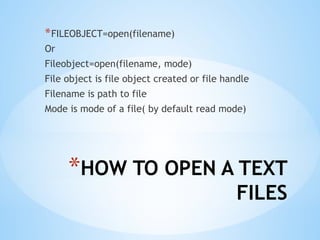
*HOW TO OPEN A TEXT
FILES
*FILEOBJECT=open(filename)
Or
Fileobject=open(filename, mode)
File object is file object created or file handle
Filename is path to file
Mode is mode of a file( by default read mode)
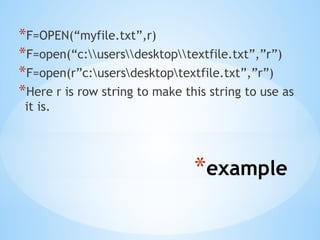
*example
*F=OPEN(“myfile.txt”,r)
*F=open(“c:usersdesktoptextfile.txt”,”r”)
*F=open(r”c:usersdesktoptextfile.txt”,”r”)
*Here r is row string to make this string to use as
it is.
*File access mode
* r= open files for reading only. This is by defualt mode.
*r+= open a file for reading and writing purpose.
*w= open a file for writing only. Overwrites the file if already
exits else create new file.
*W+= open a file for reading and writing.if file not exist it is
created. Data already existing will be lost.
*a= open a file for appending. The file pointer is at the end of
the file if the file exits.if file not exits it creates new file for
writing.
*a+= opens a file for both appending and reading
*Methods to open a
file
*Two methods to open a file
*Using open() function
*Using with statement:- this method is very
useful when you have two related operations
which we want to execute as a pair, with a
block of code in between.
* with open(file name, mode) as (file
handle/object):
f.write(“…….”)
*Benefits of with
statement
*It automatically closes the file after the nested
block of code.
*It also handles the exceptions also ocurred at
the end of block.
*READING DATA FROM
A FILE
* read()
* readline()
* readlines()
* read():- reads at most n bytes; if no n is
specified reads the entire file.
* Returns the read bytes in the form of a string.
*Syntax:- <fileobject>.read(n)
*Readline()
*Reads a line of input; if n is specified reads at
most n bytes.
*Returns the read bytes in the form of a string
ending with ‘n’ character.
*Returns a blank string if no more bytes are left
for reading in the file.
*Syntax: <fileobject>.readline()
*Readlines
*Reads all the lines of a text file.
*Returns in the form of list
*syntax:- <filehandle>.readlines()
*How to write data in
a file
*Two functions are their
* write()
* writelines()
While writing data in a file if file doesn’t exits,
it will create the new file.
If file exists, it will write the data in the file by
overwriting the exiting data.
*write
* write() function takes a string and writes it in
the file
*For storing data, with EOL character we have
to add ‘n’ character to the end of the string.
*For storing numeric value, we have to either
convert it into string using str() or write in
quote.
*writelines
*Writelines() function is used to write sequence
data tupes in a file(string,list,tuple etc.)
*Closing a file
*A close() function breaks the link of file object
and save the file on the disk.
*After close() no function can be performed on
that file through file object or handle
*Syntax filehandle.close()
* f.close()
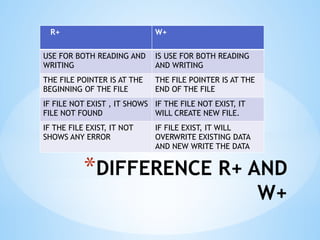
*DIFFERENCE R+ AND
W+
R+ W+
USE FOR BOTH READING AND
WRITING
IS USE FOR BOTH READING
AND WRITING
THE FILE POINTER IS AT THE
BEGINNING OF THE FILE
THE FILE POINTER IS AT THE
END OF THE FILE
IF FILE NOT EXIST , IT SHOWS
FILE NOT FOUND
IF THE FILE NOT EXIST, IT
WILL CREATE NEW FILE.
IF THE FILE EXIST, IT NOT
SHOWS ANY ERROR
IF FILE EXIST, IT WILL
OVERWRITE EXISTING DATA
AND NEW WRITE THE DATA
*BINARY FILES
*MOST OF THE FILES THAT WE SEE IN OUR
COMPUTER SYSTEMS ARE CALLED BINARY FILES.
*IMAGE FILES PNG, JPG, GIF ETC
*VIDEO FILES MP4, .3GP ETC
*AUDIO FILES
*ARCHIEVE FILES
*EXECUTABLE FILES
*BINARY FILES
*WE CAN OPEN SOME BINARY FILES IN THE
NORMAL TEXT EDITOR BUT WE CAN’T READ THE
CONTENCT OF FILES.
*DIFFICULT TO UNDERSTAND AS IN BINARY FORM
*NO DELIMITED AT END OF LINE
*NO TRANSLATION REQUIRED
*FAST IN WORKING
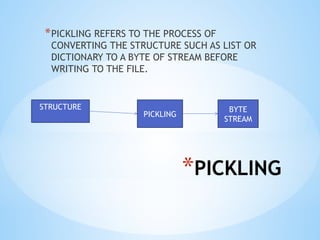
*PICKLING
*PICKLING REFERS TO THE PROCESS OF
CONVERTING THE STRUCTURE SUCH AS LIST OR
DICTIONARY TO A BYTE OF STREAM BEFORE
WRITING TO THE FILE.
STRUCTURE
PICKLING
BYTE
STREAM
*UNPICKLING
*UNPICKLING REFERS TO THE PROCESS OF
CONVERTING THE BYTE STRAM BACK TO THE
ORGINAL STRUCTURE.
*PICKLE DUMP
FUNCTION
*PICKLE.DUMP()
*USED TO WRITE THE OBJECT IN A FILE
*SYNTAX
*Pickle.dump(<structure>,file object)
*Structure can be any sequence of python, it can be
either list or dictionary.
*File object is the file handle of the file in which we
want to write the data.
*Import pickle
*Pickle load function
*Pickle.load()
*Use to read the data from the file
*Syntax :- structure=pickle.load(fileobject)
*Accessing and manipulating
position of file pointer
*tell () and seek()
*tell():- the tell function returns the current
position of file pointer in the file.it is used as
per the following syntax:
*(file object).tell()
*File object is the object use to open the file.
*Accessing and manipulating
position of file pointer
* seek():- the seek function changes the position of the file pointer by
placing the file pointer at the specified position in the open file.
* The syntax for using this function is:-
* fileobject.seek(offset,mode)
* New.seek(30,2)
* Offset:- is number specifying number of bytes
* Mode:-is a number 0,1 or 2
* 0 for beginning (default mode)
* 1 for current position of file pointer
* 2 for end of file
*Working with csv file
*Comma separted value files that store data in
tabular form.
*Comma delimits every value
*Default delimiter is comma
*Each line in csv file is treated as data record.
*Csv files are like as text files but we can use
csv module the perform any operations on
these files.
*Python csv module
*Csv module of python provides functionlity to
read and write tabular data in csv format.
*reader and writer objects are use to read and
write in a file.
*Opening and closing
of csv file
*A CSV file is opened in the same way as you
open any other text file.
*But main differnce is specify the type of file
is .csv
*Example:- dfile=open(“stu.csv”,’w,)
*For closing the file
*dfile.close()
*Benefits of csv
*1. easy to create
*2. preferred export and import format for
databases and spreadsheets
*Capable of storing large amount of data.
*Writing in csv files
*Writing into csv files involes the conversation of
the user data into the writable delimited from
and then storing it in the form of csv file.
*We use following three key functions for writing
*Csv.writer-write data in csv file
*(writer obejct).writerow()- write one row
*(writer object).writerows()- write multiple rows
*Steps to write in csv
*1.Import csv modules
*2.Open csv file in a file handle ex f=open(“abc.csv”,’w’)
*3. Create the writer object by using the syntax as shown
below:
Name of writerobject=csv.writer(file handler, delimiter)
Stuwriter=csv.writer(f)
If no delimiter is defined it is comma.
4. Obtain user data and form a python sequence.
5. Write the python sequence containing user data onto
the writer object using csv.writerow or csv.writerows()
6. Once done close the file.
*Reading in csv files
*Reading from csv file involves loading of a csv
file’s data, parsing it and loading it in a reading
from.
*For reading from a csv files we use following
function :- csv.reader()
*Steps to read a file
*1. import csv module
2.

DATA FILE HANDLING in python binary and text files .pptx

  • 1.
    *TYPES OF FILES *THEREARE THREE TYPES OF FILES *TEXT FILES *BINARY FILES *CSV FILES
  • 2.
    *TEXT FILES *STORES INFORMATIONIN ASCII OR UNICODE CHARACTERS. (NOTEPAD ( *EACH LINE OF TEXT IS TERMINATED WITH A SPECIAL CHARCTER KNOWN AS END OF LINE(EOL) (TAB) *EXTENSION OF TEXT FILES IS .TXT *DEFAULT MODE OF FILE (IF TYPE OF FILE IS NOT MENTION THAT IT IS TEXT FILE.)
  • 3.
    *BINARY FILES *CONTAINS INFORMATIONIN THE SAME FORMAT IN WHICH THE INFORMATION IS HELF IN MEMORY. *THERE IS NO DELIMITED FOR A LINE. *NO TRANSLATIONS ARE REQUIRED. *MORE SECURE.
  • 4.
    *DIFFERNCE BW TEXTFILES AND BINARY FILES TEXT FILES BINARY FILE TEXT FILES STORES INFO IN ASCII CHARACTERS BINARY FILES USE TO STORE BINARY DATA SUCH AS IMAGE, AUDIO, VEDIO ETC. EACH LINE OF TEXT IS TERMINATED WITH A SPECIAL CHARACHER KNOWN AS EOL THERE IS NO DELIMETER IN BINARY FILE TEXT FILES ARE EASY TO UNDERSTAND BINARY FILES ARE DIFFICULT TO UNDERSTAND TEXT FILES ARE SLOWER THAN BINARY FILES BINARY FILES ARE FASTER AS COMPARE TO TEXT FILES. TEXT FILES ARE HAVING EXTENSION .TXT TEXT FILES ARE HAVING EXTENSION .DAT
  • 5.
    *HOW TO OPENA TEXT FILES *FILEOBJECT=open(filename) Or Fileobject=open(filename, mode) File object is file object created or file handle Filename is path to file Mode is mode of a file( by default read mode)
  • 6.
  • 7.
    *File access mode *r= open files for reading only. This is by defualt mode. *r+= open a file for reading and writing purpose. *w= open a file for writing only. Overwrites the file if already exits else create new file. *W+= open a file for reading and writing.if file not exist it is created. Data already existing will be lost. *a= open a file for appending. The file pointer is at the end of the file if the file exits.if file not exits it creates new file for writing. *a+= opens a file for both appending and reading
  • 8.
    *Methods to opena file *Two methods to open a file *Using open() function *Using with statement:- this method is very useful when you have two related operations which we want to execute as a pair, with a block of code in between. * with open(file name, mode) as (file handle/object): f.write(“…….”)
  • 9.
    *Benefits of with statement *Itautomatically closes the file after the nested block of code. *It also handles the exceptions also ocurred at the end of block.
  • 10.
    *READING DATA FROM AFILE * read() * readline() * readlines() * read():- reads at most n bytes; if no n is specified reads the entire file. * Returns the read bytes in the form of a string. *Syntax:- <fileobject>.read(n)
  • 11.
    *Readline() *Reads a lineof input; if n is specified reads at most n bytes. *Returns the read bytes in the form of a string ending with ‘n’ character. *Returns a blank string if no more bytes are left for reading in the file. *Syntax: <fileobject>.readline()
  • 12.
    *Readlines *Reads all thelines of a text file. *Returns in the form of list *syntax:- <filehandle>.readlines()
  • 13.
    *How to writedata in a file *Two functions are their * write() * writelines() While writing data in a file if file doesn’t exits, it will create the new file. If file exists, it will write the data in the file by overwriting the exiting data.
  • 14.
    *write * write() functiontakes a string and writes it in the file *For storing data, with EOL character we have to add ‘n’ character to the end of the string. *For storing numeric value, we have to either convert it into string using str() or write in quote.
  • 15.
    *writelines *Writelines() function isused to write sequence data tupes in a file(string,list,tuple etc.)
  • 16.
    *Closing a file *Aclose() function breaks the link of file object and save the file on the disk. *After close() no function can be performed on that file through file object or handle *Syntax filehandle.close() * f.close()
  • 17.
    *DIFFERENCE R+ AND W+ R+W+ USE FOR BOTH READING AND WRITING IS USE FOR BOTH READING AND WRITING THE FILE POINTER IS AT THE BEGINNING OF THE FILE THE FILE POINTER IS AT THE END OF THE FILE IF FILE NOT EXIST , IT SHOWS FILE NOT FOUND IF THE FILE NOT EXIST, IT WILL CREATE NEW FILE. IF THE FILE EXIST, IT NOT SHOWS ANY ERROR IF FILE EXIST, IT WILL OVERWRITE EXISTING DATA AND NEW WRITE THE DATA
  • 18.
    *BINARY FILES *MOST OFTHE FILES THAT WE SEE IN OUR COMPUTER SYSTEMS ARE CALLED BINARY FILES. *IMAGE FILES PNG, JPG, GIF ETC *VIDEO FILES MP4, .3GP ETC *AUDIO FILES *ARCHIEVE FILES *EXECUTABLE FILES
  • 19.
    *BINARY FILES *WE CANOPEN SOME BINARY FILES IN THE NORMAL TEXT EDITOR BUT WE CAN’T READ THE CONTENCT OF FILES. *DIFFICULT TO UNDERSTAND AS IN BINARY FORM *NO DELIMITED AT END OF LINE *NO TRANSLATION REQUIRED *FAST IN WORKING
  • 20.
    *PICKLING *PICKLING REFERS TOTHE PROCESS OF CONVERTING THE STRUCTURE SUCH AS LIST OR DICTIONARY TO A BYTE OF STREAM BEFORE WRITING TO THE FILE. STRUCTURE PICKLING BYTE STREAM
  • 21.
    *UNPICKLING *UNPICKLING REFERS TOTHE PROCESS OF CONVERTING THE BYTE STRAM BACK TO THE ORGINAL STRUCTURE.
  • 22.
    *PICKLE DUMP FUNCTION *PICKLE.DUMP() *USED TOWRITE THE OBJECT IN A FILE *SYNTAX *Pickle.dump(<structure>,file object) *Structure can be any sequence of python, it can be either list or dictionary. *File object is the file handle of the file in which we want to write the data. *Import pickle
  • 23.
    *Pickle load function *Pickle.load() *Useto read the data from the file *Syntax :- structure=pickle.load(fileobject)
  • 24.
    *Accessing and manipulating positionof file pointer *tell () and seek() *tell():- the tell function returns the current position of file pointer in the file.it is used as per the following syntax: *(file object).tell() *File object is the object use to open the file.
  • 25.
    *Accessing and manipulating positionof file pointer * seek():- the seek function changes the position of the file pointer by placing the file pointer at the specified position in the open file. * The syntax for using this function is:- * fileobject.seek(offset,mode) * New.seek(30,2) * Offset:- is number specifying number of bytes * Mode:-is a number 0,1 or 2 * 0 for beginning (default mode) * 1 for current position of file pointer * 2 for end of file
  • 26.
    *Working with csvfile *Comma separted value files that store data in tabular form. *Comma delimits every value *Default delimiter is comma *Each line in csv file is treated as data record. *Csv files are like as text files but we can use csv module the perform any operations on these files.
  • 27.
    *Python csv module *Csvmodule of python provides functionlity to read and write tabular data in csv format. *reader and writer objects are use to read and write in a file.
  • 28.
    *Opening and closing ofcsv file *A CSV file is opened in the same way as you open any other text file. *But main differnce is specify the type of file is .csv *Example:- dfile=open(“stu.csv”,’w,) *For closing the file *dfile.close()
  • 29.
    *Benefits of csv *1.easy to create *2. preferred export and import format for databases and spreadsheets *Capable of storing large amount of data.
  • 30.
    *Writing in csvfiles *Writing into csv files involes the conversation of the user data into the writable delimited from and then storing it in the form of csv file. *We use following three key functions for writing *Csv.writer-write data in csv file *(writer obejct).writerow()- write one row *(writer object).writerows()- write multiple rows
  • 31.
    *Steps to writein csv *1.Import csv modules *2.Open csv file in a file handle ex f=open(“abc.csv”,’w’) *3. Create the writer object by using the syntax as shown below: Name of writerobject=csv.writer(file handler, delimiter) Stuwriter=csv.writer(f) If no delimiter is defined it is comma. 4. Obtain user data and form a python sequence. 5. Write the python sequence containing user data onto the writer object using csv.writerow or csv.writerows() 6. Once done close the file.
  • 33.
    *Reading in csvfiles *Reading from csv file involves loading of a csv file’s data, parsing it and loading it in a reading from. *For reading from a csv files we use following function :- csv.reader()
  • 34.
    *Steps to reada file *1. import csv module 2.