CSS(Cascading Style Sheets)
Presented By:
Akhand Pratap Singh
What is CSS
• CSS handles the look and feel part of a web
page. Using CSS, you can control the color of
the text, the style of fonts, the spacing
between paragraphs, how columns are sized
and laid out, what background images or
colors are used, layout designs,variations in
display for different devices and screen sizes
as well as a variety of other effects.
Advantages of CSS
• CSS saves time
• Pages load faster
• Easy maintenance
• Superior styles to HTML
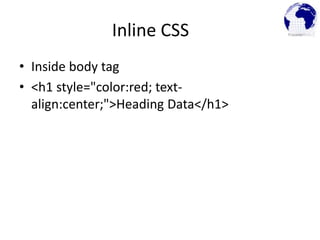
Inline CSS
• Inside body tag
• <h1 style="color:red; text-
align:center;">Heading Data</h1>
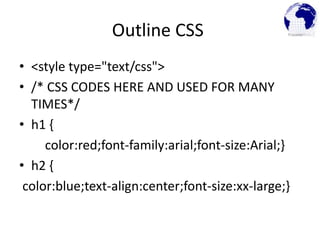
Outline CSS
• <style type="text/css">
• /* CSS CODES HERE AND USED FOR MANY
TIMES*/
• h1 {
color:red;font-family:arial;font-size:Arial;}
• h2 {
color:blue;text-align:center;font-size:xx-large;}
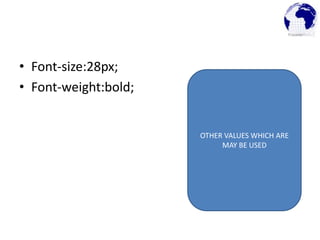
• Font-size:28px;
• Font-weight:bold;
OTHER VALUES WHICH ARE
MAY BE USED
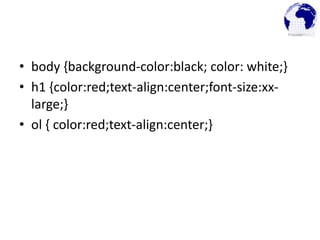
• body {background-color:black; color: white;}
• h1 {color:red;text-align:center;font-size:xx-
large;}
• ol { color:red;text-align:center;}
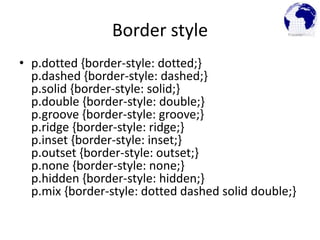
Border style
• p.dotted {border-style: dotted;}
p.dashed {border-style: dashed;}
p.solid {border-style: solid;}
p.double {border-style: double;}
p.groove {border-style: groove;}
p.ridge {border-style: ridge;}
p.inset {border-style: inset;}
p.outset {border-style: outset;}
p.none {border-style: none;}
p.hidden {border-style: hidden;}
p.mix {border-style: dotted dashed solid double;}
CSS Backgrounds

Css(cascading style sheets)

  • 1.
  • 2.
    What is CSS •CSS handles the look and feel part of a web page. Using CSS, you can control the color of the text, the style of fonts, the spacing between paragraphs, how columns are sized and laid out, what background images or colors are used, layout designs,variations in display for different devices and screen sizes as well as a variety of other effects.
  • 3.
    Advantages of CSS •CSS saves time • Pages load faster • Easy maintenance • Superior styles to HTML
  • 4.
    Inline CSS • Insidebody tag • <h1 style="color:red; text- align:center;">Heading Data</h1>
  • 5.
    Outline CSS • <styletype="text/css"> • /* CSS CODES HERE AND USED FOR MANY TIMES*/ • h1 { color:red;font-family:arial;font-size:Arial;} • h2 { color:blue;text-align:center;font-size:xx-large;}
  • 6.
  • 7.
    • body {background-color:black;color: white;} • h1 {color:red;text-align:center;font-size:xx- large;} • ol { color:red;text-align:center;}
  • 8.
    Border style • p.dotted{border-style: dotted;} p.dashed {border-style: dashed;} p.solid {border-style: solid;} p.double {border-style: double;} p.groove {border-style: groove;} p.ridge {border-style: ridge;} p.inset {border-style: inset;} p.outset {border-style: outset;} p.none {border-style: none;} p.hidden {border-style: hidden;} p.mix {border-style: dotted dashed solid double;}
  • 9.