CSS
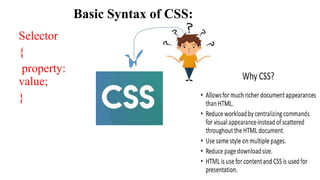
• CSS (CascadingStyle Sheets) is a language used to style and layout web pages.
• It controls the look and feel of HTML elements by defining their appearance,
positioning, and behavior.
• CSS separates content (HTML) from presentation (style), making web pages
easier to maintain and more flexible.
• Key Concepts of CSS:
• Selectors: Target specific HTML elements.
• Properties: Define the styles you want to apply.
• Values: Specify the settings for a property.
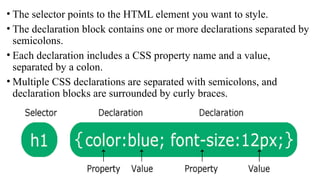
• The selectorpoints to the HTML element you want to style.
• The declaration block contains one or more declarations separated by
semicolons.
• Each declaration includes a CSS property name and a value,
separated by a colon.
• Multiple CSS declarations are separated with semicolons, and
declaration blocks are surrounded by curly braces.
5.
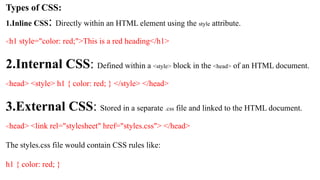
Types of CSS:
1.InlineCSS: Directly within an HTML element using the style attribute.
<h1 style="color: red;">This is a red heading</h1>
2.Internal CSS: Defined within a <style> block in the <head> of an HTML document.
<head> <style> h1 { color: red; } </style> </head>
3.External CSS: Stored in a separate .css file and linked to the HTML document.
<head> <link rel="stylesheet" href="styles.css"> </head>
The styles.css file would contain CSS rules like:
h1 { color: red; }
6.
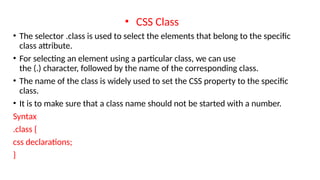
• CSS Class
•The selector .class is used to select the elements that belong to the specific
class attribute.
• For selecting an element using a particular class, we can use
the (.) character, followed by the name of the corresponding class.
• The name of the class is widely used to set the CSS property to the specific
class.
• It is to make sure that a class name should not be started with a number.
Syntax
.class {
css declarations;
}
7.
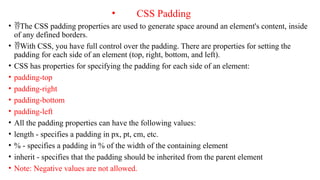
• CSS Padding
•The CSS padding properties are used to generate space around an element's content, inside
of any defined borders.
• With CSS, you have full control over the padding. There are properties for setting the
padding for each side of an element (top, right, bottom, and left).
• CSS has properties for specifying the padding for each side of an element:
• padding-top
• padding-right
• padding-bottom
• padding-left
• All the padding properties can have the following values:
• length - specifies a padding in px, pt, cm, etc.
• % - specifies a padding in % of the width of the containing element
• inherit - specifies that the padding should be inherited from the parent element
• Note: Negative values are not allowed.
8.
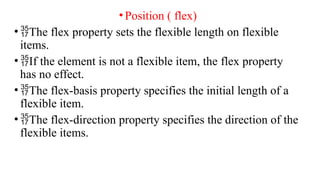
•Position ( flex)
•Theflex property sets the flexible length on flexible
items.
•If the element is not a flexible item, the flex property
has no effect.
•The flex-basis property specifies the initial length of a
flexible item.
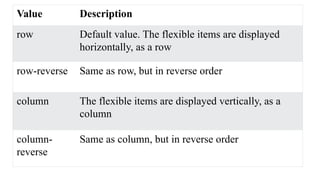
•The flex-direction property specifies the direction of the
flexible items.
9.
Value Description
row Defaultvalue. The flexible items are displayed
horizontally, as a row
row-reverse Same as row, but in reverse order
column The flexible items are displayed vertically, as a
column
column-
reverse
Same as column, but in reverse order