Functions and Static Variables
(CS1123)
By
Dr. Muhammad Aleem,
Department of Computer Science,
Mohammad Ali Jinnah University, Islamabad
Lecture Objectives
• To create functions, invoke functions, and pass
arguments to a function
• To determine the scope of local and global variables
• To understand the differences between pass-by-
value and pass-by-reference
• To use function overloading and understand
ambiguous overloading
• To use function prototypes for declaring function
headers
• To know how to use default arguments
• Static Variables
Functions in C++
• Experience has shown that the best way to develop
and maintain large programs is to construct it from
smaller pieces (modules)
• This technique Called “Divide and Conquer”
main()
{
-----
-----
-----
-----
.
.
.
----
-----
-----
return 0;
}
Bad Development Approach
Easier To >>
Design
Build
Debug
Extend
Modify
Understand
Reuse
Wise Development Approach
main()
{
-----
----
}
function f1()
{
---
---
}
function f2()
{
---
---
}
Functions in C++(Cont.)
• In C++ modules Known as Functions & Classes
• Programs may use new and “prepackaged” or built-
in modules
–New: programmer-defined functions and classes
–Prepackaged: from the standard library
About Functions in C++
• Functions invoked by a function–call-statement which
consist of it’s name and information it needs
(arguments)
• Boss To Worker Analogy:
Main
Boss
Function A Function B
Function Z
Worker
Worker
Function B2Function B1
Worker
Sub-Worker Sub-Worker
Note: usually main( ) Calls other
functions, but other functions can call
each other
Calling Function
• Function calls:
- Provide function name and arguments (data):
Function performs operations and
Function returns results
Calling Functions
• Functions calling (Syntax):
<function name> (<argument list>);
E.g.,
FunctionName( );
or
FunctionName(argument1);
or
FunctionName(argument1, argument2, …);
Calling Functions
•Examples (built-in, and user-defined functions)
int n = getPIValue( ) ; //Takes no argument
cout << sqrt(9); //Takes one argument, returns square-root
cout<<pow(2,3); //Calculates 2 power 3
cout<<SumValues(myArray); //Returns sum of the array
A user-defined function
Function Definition
• Syntax format for function definition
returned-value-type function-name (parameter-list)
{
Declarations of local variables and Statements;
…
}
– Parameter list
• Comma separated list of arguments
–Data type needed for each argument
• If no arguments  leave blank
– Return-value-type
• Data type of result returned (use void if nothing will
be returned)
Function Prototype
 Before a function is called, it must be declared first.
 Functions cannot be defined inside other functions
 A function prototype is a function declaration without
implementation (the implementation can be given
later in the program).
int multiplyTwoNums(int,int);
A Function prototype (declaration
without implementation)
Function Prototype (cont.)
 Before actual implementation of a function, a function
prototype can be used.
 Why it is needed?
 It is required to declare a function prototype before
the function is called.
Function Prototype (cont.)
void main()
{
int sum = AddTwoNumbers(3,5);
cout<<sum;
}
int AddTwoNumbers(int a, int b)
{
int sum = a+b;
return sum;
}
Error: Un-defined function
Function Prototype (cont.)
int AddTwoNumbers(int a, int b)
{
int sum = a+b;
return sum;
}
void main()
{
int sum = AddTwoNumbers(3,5);
cout<<sum;
}
int AddTwoNumbers(int, int);
void main()
{
int sum = AddTwoNumbers(3,5);
cout<<sum;
}
int AddTwoNumbers(int a, int b)
{
int sum = a+b;
return sum;
}
Solution-1 Solution-2
Function signature and Parameters
 Function signature is the combination of the
function name and the parameter list.
 Variables defined in the function header are known
as formal parameters.
 When a function is invoked, you pass a value to the
parameter. This value is referred to as actual
parameter or argument.
 A function may return a value:
 returnValueType is the data type of the value
the function returns.
 If function does not return a value, the
returnValueType is the keyword void.
 For example, the returnValueType in the main
function is void.
c
Function’s return values
Calling Functions
int max(int,int);
int main()
{
int i = 5;
int j = 2;
int k = max(i, j);
cout << "The maximum between "
<< i << " and " + j + " is "
<< k;
return 0;
}
int max(int num1, int num2)
{
int result;
if (num1 > num2)
result = num1;
else
result = num2;
return result;
}
Pass the value i
Pass the value j
c
Calling Functions
int max(int,int);
int main()
{
int i = 5;
int j = 2;
int k = max(i, j);
cout << "The maximum between "
<< i << " and " + j + " is "
<< k;
return 0;
}
int max(int num1, int num2)
{
int result;
if (num1 > num2)
result = num1;
else
result = num2;
return result;
}
Pass the value i
Pass the value j
c
i is now 5
Calling Functions
int max(int,int);
int main()
{
int i = 5;
int j = 2;
int k = max(i, j);
cout << "The maximum between "
<< i << " and " + j + " is "
<< k;
return 0;
}
int max(int num1, int num2)
{
int result;
if (num1 > num2)
result = num1;
else
result = num2;
return result;
}
Pass the value i
Pass the value j
c
j is now 2
Calling Functions
int max(int,int);
int main()
{
int i = 5;
int j = 2;
int k = max(i, j);
cout << "The maximum between "
<< i << " and " + j + " is "
<< k;
return 0;
}
int max(int num1, int num2)
{
int result;
if (num1 > num2)
result = num1;
else
result = num2;
return result;
}
Pass the value i
Pass the value j
c
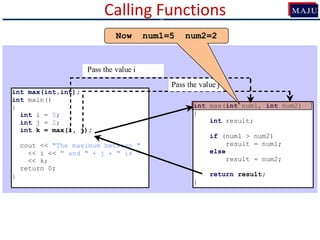
Call max(5, 2)
Calling Functions
int max(int,int);
int main()
{
int i = 5;
int j = 2;
int k = max(i, j);
cout << "The maximum between "
<< i << " and " + j + " is "
<< k;
return 0;
}
int max(int num1, int num2)
{
int result;
if (num1 > num2)
result = num1;
else
result = num2;
return result;
}
Pass the value i
Pass the value j
c
Now num1=5 num2=2
Calling Functions
int max(int,int);
int main()
{
int i = 5;
int j = 2;
int k = max(i, j);
cout << "The maximum between "
<< i << " and " + j + " is "
<< k;
return 0;
}
int max(int num1, int num2)
{
int result;
if (num1 > num2)
result = num1;
else
result = num2;
return result;
}
Pass the value i
Pass the value j
c
A new variable result will be created (local to the max function)
Calling Functions
int max(int,int);
int main()
{
int i = 5;
int j = 2;
int k = max(i, j);
cout << "The maximum between "
<< i << " and " + j + " is "
<< k;
return 0;
}
int max(int num1, int num2)
{
int result;
if (num1 > num2)
result = num1;
else
result = num2;
return result;
}
Pass the value i
Pass the value j
c
5 > 2  true condition
Calling Functions
int max(int,int);
int main()
{
int i = 5;
int j = 2;
int k = max(i, j);
cout << "The maximum between "
<< i << " and " + j + " is "
<< k;
return 0;
}
int max(int num1, int num2)
{
int result;
if (num1 > num2)
result = num1;
else
result = num2;
return result;
}
Pass the value i
Pass the value j
c
result = 5
Calling Functions
int max(int,int);
int main()
{
int i = 5;
int j = 2;
int k = max(i, j);
cout << "The maximum between "
<< i << " and " + j + " is "
<< k;
return 0;
}
int max(int num1, int num2)
{
int result;
if (num1 > num2)
result = num1;
else
result = num2;
return result;
}
Pass the value i
Pass the value j
c
return 5
Calling Functions
int max(int,int);
int main()
{
int i = 5;
int j = 2;
int k = max(i, j);
cout << "The maximum between "
<< i << " and " + j + " is "
<< k;
return 0;
}
int max(int num1, int num2)
{
int result;
if (num1 > num2)
result = num1;
else
result = num2;
return result;
}
Pass the value i
Pass the value j
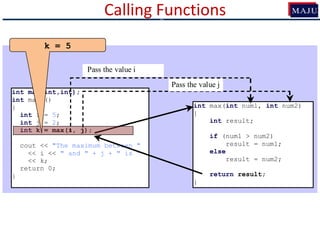
c
k = 5
Calling Functions
int max(int,int);
int main()
{
int i = 5;
int j = 2;
int k = max(i, j);
cout << "The maximum between "
<< i << " and " + j + " is "
<< k;
return 0;
}
int max(int num1, int num2)
{
int result;
if (num1 > num2)
result = num1;
else
result = num2;
return result;
}
Pass the value i
Pass the value j
c
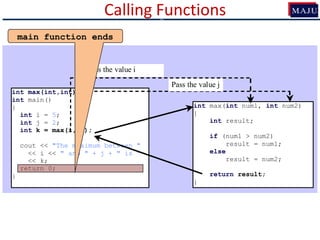
Display “The maximum between 5 and 2 is 5”
Calling Functions
int max(int,int);
int main()
{
int i = 5;
int j = 2;
int k = max(i, j);
cout << "The maximum between "
<< i << " and " + j + " is "
<< k;
return 0;
}
int max(int num1, int num2)
{
int result;
if (num1 > num2)
result = num1;
else
result = num2;
return result;
}
Pass the value i
Pass the value j
c
main function ends
c
Lecture: 02/12/2013
 Formal parameters and variables declared within
a function body are local to that function:
 Cannot be accessed outside of that function
int add(int A, int B)
{
int sum = a+b;
return sum;
}
c
Variables scope
A
B
sum
Memory (for function add)
 Gobal variables with same name:
int sum=55;
void main()
{
…
}
void display()
{
int sum = 66;
cout<<sum; // Display 66
}
c
Variables scope
55
Global Memory
sum
66
Memory (for function display)
sum
 Gobal variables with same name:
int sum=55;
void main()
{
…
}
void display()
{
int sum = 66;
cout<<::sum; // Display 55
}
c
Variables scope
55
Global Memory
sum
66
Memory (for function display)
sum
Calling Functions
• Three ways to pass arguments to function
1. Pass-by-value
2. Pass-by-reference with reference arguments
3. Pass-by-reference with pointer arguments
c
1. Pass by value – Example
void func (int num)
{
cout<<"num = "<<num<<endl;
num = 10;
cout<<"num = "<<num<<endl;
}
void main()
{
int n = 5;
cout<<"Before function call: n = "<<n<<endl;
func(n);
cout<<"After function call: n = "<<n<<endl;
}
c
Using Reference Variables with Functions
• To create a second name for a variable in a
program, you can generate an alias, or an alternate
name
• In C++ a variable that acts as an alias for another
variable is called a reference variable, or simply a
reference
• Arguments passed to function using reference
arguments:
c
2. Pass By Reference
 You can use a reference variable as a parameter in a
function and pass a regular variable to invoke the
function.
 The parameter becomes an alias for the original
variable. This is known as pass-by-reference.
 When you change the value through the reference
variable, the original value is actually changed.
c
2. Pass by Reference – Example
void func(int &num)
{
cout<<"num = "<<num<<endl;
num = 10;
cout<<"num = "<<num<<endl;
}
void main()
{
int n = 5;
cout<<"Before function call: n = "<<n<<endl;
func(n);
cout<<"After function call: n = "<<n<<endl;
}
c
num refers to variable
n (in main function)
2. Pass by Reference - Example
• Swap two variable using a Pass-By reference
c
Passing an Array to a Function
• When passing an array to a function, we need to tell
the compiler what the type of the array is and give
it a variable name, similar to an array declaration
float a[]
• We don’t want to specify the size so function can
work with different sized arrays.
• Size comes in as a second parameter
This would be a formal parameter
c
Passing an Array to a Function
int Display(int data[], int N)
{ int k;
cout<<“Array contains”<<endl;
for (k=0; k<N; k++)
cout<<data[k]<<“ “;
cout<<endl;
}
int main()
{
int a[4] = { 11, 33, 55, 77 };
Display(a, 4);
}
An int array
parameter
of unknown size
The size of
the array
The array
argument, no []
c
43
Passing an Array to a Function
#include <iostream.h>
int sum(int data[], int n); //PROTOTYPE
void main()
{
int a[] = { 11, 33, 55, 77 };
int size = sizeof(a)/sizeof(int);
cout << "sum(a,size) = " << sum(a,size) << endl;
}
int sum(int data[], int n)
{
int sum=0;
for (int i=0; i<n;i++)
sum += data[i];
return sum;
}
An int array
parameter
of unknown size
The size of the array
The array argument, no []
c
Arrays are always Pass By Reference
• Arrays are automatically passed by reference.
• Do not use &.
• If the function modifies the array, it is also modified in
the calling environment.
//Following function sets the values of an array to 0
void Zero(int arr[], int N)
{
for (int k=0; k<N; k++)
arr[k]=0;
}
c
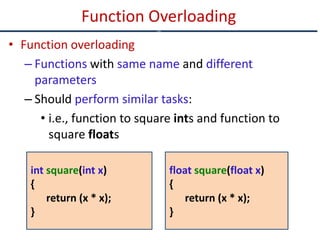
• Function overloading
– Functions with same name and different
parameters
– Should perform similar tasks:
• i.e., function to square ints and function to
square floats
Function Overloading
c
int square(int x)
{
return (x * x);
}
float square(float x)
{
return (x * x);
}
• At call-time C++ complier selects the proper
function by examining the number, type and
order of the parameters
Function Overloading
c
void print(int i)
{ cout << " Here is int " << i << endl; }
void print(double f)
{ cout << " Here is float " << f << endl; }
void print(char* c)
{ cout << " Here is char* " << c << endl; }
int main()
{ print(10); print(10.10); print("ten"); }
Function Overloading
c
void main()
{
int x = 20, y = 15;
int z = Test(x, y);
cout<<x<<" "<<y<<" "<<z;
}
Class Exercise 1 - Find the output
Ce
int Test(int &a, int b)
{
if(a >= 5)
{
a++;
b--;
return b;
}
else
{
--b;
--a;
return b;
}
}
Lecture: 09/12/13
c
• Write a program that calculates the area of a rectangle
(width*length). The program should be based on the
following functions:
– int getLength( )
– int getWidth( )
– int CalculateArea( )
– void DisplayArea( )
Class Exercise-2
c
• Write a C++ program that has a function called
zeroSmaller( ) that is passed two int arguments by
reference and then sets the smaller of the two numbers
to 0.
Class Exercise-3
c
• Write a function called swap() that interchanges two int
values passed to it by the calling program. (Note that this
function swaps the values of the variables in the calling
program, i.e., the original. You’ll need to decide how to
pass the arguments. Create a main() program to exercise
the function.
Class Exercise-4
c
• Write a function that, when you call it, displays a
message telling how many times it has been called: “I
have been called 3 times”, for instance. Write a main()
program that ask the user to call the function, if the user
presses ‘y’ the function is called otherwise if ‘n’ is
pressed the program terminates.
Class Exercise-5
c
Static Variables
c
Scope
• Different levels of scope:
1. Function scope
2. block scope
3. File scope
4. Class scope
Local variables
Global variables
Lifetime of Variables
• Local Variables (function and block scope)
have lifetime of the function or block
• Global variable (having file level scope) has
lifetime until the end of program
• Examples…
Static Variables
Static Variables
• Is created at the start of program execution
• A static variable has scope of local variable
• But has lifetime of global variables
• Therefore, static variables retain their contents or
values (until the program ends)
• If not initialized, it is assigned value 0 (automatically
by the compiler)
Static Variables - Example
• In the following example, the static variable sum is
initialized to 1
static int sum = 1;
• Initialization takes place only once.
• If declaration in a user-defined function:
 First time the function is called, the variable sum is
initialized to 1.
 Next time the function (containing the above
declaration) is executed But sum is not reset to 1.
• Write a function that, when you call it, displays a
message telling how many times it has been called: “I
have been called 3 times”, for instance. Write a main()
program that ask the user to call the function, if the user
presses ‘y’ the function is called otherwise if ‘n’ is
pressed the program terminates.
Class Exercise-5 (Using Static Variable)
c

Cs1123 8 functions

  • 1.
    Functions and StaticVariables (CS1123) By Dr. Muhammad Aleem, Department of Computer Science, Mohammad Ali Jinnah University, Islamabad
  • 2.
    Lecture Objectives • Tocreate functions, invoke functions, and pass arguments to a function • To determine the scope of local and global variables • To understand the differences between pass-by- value and pass-by-reference • To use function overloading and understand ambiguous overloading • To use function prototypes for declaring function headers • To know how to use default arguments • Static Variables
  • 3.
    Functions in C++ •Experience has shown that the best way to develop and maintain large programs is to construct it from smaller pieces (modules) • This technique Called “Divide and Conquer” main() { ----- ----- ----- ----- . . . ---- ----- ----- return 0; } Bad Development Approach Easier To >> Design Build Debug Extend Modify Understand Reuse Wise Development Approach main() { ----- ---- } function f1() { --- --- } function f2() { --- --- }
  • 4.
    Functions in C++(Cont.) •In C++ modules Known as Functions & Classes • Programs may use new and “prepackaged” or built- in modules –New: programmer-defined functions and classes –Prepackaged: from the standard library
  • 5.
    About Functions inC++ • Functions invoked by a function–call-statement which consist of it’s name and information it needs (arguments) • Boss To Worker Analogy: Main Boss Function A Function B Function Z Worker Worker Function B2Function B1 Worker Sub-Worker Sub-Worker Note: usually main( ) Calls other functions, but other functions can call each other
  • 6.
    Calling Function • Functioncalls: - Provide function name and arguments (data): Function performs operations and Function returns results
  • 7.
    Calling Functions • Functionscalling (Syntax): <function name> (<argument list>); E.g., FunctionName( ); or FunctionName(argument1); or FunctionName(argument1, argument2, …);
  • 8.
    Calling Functions •Examples (built-in,and user-defined functions) int n = getPIValue( ) ; //Takes no argument cout << sqrt(9); //Takes one argument, returns square-root cout<<pow(2,3); //Calculates 2 power 3 cout<<SumValues(myArray); //Returns sum of the array A user-defined function A user-defined function
  • 9.
    Function Definition • Syntaxformat for function definition returned-value-type function-name (parameter-list) { Declarations of local variables and Statements; … } – Parameter list • Comma separated list of arguments –Data type needed for each argument • If no arguments  leave blank – Return-value-type • Data type of result returned (use void if nothing will be returned)
  • 10.
    Function Prototype  Beforea function is called, it must be declared first.  Functions cannot be defined inside other functions  A function prototype is a function declaration without implementation (the implementation can be given later in the program). int multiplyTwoNums(int,int); A Function prototype (declaration without implementation)
  • 11.
    Function Prototype (cont.) Before actual implementation of a function, a function prototype can be used.  Why it is needed?  It is required to declare a function prototype before the function is called.
  • 12.
    Function Prototype (cont.) voidmain() { int sum = AddTwoNumbers(3,5); cout<<sum; } int AddTwoNumbers(int a, int b) { int sum = a+b; return sum; } Error: Un-defined function
  • 13.
    Function Prototype (cont.) intAddTwoNumbers(int a, int b) { int sum = a+b; return sum; } void main() { int sum = AddTwoNumbers(3,5); cout<<sum; } int AddTwoNumbers(int, int); void main() { int sum = AddTwoNumbers(3,5); cout<<sum; } int AddTwoNumbers(int a, int b) { int sum = a+b; return sum; } Solution-1 Solution-2
  • 14.
    Function signature andParameters  Function signature is the combination of the function name and the parameter list.  Variables defined in the function header are known as formal parameters.  When a function is invoked, you pass a value to the parameter. This value is referred to as actual parameter or argument.
  • 15.
     A functionmay return a value:  returnValueType is the data type of the value the function returns.  If function does not return a value, the returnValueType is the keyword void.  For example, the returnValueType in the main function is void. c Function’s return values
  • 16.
    Calling Functions int max(int,int); intmain() { int i = 5; int j = 2; int k = max(i, j); cout << "The maximum between " << i << " and " + j + " is " << k; return 0; } int max(int num1, int num2) { int result; if (num1 > num2) result = num1; else result = num2; return result; } Pass the value i Pass the value j c
  • 17.
    Calling Functions int max(int,int); intmain() { int i = 5; int j = 2; int k = max(i, j); cout << "The maximum between " << i << " and " + j + " is " << k; return 0; } int max(int num1, int num2) { int result; if (num1 > num2) result = num1; else result = num2; return result; } Pass the value i Pass the value j c i is now 5
  • 18.
    Calling Functions int max(int,int); intmain() { int i = 5; int j = 2; int k = max(i, j); cout << "The maximum between " << i << " and " + j + " is " << k; return 0; } int max(int num1, int num2) { int result; if (num1 > num2) result = num1; else result = num2; return result; } Pass the value i Pass the value j c j is now 2
  • 19.
    Calling Functions int max(int,int); intmain() { int i = 5; int j = 2; int k = max(i, j); cout << "The maximum between " << i << " and " + j + " is " << k; return 0; } int max(int num1, int num2) { int result; if (num1 > num2) result = num1; else result = num2; return result; } Pass the value i Pass the value j c Call max(5, 2)
  • 20.
    Calling Functions int max(int,int); intmain() { int i = 5; int j = 2; int k = max(i, j); cout << "The maximum between " << i << " and " + j + " is " << k; return 0; } int max(int num1, int num2) { int result; if (num1 > num2) result = num1; else result = num2; return result; } Pass the value i Pass the value j c Now num1=5 num2=2
  • 21.
    Calling Functions int max(int,int); intmain() { int i = 5; int j = 2; int k = max(i, j); cout << "The maximum between " << i << " and " + j + " is " << k; return 0; } int max(int num1, int num2) { int result; if (num1 > num2) result = num1; else result = num2; return result; } Pass the value i Pass the value j c A new variable result will be created (local to the max function)
  • 22.
    Calling Functions int max(int,int); intmain() { int i = 5; int j = 2; int k = max(i, j); cout << "The maximum between " << i << " and " + j + " is " << k; return 0; } int max(int num1, int num2) { int result; if (num1 > num2) result = num1; else result = num2; return result; } Pass the value i Pass the value j c 5 > 2  true condition
  • 23.
    Calling Functions int max(int,int); intmain() { int i = 5; int j = 2; int k = max(i, j); cout << "The maximum between " << i << " and " + j + " is " << k; return 0; } int max(int num1, int num2) { int result; if (num1 > num2) result = num1; else result = num2; return result; } Pass the value i Pass the value j c result = 5
  • 24.
    Calling Functions int max(int,int); intmain() { int i = 5; int j = 2; int k = max(i, j); cout << "The maximum between " << i << " and " + j + " is " << k; return 0; } int max(int num1, int num2) { int result; if (num1 > num2) result = num1; else result = num2; return result; } Pass the value i Pass the value j c return 5
  • 25.
    Calling Functions int max(int,int); intmain() { int i = 5; int j = 2; int k = max(i, j); cout << "The maximum between " << i << " and " + j + " is " << k; return 0; } int max(int num1, int num2) { int result; if (num1 > num2) result = num1; else result = num2; return result; } Pass the value i Pass the value j c k = 5
  • 26.
    Calling Functions int max(int,int); intmain() { int i = 5; int j = 2; int k = max(i, j); cout << "The maximum between " << i << " and " + j + " is " << k; return 0; } int max(int num1, int num2) { int result; if (num1 > num2) result = num1; else result = num2; return result; } Pass the value i Pass the value j c Display “The maximum between 5 and 2 is 5”
  • 27.
    Calling Functions int max(int,int); intmain() { int i = 5; int j = 2; int k = max(i, j); cout << "The maximum between " << i << " and " + j + " is " << k; return 0; } int max(int num1, int num2) { int result; if (num1 > num2) result = num1; else result = num2; return result; } Pass the value i Pass the value j c main function ends
  • 28.
  • 29.
     Formal parametersand variables declared within a function body are local to that function:  Cannot be accessed outside of that function int add(int A, int B) { int sum = a+b; return sum; } c Variables scope A B sum Memory (for function add)
  • 30.
     Gobal variableswith same name: int sum=55; void main() { … } void display() { int sum = 66; cout<<sum; // Display 66 } c Variables scope 55 Global Memory sum 66 Memory (for function display) sum
  • 31.
     Gobal variableswith same name: int sum=55; void main() { … } void display() { int sum = 66; cout<<::sum; // Display 55 } c Variables scope 55 Global Memory sum 66 Memory (for function display) sum
  • 32.
    Calling Functions • Threeways to pass arguments to function 1. Pass-by-value 2. Pass-by-reference with reference arguments 3. Pass-by-reference with pointer arguments c
  • 33.
    1. Pass byvalue – Example void func (int num) { cout<<"num = "<<num<<endl; num = 10; cout<<"num = "<<num<<endl; } void main() { int n = 5; cout<<"Before function call: n = "<<n<<endl; func(n); cout<<"After function call: n = "<<n<<endl; } c
  • 34.
    Using Reference Variableswith Functions • To create a second name for a variable in a program, you can generate an alias, or an alternate name • In C++ a variable that acts as an alias for another variable is called a reference variable, or simply a reference • Arguments passed to function using reference arguments: c
  • 35.
    2. Pass ByReference  You can use a reference variable as a parameter in a function and pass a regular variable to invoke the function.  The parameter becomes an alias for the original variable. This is known as pass-by-reference.  When you change the value through the reference variable, the original value is actually changed. c
  • 36.
    2. Pass byReference – Example void func(int &num) { cout<<"num = "<<num<<endl; num = 10; cout<<"num = "<<num<<endl; } void main() { int n = 5; cout<<"Before function call: n = "<<n<<endl; func(n); cout<<"After function call: n = "<<n<<endl; } c num refers to variable n (in main function)
  • 37.
    2. Pass byReference - Example • Swap two variable using a Pass-By reference c
  • 38.
    Passing an Arrayto a Function • When passing an array to a function, we need to tell the compiler what the type of the array is and give it a variable name, similar to an array declaration float a[] • We don’t want to specify the size so function can work with different sized arrays. • Size comes in as a second parameter This would be a formal parameter c
  • 39.
    Passing an Arrayto a Function int Display(int data[], int N) { int k; cout<<“Array contains”<<endl; for (k=0; k<N; k++) cout<<data[k]<<“ “; cout<<endl; } int main() { int a[4] = { 11, 33, 55, 77 }; Display(a, 4); } An int array parameter of unknown size The size of the array The array argument, no [] c
  • 40.
    43 Passing an Arrayto a Function #include <iostream.h> int sum(int data[], int n); //PROTOTYPE void main() { int a[] = { 11, 33, 55, 77 }; int size = sizeof(a)/sizeof(int); cout << "sum(a,size) = " << sum(a,size) << endl; } int sum(int data[], int n) { int sum=0; for (int i=0; i<n;i++) sum += data[i]; return sum; } An int array parameter of unknown size The size of the array The array argument, no [] c
  • 41.
    Arrays are alwaysPass By Reference • Arrays are automatically passed by reference. • Do not use &. • If the function modifies the array, it is also modified in the calling environment. //Following function sets the values of an array to 0 void Zero(int arr[], int N) { for (int k=0; k<N; k++) arr[k]=0; } c
  • 42.
    • Function overloading –Functions with same name and different parameters – Should perform similar tasks: • i.e., function to square ints and function to square floats Function Overloading c int square(int x) { return (x * x); } float square(float x) { return (x * x); }
  • 43.
    • At call-timeC++ complier selects the proper function by examining the number, type and order of the parameters Function Overloading c
  • 44.
    void print(int i) {cout << " Here is int " << i << endl; } void print(double f) { cout << " Here is float " << f << endl; } void print(char* c) { cout << " Here is char* " << c << endl; } int main() { print(10); print(10.10); print("ten"); } Function Overloading c
  • 45.
    void main() { int x= 20, y = 15; int z = Test(x, y); cout<<x<<" "<<y<<" "<<z; } Class Exercise 1 - Find the output Ce int Test(int &a, int b) { if(a >= 5) { a++; b--; return b; } else { --b; --a; return b; } }
  • 46.
  • 47.
    • Write aprogram that calculates the area of a rectangle (width*length). The program should be based on the following functions: – int getLength( ) – int getWidth( ) – int CalculateArea( ) – void DisplayArea( ) Class Exercise-2 c
  • 48.
    • Write aC++ program that has a function called zeroSmaller( ) that is passed two int arguments by reference and then sets the smaller of the two numbers to 0. Class Exercise-3 c
  • 49.
    • Write afunction called swap() that interchanges two int values passed to it by the calling program. (Note that this function swaps the values of the variables in the calling program, i.e., the original. You’ll need to decide how to pass the arguments. Create a main() program to exercise the function. Class Exercise-4 c
  • 50.
    • Write afunction that, when you call it, displays a message telling how many times it has been called: “I have been called 3 times”, for instance. Write a main() program that ask the user to call the function, if the user presses ‘y’ the function is called otherwise if ‘n’ is pressed the program terminates. Class Exercise-5 c
  • 51.
  • 52.
    Scope • Different levelsof scope: 1. Function scope 2. block scope 3. File scope 4. Class scope Local variables Global variables
  • 53.
    Lifetime of Variables •Local Variables (function and block scope) have lifetime of the function or block • Global variable (having file level scope) has lifetime until the end of program • Examples…
  • 54.
    Static Variables Static Variables •Is created at the start of program execution • A static variable has scope of local variable • But has lifetime of global variables • Therefore, static variables retain their contents or values (until the program ends) • If not initialized, it is assigned value 0 (automatically by the compiler)
  • 55.
    Static Variables -Example • In the following example, the static variable sum is initialized to 1 static int sum = 1; • Initialization takes place only once. • If declaration in a user-defined function:  First time the function is called, the variable sum is initialized to 1.  Next time the function (containing the above declaration) is executed But sum is not reset to 1.
  • 56.
    • Write afunction that, when you call it, displays a message telling how many times it has been called: “I have been called 3 times”, for instance. Write a main() program that ask the user to call the function, if the user presses ‘y’ the function is called otherwise if ‘n’ is pressed the program terminates. Class Exercise-5 (Using Static Variable) c