
Attitude Does Matter Bring a change in your attitude You are no more college students Show maturity and sensibility in your conduct Take a different approach towards your studies Learning should be the primary objective BS(CS) - A stepping-stone towards your professional life Programming Fundamentals | Lecture-1
Commitment & Dedication The only thing that is required from you Do not take things for-granted Engender interest in this field of study Even if you got admission without your consent or interest Programming Fundamentals | Lecture-1
Zero Tolerance for Plagiarism An unethical practice which is considered as cheating and deceiving others Disciplinary actions may be taken against you Plagiarism detection is not a big deal in the field of Computer Science Programming Fundamentals | Lecture-1
Be Prepared for Surprises Get to know about Semester System from your seniors Things will get passed at quite a rapid pace Be ready for tight schedules and strict deadlines Keep your morale up and try not to lose focus You’ll end up enjoying your studies Programming Fundamentals | Lecture-1
 
How Important is it? Fundamental basis  for all of your courses that involve programming throughout this degree program It will be very hard to compensate for it in future CAUTION : If you fail to perform well in this course, it will be very hard for you to go through next semesters and to finally get out with a degree in your hand Programming Fundamentals | Lecture-1
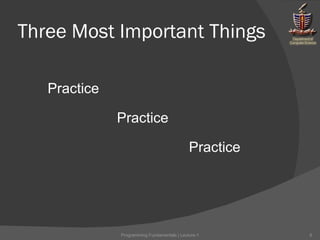
Three Most Important Things Programming Fundamentals | Lecture-1 Practice Practice Practice
How to Perform Well Revise the lecture the same day Complete given tasks before next lecture Tasks will be given at the end of every lecture Consult your teacher, TA’s, senior students if you are unable to understand a concept Programming Fundamentals | Lecture-1
Programming Fundamentals
Two Terms Computer Programming Programming Fundamentals | Lecture-1
Computer You are familiar with calculators An electronic device much more sophisticated than calculators The hardware components it contain are much more powerful than that of a calculator A dumb terminal Cannot think for itself Not pre-designed with any kind of functionality Programming Fundamentals | Lecture-1
Programming Computers are dumb but they can do exactly what they are told to do Giving instructions to a computer to perform a task is what we call “programming” These set of instructions are called a “computer program” This capability of computers is what makes them so powerful Example: Adding numbers from 1 to 1000 Programming Fundamentals | Lecture-1
Computer Program A series of instructions given to a computer, in order to accomplish a task or to achieve a particular result Programming Fundamentals | Lecture-1
What kind of instructions a computer can understand? How can we communicate it to the computer? Programming Fundamentals | Lecture-1
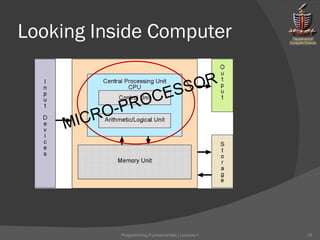
Looking Inside Computer MICRO-PROCESSOR Programming Fundamentals | Lecture-1
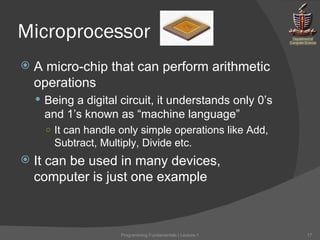
Microprocessor A micro-chip that can perform arithmetic operations Being a digital circuit, it understands only 0’s and 1’s known as “machine language” It can handle only simple operations like Add, Subtract, Multiply, Divide etc. It can be used in many devices, computer is just one example Programming Fundamentals | Lecture-1
Giving Instructions to Microprocessor It’s very hard for human beings to remember different patterns of 0’s and 1’s It is almost impossible for a human being to write a computer program consisting only of 0’s and 1’s There was a need to define a language which is easier to understand and work with Programming Fundamentals | Lecture-1
Solution: Assembly Language Set of short words to represent different patterns of 0’s and 1’s Example: ADD    00101101 Remember: Microprocessor can only understand machine language (0s & 1s) How assembly language will work then? Programming Fundamentals | Lecture-1
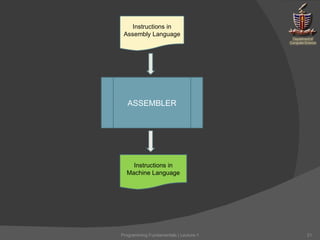
Solution: Assembler A translator to convert words into appropriate patterns of 0s & 1s i.e, converts series of instructions (written in assembly language) into machine language Programming Fundamentals | Lecture-1
Instructions in Assembly Language ASSEMBLER Instructions in Machine Language Programming Fundamentals | Lecture-1
Problem with Assembly Language It is more close to machine rather than human beings A low-level language Human mind does not work so simply as the machine does It is still very different from the languages that human beings speak It is still difficult for human beings to solve a complex problem by writing a computer program in assembly language Programming Fundamentals | Lecture-1
Solution: High Level Languages The programming languages which are closer to human languages and further from machine languages In contrast, assembly languages are considered low-level because they are very close to machine languages Remember: Microprocessor can only understand machine language (0s & 1s) How a high-level language will work then? Programming Fundamentals | Lecture-1
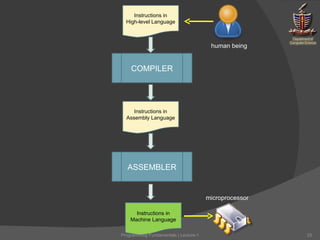
Solution: Compiler A translator to convert instructions written in a high-level language to low-level language See figure on next slide Programming Fundamentals | Lecture-1
Instructions in Assembly Language ASSEMBLER Instructions in Machine Language COMPILER Instructions in High-level Language human being microprocessor Programming Fundamentals | Lecture-1

Cs 1114 - lecture-1

  • 1.
  • 2.
    Attitude Does MatterBring a change in your attitude You are no more college students Show maturity and sensibility in your conduct Take a different approach towards your studies Learning should be the primary objective BS(CS) - A stepping-stone towards your professional life Programming Fundamentals | Lecture-1
  • 3.
    Commitment & DedicationThe only thing that is required from you Do not take things for-granted Engender interest in this field of study Even if you got admission without your consent or interest Programming Fundamentals | Lecture-1
  • 4.
    Zero Tolerance forPlagiarism An unethical practice which is considered as cheating and deceiving others Disciplinary actions may be taken against you Plagiarism detection is not a big deal in the field of Computer Science Programming Fundamentals | Lecture-1
  • 5.
    Be Prepared forSurprises Get to know about Semester System from your seniors Things will get passed at quite a rapid pace Be ready for tight schedules and strict deadlines Keep your morale up and try not to lose focus You’ll end up enjoying your studies Programming Fundamentals | Lecture-1
  • 6.
  • 7.
    How Important isit? Fundamental basis for all of your courses that involve programming throughout this degree program It will be very hard to compensate for it in future CAUTION : If you fail to perform well in this course, it will be very hard for you to go through next semesters and to finally get out with a degree in your hand Programming Fundamentals | Lecture-1
  • 8.
    Three Most ImportantThings Programming Fundamentals | Lecture-1 Practice Practice Practice
  • 9.
    How to PerformWell Revise the lecture the same day Complete given tasks before next lecture Tasks will be given at the end of every lecture Consult your teacher, TA’s, senior students if you are unable to understand a concept Programming Fundamentals | Lecture-1
  • 10.
  • 11.
    Two Terms ComputerProgramming Programming Fundamentals | Lecture-1
  • 12.
    Computer You arefamiliar with calculators An electronic device much more sophisticated than calculators The hardware components it contain are much more powerful than that of a calculator A dumb terminal Cannot think for itself Not pre-designed with any kind of functionality Programming Fundamentals | Lecture-1
  • 13.
    Programming Computers aredumb but they can do exactly what they are told to do Giving instructions to a computer to perform a task is what we call “programming” These set of instructions are called a “computer program” This capability of computers is what makes them so powerful Example: Adding numbers from 1 to 1000 Programming Fundamentals | Lecture-1
  • 14.
    Computer Program Aseries of instructions given to a computer, in order to accomplish a task or to achieve a particular result Programming Fundamentals | Lecture-1
  • 15.
    What kind ofinstructions a computer can understand? How can we communicate it to the computer? Programming Fundamentals | Lecture-1
  • 16.
    Looking Inside ComputerMICRO-PROCESSOR Programming Fundamentals | Lecture-1
  • 17.
    Microprocessor A micro-chipthat can perform arithmetic operations Being a digital circuit, it understands only 0’s and 1’s known as “machine language” It can handle only simple operations like Add, Subtract, Multiply, Divide etc. It can be used in many devices, computer is just one example Programming Fundamentals | Lecture-1
  • 18.
    Giving Instructions toMicroprocessor It’s very hard for human beings to remember different patterns of 0’s and 1’s It is almost impossible for a human being to write a computer program consisting only of 0’s and 1’s There was a need to define a language which is easier to understand and work with Programming Fundamentals | Lecture-1
  • 19.
    Solution: Assembly LanguageSet of short words to represent different patterns of 0’s and 1’s Example: ADD  00101101 Remember: Microprocessor can only understand machine language (0s & 1s) How assembly language will work then? Programming Fundamentals | Lecture-1
  • 20.
    Solution: Assembler Atranslator to convert words into appropriate patterns of 0s & 1s i.e, converts series of instructions (written in assembly language) into machine language Programming Fundamentals | Lecture-1
  • 21.
    Instructions in AssemblyLanguage ASSEMBLER Instructions in Machine Language Programming Fundamentals | Lecture-1
  • 22.
    Problem with AssemblyLanguage It is more close to machine rather than human beings A low-level language Human mind does not work so simply as the machine does It is still very different from the languages that human beings speak It is still difficult for human beings to solve a complex problem by writing a computer program in assembly language Programming Fundamentals | Lecture-1
  • 23.
    Solution: High LevelLanguages The programming languages which are closer to human languages and further from machine languages In contrast, assembly languages are considered low-level because they are very close to machine languages Remember: Microprocessor can only understand machine language (0s & 1s) How a high-level language will work then? Programming Fundamentals | Lecture-1
  • 24.
    Solution: Compiler Atranslator to convert instructions written in a high-level language to low-level language See figure on next slide Programming Fundamentals | Lecture-1
  • 25.
    Instructions in AssemblyLanguage ASSEMBLER Instructions in Machine Language COMPILER Instructions in High-level Language human being microprocessor Programming Fundamentals | Lecture-1

Editor's Notes

  • #14 A computer functions through programs
  • #15 A series of computer instructions that are designed to accomplish a task or achieve a particular result
  • #16 We use a language to communicate with others. In order to communicate with computer what we need to know is the language that computer speaks
  • #17 At the heart of the computer lies the Microprocessor or CPU - a complete computation engine that is fabricated on a single chip