CS1201
Introduction to Computer Programming
and Data Structures
Dr. B Ramachandra Reddy
Syllabus
• UNIT-I: Concepts, definitions, taxonomy and history of computer
programming, operating systems and program execution, Number
system, Input/output devices, Storage devices, Flow chart and
algorithm development, Computer program.
• UNIT-II: Introduction to programming - variables, assignments;
expressions; input/output; conditionals and branching; iteration;
functions; recursion; arrays; introduction to pointers; structures;
Syllabus
• UNIT-III: Data Structures – Introduction to Data Structures, abstract data
types, Linear list – singly linked list implementation, insertion, deletion and
searching operations on linear list, circular linked list implementation.
• UNIT-IV: Stacks-Operations, stack applications -infix to postfix conversion,
postfix expression evaluation, recursion implementation, Queues-operations,
Circular Queue operations, Dequeues, applications of queues.
• UNIT-V: Searching and Sorting –selection sort, bubble sort, Quick Sort, Merge
Sort, Searching-linear and binary search methods, Basic Concept of TreeS.
Books
• Textbooks:
1. Priti Sinha, Pradeep K., Sinha: Computer Fundamentals: Concepts, Systems &
Applications, BPB Publications.
2. Brian W. Kernighan and Dennis M. Ritchie: The C Programming Language, Prentice Hall of
India.
3. Ellis Horowitz, Satraj Sahni and Susan Anderson-Freed: Fundamentals of Data Structures
in C, W. H. Freeman and Company.
• Reference Books:
1. E. Balagurusamy: Programming in ANSI C, Third Edition, Tata McGraw-Hill
2. Yashwant Kanitkar: Let US C, BPB Publications.
3. Venugopal, Prasad: Mastering C, Tata McGraw-Hill.
4. Seymour Lipschutz: Data Structures, Schaum's Outlines Series, Tata McGraw-Hill.
5. R. G. Dromey: How to Solve it by Computer, Prentice-Hall of India.
6. Reema Thareja: Data structures using C, Oxford publications.
7. Tanenbum: Data structures using C, Pearson Education.
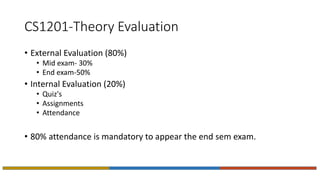
CS1201-Theory Evaluation
• External Evaluation (80%)
• Mid exam- 30%
• End exam-50%
• Internal Evaluation (20%)
• Quiz's
• Assignments
• Attendance
• 80% attendance is mandatory to appear the end sem exam.
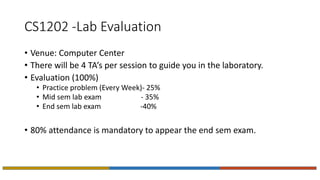
CS1202 -Lab Evaluation
• Venue: Computer Center
• There will be 4 TA’s per session to guide you in the laboratory.
• Evaluation (100%)
• Practice problem (Every Week)- 25%
• Mid sem lab exam - 35%
• End sem lab exam -40%
• 80% attendance is mandatory to appear the end sem exam.
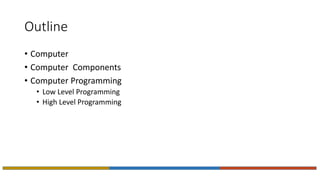
Outline
• Computer
• Computer Components
• Computer Programming
• Low Level Programming
• High Level Programming
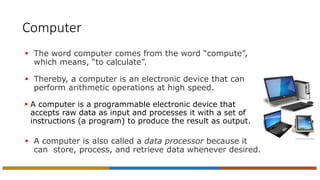
Computer
 The word computer comes from the word “compute”,
which means, “to calculate”.
 Thereby, a computer is an electronic device that can
perform arithmetic operations at high speed.
 A computer is a programmable electronic device that
accepts raw data as input and processes it with a set of
instructions (a program) to produce the result as output.
 A computer is also called a data processor because it
can store, process, and retrieve data whenever desired.
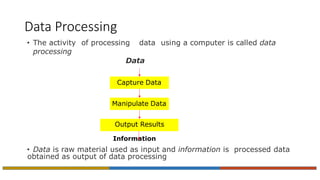
Data Processing
• The activity of processing data using a computer is called data
processing
Data
Information
• Data is raw material used as input and information is processed data
obtained as output of data processing
Capture Data
Manipulate Data
Output Results
The Five Basic Operations of a Computer
System
 Inputting. The process of entering data and instructions into the computer system.
 Storing. Saving data and instructions to make them readily available for initial
or additional processing whenever required.
 Processing. Performing arithmetic operations (add, subtract, multiply, divide, etc.)
or logical operations (comparisons like equal to, less than, greater than, etc.) on
data to convert them into useful information.
 Outputting. The process of producing useful information or results for the user such
as a printed report or visual display.
 Controlling. Directing the manner and sequence in which all of the above operations
are performed.
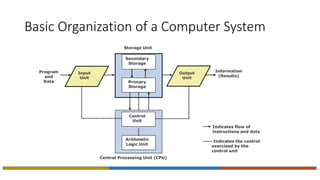
Basic Organization of a Computer System
Central Processing Unit (CPU)
Storage Unit
Secondary
Storage
Primary
Storage
Control
Unit
Arithmetic
Logic Unit
Input
Unit
Output
Unit
Program
and
Data
Information
(Results)
Indicates flow of
instructions and data
----- Indicates the control
exercised by the
control unit
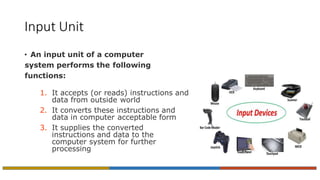
Input Unit
• An input unit of a computer
system performs the following
functions:
1. It accepts (or reads) instructions and
data from outside world
2. It converts these instructions and
data in computer acceptable form
3. It supplies the converted
instructions and data to the
computer system for further
processing
Output Unit
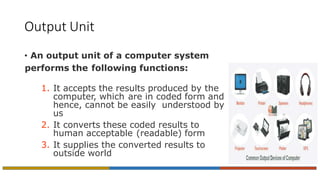
• An output unit of a computer system
performs the following functions:
1. It accepts the results produced by the
computer, which are in coded form and
hence, cannot be easily understood by
us
2. It converts these coded results to
human acceptable (readable) form
3. It supplies the converted results to
outside world
Storage Unit
• The storage unit of a computer system holds (or
stores) the following :
1. Data and instructions required for processing
(received from input devices)
2. Intermediate results of processing
3. Final results of processing, before they are
released to an output device
Two Types of Storage
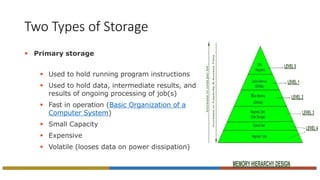
 Primary storage
 Used to hold running program instructions
 Used to hold data, intermediate results, and
results of ongoing processing of job(s)
 Fast in operation (Basic Organization of a
Computer System)
 Small Capacity
 Expensive
 Volatile (looses data on power dissipation)
Two Types of Storage
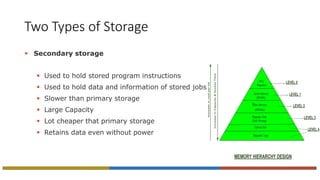
 Secondary storage
 Used to hold stored program instructions
 Used to hold data and information of stored jobs
 Slower than primary storage
 Large Capacity
 Lot cheaper that primary storage
 Retains data even without power
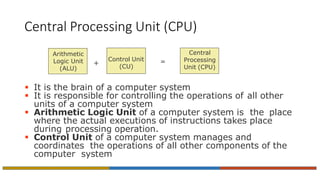
Central Processing Unit (CPU)
 It is the brain of a computer system
 It is responsible for controlling the operations of all other
units of a computer system
 Arithmetic Logic Unit of a computer system is the place
where the actual executions of instructions takes place
during processing operation.
 Control Unit of a computer system manages and
coordinates the operations of all other components of the
computer system
Arithmetic
Logic Unit
(ALU)
Control Unit
(CU)
=
Central
Processing
Unit (CPU)
+
The System Concept
• A system has following three characteristics:
1. A system has more than one element
2. All elements of a system are logically related
3. All elements of a system are controlled in a manner
to achieve the system goal
• A computer is a system as it comprises of integrated
components (input unit, output unit, storage unit, and
CPU) that work together to perform the steps called for in
the executing program
Need of programming?
• Programming somehow language
• Language is a medium for communication.
• If two person want to communicate with each other, they have to
require a language.
• Language: Hindi, English, Tamil, Bhojpuri, etc...
• Similarly, we require a language which uses to communicate with the
computer.
• Computer has its own set of instructions for communication, or what
we call computer languages.
Types of Computer Language
There are basically two types of computer programming languages
given below:
• Low level language
• High level language
Low Level Languages
The programming languages that are very close to machine code (0s
and 1s) are called low-level programming languages.
The program instructions written in these languages are in binary form.
The examples of low-level languages are:
• machine language
• assembly language
Machine Language
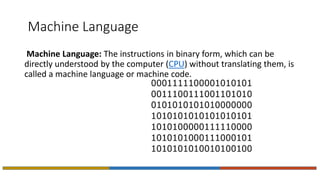
Machine Language: The instructions in binary form, which can be
directly understood by the computer (CPU) without translating them, is
called a machine language or machine code.
A Typical Machine Language Instruction
Format
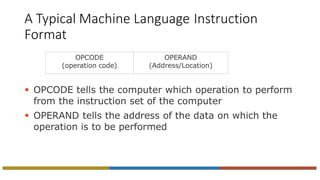
 OPCODE tells the computer which operation to perform
from the instruction set of the computer
 OPERAND tells the address of the data on which the
operation is to be performed
OPCODE
(operation code)
OPERAND
(Address/Location)
Assembly Language
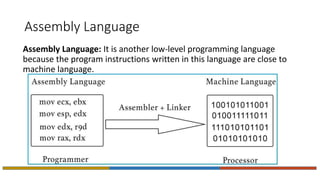
Assembly Language: It is another low-level programming language
because the program instructions written in this language are close to
machine language.
High Level Languages
• The programming languages that are close to human languages (example like English
languages) are called the high-level languages.
The examples of high-level languages are:
• Fortran
• COBOL
• Basic
• Pascal
• C
• C++
• Java
• Python
• The high level languages are similar to English language.
• The program instructions are written using English words, for example print, input etc.
But each high level language has its own rule and grammar for writing program
instructions. These rules are called syntax of the language.
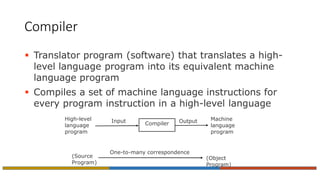
Compiler
 Translator program (software) that translates a high-
level language program into its equivalent machine
language program
 Compiles a set of machine language instructions for
every program instruction in a high-level language
One-to-many correspondence
(Source
Program)
(Object
Program)
Compiler
High-level
language
program
Machine
language
program
Input Output
Syntax Errors
• In addition to doing translation job, compilers also
automatically detect and indicate syntax errors
• Syntax errors are typically of following types:
 Illegal characters
 Illegal combination of characters
 Improper sequencing of instructions in a program
 Use of undefined variable names
• Note : A compiler cannot detect logic errors in a program
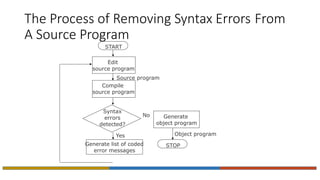
The Process of Removing Syntax Errors From
A Source Program
START
Edit
source program
Syntax
errors
detected?
Yes
Compile
source program
Source program
Generate list of coded
error messages
Generate
object program
Object program
STOP
No
Linker
 For a large software, storing all the lines of program code in a single
source file will be:
– Difficult to work with
– Difficult to deploy multiple programmers to concurrently work
towards its development
– Any change in the source program would require the entire source
program to be recompiled
 Hence, a modular approach is generally adapted to develop large
software where the software consists of multiple source program files
 No need to write programs for some modules as it might be available in
library offering the same functionality
Linker
 Each source program file can be independently
modified and compiled to create a corresponding
object program file
 Linker program (software) is used to properly
combine all the object program files (modules)
 Creates the final executable program (load module)
Interpreter
 Interpreter is a high-level language translator
 Takes one statement of a high-level language
program, translates it into machine language
instructions
 Immediately executes the resulting machine language
instructions
 Compiler simply translates the entire source program
into an object program and is not involved in its
execution
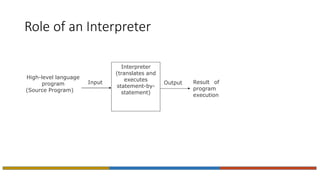
Role of an Interpreter
Interpreter
(translates and
executes
statement-by-
statement)
High-level language
program
(Source Program)
Result of
program
execution
Input Output
Intermediate Language Compiler &
Interpreter
 New type of compiler and interpreter combines the speed,
ease, and control of both compiler and interpreter
 Compiler first compiles the source program to an
intermediate object program
 Intermediate object program is not a machine language
code but written in an intermediate language that is
virtually machine independent
 Interpreter takes intermediate object program, converts
it into machine language program and executes it
Benefits of Intermediate Language Compiler
& Interpreter
 Intermediate object program is in compiled form and thus is
not original source code, so safer and easier to share
 Intermediate object program is based on a standard
Intermediate Definition Language (IDL)
 Interpreter can be written for any computer architecture and
operating system providing virtual machine environment to the
executing program
 Newer Interpreter compiles intermediate program, in memory,
into final host machine language program and executes it
 This technique is called Just-In-Time (JIT) Compilation
Advantages of High-Level Languages
 Machine independent
 Easier to learn and use
 Fewer errors during program development
 Lower program preparation cost
 Better documentation
 Easier to maintain
Limitations of High-Level Languages
 Lower execution efficiency
 Less flexibility to control the computer’s CPU, memory
and registers
Outline
• Memory(storage) Devices
• Input and Output Devices
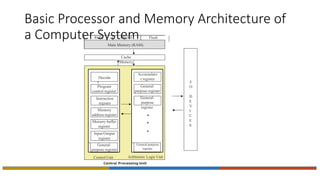
Basic Processor and Memory Architecture of
a Computer System
Cache
Memory
Decode
r
Program
control register
Instruction
register
Memory
address register
Memory buffer
register
Input/Output
register
General-
purpose register
Accumulato
r register
General-
purpose register
General-
purpose
register
General-purpose
register
Control Unit Arithmetic Logic Unit
Central Processing Unit
I/
O
D
E
V
I
C
E
S
ROM PROM Flash
Main Memory (RAM)
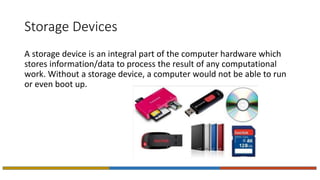
Storage Devices
A storage device is an integral part of the computer hardware which
stores information/data to process the result of any computational
work. Without a storage device, a computer would not be able to run
or even boot up.
Types of storage device
Computer storage is of two types:
• Primary Storage Devices:
• It is also known as internal memory and main memory.
• This is a section of the CPU that holds program instructions, input data, and intermediate
results. It is generally smaller in size.
• RAM (Random Access Memory) and ROM (Read Only Memory) are examples of primary
storage.
• Secondary Storage Devices:
• Secondary storage is a memory that is stored external to the computer.
• It is mainly used for the permanent and long-term storage of programs and data.
• Hard Disk, CD, DVD, Pen/Flash drive, SSD, etc, are examples of secondary storage.
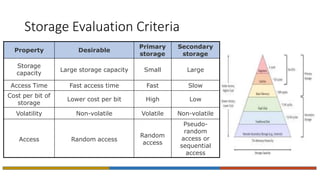
Storage Evaluation Criteria
Property Desirable
Primary
storage
Secondary
storage
Storage
capacity
Large storage capacity Small Large
Access Time Fast access time Fast Slow
Cost per bit of
storage
Lower cost per bit High Low
Volatility Non-volatile Volatile Non-volatile
Access Random access
Random
access
Pseudo-
random
access or
sequential
access
Primary storage devices
• Random Access Memory( RAM):
 Primary storage of a computer is often referred to as RAM because of its random access capability
 RAM chips are volatile memory
 A computer’s motherboard is designed in a manner that the memory capacity can be enhanced by
adding more memory chips
 The additional RAM chips, which plug into special sockets on the motherboard, are known as
single-in-line memory modules (SIMMs)
• Read-Only Memory (ROM):
• The data written or stored in these devices are non-volatile, i.e, once the data is stored in the
memory cannot be modified or deleted.
• The memory from which will only read but cannot write it.
• This type of memory is non-volatile.
• The information is stored permanently during manufacture only once
• ROM stores instructions that are used to start a computer. This operation is referred to as
bootstrap.
Types of ROMs
Type Usage
Manufacturer-programmed
ROM
Data is burnt by the manufacturer
of the electronic equipment in
which it is used.
User-programmed ROM
or
Programmable ROM
(PROM)
The user can load and store
“read-only” programs and data in
it
Erasable PROM (EPROM)
The user can erase information
stored in it and the chip can be
reprogrammed to store new
information
Types of ROMs
Type Usage
Ultra Violet EPROM
(UVEPROM)
A type of EPROM chip in which the
stored information is erased by
exposing the chip for some time
to ultra-violet light
Electrically EPROM
(EEPROM)
or
Flash memory
A type of EPROM chip in which the
stored information is erased by
using high voltage electric pulses
Cache Memory
 It is commonly used for minimizing the memory-
processor speed mismatch.
 It is an extremely fast, small memory between CPU
and main memory whose access time is closer to the
processing speed of the CPU.
 It is used to temporarily store very active data and
instructions during processing.
• Cache is pronounced as “cash”
Secondary Storage Devices
 Used in a computer system to overcome the limitations
of primary storage
 Has virtually unlimited capacity because the cost per
bit of storage is very low
 Hasan operating speed far slower than that
of the primary storage
 Used to store large volumes of data on a
permanent basis
 Also known as auxiliary memory
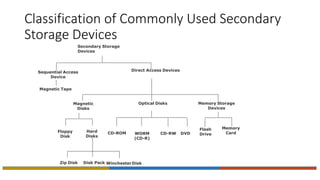
Classification of Commonly Used Secondary
Storage Devices
Sequential Access
Device
Secondary Storage
Devices
Direct Access Devices
Magnetic Tape
Magnetic
Disks
CD-ROM WORM
(CD-R)
Floppy
Disk
Hard
Disks
Zip Disk Disk Pack WinchesterDisk
Optical Disks
CD-RW DVD
Memory Storage
Devices
Flash
Drive
Memory
Card
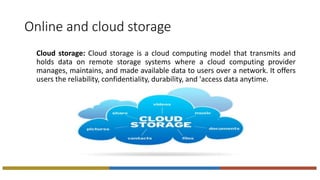
Online and cloud storage
Cloud storage: Cloud storage is a cloud computing model that transmits and
holds data on remote storage systems where a cloud computing provider
manages, maintains, and made available data to users over a network. It offers
users the reliability, confidentiality, durability, and 'access data anytime.
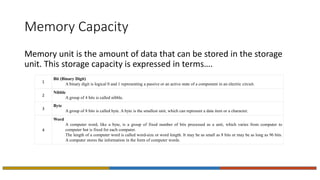
Memory Capacity
Memory unit is the amount of data that can be stored in the storage
unit. This storage capacity is expressed in terms….
1
Bit (Binary Digit)
A binary digit is logical 0 and 1 representing a passive or an active state of a component in an electric circuit.
2
Nibble
A group of 4 bits is called nibble.
3
Byte
A group of 8 bits is called byte. A byte is the smallest unit, which can represent a data item or a character.
4
Word
A computer word, like a byte, is a group of fixed number of bits processed as a unit, which varies from computer to
computer but is fixed for each computer.
The length of a computer word is called word-size or word length. It may be as small as 8 bits or may be as long as 96 bits.
A computer stores the information in the form of computer words.
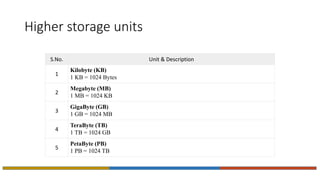
Higher storage units
S.No. Unit & Description
1
Kilobyte (KB)
1 KB = 1024 Bytes
2
Megabyte (MB)
1 MB = 1024 KB
3
GigaByte (GB)
1 GB = 1024 MB
4
TeraByte (TB)
1 TB = 1024 GB
5
PetaByte (PB)
1 PB = 1024 TB
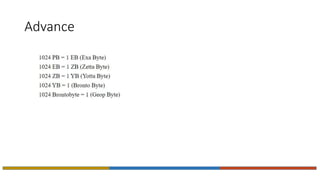
Advance
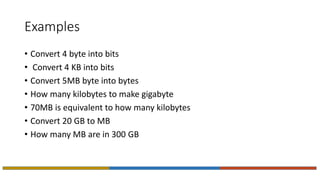
Examples
• Convert 4 byte into bits
• Convert 4 KB into bits
• Convert 5MB byte into bytes
• How many kilobytes to make gigabyte
• 70MB is equivalent to how many kilobytes
• Convert 20 GB to MB
• How many MB are in 300 GB
I/O Devices
 Provide means of communication between a computer
and outer world
 Also known as peripheral devices because they
surround the CPU and memory of a computer system
 Input devices are used to enter data from the outside
world into primary storage
 Output devices supply results of processing from
primary storage to users
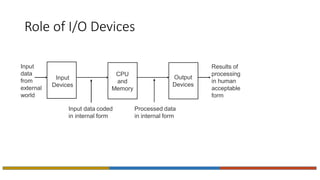
Role of I/O Devices
Input
data
from
external
world
Results of
processing
in human
acceptable
form
Input data coded
in internal form
Processed data
in internal form
CPU
and
Memory
Input
Devices
Output
Devices
Commonly Used Input Devices
 Keyboard devices
 Point-and-draw devices
 Data scanning devices
 Digitizer
 Speech recognition devices
Keyboard Devices
 Allow data entry into a computer system by pressing a
set of keys (labeled buttons) neatly mounted on a
keyboard connected to a computer system
 101-keys QWERTY keyboard is most popular
Esc F1 F2 F3 F4 F5 F6 F7 F8 F9 F10 F11 F12
~
`
_
-
+
=
 Backspace
{
[
}
]

Tab 
:
;
“
‘
Enter
Caps Lock
! @ # 3 $ % ^ & * ( )
1 2 4 5 6 7 8 9 0
Q W E R T Y U I O P
A S D F G H J K L
Z X C V B N M
<
,
>
.
?
/
Shift Shift
Alt
|

Ctrl Alt
?
/
Ctrl
Print Screen Scroll Screen Pause
Insert Home
Page Up
Delete End
PageDown
  

Num Lock Caps Lock ScrollLock
Num Lock
/ * -
7
Home
8

9
Pg Up
+
4
 5
6

1
End
2

3
Pg Dn
Enter
0
Ins
.
Del
Point-and-Draw Devices
 Used to rapidly point to and select a graphic icon or
menu item from multiple options displayed on the
Graphical User Interface (GUI) of a screen
 Used to create graphic elements on the screen such as
lines, curves, and freehand shapes
 Some commonly used point-and-draw devices are
mouse, track ball, joy stick, light pen, and touch screen
Point-and-Draw Devices
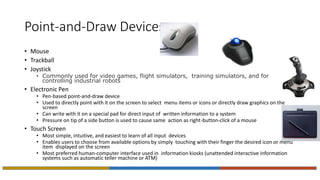
• Mouse
• Trackball
• Joystick
• Commonly used for video games, flight simulators, training simulators, and for
controlling industrial robots
• Electronic Pen
• Pen-based point-and-draw device
• Used to directly point with it on the screen to select menu items or icons or directly draw graphics on the
screen
• Can write with it on a special pad for direct input of written information to a system
• Pressure on tip of a side button is used to cause same action as right-button-click of a mouse
• Touch Screen
• Most simple, intuitive, and easiest to learn of all input devices
• Enables users to choose from available options by simply touching with their finger the desired icon or menu
item displayed on the screen
• Most preferred human-computer interface used in information kiosks (unattended interactive information
systems such as automatic teller machine or ATM)
Data Scanning Devices
 Input devices that enable direct data entry into a computer
system from source documents
 Eliminate the need to key in text data into the computer
 Due to reduced human effort in data entry, they improve
data accuracy and also increase the timeliness of the
information processed
 Demand high quality of input documents
 Some data scanning devices are also capable of recognizing
marks or characters
 Form design and ink specification usually becomes more
critical for accuracy
Data Scanning Devices
• Image Scanner
 Input device that translates paper documents into an
electronic format for storage in a computer
 Electronic format of a scanned image is its bit map
representation
 Stored image can be altered or manipulated with an image-
processing software
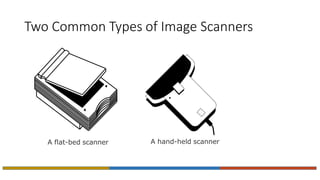
Two Common Types of Image Scanners
A flat-bed scanner A hand-held scanner
Data Scanning Devices
• Optical Character Recognition (OCR) Device
• Optical Mark Reader (OMR) Device
• Bar-code Reader
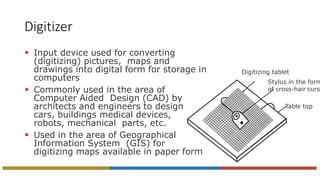
Digitizer
 Input device used for converting
(digitizing) pictures, maps and
drawings into digital form for storage in
computers
 Commonly used in the area of
Computer Aided Design (CAD) by
architects and engineers to design
cars, buildings medical devices,
robots, mechanical parts, etc.
 Used in the area of Geographical
Information System (GIS) for
digitizing maps available in paper form
Digitizing tablet
Stylus in the form
of cross-hair curso
Table top
Speech Recognition Devices
 Input device that allows a person to input data to a
computer system by speaking to it
 Today’s speech recognition systems are limited to
accepting few words within a relatively small domain
and can be used to enter only limited kinds and
quantities of data
Commonly Used Output Devices
 Monitors
 Printers
 Plotters
 Screen image projector
 Voice response systems
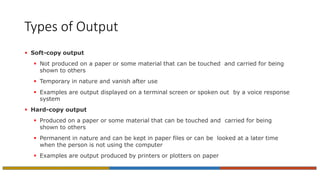
Types of Output
 Soft-copy output
 Not produced on a paper or some material that can be touched and carried for being
shown to others
 Temporary in nature and vanish after use
 Examples are output displayed on a terminal screen or spoken out by a voice response
system
 Hard-copy output
 Produced on a paper or some material that can be touched and carried for being
shown to others
 Permanent in nature and can be kept in paper files or can be looked at a later time
when the person is not using the computer
 Examples are output produced by printers or plotters on paper
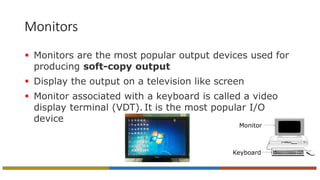
Monitors
 Monitors are the most popular output devices used for
producing soft-copy output
 Display the output on a television like screen
 Monitor associated with a keyboard is called a video
display terminal (VDT). It is the most popular I/O
device
Monitor
Keyboard
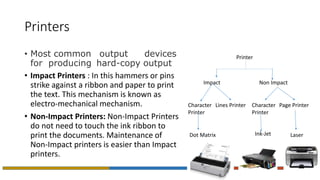
Printers
• Most common output devices
for producing hard-copy output
• Impact Printers : In this hammers or pins
strike against a ribbon and paper to print
the text. This mechanism is known as
electro-mechanical mechanism.
• Non-Impact Printers: Non-Impact Printers
do not need to touch the ink ribbon to
print the documents. Maintenance of
Non-Impact printers is easier than Impact
printers.
Printer
Impact Non Impact
Character
Printer
Lines Printer
Dot Matrix
Character
Printer
Page Printer
Ink-Jet Laser
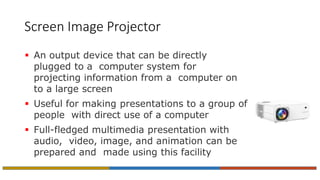
Screen Image Projector
 An output device that can be directly
plugged to a computer system for
projecting information from a computer on
to a large screen
 Useful for making presentations to a group of
people with direct use of a computer
 Full-fledged multimedia presentation with
audio, video, image, and animation can be
prepared and made using this facility
Voice Response Systems
 Voice response system enables a computer to talk to a user
 Has an audio-response device that produces audio output
 Such systems are of two types:
 Voice reproduction systems
 Produce audio output by selecting an appropriate audio output from a set of pre-recorded
audio responses
 Applications include audio help for guiding how to operate a system, automatic answering
machines, video games, etc.
 Speech synthesizers
 Converts text information into spoken sentences
 Used for applications such as:
 Reading out text information to blind persons
 Allowing those persons who cannot speak to communicate effectively
 Translating an entered text into spoken words in a selected language
Operating System
 Integrated set of programs that controls the resources (the CPU, memory,
I/O devices, etc.) of a computer system
 Provides its users with an interface or virtual machine that is more
convenient to use than the bare machine
 Two primary objectives of an OS are:
 Making a computer system convenient to use
 Managing the resources of a computer system
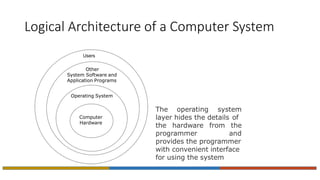
Logical Architecture of a Computer System
The operating system
layer hides the details of
the hardware from the
programmer and
provides the programmer
with convenient interface
for using the system
Computer
Hardware
Users
Other
System Software and
Application Programs
Operating System
Main Functions of an OS
 Process management
 Memory management
 File management
 Security
 Command interpretation

UNIT-111.pptx

  • 1.
    CS1201 Introduction to ComputerProgramming and Data Structures Dr. B Ramachandra Reddy
  • 2.
    Syllabus • UNIT-I: Concepts,definitions, taxonomy and history of computer programming, operating systems and program execution, Number system, Input/output devices, Storage devices, Flow chart and algorithm development, Computer program. • UNIT-II: Introduction to programming - variables, assignments; expressions; input/output; conditionals and branching; iteration; functions; recursion; arrays; introduction to pointers; structures;
  • 3.
    Syllabus • UNIT-III: DataStructures – Introduction to Data Structures, abstract data types, Linear list – singly linked list implementation, insertion, deletion and searching operations on linear list, circular linked list implementation. • UNIT-IV: Stacks-Operations, stack applications -infix to postfix conversion, postfix expression evaluation, recursion implementation, Queues-operations, Circular Queue operations, Dequeues, applications of queues. • UNIT-V: Searching and Sorting –selection sort, bubble sort, Quick Sort, Merge Sort, Searching-linear and binary search methods, Basic Concept of TreeS.
  • 4.
    Books • Textbooks: 1. PritiSinha, Pradeep K., Sinha: Computer Fundamentals: Concepts, Systems & Applications, BPB Publications. 2. Brian W. Kernighan and Dennis M. Ritchie: The C Programming Language, Prentice Hall of India. 3. Ellis Horowitz, Satraj Sahni and Susan Anderson-Freed: Fundamentals of Data Structures in C, W. H. Freeman and Company. • Reference Books: 1. E. Balagurusamy: Programming in ANSI C, Third Edition, Tata McGraw-Hill 2. Yashwant Kanitkar: Let US C, BPB Publications. 3. Venugopal, Prasad: Mastering C, Tata McGraw-Hill. 4. Seymour Lipschutz: Data Structures, Schaum's Outlines Series, Tata McGraw-Hill. 5. R. G. Dromey: How to Solve it by Computer, Prentice-Hall of India. 6. Reema Thareja: Data structures using C, Oxford publications. 7. Tanenbum: Data structures using C, Pearson Education.
  • 5.
    CS1201-Theory Evaluation • ExternalEvaluation (80%) • Mid exam- 30% • End exam-50% • Internal Evaluation (20%) • Quiz's • Assignments • Attendance • 80% attendance is mandatory to appear the end sem exam.
  • 6.
    CS1202 -Lab Evaluation •Venue: Computer Center • There will be 4 TA’s per session to guide you in the laboratory. • Evaluation (100%) • Practice problem (Every Week)- 25% • Mid sem lab exam - 35% • End sem lab exam -40% • 80% attendance is mandatory to appear the end sem exam.
  • 7.
    Outline • Computer • ComputerComponents • Computer Programming • Low Level Programming • High Level Programming
  • 8.
    Computer  The wordcomputer comes from the word “compute”, which means, “to calculate”.  Thereby, a computer is an electronic device that can perform arithmetic operations at high speed.  A computer is a programmable electronic device that accepts raw data as input and processes it with a set of instructions (a program) to produce the result as output.  A computer is also called a data processor because it can store, process, and retrieve data whenever desired.
  • 9.
    Data Processing • Theactivity of processing data using a computer is called data processing Data Information • Data is raw material used as input and information is processed data obtained as output of data processing Capture Data Manipulate Data Output Results
  • 10.
    The Five BasicOperations of a Computer System  Inputting. The process of entering data and instructions into the computer system.  Storing. Saving data and instructions to make them readily available for initial or additional processing whenever required.  Processing. Performing arithmetic operations (add, subtract, multiply, divide, etc.) or logical operations (comparisons like equal to, less than, greater than, etc.) on data to convert them into useful information.  Outputting. The process of producing useful information or results for the user such as a printed report or visual display.  Controlling. Directing the manner and sequence in which all of the above operations are performed.
  • 11.
    Basic Organization ofa Computer System Central Processing Unit (CPU) Storage Unit Secondary Storage Primary Storage Control Unit Arithmetic Logic Unit Input Unit Output Unit Program and Data Information (Results) Indicates flow of instructions and data ----- Indicates the control exercised by the control unit
  • 12.
    Input Unit • Aninput unit of a computer system performs the following functions: 1. It accepts (or reads) instructions and data from outside world 2. It converts these instructions and data in computer acceptable form 3. It supplies the converted instructions and data to the computer system for further processing
  • 13.
    Output Unit • Anoutput unit of a computer system performs the following functions: 1. It accepts the results produced by the computer, which are in coded form and hence, cannot be easily understood by us 2. It converts these coded results to human acceptable (readable) form 3. It supplies the converted results to outside world
  • 14.
    Storage Unit • Thestorage unit of a computer system holds (or stores) the following : 1. Data and instructions required for processing (received from input devices) 2. Intermediate results of processing 3. Final results of processing, before they are released to an output device
  • 15.
    Two Types ofStorage  Primary storage  Used to hold running program instructions  Used to hold data, intermediate results, and results of ongoing processing of job(s)  Fast in operation (Basic Organization of a Computer System)  Small Capacity  Expensive  Volatile (looses data on power dissipation)
  • 16.
    Two Types ofStorage  Secondary storage  Used to hold stored program instructions  Used to hold data and information of stored jobs  Slower than primary storage  Large Capacity  Lot cheaper that primary storage  Retains data even without power
  • 17.
    Central Processing Unit(CPU)  It is the brain of a computer system  It is responsible for controlling the operations of all other units of a computer system  Arithmetic Logic Unit of a computer system is the place where the actual executions of instructions takes place during processing operation.  Control Unit of a computer system manages and coordinates the operations of all other components of the computer system Arithmetic Logic Unit (ALU) Control Unit (CU) = Central Processing Unit (CPU) +
  • 18.
    The System Concept •A system has following three characteristics: 1. A system has more than one element 2. All elements of a system are logically related 3. All elements of a system are controlled in a manner to achieve the system goal • A computer is a system as it comprises of integrated components (input unit, output unit, storage unit, and CPU) that work together to perform the steps called for in the executing program
  • 19.
    Need of programming? •Programming somehow language • Language is a medium for communication. • If two person want to communicate with each other, they have to require a language. • Language: Hindi, English, Tamil, Bhojpuri, etc... • Similarly, we require a language which uses to communicate with the computer. • Computer has its own set of instructions for communication, or what we call computer languages.
  • 20.
    Types of ComputerLanguage There are basically two types of computer programming languages given below: • Low level language • High level language
  • 21.
    Low Level Languages Theprogramming languages that are very close to machine code (0s and 1s) are called low-level programming languages. The program instructions written in these languages are in binary form. The examples of low-level languages are: • machine language • assembly language
  • 22.
    Machine Language Machine Language:The instructions in binary form, which can be directly understood by the computer (CPU) without translating them, is called a machine language or machine code.
  • 23.
    A Typical MachineLanguage Instruction Format  OPCODE tells the computer which operation to perform from the instruction set of the computer  OPERAND tells the address of the data on which the operation is to be performed OPCODE (operation code) OPERAND (Address/Location)
  • 24.
    Assembly Language Assembly Language:It is another low-level programming language because the program instructions written in this language are close to machine language.
  • 25.
    High Level Languages •The programming languages that are close to human languages (example like English languages) are called the high-level languages. The examples of high-level languages are: • Fortran • COBOL • Basic • Pascal • C • C++ • Java • Python • The high level languages are similar to English language. • The program instructions are written using English words, for example print, input etc. But each high level language has its own rule and grammar for writing program instructions. These rules are called syntax of the language.
  • 26.
    Compiler  Translator program(software) that translates a high- level language program into its equivalent machine language program  Compiles a set of machine language instructions for every program instruction in a high-level language One-to-many correspondence (Source Program) (Object Program) Compiler High-level language program Machine language program Input Output
  • 27.
    Syntax Errors • Inaddition to doing translation job, compilers also automatically detect and indicate syntax errors • Syntax errors are typically of following types:  Illegal characters  Illegal combination of characters  Improper sequencing of instructions in a program  Use of undefined variable names • Note : A compiler cannot detect logic errors in a program
  • 28.
    The Process ofRemoving Syntax Errors From A Source Program START Edit source program Syntax errors detected? Yes Compile source program Source program Generate list of coded error messages Generate object program Object program STOP No
  • 29.
    Linker  For alarge software, storing all the lines of program code in a single source file will be: – Difficult to work with – Difficult to deploy multiple programmers to concurrently work towards its development – Any change in the source program would require the entire source program to be recompiled  Hence, a modular approach is generally adapted to develop large software where the software consists of multiple source program files  No need to write programs for some modules as it might be available in library offering the same functionality
  • 30.
    Linker  Each sourceprogram file can be independently modified and compiled to create a corresponding object program file  Linker program (software) is used to properly combine all the object program files (modules)  Creates the final executable program (load module)
  • 31.
    Interpreter  Interpreter isa high-level language translator  Takes one statement of a high-level language program, translates it into machine language instructions  Immediately executes the resulting machine language instructions  Compiler simply translates the entire source program into an object program and is not involved in its execution
  • 32.
    Role of anInterpreter Interpreter (translates and executes statement-by- statement) High-level language program (Source Program) Result of program execution Input Output
  • 33.
    Intermediate Language Compiler& Interpreter  New type of compiler and interpreter combines the speed, ease, and control of both compiler and interpreter  Compiler first compiles the source program to an intermediate object program  Intermediate object program is not a machine language code but written in an intermediate language that is virtually machine independent  Interpreter takes intermediate object program, converts it into machine language program and executes it
  • 34.
    Benefits of IntermediateLanguage Compiler & Interpreter  Intermediate object program is in compiled form and thus is not original source code, so safer and easier to share  Intermediate object program is based on a standard Intermediate Definition Language (IDL)  Interpreter can be written for any computer architecture and operating system providing virtual machine environment to the executing program  Newer Interpreter compiles intermediate program, in memory, into final host machine language program and executes it  This technique is called Just-In-Time (JIT) Compilation
  • 35.
    Advantages of High-LevelLanguages  Machine independent  Easier to learn and use  Fewer errors during program development  Lower program preparation cost  Better documentation  Easier to maintain
  • 36.
    Limitations of High-LevelLanguages  Lower execution efficiency  Less flexibility to control the computer’s CPU, memory and registers
  • 37.
  • 38.
    Basic Processor andMemory Architecture of a Computer System Cache Memory Decode r Program control register Instruction register Memory address register Memory buffer register Input/Output register General- purpose register Accumulato r register General- purpose register General- purpose register General-purpose register Control Unit Arithmetic Logic Unit Central Processing Unit I/ O D E V I C E S ROM PROM Flash Main Memory (RAM)
  • 39.
    Storage Devices A storagedevice is an integral part of the computer hardware which stores information/data to process the result of any computational work. Without a storage device, a computer would not be able to run or even boot up.
  • 40.
    Types of storagedevice Computer storage is of two types: • Primary Storage Devices: • It is also known as internal memory and main memory. • This is a section of the CPU that holds program instructions, input data, and intermediate results. It is generally smaller in size. • RAM (Random Access Memory) and ROM (Read Only Memory) are examples of primary storage. • Secondary Storage Devices: • Secondary storage is a memory that is stored external to the computer. • It is mainly used for the permanent and long-term storage of programs and data. • Hard Disk, CD, DVD, Pen/Flash drive, SSD, etc, are examples of secondary storage.
  • 41.
    Storage Evaluation Criteria PropertyDesirable Primary storage Secondary storage Storage capacity Large storage capacity Small Large Access Time Fast access time Fast Slow Cost per bit of storage Lower cost per bit High Low Volatility Non-volatile Volatile Non-volatile Access Random access Random access Pseudo- random access or sequential access
  • 42.
    Primary storage devices •Random Access Memory( RAM):  Primary storage of a computer is often referred to as RAM because of its random access capability  RAM chips are volatile memory  A computer’s motherboard is designed in a manner that the memory capacity can be enhanced by adding more memory chips  The additional RAM chips, which plug into special sockets on the motherboard, are known as single-in-line memory modules (SIMMs) • Read-Only Memory (ROM): • The data written or stored in these devices are non-volatile, i.e, once the data is stored in the memory cannot be modified or deleted. • The memory from which will only read but cannot write it. • This type of memory is non-volatile. • The information is stored permanently during manufacture only once • ROM stores instructions that are used to start a computer. This operation is referred to as bootstrap.
  • 43.
    Types of ROMs TypeUsage Manufacturer-programmed ROM Data is burnt by the manufacturer of the electronic equipment in which it is used. User-programmed ROM or Programmable ROM (PROM) The user can load and store “read-only” programs and data in it Erasable PROM (EPROM) The user can erase information stored in it and the chip can be reprogrammed to store new information
  • 44.
    Types of ROMs TypeUsage Ultra Violet EPROM (UVEPROM) A type of EPROM chip in which the stored information is erased by exposing the chip for some time to ultra-violet light Electrically EPROM (EEPROM) or Flash memory A type of EPROM chip in which the stored information is erased by using high voltage electric pulses
  • 45.
    Cache Memory  Itis commonly used for minimizing the memory- processor speed mismatch.  It is an extremely fast, small memory between CPU and main memory whose access time is closer to the processing speed of the CPU.  It is used to temporarily store very active data and instructions during processing. • Cache is pronounced as “cash”
  • 46.
    Secondary Storage Devices Used in a computer system to overcome the limitations of primary storage  Has virtually unlimited capacity because the cost per bit of storage is very low  Hasan operating speed far slower than that of the primary storage  Used to store large volumes of data on a permanent basis  Also known as auxiliary memory
  • 47.
    Classification of CommonlyUsed Secondary Storage Devices Sequential Access Device Secondary Storage Devices Direct Access Devices Magnetic Tape Magnetic Disks CD-ROM WORM (CD-R) Floppy Disk Hard Disks Zip Disk Disk Pack WinchesterDisk Optical Disks CD-RW DVD Memory Storage Devices Flash Drive Memory Card
  • 48.
    Online and cloudstorage Cloud storage: Cloud storage is a cloud computing model that transmits and holds data on remote storage systems where a cloud computing provider manages, maintains, and made available data to users over a network. It offers users the reliability, confidentiality, durability, and 'access data anytime.
  • 49.
    Memory Capacity Memory unitis the amount of data that can be stored in the storage unit. This storage capacity is expressed in terms…. 1 Bit (Binary Digit) A binary digit is logical 0 and 1 representing a passive or an active state of a component in an electric circuit. 2 Nibble A group of 4 bits is called nibble. 3 Byte A group of 8 bits is called byte. A byte is the smallest unit, which can represent a data item or a character. 4 Word A computer word, like a byte, is a group of fixed number of bits processed as a unit, which varies from computer to computer but is fixed for each computer. The length of a computer word is called word-size or word length. It may be as small as 8 bits or may be as long as 96 bits. A computer stores the information in the form of computer words.
  • 50.
    Higher storage units S.No.Unit & Description 1 Kilobyte (KB) 1 KB = 1024 Bytes 2 Megabyte (MB) 1 MB = 1024 KB 3 GigaByte (GB) 1 GB = 1024 MB 4 TeraByte (TB) 1 TB = 1024 GB 5 PetaByte (PB) 1 PB = 1024 TB
  • 51.
  • 52.
    Examples • Convert 4byte into bits • Convert 4 KB into bits • Convert 5MB byte into bytes • How many kilobytes to make gigabyte • 70MB is equivalent to how many kilobytes • Convert 20 GB to MB • How many MB are in 300 GB
  • 53.
    I/O Devices  Providemeans of communication between a computer and outer world  Also known as peripheral devices because they surround the CPU and memory of a computer system  Input devices are used to enter data from the outside world into primary storage  Output devices supply results of processing from primary storage to users
  • 54.
    Role of I/ODevices Input data from external world Results of processing in human acceptable form Input data coded in internal form Processed data in internal form CPU and Memory Input Devices Output Devices
  • 55.
    Commonly Used InputDevices  Keyboard devices  Point-and-draw devices  Data scanning devices  Digitizer  Speech recognition devices
  • 56.
    Keyboard Devices  Allowdata entry into a computer system by pressing a set of keys (labeled buttons) neatly mounted on a keyboard connected to a computer system  101-keys QWERTY keyboard is most popular Esc F1 F2 F3 F4 F5 F6 F7 F8 F9 F10 F11 F12 ~ ` _ - + =  Backspace { [ } ]  Tab  : ; “ ‘ Enter Caps Lock ! @ # 3 $ % ^ & * ( ) 1 2 4 5 6 7 8 9 0 Q W E R T Y U I O P A S D F G H J K L Z X C V B N M < , > . ? / Shift Shift Alt | Ctrl Alt ? / Ctrl Print Screen Scroll Screen Pause Insert Home Page Up Delete End PageDown     Num Lock Caps Lock ScrollLock Num Lock / * - 7 Home 8  9 Pg Up + 4  5 6  1 End 2  3 Pg Dn Enter 0 Ins . Del
  • 57.
    Point-and-Draw Devices  Usedto rapidly point to and select a graphic icon or menu item from multiple options displayed on the Graphical User Interface (GUI) of a screen  Used to create graphic elements on the screen such as lines, curves, and freehand shapes  Some commonly used point-and-draw devices are mouse, track ball, joy stick, light pen, and touch screen
  • 58.
    Point-and-Draw Devices • Mouse •Trackball • Joystick • Commonly used for video games, flight simulators, training simulators, and for controlling industrial robots • Electronic Pen • Pen-based point-and-draw device • Used to directly point with it on the screen to select menu items or icons or directly draw graphics on the screen • Can write with it on a special pad for direct input of written information to a system • Pressure on tip of a side button is used to cause same action as right-button-click of a mouse • Touch Screen • Most simple, intuitive, and easiest to learn of all input devices • Enables users to choose from available options by simply touching with their finger the desired icon or menu item displayed on the screen • Most preferred human-computer interface used in information kiosks (unattended interactive information systems such as automatic teller machine or ATM)
  • 59.
    Data Scanning Devices Input devices that enable direct data entry into a computer system from source documents  Eliminate the need to key in text data into the computer  Due to reduced human effort in data entry, they improve data accuracy and also increase the timeliness of the information processed  Demand high quality of input documents  Some data scanning devices are also capable of recognizing marks or characters  Form design and ink specification usually becomes more critical for accuracy
  • 60.
    Data Scanning Devices •Image Scanner  Input device that translates paper documents into an electronic format for storage in a computer  Electronic format of a scanned image is its bit map representation  Stored image can be altered or manipulated with an image- processing software
  • 61.
    Two Common Typesof Image Scanners A flat-bed scanner A hand-held scanner
  • 62.
    Data Scanning Devices •Optical Character Recognition (OCR) Device • Optical Mark Reader (OMR) Device • Bar-code Reader
  • 63.
    Digitizer  Input deviceused for converting (digitizing) pictures, maps and drawings into digital form for storage in computers  Commonly used in the area of Computer Aided Design (CAD) by architects and engineers to design cars, buildings medical devices, robots, mechanical parts, etc.  Used in the area of Geographical Information System (GIS) for digitizing maps available in paper form Digitizing tablet Stylus in the form of cross-hair curso Table top
  • 64.
    Speech Recognition Devices Input device that allows a person to input data to a computer system by speaking to it  Today’s speech recognition systems are limited to accepting few words within a relatively small domain and can be used to enter only limited kinds and quantities of data
  • 65.
    Commonly Used OutputDevices  Monitors  Printers  Plotters  Screen image projector  Voice response systems
  • 66.
    Types of Output Soft-copy output  Not produced on a paper or some material that can be touched and carried for being shown to others  Temporary in nature and vanish after use  Examples are output displayed on a terminal screen or spoken out by a voice response system  Hard-copy output  Produced on a paper or some material that can be touched and carried for being shown to others  Permanent in nature and can be kept in paper files or can be looked at a later time when the person is not using the computer  Examples are output produced by printers or plotters on paper
  • 67.
    Monitors  Monitors arethe most popular output devices used for producing soft-copy output  Display the output on a television like screen  Monitor associated with a keyboard is called a video display terminal (VDT). It is the most popular I/O device Monitor Keyboard
  • 68.
    Printers • Most commonoutput devices for producing hard-copy output • Impact Printers : In this hammers or pins strike against a ribbon and paper to print the text. This mechanism is known as electro-mechanical mechanism. • Non-Impact Printers: Non-Impact Printers do not need to touch the ink ribbon to print the documents. Maintenance of Non-Impact printers is easier than Impact printers. Printer Impact Non Impact Character Printer Lines Printer Dot Matrix Character Printer Page Printer Ink-Jet Laser
  • 69.
    Screen Image Projector An output device that can be directly plugged to a computer system for projecting information from a computer on to a large screen  Useful for making presentations to a group of people with direct use of a computer  Full-fledged multimedia presentation with audio, video, image, and animation can be prepared and made using this facility
  • 70.
    Voice Response Systems Voice response system enables a computer to talk to a user  Has an audio-response device that produces audio output  Such systems are of two types:  Voice reproduction systems  Produce audio output by selecting an appropriate audio output from a set of pre-recorded audio responses  Applications include audio help for guiding how to operate a system, automatic answering machines, video games, etc.  Speech synthesizers  Converts text information into spoken sentences  Used for applications such as:  Reading out text information to blind persons  Allowing those persons who cannot speak to communicate effectively  Translating an entered text into spoken words in a selected language
  • 72.
    Operating System  Integratedset of programs that controls the resources (the CPU, memory, I/O devices, etc.) of a computer system  Provides its users with an interface or virtual machine that is more convenient to use than the bare machine  Two primary objectives of an OS are:  Making a computer system convenient to use  Managing the resources of a computer system
  • 73.
    Logical Architecture ofa Computer System The operating system layer hides the details of the hardware from the programmer and provides the programmer with convenient interface for using the system Computer Hardware Users Other System Software and Application Programs Operating System
  • 74.
    Main Functions ofan OS  Process management  Memory management  File management  Security  Command interpretation