Cross-Platform Mobile
Development In C#
By Dan Hermes

Boston Mobile C# Developers' Group

dan@lexiconsystemsinc.com
www.lexiconsystemsinc.com
Going Native
iOS
 Android
 Windows

The Basics
UI
 Event life Cycles
 Multi-Threading
 Web Services
 Patterns

UI – Android


Xamarin Studio
◦ Xamarin Starter or Indie License



Visual Studio
◦ 2010+
◦ Professional+ (for plug-ins)
◦ Xamarin Business or Enterprise License



.axml
DEMO
UI - iOS
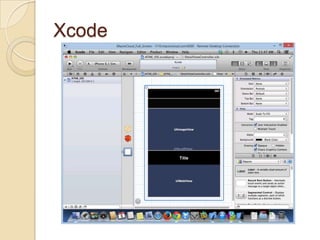
Xcode
 You need a Mac


◦ Mac Mini
◦ macincloud.com

DEMO
Xcode
Android: Activities
 An Activity

is like a…

◦ Windows Process
◦ ASP.NET Page Life Cycle
◦ MVC Page Life Cycle
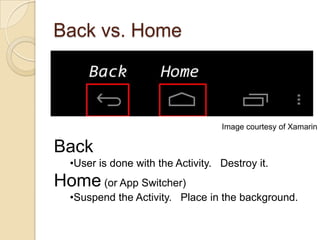
Back vs. Home

Image courtesy of Xamarin

Back
•User is done with the Activity. Destroy it.

Home (or App Switcher)
•Suspend the Activity. Place in the background.
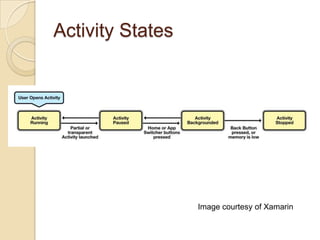
Activity States

Image courtesy of Xamarin
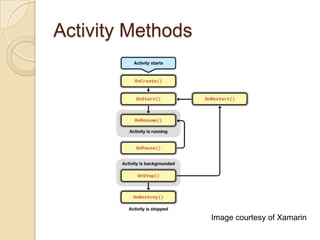
Activity Methods

Image courtesy of Xamarin
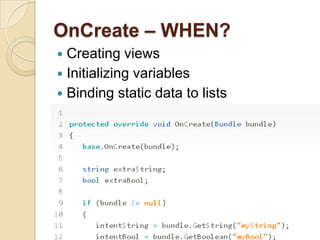
OnCreate – WHEN?
Creating views
 Initializing variables
 Binding static data to lists

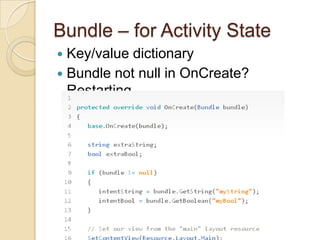
Bundle – for Activity State
Key/value dictionary
 Bundle not null in OnCreate?
Restarting.

Activity Methods


OnStart - before an activity becomes visible
◦ refresh current values of views



OnResume - start interacting with the user
◦
◦
◦
◦
◦
◦



Ramping up frame rates
Starting animations
Listening for GPS updates
Display any relevant alerts or dialogs
Wire up external event handlers
Undo operations in OnPause

OnPause
◦
◦
◦
◦
◦

Commit changes to persistent data
Destroy or clean up other objects consuming resources
Ramp down frame rates and pausing animations
Unregister external event handlers or notification handlers
Clear dialogs and alerts
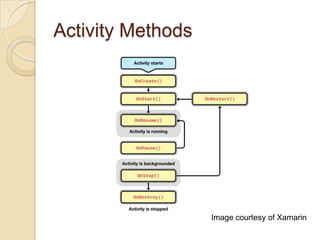
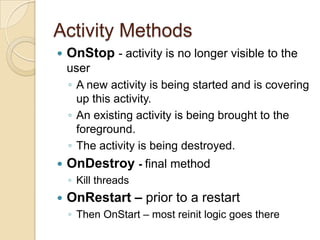
Activity Methods

Image courtesy of Xamarin
Activity Methods


OnStop - activity is no longer visible to the
user
◦ A new activity is being started and is covering
up this activity.
◦ An existing activity is being brought to the
foreground.
◦ The activity is being destroyed.



OnDestroy - final method
◦ Kill threads



OnRestart – prior to a restart
◦ Then OnStart – most reinit logic goes there
Managing State
 Bundle
◦ Primitive data types
 Custom Class
◦ Complex data (ex. Bitmap)

 Roll Your Own
◦ Circumvent the configuration change
lifecycle
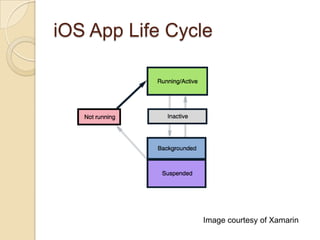
iOS App Life Cycle

Image courtesy of Xamarin
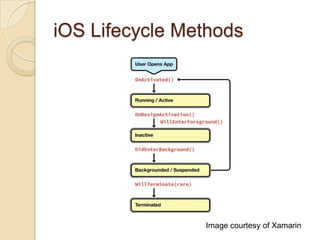
iOS Lifecycle Methods

Image courtesy of Xamarin
iOS Lifecycle Methods


OnActivated

◦ upon launch or when app returns to foreground


OnResignActivation

◦ upon an interruption such as a text or phone call


DidEnterBackground

◦ user accepts the phone call
◦ save user data and tasks
◦ remove sensitive information from the screen


WillEnterForeground

◦ App returns to foreground from background or suspension
◦ Restore state saved during DidEnterBackground
◦ Then call OnActivated


WillTerminate

◦ App shuts down and process is destroyed
◦ If multitasking is not available on the device or the OS
version
◦ Memory is low
◦ User manually terminates a backgrounded application.
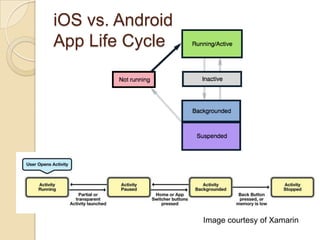
iOS vs. Android
App Life Cycle

Image courtesy of Xamarin
iOS:Events, Protocols, and
Delegates


Events

◦ Xamarin.iOS exposes .NET events on
UIKit controls
 Protocols
◦ Like a C# interface with optional methods
◦ Xamarin.iOS implements using abstract classes


Delegates
◦ strongly and weakly typed
◦ not be confused with C# delegates
Performance
Mobile users expect it
 Delays are annoying and alienate
users
 Android Activities and iOS Delegates?


◦ run in the foreground UI Thread


Long-running code should go into a…
Background Thread
Good Candidates for a
Background Thread


Operations that
◦ Make requests off of the device
 Retrieve data (web service, RSS feed)
 Connect to network
 Downloads

◦ Run more than 50 milliseconds
◦ May block the user interface thread
 Watchdog thread to kill the app
Async/Await
async
◦ method declaration
◦ lambda
◦ anonymous method
 await
◦ code stops and waits
◦ spawns background thread
◦ UI thread is not blocked
◦ resumes at the same point in the code

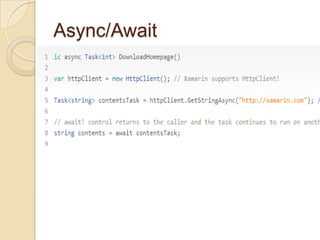
Async/Await
Async/Await
GetStringAsync
 PutAsync
 PostAsync
 DeleteAsync

Async Support


Xamarin.iOS
◦ 174 methods



Xamarin.Android
◦ 337 methods

Xamarin.Mobile
 Xamarin Component Store

Web Services
REST
 WCF
 SOAP

REST







HttpWebRequest / WebClient
RestSharp
Hammock
NSURLConnection
ServiceStack
Web Patterns
Async/Await
 MVC
 MVVMCross

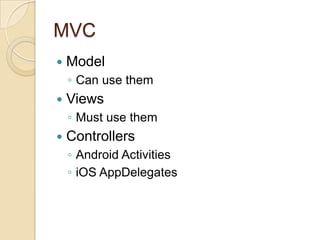
MVC


Model
◦ Can use them



Views
◦ Must use them



Controllers
◦ Android Activities
◦ iOS AppDelegates
Cross-Platform Mobile
Development In C#
Dan Hermes
Mobile Consultant
Lexicon Systems

Are You Mobilizing?
Website: www.lexiconsystemsinc.com
Email: dan@lexiconsystemsinc.com
Phone: 781-526-0738
Twitter: @lexiconsystems
Blog: www.itshopkeeping.com

Cross platform mobile development in c#

Editor's Notes

  • #9 What about App select button?
  • #10 Partial or transparent Activity? HOW TO PAUSE????
  • #11 Restart should go to OnCreate()?? (so bundle can reload)
  • #13 Caution: Your activity will be destroyed and recreated each time the user rotates the screen. When the screen changes orientation, the system destroys and recreates the foreground activity because the screen configuration has changed and your activity might need to load alternative resources (such as the layout).
  • #15 Restart should go to OnCreate()?? (so bundle can reload)
  • #18 http://docs.xamarin.com/guides/cross-platform/application_fundamentals/backgrounding/part_1_introduction_to_backgrounding_in_ios/Not Running - The application has not yet been launched on the device.Running/Active - The application is on the screen, and is executing code in the foreground.Inactive - The application is interrupted by an incoming phone call, text, or other interruption.Backgrounded - The application moves into the background and continues executing background code.Suspended - If the application does not have any code to run in the background, or if all code has completed, the app will be Suspended by the OS. A suspended application's process is kept alive, but the application is unable to execute any code in this state.Return to Not Running/Termination (Rare) - Occasionally, the application's process is destroyed, and the application returns to the Not Running state. This happens in low-memory situations, or if the user manually terminates the application.
  • #19 OnActivated - This is called the first time the application is launched, and every time the app comes back into the foreground. This is the place to put code that needs to run every time the app is opened.OnResignActivation - If the user receives an interruption such as a text or phone call, this method gets called and the app is temporarily inactivated. Should the user accept the phone call, the app will be sent to the background.DidEnterBackground - Called when the app enters the backgrounded state, this method gives an application about five seconds to prepare for possible termination. Use this time to save user data and tasks, and remove sensitive information from the screen.WillEnterForeground - When a user returns to a backgrounded or suspended application, and launches it into the foreground, WillEnterForeground gets called. This is the time to prepare the app to take the foreground by rehydrating any state saved during DidEnterBackground. OnActivated will be called immediately after this method completes.WillTerminate - The application is shut down, and its process is destroyed. This method only gets called if multitasking is not available on the device or the OS version, if memory is low, or if the user manually terminates a backgrounded application. Note that suspended applications that get terminated will not callWillTerminate.
  • #20 OnActivated - This is called the first time the application is launched, and every time the app comes back into the foreground. This is the place to put code that needs to run every time the app is opened.OnResignActivation - If the user receives an interruption such as a text or phone call, this method gets called and the app is temporarily inactivated. Should the user accept the phone call, the app will be sent to the background.DidEnterBackground - Called when the app enters the backgrounded state, this method gives an application about five seconds to prepare for possible termination. Use this time to save user data and tasks, and remove sensitive information from the screen.WillEnterForeground - When a user returns to a backgrounded or suspended application, and launches it into the foreground, WillEnterForeground gets called. This is the time to prepare the app to take the foreground by rehydrating any state saved during DidEnterBackground. OnActivated will be called immediately after this method completes.WillTerminate - The application is shut down, and its process is destroyed. This method only gets called if multitasking is not available on the device or the OS version, if memory is low, or if the user manually terminates a backgrounded application. Note that suspended applications that get terminated will not callWillTerminate.
  • #21 http://docs.xamarin.com/guides/cross-platform/application_fundamentals/backgrounding/part_1_introduction_to_backgrounding_in_ios/Not Running - The application has not yet been launched on the device.Running/Active - The application is on the screen, and is executing code in the foreground.Inactive - The application is interrupted by an incoming phone call, text, or other interruption.Backgrounded - The application moves into the background and continues executing background code.Suspended - If the application does not have any code to run in the background, or if all code has completed, the app will be Suspended by the OS. A suspended application's process is kept alive, but the application is unable to execute any code in this state.Return to Not Running/Termination (Rare) - Occasionally, the application's process is destroyed, and the application returns to the Not Running state. This happens in low-memory situations, or if the user manually terminates the application.
  • #25 Android Activities and iOS Delegates?run in the foreground UI ThreadMobile devices refresh their screen at 60 frames per second. A screen refresh will take place every 16.7 milliseconds. Movies are typically shown at a rate of 24 or 25 frames per second. This data indicates that the human eye can detect changes starting at around 20 frames per second. Anything that delays an update can cause a delay that is perceptible to the human eyea watchdog built into a device will kill the application that is blocking the UI thread.
  • #26 Uses the Task Parallel Library(TPL) ???Need code exampleThe recommended approach?await operator can be applied to a Task inside a method marked as async. It causes the method to stop execution at that point and wait until the task completes.
  • #27 Uses the Task Parallel Library(TPL) ???Need code exampleThe recommended approach?await operator can be applied to a Task inside a method marked as async. It causes the method to stop execution at that point and wait until the task completes.
  • #28 One of the new features of .NET 4.5/Mono 3.2 is the inclusion of the System.Net.Http.HttpClient class. This class is designed to perform asynchronous requests via the GET, POST, PUT, & DELETE Http verbs. The method calls for this are: There are other methods that this class exposes. Some of these methods are: CancelPendingRequests GetByteArrayAsync GetStreamAsync SendAsync