


Building Windows phone, iOS 
and Android apps with C# 
Jaime Rodriguez 
Principal Evangelist, Microsoft
About meWhy this talk…. 
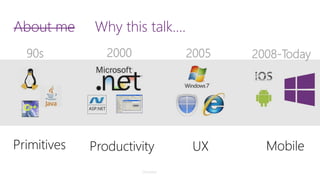
90s 
2000 
2005 
2008-Today 
Primitives 
Productivity 
UX 
Mobile 
Disclaimer
About meWhy this talk…. 
90s 
2000 
2005 
2008-Today 
Primitives 
Productivity 
UX 
Mobile 
Disclaimer 
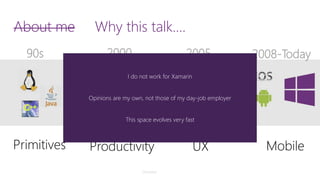
I do not work for Xamarin 
Opinions are my own, not those of my day-job employer 
This space evolves very fast
Mobile Explosion 
Consumers are already mobile-first 
Business users are increasingly demanding mobile scenarios
How? #1 –Web 
Build a Mobile 
Website
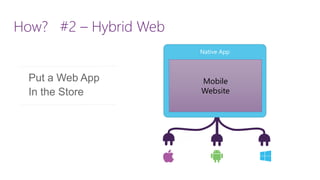
How? #2 –Hybrid Web 
Put a Web App 
In the Store 
Native App 
Mobile 
Website
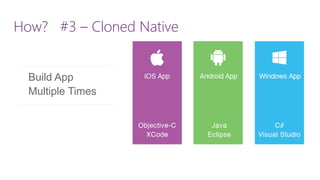
How? #3 –Cloned Native 
Build App Multiple Times
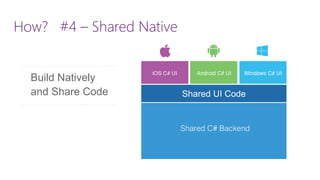
How? #4 –Shared Native 
Shared UI Code 
Build Natively 
and Share Code
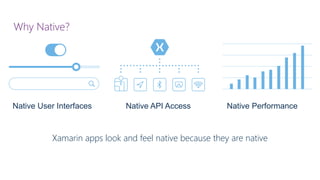
Why Native? 
Xamarin apps look and feel native because they are native 
Native User Interfaces 
Native API Access 
Native Performance
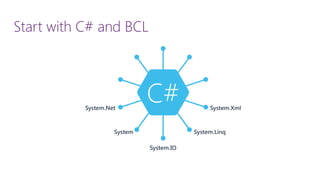
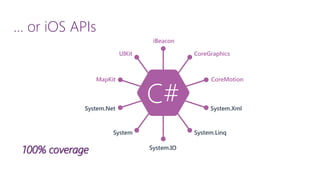
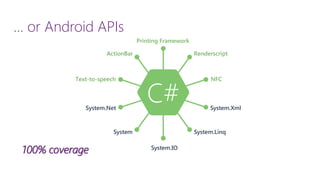
Start with C# and BCL
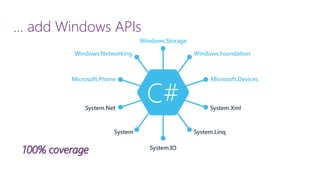
… add Windows APIs100% coverage
… or iOS APIs100% coverage
… or Android APIs100% coverage
demo 
Xamarin Development with Visual Studio
@implementationMSViewController 
-(void)viewDidLoad 
{ 
[superviewDidLoad]; 
} 
-(IBAction)OnButtonDown:(id)sender { 
UIAlertView* view = 
[[UIAlertViewalloc]init]; 
[view setTitle:@"Hello World"]; 
[view setMessage:@"How are you?”]; 
[view addButtonWithTitle:@"OK"]; 
[view show]; 
} 
@end 
publicpartialclassiOSAppViewController: UIViewController 
{ 
publiciOSAppViewController(IntPtrhandle) : base(handle){ } publicoverridevoidViewDidLoad(){ base.ViewDidLoad(); } partialvoidOnButtonDown(UIButtonsender) { UIAlertViewview = newUIAlertView(); view.Title= "Hello World"; view.Message= "How are you? "; view.AddButton("OK"); view.Show(); } } 
iOS
public class MyActivityextends Activity { 
@Override 
public void onCreate(Bundle savedInstanceState) { 
Button myBtn= (Button) this.findViewById( R.id.clickMe); 
myBtn.setOnClickListener( new View.OnClickListener() { 
@Override 
public void onClick(View view) { 
AlertDialog.Builderbuilder = new AlertDialog.Builder(MyActivity.this) ; 
builder.setTitle( "Hello World") 
.setMessage("How are you?") 
.setPositiveButton( "OK", new DialogInterface.OnClickListener() { 
@Override 
public void onClick(DialogInterfacedialogInterface, inti) { 
dialogInterface.dismiss(); 
}}) .show(); 
}}); } 
} 
[Activity(Label = "AndroidApp", MainLauncher= true, Icon = "@drawable/icon")] publicclassMainActivity: Activity { protectedoverridevoidOnCreate(Bundlebundle) { base.OnCreate(bundle); SetContentView(Resource.Layout.Main); Buttonbutton= FindViewById<Button> (Resource.Id.me); button.Click+= delegate{ AlertDialog.Builderbuilder = newAlertDialog.Builder(this); AlertDialogdialog = null; builder.SetTitle( "Hello World") .SetMessage( "How are you") .SetPositiveButton( "OK", delegate{ dialog.Dismiss(); } ); dialog = builder.Show(); } ; } } 
Android
Anything you can do in Objective-C or Java can be done in C# with Xamarin using Visual Studio
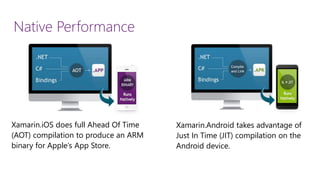
Native Performance 
Xamarin.iOSdoes full Ahead Of Time (AOT) compilation to produce an ARM binary for Apple’s App Store. 
Xamarin.Androidtakes advantage of Just In Time (JIT) compilation on the Android device.
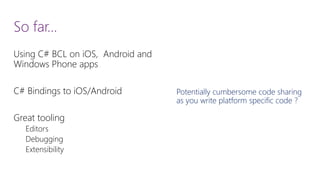
So far… 
Using C# BCL on iOS, Android and Windows Phone apps 
C# Bindings to iOS/Android 
Great tooling 
Editors 
Debugging 
Extensibility 
Potentially cumbersome code sharing as you write platform specific code ?
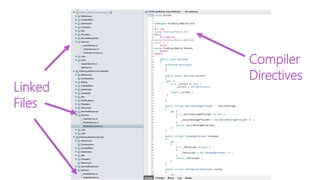
Sharing v1 
Really?
Linked 
Files 
Compiler 
Directives
Code sharing v3
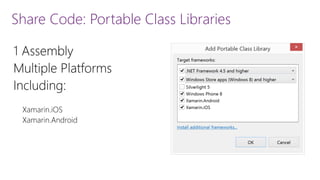
Share Code: Portable Class Libraries
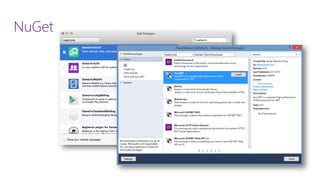
NuGet
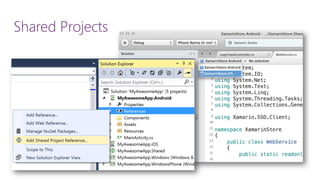
Shared Projects
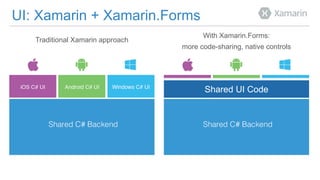
UI: Xamarin+ Xamarin.Forms 
With Xamarin.Forms: 
more code-sharing, native controls 
Traditional Xamarin approach 
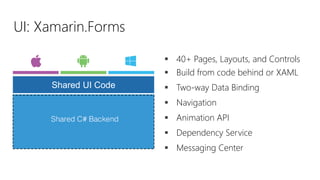
Shared UI Code
40+ Pages, Layouts, and Controls 
Build from code behind or XAML 
Two-way Data Binding 
Navigation 
Animation API 
Dependency Service 
Messaging Center 
UI: Xamarin.Forms 
Shared UI Code
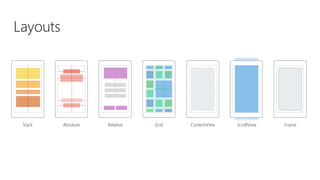
Layouts 
Stack 
Absolute 
Relative 
Grid 
ContentView 
ScrollView 
Frame
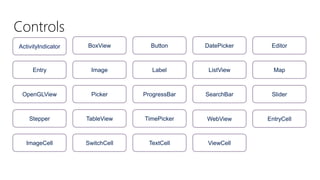
Controls 
ActivityIndicator 
BoxView 
Button 
DatePicker 
Editor 
Entry 
Image 
Label 
ListView 
Map 
OpenGLView 
Picker 
ProgressBar 
SearchBar 
Slider 
Stepper 
TableView 
TimePicker 
WebView 
EntryCell 
ImageCell 
SwitchCell 
TextCell 
ViewCell
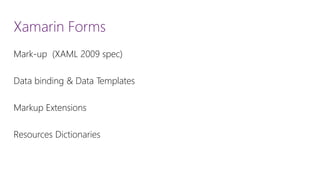
Xamarin Forms 
Mark-up (XAML 2009 spec) 
Data binding & Data Templates 
Markup Extensions 
Resources Dictionaries
Xamarin Forms Platform Features 
Page.DisplayAlert 
UI Thread marshalling 
Timers 
Xamarin.Forms.Maps 
Platform code via OnPlatform<T> and DependencyService.Get<T>
demo 
Hacking away with Xamarinand Visual Studio
Tips & Tricks Personal Observations & Lessons learned
Ramp-up & Mastery 
To be successful using C# on iOS, Android, and Windows Phone, you still have to know how to code for these platforms
How I learned native…
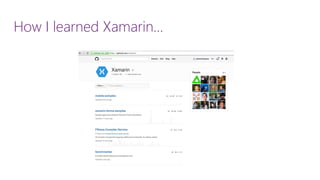
How I learned Xamarin…
Sharing code… what should you use? 
a)PCL 
b)Shared Projects 
c)partial classes 
d)C# extensions 
e)All of the above
UI Patterns & Tips 
Separate your concerns 
Declarative XAML 
MVVM is not required 
Use OnPlatform<T> for platform specific code 
Use ContentPage+ layout panels for dynamic resolution
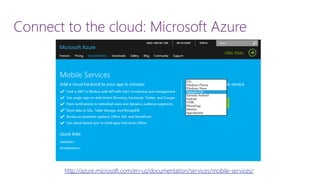
Connect to the cloud: Microsoft Azure http://azure.microsoft.com/en-us/documentation/services/mobile-services/
Memory & Garbage Collection 
iOS 
Uses AOT (Ahead of Time) compiler 
Two GCs: default (Boehm) or Sgen 
Android 
Uses SgenGC 
Windows Phone 
Uses .NET GC, http://developer.xamarin.com/guides/cross-platform/application_fundamentals/memory_perf_best_practices/ 
http://msdn.microsoft.com/en-us/library/ms973837.aspx
Performance 
Is usually not a problem 
Use native tools to measure 
iOS: Instruments 
Android: Device Monitor’s Allocation Manager 
Windows Phone: Visual Studio, Windows Phone Power tools, 
Graphics Diagnostics
For gamers
Closing: Mobile app development with C# 
Familiar 
Productive 
Highly reusable 
Empowering 
Built on a solid and extensible foundation
http://xamarin.com/MSDN
Want to win a free Xamarin license? 
1.Download free version of Xamarin Studio … 
2.Create a small Hello World Project on at least two of the three platforms: Windows Phone, Android, iOS. 
3.Tweet a link to your project to @jaimerodriguez before October 10that noon PST 
4.One random submission will be selected….and a coupon for free license will be emailed
Gracias!!! 
Aquiestoylos tresdias! 
@jaimerodriguez 
jaimer@microsoft.com

Tips & tricks for sharing C# code on iOS, Android and Windows Phone by Jaime Rodriguez

  • 1.
    Building Windows phone,iOS and Android apps with C# Jaime Rodriguez Principal Evangelist, Microsoft
  • 2.
    About meWhy thistalk…. 90s 2000 2005 2008-Today Primitives Productivity UX Mobile Disclaimer
  • 3.
    About meWhy thistalk…. 90s 2000 2005 2008-Today Primitives Productivity UX Mobile Disclaimer I do not work for Xamarin Opinions are my own, not those of my day-job employer This space evolves very fast
  • 4.
    Mobile Explosion Consumersare already mobile-first Business users are increasingly demanding mobile scenarios
  • 5.
    How? #1 –Web Build a Mobile Website
  • 6.
    How? #2 –HybridWeb Put a Web App In the Store Native App Mobile Website
  • 7.
    How? #3 –ClonedNative Build App Multiple Times
  • 8.
    How? #4 –SharedNative Shared UI Code Build Natively and Share Code
  • 9.
    Why Native? Xamarinapps look and feel native because they are native Native User Interfaces Native API Access Native Performance
  • 10.
  • 11.
    … add WindowsAPIs100% coverage
  • 12.
    … or iOSAPIs100% coverage
  • 13.
    … or AndroidAPIs100% coverage
  • 14.
    demo Xamarin Developmentwith Visual Studio
  • 15.
    @implementationMSViewController -(void)viewDidLoad { [superviewDidLoad]; } -(IBAction)OnButtonDown:(id)sender { UIAlertView* view = [[UIAlertViewalloc]init]; [view setTitle:@"Hello World"]; [view setMessage:@"How are you?”]; [view addButtonWithTitle:@"OK"]; [view show]; } @end publicpartialclassiOSAppViewController: UIViewController { publiciOSAppViewController(IntPtrhandle) : base(handle){ } publicoverridevoidViewDidLoad(){ base.ViewDidLoad(); } partialvoidOnButtonDown(UIButtonsender) { UIAlertViewview = newUIAlertView(); view.Title= "Hello World"; view.Message= "How are you? "; view.AddButton("OK"); view.Show(); } } iOS
  • 16.
    public class MyActivityextendsActivity { @Override public void onCreate(Bundle savedInstanceState) { Button myBtn= (Button) this.findViewById( R.id.clickMe); myBtn.setOnClickListener( new View.OnClickListener() { @Override public void onClick(View view) { AlertDialog.Builderbuilder = new AlertDialog.Builder(MyActivity.this) ; builder.setTitle( "Hello World") .setMessage("How are you?") .setPositiveButton( "OK", new DialogInterface.OnClickListener() { @Override public void onClick(DialogInterfacedialogInterface, inti) { dialogInterface.dismiss(); }}) .show(); }}); } } [Activity(Label = "AndroidApp", MainLauncher= true, Icon = "@drawable/icon")] publicclassMainActivity: Activity { protectedoverridevoidOnCreate(Bundlebundle) { base.OnCreate(bundle); SetContentView(Resource.Layout.Main); Buttonbutton= FindViewById<Button> (Resource.Id.me); button.Click+= delegate{ AlertDialog.Builderbuilder = newAlertDialog.Builder(this); AlertDialogdialog = null; builder.SetTitle( "Hello World") .SetMessage( "How are you") .SetPositiveButton( "OK", delegate{ dialog.Dismiss(); } ); dialog = builder.Show(); } ; } } Android
  • 17.
    Anything you cando in Objective-C or Java can be done in C# with Xamarin using Visual Studio
  • 18.
    Native Performance Xamarin.iOSdoesfull Ahead Of Time (AOT) compilation to produce an ARM binary for Apple’s App Store. Xamarin.Androidtakes advantage of Just In Time (JIT) compilation on the Android device.
  • 19.
    So far… UsingC# BCL on iOS, Android and Windows Phone apps C# Bindings to iOS/Android Great tooling Editors Debugging Extensibility Potentially cumbersome code sharing as you write platform specific code ?
  • 20.
  • 21.
  • 22.
  • 23.
    Share Code: PortableClass Libraries
  • 24.
  • 25.
  • 26.
    UI: Xamarin+ Xamarin.Forms With Xamarin.Forms: more code-sharing, native controls Traditional Xamarin approach Shared UI Code
  • 27.
    40+ Pages, Layouts,and Controls Build from code behind or XAML Two-way Data Binding Navigation Animation API Dependency Service Messaging Center UI: Xamarin.Forms Shared UI Code
  • 28.
    Layouts Stack Absolute Relative Grid ContentView ScrollView Frame
  • 29.
    Controls ActivityIndicator BoxView Button DatePicker Editor Entry Image Label ListView Map OpenGLView Picker ProgressBar SearchBar Slider Stepper TableView TimePicker WebView EntryCell ImageCell SwitchCell TextCell ViewCell
  • 30.
    Xamarin Forms Mark-up(XAML 2009 spec) Data binding & Data Templates Markup Extensions Resources Dictionaries
  • 31.
    Xamarin Forms PlatformFeatures Page.DisplayAlert UI Thread marshalling Timers Xamarin.Forms.Maps Platform code via OnPlatform<T> and DependencyService.Get<T>
  • 32.
    demo Hacking awaywith Xamarinand Visual Studio
  • 33.
    Tips & TricksPersonal Observations & Lessons learned
  • 34.
    Ramp-up & Mastery To be successful using C# on iOS, Android, and Windows Phone, you still have to know how to code for these platforms
  • 35.
    How I learnednative…
  • 36.
    How I learnedXamarin…
  • 37.
    Sharing code… whatshould you use? a)PCL b)Shared Projects c)partial classes d)C# extensions e)All of the above
  • 38.
    UI Patterns &Tips Separate your concerns Declarative XAML MVVM is not required Use OnPlatform<T> for platform specific code Use ContentPage+ layout panels for dynamic resolution
  • 39.
    Connect to thecloud: Microsoft Azure http://azure.microsoft.com/en-us/documentation/services/mobile-services/
  • 40.
    Memory & GarbageCollection iOS Uses AOT (Ahead of Time) compiler Two GCs: default (Boehm) or Sgen Android Uses SgenGC Windows Phone Uses .NET GC, http://developer.xamarin.com/guides/cross-platform/application_fundamentals/memory_perf_best_practices/ http://msdn.microsoft.com/en-us/library/ms973837.aspx
  • 41.
    Performance Is usuallynot a problem Use native tools to measure iOS: Instruments Android: Device Monitor’s Allocation Manager Windows Phone: Visual Studio, Windows Phone Power tools, Graphics Diagnostics
  • 42.
  • 43.
    Closing: Mobile appdevelopment with C# Familiar Productive Highly reusable Empowering Built on a solid and extensible foundation
  • 44.
  • 45.
    Want to wina free Xamarin license? 1.Download free version of Xamarin Studio … 2.Create a small Hello World Project on at least two of the three platforms: Windows Phone, Android, iOS. 3.Tweet a link to your project to @jaimerodriguez before October 10that noon PST 4.One random submission will be selected….and a coupon for free license will be emailed
  • 46.
    Gracias!!! Aquiestoylos tresdias! @jaimerodriguez jaimer@microsoft.com