Mobile Cross Platform Automation
in-practice and on a large scale
Sathish Gogineni
Mobile QA Automation Lead
Raise your hands if….
• You’re working in Mobile platform?
• You have apps on multiple platforms?
• You’re aware of the test automation tools in
Mobile?
• You have functional test automation?
• You’re using Cross platform test automation?
A bit of self promotion
Mobile Automation at Badoo
• Badoo has 2 popular apps
– Badoo
– HotOrNot
• Apps support 4 mobile platforms
– Android
– iOS
– MobileWeb ( HTML5 )
– Windows
Mobile Automation at Badoo
• A Single code base
• Run across two apps
• Runs on three platforms
• We have
– 350 scenarios for Badoo in Android & iOS ( 62%)
– 250 scenarios for HotOrNot in Android & iOS ( 76%
)
– 75 scenarios for HotOrNot in MobileWeb ( 22% )
– And in Windows platform we have 0 ( 0% )
Device Display Cabinet
A bit of Cross platform test
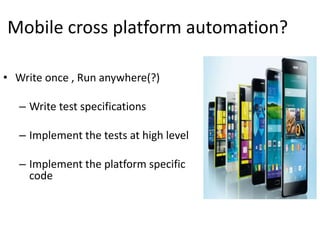
Mobile cross platform automation?
• Write once , Run anywhere(?)
– Write test specifications
– Implement the tests at high level
– Implement the platform specific
code
Why cross platform automation?
• Business logic is same. It is only
interaction with UI is change
• We can make sure applications is
same across platforms
• Pooled resources
• Less maintenance
Mobile Cross Platform Tools
• Instrument based tools
– Calabash
– Appium
– MonkeyTalk
• Image based tools
– eggPlant
– seetest
What should be considered?
• Who is writing the test cases?
App developers or QA?
• Which model?
BDD/UnitTest/DDD
• Which programming language?
Initial challenges
• “Our application is not exactly
same for different platforms”
• “The performance of the tools are
very slow”
• “It is better to write in the same
language as application”
A bit of Calabash
What is Calabash?
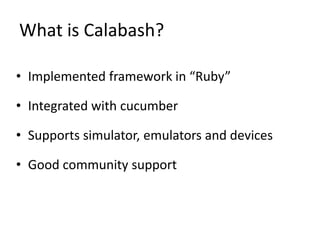
• Implemented framework in “Ruby”
• Integrated with cucumber
• Supports simulator, emulators and devices
• Good community support
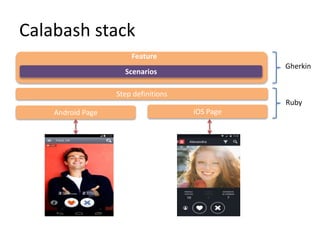
Calabash stack
Scenarios
Feature
Step definitions
Android Page iOS Page
Gherkin
Ruby
DEMO!
WHAT COULD POSSIBLY GO WRONG?
A bit of……
#1 Problem : Most of the code is
repeated in the pages for both
platforms
Solution:
• All the test logic in step definition.
• Pages should be light weight. It should only
‘interact’ with UI
• Transitions should be handled by Pages.
#2 Problem : There are too many
things in the screen and “Page”
becomes long and complex
Solution :
• Divide the screen into different panels
• Use ruby “modules” to represent each Panel
• Include the panels in the main “Page”
#3 Problem :
Test case should be independent
but it’s hard to set up the pre
conditions every time
Solution :
Implement an API with server
Examples:
Create a new user ( from user pool )
Add photo
Send message from other user
#4 Problem :
Some time test case fails due to
networks issue and server glitches
that are not reproducible
Solution :
Re-run the failed test cases in the build server
• Run with “cucumber -f rerun -o rerun.txt”
• Rerun with “cucumber rerun.txt”
#5 Problem :
Testing scenarios which interact
outside the app like Facebook sign in &
taking photos
Solution :
Integrate with tools which work outside
application
• monkeyrunner/UIAutomator for Android
• Sikuli for iOS
#6 Problem :
Having the same environment setup
everywhere
Solution :
Use Bundler for gem maintenance
(http://bundler.io/)
• Write “Gemfile”
• Run “bundle install”
• Execute through “bundler exec”
Mobile Cross Platform Automation in-practice and on a Large Scale

Mobile Cross Platform Automation in-practice and on a Large Scale

  • 1.
    Mobile Cross PlatformAutomation in-practice and on a large scale Sathish Gogineni Mobile QA Automation Lead
  • 2.
    Raise your handsif…. • You’re working in Mobile platform? • You have apps on multiple platforms? • You’re aware of the test automation tools in Mobile? • You have functional test automation? • You’re using Cross platform test automation?
  • 3.
    A bit ofself promotion
  • 4.
    Mobile Automation atBadoo • Badoo has 2 popular apps – Badoo – HotOrNot • Apps support 4 mobile platforms – Android – iOS – MobileWeb ( HTML5 ) – Windows
  • 5.
    Mobile Automation atBadoo • A Single code base • Run across two apps • Runs on three platforms • We have – 350 scenarios for Badoo in Android & iOS ( 62%) – 250 scenarios for HotOrNot in Android & iOS ( 76% ) – 75 scenarios for HotOrNot in MobileWeb ( 22% ) – And in Windows platform we have 0 ( 0% )
  • 6.
  • 7.
    A bit ofCross platform test
  • 8.
    Mobile cross platformautomation? • Write once , Run anywhere(?) – Write test specifications – Implement the tests at high level – Implement the platform specific code
  • 9.
    Why cross platformautomation? • Business logic is same. It is only interaction with UI is change • We can make sure applications is same across platforms • Pooled resources • Less maintenance
  • 10.
    Mobile Cross PlatformTools • Instrument based tools – Calabash – Appium – MonkeyTalk • Image based tools – eggPlant – seetest
  • 11.
    What should beconsidered? • Who is writing the test cases? App developers or QA? • Which model? BDD/UnitTest/DDD • Which programming language?
  • 12.
    Initial challenges • “Ourapplication is not exactly same for different platforms” • “The performance of the tools are very slow” • “It is better to write in the same language as application”
  • 13.
    A bit ofCalabash
  • 14.
    What is Calabash? •Implemented framework in “Ruby” • Integrated with cucumber • Supports simulator, emulators and devices • Good community support
  • 15.
  • 16.
  • 18.
  • 19.
    #1 Problem :Most of the code is repeated in the pages for both platforms
  • 20.
    Solution: • All thetest logic in step definition. • Pages should be light weight. It should only ‘interact’ with UI • Transitions should be handled by Pages.
  • 21.
    #2 Problem :There are too many things in the screen and “Page” becomes long and complex
  • 22.
    Solution : • Dividethe screen into different panels • Use ruby “modules” to represent each Panel • Include the panels in the main “Page”
  • 23.
    #3 Problem : Testcase should be independent but it’s hard to set up the pre conditions every time
  • 24.
    Solution : Implement anAPI with server Examples: Create a new user ( from user pool ) Add photo Send message from other user
  • 25.
    #4 Problem : Sometime test case fails due to networks issue and server glitches that are not reproducible
  • 26.
    Solution : Re-run thefailed test cases in the build server • Run with “cucumber -f rerun -o rerun.txt” • Rerun with “cucumber rerun.txt”
  • 27.
    #5 Problem : Testingscenarios which interact outside the app like Facebook sign in & taking photos
  • 28.
    Solution : Integrate withtools which work outside application • monkeyrunner/UIAutomator for Android • Sikuli for iOS
  • 29.
    #6 Problem : Havingthe same environment setup everywhere
  • 30.
    Solution : Use Bundlerfor gem maintenance (http://bundler.io/) • Write “Gemfile” • Run “bundle install” • Execute through “bundler exec”