Creating the Digipak
These are some of the stages I went through while I created my digipak.
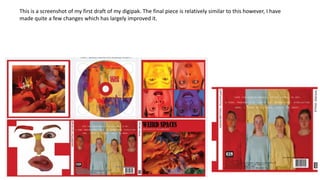
This is a screenshot of my first draft of my digipak. The final piece is relatively similar to this however, I have
made quite a few changes which has largely improved it.
This is an idea I had for the bottom
left tile of the digipak and I was
comparing whether to have it with
or without red squares. I ended up
not doing this for the digipak at all
because even though I did quite like
it on it’s own, I didn’t feel like it
went well enough with the rest of
the digipak.
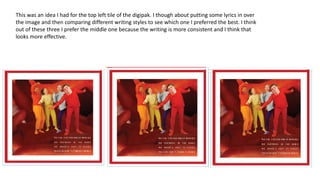
This was an idea I had for the top left tile of the digipak. I though about putting some lyrics in over
the image and then comparing different writing styles to see which one I preferred the best. I think
out of these three I prefer the middle one because the writing is more consistent and I think that
looks more effective.
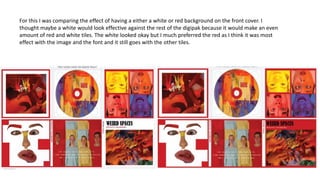
For this I was comparing the effect of having a either a white or red background on the front cover. I
thought maybe a white would look effective against the rest of the digipak because it would make an even
amount of red and white tiles. The white looked okay but I much preferred the red as I think it was most
effect with the image and the font and it still goes with the other tiles.
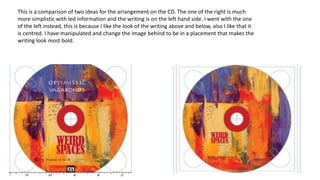
This is a comparison of two ideas for the arrangement on the CD. The one of the right is much
more simplistic with led information and the writing is on the left hand side. I went with the one
of the left instead, this is because I like the look of the writing above and below, also I like that it
is centred. I have manipulated and change the image behind to be in a placement that makes the
writing look most bold.
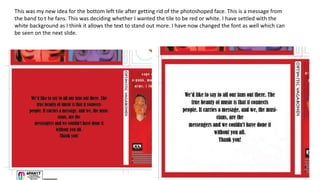
This was my new idea for the bottom left tile after getting rid of the photoshoped face. This is a message from
the band to t he fans. This was deciding whether I wanted the tile to be red or white. I have settled with the
white background as I think it allows the text to stand out more. I have now changed the font as well which can
be seen on the next slide.
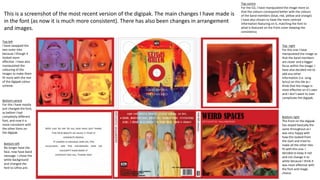
This is a screenshot of the most recent version of the digipak. The main changes I have made is
in the font (as now it is much more consistent). There has also been changes in arrangement
and images.
Bottom left
No longer have the
face, now have band
message. I chose the
white background
and changed the
font to Lithos pro
Top left
I have swapped the
two outer tiles
because I though it
looked more
effective. I have also
manipulated the
colouring of the
images to make them
fit more with the rest
of the digipak colour
scheme.
Top right
For this one I have
manipulated the image so
that the band members
are closer and a bigger
focus within the image. I
have also decided not to
add any other
information (i.e. song
lyrics) on this tile as I
think that the image is
most effective on it’s own
and I don’t want to over
complicate the digipak.
Bottom right
The front on the digipak
has stayed basically the
same throughout as I
was very happy with
how this looked from
the start and tried to
make all the other tiles
fit with this one. I
decided to keep it red
and not change it to
white because I think it
was most effective with
the font and image
choice.
Top centre
For the CD, I have manipulated the image more so
that the colours correspond better with the colours
of the band members (blue, red, yellow and orange).
I have also chosen to have the more centred
information featuring on it, matching the font to
what is featured on the front cover keeping the
consistency
Bottom centre
For this I have mostly
just changed the font,
as before I had
completely different
font, and now it is
more consistent with
the other fonts on
the digipak.

Creating the digipak

  • 1.
    Creating the Digipak Theseare some of the stages I went through while I created my digipak.
  • 2.
    This is ascreenshot of my first draft of my digipak. The final piece is relatively similar to this however, I have made quite a few changes which has largely improved it.
  • 3.
    This is anidea I had for the bottom left tile of the digipak and I was comparing whether to have it with or without red squares. I ended up not doing this for the digipak at all because even though I did quite like it on it’s own, I didn’t feel like it went well enough with the rest of the digipak.
  • 4.
    This was anidea I had for the top left tile of the digipak. I though about putting some lyrics in over the image and then comparing different writing styles to see which one I preferred the best. I think out of these three I prefer the middle one because the writing is more consistent and I think that looks more effective.
  • 5.
    For this Iwas comparing the effect of having a either a white or red background on the front cover. I thought maybe a white would look effective against the rest of the digipak because it would make an even amount of red and white tiles. The white looked okay but I much preferred the red as I think it was most effect with the image and the font and it still goes with the other tiles.
  • 6.
    This is acomparison of two ideas for the arrangement on the CD. The one of the right is much more simplistic with led information and the writing is on the left hand side. I went with the one of the left instead, this is because I like the look of the writing above and below, also I like that it is centred. I have manipulated and change the image behind to be in a placement that makes the writing look most bold.
  • 7.
    This was mynew idea for the bottom left tile after getting rid of the photoshoped face. This is a message from the band to t he fans. This was deciding whether I wanted the tile to be red or white. I have settled with the white background as I think it allows the text to stand out more. I have now changed the font as well which can be seen on the next slide.
  • 8.
    This is ascreenshot of the most recent version of the digipak. The main changes I have made is in the font (as now it is much more consistent). There has also been changes in arrangement and images. Bottom left No longer have the face, now have band message. I chose the white background and changed the font to Lithos pro Top left I have swapped the two outer tiles because I though it looked more effective. I have also manipulated the colouring of the images to make them fit more with the rest of the digipak colour scheme. Top right For this one I have manipulated the image so that the band members are closer and a bigger focus within the image. I have also decided not to add any other information (i.e. song lyrics) on this tile as I think that the image is most effective on it’s own and I don’t want to over complicate the digipak. Bottom right The front on the digipak has stayed basically the same throughout as I was very happy with how this looked from the start and tried to make all the other tiles fit with this one. I decided to keep it red and not change it to white because I think it was most effective with the font and image choice. Top centre For the CD, I have manipulated the image more so that the colours correspond better with the colours of the band members (blue, red, yellow and orange). I have also chosen to have the more centred information featuring on it, matching the font to what is featured on the front cover keeping the consistency Bottom centre For this I have mostly just changed the font, as before I had completely different font, and now it is more consistent with the other fonts on the digipak.