E M I L Y M . J O H N S O N , M L I S
R E G I O N A L A S S I S T A N T L I B R A R I A N &
A S S I S T A N T P R O F E S S O R
L I B R A R Y O F T H E H E A L T H S C I E N C E S -
P E O R I A
Creating Effective Scientific
Posters
Objectives
 Review effective scientific posters creation and
design
 Identify and discuss posters which demonstrate
best practices in design
2
Scientific Poster Creation Research Guide
http://researchguides.uic.edu/UICOMP-Poster
3
Scientific Posters
 Effective Posters will help you…
 Engage Colleagues in Conversation
 Get your main point across to as many people as
possible
 Key elements include
Single message is focused
Graphics tells the story
Sequence is well-ordered and obvious
4
Timeline
Due Date Activity
Notified of poster acceptance by Program Committee
Create budget for poster
Discuss content and layout with collaborator and mentors
Complete first draft with content/visuals
Review draft with collaborators and mentors
Complete final edits
Print final version of poster
Poster presentation
6
The Planning Process
 Know the conference rules
 Know the judging criteria
 Know how you are going to physically produce the
poster
7
The Planning Process
 Provide Clear Messages
 Use IMRAD format
 Graphics
 Edit text carefully but ruthlessly!
8
9
The Planning Process
10
 Avoid clutter
 Keep the lettering simple
 Keep the colors simple
 Don’t fight reader gravity
 Layouts
The Planning Process
11
Image used from: http://www.ncsu.edu/project/posters/CreatePosterLayout.html
American College of Physicians - Final Checklist
12
13
14
15
Traveling with Posters
 Find an appropriate carrying case
 Don’t check your poster as luggage
 Bring tape, scissors and tacks with you
 Save your poster on a travel drive to take with you
16
When Presenting…
 Bring a poster hanging kit
 Hang poster neat and square
 Consider bringing:
 Extra copies of the poster
 Handout
 Business card
 Prepare short “tours” of your poster
 Be prepared to promote yourself
17
Resources
18
 Visit Preparing a Poster Presentation
 Created by American College of Physicians
 Visit Creating Effective Poster Presentations
 Created by George Hess, Kathryn Tosney, & Leon Liegel
 Visit Designing Conference Posters
 Created by Colin Purrington
 Visit the DES Guidelines for specifics about font
sizes, word counts, dpi’s, etc.

Creating Effective Scientific Posters

  • 1.
    E M IL Y M . J O H N S O N , M L I S R E G I O N A L A S S I S T A N T L I B R A R I A N & A S S I S T A N T P R O F E S S O R L I B R A R Y O F T H E H E A L T H S C I E N C E S - P E O R I A Creating Effective Scientific Posters
  • 2.
    Objectives  Review effectivescientific posters creation and design  Identify and discuss posters which demonstrate best practices in design 2
  • 3.
    Scientific Poster CreationResearch Guide http://researchguides.uic.edu/UICOMP-Poster 3
  • 4.
    Scientific Posters  EffectivePosters will help you…  Engage Colleagues in Conversation  Get your main point across to as many people as possible  Key elements include Single message is focused Graphics tells the story Sequence is well-ordered and obvious 4
  • 6.
    Timeline Due Date Activity Notifiedof poster acceptance by Program Committee Create budget for poster Discuss content and layout with collaborator and mentors Complete first draft with content/visuals Review draft with collaborators and mentors Complete final edits Print final version of poster Poster presentation 6
  • 7.
    The Planning Process Know the conference rules  Know the judging criteria  Know how you are going to physically produce the poster 7
  • 8.
    The Planning Process Provide Clear Messages  Use IMRAD format  Graphics  Edit text carefully but ruthlessly! 8
  • 9.
  • 10.
    The Planning Process 10 Avoid clutter  Keep the lettering simple  Keep the colors simple  Don’t fight reader gravity
  • 11.
     Layouts The PlanningProcess 11 Image used from: http://www.ncsu.edu/project/posters/CreatePosterLayout.html
  • 12.
    American College ofPhysicians - Final Checklist 12
  • 13.
  • 14.
  • 15.
  • 16.
    Traveling with Posters Find an appropriate carrying case  Don’t check your poster as luggage  Bring tape, scissors and tacks with you  Save your poster on a travel drive to take with you 16
  • 17.
    When Presenting…  Bringa poster hanging kit  Hang poster neat and square  Consider bringing:  Extra copies of the poster  Handout  Business card  Prepare short “tours” of your poster  Be prepared to promote yourself 17
  • 18.
    Resources 18  Visit Preparinga Poster Presentation  Created by American College of Physicians  Visit Creating Effective Poster Presentations  Created by George Hess, Kathryn Tosney, & Leon Liegel  Visit Designing Conference Posters  Created by Colin Purrington  Visit the DES Guidelines for specifics about font sizes, word counts, dpi’s, etc.

Editor's Notes

  • #3 Disclaimer – Not a graphic artist or an expert in poster preparation but I hope these ideas and tips will be helpful when you are producing a poster.
  • #4 All of the resources that I’m going to talk about are included in the Guide.
  • #5 Why produce a poster? An effective poster operates on multiple levels ... source of information conversation starter advertisement of your work summary of your work It is import to think of your poster as form of scholarly communication, not just a research paper stuck on a poster board.
  • #6 Example One Prompting Questions: What is this poster about? What did they do? What are the graphics about?
  • #7 Suggested schedule. Here are some ideas for establishing milestones. This schedule assumes that you're doing other things during the week. It also allows time for your poster to "sit on the shelf" while you think about it. Of course, you can turn weeks to days and skip drafts as time pressures require. When What 0 Present poster -1 week Final print -1 week Make changes suggested by peers -1 week Distribute draft for peer review (round 2) -2 weeks Make changes suggested by peers -2 weeks Distribute draft for peer review (round 1) -3 weeks Edit your draft ruthlessly -3 weeks Create first draft of poster -4 weeks Plan out poster on scratch paper -4 weeks Define message and write an abstract (if you haven't already done so)
  • #8 Logististics As you begin to plan your poster the American College of Physicians recommends that you make sure that you know the conference rules for posters and the judging criteria if the poster is to be judged. Make sure that you know the physical requirements as well how the posters will be displayed or mounted. You will also need to determine early in the process who will be actually producing the physical poster so that you can accommodate their requirements into your timeline.
  • #9 Content preparation Message - State your main points and conclusion clearly and succintly - Make the strongest statements your research will allow All visuals and text should relate to those point and conclusion IMRAD Introduction, Methodology, Results, Analysis, Discussion Use organizational cues for headers Graphics Do not copy and paste! Save graphs as images High Res images/graphs Editing - Edit all text to simplify verbiage, to reduce sentence complexity, and to delete details.
  • #10 Example 2 Questions: What is this poster about? Does it draw your interest? How would you read through this poster? What about the colors and images? Do they add to the poster?
  • #11 Appearance Besides providing guidance on content, the ACP provides a few tips about appearance, but they only give broad suggestions like avoiding clutter, using simple fonts, and choosing a simple color scheme.
  • #12 Your poster should have a good visual balance of figures and text, separated by white space. Balance occurs when images and text are reflected (at least approximately) across a central horizontal, vertical, or diagonal axis. This axis is know as the axis of symmetry. TRANSITION
  • #13 So before we move on to look a little more closely at design, I just wanted to mention that the ACP does provide a checklist which is available as a link from the article.
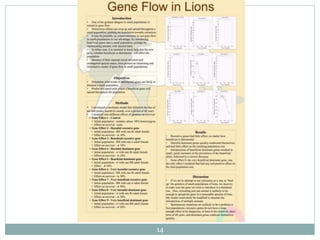
  • #14 Example 3 Now that I have covered some basics on logistics, content and planning, we will take a look at a couple of examples Thoughts?
  • #15 Example 4
  • #16 Example 5
  • #18 Hanging Kit – Push pins, tape, scissors Hanging posters – ask a friend Bring extra stuff Tours – use the graphics to focus your talk Length of time: 30sec, 2min, 5min Tell viewers: the context of your problem and why it is important (Introduction), your objective and what you did (Objective & Methods), what you discovered (Results), and what the answer means in terms of the context (Discussion).