Creating content to attract website traffic
Grow your business www.theoruby.com
How to easily create content to attract website traffic
1) The basics of content creation
2) Free tools to get you started
3) Deciding which type of content is best for your business
4) Maximising your content
5) Quick SEO guide
6) Q&A
1) The basics of content creation
Brand awareness - raise your profile
Generate leads - get enquiries and traffic
Convert users - get sales and bookings
Retain and educate customers - brand loyalty
Improve SEO - get new traffic for free
Will this content achieve your goals?
What is the value for the audience?
Define your goals
Ask Yourself?
1) The basics of content creation
Start by doing what you enjoy most!
Which content types can you create easily?
What time & financial resources do you have available?
What problem are you solving?
How will you manage it long-term and monitor (analytics)?
Considerations
1) The basics of content creation
What is your customers biggest challenge and will content help
them?
Where do you think your customers spend their time online?
Name 1 person in your industry with inspiring content
Practical
2) Free tools to get you started
Listen to your customers and understand there challenges
Think about content to make their life easier
Guides / Self-help / How-to / Informative / Motivational / Case study
etc
Get feedback from your most loyal customers
Pocket App - Research others in the same space and subscribe /
follow them and Pocket their articles.
Your customers are your best market research tool!!!
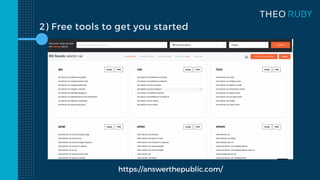
2) Free tools to get you started
https://answerthepublic.com/
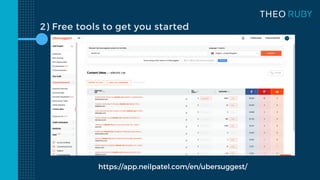
2) Free tools to get you started
https://app.neilpatel.com/en/ubersuggest/
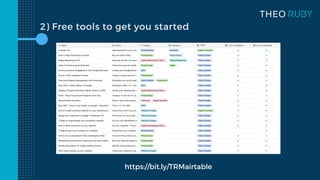
2) Free tools to get you started
https://bit.ly/TRMairtable
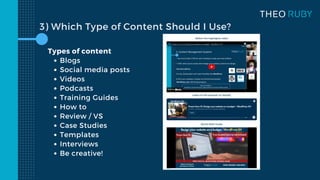
Blogs
Social media posts
Videos
Podcasts
Training Guides
How to
Review / VS
Case Studies
Templates
Interviews
Be creative!
Types of content
3) Which Type of Content Should I Use?
Repurposing example
1) Create an article or blog post on your website
2) Share on your social media channels - FB / TW / LI / IG
3) Add to your Google Business updates
4) Add to an email list if you have one
5) Share with publishers to get backlinks
6) Take highlights / snippets and reshare in the future
4) Maximising Your Content
Stay succinct - keep it short and snappy
Read through 3x and cut out around 50% (for most people)
Use a voice recorder and playback to check for errors
Ask an impartial person to review with critical feedback
Make room for topical information
Updating every few months will massively improve SEO
Productivity tips
Write your own checklist for repurposing content
Website / Social / Email / Google / Partners / Snippets
Which parts can be grouped together for efficiency?
Keep this checklist at your desk!
Pracitcal
4) Maximising Your Content
5) Quick SEO guide
Use a plugin like Rankmath to keep it simple
Make sure your title and description are clear
Always think about the customer and not Google!
Create a 2 sentence excerpt of your content to share with a link
I can offer a free SEO audit of your website on request
Updating your website every few months will massively improve SEO
SEO helps google to rank your website content so new customers can find you
5) Quick SEO guide
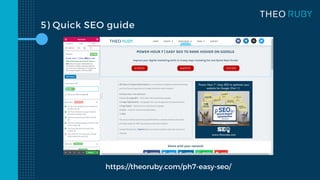
https://theoruby.com/ph7-easy-seo/
Additional Resources
Power Hour 5 - Canva: A Non-Designers Dream
Power Hour 6 - Free Social Media Management with Hootsuite
Power Hour 7 / 11 - Easy SEO: How to Rank Higher on Google
Power Hour 14 - How to Drive Customers to Your Website
Everything can be found below:
www.theoruby.com/marketing-guides
THANK YOU
Please get in touch if you have any questions
theo@theoruby.com
07709 852 364
BOOK A FREE 45 MINUTE 121 SESSION
www.theoruby.com/clinic
Subscribe to receive marketing guides
www.theoruby.com/news

Creating content for your small business

  • 1.
    Creating content toattract website traffic Creating content to attract website traffic Creating content to attract website traffic Grow your business www.theoruby.com
  • 2.
    How to easilycreate content to attract website traffic 1) The basics of content creation 2) Free tools to get you started 3) Deciding which type of content is best for your business 4) Maximising your content 5) Quick SEO guide 6) Q&A
  • 3.
    1) The basicsof content creation Brand awareness - raise your profile Generate leads - get enquiries and traffic Convert users - get sales and bookings Retain and educate customers - brand loyalty Improve SEO - get new traffic for free Will this content achieve your goals? What is the value for the audience? Define your goals Ask Yourself?
  • 4.
    1) The basicsof content creation Start by doing what you enjoy most! Which content types can you create easily? What time & financial resources do you have available? What problem are you solving? How will you manage it long-term and monitor (analytics)? Considerations
  • 5.
    1) The basicsof content creation What is your customers biggest challenge and will content help them? Where do you think your customers spend their time online? Name 1 person in your industry with inspiring content Practical
  • 6.
    2) Free toolsto get you started Listen to your customers and understand there challenges Think about content to make their life easier Guides / Self-help / How-to / Informative / Motivational / Case study etc Get feedback from your most loyal customers Pocket App - Research others in the same space and subscribe / follow them and Pocket their articles. Your customers are your best market research tool!!!
  • 7.
    2) Free toolsto get you started https://answerthepublic.com/
  • 8.
    2) Free toolsto get you started https://app.neilpatel.com/en/ubersuggest/
  • 9.
    2) Free toolsto get you started https://bit.ly/TRMairtable
  • 10.
    Blogs Social media posts Videos Podcasts TrainingGuides How to Review / VS Case Studies Templates Interviews Be creative! Types of content 3) Which Type of Content Should I Use?
  • 11.
    Repurposing example 1) Createan article or blog post on your website 2) Share on your social media channels - FB / TW / LI / IG 3) Add to your Google Business updates 4) Add to an email list if you have one 5) Share with publishers to get backlinks 6) Take highlights / snippets and reshare in the future 4) Maximising Your Content
  • 12.
    4) Maximising YourContent Stay succinct - keep it short and snappy Read through 3x and cut out around 50% (for most people) Use a voice recorder and playback to check for errors Ask an impartial person to review with critical feedback Make room for topical information Updating every few months will massively improve SEO Productivity tips
  • 13.
    Write your ownchecklist for repurposing content Website / Social / Email / Google / Partners / Snippets Which parts can be grouped together for efficiency? Keep this checklist at your desk! Pracitcal 4) Maximising Your Content
  • 14.
    5) Quick SEOguide Use a plugin like Rankmath to keep it simple Make sure your title and description are clear Always think about the customer and not Google! Create a 2 sentence excerpt of your content to share with a link I can offer a free SEO audit of your website on request Updating your website every few months will massively improve SEO SEO helps google to rank your website content so new customers can find you
  • 15.
    5) Quick SEOguide https://theoruby.com/ph7-easy-seo/
  • 16.
    Additional Resources Power Hour5 - Canva: A Non-Designers Dream Power Hour 6 - Free Social Media Management with Hootsuite Power Hour 7 / 11 - Easy SEO: How to Rank Higher on Google Power Hour 14 - How to Drive Customers to Your Website Everything can be found below: www.theoruby.com/marketing-guides
  • 17.
    THANK YOU Please getin touch if you have any questions theo@theoruby.com 07709 852 364 BOOK A FREE 45 MINUTE 121 SESSION www.theoruby.com/clinic Subscribe to receive marketing guides www.theoruby.com/news