Creating
Container View
   Controllers

        http://bobmccune.com
About...
Bob McCune
 ‣ MN Developer and Instructor
 ‣ Owner of TapHarmonic, LLC.
 ‣ Founded Minnesota CocoaHeads in 2008
Agenda
What will I learn?
‣ View Controller Overview
‣ Custom Containers Before iOS 5
‣ iOS 5’s View Controller Containment API
‣ Custom Container Demo
View Controller
   Overview
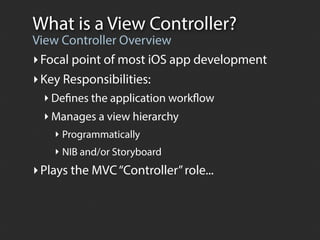
What is a View Controller?
View Controller Overview
‣ Focal point of most iOS app development
‣ Key Responsibilities:
  ‣ Defines the application workflow
  ‣ Manages a view hierarchy
    ‣ Programmatically
    ‣ NIB and/or Storyboard
‣ Plays the MVC “Controller” role...
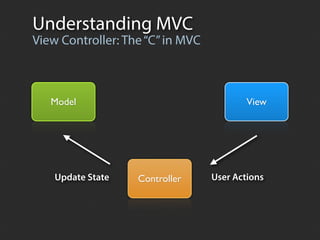
Understanding MVC
View Controller: The “C” in MVC


   Model                                  View


    Update State   Controller     User Actions
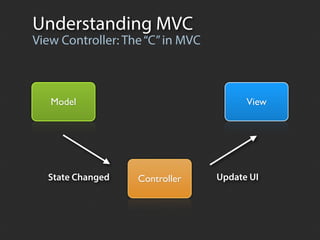
Understanding MVC
View Controller: The “C” in MVC


   Model                                View


  State Changed    Controller     Update UI
MVC Benefits
Core iOS Design Pattern
 ‣ Clean separation of concerns
    ‣ Simplifies development
    ‣ Provides for greater reusability
    ‣ Improves quality
 ‣ Allows us to standardize the behavior and
   responsibilities at each tier
UIViewController Lifecycle
Standardized Behavior
‣ Loading Callbacks
 - (void)viewDidLoad;
 - (void)viewDidUnload;

‣ Appearance Callbacks
 -   (void)viewWillAppear:
 -   (void)viewDidAppear:
 -   (void)viewWillDisappear:
 -   (void)viewDidDisappear:

‣ Rotation Callbacks
 - (void)willRotateToInterfaceOrientation:
 - (void)willAnimateRotationToInterfaceOrientation:
 - (void)didRotateFromInterfaceOrientation:
View Controller Types
Container vs Content
Container Controllers
‣ Manages a hierarchy of child view controllers

 UITabBarController
 UINavigationController
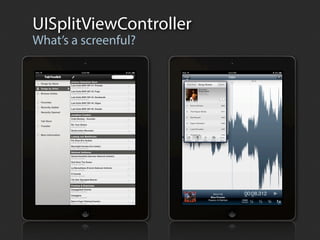
 UISplitViewController

Content Controllers
‣ Manage the individual screens within an app

‣ Can be used in multiple presentation contexts

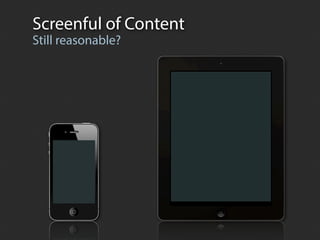
‣ Manages a “screenful of content”
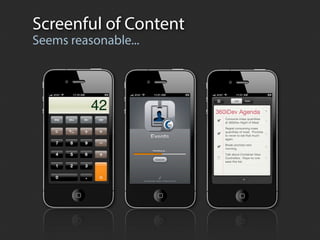
Screenful of Content
Seems reasonable...
Screenful of Content
Still reasonable?
UISplitViewController
What’s a screenful?
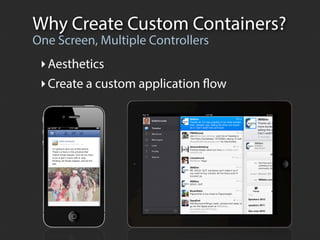
Why Create Custom Containers?
One Screen, Multiple Controllers
 ‣ Aesthetics
 ‣ Create a custom application flow
 Pre  -­  iOS  5
Custom Containers
The heartbreaking true story
Custom Containers
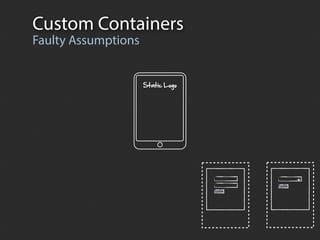
Faulty Assumptions


                     Static  Logo
Custom Containers
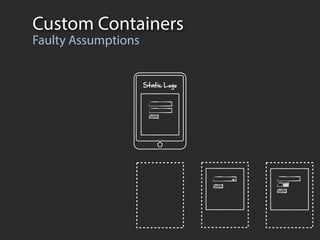
Faulty Assumptions


                     Static  Logo
Custom Containers
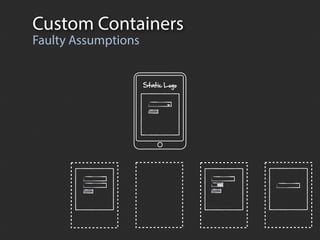
Faulty Assumptions


                     Static  Logo
Custom Containers
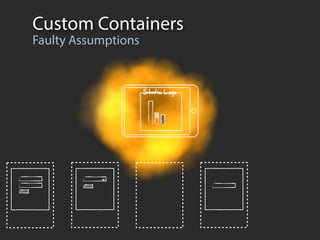
Faulty Assumptions can’t!
            No you


                   Static  Logo
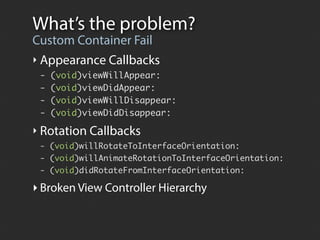
What’s the problem?
Custom Container Fail
‣ Appearance Callbacks
 -   (void)viewWillAppear:
 -   (void)viewDidAppear:
 -   (void)viewWillDisappear:
 -   (void)viewDidDisappear:

‣ Rotation Callbacks
 - (void)willRotateToInterfaceOrientation:
 - (void)willAnimateRotationToInterfaceOrientation:
 - (void)didRotateFromInterfaceOrientation:

‣ Broken View Controller Hierarchy
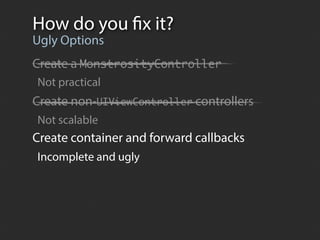
How do you fix it?
Ugly Options
Create a MonstrosityController
Not practical
Create non-UIViewController controllers
Not scalable
Create container and forward callbacks
Incomplete and ugly
View Controller Containment
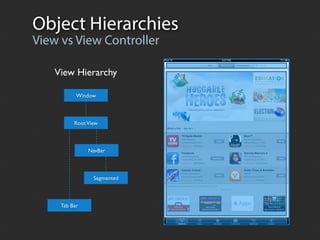
Object Hierarchies
View vs View Controller

    View Hierarchy

           Window


          Root View


               NavBar


                 Segmented


     Tab Bar
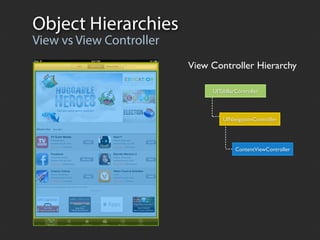
Object Hierarchies
View vs View Controller
                          View Controller Hierarchy

                               UITabBarController


                                   UINavigationController


                                        ContentViewController
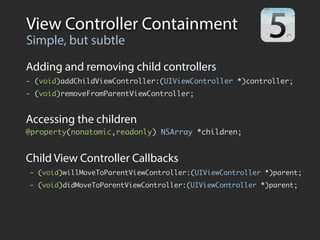
View Controller Containment
Simple, but subtle
Adding and removing child controllers
- (void)addChildViewController:(UIViewController *)controller;
- (void)removeFromParentViewController;


Accessing the children
@property(nonatomic,readonly) NSArray *children;


Child View Controller Callbacks
- (void)willMoveToParentViewController:(UIViewController *)parent;
- (void)didMoveToParentViewController:(UIViewController *)parent;
Containment API Usage
Adding a Child View Controller
   [self addChildViewController:controller];
   [self.view addSubview:controller.view];
   [controller didMoveToParentViewController:self];

                                         view
           ParentViewController


willMove


                                  view
           ChildViewController
Containment API Usage
Adding a Child View Controller
 [self addChildViewController:controller];
 [self.view addSubview:controller.view];
 [controller didMoveToParentViewController:self];

                           view
    ParentViewController


                           view
    ChildViewController
Containment API Usage
Adding a Child View Controller
   [self addChildViewController:controller];
   [self.view addSubview:controller.view];
   [controller didMoveToParentViewController:self];

                                 view
          ParentViewController


didMove


                                 view
          ChildViewController
Containment API Usage
Removing a Child View Controller
   [controller willMoveToParentViewController:nil];
   [controller.view removeFromSuperview];
   [controller removeFromParentViewController];

                                  view
           ParentViewController


willMove


                                  view
           ChildViewController
Containment API Usage
Removing a Child View Controller
 [controller willMoveToParentViewController:nil];
 [controller.view removeFromSuperview];
 [controller removeFromParentViewController];

                                  view
    ParentViewController


                           view
    ChildViewController
Containment API Usage
Removing a Child View Controller
   [controller willMoveToParentViewController:nil];
   [controller.view removeFromSuperview];
   [controller removeFromParentViewController];

                                        view
          ParentViewController


didMove


                                 view
          ChildViewController
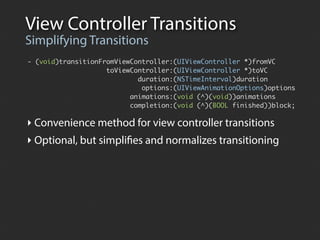
View Controller Transitions
Simplifying Transitions
- (void)transitionFromViewController:(UIViewController *)fromVC
                    toViewController:(UIViewController *)toVC
                            duration:(NSTimeInterval)duration
                             options:(UIViewAnimationOptions)options
                          animations:(void (^)(void))animations
                          completion:(void (^)(BOOL finished))block;

‣ Convenience method for view controller transitions
‣ Optional, but simplifies and normalizes transitioning
Cloning UINavigationController
pushViewController:animated:
- (void)pushViewController:(UIViewController *)toViewController animated:(BOOL)animated {

    UIViewController *fromViewController = [self.stack topObject];
    toViewController.view.frame = CGRectMake(width, 0.f, width, height);

    [self addChildViewController:toViewController];

    NSTimeInterval duration = animated ? 0.3f : 0.f;

    [self transitionFromViewController:fromViewController
                      toViewController:toViewController
                              duration:duration
                                options:UIViewAnimationCurveEaseInOut
                            animations:^{
                              CGRect frame = CGRectMake(-width, 0.f, width, height);
                              fromViewController.view.frame = frame;
                            }
                            completion:^(BOOL complete) {
                              [toViewController didMoveToParentViewController:self];
                              [self.stack pushObject:toViewController];
                            }];
}
Cloning UINavigationController
popViewControllerAnimated:
- (UIViewController *)popViewControllerAnimated:(BOOL)animated {

    UIViewController *fromViewController = [self.stack popObject];
    UIViewController *toViewController = [self.stack topObject];

    [fromViewController willMoveToParentViewController:nil];

    NSTimeInterval duration = animated ? 0.3f : 0.0f;

    [self transitionFromViewController:fromViewController
                      toViewController:toViewController
                              duration:duration
                                options:UIViewAnimationOptionCurveEaseInOut
                            animations:^{
                                 CGRect frame = CGRectMake(width, 0.f, width, height);
                                 fromViewController.view.frame = frame;
                            }
                            completion:^(BOOL complete) {
                                 [fromViewController removeFromParentViewController];
                            }];

    return fromViewController;
}
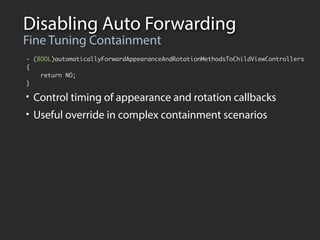
Disabling Auto Forwarding
Fine Tuning Containment
- (BOOL)automaticallyForwardAppearanceAndRotationMethodsToChildViewControllers
{
    return NO;
}

• Control timing of appearance and rotation callbacks
• Useful override in complex containment scenarios
Avoiding
 Common Mistakes
Common Mistakes
Simple API, Common Problems
 ‣ Outside Callers
 ‣ Disobedient Children
 ‣ Meddling Parents
Outside Callers
  Drive-by Adoption

                              ModalViewController


     RootViewController


                              ChildViewController


- (IBAction)showModalView:(id)sender {
  ModalViewController *modalController = [ModalViewController controller];
  [self presentViewController:modalController animated:YES completion:nil];
  ChildViewController *childController = [ChildViewController controller];
	 [modalController addChildViewController:childController];
	 [modalController addSubview:childController.view];
}
Disobedient Children
Parents make the rules

                            CustomContainerController
    OtherViewController
                               ChildViewController


CustomContainerController
-    (void)showChildViewController:(UIViewController *)controller {
	    [self addChildViewController:controller];
	    controller.view.frame = CGRectMake(0, 0, 320, 480);
     [controller didMoveToParentViewController:self];
}    [self.view addSubview:controller.view];

ChildViewController
- (void)didMoveToParentViewController:(UIViewController *)parent {
    self.view.frame = CGRectMake(0, 260, 320, 220);
    [parent.view addSubview:self.view];
}
Disobedient Children
Parents make the rules

                            CustomContainerController
    OtherViewController
                               ChildViewController


CustomContainerController
-    (void)showChildViewController:(UIViewController *)controller {
	    [self addChildViewController:controller];
	    controller.view.frame = CGRectMake(0, 0, 320, 480);
     [controller didMoveToParentViewController:self];
}    [self.view addSubview:controller.view];

ChildViewController
- (void)didMoveToParentViewController:(UIViewController *)parent {
    self.view.frame = CGRectMake(0, 260, 320, 220);
    [parent.view addSubview:self.view];
}
Disobedient Children
Parents make the rules

                         CustomContainerController
 OtherViewController
                            ChildViewController


CustomContainerController
- (void)showChildViewController:(UIViewController *)controller {
	 [self addChildViewController:controller];
  controller.view.frame = CGRectMake(0, 260, 320, 220);
  [self.view addSubview:controller.view];
	 [controller didMoveToParentViewController:self];
}
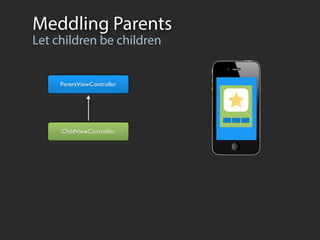
Meddling Parents
Let children be children


     ParentViewController


     ChildViewController
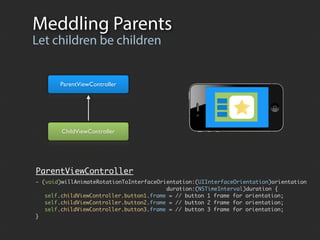
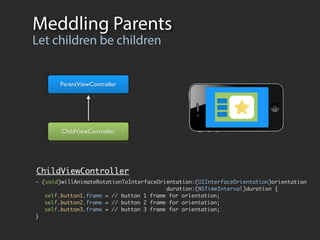
Meddling Parents
Let children be children


       ParentViewController


        ChildViewController


ParentViewController
- (void)willAnimateRotationToInterfaceOrientation:(UIInterfaceOrientation)orientation
                                         duration:(NSTimeInterval)duration {
	 self.childViewController.button1.frame = // button 1 frame for orientation;
	 self.childViewController.button2.frame = // button 2 frame for orientation;
	 self.childViewController.button3.frame = // button 3 frame for orientation;
}
Meddling Parents
Let children be children


       ParentViewController


        ChildViewController


ChildViewController
- (void)willAnimateRotationToInterfaceOrientation:(UIInterfaceOrientation)orientation
                                         duration:(NSTimeInterval)duration {
	 self.button1.frame = // button 1 frame for orientation;
	 self.button2.frame = // button 2 frame for orientation;
	 self.button3.frame = // button 3 frame for orientation;
}
Demo
Summary
View Controller Containment FTW!
 ‣ Simple, but subtle API. Easy to make mistakes.
 ‣ Need to understand UIViewController internals
 ‣ Small, but important, enhancements in iOS 6
Resources
Presentation Materials
http://www.slideshare.net/bobmccune/
https://github.com/tapharmonic/

WWDC 2011: Implementing View Controller Containment
https://developer.apple.com/videos/wwdc/2011/?id=102

WWDC 2012: The Evolution of View Controllers on iOS
https://developer.apple.com/videos/wwdc/2012/?id=236


    BobMcCune.com                                 @bobmccune

Creating Container View Controllers

  • 1.
    Creating Container View Controllers http://bobmccune.com
  • 2.
    About... Bob McCune ‣MN Developer and Instructor ‣ Owner of TapHarmonic, LLC. ‣ Founded Minnesota CocoaHeads in 2008
  • 3.
    Agenda What will Ilearn? ‣ View Controller Overview ‣ Custom Containers Before iOS 5 ‣ iOS 5’s View Controller Containment API ‣ Custom Container Demo
  • 4.
  • 5.
    What is aView Controller? View Controller Overview ‣ Focal point of most iOS app development ‣ Key Responsibilities: ‣ Defines the application workflow ‣ Manages a view hierarchy ‣ Programmatically ‣ NIB and/or Storyboard ‣ Plays the MVC “Controller” role...
  • 6.
    Understanding MVC View Controller:The “C” in MVC Model View Update State Controller User Actions
  • 7.
    Understanding MVC View Controller:The “C” in MVC Model View State Changed Controller Update UI
  • 8.
    MVC Benefits Core iOSDesign Pattern ‣ Clean separation of concerns ‣ Simplifies development ‣ Provides for greater reusability ‣ Improves quality ‣ Allows us to standardize the behavior and responsibilities at each tier
  • 9.
    UIViewController Lifecycle Standardized Behavior ‣Loading Callbacks - (void)viewDidLoad; - (void)viewDidUnload; ‣ Appearance Callbacks - (void)viewWillAppear: - (void)viewDidAppear: - (void)viewWillDisappear: - (void)viewDidDisappear: ‣ Rotation Callbacks - (void)willRotateToInterfaceOrientation: - (void)willAnimateRotationToInterfaceOrientation: - (void)didRotateFromInterfaceOrientation:
  • 10.
    View Controller Types Containervs Content Container Controllers ‣ Manages a hierarchy of child view controllers UITabBarController UINavigationController UISplitViewController Content Controllers ‣ Manage the individual screens within an app ‣ Can be used in multiple presentation contexts ‣ Manages a “screenful of content”
  • 11.
  • 12.
  • 13.
  • 14.
    Why Create CustomContainers? One Screen, Multiple Controllers ‣ Aesthetics ‣ Create a custom application flow
  • 15.
     Pre  -­  iOS 5 Custom Containers The heartbreaking true story
  • 16.
  • 17.
  • 18.
  • 19.
    Custom Containers Faulty Assumptionscan’t! No you Static  Logo
  • 20.
    What’s the problem? CustomContainer Fail ‣ Appearance Callbacks - (void)viewWillAppear: - (void)viewDidAppear: - (void)viewWillDisappear: - (void)viewDidDisappear: ‣ Rotation Callbacks - (void)willRotateToInterfaceOrientation: - (void)willAnimateRotationToInterfaceOrientation: - (void)didRotateFromInterfaceOrientation: ‣ Broken View Controller Hierarchy
  • 21.
    How do youfix it? Ugly Options Create a MonstrosityController Not practical Create non-UIViewController controllers Not scalable Create container and forward callbacks Incomplete and ugly
  • 22.
  • 23.
    Object Hierarchies View vsView Controller View Hierarchy Window Root View NavBar Segmented Tab Bar
  • 24.
    Object Hierarchies View vsView Controller View Controller Hierarchy UITabBarController UINavigationController ContentViewController
  • 25.
    View Controller Containment Simple,but subtle Adding and removing child controllers - (void)addChildViewController:(UIViewController *)controller; - (void)removeFromParentViewController; Accessing the children @property(nonatomic,readonly) NSArray *children; Child View Controller Callbacks - (void)willMoveToParentViewController:(UIViewController *)parent; - (void)didMoveToParentViewController:(UIViewController *)parent;
  • 26.
    Containment API Usage Addinga Child View Controller [self addChildViewController:controller]; [self.view addSubview:controller.view]; [controller didMoveToParentViewController:self]; view ParentViewController willMove view ChildViewController
  • 27.
    Containment API Usage Addinga Child View Controller [self addChildViewController:controller]; [self.view addSubview:controller.view]; [controller didMoveToParentViewController:self]; view ParentViewController view ChildViewController
  • 28.
    Containment API Usage Addinga Child View Controller [self addChildViewController:controller]; [self.view addSubview:controller.view]; [controller didMoveToParentViewController:self]; view ParentViewController didMove view ChildViewController
  • 29.
    Containment API Usage Removinga Child View Controller [controller willMoveToParentViewController:nil]; [controller.view removeFromSuperview]; [controller removeFromParentViewController]; view ParentViewController willMove view ChildViewController
  • 30.
    Containment API Usage Removinga Child View Controller [controller willMoveToParentViewController:nil]; [controller.view removeFromSuperview]; [controller removeFromParentViewController]; view ParentViewController view ChildViewController
  • 31.
    Containment API Usage Removinga Child View Controller [controller willMoveToParentViewController:nil]; [controller.view removeFromSuperview]; [controller removeFromParentViewController]; view ParentViewController didMove view ChildViewController
  • 32.
    View Controller Transitions SimplifyingTransitions - (void)transitionFromViewController:(UIViewController *)fromVC toViewController:(UIViewController *)toVC duration:(NSTimeInterval)duration options:(UIViewAnimationOptions)options animations:(void (^)(void))animations completion:(void (^)(BOOL finished))block; ‣ Convenience method for view controller transitions ‣ Optional, but simplifies and normalizes transitioning
  • 33.
    Cloning UINavigationController pushViewController:animated: - (void)pushViewController:(UIViewController*)toViewController animated:(BOOL)animated { UIViewController *fromViewController = [self.stack topObject]; toViewController.view.frame = CGRectMake(width, 0.f, width, height); [self addChildViewController:toViewController]; NSTimeInterval duration = animated ? 0.3f : 0.f; [self transitionFromViewController:fromViewController toViewController:toViewController duration:duration options:UIViewAnimationCurveEaseInOut animations:^{ CGRect frame = CGRectMake(-width, 0.f, width, height); fromViewController.view.frame = frame; } completion:^(BOOL complete) { [toViewController didMoveToParentViewController:self]; [self.stack pushObject:toViewController]; }]; }
  • 34.
    Cloning UINavigationController popViewControllerAnimated: - (UIViewController*)popViewControllerAnimated:(BOOL)animated { UIViewController *fromViewController = [self.stack popObject]; UIViewController *toViewController = [self.stack topObject]; [fromViewController willMoveToParentViewController:nil]; NSTimeInterval duration = animated ? 0.3f : 0.0f; [self transitionFromViewController:fromViewController toViewController:toViewController duration:duration options:UIViewAnimationOptionCurveEaseInOut animations:^{ CGRect frame = CGRectMake(width, 0.f, width, height); fromViewController.view.frame = frame; } completion:^(BOOL complete) { [fromViewController removeFromParentViewController]; }]; return fromViewController; }
  • 35.
    Disabling Auto Forwarding FineTuning Containment - (BOOL)automaticallyForwardAppearanceAndRotationMethodsToChildViewControllers { return NO; } • Control timing of appearance and rotation callbacks • Useful override in complex containment scenarios
  • 36.
  • 37.
    Common Mistakes Simple API,Common Problems ‣ Outside Callers ‣ Disobedient Children ‣ Meddling Parents
  • 38.
    Outside Callers Drive-by Adoption ModalViewController RootViewController ChildViewController - (IBAction)showModalView:(id)sender { ModalViewController *modalController = [ModalViewController controller]; [self presentViewController:modalController animated:YES completion:nil]; ChildViewController *childController = [ChildViewController controller]; [modalController addChildViewController:childController]; [modalController addSubview:childController.view]; }
  • 39.
    Disobedient Children Parents makethe rules CustomContainerController OtherViewController ChildViewController CustomContainerController - (void)showChildViewController:(UIViewController *)controller { [self addChildViewController:controller]; controller.view.frame = CGRectMake(0, 0, 320, 480); [controller didMoveToParentViewController:self]; } [self.view addSubview:controller.view]; ChildViewController - (void)didMoveToParentViewController:(UIViewController *)parent { self.view.frame = CGRectMake(0, 260, 320, 220); [parent.view addSubview:self.view]; }
  • 40.
    Disobedient Children Parents makethe rules CustomContainerController OtherViewController ChildViewController CustomContainerController - (void)showChildViewController:(UIViewController *)controller { [self addChildViewController:controller]; controller.view.frame = CGRectMake(0, 0, 320, 480); [controller didMoveToParentViewController:self]; } [self.view addSubview:controller.view]; ChildViewController - (void)didMoveToParentViewController:(UIViewController *)parent { self.view.frame = CGRectMake(0, 260, 320, 220); [parent.view addSubview:self.view]; }
  • 41.
    Disobedient Children Parents makethe rules CustomContainerController OtherViewController ChildViewController CustomContainerController - (void)showChildViewController:(UIViewController *)controller { [self addChildViewController:controller]; controller.view.frame = CGRectMake(0, 260, 320, 220); [self.view addSubview:controller.view]; [controller didMoveToParentViewController:self]; }
  • 42.
    Meddling Parents Let childrenbe children ParentViewController ChildViewController
  • 43.
    Meddling Parents Let childrenbe children ParentViewController ChildViewController ParentViewController - (void)willAnimateRotationToInterfaceOrientation:(UIInterfaceOrientation)orientation duration:(NSTimeInterval)duration { self.childViewController.button1.frame = // button 1 frame for orientation; self.childViewController.button2.frame = // button 2 frame for orientation; self.childViewController.button3.frame = // button 3 frame for orientation; }
  • 44.
    Meddling Parents Let childrenbe children ParentViewController ChildViewController ChildViewController - (void)willAnimateRotationToInterfaceOrientation:(UIInterfaceOrientation)orientation duration:(NSTimeInterval)duration { self.button1.frame = // button 1 frame for orientation; self.button2.frame = // button 2 frame for orientation; self.button3.frame = // button 3 frame for orientation; }
  • 45.
  • 46.
    Summary View Controller ContainmentFTW! ‣ Simple, but subtle API. Easy to make mistakes. ‣ Need to understand UIViewController internals ‣ Small, but important, enhancements in iOS 6
  • 47.
    Resources Presentation Materials http://www.slideshare.net/bobmccune/ https://github.com/tapharmonic/ WWDC 2011:Implementing View Controller Containment https://developer.apple.com/videos/wwdc/2011/?id=102 WWDC 2012: The Evolution of View Controllers on iOS https://developer.apple.com/videos/wwdc/2012/?id=236 BobMcCune.com @bobmccune